- The quick result: 1,114 enquiries in 24 days
- First, all the weekly experiments that got me here
- From 15.6 enquiries a day to 57.6
- The website growth behind the busier inbox
- Why Gmail's sending limit became part of the problem
- Why I wanted [email protected] on the reply
- This was a whole HubSpot sequence system, not one autoresponder
- What had to change across the AI email workflow?
- What did Claude do, and what did I keep?
- The mistakes that changed how I test the system
- How to build an AI email workflow for your own business
- Questions about growing beyond your original email setup
- Grateful for the enquiries. Less grateful for the admin.
In this blog post I'm going to show you how my enquiries grew from 485 in July to 1,114 in the first 24 days of October, why that meant rebuilding my AI email workflow, and what I changed across Gmail, Google Workspace and HubSpot to handle the growth.
I spent months asking the internet to send me more enquiries. It appears to have taken the brief personally.
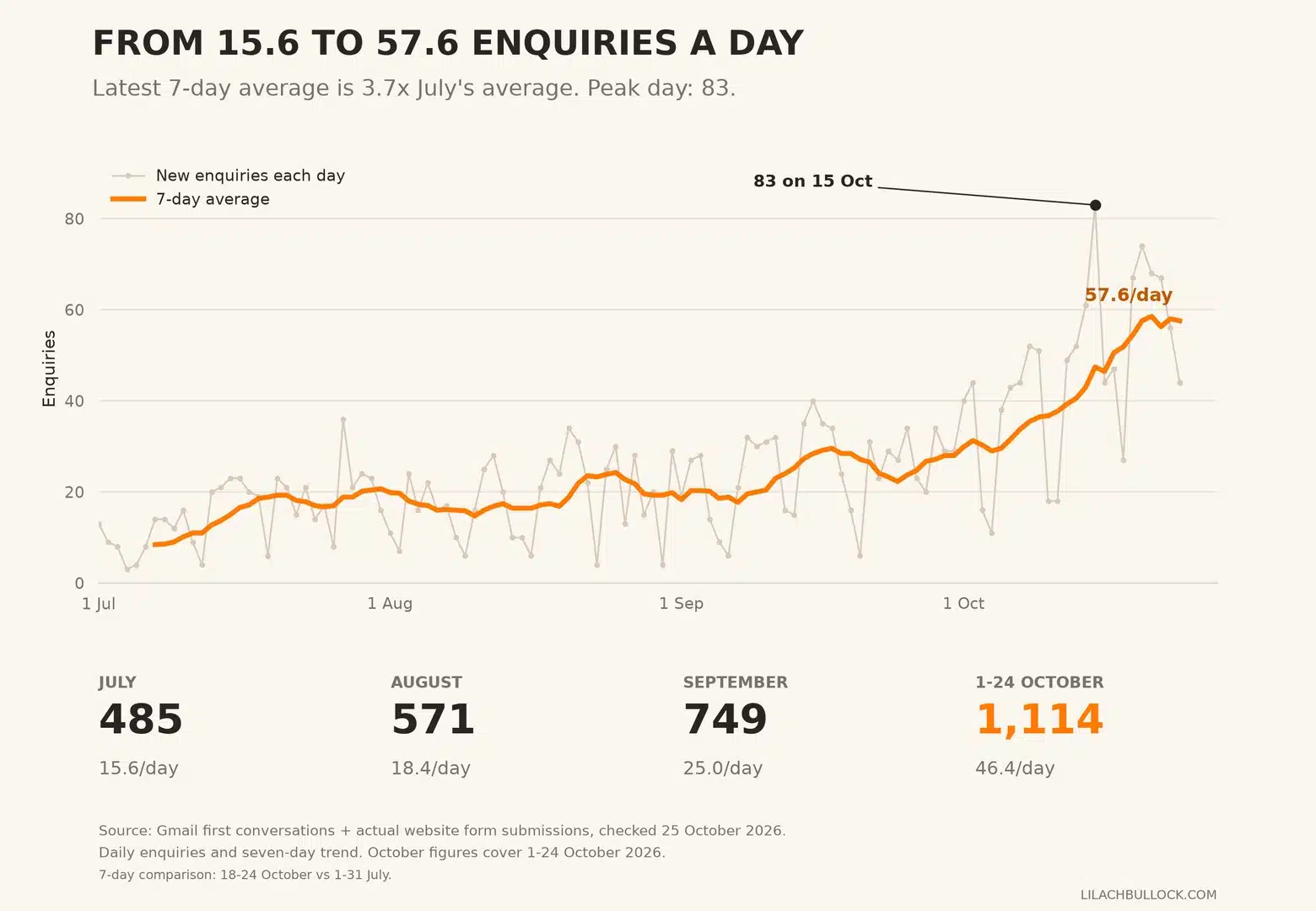
On 15 October, 83 new enquiries arrived in one day. The latest complete week averaged 57.6 a day, up from 15.6 in July.
I'm delighted. I'm overwhelmed. I'm trying to explain the second bit without sounding ungrateful for the first.
After working so hard to get the business moving, "too many people want to talk to me" feels like a complaint that should come with a small violin. But those people deserve answers. And there's still one of me.
The graph was going up. So was the correspondence. My personal Gmail had a sending limit; my follow-up system had several moving parts; and my professional reply address needed to be [email protected].
Apparently, growth comes with attachments.
So this week's experiment was rebuilding the email system around the business I'd been trying to build. I'll show you the growth, the different enquiry journeys, what had to change and the checks you can borrow for your own business.
The quick result: 1,114 enquiries in 24 days
By 24 October 2026, I'd recorded 1,114 new enquiries that month. The latest seven complete days averaged 57.6 a day, about 3.7 times July's pace. My website also reached 1.7 million Google impressions over its reported 28-day window, while Bing's AI Performance report shows about 567,600 citations in its three-month view. That growth is driving the next stage of my email system.
First, all the weekly experiments that got me here
This is another chapter in my rebuild in public. You've seen the website recovery, the inbox sorting and the occasional confident decision that required a less confident follow-up.
Here's the story so far. Every previous chapter is linked below, because a comeback is more useful when you can see the bits before the nice graph.
- Week 1: I de-indexed 1,300 pages to save my website
- Week 2: My newsletter stopped getting opened
- Week 3: The unglamorous SEO work nobody talks about
- Week 4: The crawled-but-not-indexed problem
- Week 5: Getting my newsletter opened again
- Week 6: Conquering my inbox instead of my blog posts
- Week 7: The sponsored post experiment that helped rebuild my business
- Week 8: I let Claude loose on my website
- Week 9: The newsletter redesign that backfired
- Week 10: Automating my WordPress publishing
- Week 11: Rescuing the pages I'd de-indexed
- Week 12: Getting AI to help with my inbox
- Week 13: The month my website started paying me again
- Week 14: The rebuild in public numbers
- Week 15: Getting found by AI
- Week 16: Setting up cold email with AI
- Week 17: My hands-free cold email disaster
- The five-month passive income comeback
- Week 19: I asked one AI to audit another
- Building an AI agent to run my newsletter
- My AI SEO results and the ChatGPT recommendation
- My experiment with AI in everyday life
- I Built My Career on Luck and Timing. I Don't Have Either Anymore. Here's What I'm Doing Instead.
- How to Keep Your Business Running When Your Brain Has Officially Left the Building
- I Can't Keep Up With AI. There. I Said It.
From 15.6 enquiries a day to 57.6
My enquiry tracker recorded an average of 15.6 new conversations a day in July. During the seven complete days from 18 to 24 October, the average was 57.6.
That's 3.7 times July's daily average, an increase of 268%.
Here is the growth across the last few months. The graph shows each day's new enquiries and a seven-day average, so you can see the direction without pretending every day is a record day.
| Period | New enquiries | Average per day |
|---|---|---|
| July | 485 | 15.6 |
| August | 571 | 18.4 |
| September | 749 | 25.0 |
| 1-24 October | 1,114 | 46.4 |
| Latest seven complete days, 18-24 October | 403 | 57.6 |
For a like-for-like comparison, the first 24 days of September brought 580 enquiries. The same dates in October brought 1,114. That's 92% growth.
And 24 days into October, I'd already passed September's entire 749-enquiry total by 365.
The peak reached 83 on 15 October. A weekly average of 57.6 enquiries a day gives me a much bigger business opportunity to manage than July's 15.6.
That's why this week's experiment happened. My earlier inbox experiment was about handling the messages. This time, the business had outgrown the way those messages moved.
The website growth behind the busier inbox
The enquiry growth is happening alongside a much bigger audience finding the website.
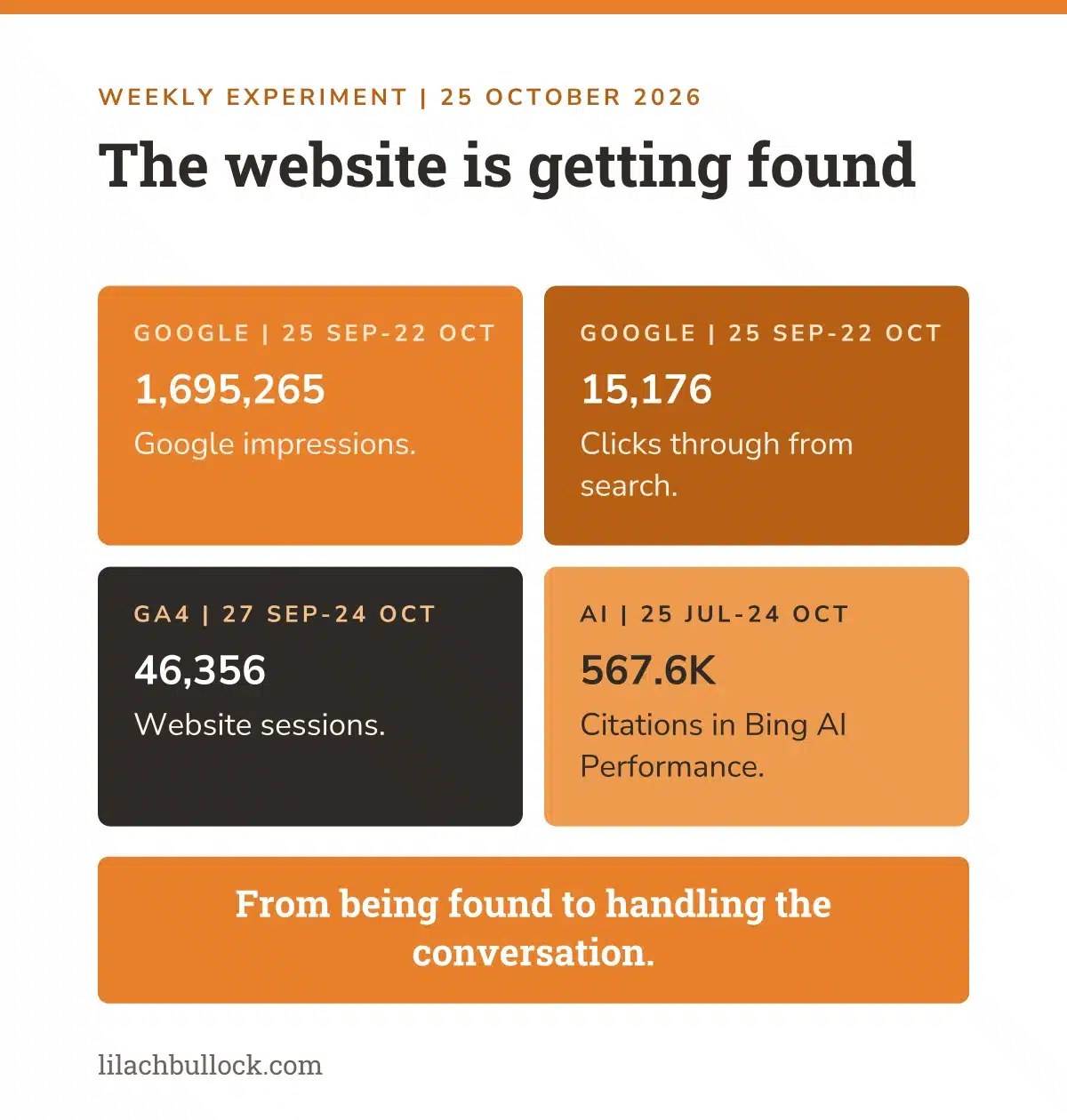
Google Search Console recorded 1,695,265 impressions and 15,176 clicks during 25 September to 22 October. Google Analytics recorded 46,356 visits, measured as sessions, during 27 September to 24 October. Of those sessions, 4,405 were attributed to AI-assistant sources.
The website has reached roughly 1.7 million Google impressions over 28 days and over half a million AI citations in the three-month report. Add more than 46,000 website visits in the analytics window and 1,114 enquiries in October's first 24 days, and there's a lot to be pleased about.
A million used to be the milestone. Now the 28-day figure is approaching 1.7 million.
I'd like to enjoy that for a moment before the inbox clears its throat.
| What I measured | Result | Reporting period |
|---|---|---|
| Google search impressions | 1,695,265 | 25 September-22 October |
| Google search clicks | 15,176 | 25 September-22 October |
| Website sessions | 46,356 | 27 September-24 October |
| AI-attributed sessions | 4,405 | 27 September-24 October |
| AI citations, about | 567,600 | Bing three-month view, 25 July-24 October |
| Peak daily AI citations, about | 35,200 | 20 October |
| New enquiries | 1,114 | 1-24 October |
The million-impression milestone I was chasing in the last SEO experiment is now behind me. Getting found is starting to look very different from where I began.
Over half a million AI citations, and a daily peak of 35,200
Bing's AI Performance report now shows about 567,600 citations for my website in its three-month view, covering 25 July to 24 October 2026. The report tracks citations across Microsoft Copilots and its partner network.
And the daily numbers have made another leap. On 18 October, the report shows around 16,800 citations. On 19 October, around 29,600. On 20 October, around 35,200.
I've spent months making the site easier to find, easier to understand and more useful to the people asking those questions. Seeing my content appear in AI answers at that scale is a rather lovely return on all those less glamorous hours.
Over half a million citations. I think I'm allowed a moment with that one.
Then I open the inbox, which has apparently prepared its own acceptance speech.
My experiment on getting found by AI explains the foundations. The latest figures show how far that work has grown. For your business, start with the questions your customers ask, give them a useful answer and make the next step easy to find. My free AI visibility checker shows whether AI tools already mention your business.
The growth started before somebody filled in the form
The work behind this has included improving existing pages around the questions people search for, making the answers clearer and connecting related articles to the relevant offer. I've also been building pages that explain the services and commercial opportunities available.
That gives somebody who finds an article somewhere useful to go next. A buyer can understand what I offer and how to contact me, rather than having to piece it together from an old About page and several optimistic guesses.
If you're doing this in your business, start with a page already getting seen for a question your customers ask. Does it answer that question? Does it show the relevant next step? Can somebody find the service or offer without starting another search?
I can't isolate one edit and say it produced all these enquiries. But I can show the growth and explain the work behind it. The email rebuild is what comes after that work begins producing more conversations.
The marketing is bringing people in. Now the follow-up has to earn its place. That's why checking where leads leak from your funnel matters alongside getting more visitors.
If you've been following the rebuild, this picks up from my SEO results and AI visibility experiment. Earlier chapters include sorting my inbox in Week 6, getting AI to help with email and the cold-email experiment that went wrong.
The difference this time is the scale of the incoming work. I needed to deal with the consequences of getting found.
Why Gmail's sending limit became part of the problem
One enquiry can create several outgoing emails. That's what makes a growing inbox a sending-capacity problem as well as a reading problem.
Google documents a 500-email daily sending limit for personal Gmail. I didn't want the business growing into a restriction that stopped me replying to people.
On 20 October, the outgoing workload reached 298 messages and 449 recipient deliveries in a rolling 24-hour window. The replies, follow-ups and CRM copies were all part of keeping those conversations moving.
That showed how much outgoing work sat behind the new enquiries. With the latest daily enquiry rate at 3.7 times July's average, I wanted room for the business correspondence to grow without every automatic reply sharing the account I depend on for the rest of my email.
I wanted more room to run the business, a professional domain sender and a clearer separation between personal correspondence and the systems sending on my behalf. I wasn't waiting for a customer's reply to bounce back with a sending-limit error before doing something about it.
The automatic replies add work you don't see yourself typing
The first acknowledgement, the menu, the reminder and the CRM copy can all be part of the same opportunity. When several different systems send those messages, the load is easy to underestimate.
This is the part I'd check in your business. Don't count only the messages you personally write. Identify every automation connected to the sending account and include the follow-up work it schedules for later.
A three-email sequence is a small queue of future work
For a simple illustration, 50 new enquiries entering a three-email sequence create up to 150 scheduled email steps across that group. Replies and stop conditions reduce the number that eventually sends, but the later steps still need managing.
Tomorrow brings another group. Yesterday's group reaches its follow-up. Meanwhile, you're answering questions from the people who replied.
The follow-up has follow-up. Lovely for the pipeline. Less lovely if the entire pipeline relies on me remembering who needs what next.
If you're preparing your small business for AI automation, this is the work to map first. A new tool won't recognise a missing stopping rule on your behalf.
I wanted the enquiries. I didn't want the whole operation resting on whether my personal Gmail still had room for another automated follow-up.
Why I wanted [email protected] on the reply
Capacity was one reason for the move. Presenting the business consistently was another.
I wanted my professional domain address on the relevant business replies. If somebody is discussing a placement, sponsorship or working with me, I want the email to look like it belongs to the same business as the website they just visited.
The important distinction was between the address the customer sees and the place where I work.
I still wanted to work in Gmail. The inbox, the conversation history, the familiar routine. I didn't want to start checking another inbox because we'd improved the sending arrangement.
So the requirement became: professional domain sending, familiar working inbox, accurate conversation history and no guessing which address a reply used.
Changing the visible address alone wouldn't meet that brief. We had to look at the sender each connected process was using too.
I wanted the business to look joined up. That required the less photogenic achievement of making it joined up.
This was a whole HubSpot sequence system, not one autoresponder
I already had different email journeys for different kinds of interest. A potential newsletter sponsor, somebody asking for a product placement and somebody using my AI calculator shouldn't all get the same reply.
The 13 email journeys in my HubSpot setup
Here are 13 email journeys in my HubSpot setup. They cover new enquiries, follow-ups, previous contacts and people who have used a resource. They weren't all created this week, and they aren't all sending at once.
But it shows the system the email move has to account for.
| Journey | What it is there to handle | Configured email pattern |
|---|---|---|
| Sponsored Post | Website enquiries about sponsored posts | Initial email, then waits of 3 and 3 days |
| Product Placement | Interest in a place within a relevant article or list | Initial email, then a 3-day wait |
| Product Review | Enquiries about a dedicated review | Initial email, then waits of 5, 5 and 5 days |
| Podcast & Product Review Enquiry | That enquiry route and its follow-ups | Initial email, then waits of 5 and 5 days |
| Partnership/Sponsorship Enquiry | Broader commercial partnership interest | Initial email, then waits of 3 and 4 days |
| Partnership Collaboration enquiry | A separate collaboration enquiry journey | Initial email, then a 5-day wait |
| Newsletter sponsorship, past partners | People who have worked with me before | Initial email, then waits of 3 and 3 days |
| Newsletter sponsorship, in touch but never worked together | Existing conversations without a previous partnership | Initial email, then waits of 3 and 3 days |
| AI Calculator Roadmap | The follow-up journey connected to my AI calculator | Initial email, then waits of 3 and 3 days |
| Coaching Enquiry Form | Somebody asking about coaching | Initial email, then waits of 2 and 3 days |
| Business Coaching / CMO Follow Up | Follow-up around that kind of work | Initial email, then waits of 7 and 7 days |
| Sponsored post re-engagement 2026 | A previous sponsored enquiry journey | Initial email, then a 3-day wait |
| Sponsored post re-engagement 16 April 2026 | A separate saved re-engagement campaign | Initial email, then a 3-day wait |
Why each journey stays separate
Those are configured waits between steps, rather than a promise that every contact receives every message on those exact calendar days. Enrolment, permitted sending days and stopping rules still matter.
The useful lesson is the separation. Different interests, different context, different follow-up.
Someone who wants a product review hasn't accidentally applied for coaching. My automation shouldn't behave as though they have.
The same principle runs through these AI workflow examples for small businesses: start with the job and the person waiting for it.
The website form and a direct email had different routes
Website enquiries could go into the relevant HubSpot sequence. Direct sponsored-post emails used an existing Make process for the price-menu reply and a separate follow-up process.
They could end up as contacts in the same CRM without having entered through the same email journey.
That matters when you're changing the sending account. Moving one route doesn't move the other. Seeing a contact in HubSpot also doesn't tell you which system sent the first message.
Before changing anything, map what starts each journey, which account sends it and what happens when the person replies.
Want AI doing the heavy lifting in your marketing?
I build the systems that handle the boring 80 percent, so you get your week back. Done properly, with the human kept in.
That's considerably more useful than opening the CRM, finding a reassuring green tick and declaring the problem fixed.
What had to change across the AI email workflow?
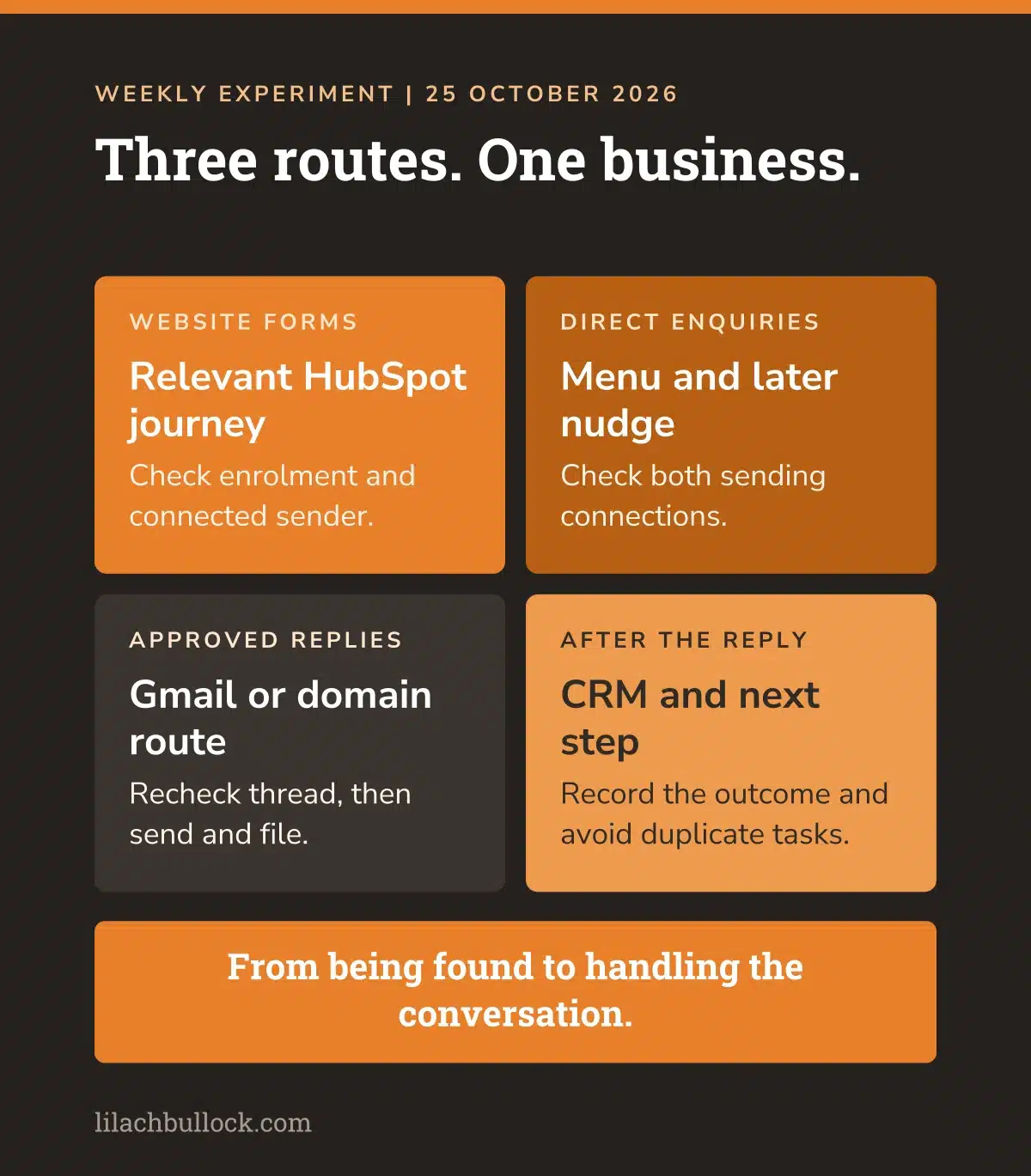
The sender, the connected accounts, the automatic replies, the follow-ups and the record of the conversation all needed checking together.
This is the map I'd use if you're making a similar change. It fits the approach in my practical AI implementation roadmap: choose the process, set the boundaries and test the outcome.
1. The domain account had to be ready to send
Google Workspace needed the domain verified and the sending authentication set up. We checked the email authentication results on a test message, including SPF, DKIM and DMARC.
In plain English, the receiving service needs to be able to see that the message is allowed to come from my domain.
A business address that looks professional is only useful if its email is set up to arrive.
2. HubSpot needed the correct connected sender
A domain address existing in Workspace doesn't automatically make it available as a sender in every HubSpot workflow or enrolment.
The connected inbox, the address accepted by the sequence-enrolment route and the dropdown in an existing workflow had to be checked separately.
During this build, the form-enrolment process was changed to use the connected domain account, while an older workflow still showed the Gmail sender. That distinction mattered because the older workflow also had enrolment errors. The separate catch-up process was doing work the visible workflow wasn't completing.
So we traced the route that was sending, rather than assuming the screen with the right name was the whole system.
3. The automatic menu and the nudge needed their own changes
The direct-email route had two parts: the first menu and the later follow-up. Changing the sender on the menu wasn't enough if the follow-up still went through the old account.
We added routing so the sender followed the appropriate address for the conversation. Both paths were tested separately.
This is a useful check even if you never move email providers. Read the first message and the follow-up together. Do they come from the address you expect? Do they stay in the conversation? Does a reply stop an inappropriate chase?
4. My personal replies still needed to work in Gmail
I wanted to see the draft, approve it and keep the reply in the original conversation. For domain replies, Claude helped build a route through Workspace that also filed a sent copy back into Gmail.
The copy, the timestamp and the cleared draft all mattered. Without them, I'd be asking whether the message went out, which is the exact sort of recurring admin I was trying to remove.
5. The CRM had to remember what happened next
A sales reply also needs the right contact, the relevant notes and a follow-up task where one is needed. The process checks for an existing open task so it doesn't create duplicate reminders for the same conversation.
A reply received after the draft was approved also needs to stop that old draft going out unchanged.
The business decision still comes from me. The point of the automation is to carry that decision through the process without making me do every administrative step by hand.
Otherwise, I've automated the reply and promoted myself to full-time checker of whether the reply was automated. A sideways career move.
6. Incoming mail was a separate part of the migration
Sending through Workspace and moving all incoming domain mail are separate jobs. Existing addresses, forwarding and account-recovery mail have to survive the move.
At this stage, parts of the sending process had changed while the full incoming-mail migration was still ahead. I wasn't going to call it complete just because one test email looked right.
The target is one dependable working experience, even when several systems sit behind it.
What did Claude do, and what did I keep?
I used Claude Code to inspect the setup, build the scripts, make the approved changes and help verify what happened afterwards.
The important work was connecting the pieces: finding out which route sent which message, handling the different sender accounts, preserving the conversation and updating the follow-up record.
I kept the commercial judgement and approval of my personal replies. If a message promises something, quotes a price or commits my time, I want to know what it says before it leaves.
That split is why this is useful for a business owner. You don't have to choose between typing everything yourself and giving an assistant unlimited authority over your customers.
You can decide what the system prepares, what it may do automatically and what needs you. My AI marketing permissions checklist helps define those boundaries before you connect another account.
And the words still need to sound like your business. Building an AI voice bank from your old content gives the assistant something better to follow than 'make it warm and professional'. That instruction has produced enough emails hoping to find people well.
My earlier AI audit experiment explains why I separate producing the work from checking it. And my AI workflow automation guide starts with the process for the same reason.
The email draft is one output. A customer conversation handled well is the job.
The mistakes that changed how I test the system
The biggest lesson was to test a whole conversation, not just whether a message could be sent.
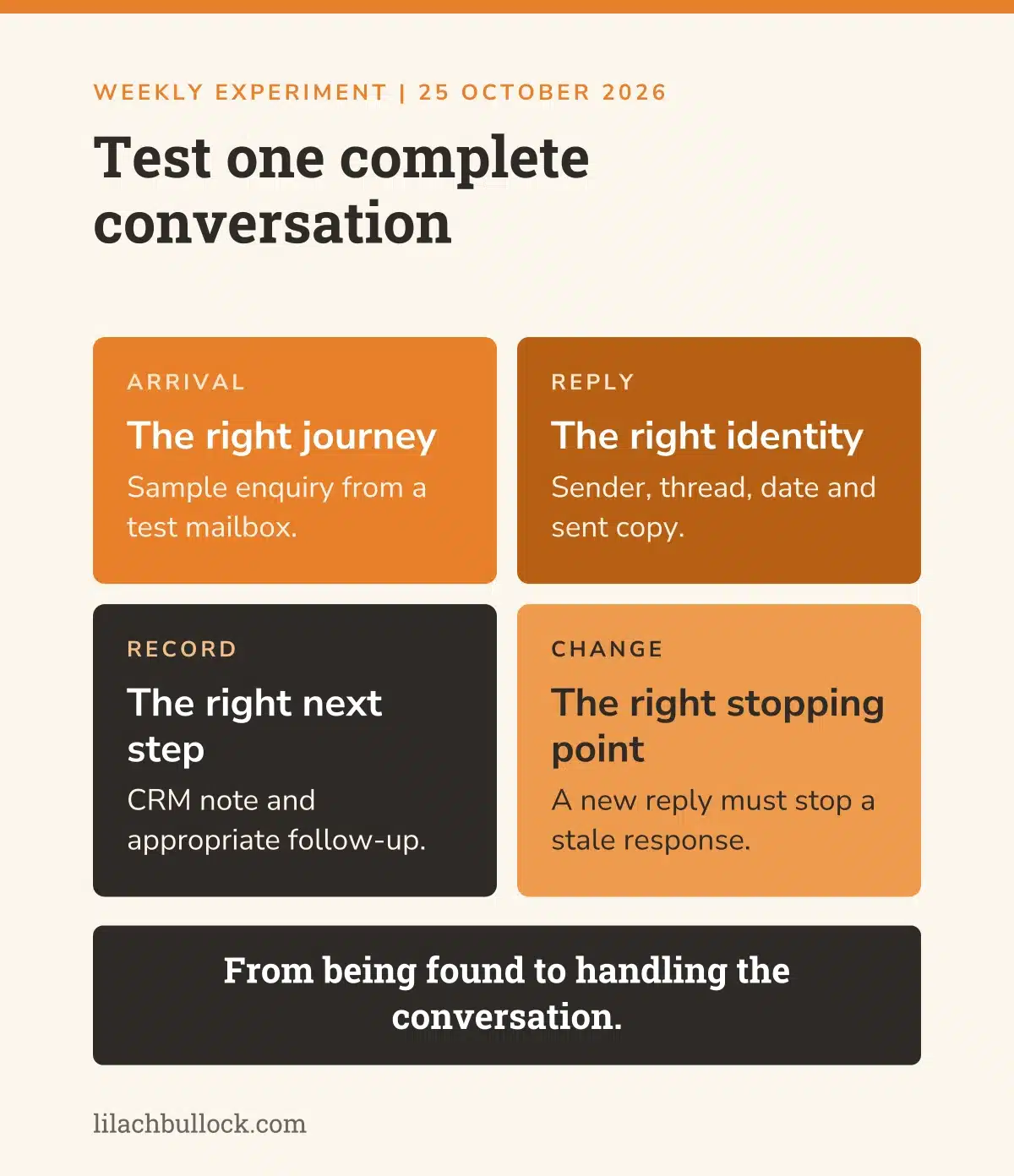
A successful send could still leave the copy missing from Gmail. An old draft date could make a new reply look as though it belonged to last week. A longer queue could outlast its access token. A customer could reply while an approved draft was waiting.
We added checks for those situations. Current send time. Separate records for sending and filing. Access refreshed per item. The conversation rechecked before the old draft is sent.
Those details don't belong in the subject line of an exciting launch announcement. They do belong in a system you're trusting with business enquiries.
My cold-email automation failure is part of why I'm picky about this. An assistant sounding certain doesn't count as a test.
Here's the test I'd borrow:
- Send a sample enquiry from a separate test account.
- Check it enters the correct journey and receives the intended first reply.
- Prepare and approve a personal response, then confirm the sender, conversation and sent copy.
- Check the contact record and follow-up task.
- Reply from the test account before the next automated step and check the stopping behaviour.
- Simulate a failure after sending but before filing. Make sure recovery doesn't send another copy.
Don't start by testing it on a potential customer who's already waiting for an answer.
How to build an AI email workflow for your own business
Start with the type of enquiry you receive most often. Write the route from arrival to the next business decision before you buy anything or move an account.
Count the demand and the outgoing work separately
New enquiries tell you how much interest is arriving. Sent messages tell you how much correspondence that interest produces. Recipient copies tell you something else again.
Keep those separate. Otherwise, the chart looks wonderful and the capacity plan is nonsense.
Then count the work your follow-up sequences create. A customer who hasn't replied is still in a process. That process needs an owner, a stopping rule and a limit on how often it contacts them.
Give each kind of enquiry a useful next step
A newsletter sponsor needs sponsorship information. A coaching enquiry needs an answer relevant to coaching. A product-placement request needs a conversation about placement.
That sounds obvious. Look at your automatic reply and see whether it knows the difference.
Start with one strong, relevant journey. Add another when the needs differ enough to justify it. Thirteen sequences in my account isn't a shopping list for yours.
If you're deciding when your business should use AI agents, a repeatable job with a clear trigger is a better starting point than 'I should probably have an agent'.
Make the brief specific enough to build
This is the brief I'd give an assistant before allowing any live changes.
Copy this prompt
Audit my enquiry-to-follow-up process using the systems and records I provide. Work read-only first. List each enquiry type, its trigger, its first reply, its sending account, its follow-up timing, its stopping conditions and its CRM record. Count new enquiries separately from replies and outgoing messages. Find places where sender changes, duplicate enrolments, stale drafts or missing sent copies could break the journey. Show one proposed test using a separate test mailbox and the exact checks that would prove it works. Do not send, enrol contacts, change settings or publish anything without approval for those actions.
Measure what matters after the build
Track the percentage of relevant enquiries that receive the intended reply, how long that takes, and whether the next step is recorded. Measure your own review time too. My guide to measuring the ROI of AI tools in a small business covers that distinction. Time saved in one place can quietly become time spent checking another.
Then track conversations progressing, work agreed and payments received. Build the follow-up around the demand your marketing is creating, so every opportunity has a clear next step.
If you want to assess the potential cost of missed follow-up, use my lead leak calculator. For repeated administrative work, the AI savings calculator helps you work through your own timings.
Questions about growing beyond your original email setup
How much have my enquiries grown?
Enquiries reached a peak of 83 on 15 October. The latest seven complete days, 18-24 October, averaged 57.6 new enquiries a day. October's first 24 days averaged 46.4, compared with 15.6 across July. Those are different views of the same growing workload.
Does moving to Workspace instantly give you unlimited sending?
No. Google Workspace has its own limits, and trial accounts have lower limits than established paid accounts. Google's published standard limit is 2,000 messages per day, with 500 for trial accounts; other recipient and service limits apply. The build still needs a sending-capacity check for the actual account and route.
Why not put everybody into the same HubSpot sequence?
Because they asked for different things and have different relationships with the business. A past newsletter partner isn't the same as a new product-review enquiry. The useful automation sends relevant information, follows up appropriately and stops when the conversation changes. It doesn't merely produce more emails.
Can you keep Gmail as your working inbox?
That's the requirement in my build. The place I read and handle the conversations is separate from the account used to send certain business messages. Each route needs testing, including the sent copy, replies, attachments and follow-up records. Changing a visible From address alone doesn't establish that the whole process works.
Grateful for the enquiries. Less grateful for the admin.
I wanted more people to find me. They did.
I wanted more enquiries. The latest week averaged 57.6 a day.
I don't get to request business growth and then act affronted when it brings business correspondence. Although I reserve the right to look briefly affronted while opening Gmail.
I'm grateful for every opportunity to discuss paid work. After the rebuild, seeing this much interest matters to me. So does being able to answer it without spending the whole day moving information between systems.
That's the point of this experiment. The graph is the lovely bit. The follow-up is how I intend to make it useful.
The next stage is completing the migration around that growing demand. The routes we've changed and the conversation tests give us a clear foundation to build on.
The business needs to grow. My personal involvement in every piece of admin doesn't.
More enquiries, please. Fewer jobs per enquiry.
You can follow the next stage in my newsletter. For this week's AI updates worth your time, read AI news this week for small business 25 October 2026.
And if your marketing needs to bring in more enquiries, or the systems behind it aren't keeping up with the ones you've got, here's how we can work together. I help business owners build the strategy and put the AI systems into practice, from being found to handling the work that follows.
Lilach