- You Can't Do It All. And That's Not a Failure.
- Why Your Email Inbox Is Probably a Disaster and How to Organise It
- How to Organise Your Email Inbox Step by Step
- Step 1: Set Up Your Visual Sorting System to Organise Your Email Inbox
- Step 2: The Unsubscribe Session (Not from This One. I Mean the Others.)
- Step 3: The Great Sort (Getting to Zero Isn't the Goal. Getting to Calm Is.)
- Step 4: Protect Your Email Inbox Going Forward (Time Blocking for Email)
- Step 5: The Maintenance Habit (So It Never Gets This Bad Again)
- A Confession About Admin Weeks
- Where the Rebuild Stands
- Catch Up on the Full Series
- The 4-Folder System That Got Me From 1,847 Unread Emails to Zero
Learning how to organise your email inbox properly is one of those things that sounds boring until yours is so chaotic it's costing you real time and real money. This is Week 6 of my rebuild-in-public series. And I'll be honest with you right from the start, this week did not go according to plan. At all.
Worth reading next: I Asked AI to Audit My Own Blog. It Told Me to Delete Half of It..
Worth reading next: Stop Using AI To Write Your Emails. Use It To Triage Them Instead.
Worth reading next: The 8 Reasons Most Blog Posts Never Get Found on Google.
My plan was to update blog posts for SEO. Priority 1 content refresh, sleeves rolled up, water glass filled. No coffee and before you assume it's some wellness thing, it isn't. I just can't stand the taste. I love the smell, which is arguably the cruellest trick nature ever played on a person. I'm also British and don't drink tea, which means I have essentially disqualified myself from two of my nation's most sacred coping mechanisms. Water. That's it. Just water. I'm a lot of fun at conferences.
What actually happened was: sirens. A lot of them. Day and night, which is, as it turns out, not ideal for productivity or sleep or really anything except becoming very familiar with your bomb shelter at all hours. If you've read my piece about keeping your business running during a war, you'll know I try not to pretend context doesn't exist. It does.
The thing about working during a war isn't just the sirens, it's the not knowing when the next one's coming. Half your brain is always listening. You can't fully switch off, which means you can't fully switch on either. And updating blog posts for SEO requires a very specific type of thinking that is simply not available when you're running on broken sleep and pure stubbornness.
And then, because the universe apparently felt I wasn't juggling enough, my husband fell off his bike and broke his ribs. So that was also a thing that happened this week.
So. The blog posts did not get updated. I was disappointed. Frustrated. Genuinely pissed off about it, if I'm being honest, because I have powered through for five weeks straight and the idea of admitting defeat does not come naturally to me. I even debated doing them on Friday, my day off, in between running around preparing for Shabbat (the Jewish Sabbath, basically my version of a very busy Sunday, except it starts Friday night).
But for the first time since this experiment started, I looked at my to-do list and thought, you know what? No. Not today. Be kind to yourself.
I am stubborn. I am a workaholic. These are not secrets. But I'm also someone who was running on sirens, broken sleep, and a husband with broken ribs, and sometimes the most productive thing you can do is recognise that your brain has simply left the building.
I'm glad I didn't push through. As I write this, I have more energy, more optimism, and a functioning inbox. The blog posts will get done. They've waited this long.
And then I looked at my email inbox and thought, ah. Right. There's actually something I can do today.
My email inbox had become, in the very technical Israeli expression, a total balagan. Absolute chaos. While I've been deep in SEO recovery work, technical audits, DNS records at midnight, and content clusters, I had been doing the inbox equivalent of shoving everything under the bed and hoping no one opens the door. I was replying to urgent emails only. Everything else? Buried. Accumulating. Quietly judging me.
This week I tackled it. I spent hours going through it, setting up filters, building a proper system, unsubscribing from things I don't read (not you, obviously, please don't leave, I've only just fixed my deliverability), and getting it to a place where I can actually see what needs my attention.
I'm going to share exactly what I did and how you can do the same. Because the truth is, email inbox chaos is productivity tax. It drains mental energy, creates anxiety, causes things to fall through the cracks, and makes you feel vaguely behind before you've even started your day. Sorting it out is not glamorous. It's also not optional.
You Can't Do It All. And That's Not a Failure.

Every week in this series I've shared what I did. This week I want to also share what I didn't do, and why that's okay, because I think there's a version of rebuild-in-public that becomes its own kind of performance if you're not careful.
I've been doing SEO recovery, email deliverability fixes, content audits, cluster building, and trying to run an actual business at the same time. Some weeks everything gets done. Some weeks a broken rib and a red alert system between them claim half the calendar.
And look, it's not like I sat around doing nothing this week. I wrote three other blog posts: Why You're Losing Sales (And It Has Nothing to Do With Your Offer), The Best AI Courses in 2026: Free Ones That Actually Teach You Something and Paid Ones Worth the Money, and 25 LinkedIn Algorithm Hacks That Work in 2026. So it's not that I wasn't writing.
Here's the thing I've discovered about myself during this experiment, writing new content is actually easier for me than updating old content for SEO. Weirdly. New content I can just... do. Updating existing posts requires a completely different kind of thinking, analytical, methodical, pulling up data, checking what's ranking, cross-referencing. It's slower, it's more draining, and when your brain is already running on fumes, it's the first thing that doesn't get done. The inbox, on the other hand, just needed sorting. So I sorted it.
The blog posts will get done next week. They're not going anywhere. (They've been sitting there since 2022. A few more days isn't going to hurt them.)
Why Your Email Inbox Is Probably a Disaster and How to Organise It

Here's what happens to most people's inboxes when they get into a big project. You prioritise the urgent. Everything else gets de-prioritised. The problem is that email doesn't stop arriving just because you're busy. It stacks. And stacks. And when you're finally ready to deal with it, the pile is so enormous that even looking at it feels overwhelming, so you don't, and it stacks some more.
Here's the problem, your email inbox doesn't care. It treats everything exactly the same. The client email that needed a reply two days ago sits right next to the receipt for a software subscription you bought in 2023, the newsletter you haven't opened since the pandemic, and something from your bank that is almost certainly fine but you won't know until you actually look at it, which you won't, because it's buried under forty-seven other things that all look equally urgent and aren't.
No wonder it feels overwhelming. It's designed to feel overwhelming. There's no hierarchy, no triage, no signal about what actually needs you. Just a pile. An ever-growing, mildly threatening pile.
My email inbox had become exactly this. Thousands of things, no structure, no way to quickly see what actually needed me. The system I'm going to share is the one I've built over years and rebuilt this week, with some additions I've added recently that have made a real difference.
How to Organise Your Email Inbox Step by Step
Step 1: Set Up Your Visual Sorting System to Organise Your Email Inbox
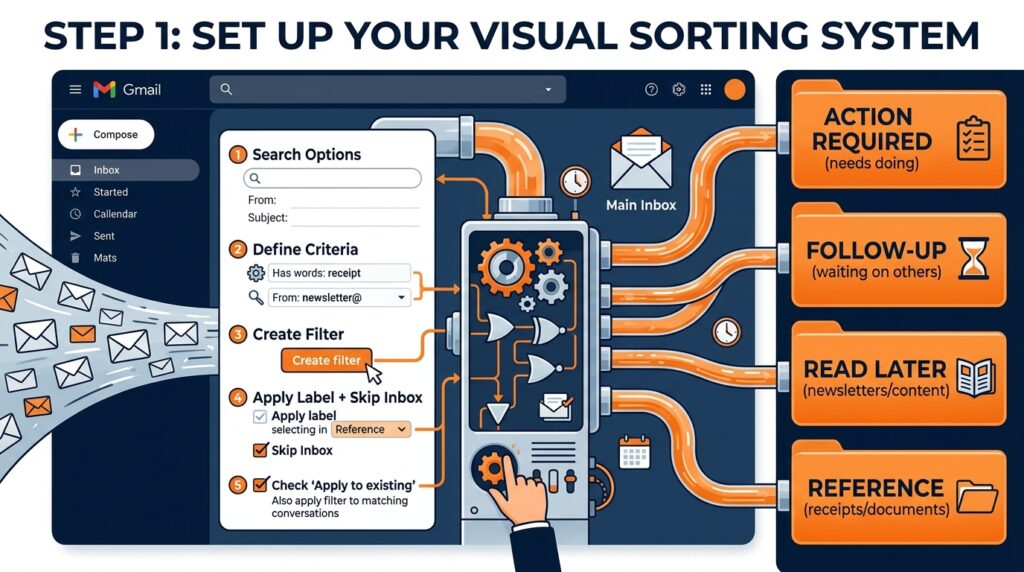
Before you touch a single email, set up the structure that will catch incoming mail going forward. In Gmail, this is labels and filters. In Outlook, this is categories and rules. The principle is the same either way.
On the right-hand side of my inbox (Gmail's label panel), I have four core categories:
- Action Required. Emails that need me to actually do something. Reply, complete a task, make a decision. These are the only emails that truly compete for my immediate attention.
- Follow-Up. Emails where I've replied or responded but am waiting on something from someone else. Things I need to chase but not right now.
- Read Later. Newsletters, long reads, industry updates. Content I want to engage with but not at the expense of actual work. This is where the guilt goes to live peacefully until I'm ready for it.
- Reference. Receipts, confirmations, login details, important documents. Stuff I need to keep but don't need to action.
Once these labels exist, set up filters so that certain types of email land in the right place automatically without ever appearing in your main inbox at all. This is the part most people skip, and it's the part that does the heavy lifting.
How to set up a filter in Gmail:
- Click the search bar at the top of Gmail and select 'Show search options' (the small arrow on the right side of the search bar).
- Fill in the criteria: From (email address or domain), subject keywords, or other details.
- Click 'Create filter' at the bottom of the options panel.
- Choose what happens: Apply a label, skip the inbox, mark as read, etc. For newsletters, I use 'Skip the Inbox' + 'Apply label: Read Later'. They land in the folder, never in the main view.
- Check the box 'Also apply filter to matching conversations' to apply it retroactively to everything already in your inbox.
That last step is the one that will make the biggest immediate difference to your inbox count. Check it every time.
Step 2: The Unsubscribe Session (Not from This One. I Mean the Others.)

This is the bit everyone knows they should do and never actually does. So let's do it properly.
You are subscribed to things you do not read. We all are. Newsletters you signed up for in 2019 that you haven't opened since the pandemic, promotional emails from brands you bought one thing from once, deal alerts for flights to places you're not going. All of them are arriving. All of them are adding to the pile. None of them are adding to your life. (Mine? Different story. Obviously. Mine is essential reading. Please keep that one.)
Here's how to do the unsubscribe session without it taking your entire afternoon:
Search for 'unsubscribe' in your inbox. This surfaces every email that has an unsubscribe link. Sort by sender. Work through them quickly, do I read this? No? Unsubscribe. Do I vaguely want to read it but never do? Unsubscribe. Is this a brand I bought from once? Unsubscribe. Is this something I genuinely look forward to? Keep.
Want AI doing the heavy lifting in your marketing?
I build the systems that handle the boring 80 percent, so you get your week back. Done properly, with the human kept in.
Use a tool if your inbox is very large. Unroll.me and Clean Email can surface all your subscriptions at once and let you unsubscribe in bulk. Useful if you're dealing with hundreds of senders. Worth noting that these tools do access your email data, so read their privacy policies before using them and make your own decision about whether that trade-off works for you.
The nuclear option: Gmail's 'Promotions' and 'Social' tabs. If you have these tabs enabled, you can select all emails in them, delete them in bulk, and start fresh. It feels dramatic. It is very satisfying. Important caveat, scan briefly before deleting to make sure nothing important has ended up there.
A note on the psychology of unsubscribing, it feels like giving up. Like admitting you're never going to read that newsletter about artisan sourdough fermentation or the weekly round-up of venture capital funding rounds. You are correct. You are never going to read those things. And that's fine. Unsubscribing is not failure. It's just honesty.
A note on AI and your inbox
Could I have used AI to help with this? Probably. Did I? No.
There are tools out there that will use AI to sort, summarise, and even respond to your emails on your behalf. And I'll be honest, the idea makes me slightly nervous. I use AI to help me write emails all the time. But having it send them without me? I don't even fully trust a human assistant to do that. An AI doing it autonomously feels like a step further than I'm ready for.
There's also the practical reality, I had over a thousand emails to deal with. By the time I'd found, set up, and learned a new AI tool, I'd have still needed to manually check everything it did anyway. Sometimes the fastest route is just doing the thing.
That said, if you have a tidier inbox than I did and you want to explore AI email tools, Google's Gemini in Gmail can summarise threads and draft replies, and tools like Shortwave use AI to prioritise and sort your inbox automatically. Worth exploring if you're starting from a less catastrophic baseline than mine. This is one of the most satisfying steps when you're learning how to organise your email inbox properly.
For me, this one needed hands and eyes. No shortcuts.
Step 3: The Great Sort (Getting to Zero Isn't the Goal. Getting to Calm Is.)
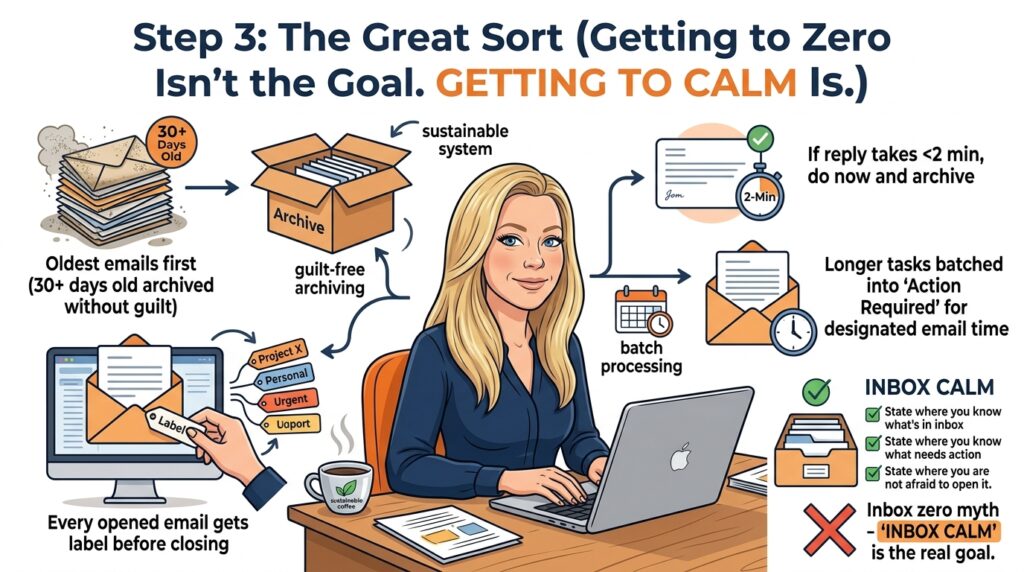
Inbox zero is a myth that has made many people miserable. Let's not chase it. Email inbox calm is the goal, a state where you know what's in your inbox, you know what needs action, and you're not afraid to open it.
Here's how I worked through the backlog:
- Start with the oldest. Anything more than 30 days old that you haven't replied to is either no longer relevant or has already been handled another way. Archive it or delete it without guilt.
- Apply labels as you go. Every email you open gets a label before you close it. Action Required, Follow-Up, Read Later, or Reference. Nothing stays untagged.
- Two-minute rule. If replying or actioning an email takes less than two minutes, do it now. Don't label it. Don't move it. Just do it and archive it.
- Batch the rest. Anything that needs more than two minutes gets labelled as Action Required and dealt with during your designated email time, not now, not during deep work, not at midnight when you've run out of willpower.
Step 4: Protect Your Email Inbox Going Forward (Time Blocking for Email)

The biggest shift I've made and the one that has made the most difference, is treating email as a scheduled activity rather than a background one.
I check email twice a day. Morning, before I start deep work. Early evening, before I finish for the day. Outside of those windows, the tab is closed. Notifications are off. I am not available via email in real time, and genuinely nobody has complained about this or needed me to be.
The research on this is fairly consistent. Switching between tasks, including checking email has a significant cost to focus and concentration. Every time you stop what you're doing to check email, you lose time not just to the email itself but to the mental cost of re-entering the work you were doing before. Blocking email into specific windows eliminates that cost.
If you're worried about missing something urgent, almost nothing that arrives by email is truly urgent. Genuinely urgent things get a phone call or a WhatsApp. Email is, by its nature, asynchronous. You don't have to treat it like a live chat. Time blocking is the habit that makes how to organise your email inbox actually stick long term.
Step 5: The Maintenance Habit (So It Never Gets This Bad Again)
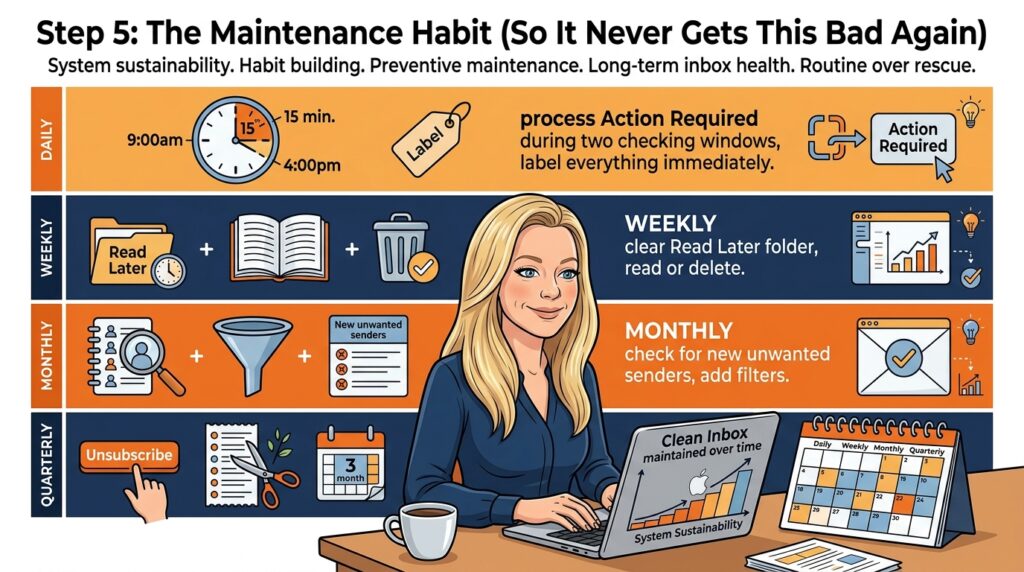
The system above is the rebuild. This is the maintenance. Because a clean email inbox only stays clean if you have a routine that keeps it that way. This is the maintenance that makes how to organise your email inbox a permanent change rather than a one-week fix.
Mine now looks like this:
- Daily: Process Action Required emails during my two checking windows. Everything that arrives gets labelled immediately. Nothing sits untagged overnight.
- Weekly: Clear the Read Later folder. Either read the things I want to read, or accept I'm not going to and delete them.
- Monthly: Check for new senders that have crept in and don't belong. Add filters for anything that's arrived repeatedly without being useful.
- Quarterly: Run another unsubscribe session. The subscriptions creep back. They always do.
A Confession About Admin Weeks

There's a specific kind of guilt that comes with weeks that look like admin rather than progress. I felt it this week. Yes, I wrote three new blog posts, Why You're Losing Sales (And It Has Nothing to Do With Your Offer), The Best AI Courses in 2026, and 25 LinkedIn Algorithm Hacks That Work in 2026 but the thing I'd actually planned to do, updating old content for SEO, didn't happen. And I spent hours sorting my email inbox, which is not something you can put in a case study or a highlight reel.
But the inbox was costing me. Every important email I nearly missed. Every thread I had to search for rather than find immediately. Every ten minutes spent scrolling to confirm what I already thought I knew. It was adding up to a meaningful amount of time and a meaningful amount of stress.
Sorting that out is not separate from the rebuild. It is part of it. The same principle I've come back to every week, infrastructure before promotion, plumbing before painting applies to email just as much as it applies to SEO or deliverability or content architecture.
You cannot run a business efficiently from a chaotic email inbox. Not really. You can run it despite a chaotic email inbox, which is what most of us do, but that's not the same thing. Fixing it is operational work. Operational work matters.
Next week, the blog posts. Sirens permitting. (And even if not, they're happening anyway. I've now told the entire internet and I refuse to write a Week 7 that starts with 'so about those blog posts...')
Where the Rebuild Stands
The SEO work from Weeks 1–4 is still processing in the background. The noindex changes were deployed on 12 February. I'm now past the 6–8 week window where meaningful movement should become visible, and I'll be doing a proper data check-in next week with updated GSC numbers.
The email recovery from Week 5 is holding. My open rate on the engaged segment is sitting at 70%, which still makes me do a double-take every time I check. The domain reputation is stable. I'm continuing to gradually expand the audience I'm sending to as the reputation strengthens.
The email inbox is considerably less of a disaster than it was on Monday. That counts.
Catch Up on the Full Series
- Week 1: I'm De-Indexing 1,300 Pages to Save My Website (And Why This Might Be Your Only Option Too)
- Week 2: My Open Rate Crashed to 11% and I Didn't Even Do Anything Wrong
- Week 3: The Unglamorous SEO Work Nobody Talks About (But Everyone Needs to Do)
- Week 4: The Content Rescue Operation
- Week 5: I Took My Open Rate From 11% to 70%. Here's Exactly How.
Related reading
- Introducing GetEmails: 10x Your Email List Growth in a Totally New Way
- Email Marketing Mastery: Proven Techniques to Skyrocket Your Sales
- Crafting High-Conversion Email Newsletters: Best Practices and Tips for 2023
- How to Write Better Marketing Emails for HigherConversions?
- How to design beautiful emails that convert
- The Ultimate Guide to Having Cleaner Email Lists to Improve Deliverability
I go much deeper on this in the content marketing guide.
Related reading: How to Get a Guest Post Accepted in 2026: The Editor's Honest Guide (From 21 Years on Both Sides of the Inbox) and How to Repurpose One Blog Post Into a Week of Content.
The 4-Folder System That Got Me From 1,847 Unread Emails to Zero
I counted them before I started, because I wanted proof of how bad it had gotten: 1,847 unread emails, going back to March. Most people tell you to "set aside time each day" for email, which is useless advice if your inbox is already a graveyard. What worked for me was building four folders and forcing every single email into one of them within 90 seconds: Action This Week, Waiting On Reply, Read Later, and Archive Forever. No Inbox folder left active once the sort was done. That last part matters more than anything else here, because as long as the inbox exists as a resting place, your brain treats it as optional storage instead of a decision point.
It took me four hours across two days to get through the backlog, which is nothing compared to the weeks I'd spent avoiding it. I unsubscribed from 63 lists in that first pass alone, including three separate marketing newsletters I'd signed up for to download lead magnets I never opened. That single move cut my daily incoming volume from around 90 emails to 34. If you want a number to aim for, 34 a day is manageable in two 20-minute sessions. Ninety is not, no matter how good your filing system is.
The part nobody mentions is what happens to your actual work output once the inbox stops running the show. I wrote two blog post drafts this week that had been sitting half-finished since January, not because I suddenly found more hours, but because I stopped opening my email app every 12 minutes to check if something urgent had landed. I timed myself on day three: I checked email four times total, at set points, instead of the 40-plus times a day I'd been averaging based on my phone's screen time report. That gap between 40 and 4 is the entire story.
- Waiting On Reply folder gets checked once a day, and anything sitting there more than 5 days gets a one-line follow-up, no exceptions
- Read Later folder gets emptied every Friday afternoon or deleted unread, because if it wasn't important enough to read in a week, it wasn't important
- Archive Forever is searchable, so nothing is lost, it's just out of sight until I need it
My honest opinion, after doing this for a week: inbox zero is a gimmick if you chase the number. The value isn't an empty inbox, it's an inbox that no longer decides your schedule for you. I'm not fully caught up on blogging yet, but for the first time in months I chose what to work on instead of reacting to whatever landed last.