


- AI news this week for small business at a glance
- 1. Claude Sonnet 5.5 for the documents you keep having to rewrite
- 2. ChatGPT audio uploads turn a recorded call into a useful follow-up
- 3. ChatGPT Intelligent UI helps you work through business calculations
- 4. Google skills save repeated instructions as Gemini moves on from Gems
- 5. ChatGPT Space, Pages and team tasks make shared work easier to hand over
- 6. Microsoft Copilot Search adds follow-up questions to business search
- 7. ChatGPT iPhone Scan turns several pages of notes into one PDF
- 8. ChatGPT Meetings takes notes on a Mac but does not keep the audio
- 9. GPT-6.1 Sol gives ChatGPT Work and Codex another model to test
- 10. Claude Haiku 5.5 lowers API costs for repetitive business tasks
- 11. Claude Max and Team API credits come with a separate set of limits
- 12. ChatGPT dots can run ongoing work but access remains limited
- 13. ChatGPT visual ads are coming to a limited test, while measurement expands
- Which update deserves your attention first?
- What changed since the last Digest
- Your 60-minute action plan
- Final takeaway
- Frequently asked questions
- Get the next AI Digest
In this blog post I'm going to share the AI news this week for small business, and the updates I'd try first.
If you want to go deeper on this: Copilot vs Gemini: Which AI Assistant Fits Your Business?.
If you want to go deeper on this: How to Use Claude Cowork: First Tasks for Small Business.
If you want to go deeper on this: What Jobs Will AI Replace? A Business Owner's Honest View.
We've got two weeks to catch up on. There's a new Claude model for everyday work, ChatGPT can help with the follow-up from a recorded call, and Google is changing how you save instructions you want to use again.
If you've been following my weekly experiments, you'll know how keen I am to get AI doing more of the work. You'll also know it hasn't all gone smoothly. I managed to crash my own website while trying to get more done. This week's experiment covers my AI SEO results, including what broke along the way. So I'm interested in what these updates can help you finish, and what you still need to check yourself.
I've picked 13 updates from 28 September to 11 October, starting with the ones I'd expect to be useful to most small-business owners. Each has something you can try. Where you need a particular plan, or the feature hasn't arrived yet, I've said so.
This picks up from the 27 September AI Digest. There's a copyable meeting prompt below, the earlier editions, and a 60-minute plan if you'd like to put one of these ideas to work.
AI news this week for small business at a glance
If you're short on time, start with the first three: Claude Sonnet 5.5 for documents, ChatGPT audio uploads for recorded-call follow-ups, and ChatGPT's interactive calculators. The API pricing stories are further down for those already running automations. Access details were checked on 11 October; rollouts and plans vary.
Here's the full list. You can jump straight to the bit you need:
- Claude Sonnet 5.5 for the documents you keep having to rewrite
- ChatGPT audio uploads turn a recorded call into a useful follow-up
- ChatGPT Intelligent UI helps you work through business calculations
- Google skills save repeated instructions as Gemini moves on from Gems
- ChatGPT Space, Pages and team tasks make shared work easier to hand over
- Microsoft Copilot Search adds follow-up questions to business search
- ChatGPT iPhone Scan turns several pages of notes into one PDF
- ChatGPT Meetings takes notes on a Mac but does not keep the audio
- GPT-6.1 Sol gives ChatGPT Work and Codex another model to test
- Claude Haiku 5.5 lowers API costs for repetitive business tasks
- Claude Max and Team API credits come with a separate set of limits
- ChatGPT dots can run ongoing work but access remains limited
- ChatGPT visual ads are coming to a limited test, while measurement expands
1. Claude Sonnet 5.5 for the documents you keep having to rewrite
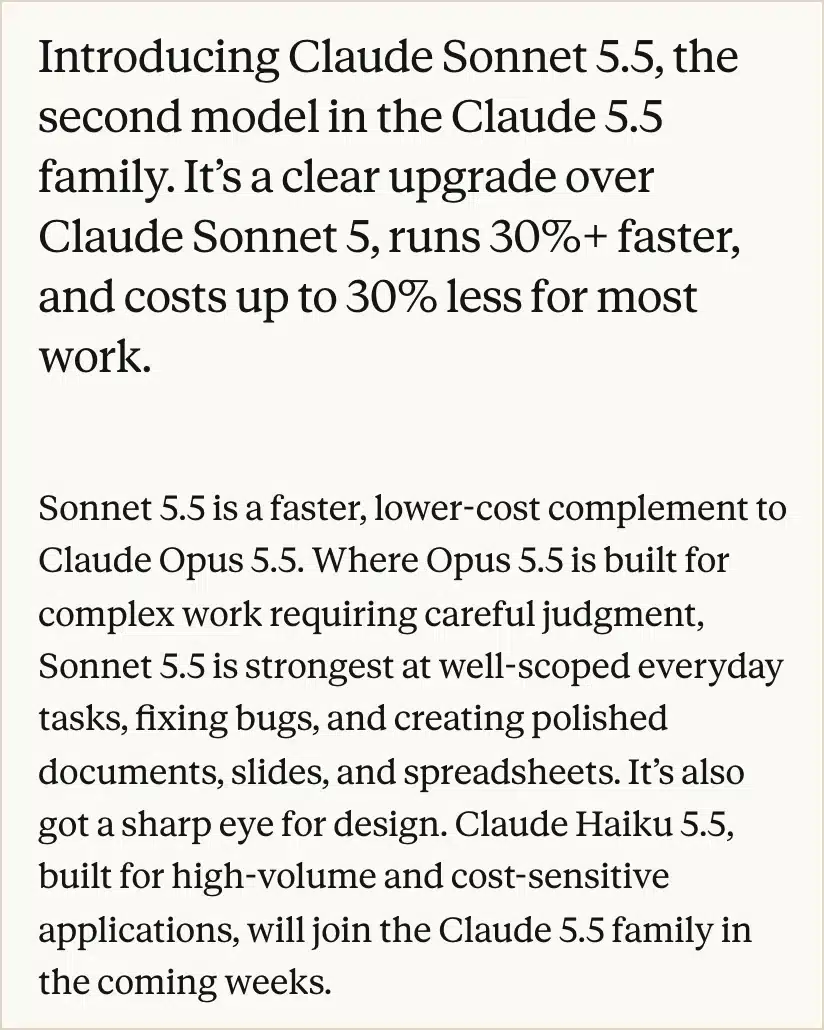
What changed, 28 September: Anthropic launched Sonnet 5.5 for everyday work such as documents, slides and spreadsheets. It says the model works faster and completes tasks at a lower cost than Sonnet 5. That doesn't mean your monthly subscription is cheaper. It's available through Anthropic and major cloud platforms. Source: Anthropic's Sonnet 5.5 announcement.
My verdict
This is the one I'd try first if you're using AI for proposals, reports or presentations and still doing far too much of the writing yourself.
Getting a draft back quickly is lovely. Having to remove the grand introduction, put the missing details back and rewrite anything you'd be embarrassed to send takes some of the pleasure out of it.
I'm interested in whether Sonnet can reduce that second bit. That's where I'd judge the improvement.
Use it in your business
Go back to a document you've already finished. Give Sonnet the notes you started with, the template and an example of how you write. Ask for the document again, then compare it with the version you approved.
Be fussy. If the price belongs on page one, say so. If you never describe your services as "bespoke solutions", put that in the instructions too. Give it the details you usually end up adding yourself.
I've explained how to collect those examples in my guide to building an AI voice bank. And if you keep feeding it the same business information, the private AI assistant guide will help you get that together once.
The 27 September Digest's Claude comparison goes into the bigger question of which setup to use. For this test, I'd be happy with one document that needs less rewriting.
Keep this human
Read the promises carefully. A nicer sentence can still change what you've agreed to do. You decide the price and scope, even when the rest of the proposal looks ready to go.
2. ChatGPT audio uploads turn a recorded call into a useful follow-up
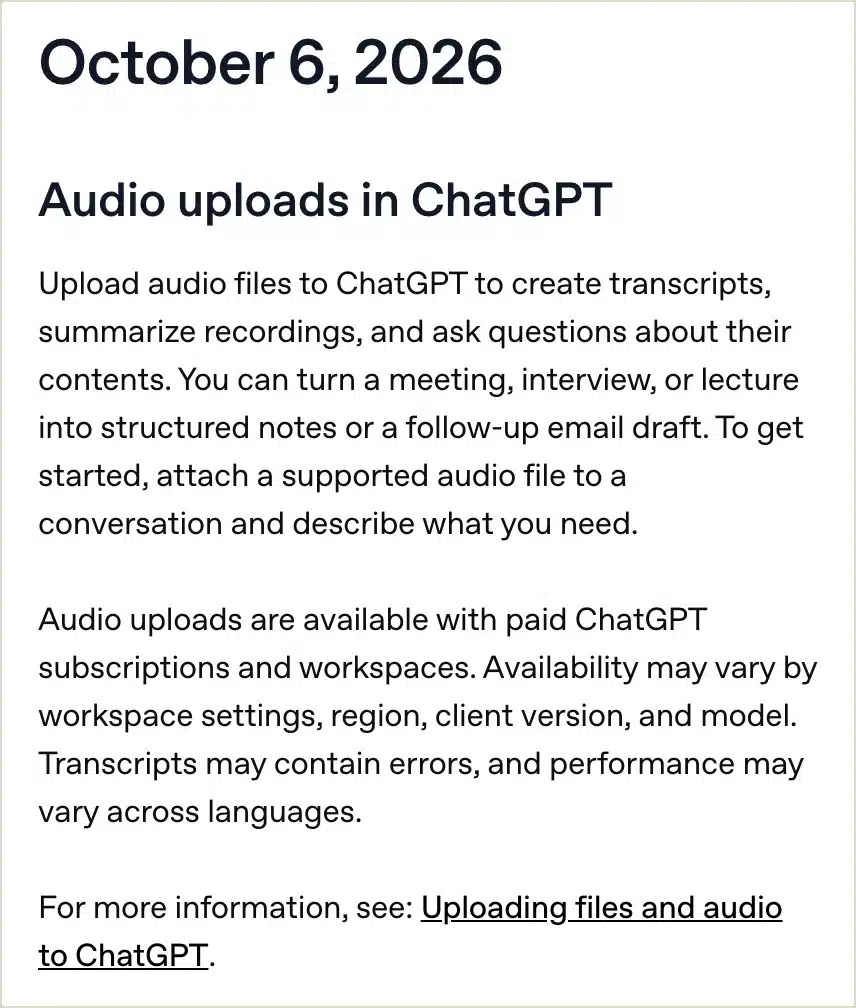
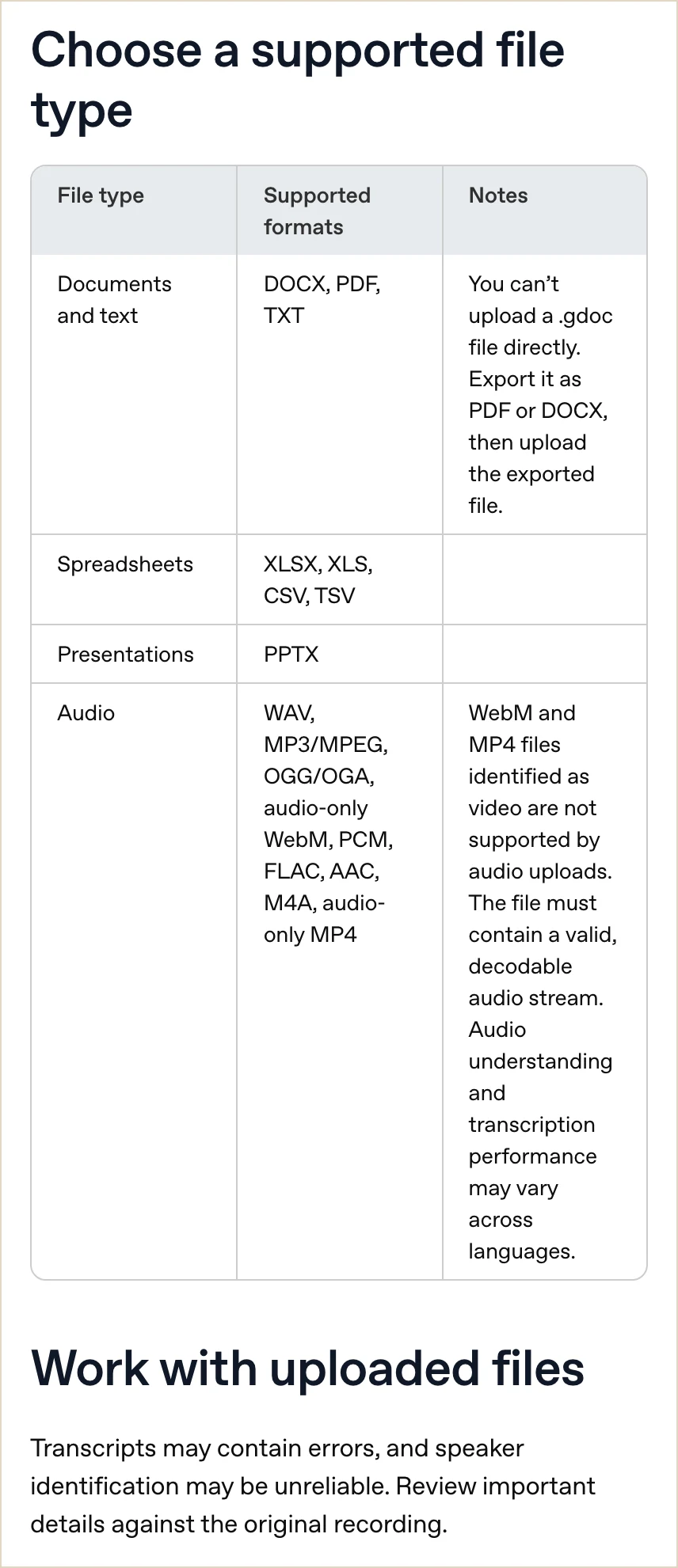
What changed, 6 October: You can upload audio to ChatGPT on paid subscriptions and workspaces, then ask for a transcript, a recap or answers about the recording. Free accounts don't have this feature. Availability also depends on your settings, region, app version and model. Source: OpenAI's release notes and audio-upload guidance.
My verdict
I like this because you don't have to invent a new use for it. If you've got a call recording and a follow-up to write, you've already got the job.
The bit I'd want help with is remembering exactly what was agreed. Who's doing what, when they said they'd do it, and whether "that sounds interesting" became a yes somewhere in the summary.
It does happen. And it's a slightly awkward way to start the next conversation.
Use it in your business
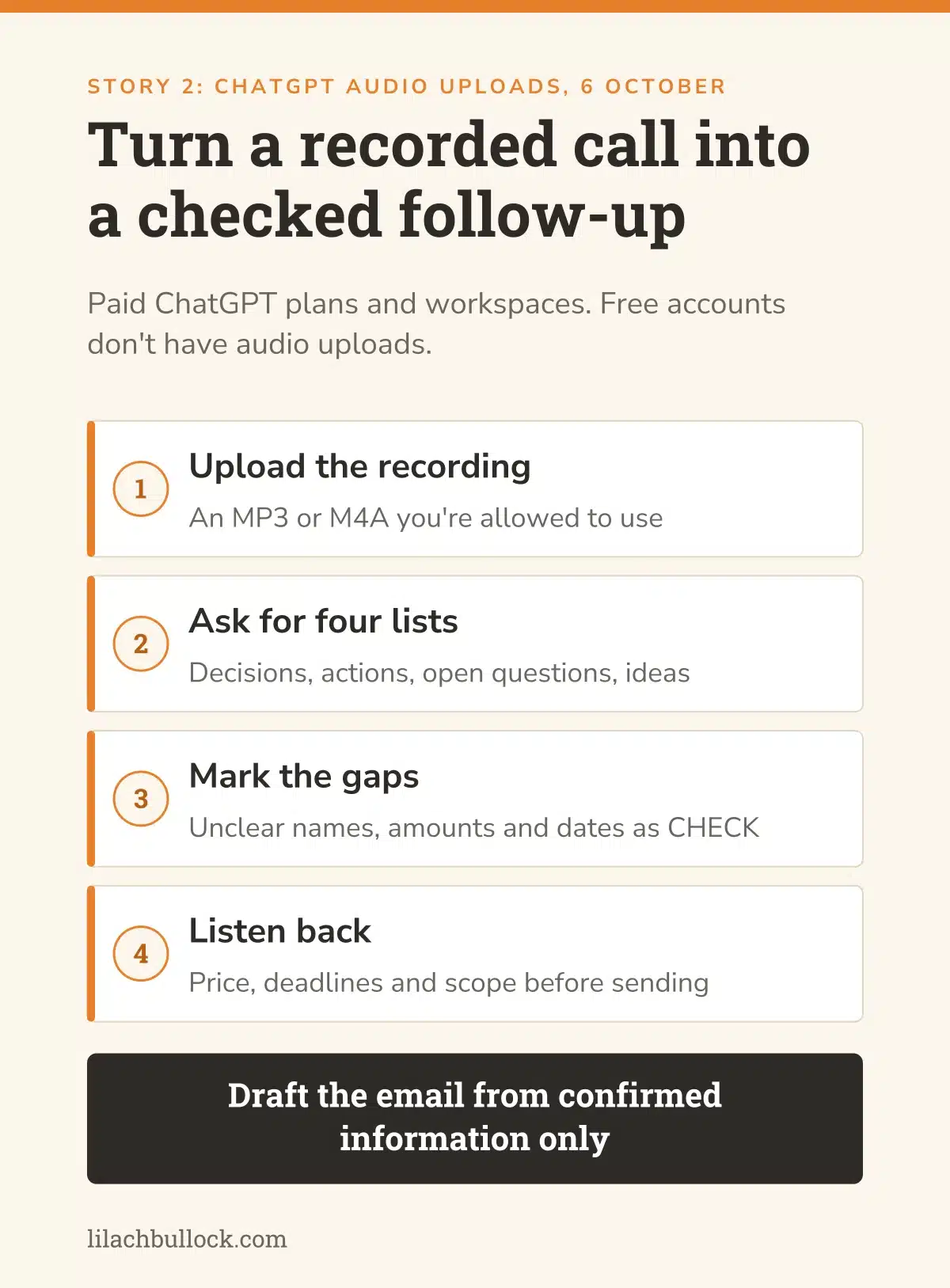
Take an MP3 or M4A recording you're allowed to use and ask ChatGPT to draft the follow-up. Tell it to separate decisions, actions, questions still unanswered and ideas nobody has agreed to yet.
Then listen back to the parts about price, deadlines and scope. I've written about what AI meeting notes miss, because those are often the details that matter most after the meeting.
Here's the prompt I'd start with. You can change the format to match the way you usually follow up, and there are more in my ChatGPT prompts for small business owners.
Copy this prompt
Use this recording to draft a follow-up email. Do not send it. List confirmed decisions, actions with owners and deadlines, unresolved questions, and tentative ideas separately. Mark unclear names, amounts and dates as CHECK. Do not turn suggestions into commitments. Add timestamps for scope, price and deadline statements when you can identify them reliably. Otherwise say the timestamp is unavailable. Draft the email from confirmed information only.
Keep this human
Check who said what before sending the email. Speaker identification isn't always reliable. If two people said "I'll do that", make sure the right person has ended up with the job.
3. ChatGPT Intelligent UI helps you work through business calculations
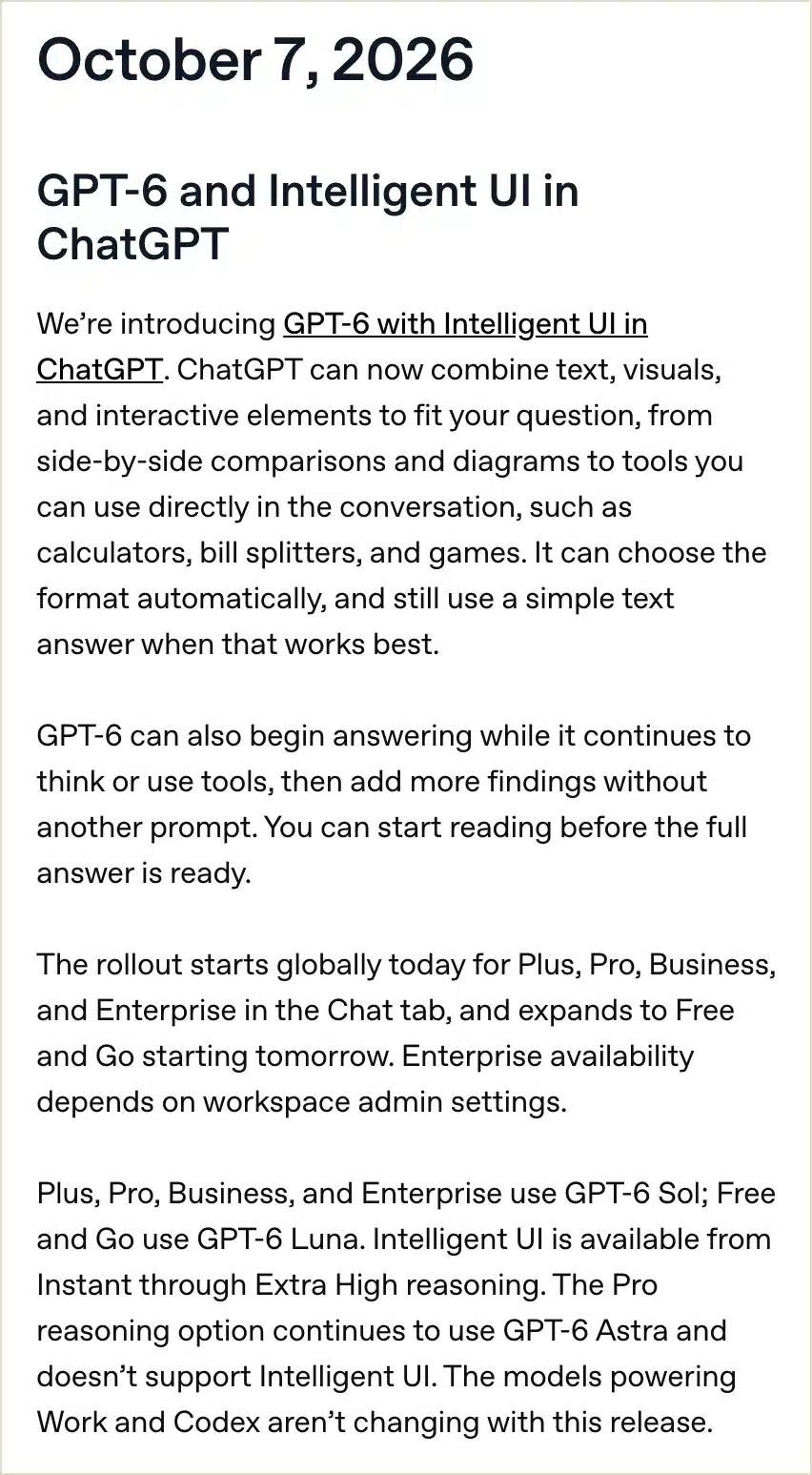
What changed, 7 October: OpenAI started rolling out GPT-6 with Intelligent UI in ChatGPT. Answers can include interactive elements, such as calculators, alongside text and visuals. Plus, Pro, Business and Enterprise started getting it on 7 October, with Free and Go following from 8 October. Supported reasoning levels go up to Extra High; Astra's Pro reasoning option doesn't support it. Source: OpenAI's launch and release notes.
My verdict
This is handy if you understand a decision better when you can play with the numbers.
Say you're working out how many clients you can take next month. You change the time each job takes, allow more for admin, then see what happens. That's easier to follow than asking ChatGPT for another long explanation every time you change your mind.
I'd try a small calculation first. Something you can check yourself, before you use it to decide how much work to promise someone.
Use it in your business
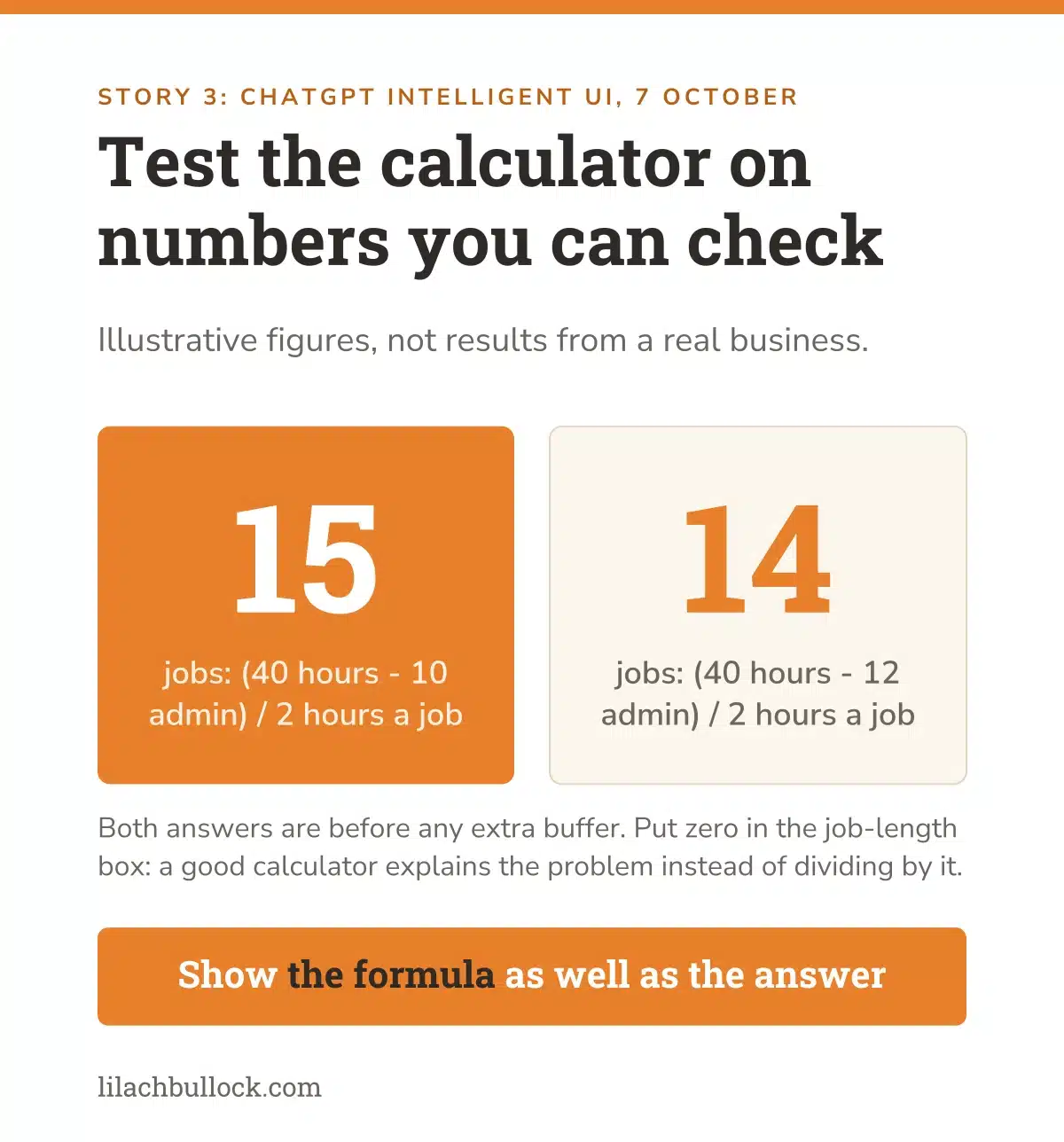
Give ChatGPT the hours you have available, the time each job takes and the hours you need for admin. Ask for a calculator where you can change those numbers. Tell it to show the formula as well as the answer.
Here's a simple example. Forty hours available, minus ten for admin, leaves thirty. At two hours a job, you have room for fifteen jobs, before allowing an extra buffer. Change the admin time to twelve hours and the answer should become fourteen.
Try a few other numbers, including zero. If you put zero in the job-duration box, it should explain the problem rather than cheerfully divide by it.
If you're deciding whether to bring in help, read my hiring versus automation guide. There's also the AI Savings Calculator if you'd like to work out what the time could be worth.
Keep this human
Put the unexciting bits of your week into the calculation too. Preparation, travel, follow-ups. They still take time, however much you'd prefer the calculator to ignore them.
4. Google skills save repeated instructions as Gemini moves on from Gems
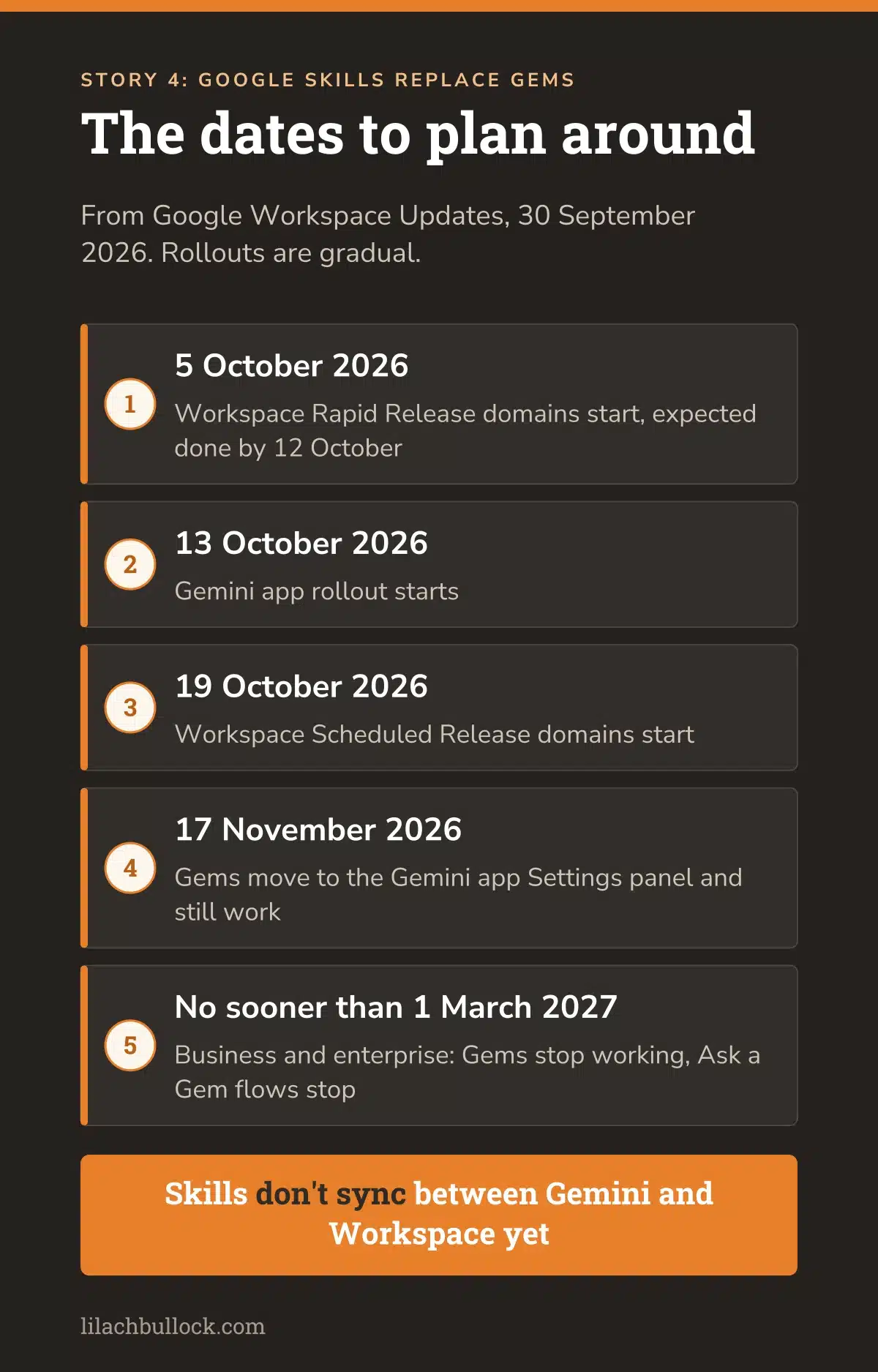
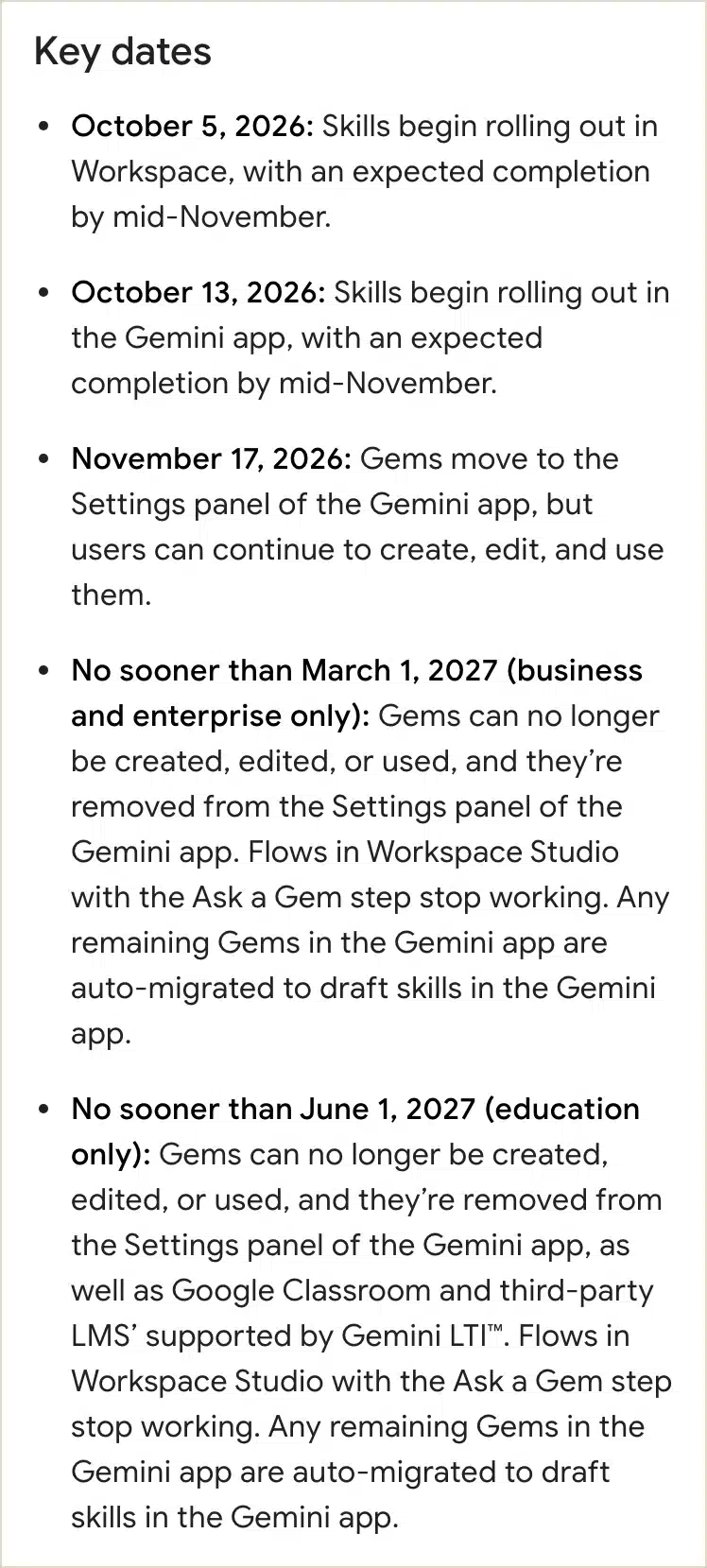
What changed, announced 30 September: Google is introducing reusable skills and moving away from Gems. The Workspace Rapid Release rollout began on 5 October. Scheduled Release is due to start on 19 October, and the Gemini app on 13 October, after this Digest's cutoff. For now, skills don't sync between Gemini and Workspace. Source: Google Workspace Updates.
My verdict
I'm very much in favour of explaining something once and being able to use it again. Especially when the alternative is pasting the same instructions into a chat, then wondering which version you copied.
That's the appeal of skills. You save how you want a recurring job done, including the format, the rules and an example you like.
However, there's a detail worth knowing before you get carried away: Gemini and Workspace don't currently share those skills automatically. If you use both, you'll have two copies to look after.
Use it in your business
Start with something you repeat, such as writing a client update from project notes. Save the instructions in one document. Include what belongs in the update, what should be left out and an example you've already approved.
You can borrow the structure from my ChatGPT prompt templates for work and adapt it for the Google job. Your own example is the useful addition. It shows what you mean when you ask for a short update.
When skills appear in your account, try that one job. If you also use "Ask a Gem" in Workspace Studio, make a note of where. You'll need to deal with those flows as the transition happens.
Keep this human
Your Gems haven't suddenly stopped working. Google's business and enterprise removal date is no sooner than 1 March 2027. Save the instructions and test the replacement before you retire something you depend on.
5. ChatGPT Space, Pages and team tasks make shared work easier to hand over
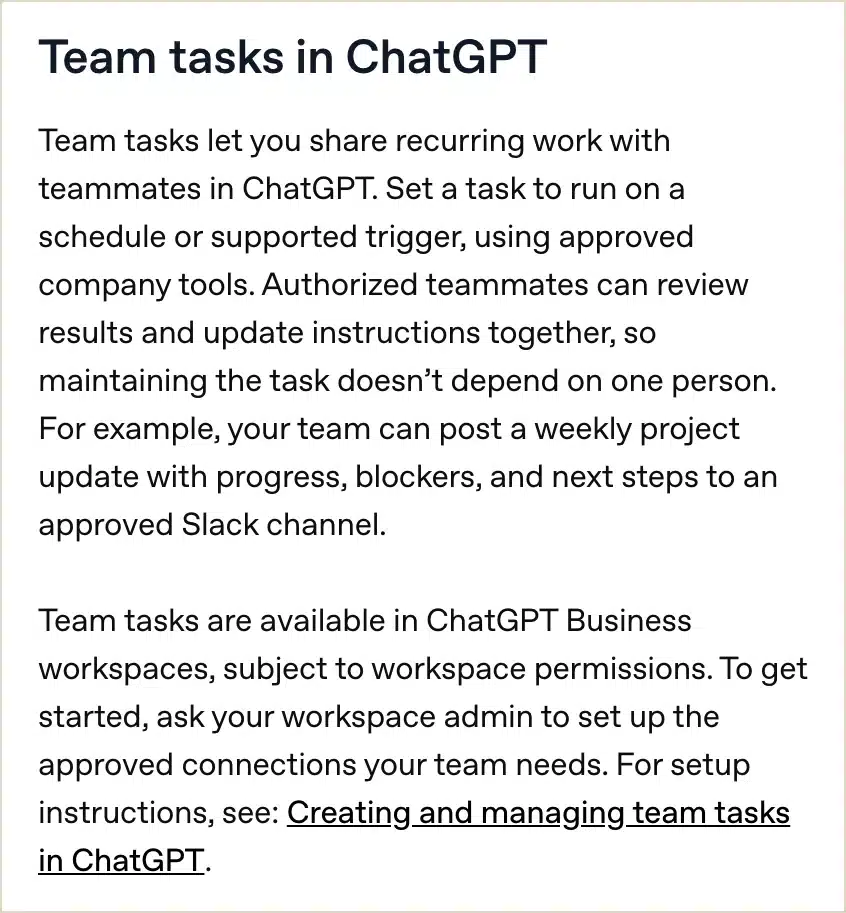
What changed, 29 September: OpenAI introduced Space and collaborative Pages for eligible Pro, Business and Enterprise users. Business workspaces also gained shared team tasks. These can run on a schedule or supported trigger, using approved connections. Sharing team work doesn't automatically share your private chats, and access permissions still apply. Source: OpenAI's DevDay recap and Business release notes.
My verdict
This is worth a look if you use ChatGPT with a team. You can do quite a lot of work in a conversation, then discover that nobody else can find the bit they need.
A screenshot helps until something changes. Then you have a screenshot of the old plan.
I'd use Space and Pages for the work that needs to carry on without the person who started the chat. A project update, for example, or a report somebody else needs to take over while you're away.
Use it in your business
Choose one weekly update. Put the agreed plan and its source documents in a shared space with the right access. Create a Page for the current version.
Keep the update useful: what's changed, what needs a decision, who's responsible and when it's due. If your account has team tasks, ask one to prepare the next draft from those sources.
Then have a colleague try it. Can they find the information, check the draft and run the next update without asking you where everything lives? That's the handover I'd want to see. My article on common small-business AI mistakes covers some of the things that get missed around the tool. And if you'd like the whole team using it the same way, here's what an AI workshop for marketing teams should cover.
Keep this human
Check who's allowed to read the shared Page. Material you copy into it becomes available to those viewers, even if the chat you copied it from was private.
6. Microsoft Copilot Search adds follow-up questions to business search
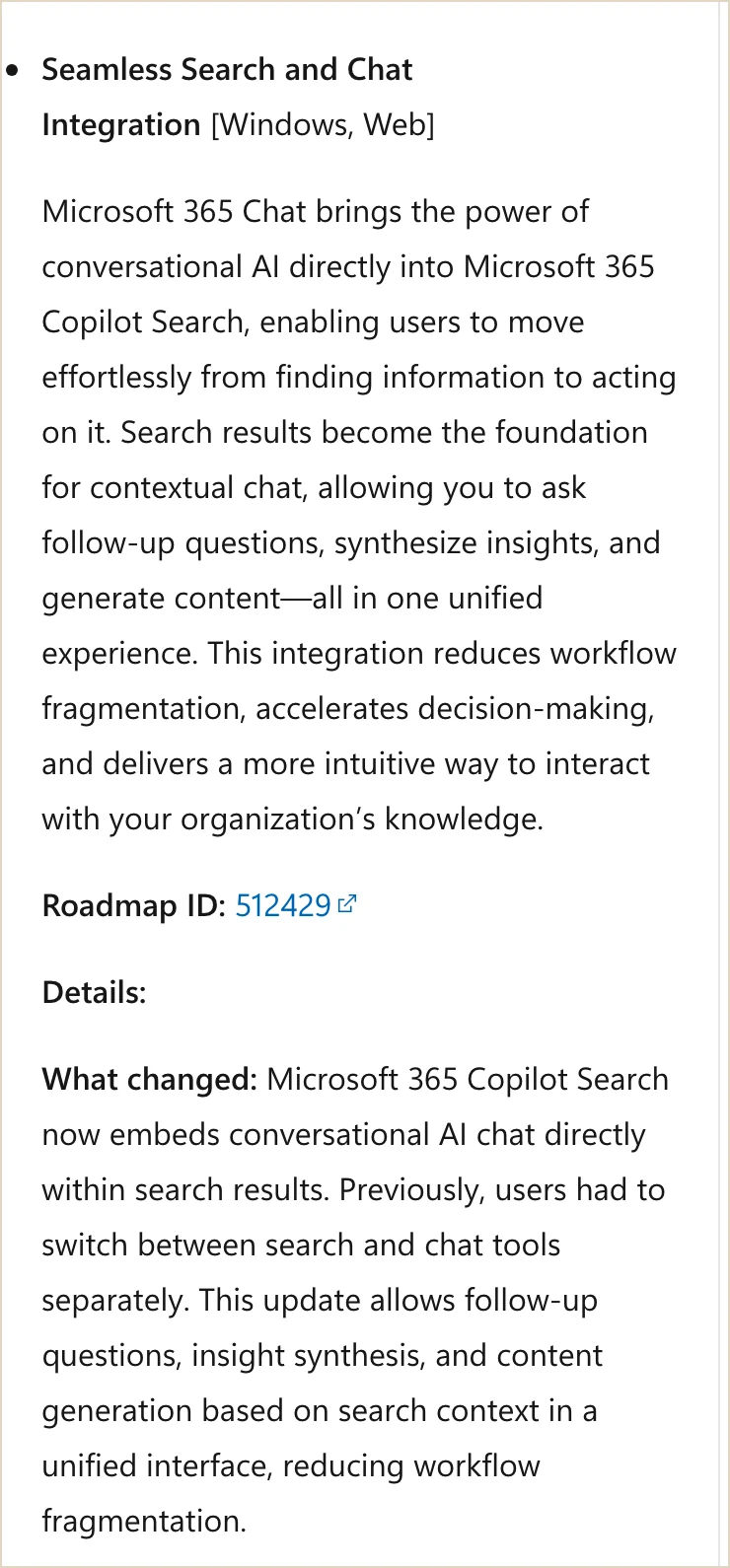
What changed, reported 6 October: Microsoft added chat to Microsoft 365 Copilot Search on Windows and web, so you can ask follow-up questions about what you've found. Its release notes cover 22 September to 6 October without giving this feature its own launch day. The rollout is gradual. Source: Microsoft 365 Copilot release notes.
My verdict
If you already work in Microsoft 365, this might save you some digging around.
You find the document, then ask the question you were trying to answer in the first place. Which parts of onboarding need your approval? Does the agreed scope include the thing the customer has just requested?
I'd test it on a question you know the answer to. That gives you a quick way to find out whether it's helping or making a confident guess from the wrong file.
Use it in your business
Search for your current onboarding document and ask which steps need the owner's approval. Open the source beside the answer and compare them.
Look for missing steps, the wrong person named, or an old process treated as current. If the answer holds up, use it to decide which approvals you could hand over.
The Founder Dependency Audit will help with that part. Finding out how often work waits for you can be rather revealing. Deciding which decisions you can stop making is where it becomes useful.
Keep this human
Check the date and owner of the source document. And try the feature within your existing access before changing licences. An announcement doesn't tell you what's included in your account.
7. ChatGPT iPhone Scan turns several pages of notes into one PDF
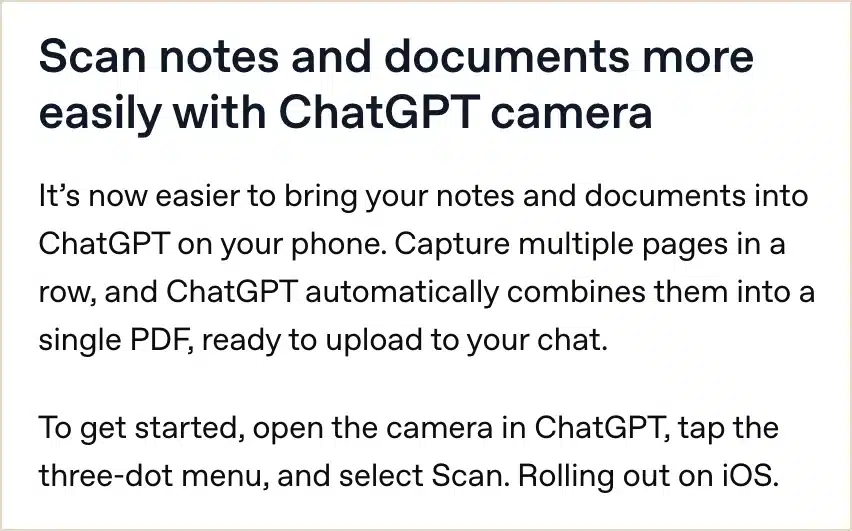
What changed, 1 October: ChatGPT began rolling out Scan in its iOS camera. It lets you capture several pages and combine them into one PDF to upload. Source: OpenAI's ChatGPT release notes.
My verdict
Not the biggest announcement here, but I'd use this if you come away from meetings or site visits with handwritten notes.
You can scan several pages into one PDF, in order, instead of uploading separate photos and explaining which page goes where. Then you can ask ChatGPT to turn the notes into a list of things to do.
Scan them while you still remember what the notes mean. It's much easier to sort out a missing name now than a month later.
Use it in your business
Open the ChatGPT camera and look for Scan in the three-dot menu. Capture the pages, then check the PDF before asking for anything else. Make sure you've got every page and can see the edges.
Ask for actions, owners and deadlines. Tell it to put "not specified" where you haven't written the answer, and to list anything it can't read.
If they're marketing notes, you can put the agreed actions into your weekly marketing routine. Keep the PDF as well. You'll want it if an action looks odd later.
Keep this human
Check numbers and names yourself. A handwritten 15 can look an awful lot like 75. It's better to have the assistant admit it can't tell than change the size of your order.
8. ChatGPT Meetings takes notes on a Mac but does not keep the audio
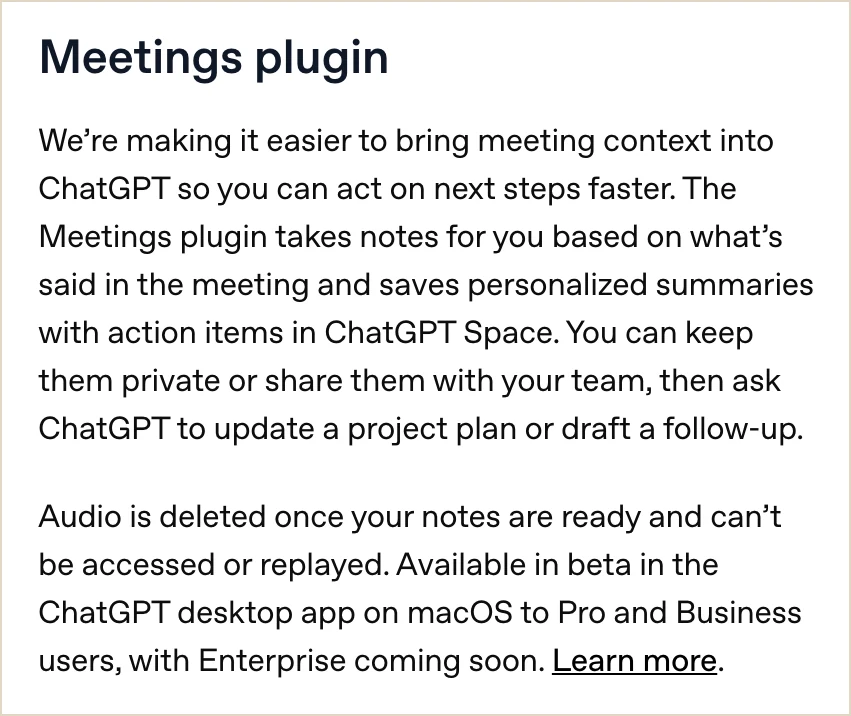
What changed, 29 September: The ChatGPT Meetings plugin entered beta for Pro and Business users in the Mac desktop app. It puts summaries and actions in Space. It also deletes the captured audio when the notes are ready, so you can't replay it. Enterprise access was announced for later. Source: OpenAI's ChatGPT release notes.
My verdict
This could be useful for taking notes in an ordinary team meeting, if you've got the eligible plan and Mac app.
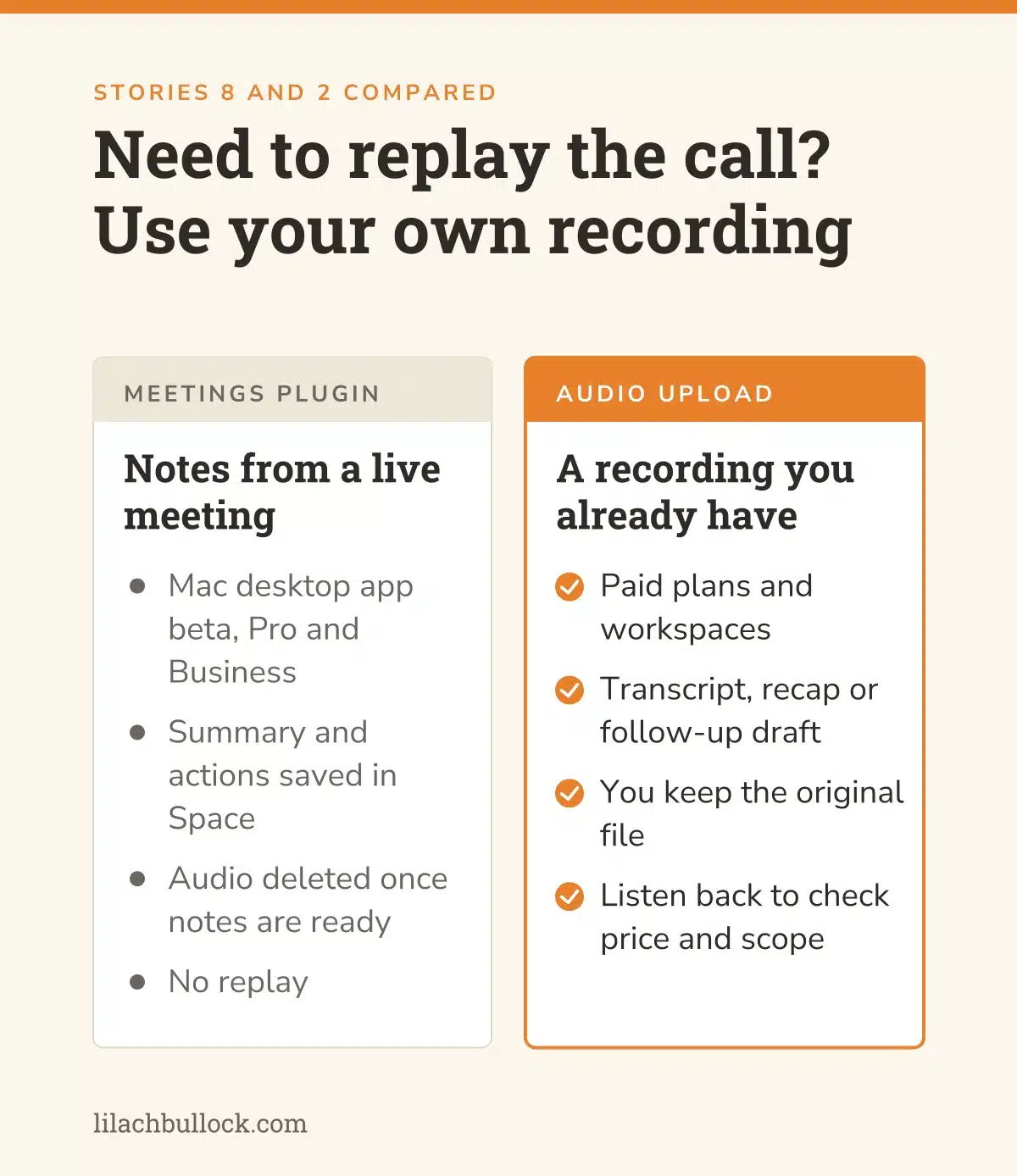
But I'd want you to know about the audio before trying it on a customer call. Once the notes are ready, the plugin deletes the audio it captured. You can't go back and listen to it.
That's different from the upload feature earlier in this post, where you already have your own recording. I'd choose between them based on whether you'll need to replay the conversation.
Use it in your business
Try an internal meeting first, with everyone's knowledge and the permission you need. Before the call ends, read back the actions and dates. It's much easier to clear up a misunderstanding while everyone's still there.
Then compare that list with the notes. Look for something tentative that has turned into an agreement, or a condition that's disappeared. My guide to checking an AI meeting summary goes through what I'd look for. If you're weighing up a notetaker more generally, read my 90-day AI notetaker experiment on sales calls.
Keep this human
If you need to keep a recording, use a method that does that. Don't leave it until somebody disputes the price to find out you can't replay the call.
9. GPT-6.1 Sol gives ChatGPT Work and Codex another model to test
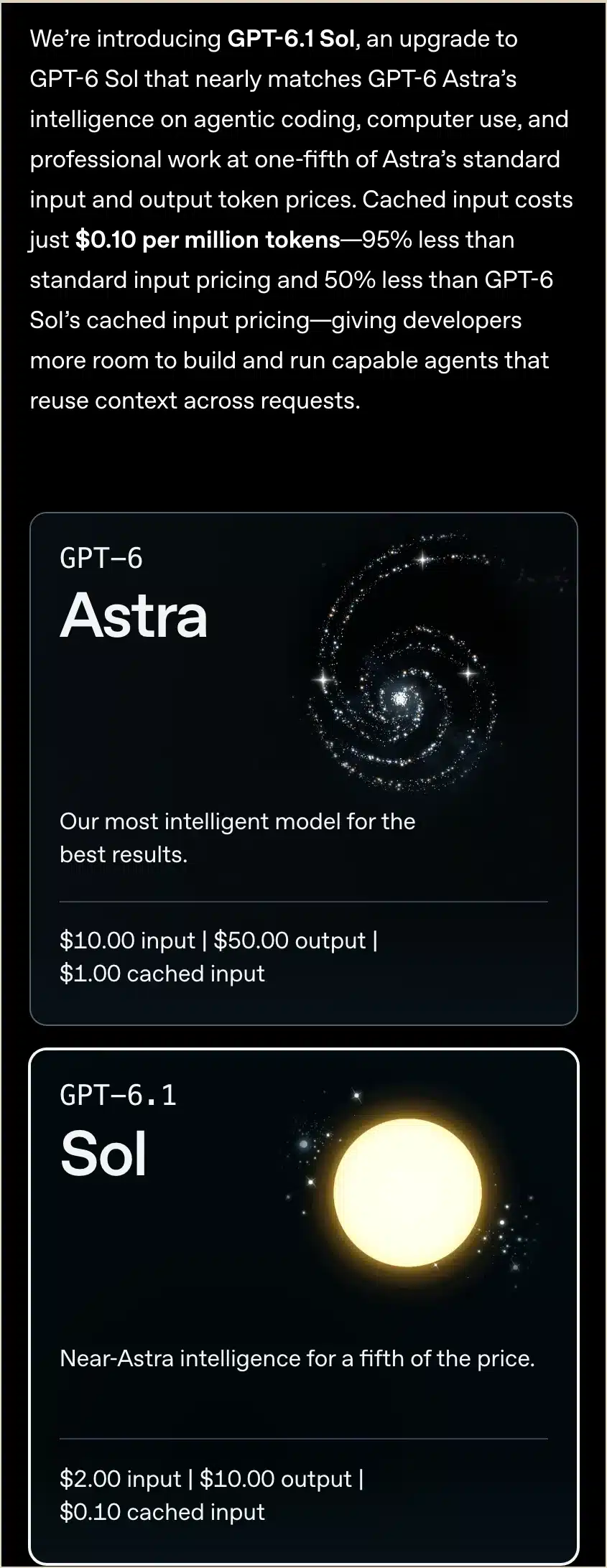
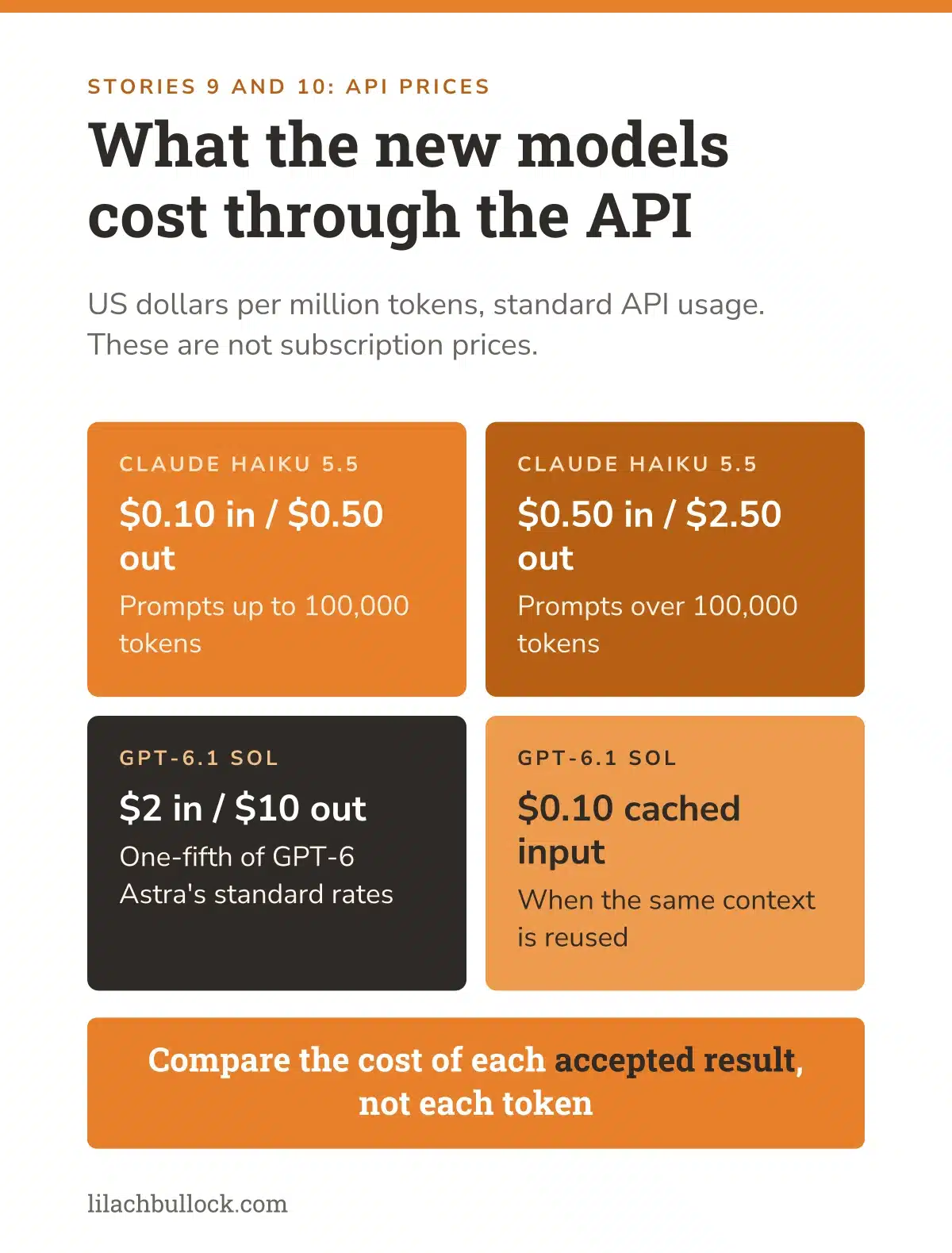
What changed, 29 September: OpenAI launched GPT-6.1 Sol for ChatGPT Work, Codex and the API. Standard API prices are $2 per million input tokens and $10 per million output tokens, one-fifth of Astra's corresponding rates. Cached input costs $0.10 per million tokens. Work and Codex access includes Plus, Pro, Business, Enterprise and Edu, depending on rollout and workspace controls. This is separate from the model in regular Chat. Source: OpenAI's launch announcement and dated release notes.
My verdict
I'd be interested in this if you're already using Work or Codex for jobs that take several attempts to finish.
Want AI doing the heavy lifting in your marketing?
I build the systems that handle the boring 80 percent, so you get your week back. Done properly, with the human kept in.
Perhaps you've got a report that pulls information from several files. Or a page that needs fixing. I'd take one of those jobs back out and see how Sol handles it, using the same instructions as before.
The API price is useful to know, but it isn't the whole comparison. If you're on a subscription, you'll also care about how far you get before an interruption and how much you have to correct.
Use it in your business
Give Sol and your current setup the same files, brief and checklist. Write down the settings you used. Otherwise it's very easy to end up comparing two different briefs and blaming the model.
If you're testing a report, check the totals. If you're testing something it built, try using it. Include a missing input or an awkward question, not only the example that makes it look good.
My AI implementation roadmap will help you keep the test manageable. And when two assistants disagree, the guide to checking AI business advice gives you a way to work through the answers.
Keep this human
Count your correction time. You know how much of your afternoon went into getting the result ready, even if the usage bill doesn't mention it.
10. Claude Haiku 5.5 lowers API costs for repetitive business tasks
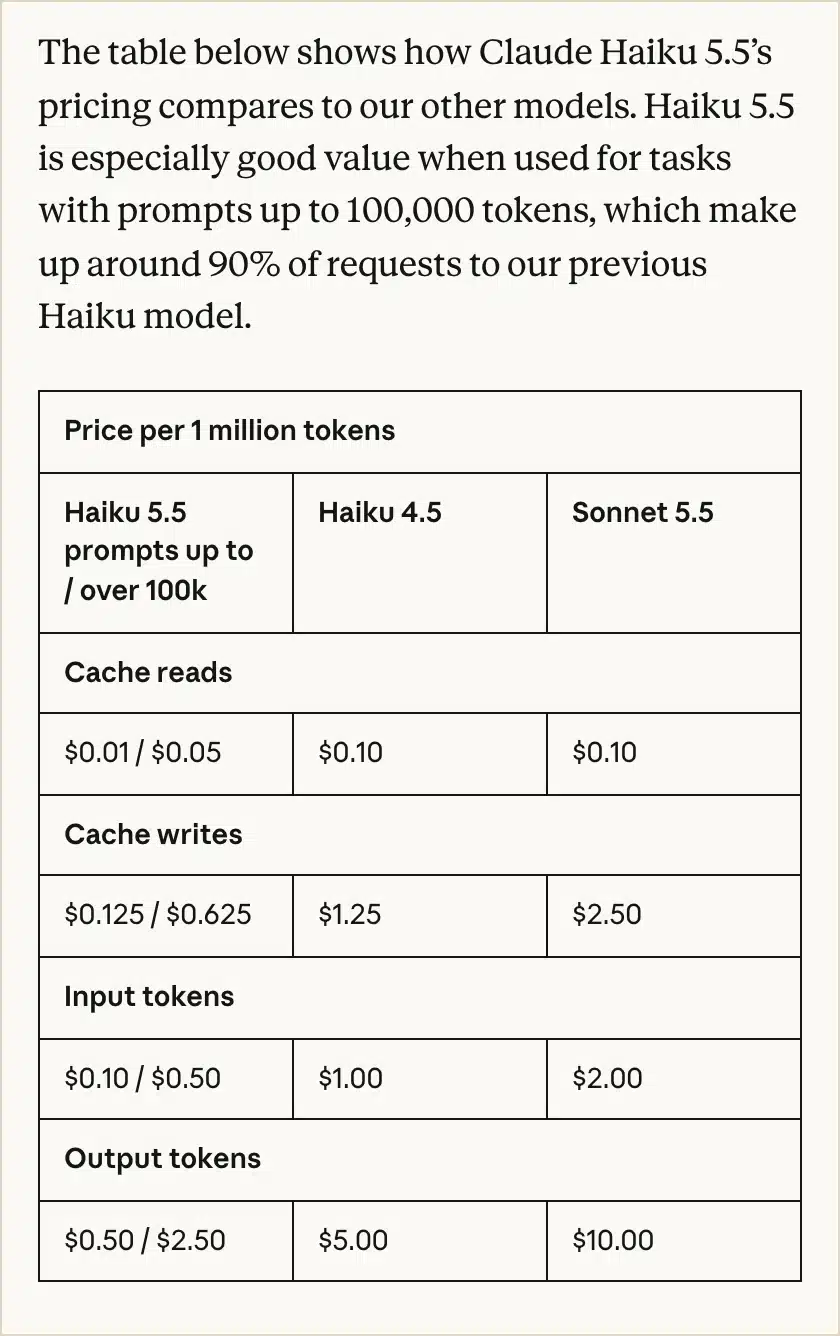
What changed, 7 October: Anthropic launched Haiku 5.5 for narrow, high-volume tasks. Up to 100,000 prompt tokens, standard API input and output cost $0.10 and $0.50 per million tokens. Above that threshold, the rates are $0.50 and $2.50. It's available through the Claude Platform and major cloud platforms. These are usage prices, not subscription prices. Source: Anthropic's Haiku 5.5 announcement.
My verdict
This one matters if you're paying to run lots of similar AI jobs. If you mainly use a chat window, you can skip the pricing maths.
For an existing automation, though, it's worth checking whether a cheaper model can handle the straightforward parts. Sorting enquiries, for example, or pulling agreed fields from a document.
I wouldn't send every job to it because it's cheaper. I'd find out which jobs it can do well enough that you don't have to rescue them afterwards.
Use it in your business
Take a set of old enquiries and label them yourself: sales, support, supplier, unrelated and unclear. Include a few awkward ones. A message with two requests, or one that only makes sense if you know the customer's history.
Give Haiku the same set and compare the labels. Keep it away from sending messages or changing customer records during the test.
Then decide what should happen to each category. I've covered that in the AI workflow automation guide. Use the AI tools ROI guide to include errors and checking time in the calculation.
Keep this human
Have somebody read the "unclear" pile. A promising enquiry doesn't always arrive in the wording you expected. I'd be particularly interested in the good enquiries the model missed.
11. Claude Max and Team API credits come with a separate set of limits
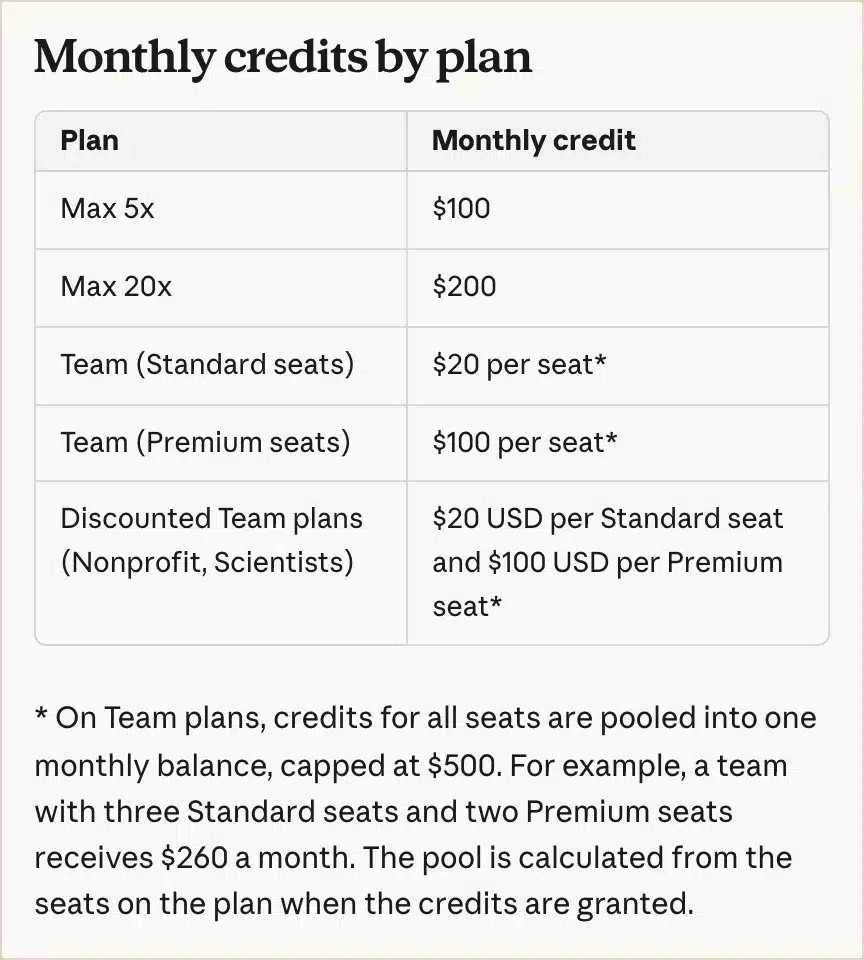
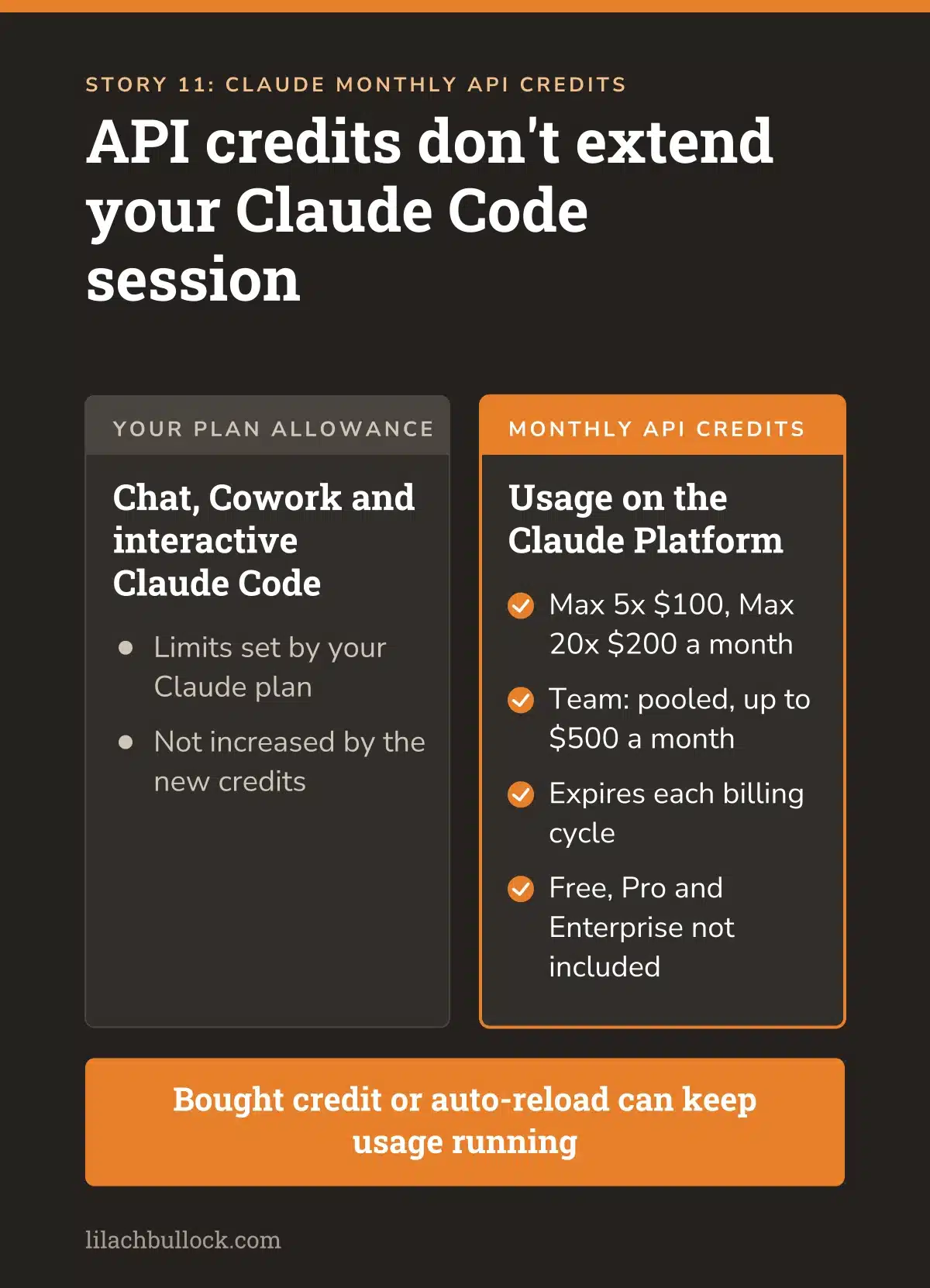
What changed, announced 7 October: Anthropic began rolling out monthly API credits for Max and Team subscribers. Max 5x gets $100 and Max 20x gets $200. Team credits depend on seat type and are pooled, up to $500 a month. Free, Pro and Enterprise plans aren't included. New eligible subscriptions need seven days before claiming. Source: Anthropic's announcement and current credit guidance.
My verdict
If you've already got an eligible plan, this is worth checking. You may have API credit you can use for an automation instead of paying separately for that usage.
There's one distinction I want to make very clear: it won't extend an ordinary Claude Code session. It doesn't add to your chat, Cowork or interactive Claude Code allowance.
I know that's the bit some of you will have been hoping for. These credits pay for a different kind of use.
Use it in your business
Check the API credits section in Billing. Before linking anything, make sure you've chosen the right Claude Console organisation. You can't change that choice yourself afterwards, and anyone with an API key in that organisation can use the balance.
Pick a small job from my AI workflow examples for small businesses and put a spending limit on the trial. Also check what happens when the credit runs out. Bought credits or automatic top-ups may allow the process to carry on charging.
The included credit expires each billing cycle. You don't have to use it all. I'd rather leave some unused than create work merely because there's a balance to spend.
Keep this human
Work out the cost of running the process after the trial. If you don't already have the plan, don't upgrade until you know what you'd use the credit for.
12. ChatGPT dots can run ongoing work but access remains limited
What changed, 29 September: OpenAI introduced dots, ongoing agents with a cloud computer. Access is rolling out to eligible Pro and Business Premium accounts; administrators control the Enterprise beta. At launch, Pro access excludes the UK, EEA and Switzerland. Business Premium has a different regional scope. Source: OpenAI's release notes and dot setup guidance.

My verdict
There's a useful idea here: ask for a piece of work once and have it continue without you starting the conversation again.
I'd begin with something like checking a few suppliers for changes. Give it the pages, tell it what matters, and ask it to come back when something changes. You probably don't need a daily email confirming that Tuesday's prices are still Wednesday's prices.
I've put this further down because access is limited and it needs more thought than uploading a recording. If you're a Pro user in the UK, the launch excludes you. I'd check that before planning the job.
Use it in your business
If you have access, choose three suppliers and their public pages. List the changes you care about: price, delivery restrictions or a service being withdrawn.
Tell the dot where to save its findings and when to notify you. Keep buying and sending messages outside the brief. Then see whether it can identify a change you already know about.
The AI automation guide for small business will help you write the instructions. And if you don't have dots, those instructions can still be used for an existing scheduled process. Not sure an agent is the right answer at all? I've written about when to use AI agents in your business.
Keep this human
Check its work before giving it more access. The launch usage arrangements are temporary, and local computer access is optional and initially off. Give it what the job needs, then look at what it did with it.
13. ChatGPT visual ads are coming to a limited test, while measurement expands
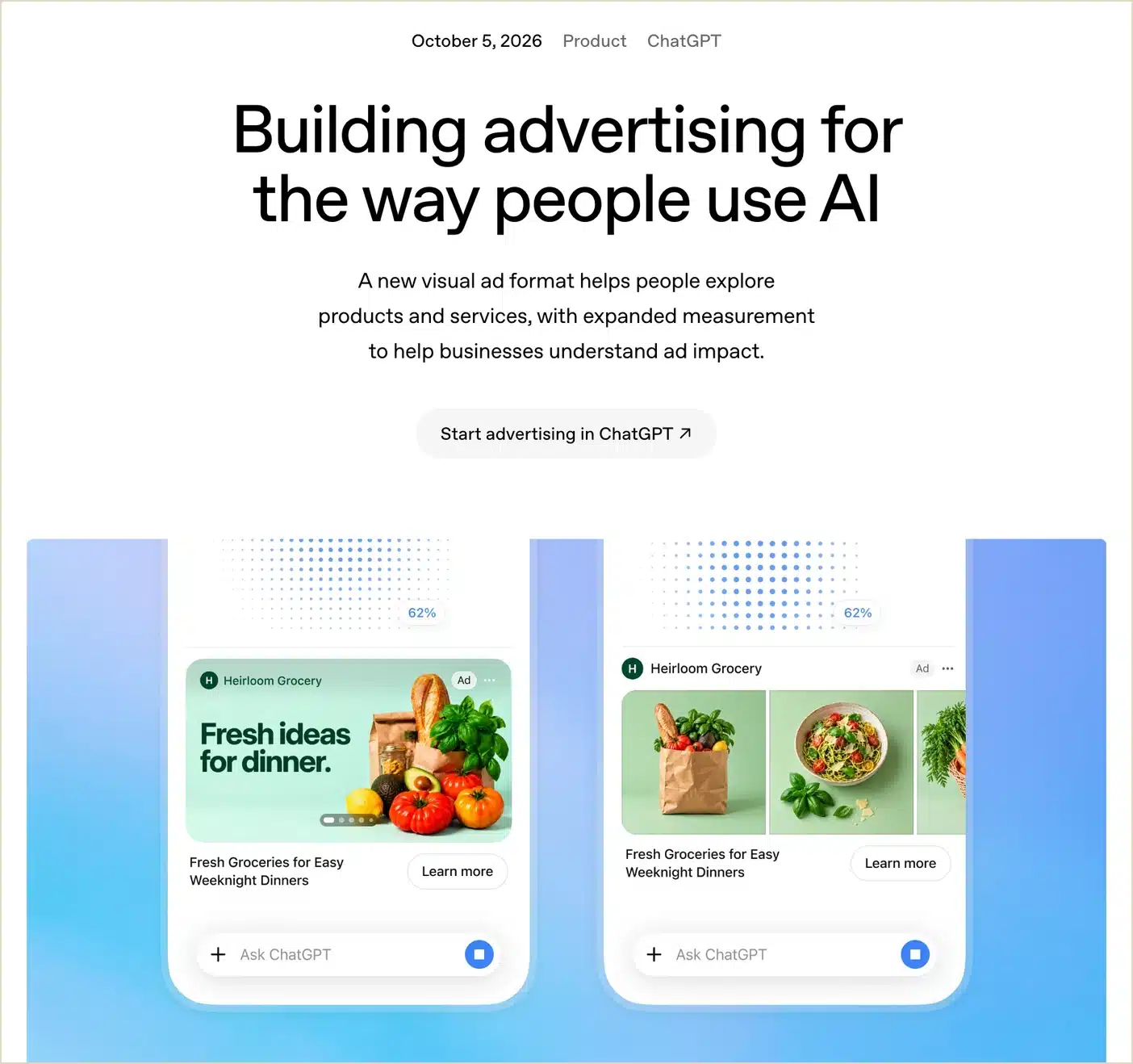
What changed, 5 October: OpenAI announced visual ads during image generation. Testing is planned for later in October with selected US advertisers and Free/Go users. The format isn't generally available. Separately, OpenAI expanded measurement integrations and made Negative Phrases available to qualifying advertisers. Source: OpenAI's advertising update.
My verdict
I'd keep an eye on this if seeing your product helps someone decide to buy. But the visual format is a limited test coming later in October. You may not be able to use it yet.
If you're already advertising, the measurement changes are more immediately relevant. You need to know whether the clicks brought the sort of enquiry or sale you wanted.
I covered Sponsored Agents and ad management in the previous AI news roundup. This adds to that picture. It doesn't mean every new format is ready for your account.
Use it in your business
Choose one offer for a small test on a format you can access. Look at the ad and landing page together. Does the page answer the question someone is likely to have after seeing the ad? Is it clear why they'd choose you?
My business differentiation guide will help with the second question. Before spending, decide what you're counting as success: a purchase or an enquiry that meets your criteria. Check that the tracking records it.
Keep the advertising results separate from being found in AI answers. That's the subject of my AI SEO guide, and it needs its own measures. It also helps to understand where ChatGPT gets its information.
Keep this human
Set the budget and check the claims before the campaign runs. Afterwards, look at sales and costs as well as the platform's attribution. I'd want to know what the business gained before increasing the spend.
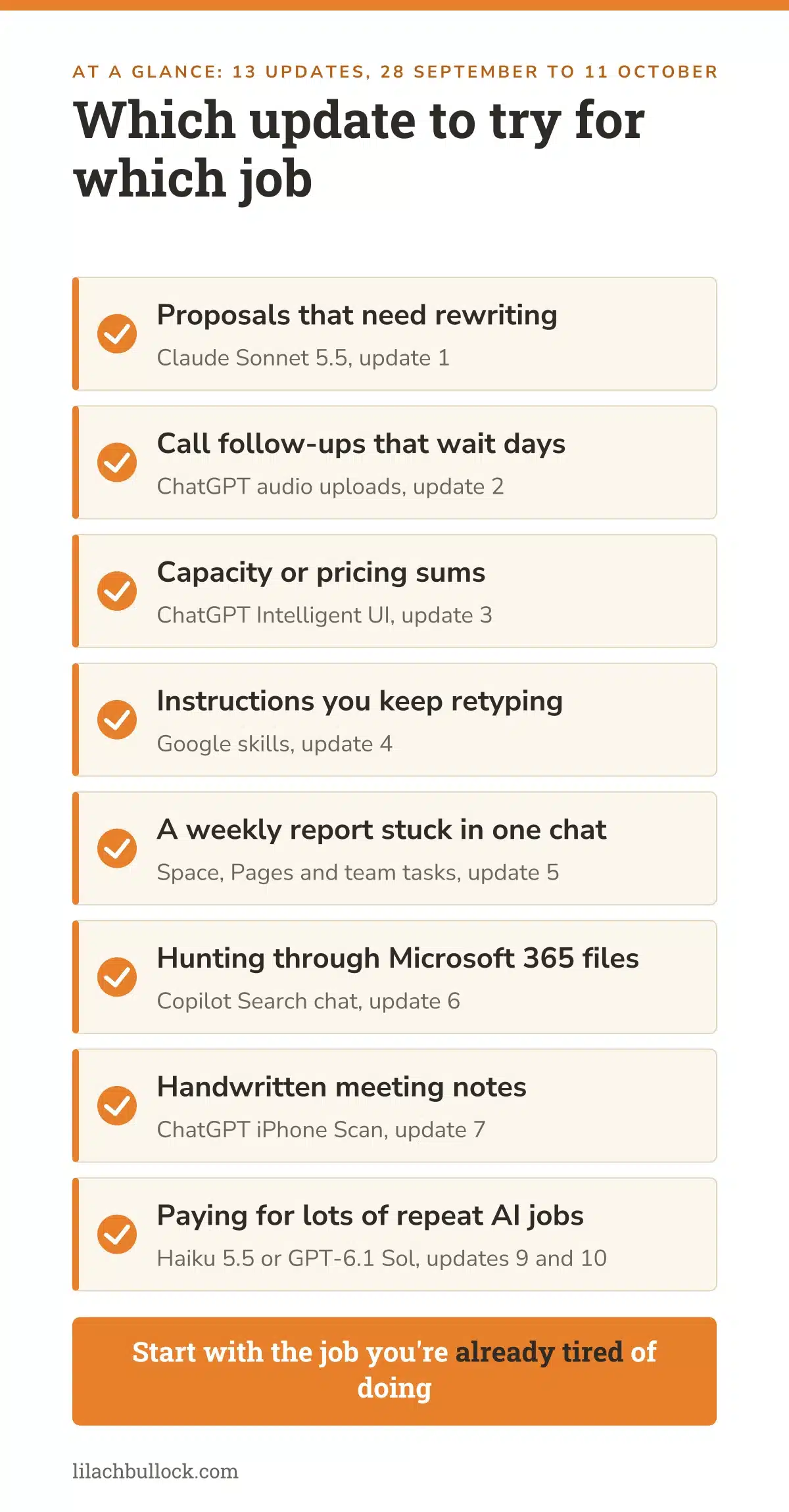
Which update deserves your attention first?
I'd choose the one that deals with something you're already tired of doing. This might help you narrow it down.
| If this keeps happening | Start here | A useful first result |
|---|---|---|
| Customer calls wait days for a follow-up | Audio uploads | A checked recap with owners and dates |
| Every document draft needs the same repairs | Sonnet 5.5 | One finished document with less editing |
| Repeated AI jobs cost more than expected | Haiku 5.5 or GPT-6.1 Sol | Lower cost per accepted output |
| People keep retyping the same instructions | Google skills | One repeatable task with a maintained brief |
| The weekly report lives in one person's chat | Space and team tasks | A shared draft another person can maintain |
| You cannot see which assumption changes the decision | Intelligent UI | A checked calculator with visible assumptions |
If you're still working out where AI fits, start with my small-business AI guide. You don't have to try everything in this list. One thing you keep using would be a good result.
What changed since the last Digest
The 27 September edition covered Opus 5.5, custom GPT retirement, ChatGPT in Word and a five-task comparison for choosing your AI setup. This edition moves into the everyday work around those decisions: a lighter document model, recorded-call follow-ups, reusable Google instructions and shared team work.
If you were still deciding what to test after the 6 September Digest, keep your original test task. Running a different task with every release tells you less about whether anything improved.
Previous AI Digests
Here are the earlier editions in date order, newest first. Use them for context and the practical exercises. Prices, plan names and availability can change, so check current guidance before following an older product instruction.
- 27 September 2026 AI Digest
- 6 September 2026 AI Digest
- 23 August 2026 AI Digest
- 16 August 2026 AI Digest
- 9 August 2026 AI Digest
- 2 August 2026 AI Digest
- 26 July 2026 AI Digest
- 19 July 2026 AI Digest
- 12 July 2026 AI Digest
- 7 July 2026 AI updates for business owners
Your 60-minute action plan
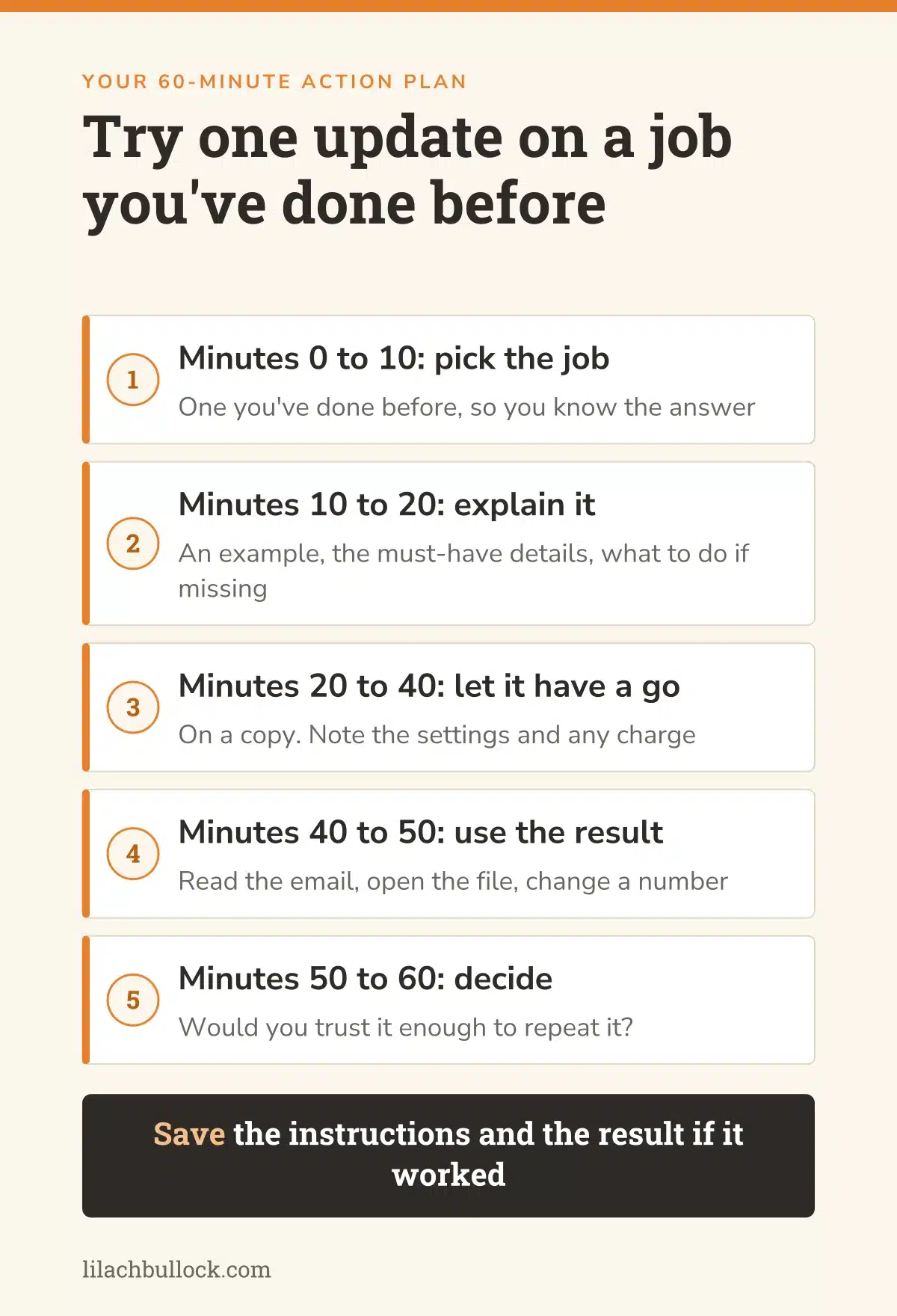
If you'd like to try something but know this will otherwise become another open tab, give yourself an hour. Here's how I'd spend it.
Minutes 0 to 10: pick the job
Choose something you've done before, so you know what the answer should look like. Find the notes, files or recording. Make a quick note of how long the job usually takes, including the editing. If you'd like to see what that looks like over a whole week, here's my AI time-saved experiment.
Minutes 10 to 20: explain what you want back
Give the assistant an example and the details it must include. For a follow-up, that's the decisions, names, dates and questions left open. Tell it what to do when information is missing. I'd want it to ask or flag the gap, rather than fill it in.
Minutes 20 to 40: let it have a go
Check you've got access to the feature, then try it on a copy or a suitable sample. Keep a note of the settings and any usage charge. If it's still running at the end of the twenty minutes, that's something to record too.
Minutes 40 to 50: use what it made
Read the email as the customer would. Open the document. Change a number in the calculator. Go back to the source if anything looks odd. My AI review method explains how a second assistant can help, provided it checks the original material too.
Minutes 50 to 60: decide whether you'd do it again
How much did you have to fix? Did it save time once you'd finished checking? Would you trust the process enough to repeat it on another example?
If yes, save the instructions and the result. If somebody else will run it, write down what they need to know. My guide to preparing a small business for AI automation covers the next steps when you're ready to make it a regular part of the business.
Related question: Can a remote AI implementation consultant work for your business?
Final takeaway
The updates I'm most interested in are the ones that help with work you've already got. The report, the proposal, the follow-up you meant to send yesterday.
Start there. Try the feature, see what you get back and be honest about how much fixing it needs. You don't owe a new model a good review because the announcement was impressive.
And if it does make the job easier, save what worked. That's something you can use again next week, whatever gets launched between now and then.
If this was useful, so is my piece on ongoing AI consultant support versus a one-off project.
Related: ai consultant handover checklist.
Frequently asked questions
Which AI updates from this fortnight are most useful for a small business?
For most small businesses: Claude Sonnet 5.5 for documents you keep rewriting, ChatGPT audio uploads for turning a recorded call into a follow-up, and ChatGPT Intelligent UI for working through calculations. Haiku 5.5 and GPT-6.1 Sol matter mainly if you already pay for automations through the API.
What period does this AI news this week for small business edition cover?
It covers announcements from 28 September to 11 October 2026. Microsoft's 6 October release batch spans 22 September to 6 October and is labelled separately because it does not give the individual feature's launch day. Features announced for later release are identified as upcoming.
Which update can I try without building an automation?
An eligible paid ChatGPT user can try audio uploads with an existing recording. Sonnet 5.5 can be tested on a document task. Intelligent UI can help you explore a calculation in the conversation. Access depends on the account and rollout; start with a feature already visible to you.
Will the new Claude API credits extend my Claude Code session?
No. They are separate credits for qualifying use on the Claude Platform, not additional interactive Claude Code, chat or Cowork allowance. Check the plan, organisation and billing rules before claiming or building around them.
Are Google's Gems disappearing immediately?
No. Google describes a staged transition to skills, with business and enterprise removal no sooner than 1 March 2027. Preserve your instructions and identify dependent flows now, then test replacements as access becomes available.
Can I use a ChatGPT dot in the UK?
The launch excludes UK Pro users. Business Premium has different availability across supported regions, while Enterprise beta depends on administrator access. Check your specific plan; don't assume another user's screenshot establishes eligibility.
Should I replace my current model with the cheapest new one?
Compare it on work you can judge. Measure accepted output, mistakes, correction time and cost. Narrow sorting tasks and difficult business decisions may deserve different models. A cheaper failed run still leaves you with the job.
Can every advertiser try the new visual ChatGPT ads?
No. OpenAI announced a later-October US test with selected advertisers. Preparing suitable creative and measurement is useful; planning a campaign around guaranteed access is premature.
What is the most useful thing to do after reading this?
Finish one trial using a job already on your desk. Save the instructions and checked result. If it works, repeat it before adding more complexity. If it doesn't, you have learned something without rebuilding the business around a launch announcement.
A question readers often ask next: How do you fix an ineffective AI strategy?
Get the next AI Digest
If you'd like the next Digest, along with the experiments I'm running in my own business, you can join my newsletter here. I'll share what worked and what didn't. There tends to be a bit of both.
If you'd rather have help putting AI to work in your business, here's how to work with me.
Lilach
Let's get your marketing running on AI.
I'm Lilach. 23 years in marketing. Currently obsessed with AI.
My day job is making your lead generation and ads run on AI. SEO and content that compound. Automation, systems, and processes quiet enough to leave alone. Forty hours a week reclaimed.
Done for you, consulting, coaching, or training.


