- AI news this week for small business at a glance
- 1. ChatGPT Slides could get that unfinished presentation off your desk
- 2. Google Deep Review gives you somewhere to take the report you don't quite trust
- 3. Gemini 4 Argon is available more widely, so give it a difficult job you already understand
- 4. ChatGPT's browser extension can help with work spread across open tabs
- 5. An OpenAI retirement notice could affect an automation you've forgotten about
- 6. ChatGPT Pro can divide a bigger task between agents
- 7. Google Play is making small personal Android apps easier to try
- 8. ChatGPT Voice has new speech models and voices
- 9. Fish Audio Drama 3 aims to make small narration repairs less painful
- 10. Meta Muse Wonder adds another option for building a small business tool
- 11. Grok Voice 3.0 matters most if you already run a phone assistant
- 12. DeepSeek's Search and Fetch documentation offers another way to check current web information
- Which update deserves your attention first?
- What changed since last week's Digest?
- Your 60-minute action plan
- Final takeaway
- Frequently asked questions
- Get the next AI Digest
In this blog post I'm going to share the AI news this week for small business, with the updates I'd put to work first and the ones I'd leave alone for now.
This week, I'd start with the document you're about to send, the presentation you keep putting off, or the admin spread across six browser tabs. There are useful changes for all three.
There's also a retirement notice to check if an old AI automation is quietly keeping part of your business running. Quietly is lovely. Silently stopping is less lovely.
This picks up from last week's AI Digest. It covers announcements from 12 to 17 October, checked by the morning of 18 October 2026. Two entries cover current documentation without a confirmed launch day; I've labelled those rather than pretending they're new releases. Each story includes a task you can try and the checks I'd make.
AI news this week for small business at a glance
If you only try one thing, choose a job you can finish and check today. My first picks are ChatGPT Slides for an existing presentation, Deep Review for a document with claims to check, and Gemini 4 Argon if you already have the eligible subscription. Before starting another automation, check whether an existing one needs a model update.
- ChatGPT Slides: turn approved material into a presentation you can keep editing.
- Google Deep Review: get a second pass over a report's logic and numbers.
- Gemini 4 Argon: wider access gives you another option for difficult document work.
- ChatGPT browser extension: current guidance explains how to work across your existing tabs.
- OpenAI API retirements: check older automations before their models disappear in January.
- ChatGPT Pro: parallel agents can tackle separate parts of a larger task.
- Google Play personal apps: eligible Android users can build a small tool for their own phone.
- ChatGPT Voice: new speech models and voices are rolling out.
- Fish Audio Drama 3: edit a small section of narration without starting the whole recording again.
- Meta Muse Wonder: another coding option for an internal tool you need built.
- Grok Voice 3.0: an API update worth checking if you already run a voice assistant.
- DeepSeek Search and Fetch: current documentation adds another route to web research in an automation.
The developer stories are at the end. You don't need to understand API billing to get something useful from the first few.
1. ChatGPT Slides could get that unfinished presentation off your desk
What changed, 16 October: OpenAI announced editable Slides in Space for eligible Pro, Business and Enterprise accounts. You can collaborate and export, including to PowerPoint on the web. Access is rolling out. Source: OpenAI's ChatGPT release notes.
My verdict
I'd try this on a presentation where you already know what you want to say. An update for a customer, a workshop you've delivered before, or the introduction you send to a prospective partner.
The tempting brief is "make this look impressive". But an impressive deck can still take twelve slides to explain something that needed four. I'd rather have the right points in the right order, with the numbers readable from the back of the room.
Use it in your business
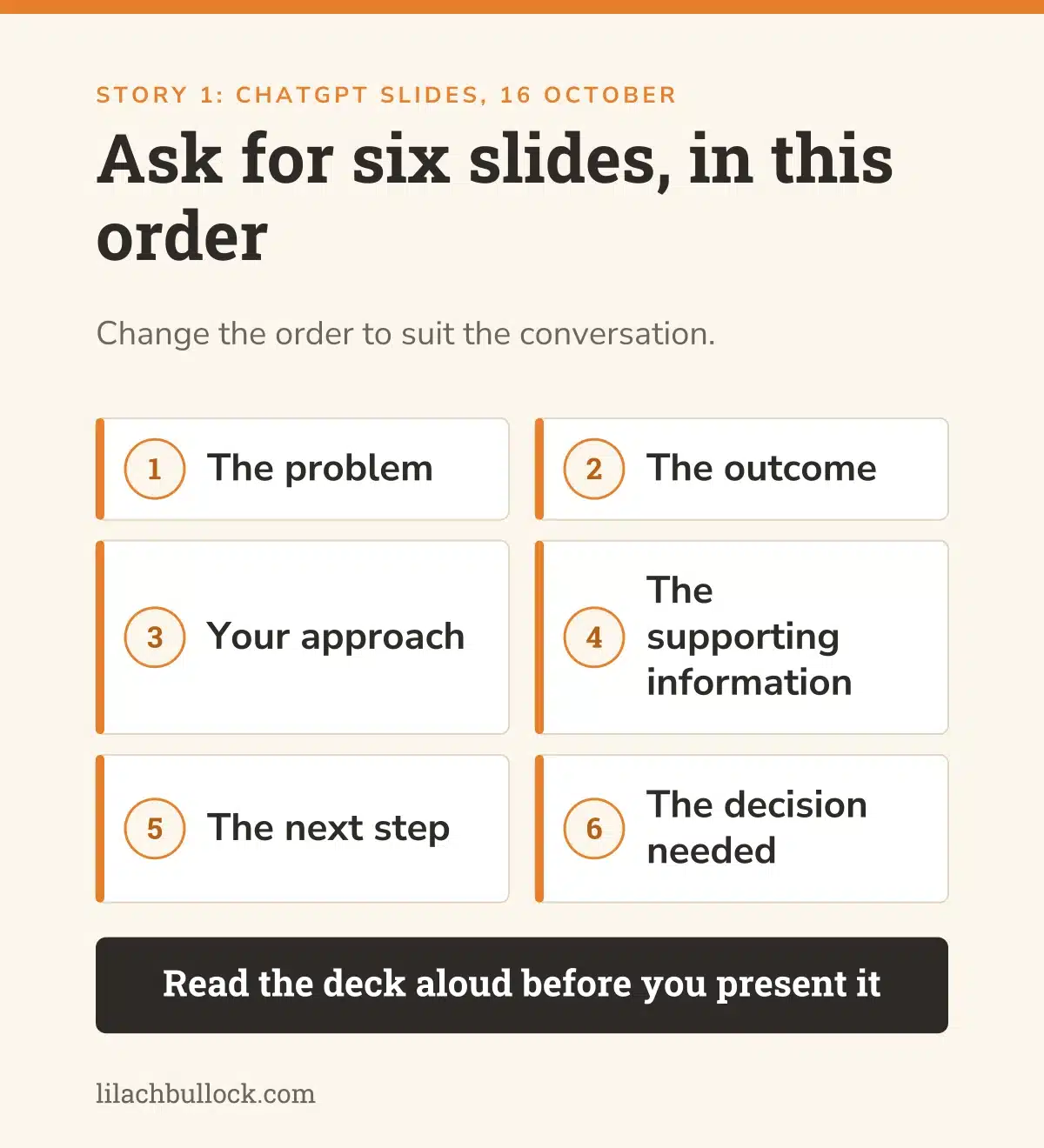
Take an approved document and a deck whose layout you like. Ask for six slides: the problem, the outcome, your approach, the supporting information, the next step and the decision needed. Change that order to suit the conversation.
Tell it which facts must survive the move into slides. A qualification underneath a result matters just as much as the large number above it.
Then export the file and open it in the app you'll present from. Check the charts, line breaks and slide order there. My AI voice bank guide will help you give it examples of how you explain things, and the business differentiation guide is useful if the message itself still sounds interchangeable.
Keep this human
You decide what the customer needs to understand. Before presenting, read the deck aloud. If you can't explain a chart without asking the assistant what it meant, the slide isn't finished.
2. Google Deep Review gives you somewhere to take the report you don't quite trust
What changed, 14 October: Google publicly launched Deep Review, expanding document checking beyond research papers. Initial inputs are PDF and plain text, with two complimentary reviews per user each week. Google says uploads aren't used for model training but are stored for one year for display in the review interface. Source: Google Research's launch announcement.
My verdict
This is one of the more useful ideas this week. Writing is getting quicker. Checking whether the writing holds together is still a job.
I'd use this before a report or presentation leaves the business, especially when several sections have been written at different times. The introduction says one thing, a table says another, and the conclusion has developed ambitions of its own.
A review tool gives you another set of questions. It doesn't give you a certificate saying the document is correct.
Use it in your business
Start with a document you're allowed to upload. Ask for contradictions, unsupported claims, totals that don't agree and recommendations that don't follow from the material.
Work through its findings beside the original. For each one, decide whether it's a mistake, a missing explanation or a suggestion you disagree with. Keep the useful changes; don't accept a rewrite merely because it arrived in a review report.
My AI auditing AI method covers this distinction. And if the report gives you business advice, use the checks in how to assess an AI recommendation.
Keep this human
Check the upload policy before using a confidential document. The one-year storage detail matters. Start with public or suitable sample material if the document contains information you haven't agreed to share with another service.
3. Gemini 4 Argon is available more widely, so give it a difficult job you already understand
What changed, 13 October: Google expanded Argon to the paid API and to Pro and Ultra subscribers in the Gemini app and AI Mode. Its app announcement also describes a chat-to-tasks toggle and more connected apps. This is wider access to an already announced model, not its first announcement. Sources: Google's Argon availability and Gemini app posts.
My verdict
If you already pay for an eligible Google plan, this is worth a trial before buying something else.
I'd give it work with several pieces to reconcile. Perhaps your project notes, the agreed scope and the last customer update. Can it produce the next update without losing the awkward detail that explains why the deadline changed?
That's more useful than asking it to write a cheerful paragraph and deciding that the new model is marvellous.
Use it in your business
Choose one finished job where you still have the starting files. Give Argon the same information and ask for the same output. Make it distinguish confirmed facts from things it can't establish.
For example, ask it to draft a project update with completed work, outstanding decisions and changes to the plan. Tell it not to email anyone. Compare its draft with the version you approved, including what it left out.
My Copilot versus Gemini comparison helps with the broader choice. For this trial, the small-business AI implementation roadmap will keep the work focused.
Keep this human
App access and API billing are different arrangements. And the ability to connect another app isn't a reason to give it access. Start with the files needed for the job, then decide whether any additional connection would help.
4. ChatGPT's browser extension can help with work spread across open tabs
Current guidance checked 18 October, launch day not established here: OpenAI documents browser tasks through its extension and desktop app, including mentioning open tabs. It describes per-site permissions and broader access options. This is a current capability check, not a claim that the extension first launched this week. Source: OpenAI's browser extension guide.
My verdict
This interests me because so much business admin lives between applications. The information is there. You're the person copying it from one place to another.
I'd begin with reading and comparing. A supplier's price page, their delivery terms and the specification you need. Ask for the differences and the source for each answer. That's a useful job before you let anything fill in a form.
Use it in your business
Open two or three public supplier pages. Ask ChatGPT to compare one defined purchase: the same quantity, delivery destination and specification. Have it show the page behind every price and put "not stated" wherever a term is missing.
Then check the result. Did it compare the same product? Is delivery included? Did it treat an introductory price as the ordinary price?
Save the brief if it works. My AI workflow examples can help you choose another small job. Read when to use an AI agent before turning a helpful comparison into an ongoing process.
Keep this human
Use the site's individual permission setting for the trial. Keep purchases, messages and account changes outside the brief. Read the official browser guide before granting broader access, particularly to browsing history.
5. An OpenAI retirement notice could affect an automation you've forgotten about
What changed, 14 October: OpenAI announced that specified GPT-4o, GPT-4o mini, GPT-4.1 and GPT-4.1 mini API models will shut down on 14 January 2027. Fine-tuned versions follow their base model's schedule. OpenAI lists GPT-6 Luna as the recommended replacement for these entries. Source: OpenAI's API deprecations page.
My verdict
This deserves attention before another new feature does, if you've got an existing automation using one of those models.
You might not remember its name. You may remember that enquiries get categorised, a report arrives each week, or a document turns into a set of fields. That's the process to find.
The announcement is a notice period. It doesn't mean those models stopped working on 14 October.
Use it in your business
Make a list of the AI processes you rely on. Record the model identifier, where it's configured, what starts the process and what a successful result looks like. If someone built it for you, the identifier belongs in the handover documentation.
Test the replacement on saved inputs before changing the live process. Include a normal enquiry, an unclear one and something that should be rejected. Check the output format as well as the answer. A correct label in the wrong field can still break the next step.
The AI workflow automation guide will help you map that sequence. Use preparing a business for automation to record the parts somebody else would need to maintain.
Keep this human
Don't treat a recommended replacement as a promise of identical behaviour. Check the exact identifiers in your configuration against OpenAI's table, test the outputs and keep a way to recover if the new version fails.
6. ChatGPT Pro can divide a bigger task between agents
What changed, 16 October: OpenAI's release notes describe faster Pro responses, improved tool use and parallel agents, rolling out to eligible Pro users in the Chat tab. Source: OpenAI's ChatGPT release notes.
My verdict
I'd use this when the work has separate parts you can check. It's less helpful when you haven't decided what the finished result should be.
Suppose you're preparing a workshop. One part is checking the source material. Another is organising the exercises. A third is reviewing the timing. Those jobs can happen separately, but somebody still has to make the final workshop make sense.
Use it in your business
Take an existing workshop outline. Ask for separate reviews of factual claims, exercise instructions and timing. Require each review to name the section it refers to and explain the proposed change.
Then ask for one revised outline with a record of the changes. Check that an exercise hasn't vanished because it was awkward to schedule. More activity isn't the same as a better workshop.
If you're planning training for your team, my AI workshop guide explains what I'd want the session to achieve.
Keep this human
Check the finished result against the original brief. Several agents agreeing doesn't establish that a claim is true. They still need to check the source material, and you still need to decide what belongs in the final version.
7. Google Play is making small personal Android apps easier to try
What changed, 13 October: Google began rolling out a route from AI Studio to personal Android apps on your own device, using a standard Google account. It's for adults in selected markets, including the US. Sharing with friends and family is planned for later. Source: Google's Google Play update.
My verdict
I'd consider this for a very small tool you need on your own phone. A checklist for a site visit, for example, or a calculator for a repetitive internal estimate.
Keep the first version boring. Five useful fields beat an ambitious app that nobody can maintain.
Use it in your business
Write the task on paper first. What do you enter? What should come back? What happens when you close and reopen it?
For a checklist, start with a few steps and a reset button. Use sample information. Check whether it remembers progress, whether reset asks for confirmation, and whether it works when the connection drops. Don't assume any of those behaviours unless you've checked them.
The hiring or automation guide can help you decide whether building the tool is worth it. Compare the time spent making and maintaining it with the job it replaces.
Keep this human
This rollout is for personal apps, not a promise that you can distribute an internal team system today. Keep customer information out of the first version and check your market's access before investing time in the build.
Want AI doing the heavy lifting in your marketing?
I build the systems that handle the boring 80 percent, so you get your week back. Done properly, with the human kept in.
8. ChatGPT Voice has new speech models and voices
What changed, 15 October: GPT-Live-1.1 and Quip began rolling out, alongside additional voices and more natural accents. Availability varies by account and region. Source: OpenAI's ChatGPT release notes.
My verdict
Useful if speaking helps you think. I'd try it on the conversation you've been avoiding rather than a general chat about your business.
Perhaps you need to explain a delay, turn down work outside the agreed scope or answer a difficult question in a presentation. Say it aloud. It's a good way to discover where your explanation becomes vague.
Use it in your business
Ask Voice to play a customer who needs a clear explanation of a delayed project. Give it a fictional situation, your constraints and what you can offer. Have it ask one question at a time.
Afterwards, ask for the three places where your answer was unclear. Write the final explanation yourself from the agreed facts. The guide to using AI to learn a skill has more ways to turn a conversation into practice.
Keep this human
A convincing voice doesn't make the answer more accurate. Check anything factual in the written conversation, especially amounts and dates. This update also doesn't establish new rights to record customers or use somebody else's voice.
9. Fish Audio Drama 3 aims to make small narration repairs less painful
What changed, 13 October: Fish Audio launched Drama 3 with natural-language performance direction and editing of selected audio segments. The company describes changing a word or passage while preserving the surrounding recording. These are vendor claims, not a listening test conducted for this Digest. Source: Fish Audio's launch release.
My verdict
I'd look at this if you already make narrated tutorials or training material. One wrong product name shouldn't mean rebuilding a whole video.
But the repair has to sound as though it belongs. A beautifully pronounced word in a different rhythm still leaves you with an edit to fix.
Use it in your business
Use a short sample script and a voice you have permission to use. Deliberately change one harmless word after generating the clip, then try the segment edit.
Listen to the sentence before it, the edited sentence and the next one. Check pronunciation, pacing and volume. Also check whether the change altered anything you wanted to keep.
Save both versions. Count the editing time before deciding whether it belongs in your weekly marketing routine.
Keep this human
Use licensed or authorised voices and check the usage terms for your intended work. Don't turn a customer quote into synthetic speech without permission. A product announcement isn't proof that the output will suit your audience.
10. Meta Muse Wonder adds another option for building a small business tool
What changed, 12 October: Meta launched Muse Wonder through Muse Code and its Model API. Muse Wonder Full is limited to Power and Maximum Muse Code subscriptions. Meta positions the models for coding and longer tasks. Source: Meta's developer announcement.
My verdict
Worth considering if you're already comparing coding assistants. It isn't a reason to move a working system merely because another model has arrived.
I'd judge it on a small finished tool. Can you enter information, get the right answer, correct a mistake and use it again tomorrow? That tells you something a leaderboard doesn't.
Use it in your business
Take a copy of a simple internal calculator. Ask for one improvement, such as clearer input labels and an explanation when a required field is empty. Write down the expected answers before asking for the change.
Try ordinary values, blank fields and zero. Check that it hasn't changed the formula while improving the layout. Keep the original version so the comparison is fair.
Use the AI tools ROI guide to count the work required to get the result accepted, including repairs.
Keep this human
Check which version you're using. Full's subscription access and Wonder's API access are different. Keep the trial away from your live website and customer records until the tool works as intended.
11. Grok Voice 3.0 matters most if you already run a phone assistant
What changed, 14 October: Grok Voice 3.0 launched in the Voice Agent API at $0.08 a minute. The announcement says users of grok-voice-latest were switched automatically. Source: the official Grok Voice 3.0 announcement.
My verdict
If you're already using that model name, check an existing call flow. An automatic upgrade is still a change to a process customers may be using.
For everyone else, I'd start by listing the calls you receive. Opening hours and delivery status are different jobs from a complaint, a disputed charge or a customer who needs an exception.
Use it in your business
Run a small set of internal test calls. Include an ordinary question, an interruption, a name spelled aloud and a request it should hand to a person.
Check the saved outcome as well as the conversation. Did it record the right details? Did the handover happen? Could the next person understand what the caller wanted?
Keep a note of the total cost, including telephony, connections and checking. The AI Savings Calculator can help you compare that with the time the process might save.
Keep this human
Keep refunds, unusual promises and sensitive situations with a person during the trial. A low per-minute model price doesn't tell you the full cost of a working phone service.
12. DeepSeek's Search and Fetch documentation offers another way to check current web information
Current documentation checked 18 October, exact launch day not established: DeepSeek documents standalone web search and page-fetching APIs. Search finds pages; Fetch retrieves a page's content. Both are read-only. Source: DeepSeek's Search and Fetch guide.
My verdict
This is for an existing research automation, not something you need to build simply to keep up.
The useful distinction is finding a page versus reading it. A search result can point you towards an answer. It doesn't establish that the answer is on the page, current or relevant to your customer.
Use it in your business
If you maintain an automated supplier or competitor report, test one factual question whose answer you know. Have the process find the official page, retrieve it, record the URL and show the supporting passage.
Then include a question the page doesn't answer. You want "not found", not a plausible sentence filling the gap. My guide to where ChatGPT gets its information explains why this distinction matters beyond any one provider.
Keep this human
Don't put confidential customer information into a public search query. Check the original page for anything that affects a purchase or promise, and check billing before connecting another service to a recurring process.
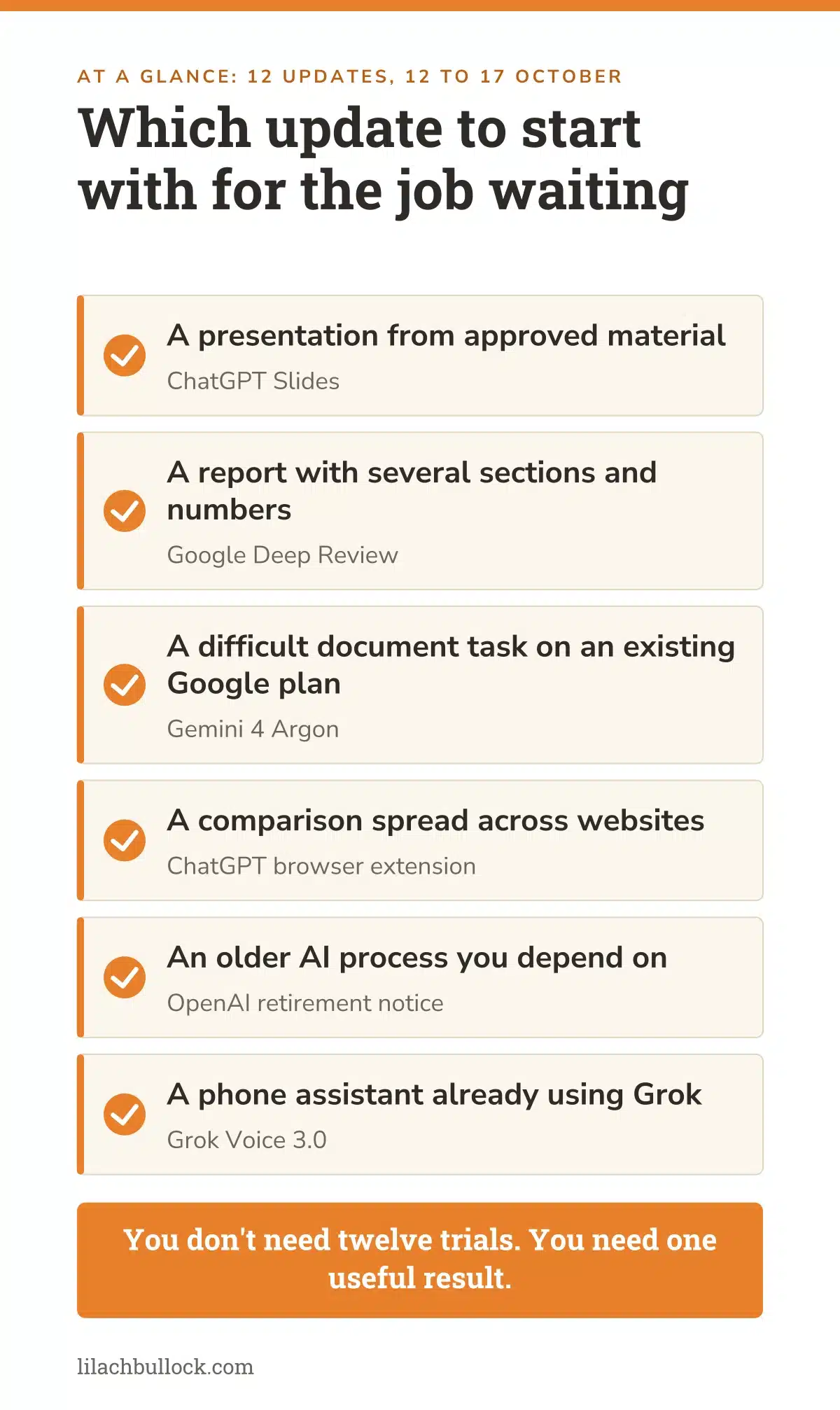
Which update deserves your attention first?
| The job waiting for you | Start with | What to check |
|---|---|---|
| A presentation from approved material | ChatGPT Slides | The exported file, chart labels and claims |
| A report with several sections and numbers | Deep Review | Each finding against the original |
| A difficult document task on an existing Google plan | Gemini 4 Argon | Missing facts and correction time |
| A comparison spread across websites | Browser extension | Same specification, prices and delivery terms |
| An older AI process you depend on | OpenAI retirement notice | Exact model identifier and replacement outputs |
| A phone assistant already using Grok | Grok Voice 3.0 | Interruptions, saved details and human handover |
If you're still deciding where AI belongs, start with my small-business AI guide. You don't need twelve trials. You need one useful result.
What changed since last week's Digest?
The 11 October edition focused on documents, audio uploads, reusable instructions and shared work. This week adds editable presentations, a dedicated document review service and wider access to Argon.
There are maintenance jobs alongside the launches, too. Check an old API model before its retirement, and check a voice assistant after an automatic upgrade. Neither produces a glamorous screenshot. Both can save you an unpleasant interruption.
For the earlier model comparisons and business exercises, here's the 27 September Digest. Keep using the same test job when you compare models. Otherwise, you won't know whether the improvement came from the model or the easier brief.
Your 60-minute action plan
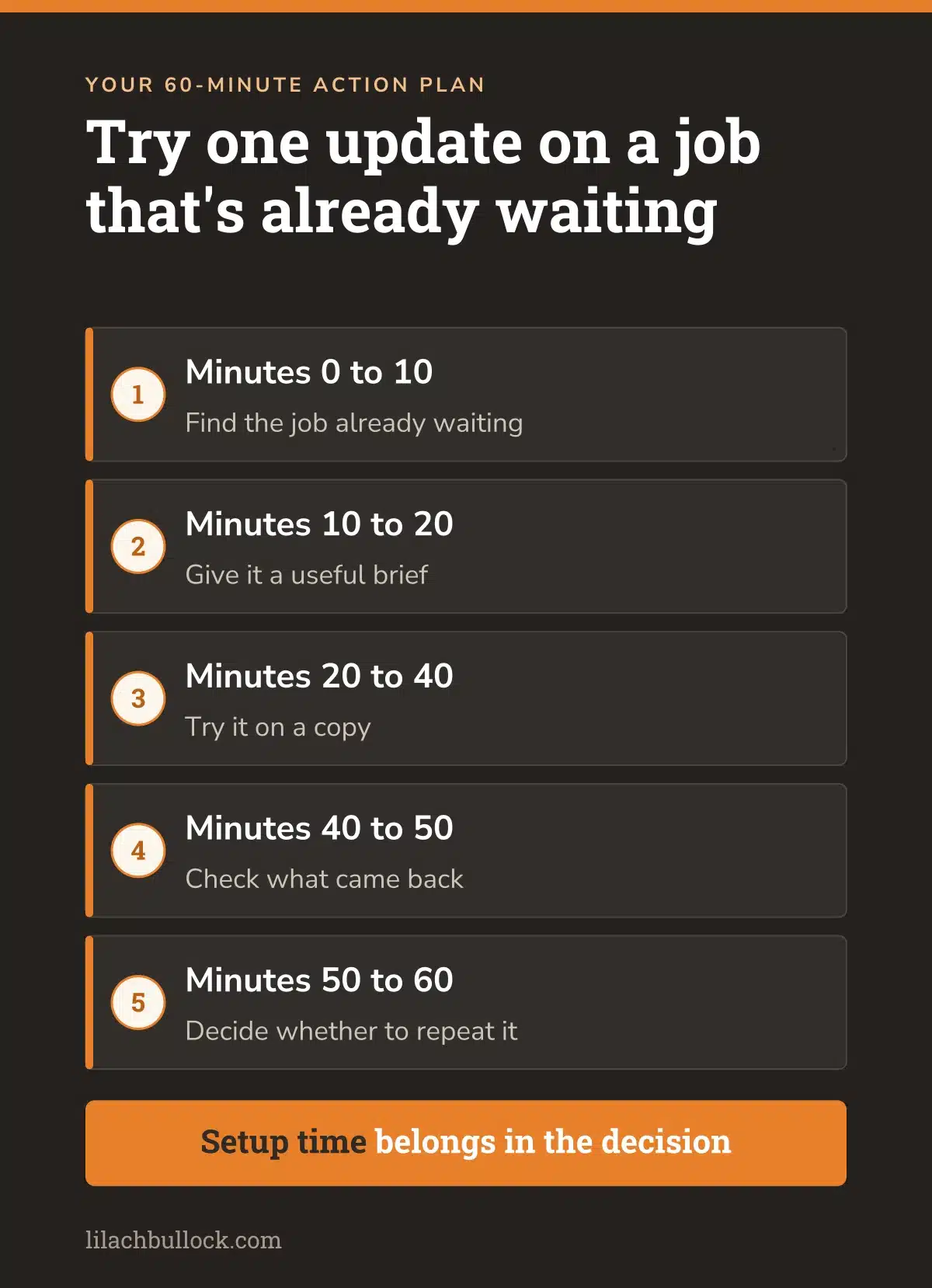
Minutes 0 to 10 - find the job already waiting
Choose a presentation, report or comparison you've done before. If an old automation is important to the business, choose the model check instead. Find the source material and write down what a finished result must contain.
Minutes 10 to 20 - give it a useful brief
Include an approved example, the facts it must preserve and what it should do when something is missing. Be explicit about the stopping point. A draft for you to check is a different job from sending it to a customer.
Copy this prompt
Work from the files and pages I provide. Produce [specific deliverable] for [reader and purpose]. Preserve these approved facts: [facts]. Use this example for structure and tone: [example]. Mark missing or contradictory information as CHECK and show where the problem occurs. Do not invent numbers, experience, customer quotes or commitments. Do not send, publish, purchase or change source records. Return the finished draft, its sources and a short list of checks I need to make.
Minutes 20 to 40 - try it on a copy
Use the feature available in your account. Keep the source files intact. If you need to spend most of the twenty minutes installing and connecting things, record that too. Setup time belongs in the decision.
Minutes 40 to 50 - check what came back
Open the presentation, trace the report's figures, or compare the supplier terms with the pages. Try the awkward input. Look at omissions as well as mistakes: the missing condition can be more expensive than the clumsy sentence.
Minutes 50 to 60 - decide whether to repeat it
Count the time spent checking and repairing. Then save the instructions and accepted result if you'd use the process again. My guide to AI automation for small business covers the next step when a useful trial is ready to become recurring work.
Final takeaway
The presentation still needs a point. The report still needs to be right. The customer still needs the answer you promised.
I'd judge this week's updates by how much easier they make those jobs. If one gets a piece of work finished with less fixing, keep it. If it gives you another afternoon of configuration and a result you can't use, leave it there.
You have a business to run. The release calendar can manage without your attendance.
Frequently asked questions
What period does this AI news this week for small business edition cover?
The dated announcements run from 12 to 17 October 2026, checked by the morning of 18 October. The browser extension and DeepSeek entries describe current primary documentation without a verified launch day. They're labelled as documentation checks, so you can distinguish them from this week's dated releases.
Which update should I try without building an automation?
Start with an existing presentation in ChatGPT Slides if your account has access, or a suitable PDF in Deep Review. An eligible Gemini subscriber can try Argon on a finished document task. Choose material you can check and are allowed to upload. You don't need to connect customer systems for the first trial.
Does Gemini 4 Argon access include free API usage?
Don't assume that it does. Google's announcement distinguishes paid API access from Pro and Ultra access in the Gemini app. Check the terms for the surface you're using before connecting it to an automation. A subscription's chat access doesn't establish what an API run will cost.
Are the older OpenAI models already switched off?
The 14 October notice gives 14 January 2027 as the shutdown date for the specified GPT-4o and GPT-4.1 API entries. Check the exact model identifier in the official deprecations table. Other models have different dates, so the family name alone isn't enough to plan a change.
Can I use a personal Android app with my whole team?
The Google Play announcement starts with personal apps on your own device in selected markets for adults. It describes friends-and-family sharing as a later step. Don't build your team's operating process around access that hasn't been confirmed. Start with a small personal tool and sample information.
Does an AI document review mean I can skip my own checks?
No. Treat the review as a list of findings to investigate. Check each one against the original document and supporting sources. You remain responsible for the claims, amounts and commitments in the version you send. Also check the upload and storage terms before sharing confidential material with a review service.
How do I know whether a new model is worth keeping?
Use the same brief, files and acceptance checks as before. Count setup, checking, corrections and any usage charges. Judge the version you can use, rather than the first answer. If the job still takes the same afternoon once you've repaired it, a quicker first draft hasn't saved that afternoon.
Get the next AI Digest
If you'd like the next Digest alongside the experiments I'm running in my own business, join my newsletter. I'll keep separating the useful changes from the ones you can leave for another week.
And if marketing keeps slipping because you're busy delivering the work, here's how to work with me. I help business owners put the strategy and AI systems into practice, so the work keeps moving.
Lilach