- Phase 1 - Build Your AI Foundations (Week 1)
- Phase 2: AI as Your Strategic Thinking Partner (Week 2)
- Phase 3: AI as Your Worker — The 10/80/10 Rule (Weeks 3–4)
- Phase 4: AI as a System — Build Your Prompt Library (Months 2–3)
- Phase 5: AI as Infrastructure Automation (Month 4 Onwards)
- The AI Tools Stack I Actually Recommend for B2B in 2026
- Common Mistakes That Kill Your AI Results (And How to Avoid Them)
- Your 90-Day AI Fluency Roadmap
- The Best Time to Start Was Yesterday. The Second Best Time Is Right Now.
- FAQs: Questions B2B Marketers and Entrepreneurs Ask About AI
- Related reading
- Related: deeper reading
- More on AI implementation and consulting
- Frequently asked questions
In this blog post, I'm going to walk you through a practical, step-by-step system for becoming fluent in AI in about 90 days. Not the watch a few YouTube videos and call yourself an expert kind of fluent. The kind where AI is saving you 10+ hours a week and your competitors are wondering how you're moving so fast. Whether you're a B2B marketer, an entrepreneur, or running an SME, this guide covers everything from building your first AI habits right through to automating entire workflows.
If you’re reading this in 2026 and you still haven’t figured out how to properly use AI in your business, you’re not behind yet. But that window is closing faster than a browser tab you accidentally opened in a meeting.
Here’s the thing that nobody in the AI guru space wants to tell you, you don’t need to become a prompt engineer. You don’t need to learn Python. You don’t need to spend $2,000 on a course that teaches you to type act as a marketing expert into ChatGPT (please don’t do this).
What you do need is a structured, practical system for making AI a natural part of how you work and run your business. And that’s exactly what this guide gives you.
I’ve spent the last two years helping B2B marketers, entrepreneurs, and SME owners figure out how to actually use AI, not the flashy demo version, but the oh wow, I just saved 15 hours this week version. This guide is everything I’ve learned, distilled into a 90-day roadmap that actually works.
Who is this for?
- B2B marketers who keep hearing about AI but feel overwhelmed
- Entrepreneurs and founders wearing 47 hats who need to work smarter
- Small business owners who want to compete with companies ten times their size
- Anyone who’s tried ChatGPT once, got a generic response, and thought what’s the big deal?
Let’s fix that.

Phase 1 - Build Your AI Foundations (Week 1)
The goal: Make AI as habitual as checking your email.
I know, I know. You want to jump straight to the cool stuff, automating your entire content calendar, generating leads on autopilot, building AI-powered funnels. I get it. But if you skip this phase, everything else will feel like pushing a boulder uphill.
Think of it like this, you wouldn’t try to run a marathon without first buying running shoes. These foundations are your running shoes.
Foundation 1: Replace Google with AI for Research

Starting right now, every time you reach for Google to look something up, open an AI tool instead. Need to understand what a competitor’s pricing strategy looks like? Ask AI. Want to know the best email subject line format for a cold outreach campaign? Ask AI. Trying to figure out what zero-click content means? Ask AI.
Which AI tool should you use? Here’s my honest take:

- Claude (by Anthropic) My personal favourite for anything involving writing, strategy, and nuanced thinking. It’s less likely to give you that robotic, here are 5 tips energy.
- ChatGPT (by OpenAI): Still the most versatile all-rounder. GPT-4o and the newer models are super impressive for research and creative tasks.
- Gemini (by Google): Brilliant if you’re deep in the Google ecosystem and want AI that integrates with your Workspace.
- Perplexity: Incredible for research specifically, because it cites its sources (so you can actually verify what it’s telling you).
Pro tip for B2B marketers. Don’t just pick one. Use Claude or ChatGPT for strategic thinking and content creation, and Perplexity for research and competitive analysis. Different tools have different strengths, just like you wouldn’t use a hammer to fix a leaky tap.
Foundation 2: Pin It, Dock It, Make It Impossible to Ignore
Whatever AI tool you choose, it needs to be open on your screen at all times. Pin the tab. Dock the app. Put it right next to Slack or your email client.
The psychology here is simple, if you have to actively go looking for AI, you won’t use it. If it’s already there, staring at you, you’ll start reaching for it instinctively. Within a week, it becomes second nature.
For B2B teams, if you manage a team, make this a company-wide standard. Have everyone pin their AI tool. Normalise it. The fastest way to get AI adoption across an organisation is to make it visible.
Foundation 3: Talk to AI (Literally, With Your Voice)
This is the single most underrated habit that separates casual AI users from people who genuinely get massive value from it.
Here’s why, when you type, you edit yourself. You keep things short. You leave out context because typing is effort. When you speak, you ramble and rambling is actually amazing for AI.
AI performs dramatically better when you give it more context, more background, more of the messy, unfiltered version of what you’re thinking. Speaking does that naturally.
How to do it:
- Most AI tools now have built-in voice input (Claude, ChatGPT, Gemini all do)
- On Mac, press the microphone key or use Fn Fn to start dictation
- On Windows, press Win + H for dictation
- Third-party tools like Whisper Flow work brilliantly for this too
Try this right now. Instead of typing your next AI prompt, speak it. Say something like: ‘I’m a B2B marketer working for a SaaS company that sells project management tools to mid-size agencies. We’re struggling with our LinkedIn content because everything feels generic and we’re not getting engagement. Our target audience is agency founders and ops managers. What are some content angles we should be testing?’
That 20-second voice note just gave the AI ten times more context than you would have typed. The output will be ten times better too.
Foundation 4: Download the Mobile Apps
This isn't so you can be always on. It's so you can capture ideas when they hit you. And ideas hit you at the weirdest times.
You’re walking the dog and suddenly think of the perfect angle for your next LinkedIn post? Open Claude on your phone and talk through it. You’re commuting and want to prep for tomorrow’s client call? Have AI help you anticipate objections. You’re waiting for your takeaway and want to brainstorm lead magnet ideas? You’ve got a thinking partner in your pocket.
The real magic for entrepreneurs. Those random shower thoughts about your business? The ones you normally forget by the time you sit down at your desk? Now you can capture and develop them instantly.
Foundation 5: Record and Transcribe Everything
This is where things start getting seriously powerful but most people skip it because it feels like overkill. It’s not.
Start recording and transcribing your Zoom calls, Google Meets, and (where legally appropriate and with consent) in-person meetings. The transcripts become raw material for AI to work with later.
Free and affordable tools for this:
- Fathom — Free and excellent for Zoom
- Grain — More features, great for teams
- Otter.ai — Good for in-person meeting transcription
- tl;dv — Popular with sales teams
Why this matters for B2B. Think about how much valuable information gets shared in client calls, strategy sessions, and team meetings and how much of it gets forgotten by the next day. Recording and transcribing means you now have a searchable, AI-processable record of every conversation. We’ll use this extensively in later phases.
Your Week 1 Checklist
- ☐ Choose your primary AI tool and start using it instead of Google
- ☐ Pin that AI tool in your browser / dock the app
- ☐ Practice voice input at least three times
- ☐ Download the AI mobile app
- ☐ Set up automatic meeting recording and transcription
- ☐ Use AI at least 5 times per day for anything (even silly questions)
Seriously, don’t skip ahead until you’ve done these. I’m not being dramatic. The people who skip this phase are the same people who, three months from now, will still be saying I tried AI but it wasn’t that useful.
Phase 2: AI as Your Strategic Thinking Partner (Week 2)
The goal: Use AI to think better about the work you’re already doing.
Here’s a critical distinction that most AI guides completely miss, before you ask AI to do your work, you should first learn to use it to think about your work.
This is the difference between asking AI write me a LinkedIn post (which produces garbage) and asking AI help me think through my LinkedIn content strategy so I can write better posts (which produces genuine insight).
The Coaching Prompt Framework
The most powerful way to use AI as a coach is to give it your role, your goal, your current situation, and then ask it to help you think. Here’s the framework:
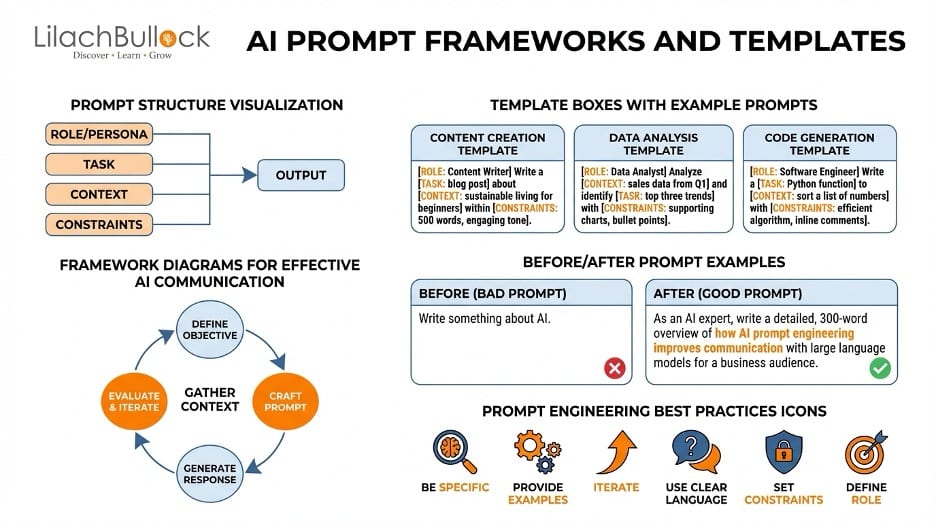
I am a [your role] working at [type of company]. My goal is [specific outcome] within [timeframe]. Currently, [your situation/challenge]. Can you [help me think / interview me / ask me questions] about [the thing you want to improve]?
Let me show you what this looks like in practice for different B2B scenarios:
For a B2B Content Marketer:
I’m a content marketing manager at a B2B fintech startup. We’re trying to grow our organic traffic from 15,000 to 50,000 monthly visitors in the next 6 months. Currently, we publish 4 blog posts a month and get decent engagement on LinkedIn, but our SEO traffic has plateaued. I suspect we’re not targeting the right keywords or topics. Can you interview me about our content strategy and help me identify what’s working, what isn’t, and where the biggest opportunities are?
For an Entrepreneur Running a Service Business:
I run a digital marketing agency with 8 employees, generating about $600K in annual revenue. I want to hit $1M in the next 12 months. My biggest challenge is that I’m still involved in too much client delivery and I can’t seem to delegate without quality dropping. Can you ask me a series of questions to help me figure out which parts of client delivery I should systematise first, and how I might structure my team differently?
For an SME Owner in E-commerce:
I own a B2B e-commerce business selling office supplies to small businesses across the US. Our average order value is $85 and our customer retention rate is around 30%. I want to increase repeat purchases and lifetime value. Can you help me think through what levers I should be pulling, what data I should be looking at, and what experiments I should run?
Using Meeting Transcripts as AI Fuel
Remember those transcripts from Phase 1? Here’s where they become gold.
After any important meeting, a strategy call, a client onboarding, a team brainstorm, a sales call take the transcript and give it to AI with a specific request.
Powerful transcript prompts for B2B:
After a client call: > Here’s a transcript from a discovery call with a potential client. Based on this conversation, what are their core pain points? What objections might come up? What should we emphasise in our proposal to address their specific concerns?
After a strategy meeting: > Here’s a transcript from our quarterly marketing strategy meeting. Pull out the key decisions that were made, any action items that were discussed, areas where the team seemed misaligned, and any strategic blind spots you notice.
After a sales call: > This is a transcript of a sales call where we lost the deal. Based on the conversation, where do you think we went wrong? What could we have said differently? Give me honest, constructive feedback.
This is transformative for B2B businesses. You’re essentially turning every conversation into a learning opportunity, without having to replay hours of recordings.
The Interview Me Prompt
This is deceptively simple but ridiculously powerful. Just say:
I want you to interview me about what I actually do in my role day-to-day. Help me identify what’s high-leverage and what’s probably a waste of time. Ask me one question at a time.
Then just answer honestly. Be messy. Ramble (especially if you’re using voice input). The AI will pick up on patterns you can’t see yourself because you’re too close to your own work.
I’ve seen B2B marketers discover they were spending 60% of their time on activities that generated less than 10% of their results. Entrepreneurs who realised they were doing tasks a $15/hour VA could handle. SME owners who identified that one process they’d been doing manually for years that could be eliminated entirely.
The Critical Caveat (Don’t Skip This)
AI is like a very well-read colleague who’s never actually done your job. It has broad knowledge from consuming vast amounts of information, but it has zero real-world context unless you provide it.
This means:
- Use AI insights as starting points, not final answers. Test everything against your own experience and judgement.
- AI is great at asking you the right questions. It’s less great at knowing the right answers for your specific situation.
- The more context you give, the better the output. Don’t be lazy with your prompts. Treat AI like a smart new hire who needs thorough briefing.
- Cross-reference important claims. AI can sound very confident while being completely wrong. Especially with data, statistics, and anything time-sensitive.
Your Week 2 Checklist

- ☐ Use the Coaching Prompt Framework at least 3 times for different business challenges
- ☐ Feed at least one meeting transcript to AI and ask for insights
- ☐ Try the “Interview Me” prompt about your own role
- ☐ Practice giving AI longer, more contextual prompts (voice helps here!)
- ☐ Notice when you’re stuck on something and turn to AI as a thinking partner
Phase 3: AI as Your Worker — The 10/80/10 Rule (Weeks 3–4)
The goal: Get AI to do the heavy lifting while you maintain quality control.
Alright, now we’re getting to the part everyone wants to jump to. But because you’ve built your foundations and learned to use AI as a thinking partner first, you’re going to get dramatically better results than someone who starts here.
Why Most People’s AI Outputs Are Rubbish
Let’s be blunt, the reason most people think AI produces generic, useless content is because they give it generic, useless prompts.
Write me an email sequence for my product. That’s like walking into a restaurant and saying make me food. You’ll get something, but it won’t be what you wanted.
The fix is the 10/80/10 Rule.
The 10/80/10 Rule, Explained
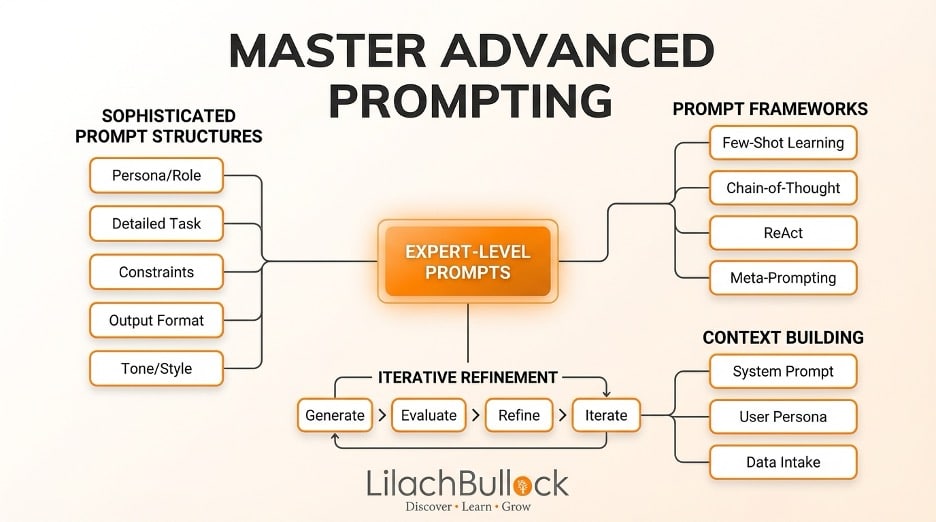
You do the first 10%: You provide the context, the strategy, the raw material, the examples, and the brief. This is the thinking work.
AI does the middle 80%: The actual production, writing, structuring, drafting, analysing, formatting. This is the heavy lifting.
You do the final 10%: You review, edit, refine, and apply your taste. This is quality assurance.
This is not a shortcut to doing zero work. It’s a system for doing ten times the output at the same quality level. There’s a massive difference.
What the 10/80/10 Rule Looks Like in B2B Marketing
Let me walk you through specific, tactical examples for the kind of work B2B marketers, entrepreneurs, and SME owners do every day.
Example 1: Creating a LinkedIn Content Calendar
Your 10% (the input):
I’m the founder of a B2B SaaS company that helps recruitment agencies automate candidate sourcing. Our target audience is recruitment agency owners and senior recruiters in the US. Here are our brand values: [list them]. Here’s our tone of voice guide: [paste it]. Here are 5 LinkedIn posts from competitors that performed really well this month: [paste them]. Here are the top 3 pain points our customers mention in sales calls: [list them].
Based on all of this, create a 4-week LinkedIn content calendar. For each post, give me the hook (first line), the core angle, the format (text, carousel, poll), and a brief outline. Focus on counterintuitive takes and real-world examples rather than generic advice.
AI does its 80%: It generates 20 content ideas with hooks, angles, and outlines all informed by the context you provided.
Your 10% (the output): You go through the 20 ideas. Maybe 6 resonate. You tweak the hooks. You add your personal anecdotes. You adjust the tone. You’ve now got a month of content in under an hour.
Example 2: Writing a Cold Email Sequence
Your 10%:
I run a web design agency targeting B2B e-commerce companies doing between $1M-£10M in revenue. Our USP is that we specialise in conversion rate optimization, we don’t just make pretty websites, we make websites that sell. Our best clients came to us because their existing site had high traffic but low conversion rates.
Here’s a case study showing how we increased a client’s conversion rate by 40%: [paste key details].
Write a 4-email cold outreach sequence targeting e-commerce directors. The tone should be direct, confident, and slightly cheeky, not corporate or salesy. Each email should be under 100 words. The CTA should be booking a 15-minute call.
AI does its 80%: Drafts 4 punchy emails with subject lines and CTAs.
Your 10%: You personalise the emails, adjust the tone to sound like you (not like a robot), test different subject lines, and add any real-world details that make it feel human.
Example 3: Analysing Competitor Positioning
Your 10%:
Here are the homepages and key landing pages from our top 5 competitors: [paste the text or URLs]. Here’s our own positioning statement: [paste it]. I want you to analyse how each competitor positions themselves, what messaging angles they use, where there are gaps in the market that nobody is addressing, and how our positioning compares. Be brutally honest.
AI does its 80%: Delivers a detailed competitive analysis.
Your 10%: You layer in your own market knowledge, customer conversations, and strategic judgement to decide what to actually do with the insights.
The Taste Problem (And Why It’s Actually a Good Problem to Have)
Here’s something that might bother you at first, AI output often feels… off. It’s technically correct but it lacks soul. It reads like it was written by someone who’s read a thousand marketing blogs but never actually run a campaign.
That slight feeling of hmm, this isn’t quite right is your taste speaking. And it’s incredibly valuable.
Your job isn’t to make AI produce perfect output. Your job is to use AI to produce rough output quickly, and then apply your taste to make it great. This is far more efficient than starting from a blank page.
A useful mental model. Think of AI output like a first draft from a talented but junior team member. It gives you something to react to, shape, and refine which is always faster than creating from scratch.
When Not to Use the 10/80/10 Rule
Let me be honest, not everything should go through AI.
- Deep relationship-building emails to key clients? Write those yourself. They need your personality.
- High-stakes sales proposals with unusual requirements? AI can help you think, but the writing should be yours.
- Creative brand positioning work? AI can brainstorm, but the final creative direction should come from a human brain (preferably yours).
- Anything requiring up-to-the-minute accuracy? AI models have knowledge cutoff dates and can hallucinate. Always verify critical facts.
Your Weeks 3–4 Checklist
- ☐ Apply the 10/80/10 rule to at least 5 different work tasks
- ☐ Practice giving AI rich context (brand voice, examples, competitor info)
- ☐ Notice where AI output falls short and give it feedback to improve
- ☐ Start developing your taste filter, what’s good enough, and what needs work?
- ☐ Try the feedback loop: take AI’s best outputs, feed them back, and ask for more like those
Phase 4: AI as a System — Build Your Prompt Library (Months 2–3)
The goal: Stop starting from scratch. Build reusable, evolving prompts that get better over time.
This is where you shift from being someone who uses AI to someone who has an AI system. And honestly, this is where the real competitive advantage lives for B2B businesses.
The Recipe Analogy
Think about your grandmother’s best recipe. It didn’t start out perfect. She made it once, it was okay. She added a bit more salt. She cooked it a little longer. Over years and hundreds of iterations, it became that recipe, the one everyone asks for.
Your AI prompts should work the same way.
The first time you use AI to write a blog outline, the prompt is basic and the output is basic. But if you pay attention to what’s missing, what’s generic, and what doesn’t sound right and you update the prompt each time, by the twentieth iteration, you’ve got a finely-tuned recipe that consistently produces great output.
How to Build Your Prompt Library: A Practical Walkthrough
Let’s say you’re a B2B marketer who regularly needs to create case studies.
Want AI doing the heavy lifting in your marketing?
I build the systems that handle the boring 80 percent, so you get your week back. Done properly, with the human kept in.
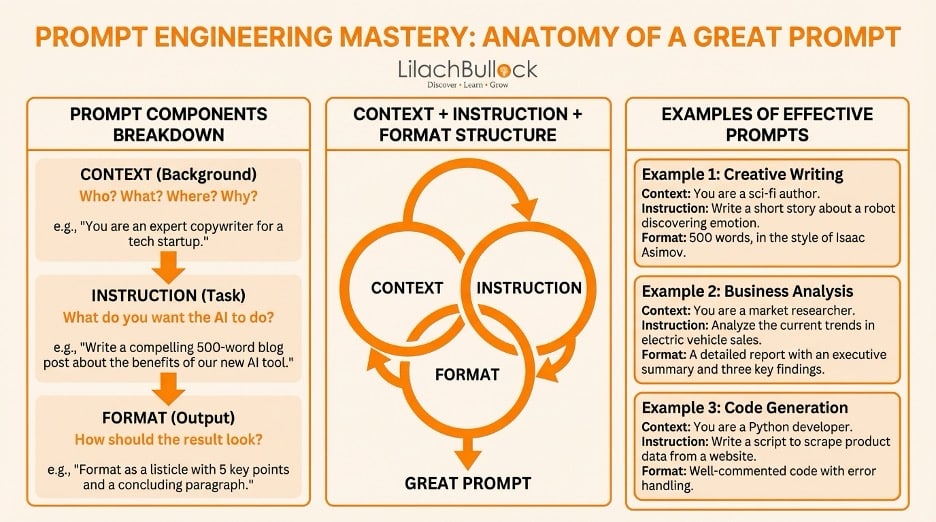
Version 1 of your prompt:
Write a case study about how our client achieved [result].
The output is generic, reads like every other case study on the internet, and misses the specific tone your brand uses.
Version 2 You add structure:
Write a case study following this format: Challenge (what problem the client faced), Solution (what we did, with specific details about our approach), Results (quantified outcomes with numbers), and a pull quote from the client. The tone should be conversational and confident, not corporate.
Better. But it still sounds a bit… AI-ish.
Version 3 You add tone and anti-patterns:
Write a case study following this format: [same as above]. The tone should be like a smart friend explaining what happened over coffee. Avoid phrases like ‘leveraging’, ‘cutting-edge’, ‘innovative solutions’, ‘game-changer’, or any other overused marketing buzzwords. Be specific about what we actually did, not vague about ‘comprehensive strategies’.
Getting closer. The output has more personality now.
Version 4 You add examples:
[Same prompt as V3]. Here is an example of a case study we’ve written before that captures our desired tone: [paste example]. Match this style.
Now AI has a concrete reference point. The output will be significantly more aligned with your brand.
Version 5 You add constraints based on experience:
[Same prompt as V4]. Keep the total length between 600-800 words. Start with a surprising or counterintuitive hook, don’t start with ‘Company X was struggling with…’. Include at least 3 specific numbers or data points. End with a subtle CTA that doesn’t feel salesy.
This is now a highly refined, reusable prompt that consistently produces case studies close to your quality bar.
Organising Your Prompt Library
Once you have 10-20 refined prompts, you need a system for storing and accessing them quickly. Here are your options:
For Solo Entrepreneurs and Small Teams:
- A simple Google Doc or Notion page. Create a table with columns for: Prompt Name, Current Version, Category (content, email, strategy, analysis), and the actual prompt text.
- Text Expander (or similar). Set up keyboard shortcuts so typing something like /casestudy automatically expands into your full case study prompt. This is incredibly satisfying and saves a surprising amount of time.
For Larger Teams:
- Shared Notion database with prompts categorised by department (marketing, sales, customer success) and use case.
- Dedicated prompt management tools like PromptLayer or Langsmith if you’re getting serious about it.
The key principle: Every prompt should have a version number and be treated as a living document. When someone on your team discovers a tweak that improves the output, they update the prompt and increment the version.
Matching Prompts to Models
Something you’ll discover as you build your prompt library: different AI models are better at different things.
In my experience (and this is constantly evolving, so take it as a snapshot):
- Claude tends to excel at nuanced writing, long-form content, strategic analysis, and tasks where you need the AI to get your brand voice
- ChatGPT is incredibly versatile, great at structured outputs, coding, and tasks that benefit from its wider integration ecosystem
- Gemini shines when you need it to work with Google Workspace data, and it’s getting seriously good at research
- Perplexity is unbeatable for research tasks where you need cited sources
Don’t be dogmatic about which tool you use. The best AI workflow for most B2B teams involves 2-3 tools used strategically for different task types.
Your Month 2–3 Checklist
- ☐ Identify your 5 most repetitive work tasks
- ☐ Create V1 prompts for each of them
- ☐ Iterate each prompt at least 3 times based on output quality
- ☐ Set up a prompt library (Google Doc, Notion, or Text Expander)
- ☐ Experiment with using different AI models for different prompt types
- ☐ Share your best prompts with your team and gather their improvements
Phase 5: AI as Infrastructure Automation (Month 4 Onwards)
The goal: Remove yourself from repetitive AI workflows entirely.
Everything up to this point has required you to be in the loop, opening a chat window, pasting a prompt, reviewing the output. Phase 5 is now building systems that run without you.
Fair warning: this phase is an infinite rabbit hole. You could spend years going deeper. The key is to start simple and only automate what saves meaningful time.
Level 1: Use AI Automation That’s Already Built Into Your Tools
Before you start building anything custom, look at the tools you already use. Most B2B software now has AI features baked in.
Examples you should be exploiting right now:
- HubSpot — AI-powered content generation, lead scoring, email writing
- Notion AI — Summarise notes, extract action items, draft content
- Canva — AI-powered design, Magic Write for copy
- Slack — AI summaries of channels and threads
- Descript — AI-powered video editing, automatic transcription
- Fireflies.ai / Grain / Fathom — Meeting transcription + AI summaries
- LinkedIn Sales Navigator — AI-suggested leads and messaging
Quick win for B2B marketers: If you use HubSpot, Salesforce, or any major CRM, dig into their AI features. Most teams are only using about 10% of what’s available.
Level 2: Simple Automations with Zapier or Make
This is where it starts getting exciting. Tools like Zapier and Make (formerly Integromat) let you connect apps together and add AI processing in between.
Practical automations for B2B businesses:
The Automatic Blog-to-Social Pipeline. Trigger: New blog post published on WordPress → Zapier sends the blog content to ChatGPT → ChatGPT generates 3 LinkedIn post variations, 5 tweets, and an email newsletter summary → Outputs are sent to a Slack channel for human review.
The Smart Lead Enrichment Flow. Trigger: New lead captured in HubSpot → Zapier pulls company info from Clearbit → Sends enriched data to ChatGPT with prompt: Based on this company profile, draft a personalised first-touch email using our cold email template → Draft saved in HubSpot as a task for the sales rep to review and send.
The Weekly Competitor Monitoring Report: Trigger: Every Monday morning → Make.com scrapes competitor blogs and social media → Content sent to AI with prompt from your prompt library: Analyse this week’s competitor content. Identify new messaging angles, content topics they’re pushing, and any gaps we should exploit → Report delivered via email or Slack.
The Client Call Summary System: Trigger: New recording completed in Grain → Transcript automatically sent to AI → AI generates: key takeaways, action items, client sentiment analysis, and suggested follow-up email draft → Everything saved to the relevant client folder in your CRM.
Level 3: More Powerful Automation with n8n
When Zapier starts feeling limiting (and it will, eventually), tools like n8n give you significantly more control. n8n is open-source, which B2B companies often prefer for data privacy reasons.
What n8n lets you do that Zapier doesn’t (easily):
- Chain multiple AI calls together with conditional logic
- Process large batches of data
- Self-host everything so your client data never touches third-party servers
- Build genuinely complex workflows with branching, loops, and error handling
Example n8n workflow for a B2B agency: Every Friday, n8n automatically: pulls all client call transcripts from the week → combines them with Slack support channel messages → cross-references with the project management tool → runs everything through a custom AI prompt that generates a per-client weekly report including: wins, blockers, upcoming priorities, and suggested talking points for next week’s call → delivers reports to account managers via email.
That’s replacing 3-4 hours of manual admin work per account manager, per week. For an agency with 20 clients, that’s enormous.
Level 4: Building Custom AI Tools (Advanced)
At some point, you might find that off-the-shelf tools don’t quite do what you need. This is where building custom internal tools comes in.
You don’t need to be a developer for this. Tools like:
- Cursor + Claude / ChatGPT — AI-powered code editors that let non-developers build simple web apps
- Streamlit — Build basic AI-powered dashboards with minimal code
- Voiceflow / Botpress — Build AI chatbots for customer support or lead qualification
Realistic examples for B2B:
- A custom internal chatbot trained on your company’s knowledge base that your team can query
- A lead scoring tool that uses AI to analyse incoming leads based on your specific qualification criteria
- A content brief generator that pulls data from your SEO tool, competitor analysis, and brand guidelines to produce a detailed brief
But honestly? Most B2B businesses don’t need Level 4 yet. Levels 1-3 will give you 90% of the value with 10% of the effort.
The Discipline of NOT Automating Everything
Here’s the thing that AI automation enthusiasts won’t tell you, sometimes the best automation is deleting the process entirely.
Before you automate something, ask yourself:
- Does this process actually need to exist? Maybe the weekly report nobody reads should just… stop.
- Is the manual version actually faster? Some tasks take 5 minutes to do manually but 5 hours to automate. Not everything needs to be a Zapier workflow.
- Would a human do this better? Some things, like following up with a disappointed client or writing a nice thank you to a referral partner should stay human. Not everything needs to be optimised.
Your Month 4+ Checklist
- ☐ Audit AI features in tools you already pay for (you’ll be surprised)
- ☐ Build one simple Zapier/Make automation for a repetitive task
- ☐ Track time saved per week (this is great for justifying AI tool costs to your boss)
- ☐ Explore n8n if you’re ready for more complex workflows
- ☐ Resist the urge to automate everything, focus on highest-ROI processes
The AI Tools Stack I Actually Recommend for B2B in 2026

Let me save you the hours of research and just tell you what I think works best for most B2B marketers, entrepreneurs, and SME owners right now:
For Thinking & Strategy: Claude Pro ($18/month) — Best-in-class for strategic thinking, writing, and nuanced tasks.
For All-Purpose Work: ChatGPT Plus or Pro — Still the most versatile. The ecosystem of plugins and integrations is unmatched.
For Research: Perplexity Pro — Cited sources, up-to-date information, brilliant for competitive research and market analysis.
For Meeting Intelligence: Fathom (free) or Grain (paid) — Non-negotiable for any business that does calls.
For Automation: Start with Zapier (easy) → Graduate to Make (more flexible) → Eventually explore n8n (most powerful).
For Team Adoption: Notion AI or your CRM’s built-in AI features — Lower friction means higher adoption.
Total monthly cost for a solid AI stack: $40-80/month per person. Compare that to what you’d pay a single freelancer for the work AI helps you do. The ROI is absurd.
Common Mistakes That Kill Your AI Results (And How to Avoid Them)

Mistake 1: Treating AI Like Google
Google needs keywords. AI needs context. Best B2B marketing strategies is a Google search. I run a B2B SaaS company selling HR software to mid-market companies. We’re currently doing content marketing and LinkedIn ads. Our CAC is $800 and we need to get it below $500. What strategies should we be testing? that’s an AI prompt.
Mistake 2: Not Giving AI Your Brand Voice
AI will default to generic, corporate-sounding output unless you tell it otherwise. Always include your tone of voice, examples of content you like, and specific words or phrases to avoid. The difference is night and day.
Mistake 3: Expecting Perfection on the First Try
AI is not a magic button. It’s a starting point. If your first prompt doesn’t produce great output, that’s normal. Give feedback, refine, iterate. The third or fourth attempt is usually where the magic happens.
Mistake 4: Using AI for Everything (Including Things It’s Bad At)
AI is terrible at knowing your specific customers, understanding internal politics, making judgment calls about relationships, predicting the future with any certainty, and being original (it’s great at being cleverly derivative, which is different).
Use AI for what it’s good at and keep humans in the loop for everything else.
Mistake 5: Not Investing in Learning
The AI tools are changing so fast that what works today might be outdated in 6 months. Dedicate 30 minutes a week to staying current. Follow a few AI newsletters (you can subscribe to my newsletter here), try new features when they launch, and talk to peers about what’s working for them.
Your 90-Day AI Fluency Roadmap
Week 1 — Foundations: Replace Google with AI, pin your AI tool, start using voice input, download mobile apps, set up meeting recording.
Week 2 — AI as Coach: Use AI to think about your work, feed it meeting transcripts for analysis, try the “interview me” prompt.
Weeks 3-4 — AI as Worker: Apply the 10/80/10 rule, give AI rich context and examples, develop your taste filter.
Months 2-3 — AI as System: Build and iterate your prompt library, organise prompts in a system, match prompts to optimal AI models.
Month 4+ — AI as Infrastructure: Exploit built-in AI features, build automations with Zapier/Make, explore n8n for advanced workflows.
The Best Time to Start Was Yesterday. The Second Best Time Is Right Now.

I know that headline is a cliché. But sometimes clichés are clichés because they’re true.
The gap between AI-fluent professionals and AI-illiterate professionals is widening every single week. The gap between businesses that are using AI systematically and businesses that aren’t is widening every single month.
You don’t need to be an AI expert. You just need to be an AI user, someone who’s built the habits, developed the taste, and created the systems to make AI work for your specific context.
90 days. That’s all it takes. Start with Week 1 today, and I promise you by the end of month three, you’ll wonder how you ever worked without it.
Now close this tab and go pin your AI tool. Seriously. Do it right now.
FAQs: Questions B2B Marketers and Entrepreneurs Ask About AI
How much does all this cost? Is there a free option?
You can do a surprising amount with free tiers. ChatGPT has a free version. Claude has a free version. Perplexity has a free version. Zapier has a free tier. You could realistically follow this entire guide spending $0 for the first month. When you start seeing value (and you will), upgrading to paid tiers typically costs $18-30/month per tool.
I’m worried about data privacy. Can I use AI with sensitive client data?
Valid concern. Here’s the practical answer, don’t paste confidential client data, proprietary financials, or sensitive personal information into consumer AI tools (the free versions of ChatGPT, Claude, etc.). Most paid business tiers (ChatGPT Team, Claude for Business, etc.) have data policies that prevent your inputs from being used for training. If you’re handling sensitive data, look into enterprise AI solutions or self-hosted options like n8n with a locally-run model.
My team is resistant to AI. How do I get buy-in?
Start with a single use case that saves a specific person a specific amount of time. Don’t try to transform the whole company at once. When Sarah in marketing shows that AI cut her blog writing time from 4 hours to 90 minutes, the rest of the team will start asking questions. Adoption spreads through demonstrated results, not mandates.
Will AI replace my job / my team?
No. But people who use AI effectively will replace people who don’t. The roles aren’t disappearing, they’re evolving. A B2B marketer who can do the work of three people using AI is incredibly valuable. An entrepreneur who can operate with a lean team because AI handles the busy work has a massive cost advantage. The threat isn’t AI, it’s choosing to ignore it.
How do I know which AI tool is best for my specific use case?
Try three or four with the same task and compare the outputs. AI tools are cheap enough that experimenting is easy. There’s no universal best tool, it depends on your specific use case, your workflow, and frankly your personal preference for how different tools feel to use.
I tried AI and the output was rubbish. What am I doing wrong?
Almost certainly one of three things: you’re not giving enough context, you’re not giving specific enough instructions, or you’re not iterating. Go back to the 10/80/10 rule and the prompt engineering section. The quality of AI output is directly proportional to the quality of your input.
How much time should I realistically expect to save?
It varies hugely depending on your role and what you do. But here are some benchmarks from B2B teams I’ve worked with: content creation time reduced by 50-70%, research and analysis time reduced by 60-80%, email writing time reduced by 40-60%, meeting follow-up and admin time reduced by 70-90%. The total usually works out to somewhere between 5-15 hours per week for most knowledge workers.
Should I be worried about AI-generated content being penalised by Google?
Google has been clear: they care about quality, not whether content was AI-generated. The risk isn’t using AI, it’s publishing low-quality AI slop without human editing. If you follow the 10/80/10 rule and apply your taste and expertise, your content will be fine. In fact, AI-assisted content that’s been properly edited and enriched often outperforms purely human-written content because you can simply produce more of it, iterate faster, and optimise more aggressively.
What about AI and SEO? Does this guide help with ranking?
Absolutely. Here’s how this connects to SEO specifically: AI helps you produce more high-quality content (volume + quality), it helps you research and target keywords more efficiently, it helps you create more comprehensive content that covers topics thoroughly (which search engines love), and it helps you repurpose content across channels, which builds topical authority. The key is using AI as a force multiplier for your existing SEO strategy, not as a replacement for SEO knowledge.
I’m not technical at all. Can I still do the automation stuff?
Yes. Zapier was literally designed for non-technical people. If you can fill in a form and follow instructions, you can build a Zapier automation. Make is slightly more complex but still very visual and drag-and-drop. You don’t need to learn code unless you want to go deep into Level 4, which most people don’t need.
Related reading
Related: deeper reading
More on AI implementation and consulting
Related: running a guest posting campaign
Related: leveraging advanced video editing skills for social media success tips and strategies.
The short version: Learning AI from scratch in 90 days is completely realistic if you break the journey into three focused phases: foundations, hands-on practice, and project-based application. You do not need a computer science degree or advanced math to get started, just a clear plan and consistent daily effort. Pick one learning track, stick to it, and build something real before day 90 arrives.
Related: food blogs that accept guest posts.
Frequently asked questions
What math do I need before starting to learn AI?
You need a working comfort with basic algebra and an openness to learning statistics as you go. Most beginner-friendly AI courses teach you the math in context, so you do not have to complete a full calculus course before writing your first line of Python or running your first model.
Which tools and languages should a complete beginner focus on in the first 30 days?
Start with Python, since it is the dominant language in AI development and has the largest library of beginner resources. Pair it with free tools like Google Colab so you can run code without any complicated local setup, and spend time getting comfortable with pandas and NumPy before moving on to machine learning libraries like scikit-learn.
How many hours per day do I need to commit to hit the 90-day goal?
One to two focused hours per day is enough for most beginners to make real progress within 90 days. Consistency matters far more than marathon study sessions, so a steady daily habit will outperform occasional cramming every time.
How do I know when I am ready to build a real AI project?
You are ready when you can load a dataset, clean it, and run a simple model without following a tutorial step by step. That moment usually arrives somewhere between day 30 and day 45 if you are putting in daily practice, and building a project at that stage will teach you more than any course can.
Related reading: One Client Win, Thirty Days of Content: The AI System That Stopped Me Starting From Scratch Every Week and What Works When You're Starting Small: The Hard Truths About Business Ideas.
Related reading: ChatGPT Prompts for Recruiters: Job Adverts That Get Applications, Not S.