


- How to generate, nurture and manage your leads and prospects like a pro
- Step 1: How to generate, nurture and manage your leads and prospects with Jumplead
- Step 2: How to nurture your leads
- Step 3: Manage your leads and contacts
- Step 4: Activity tracking and marketing analytics
- Conclusion
- Frequently asked questions
How to generate, nurture and manage your leads and prospects like a pro
What do the lead generation and nurturing process look like?
In order to best this process, you first need to understand how it works: Stage 1: Generating leads The first step is to make your website work for you and help you generate leads. You can do so with a variety of useful lead generation tools, most notably:- Lead generation forms on your website for collecting your visitors’ contact information
- Landing pages for specific products and services
- Live chat for connecting with potential leads
- Overlays for catching your visitors’ attention, such as an overlay triggered to appear just as a visitor is preparing to leave your website (exit intent)
- Segment your list into categories so that you can deliver personalized marketing emails
- Qualify your leads based on various factors so that you can prioritise the best leads to reach out to first and what kinds of email sequences to send them based on their location in the sales funnel
- Send personalized and triggered emails to your leads in order to start nurturing them
- Set up marketing automation campaigns to further nurture your leads
- Use live chat to nurture existing leads as they come back to your website
- Lead generation forms, landing pages and overlays for generating leads from your website visitors
- Automation workflows, triggered emails and email broadcasts for nurturing your leads
- A CRM and lead management tool for managing all of your leads from one place
Step 1: How to generate, nurture and manage your leads and prospects with Jumplead
As I mentioned just before, Jumplead has several tools for lead generation:- Lead gen forms
- Landing pages
- Overlays
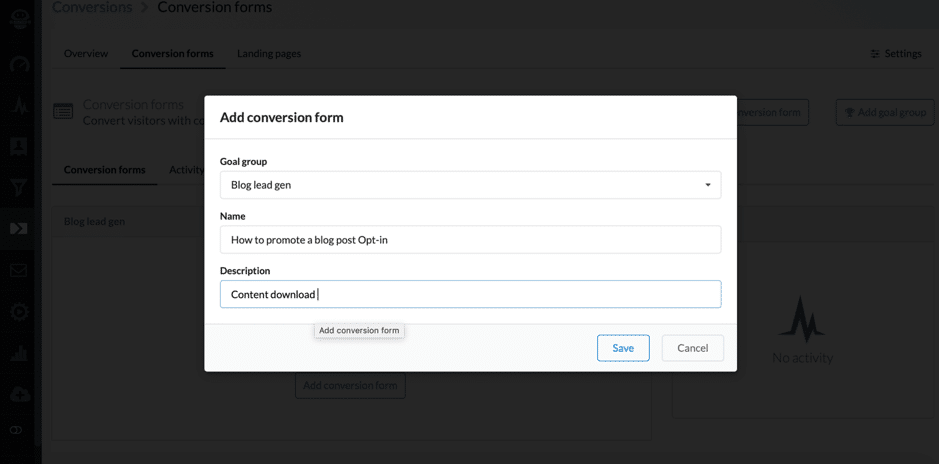 When it comes to online forms, Jumplead offers 2 different options: an embedded form on your website or an overlay pop-up which appears on your website based on the triggers you set up.
To start with, I’ve chosen the form:
When it comes to online forms, Jumplead offers 2 different options: an embedded form on your website or an overlay pop-up which appears on your website based on the triggers you set up.
To start with, I’ve chosen the form:
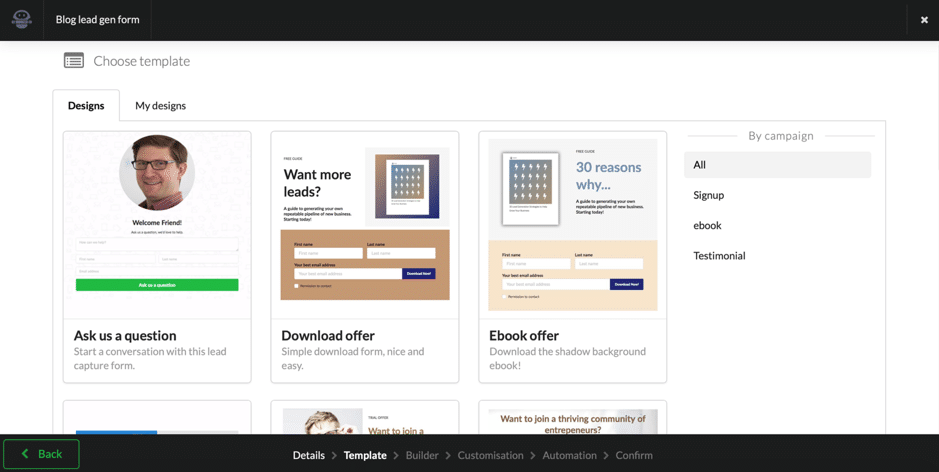 As you can see in the screenshot above, there are numerous templates to choose from, categorized by campaign type. You can also create new forms (and emails) based you’re your previously saved designs. Once you’ve chosen the template or design you want, you’re taken to the builder where you can start customizing it to your liking:
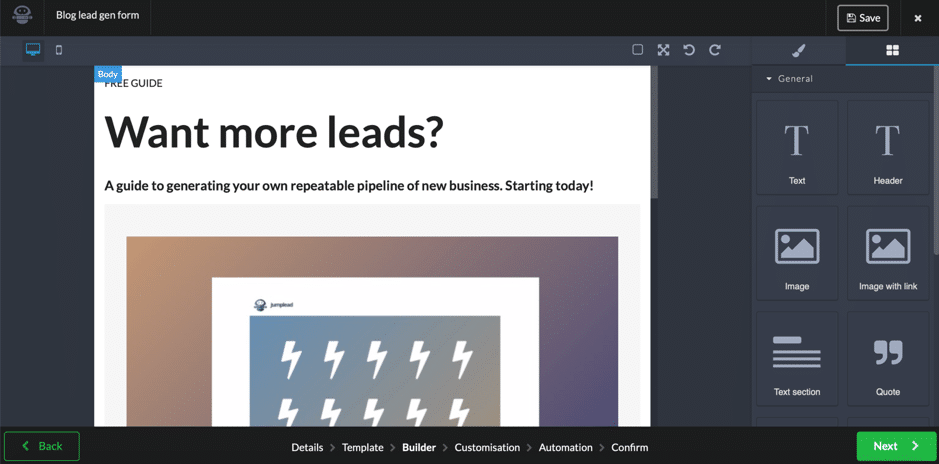 To edit your form, you can find all of the different elements you can add to it on the right-hand side of your screen, separated into categories; they’re super easy to add: you just need to drag and drop them in the section you want to add them.
You can add as many content sections as you want, along with images, videos, links and the actual form (and easily edit the information you want to ask for in the form).
And, of course, you can also edit the look and feel of your form; simply select the section you want to edit to see the customization options:
To edit your form, you can find all of the different elements you can add to it on the right-hand side of your screen, separated into categories; they’re super easy to add: you just need to drag and drop them in the section you want to add them.
You can add as many content sections as you want, along with images, videos, links and the actual form (and easily edit the information you want to ask for in the form).
And, of course, you can also edit the look and feel of your form; simply select the section you want to edit to see the customization options:
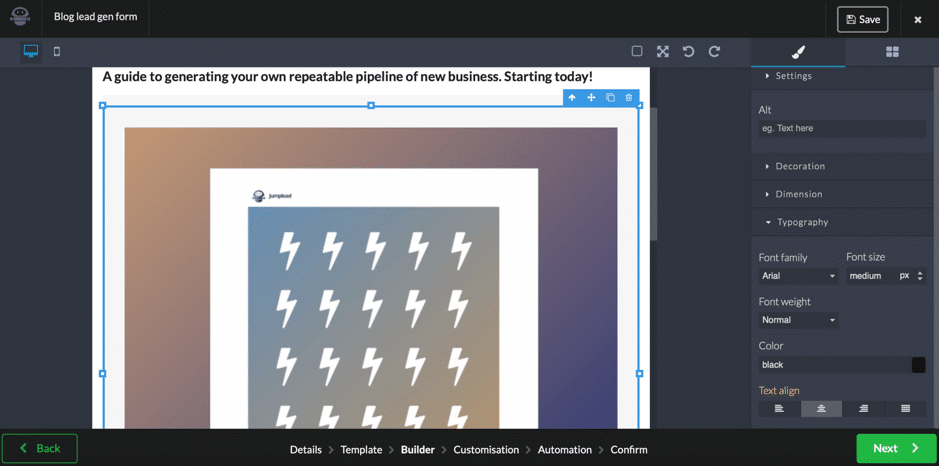 You can edit any design element you want in order to suit your needs (and your branding): the colours used, the fonts, the backgrounds.
Once you’ve designed your form, you also have the option to add style overrides or extra code to your head tag; for example, a Facebook or Google pixel to create a custom audience. And last but not least, you can set up a workflow automation to start nurturing your contacts:
You can edit any design element you want in order to suit your needs (and your branding): the colours used, the fonts, the backgrounds.
Once you’ve designed your form, you also have the option to add style overrides or extra code to your head tag; for example, a Facebook or Google pixel to create a custom audience. And last but not least, you can set up a workflow automation to start nurturing your contacts:
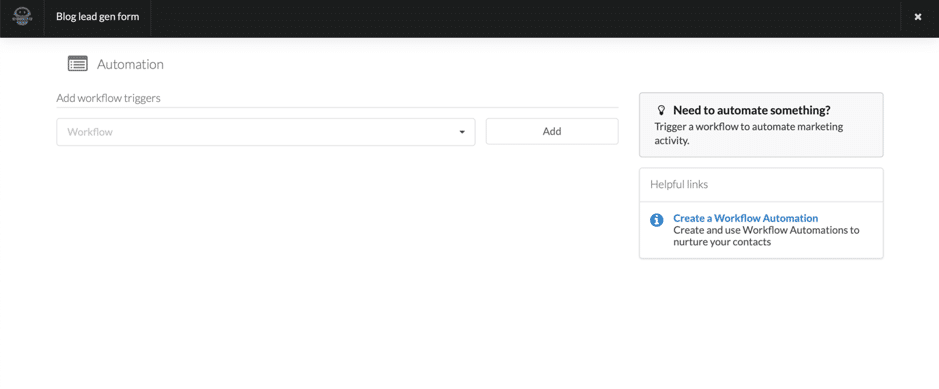 Once your form (or multiple forms) is set up, you’ll be able to get the embed code to add to your website (including a WordPress specific code) from the Conversions Forms page, as well as see snapshot views of submissions made and the conversions generated. Jumplead forms and popups can be multi-step form funnels, which allows you to break down large forms into steps increasing conversion rates and adding flexibility.
Apart from lead generation forms and overlays, you can also create landing pages with Jumplead – either code your own landing page or use a template:
Once your form (or multiple forms) is set up, you’ll be able to get the embed code to add to your website (including a WordPress specific code) from the Conversions Forms page, as well as see snapshot views of submissions made and the conversions generated. Jumplead forms and popups can be multi-step form funnels, which allows you to break down large forms into steps increasing conversion rates and adding flexibility.
Apart from lead generation forms and overlays, you can also create landing pages with Jumplead – either code your own landing page or use a template:
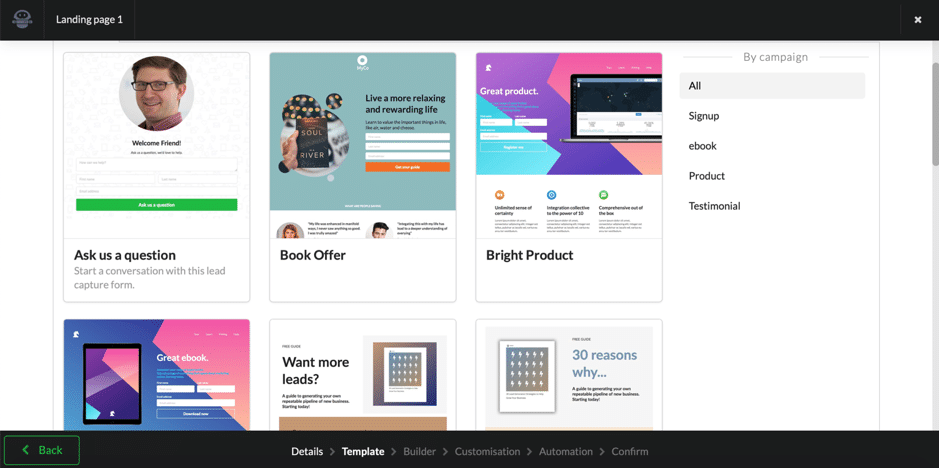 As for customizing your landing page, it uses the same builder as the one for lead generation forms and overlays – simply add the elements you want to your template and select a section to start customizing it. And, as with the forms earlier, you can also customize your page with style overrides and extra code and set up workflow triggers to nurture your leads. Once done, you can check the Landing Pages section in your Jumplead dashboard to see how many visitors and submissions each landing page has had, as well as what the conversion rate is.
Step 2: How to nurture your leads
It’s not enough to simply generate leads – you also need to nurture them properly if you’re going to eventually turn them into your paying customers. Jumplead has several nurturing options; to start with: email marketing. You can set up triggered emails and email broadcasts as you start building your list, as well as personalized emails as you create your list segments. As before, you have several templates to choose from, although you can also code your own emails and broadcasts: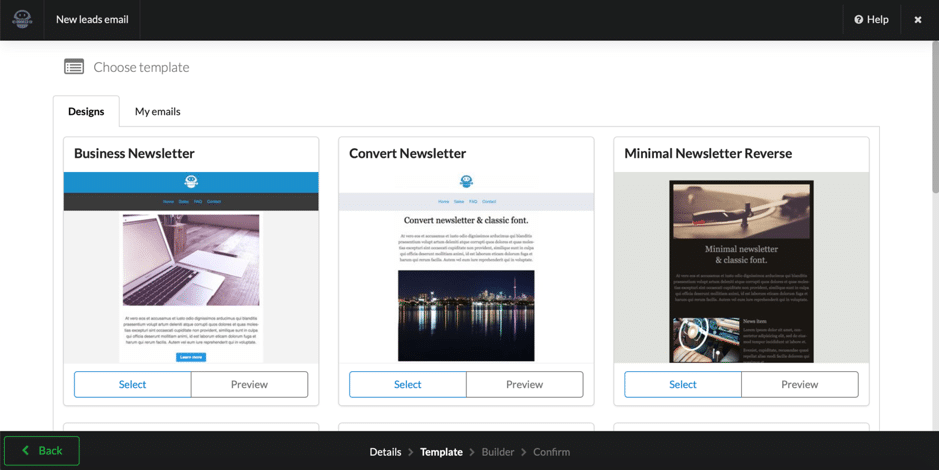 Then, you’re taken back to the builder where you can customize your email and add various elements such as quotes, links, images with links, as well as new content sections such as menus and columns.
As with the lead generation tools, you can view a snapshot of your email’s or broadcasts’ results directly in their dashboard (how many delivered, opened and clicked).
However, my favourite part is the email workflow feature – where you can create complex workflows and automations.
First, let’s take a look at workflow automations; you can create multiple workflow groups and add workflows to them which can be triggered once or multiple times:
Then, you’re taken back to the builder where you can customize your email and add various elements such as quotes, links, images with links, as well as new content sections such as menus and columns.
As with the lead generation tools, you can view a snapshot of your email’s or broadcasts’ results directly in their dashboard (how many delivered, opened and clicked).
However, my favourite part is the email workflow feature – where you can create complex workflows and automations.
First, let’s take a look at workflow automations; you can create multiple workflow groups and add workflows to them which can be triggered once or multiple times:
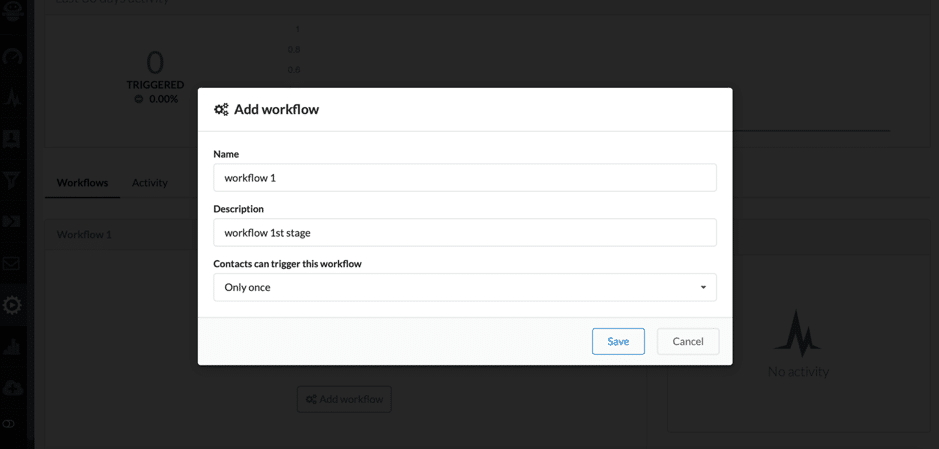 Then, you can start building your workflow automation with the very visual builder:
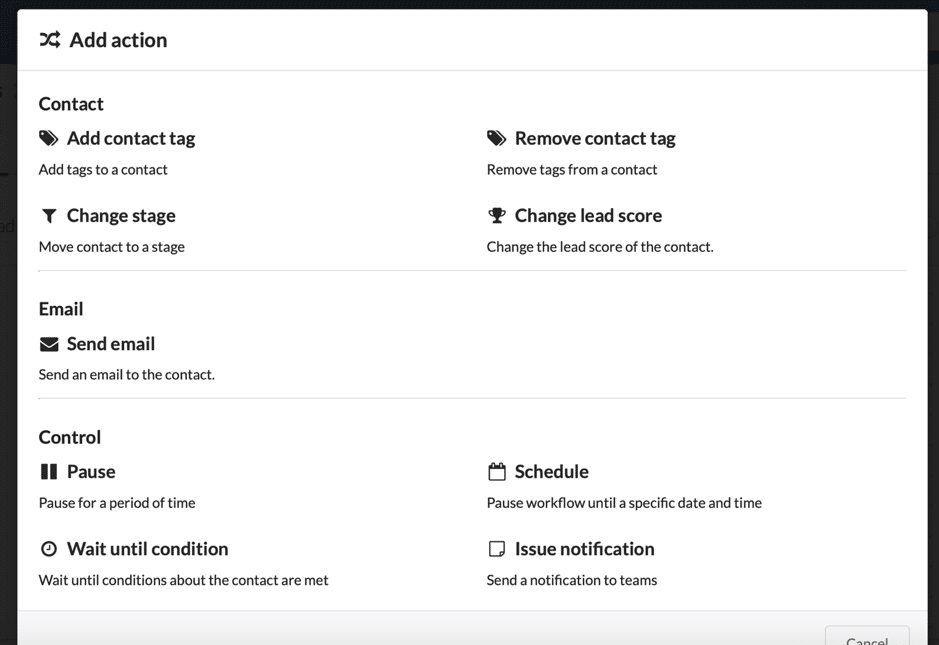
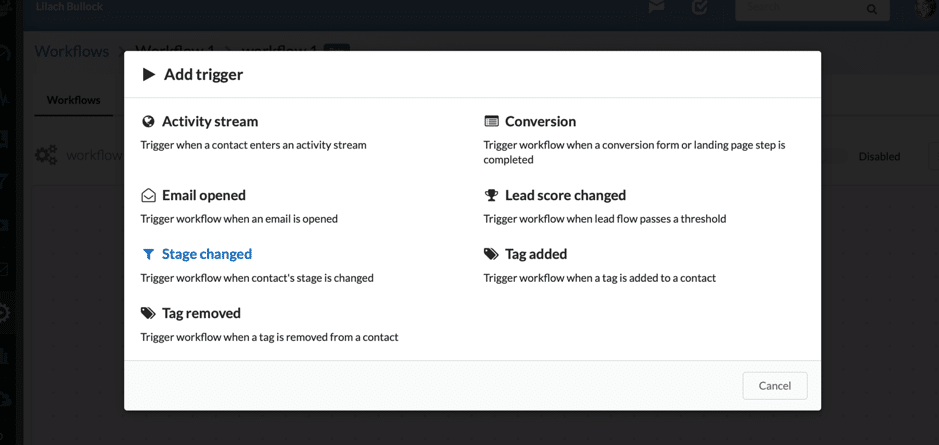 Once you’ve chosen a trigger – in this case, I wanted to trigger the workflow once a lead completes a certain landing page – you can set up the action (or actions) that you want to take (based on that trigger):
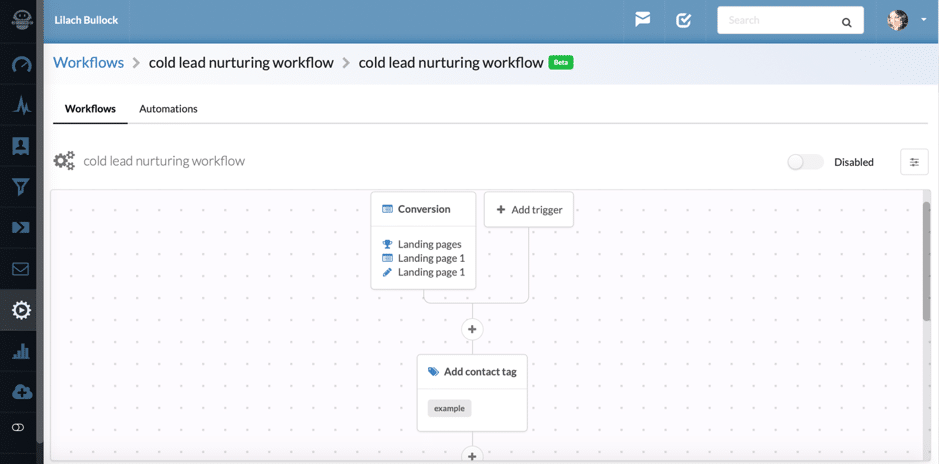
 The workflow is very visual and shows exactly how the triggers you’ve set will lead to different actions:
Step 3: Manage your leads and contacts
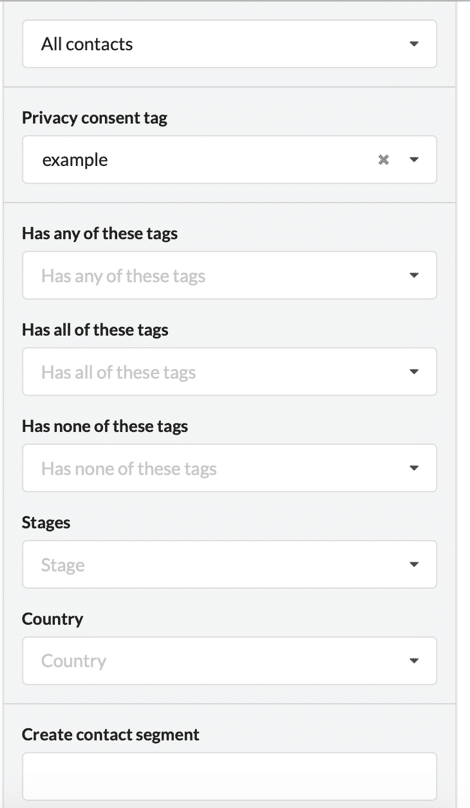
As you generate leads with Jumplead (or import your existing contacts), you can also use the software to manage all of your leads and prospects and check your analytics (which we’ve already touched upon a bit). In terms of lead management, you have an onboard CRM that pulls together all of your interactions with your leads as well as several handy features to help you manage them effectively, as well as so that you can better target them with your marketing campaigns. For example, you can easily segment your audience using a plethora of filters and tags, including any custom contact fields you add to quality your leads with the specific questions that relate to your sales process. In fact, any custom contact fields you add can be easily dragged into your forms and landing pages, then also used to segment your leads for your email campaigns at a later date:
 And what’s more, you can also add companies to your list of leads and prospects, as well as segment your companies just like you would with leads.
Another cool management feature is that you can set up automatic lead scoring:
And what’s more, you can also add companies to your list of leads and prospects, as well as segment your companies just like you would with leads.
Another cool management feature is that you can set up automatic lead scoring:
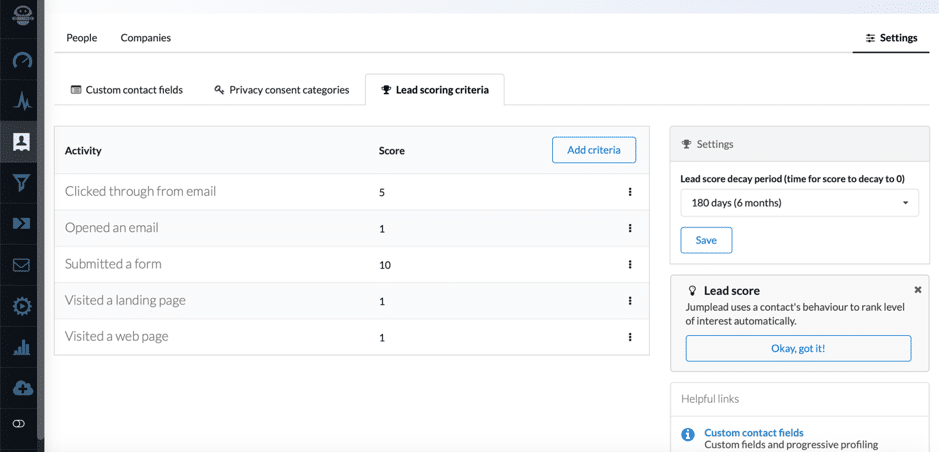 Choose and add the criteria you want, and provide a score for each one; you can then use this to easily prioritize the leads you need to reach out to first (which you could otherwise miss completely), as well as so that you can send them personalized marketing messages in order to convert them faster – Jumplead lists your contacts by their lead score, so it automatically “bubbles up” highly engaged leads.
Step 4: Activity tracking and marketing analytics
No marketing tool is complete without good analytics (or at least, from my point of view); Jumplead not only offers marketing analytics, but it also has a really useful feature for lead generation – one that allows you to be more proactive and to personalize your lead messaging even further: activity tracking. There are 3 different parts to the activity tracking: prospect tracking, visitor tracking and Twitter monitoring (once you’ve added your Twitter account to Jumplead). For example, you can see which prospects (contacts and organizations/companies who have completed a Jumplead form or clicked from a Jumplead email campaign) have visited (or are visiting) your website, as well as what search terms got them to your website (if possible), what pages they viewed on your website and where they’re from: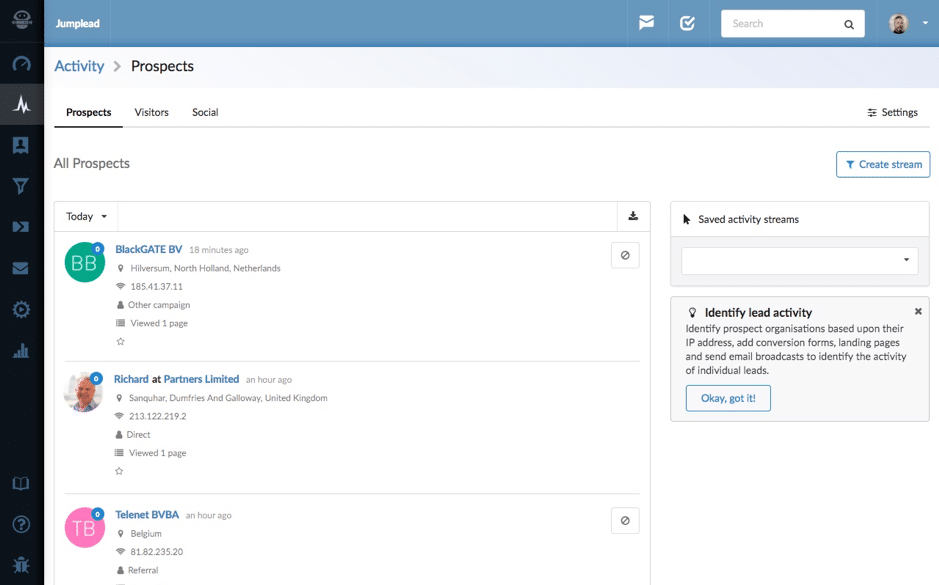 If they haven’t completed any actions, then you’ll be able to see the list of visitors in the Visitors section.
This type of information is extremely useful for B2B businesses as it allows them to be more proactive with their prospects; for example, if one of your ideal companies have triggered a campaign and are visiting your website again, it gives you a great a reason to reach out to them (for example, via the live chat window – another Jumplead feature –, with lead messaging or via email) and as you also know what pages they viewed and what content they liked you can better personalize your messaging.
Also, creating an Activity Stream based upon people that have visited an important page on your website, the pricing page for example, can be used to trigger a workflow to send your sales team an email alert so that they can follow upon high value activity at exactly the right time.
Once you’ve added the Jumplead code on each page of your website, you’ll also be able to track your marketing analytics in great detail, particularly as it pertains to your marketing campaigns.
For example, some of the things that you can learn with Jumplead’s analytics include:
If they haven’t completed any actions, then you’ll be able to see the list of visitors in the Visitors section.
This type of information is extremely useful for B2B businesses as it allows them to be more proactive with their prospects; for example, if one of your ideal companies have triggered a campaign and are visiting your website again, it gives you a great a reason to reach out to them (for example, via the live chat window – another Jumplead feature –, with lead messaging or via email) and as you also know what pages they viewed and what content they liked you can better personalize your messaging.
Also, creating an Activity Stream based upon people that have visited an important page on your website, the pricing page for example, can be used to trigger a workflow to send your sales team an email alert so that they can follow upon high value activity at exactly the right time.
Once you’ve added the Jumplead code on each page of your website, you’ll also be able to track your marketing analytics in great detail, particularly as it pertains to your marketing campaigns.
For example, some of the things that you can learn with Jumplead’s analytics include:
- The paths your leads are taking through the sales funnel and an overview of your sales funnel activity:
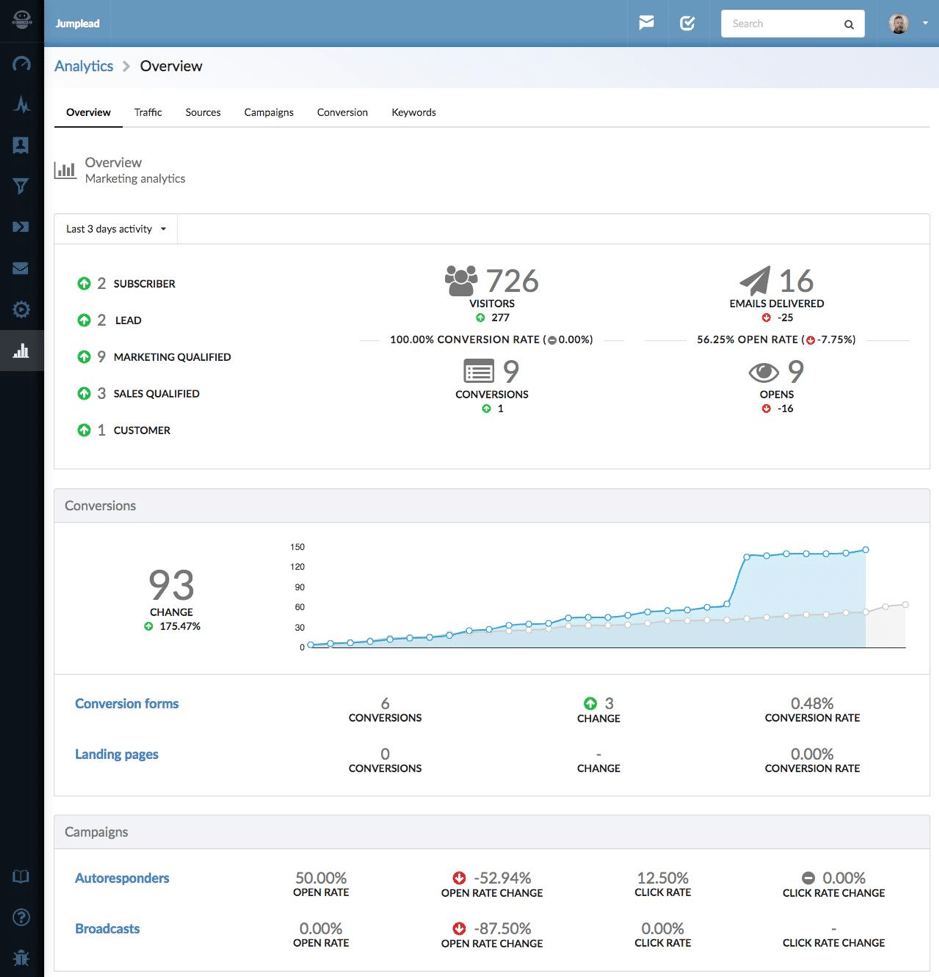
- Your traffic, including where it’s coming from and from which campaigns and sources your visitors came from
- Track and measure your conversion rates for your forms, landing pages and other marketing campaigns you’ve set up
Conclusion
There are very few tools that can not only perform numerous tasks (which otherwise require a plethora of different tools), but that can actually perform each of these tasks well. And after spending a good time using Jumplead and trying to leverage all the different features, I have to say that even though it has so many different (and complex!) features, they’ve clearly awarded the same attention to each feature. So if you’re struggling with the amount of tools you have to use on a daily basis for your marketing tasks, it’s worth checking out Jumplead to see how it can improve your daily productivity – and your marketing results.Related reading
- How to kickstart your employee advocacy program with Smarp
- How to monitor the entire web like a pro
- Discover a better way to communicate with your team
- How to improve employee management for your SMB
- more marketing and business articles
The short version: Lead management is about creating systems that capture the right people, keep them engaged with relevant content, and move them through your sales pipeline at the right pace. When you treat your prospects like individuals with specific needs rather than just sales targets, you build trust and dramatically improve your conversion rates.
Frequently asked questions
What's the difference between a lead and a prospect?
A lead is someone who has shown interest in your business but hasn't been qualified yet. A prospect is a lead you've determined has the potential to become a paying customer based on their needs, budget, and fit with what you offer.
How often should I follow up with prospects?
The ideal follow-up frequency depends on your industry and sales cycle, but most businesses see good results with a consistent cadence of 3-5 touchpoints over 2-4 weeks. The key is staying visible without being pushy - space your contact so each interaction adds value.
What should I include in my lead nurturing content?
Share resources that answer your prospects' questions at each stage of their buying journey - educational articles early on, case studies and comparisons in the middle, and testimonials and special offers near the end. The goal is to build credibility and confidence, not to sell immediately.
Want AI doing the heavy lifting in your marketing?
I build the systems that handle the boring 80 percent, so you get your week back. Done properly, with the human kept in.
How do I know which leads to prioritize?
Score your leads based on engagement level, company size, industry fit, and expressed budget. Prospects who open your emails, visit your website multiple times, or match your ideal customer profile deserve your immediate attention and personal outreach.
Related reading: How to generate more Twitter followers, traffic, and leads with Socedo and How to generate more leads and customers for your business.



