


If you are skim reading
Related reading: Discover an easier way to manage your entire business. Related reading: Discover an easier way to manage your marketing reports and Brosix: an easier way to manage your entire organization.In this article
- Business essentials: what are the main tools you need to manage your business?
- How to manage your business with Grow In Cloud
- Your client site
- Setting up your appointment calendar
- Customer relationship management
- Document sharing and management
- Invoicing and online payments
- Tasks and reminders
- Reporting
- Other notable features: task management, marketing campaigns, and more
- Conclusion
As a business, especially one with an online presence, you need multiple tools and software to help manage all of the different areas of your business, from task and staff management to online calendars and CRM tools. This can get very costly, confusing, and time-consuming very fast. In this blog post, I’m going to show you how to manage your entire business with one tool.
 It’s basically a very easy way for your clients to either book an appointment with you (I’ll tell you all about the calendar in a bit), share documents with you, or leave you a message together with their contact details:
 This is a completely free feature, but if you’d rather add this to your own website you definitely have the option.
 As you can see above, you have numerous useful options to fill in when you add a service. Add its name and the code for admin purposes, write a description of the service and specify its duration, if necessary.
Plus, you can add the member of your staff who handles this particular service, add an image, and set the pricing in the currency you prefer (and even include the appropriate VAT rate).
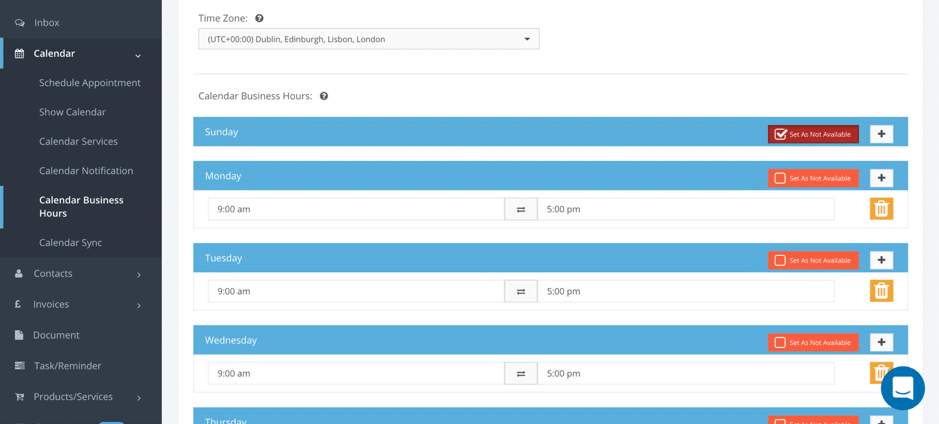
Additionally, you can also set specific business hours and set times when you are completely unavailable – this way, you’ll eliminate the need for any unnecessary back-and-forth if a client schedules an appointment when you aren’t free to take it; you can even set entire days as ‘unavailable’:
As you can see above, you have numerous useful options to fill in when you add a service. Add its name and the code for admin purposes, write a description of the service and specify its duration, if necessary.
Plus, you can add the member of your staff who handles this particular service, add an image, and set the pricing in the currency you prefer (and even include the appropriate VAT rate).
Additionally, you can also set specific business hours and set times when you are completely unavailable – this way, you’ll eliminate the need for any unnecessary back-and-forth if a client schedules an appointment when you aren’t free to take it; you can even set entire days as ‘unavailable’:
 Then, when your clients or potential clients go to schedule an appointment, this is an example of what they will see:
 They’ll be able to see what the service is, who will perform it (if relevant), how long it will last and how much it will cost them.
Once they choose the service they want, they’ll be directed to the appointment booking window where they can choose a time slot from the ones available:
They’ll be able to see what the service is, who will perform it (if relevant), how long it will last and how much it will cost them.
Once they choose the service they want, they’ll be directed to the appointment booking window where they can choose a time slot from the ones available:
 If you want to cut down on no-shows, you can request payment upfront after the appointment is scheduled:
 Both PayPal and Stripe work.
It’s also worth noting that the system will recognize repeat customers and so will fill out any stored information to speed things up for your client.
Plus, you can also schedule your own appointments with clients, prospects, suppliers, and so on using Grow In Cloud:
You can add a contact from your contact list, add a subject of discussion, select a service, set the meetings times, and establish the appointment type (by call, Skype, or in person).
And if you head over to Calendar Notifications, you can set up reminders before the meetings to make sure you’re there on time as well as set up notifications in case an appointment is rescheduled or cancelled, among other options:
Both PayPal and Stripe work.
It’s also worth noting that the system will recognize repeat customers and so will fill out any stored information to speed things up for your client.
Plus, you can also schedule your own appointments with clients, prospects, suppliers, and so on using Grow In Cloud:
You can add a contact from your contact list, add a subject of discussion, select a service, set the meetings times, and establish the appointment type (by call, Skype, or in person).
And if you head over to Calendar Notifications, you can set up reminders before the meetings to make sure you’re there on time as well as set up notifications in case an appointment is rescheduled or cancelled, among other options:
 It’s also worth noting that you can use this calendar for all of your business needs because you can sync it with any major calendars: Google Calendar, Microsoft Calendar, and Apple Calendar.
All of your appointment and plans will then appear in your calendar and will be colour coded to make things easier for you; for example, in-person meetings are in green, Skype calls in blue, and phone calls in orange:
It’s also worth noting that you can use this calendar for all of your business needs because you can sync it with any major calendars: Google Calendar, Microsoft Calendar, and Apple Calendar.
All of your appointment and plans will then appear in your calendar and will be colour coded to make things easier for you; for example, in-person meetings are in green, Skype calls in blue, and phone calls in orange:
 Everyone on your staff will have access to their calendar so they can clearly see what appointments they have coming up and set up reminders if they need them.
Or you can import multiple contacts at a time using either your Google account or a .csv file.
Everyone on your staff will have access to their calendar so they can clearly see what appointments they have coming up and set up reminders if they need them.
Or you can import multiple contacts at a time using either your Google account or a .csv file.
 Just select the contact you want and write an email to send them to get that document in your library.
 And you can enable the Pay Button to let people pay you online more quickly – they get the invoice, see the payment option, and they can just pay so much faster.
All of your invoices will be stored in your account so that you have a complete list readily available whenever you or your accountant need them – your accountant will definitely love you for being so organised and on-the-ball with invoicing.
And you can enable the Pay Button to let people pay you online more quickly – they get the invoice, see the payment option, and they can just pay so much faster.
All of your invoices will be stored in your account so that you have a complete list readily available whenever you or your accountant need them – your accountant will definitely love you for being so organised and on-the-ball with invoicing.
 But what’s truly great about it is that you can also:
 I really love this priority level feature because once you set your tasks and check your calendar to see what you need to do, you can filter results to only see tasks of a certain priority level. If you have a lot of tasks to do this is a great way to focus on the tasks that matter most to you.
But my favourite reports are the client/lead percentage report and the lead to clients report as they’re very useful for evaluating the state of your business.
For example, the client/lead percentage report shows you how many clients you have compared to leads:
I really love this priority level feature because once you set your tasks and check your calendar to see what you need to do, you can filter results to only see tasks of a certain priority level. If you have a lot of tasks to do this is a great way to focus on the tasks that matter most to you.
But my favourite reports are the client/lead percentage report and the lead to clients report as they’re very useful for evaluating the state of your business.
For example, the client/lead percentage report shows you how many clients you have compared to leads:
 The Lead to Client report, on the other hand, allows you to see how your conversion rate is changing over time and see how many of your leads actually turned into clients:
 You can select the dates you prefer and easily export or print your reports for safekeeping, for presentation, or for clients or investors.
 Another very interesting feature is Campaigns – it’s currently in beta and allows you to create one of two types of campaigns: email and SMS campaigns.
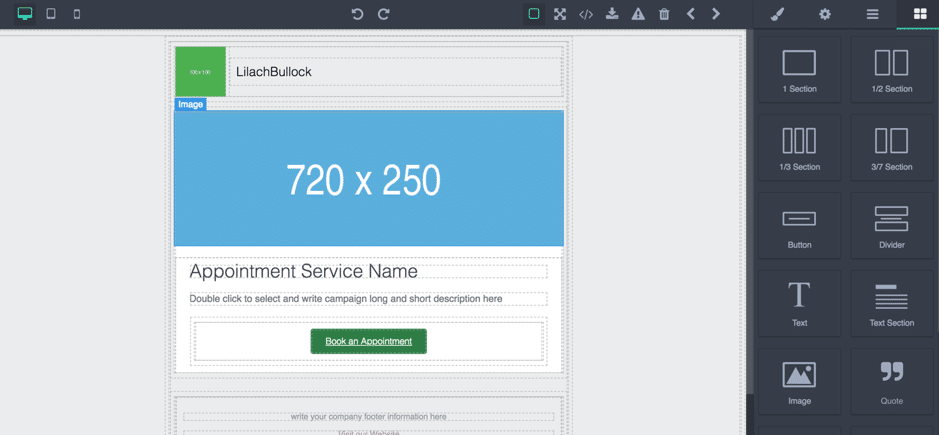
Both have their own set of templates to choose from – or you can always start from scratch – and there’s a built-in editor where you can customize your campaign for all types of devices:
Another very interesting feature is Campaigns – it’s currently in beta and allows you to create one of two types of campaigns: email and SMS campaigns.
Both have their own set of templates to choose from – or you can always start from scratch – and there’s a built-in editor where you can customize your campaign for all types of devices:
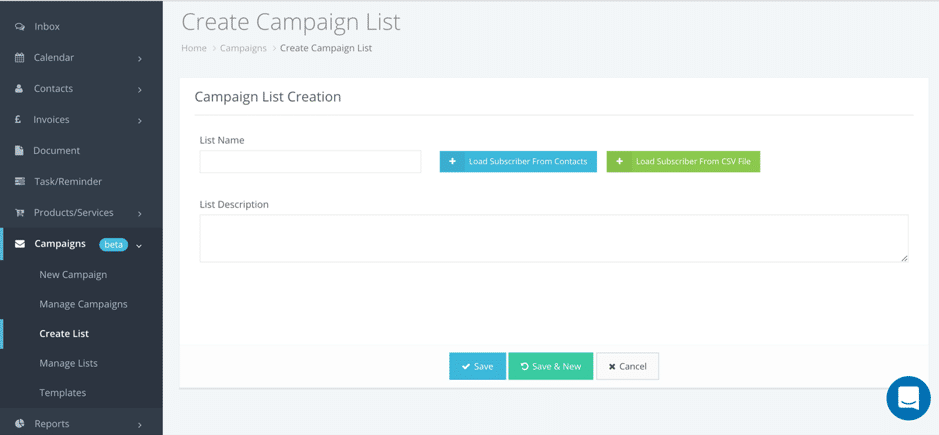
 To create the lists you’ll send the campaigns to, you can import users from your contacts or from a .csv file:
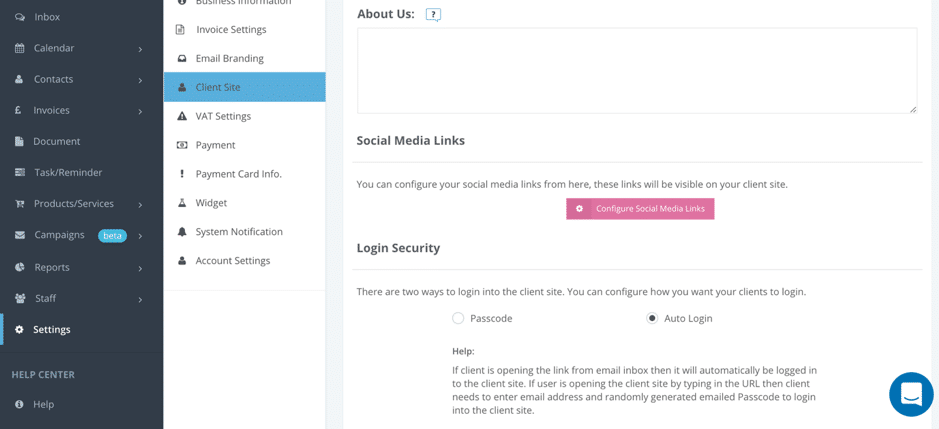
And finally, I want to show you have a few cool settings that you can set up; first, you can configure your client site and include an “about us”, add social media links and even set up a password that clients need in order to access it (unless you’ve emailed them the link directly):
As I mentioned earlier, you also have the option of adding a widget to your website for bookings, document sharing, and details; you can do this in your Settings very quickly:
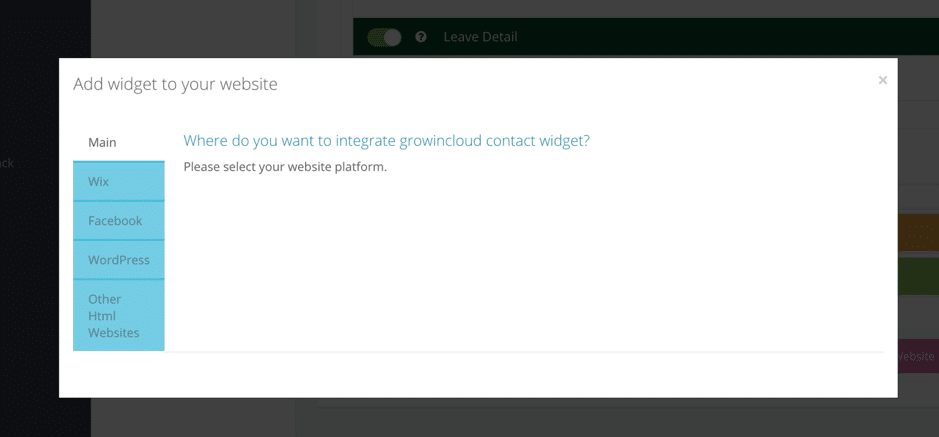
Select which features you want to include, change colours, text, and the order, and then add the widget to your Wix or WordPress website, a Facebook Page, or any other HTML websites:
To create the lists you’ll send the campaigns to, you can import users from your contacts or from a .csv file:
And finally, I want to show you have a few cool settings that you can set up; first, you can configure your client site and include an “about us”, add social media links and even set up a password that clients need in order to access it (unless you’ve emailed them the link directly):
As I mentioned earlier, you also have the option of adding a widget to your website for bookings, document sharing, and details; you can do this in your Settings very quickly:
Select which features you want to include, change colours, text, and the order, and then add the widget to your Wix or WordPress website, a Facebook Page, or any other HTML websites:

Business essentials: what are the main tools you need to manage your business?
Every business is different and has its own particular set of needs depending on the industry they’re in. Generally, though, these are some of the main tools you need to properly manage your business – across niches and industries:- Online calendar: if your business is in the services industry, online calendars with appointment scheduling are essential to a smooth-running business. Your customers need an easy to book an appointment with your business, while you need a tool that will allow you to easily keep track of all appointments and make sure there aren’t any errors or miscommunication issues
- Customer relationship management: CRM tools allow you to keep track of all your contacts, leads, prospects, and customers in one place. They aren’t just important for their organizational purpose, but also because they help you nurture your leads into becoming paying customers
- Manage business expenses and suppliers: as a business selling a product – or even services, in some cases – you need to deal with a number of suppliers; your purchases from suppliers cost you quite a bit of money, so you need to make sure you’re keeping track of all these business expenses and that you’re well aware of what you’ve bought from your suppliers
- Invoicing/accounting: want to make sure you’re getting paid on time? Then you need an easy way to send your clients branded invoices as soon as needed – and preferably, an easy way for your clients to pay you so everyone involved is happy with the transaction
- Task management: every day, I feel like I’m drowning in the number of tasks I have to do, both small and big. Without a good task management tool, I’d probably be lost – you need to be organised if you want to get things done, it’s as simple as that
- Team communication: you need to make it easy for your entire team to communicate and collaborate, preferably all in one place for safekeeping
- Staff management: whether you have a couple of employees or dozens you need a tool to help you keep track of them, when they’re off, what they’re working on, and so on
- Reporting: in order to grow your business, you need to understand what works and what doesn’t and to keep an eye on your businesses’ progress. That’s why reporting and business intelligence are so important – if an area of your business is underperforming, then you need to find out why; likewise, if you’re getting amazing results, you need to understand what brought that on so you can be able to replicate this type of success in the future
How to manage your business with Grow In Cloud
Lately, I’ve had the opportunity to try out Grow In Cloud, a business management tool that actually has most, if not all, the features you could possibly need to manage your business. So as you can imagine…that got me very excited to explore everything and I want to share my findings with you. Let me first quickly run you through the main features and then when we can really start exploring them in more detail:- Online calendar and appointment scheduling tool
- CRM tools for contact and lead management
- Invoicing
- Document sharing
- Task management and reminders
- Products and services management
- Email and SMS campaigns
- Internal chat/collaboration tool for teams
- Staff management for keeping track of your staff
- Reporting
- Client website where clients can book appointments, share documents, and/or leave their details
Your client site
Once you create your account – and by the way, I was very surprised to see that there is a free account which seems almost impossible considering the number of different tools you get – and set it up, you’ll notice at the top of your dashboard a link to “My Client Site”: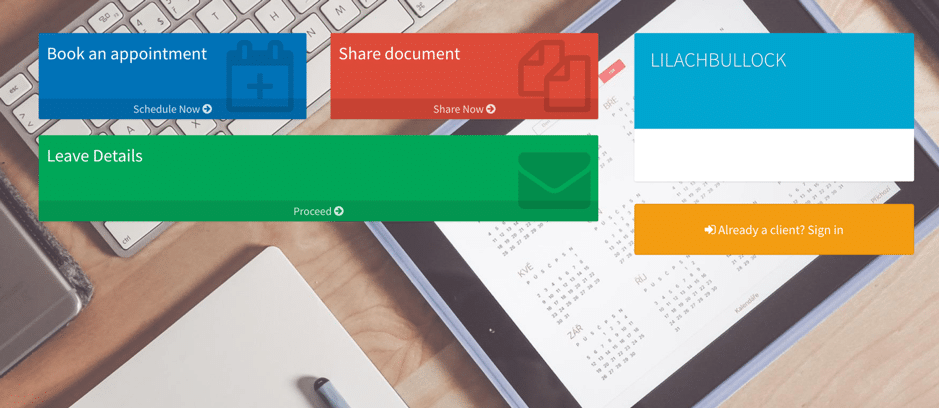 It’s basically a very easy way for your clients to either book an appointment with you (I’ll tell you all about the calendar in a bit), share documents with you, or leave you a message together with their contact details:
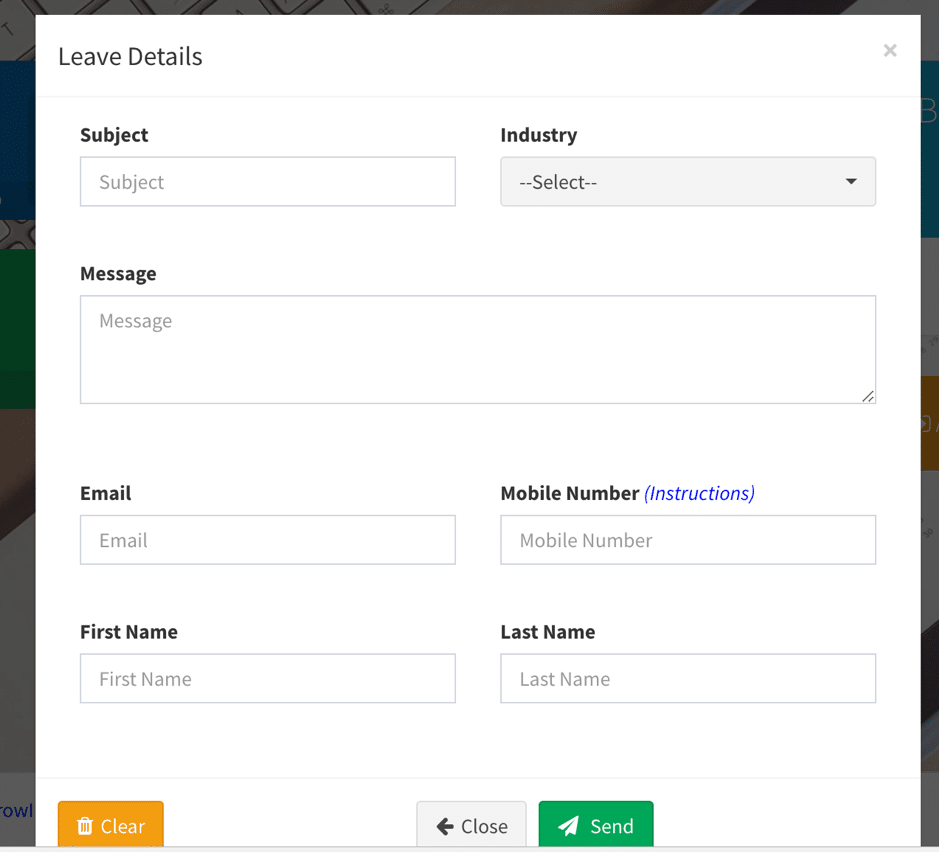 This is a completely free feature, but if you’d rather add this to your own website you definitely have the option.
Setting up your appointment calendar
This is a perfect tool for anyone who sells a service; whether you’re a consultant, a personal trainer, a real estate company and so on, you can easily set up your services in the calendar so that people can book appointments easily and quickly: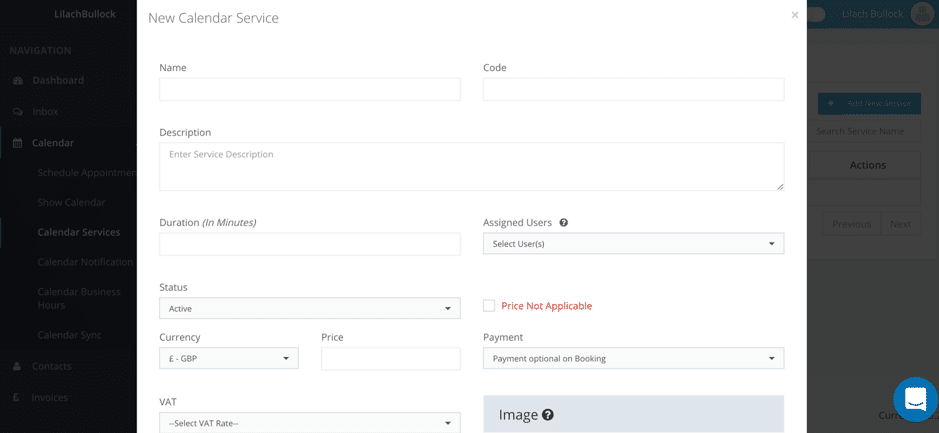 As you can see above, you have numerous useful options to fill in when you add a service. Add its name and the code for admin purposes, write a description of the service and specify its duration, if necessary.
Plus, you can add the member of your staff who handles this particular service, add an image, and set the pricing in the currency you prefer (and even include the appropriate VAT rate).
Additionally, you can also set specific business hours and set times when you are completely unavailable – this way, you’ll eliminate the need for any unnecessary back-and-forth if a client schedules an appointment when you aren’t free to take it; you can even set entire days as ‘unavailable’:
As you can see above, you have numerous useful options to fill in when you add a service. Add its name and the code for admin purposes, write a description of the service and specify its duration, if necessary.
Plus, you can add the member of your staff who handles this particular service, add an image, and set the pricing in the currency you prefer (and even include the appropriate VAT rate).
Additionally, you can also set specific business hours and set times when you are completely unavailable – this way, you’ll eliminate the need for any unnecessary back-and-forth if a client schedules an appointment when you aren’t free to take it; you can even set entire days as ‘unavailable’:
 Then, when your clients or potential clients go to schedule an appointment, this is an example of what they will see:
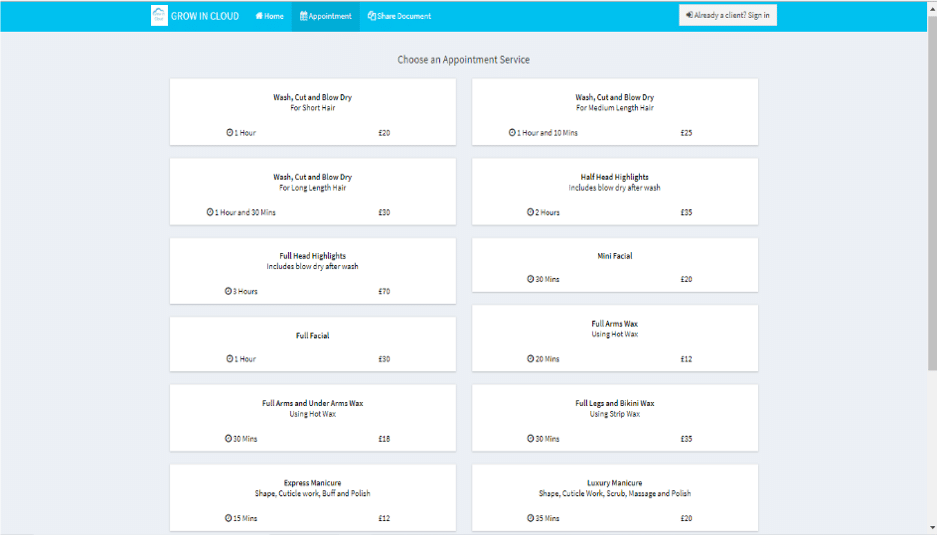 They’ll be able to see what the service is, who will perform it (if relevant), how long it will last and how much it will cost them.
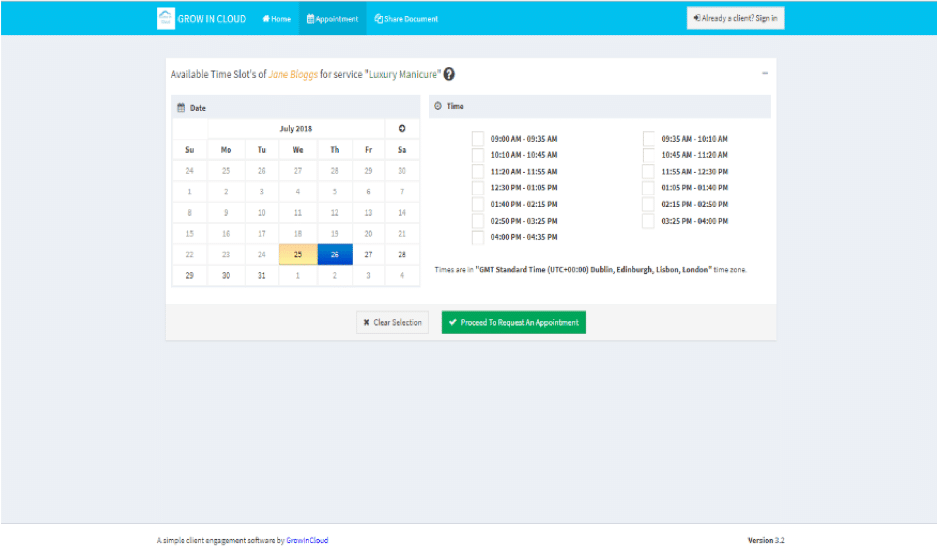
Once they choose the service they want, they’ll be directed to the appointment booking window where they can choose a time slot from the ones available:
They’ll be able to see what the service is, who will perform it (if relevant), how long it will last and how much it will cost them.
Once they choose the service they want, they’ll be directed to the appointment booking window where they can choose a time slot from the ones available:
 If you want to cut down on no-shows, you can request payment upfront after the appointment is scheduled:
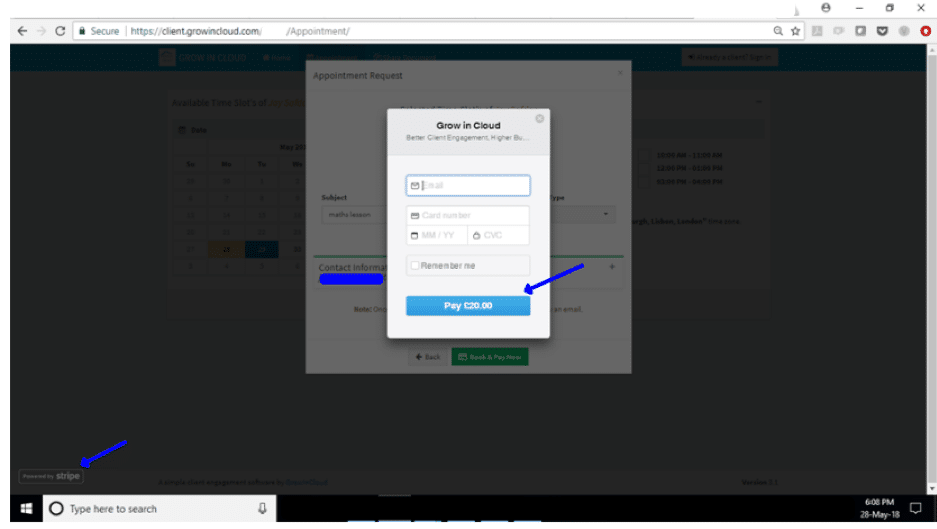 Both PayPal and Stripe work.
It’s also worth noting that the system will recognize repeat customers and so will fill out any stored information to speed things up for your client.
Plus, you can also schedule your own appointments with clients, prospects, suppliers, and so on using Grow In Cloud:
Both PayPal and Stripe work.
It’s also worth noting that the system will recognize repeat customers and so will fill out any stored information to speed things up for your client.
Plus, you can also schedule your own appointments with clients, prospects, suppliers, and so on using Grow In Cloud:
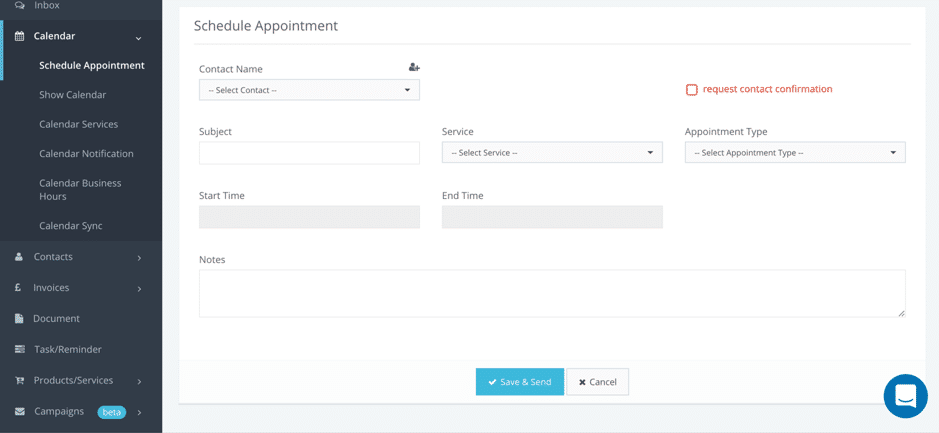 You can add a contact from your contact list, add a subject of discussion, select a service, set the meetings times, and establish the appointment type (by call, Skype, or in person).
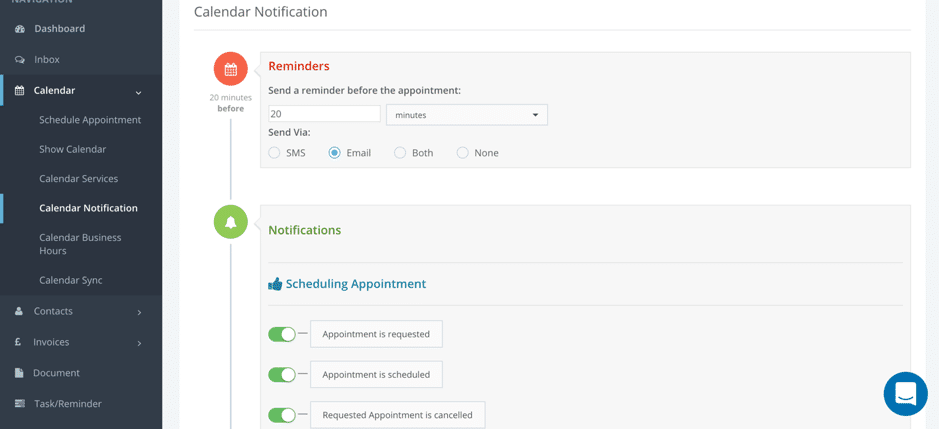
And if you head over to Calendar Notifications, you can set up reminders before the meetings to make sure you’re there on time as well as set up notifications in case an appointment is rescheduled or cancelled, among other options:
You can add a contact from your contact list, add a subject of discussion, select a service, set the meetings times, and establish the appointment type (by call, Skype, or in person).
And if you head over to Calendar Notifications, you can set up reminders before the meetings to make sure you’re there on time as well as set up notifications in case an appointment is rescheduled or cancelled, among other options:
 It’s also worth noting that you can use this calendar for all of your business needs because you can sync it with any major calendars: Google Calendar, Microsoft Calendar, and Apple Calendar.
All of your appointment and plans will then appear in your calendar and will be colour coded to make things easier for you; for example, in-person meetings are in green, Skype calls in blue, and phone calls in orange:
It’s also worth noting that you can use this calendar for all of your business needs because you can sync it with any major calendars: Google Calendar, Microsoft Calendar, and Apple Calendar.
All of your appointment and plans will then appear in your calendar and will be colour coded to make things easier for you; for example, in-person meetings are in green, Skype calls in blue, and phone calls in orange:
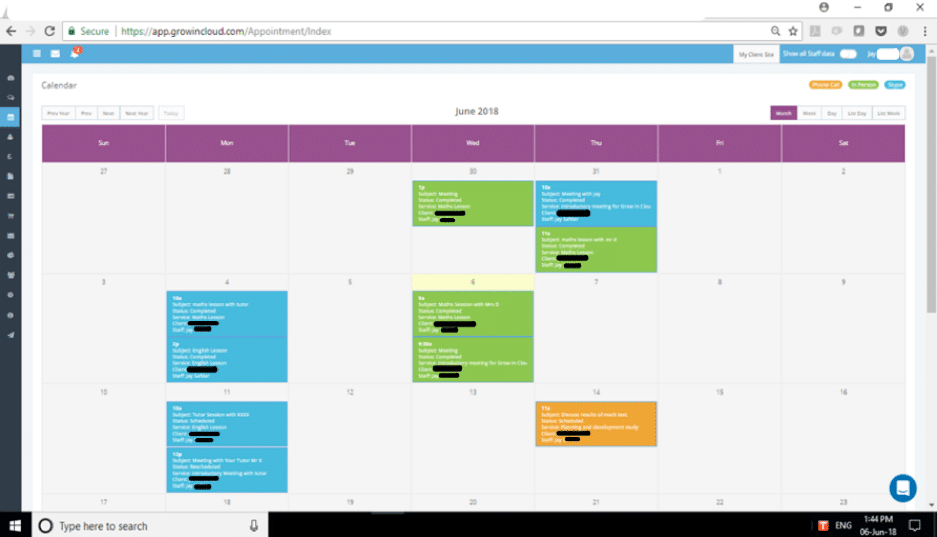 Everyone on your staff will have access to their calendar so they can clearly see what appointments they have coming up and set up reminders if they need them.
Customer relationship management
Also built-in is a CRM tool where you can easily add all of your contacts, including any relevant information about them, such as their contact details, names, their source, and their status. You can easily add new contacts manually, one by one: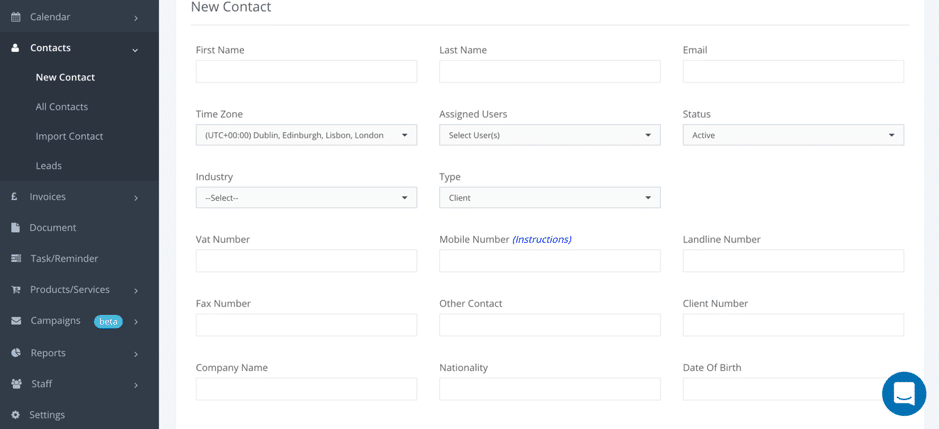 Or you can import multiple contacts at a time using either your Google account or a .csv file.
Document sharing and management
In your Grow In Cloud account, you have access to a separate tab where you can manage all of your files. As you might remember from earlier, clients and website visitors can easily upload and share documents with you either using the free client website or the live widget. What’s more, you can also upload your own documents for safekeeping (it’s so much easier when everything is in one place as you can quickly search for what you need) and even request a document from a client, supplier, business associate, employee, and pretty much anyone that you need a document from: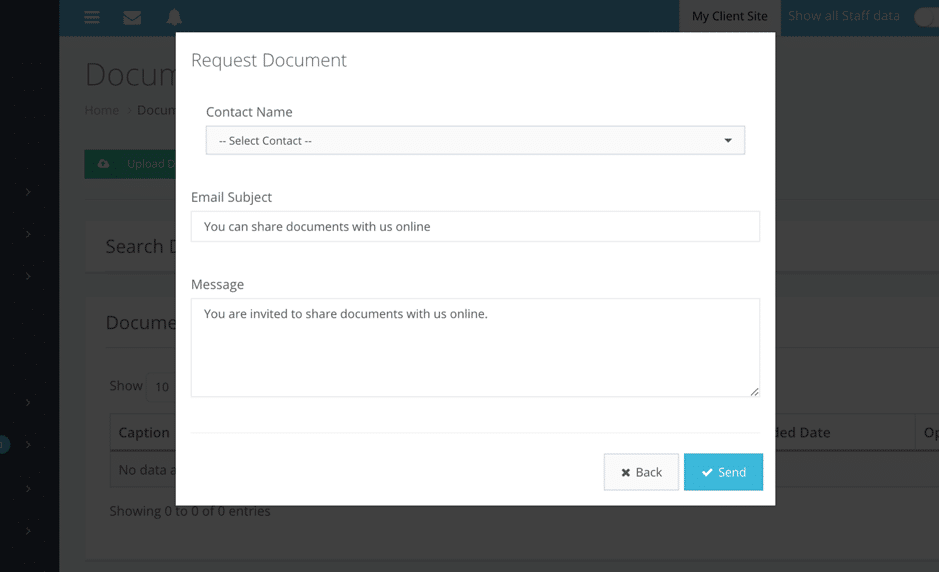 Just select the contact you want and write an email to send them to get that document in your library.
Invoicing and online payments
Invoices and payments are – more often than not – a pain to handle. From remembering to send an invoice on time to making sure you’re paid, the whole process is a bit of a headache. But Grow In Cloud really simplifies the process; creating a new branded invoice is very easy and you can do it directly in your dashboard: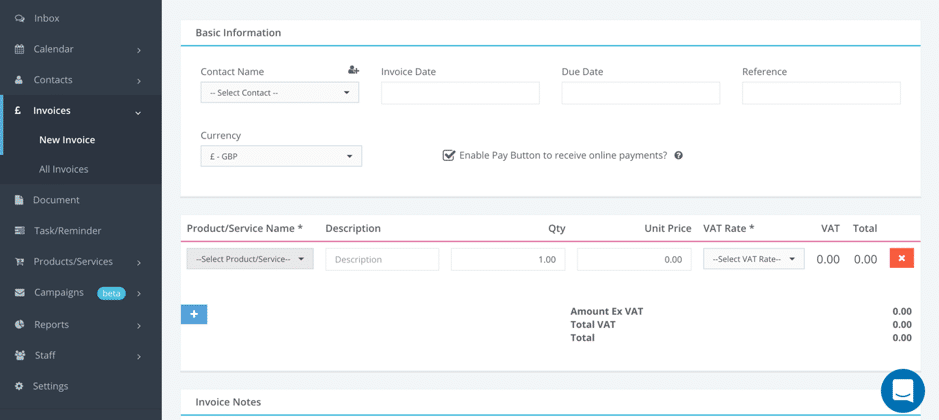 And you can enable the Pay Button to let people pay you online more quickly – they get the invoice, see the payment option, and they can just pay so much faster.
All of your invoices will be stored in your account so that you have a complete list readily available whenever you or your accountant need them – your accountant will definitely love you for being so organised and on-the-ball with invoicing.
And you can enable the Pay Button to let people pay you online more quickly – they get the invoice, see the payment option, and they can just pay so much faster.
All of your invoices will be stored in your account so that you have a complete list readily available whenever you or your accountant need them – your accountant will definitely love you for being so organised and on-the-ball with invoicing.
Tasks and reminders
I love task management tools and I always get excited when I try out a new one. That’s because I have so many different tasks on any given day – both small and big – that I get overwhelmed very easily. And I have to say – I’m very impressed with this task management tool (which is built-in to your Grow In Cloud dashboard). As you can see below, you can add new tasks: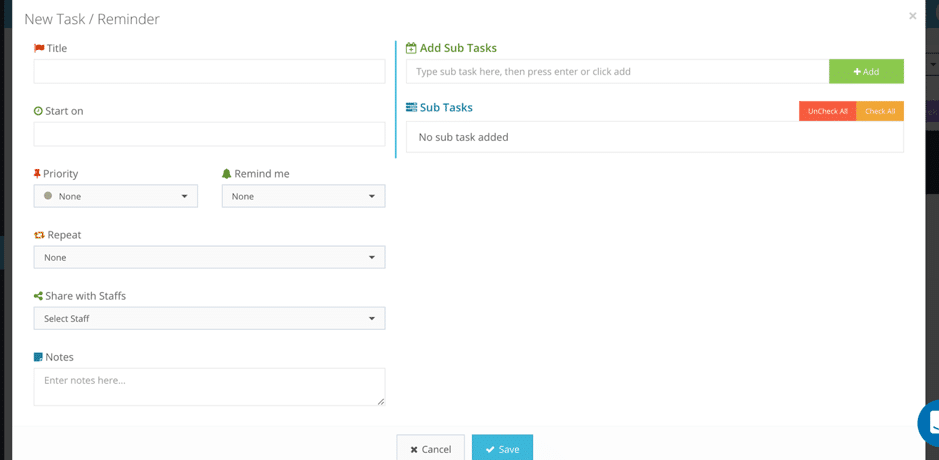 But what’s truly great about it is that you can also:
- Add subtasks for your task (this is essential for project management)
- Set a date for when you need to start
- Create a reminder to make sure you remember to actually perform that task (or set of tasks)
- Add it as a repeat task to automatically add it to your calendar (for example, if you need to publish a new blog post every Monday or you need to send an invoice on a specific date every month)
- Add any relevant notes that you’ll need to perform the task
- Share the task with specific members of your task
- And finally, set the priority level for your task:
 I really love this priority level feature because once you set your tasks and check your calendar to see what you need to do, you can filter results to only see tasks of a certain priority level. If you have a lot of tasks to do this is a great way to focus on the tasks that matter most to you.
Reporting
You know me – I love analytics and data. And Grow In Cloud offers some very interesting and useful reports. For example, you can generate reports on all of your sales: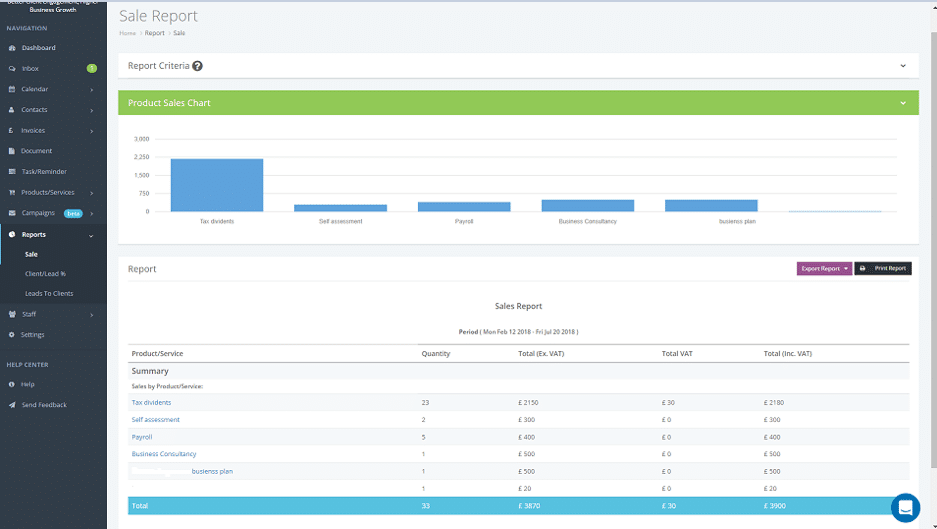 But my favourite reports are the client/lead percentage report and the lead to clients report as they’re very useful for evaluating the state of your business.
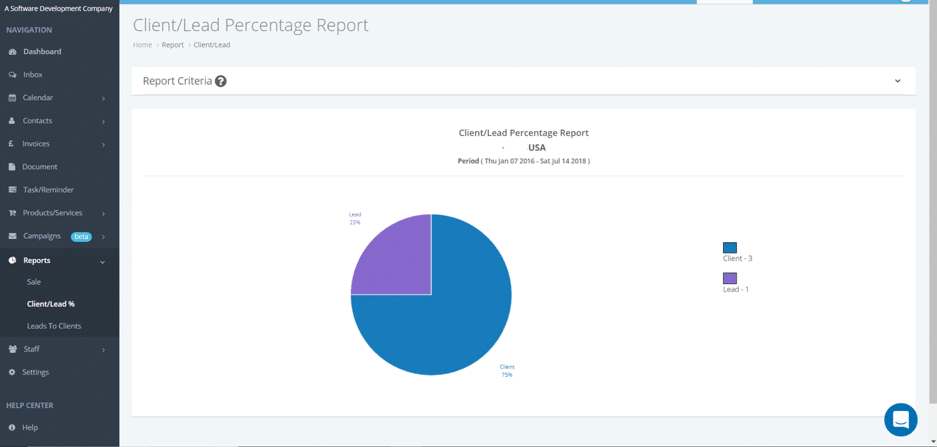
For example, the client/lead percentage report shows you how many clients you have compared to leads:
But my favourite reports are the client/lead percentage report and the lead to clients report as they’re very useful for evaluating the state of your business.
For example, the client/lead percentage report shows you how many clients you have compared to leads:
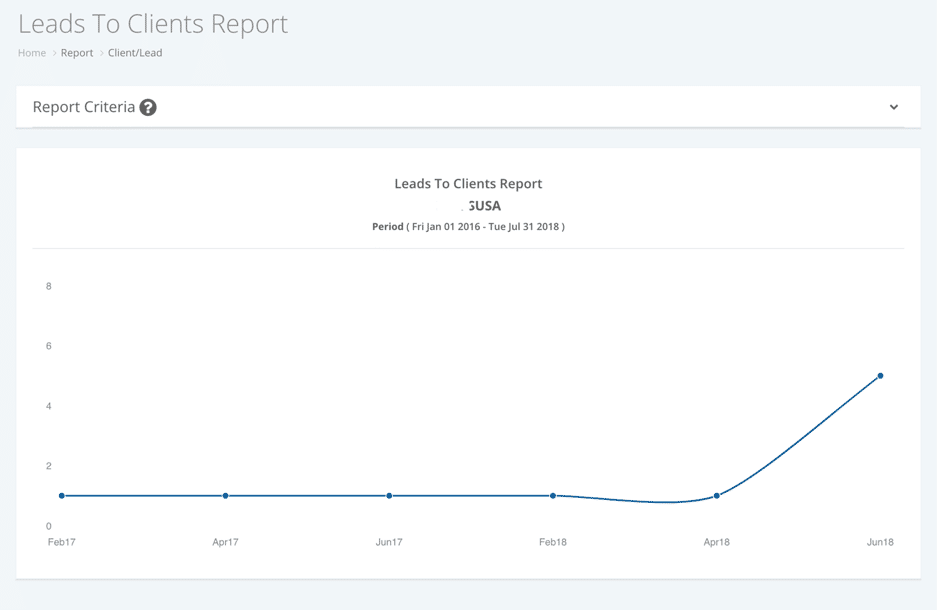
 The Lead to Client report, on the other hand, allows you to see how your conversion rate is changing over time and see how many of your leads actually turned into clients:
 You can select the dates you prefer and easily export or print your reports for safekeeping, for presentation, or for clients or investors.
Other notable features: task management, marketing campaigns, and more
This is truly an all-in-one business management tool – there are a lot more notable features but it would take a very long article to go through them all. Still, I do want to mention a few other cool features. Like for example staff management; you can add all of your staff members to the system to keep track of them, but what’s even better is that there’s a built-in chat so you can also keep all of your conversations in one place.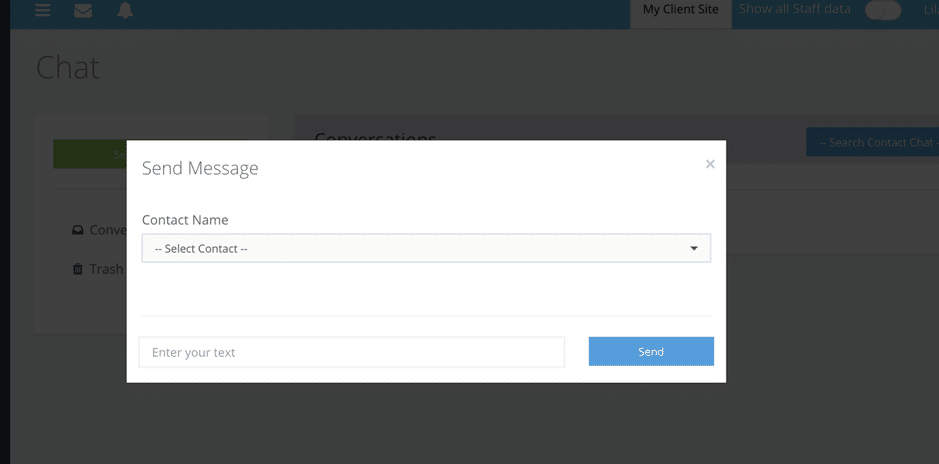 Another very interesting feature is Campaigns – it’s currently in beta and allows you to create one of two types of campaigns: email and SMS campaigns.
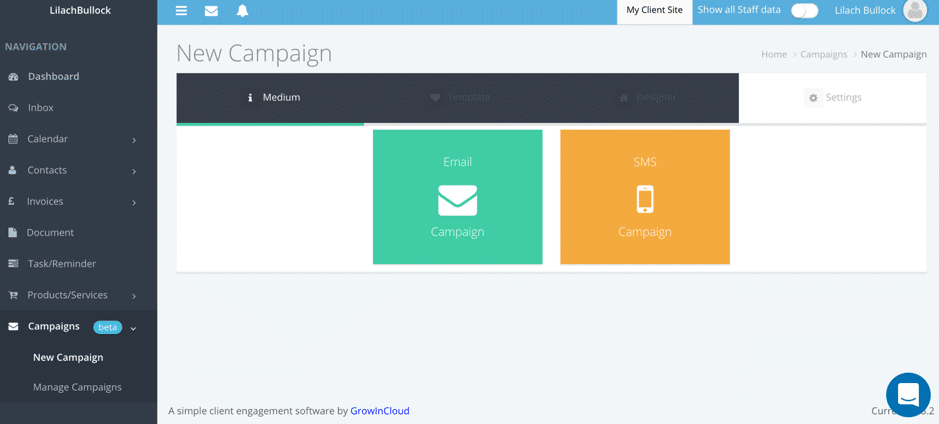 Both have their own set of templates to choose from – or you can always start from scratch – and there’s a built-in editor where you can customize your campaign for all types of devices:
 To create the lists you’ll send the campaigns to, you can import users from your contacts or from a .csv file:
 And finally, I want to show you have a few cool settings that you can set up; first, you can configure your client site and include an “about us”, add social media links and even set up a password that clients need in order to access it (unless you’ve emailed them the link directly):
 As I mentioned earlier, you also have the option of adding a widget to your website for bookings, document sharing, and details; you can do this in your Settings very quickly:
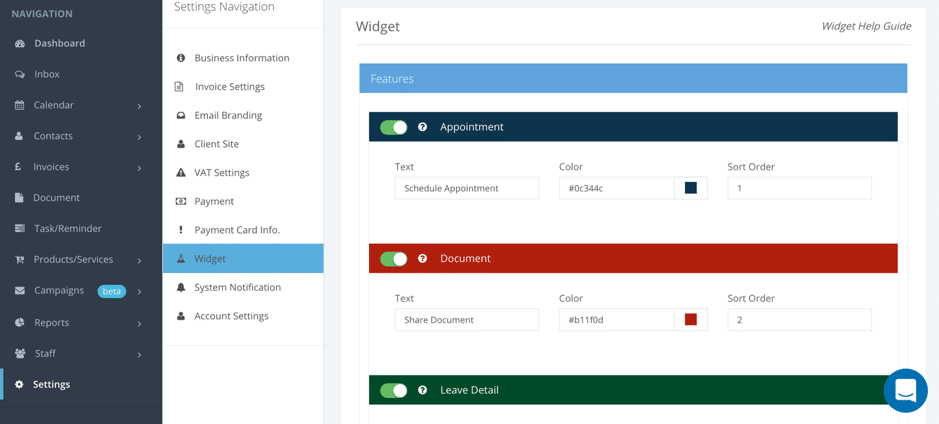 Select which features you want to include, change colours, text, and the order, and then add the widget to your Wix or WordPress website, a Facebook Page, or any other HTML websites:
Conclusion
There are a lot of so-called all-in-one tools but I have to say I’m often disappointed in the number of features – most cases, they could use some more to completely make it an all-in-one service. However, that’s definitely not the case with Grow In Cloud; not only do they have all of these amazing (and must-have) business management features but they’ve even added some awesome extras, like the campaign creator and manager.Related reading
- The ultimate all-in-one marketing and sales tool for small businesses
- Storytelling in Business: How to Harness the Power of Storytelling to Increase Engagement and Conversions
- How to Streamline Your Small Business Operations
- The Benefits Of Getting A Tutor To Improve Overall Skills and Knowledge In Business
- how to start an online business
Related reading: Discover an easier way to manage your entire business.
Related reading: Discover an easier way to manage your marketing reports and Brosix: an easier way to manage your entire organization.
Work with me
Want AI doing the heavy lifting in your marketing?
I build the systems that handle the boring 80 percent, so you get your week back. Done properly, with the human kept in.
Published and maintained by the Lilach Bullock team, covering marketing, AI and business growth.

