


Ubersuggest is one of the most accessible SEO and keyword research tools on the market in 2026. Created by Neil Patel, it sits as a cheaper alternative to Ahrefs and Semrush, with a free tier that covers basic research and paid plans that scale into agency use. This guide covers what Ubersuggest actually does in 2026, who it is best for, how it compares to the more expensive SEO platforms, and the realistic cost of using it for keyword research, content planning, and competitor analysis.
Keyword research is an essential tool for businesses: it helps you improve your search engine ranking, your content, your website traffic, and your results from online ads. In fact, if you want to be successful online, then performing keyword research regularly is extremely important. In this blog post, I’m going to talk about one of the new players in keyword research: Ubersuggest, the new all-in-one keyword research tool for SEO, PPC, and any other keyword needs you might have.Why do you need to perform keyword research?
There are several ways to use keyword research to your advantage; the first and most well-known use is for SEO purposes. If you want your website to rank high up in search engines (and who doesn’t? it means more traffic to your website and more sales for your business!), then you’ll need to rank for the right keywords – that makes keyword research one of the most important aspects of an SEO strategy. Likewise, if you’re planning to set up a PPC campaign, keyword research is essential. In order to be successful, you need to go straight to the source and find out exactly what keywords and long-tail keywords your target audience is using. Another way to use keyword research to your advantage is to research your audience and gain a better understanding of what their interests and needs are, and how they use search engines to find products and services like yours. You’ll then be able to improve your website copy, as well as your blog content and create better-targeted content based on your audience’s search habits. And all of these uses for keyword research lead to other benefits: you’ll get more traffic to your website and blog (from your own improved search engine ranking, from your easily discoverable content, and from your optimised ad campaigns) as well as generate more sales and customers as you’ll be able to get more targeted traffic when you focus on the right keywords.Introducing Ubersuggest…
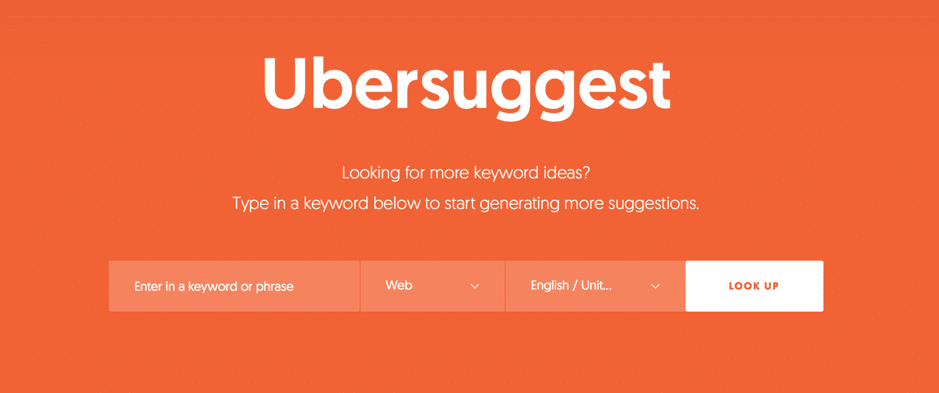 Ubersuggest is a keyword research tool that was recently revamped and relaunched by Neil Patel and coming with some awesome new features and an improved design that makes is super easy and quick to use. Also, it’s completely free to use and you can use it as many times as you want, no sign-in necessary: quick and easy.
All you have to do is enter your keyword or phrase in the search box and you’re good to go – but, more on that in a minute.
You can use it for all of your keyword research needs, such as for SEO purposes, for your PPC campaigns, to get ideas for new content to write for your blog and website, or just so you can get a better understanding of your audience and how they use search engines.
Ubersuggest is a keyword research tool that was recently revamped and relaunched by Neil Patel and coming with some awesome new features and an improved design that makes is super easy and quick to use. Also, it’s completely free to use and you can use it as many times as you want, no sign-in necessary: quick and easy.
All you have to do is enter your keyword or phrase in the search box and you’re good to go – but, more on that in a minute.
You can use it for all of your keyword research needs, such as for SEO purposes, for your PPC campaigns, to get ideas for new content to write for your blog and website, or just so you can get a better understanding of your audience and how they use search engines.
How to use Ubersuggest for keyword research
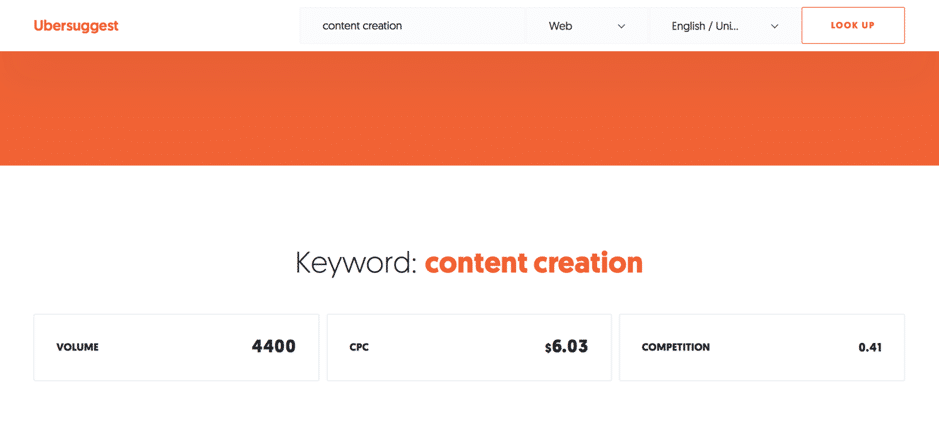
To get started with Ubersuggest, you don’t need to log in or anything – just use the search bar to get started. There are a few different options here to help you narrow down your search: start by putting in the keywords you want to research (I’ll use “content creation” to start with), choose the language and country you want to target, as well as select whether you’re interested in web or image searches, shopping, YouTube, or news: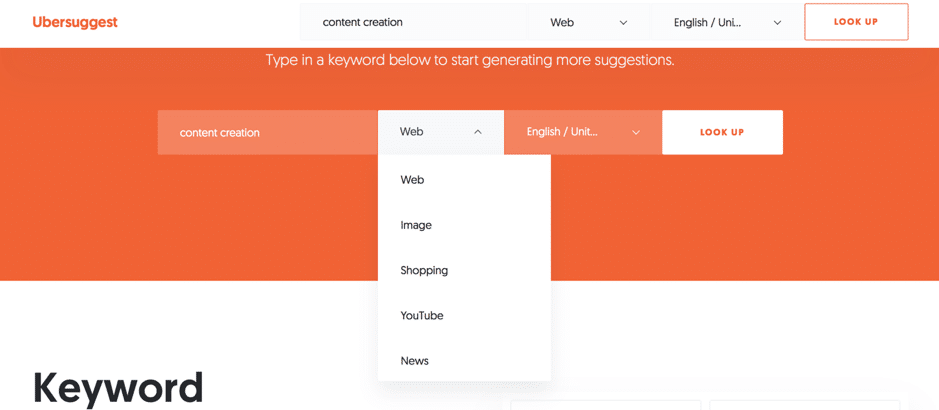 The first thing you’ll see is an overview of the search volume, the cost per click, and competition for the exact keyword or long tail keyword you searched for:
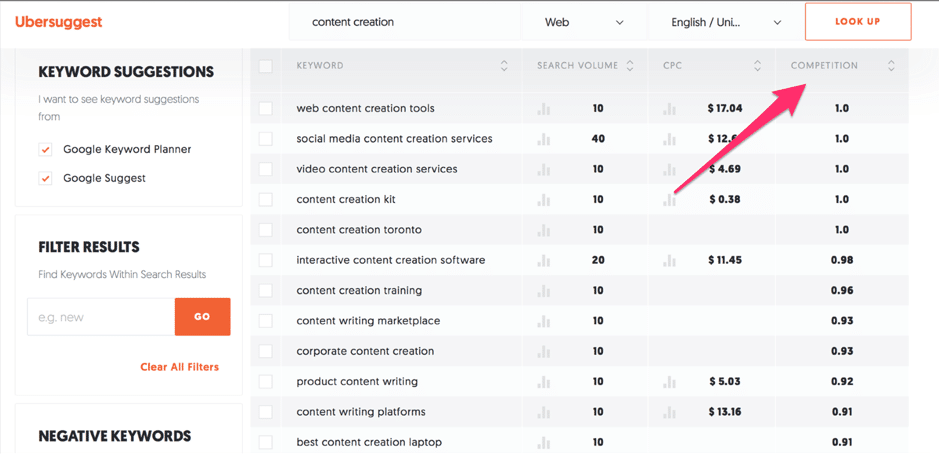
 Following this, you’ll see a list of all the keyword ideas that the tool generated, together with their search volume, and information about CPC and competition:
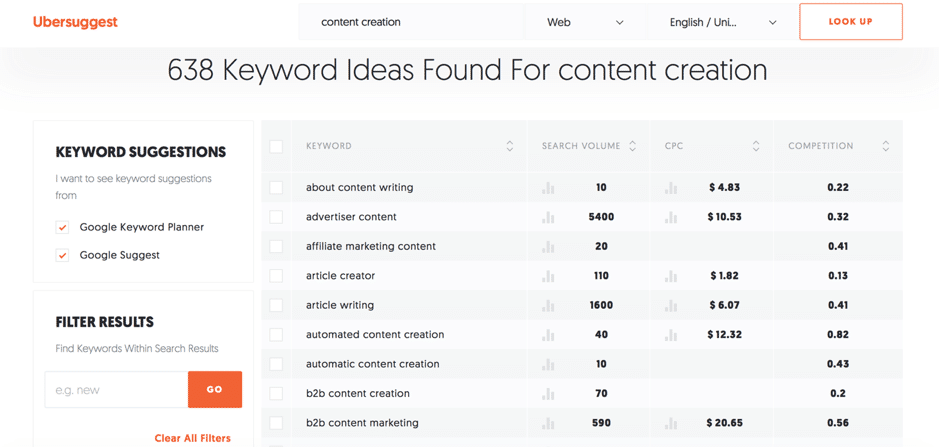 638 ideas are quite a lot to go through so I can further filter my results. For example, I can order the results based on alphabetical order, on search volume, CPC, or competition by clicking on the arrows next to the corresponding column; additionally, I can select whether I want to see suggestions from Google Suggest or from Google Keyword Planner.
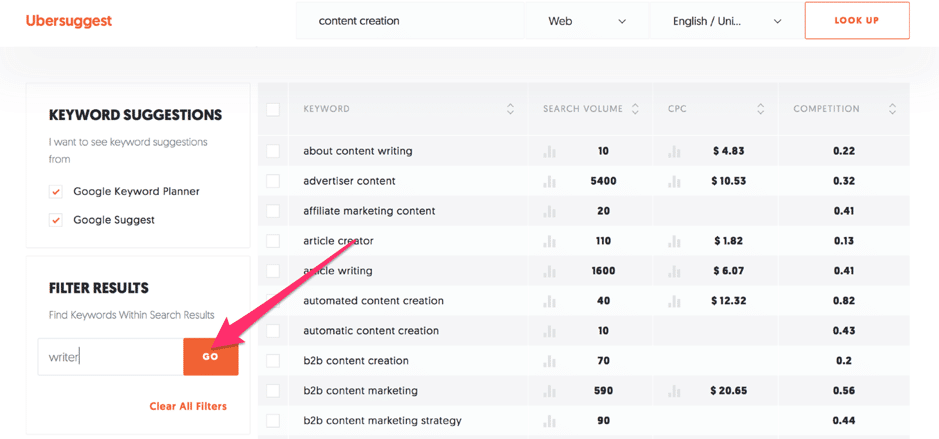
Plus, to further filter my search, I can search for keywords within the results:
638 ideas are quite a lot to go through so I can further filter my results. For example, I can order the results based on alphabetical order, on search volume, CPC, or competition by clicking on the arrows next to the corresponding column; additionally, I can select whether I want to see suggestions from Google Suggest or from Google Keyword Planner.
Plus, to further filter my search, I can search for keywords within the results:
 As well as add any negative keywords that I want to be excluded from my search:
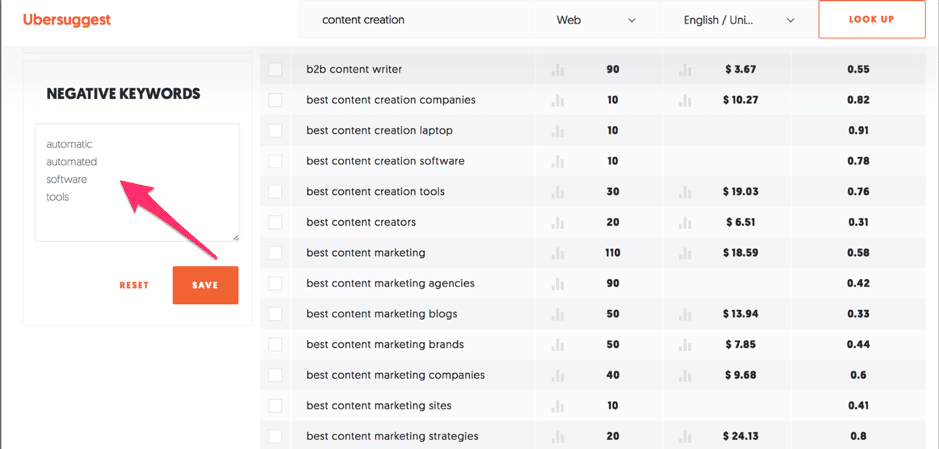 The more you narrow down your search, the easier it is to find the right keywords to target or rank for. And that’s a big reason why I’m loving this tool – it allows you to create very in-depth searches for a free to use tool.
Once you find a keyword that you might be interested in, you can find out more information about its ranking by hovering over the icons under the Search Volume and CPC columns, right next to the numbers for each one:
The more you narrow down your search, the easier it is to find the right keywords to target or rank for. And that’s a big reason why I’m loving this tool – it allows you to create very in-depth searches for a free to use tool.
Once you find a keyword that you might be interested in, you can find out more information about its ranking by hovering over the icons under the Search Volume and CPC columns, right next to the numbers for each one:
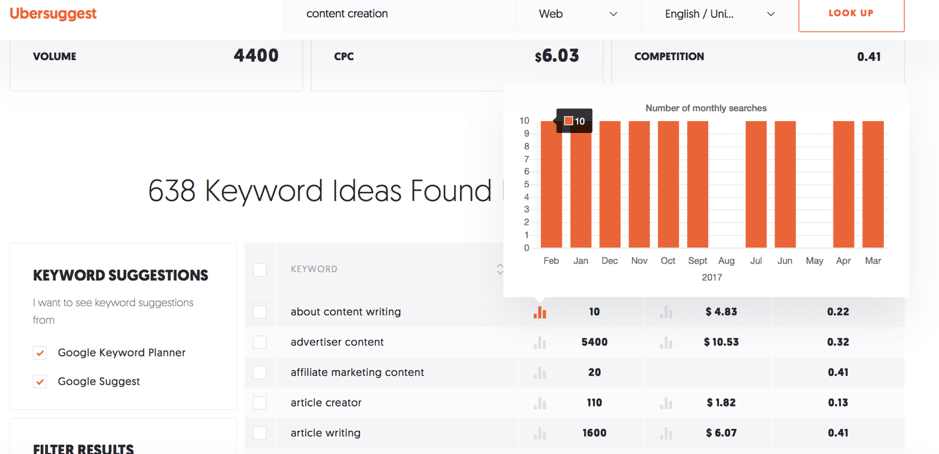 As you can see in the screenshot above, Ubersuggest runs you through the search volume for that keyword for the last 12 months; simply hover over the columns representing each month of the year to see the exact number of searches for that particular month.
Likewise, for CPC, hover over the icon to see a more detailed report for that keyword:
As you can see in the screenshot above, Ubersuggest runs you through the search volume for that keyword for the last 12 months; simply hover over the columns representing each month of the year to see the exact number of searches for that particular month.
Likewise, for CPC, hover over the icon to see a more detailed report for that keyword:
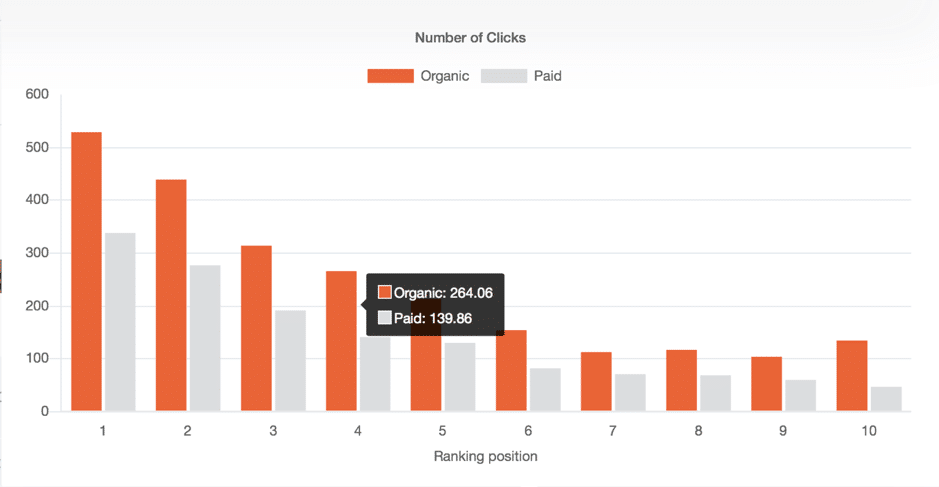 This way, you get to find out the exact number of clicks, both organic and paid, based on the ranking position.
Another important piece of information that you get for each keyword is the competition for it so you can see how difficult it is to rank for that keyword:
This way, you get to find out the exact number of clicks, both organic and paid, based on the ranking position.
Another important piece of information that you get for each keyword is the competition for it so you can see how difficult it is to rank for that keyword:
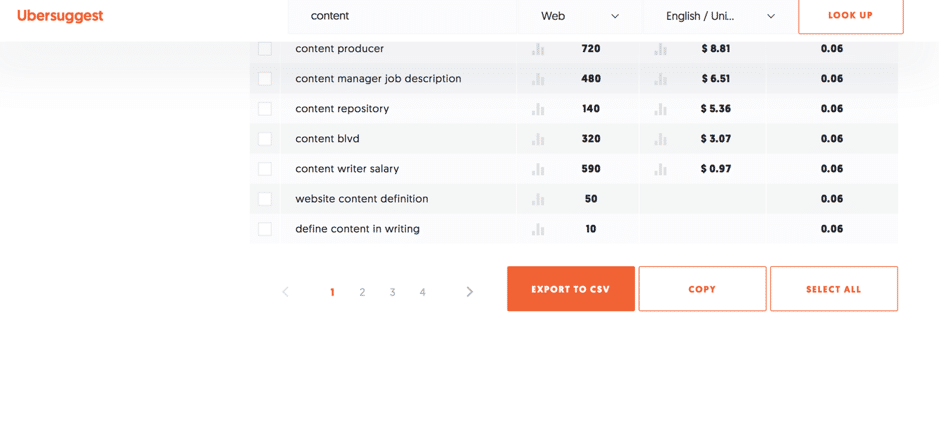
 Once you find keywords that you’re interested in, you can easily select them to copy them or export them to a .csv file to keep evidence of them and further research them:
So, should you try Ubersuggest?
I’m very impressed with the revamping of Ubersuggest, for 2 main reasons: one, for the results and keyword suggestions you get even though it’s a free tool and two, I’m loving the interface and its ease of use. And if you’re a beginner, you’ll likely find this tool to be much easier to use than other free tools, like Google’s Keyword Planner – but, it comes in just as handy if you’re a more experienced user as it As I mentioned earlier, you can use this tool for a variety of different reasons, such as:- Improving your search engine ranking by finding the right long tail keywords to rank for
- Get keyword suggestions to help improve your website’s content as well as to write highly-targeted niche content on your blog
- Get keyword suggestions for your CPC campaigns to get better results and ultimately drive more traffic and make more sales
- Gain a better understanding of your audience and how they search for products and services like the ones you sell
It's worth knowing which keyword research tools are most accurate before you trust the numbers.
Conclusion
If you’re looking a free and easy to use keyword research tool, Ubersuggest is a great option. Not only is it easy and quick to use, but it also generates a lot of results as well as quality suggestions to consider for your campaigns. How important is keyword research to you? What tools do you use to research keywords for SEO, ad campaigns, and content creation? Let me know in the comments section and please do share if you enjoyed the post 🙂I run AI training and workshops for teams, and help businesses with AI enablement and workflow automation, so the busywork runs itself and people get time back. Most of that work is with SaaS marketing teams and small businesses. Here's how we can work together.
Ubersuggest FAQ
What does Ubersuggest do?
Ubersuggest is an all-in-one SEO platform offering keyword research, competitor analysis, backlink tracking, site auditing, and content ideas. It pulls keyword data from Google's own datasets and combines it with competitive intelligence from across the web.
Is Ubersuggest free?
Ubersuggest has a free tier that allows a limited number of searches per day, plus paid plans starting around $12-$30 per month for individuals and scaling up for agencies. The free tier is useful for occasional research; serious SEO work needs a paid plan.
Want AI doing the heavy lifting in your marketing?
I build the systems that handle the boring 80 percent, so you get your week back. Done properly, with the human kept in.
Ubersuggest vs Ahrefs or Semrush — which to choose?
Ubersuggest is the budget-friendly entry point. Ahrefs and Semrush offer significantly deeper data and more reliable rank tracking, but cost 5-10x more. For solo creators and small businesses, Ubersuggest is sufficient. Agencies and serious SEO operators usually graduate to Ahrefs or Semrush.
Related: Best AI Tools for Marketing in 2026: The Honest Stack After 23 Years of Testing
Related reading: The 5 Best Keyword Research Tools for Entrepreneurs and How to Do Keyword Research for Free Without Expensive Tools.



