If you are skim reading
Related: these Facebook Messenger hacks Related reading: Movavi: Make It, Share It, Enjoy It and AI Prompts for Marketing That Work (Not the Copy-Paste Lists Everyone Shares).In this article
Over the years of being a business owner, I’ve tried many different social sharing plugins, some good, some not so good, but there is only one of them that really stood out to me: the Social Warfare plugin for WordPress. In this blog post, I'm going to show you how to get more social shares with the Social Warfare plugin.
When it comes to social sharing buttons, many people don’t realise that a good tool can actually help you get better results; the most common mindset, in my experience, is that so long as people can easily share your content on enough social networks, then, well, that’s good enough. However, I’ve tried out so many social sharing buttons in the years I’ve been in business, both for my website and my clients’ ones, that I know how big of a difference a good tool can really make to the results you’re getting.
Most decent social sharing plugins will get you some results, such as more shares and engagement, as well as more traffic. But a really good tool will bring in even more shares and a considerable amount of traffic to your website.
One of the big issues that I’ve had with other social sharing plugins in the past is the fact that they were rarely updated to keep up with the times. Many of them are free and their respective developers don’t make enough money to have the time and resources to keep the plugin up to date.
But let’s go into what makes the Social Warfare plugin my favourite.
[clickToTweet tweet="How To Get More Social Shares With @warfareplugins via @lilachbullock" quote="How To Get More Social Shares With @warfareplugins via @lilachbullock"]
Twitter
 This is perhaps my favourite thing about the Social Warfare plugin – and the reason why I got it in the first place. Remember how Twitter removed number counts on social sharing buttons? Social Warfare is one of the few plugins that still shows your Twitter shares, as it is integrated with Twitter’s API.
With Social Warfare, you can also add Click-to-tweets in your posts easily, which increases your chances of getting more Twitter shares. You can also customise the text for each click-to-tweet to increase your chances of getting more shares and more engagement. There are several different themes for click-to-tweets that you can experiment with to see which ones attract the most attention and the most clicks.
You can also customise the main Twitter share button if you don’t want it just be the title of your post or page, or if you want to add some hashtags to it to increase your reach and engagement.
The Twitter Cards option is pretty cool as well. You can easily add them to your tweets and you can also choose for them to automatically include your Twitter username.
This is perhaps my favourite thing about the Social Warfare plugin – and the reason why I got it in the first place. Remember how Twitter removed number counts on social sharing buttons? Social Warfare is one of the few plugins that still shows your Twitter shares, as it is integrated with Twitter’s API.
With Social Warfare, you can also add Click-to-tweets in your posts easily, which increases your chances of getting more Twitter shares. You can also customise the text for each click-to-tweet to increase your chances of getting more shares and more engagement. There are several different themes for click-to-tweets that you can experiment with to see which ones attract the most attention and the most clicks.
You can also customise the main Twitter share button if you don’t want it just be the title of your post or page, or if you want to add some hashtags to it to increase your reach and engagement.
The Twitter Cards option is pretty cool as well. You can easily add them to your tweets and you can also choose for them to automatically include your Twitter username.
 The Social Warfare buttons, to put it simply, just look good. They are simple, yet sleek, or as they like to say, “the sexiest social sharing buttons on the market”. What is really great about these buttons, though, is that you can customise them as you want. There are dozens of options for changing the shape, colours and size to make sure your buttons fit the rest of your website’s branding.
To make any changes to the look and feels of your sharing buttons, simply go to Styles and experiment with the different options – with the right design to fit your website, you could be getting more shares and traffic.
The Social Warfare buttons, to put it simply, just look good. They are simple, yet sleek, or as they like to say, “the sexiest social sharing buttons on the market”. What is really great about these buttons, though, is that you can customise them as you want. There are dozens of options for changing the shape, colours and size to make sure your buttons fit the rest of your website’s branding.
To make any changes to the look and feels of your sharing buttons, simply go to Styles and experiment with the different options – with the right design to fit your website, you could be getting more shares and traffic.
 Another cool thing is that they are super fast and load up instantly. I’ve even tested to see if the plugin is slowing down my website (choosing only a few WordPress plugins can be a huge chore!) and I’ve noticed no difference.
You can also sort the buttons in whichever order you prefer simply by dragging and dropping, and you have various options for positioning the buttons by post type.
[clickToTweet tweet="How To Get More Social Shares With @warfareplugins via @lilachbullock" quote="How To Get More Social Shares With @warfareplugins via @lilachbullock"]
There are quite a few different buttons that you can add to your website including the most popular social networks (Facebook, Twitter, Pinterest, Google+ and LinkedIn) as well as other services, such as StumbleUpon, Flipboard, Reddit, WhatsApp and e-mail, among others.
If you only want to show the share numbers after you’ve already reached a decent amount, simply go to Display and scroll down to Share Counts, where you can enter the number of minimum shares that you want your website visitors to be able to see:
Another cool thing is that they are super fast and load up instantly. I’ve even tested to see if the plugin is slowing down my website (choosing only a few WordPress plugins can be a huge chore!) and I’ve noticed no difference.
You can also sort the buttons in whichever order you prefer simply by dragging and dropping, and you have various options for positioning the buttons by post type.
[clickToTweet tweet="How To Get More Social Shares With @warfareplugins via @lilachbullock" quote="How To Get More Social Shares With @warfareplugins via @lilachbullock"]
There are quite a few different buttons that you can add to your website including the most popular social networks (Facebook, Twitter, Pinterest, Google+ and LinkedIn) as well as other services, such as StumbleUpon, Flipboard, Reddit, WhatsApp and e-mail, among others.
If you only want to show the share numbers after you’ve already reached a decent amount, simply go to Display and scroll down to Share Counts, where you can enter the number of minimum shares that you want your website visitors to be able to see:
 The buttons also look great on other devices as well, and they load up just as fast on both mobile phones and tablets, no matter the screen size.
Pinterest
Apart from the regular Pin button, there is also a PinIt button that, when activated for your website, will appear as users hover over an image. The really cool thing here though is that you can add images that are specifically made for Pinterest, complete with a description; this way, if someone pins one of your images, you’ll increase your chances of getting more results than if you only have images that simply wouldn’t look good on Pinterest.
 This is perhaps my favourite thing about the Social Warfare plugin – and the reason why I got it in the first place. Remember how Twitter removed number counts on social sharing buttons? Social Warfare is one of the few plugins that still shows your Twitter shares, as it is integrated with Twitter’s API.
With Social Warfare, you can also add Click-to-tweets in your posts easily, which increases your chances of getting more Twitter shares. You can also customise the text for each click-to-tweet to increase your chances of getting more shares and more engagement. There are several different themes for click-to-tweets that you can experiment with to see which ones attract the most attention and the most clicks.
You can also customise the main Twitter share button if you don’t want it just be the title of your post or page, or if you want to add some hashtags to it to increase your reach and engagement.
The Twitter Cards option is pretty cool as well. You can easily add them to your tweets and you can also choose for them to automatically include your Twitter username.
This is perhaps my favourite thing about the Social Warfare plugin – and the reason why I got it in the first place. Remember how Twitter removed number counts on social sharing buttons? Social Warfare is one of the few plugins that still shows your Twitter shares, as it is integrated with Twitter’s API.
With Social Warfare, you can also add Click-to-tweets in your posts easily, which increases your chances of getting more Twitter shares. You can also customise the text for each click-to-tweet to increase your chances of getting more shares and more engagement. There are several different themes for click-to-tweets that you can experiment with to see which ones attract the most attention and the most clicks.
You can also customise the main Twitter share button if you don’t want it just be the title of your post or page, or if you want to add some hashtags to it to increase your reach and engagement.
The Twitter Cards option is pretty cool as well. You can easily add them to your tweets and you can also choose for them to automatically include your Twitter username.
The buttons
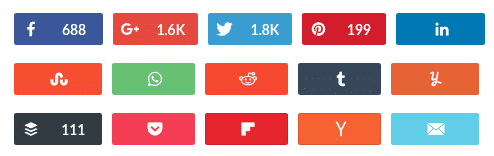 The Social Warfare buttons, to put it simply, just look good. They are simple, yet sleek, or as they like to say, “the sexiest social sharing buttons on the market”. What is really great about these buttons, though, is that you can customise them as you want. There are dozens of options for changing the shape, colours and size to make sure your buttons fit the rest of your website’s branding.
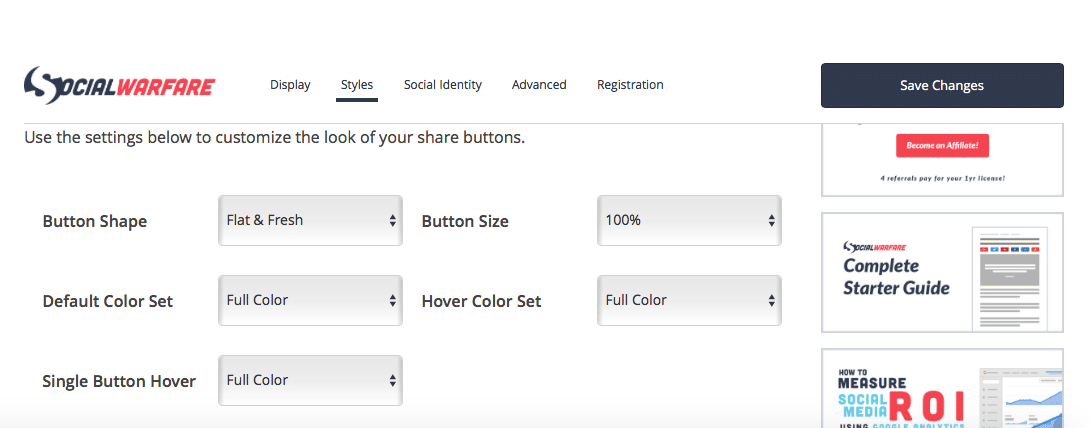
To make any changes to the look and feels of your sharing buttons, simply go to Styles and experiment with the different options – with the right design to fit your website, you could be getting more shares and traffic.
The Social Warfare buttons, to put it simply, just look good. They are simple, yet sleek, or as they like to say, “the sexiest social sharing buttons on the market”. What is really great about these buttons, though, is that you can customise them as you want. There are dozens of options for changing the shape, colours and size to make sure your buttons fit the rest of your website’s branding.
To make any changes to the look and feels of your sharing buttons, simply go to Styles and experiment with the different options – with the right design to fit your website, you could be getting more shares and traffic.
 Another cool thing is that they are super fast and load up instantly. I’ve even tested to see if the plugin is slowing down my website (choosing only a few WordPress plugins can be a huge chore!) and I’ve noticed no difference.
You can also sort the buttons in whichever order you prefer simply by dragging and dropping, and you have various options for positioning the buttons by post type.
[clickToTweet tweet="How To Get More Social Shares With @warfareplugins via @lilachbullock" quote="How To Get More Social Shares With @warfareplugins via @lilachbullock"]
There are quite a few different buttons that you can add to your website including the most popular social networks (Facebook, Twitter, Pinterest, Google+ and LinkedIn) as well as other services, such as StumbleUpon, Flipboard, Reddit, WhatsApp and e-mail, among others.
If you only want to show the share numbers after you’ve already reached a decent amount, simply go to Display and scroll down to Share Counts, where you can enter the number of minimum shares that you want your website visitors to be able to see:
Another cool thing is that they are super fast and load up instantly. I’ve even tested to see if the plugin is slowing down my website (choosing only a few WordPress plugins can be a huge chore!) and I’ve noticed no difference.
You can also sort the buttons in whichever order you prefer simply by dragging and dropping, and you have various options for positioning the buttons by post type.
[clickToTweet tweet="How To Get More Social Shares With @warfareplugins via @lilachbullock" quote="How To Get More Social Shares With @warfareplugins via @lilachbullock"]
There are quite a few different buttons that you can add to your website including the most popular social networks (Facebook, Twitter, Pinterest, Google+ and LinkedIn) as well as other services, such as StumbleUpon, Flipboard, Reddit, WhatsApp and e-mail, among others.
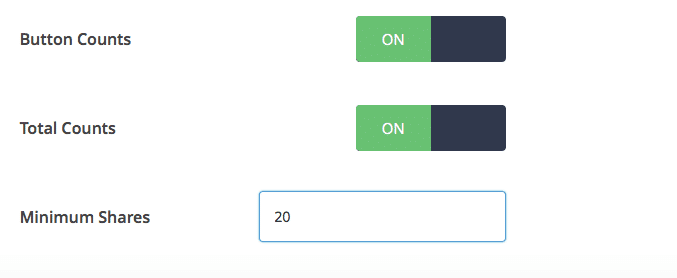
If you only want to show the share numbers after you’ve already reached a decent amount, simply go to Display and scroll down to Share Counts, where you can enter the number of minimum shares that you want your website visitors to be able to see:
 The buttons also look great on other devices as well, and they load up just as fast on both mobile phones and tablets, no matter the screen size.
Link Shortening
The Social Warfare plugin allows you to connect your account to your Bitly account so that your links are automatically shortened. You can also select to activate Button Click Tracking and UTM Link Tracking to get full analytics on the shares you get for each of your posts and pages. [clickToTweet tweet="How To Get More Social Shares With @warfareplugins via @lilachbullock" quote="How To Get More Social Shares With @warfareplugins via @lilachbullock"]Conclusion
Even though there are plenty of decent social sharing tools out there that are free to use, I think it’s well worth it to consider changing to Social Warfare. The prices start at $29 a year for one website, but the beautiful buttons and extra features, such as the Twitter share counts and the Pinterest-specific images, that you won’t find with many other plugins make it a good investment. When used right, this plugin can help you increase the numbers of shares you get and consequently also increase your social media engagement and traffic to your website. What social sharing tool are you using? Why do you prefer it – or, alternatively, why do you want to change it? Let me know in the comments section – I’m always on the lookout for more tools and plugins to try and would love to hear your input.Related: these Facebook Messenger hacks
Related reading: Movavi: Make It, Share It, Enjoy It and AI Prompts for Marketing That Work (Not the Copy-Paste Lists Everyone Shares).
Work with me
Want AI doing the heavy lifting in your marketing?
I build the systems that handle the boring 80 percent, so you get your week back. Done properly, with the human kept in.
Published and maintained by the Lilach Bullock team, covering marketing, AI and business growth.