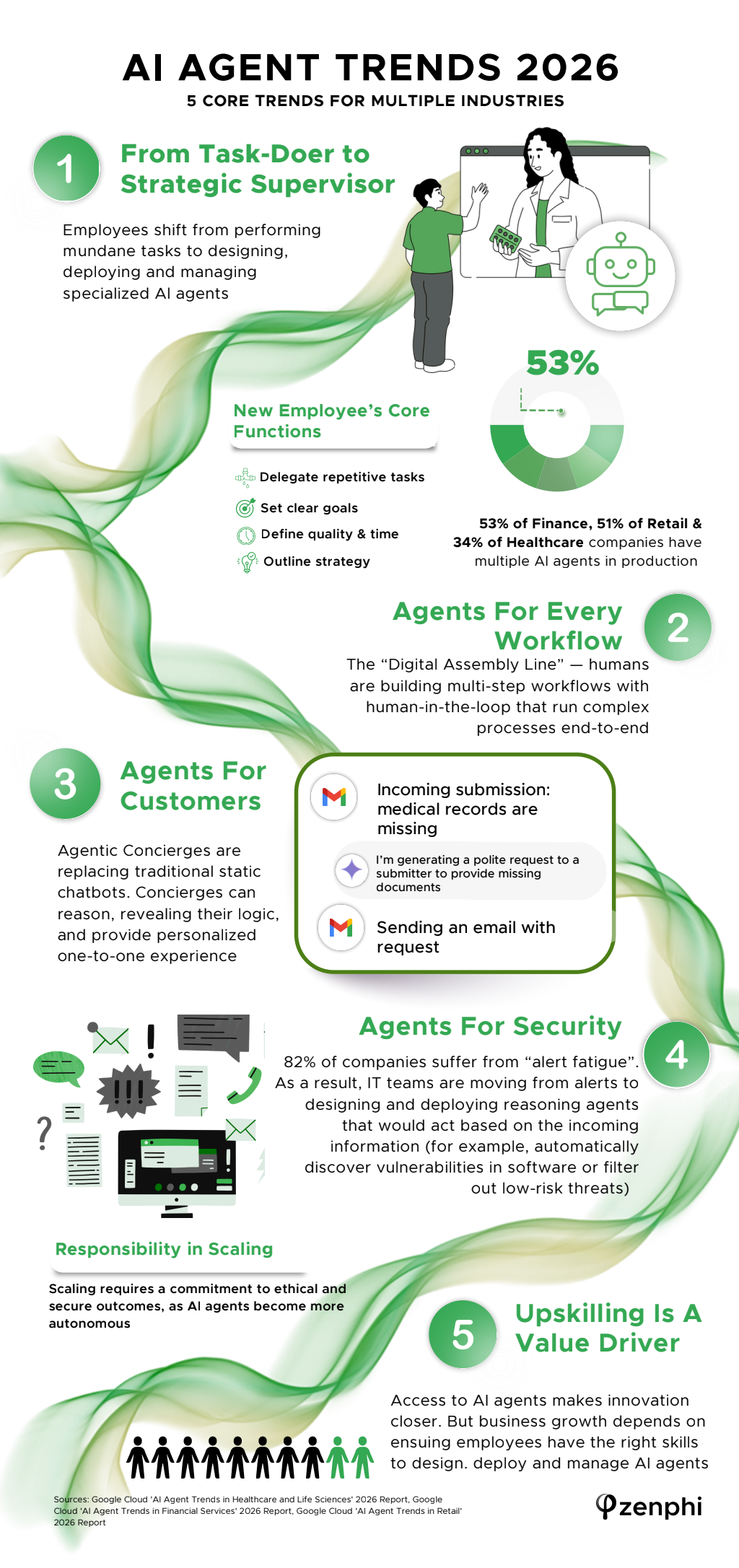
AI agents are moving from simple tools to active participants in business operations. Instead of answering single questions, they now complete tasks, manage workflows, and support decision-making. This shift is changing how teams operate and how work gets done.
From Assistants to Task Managers
Early AI tools focused on providing information. In 2026, AI agents handle full tasks. They can schedule meetings, process requests, and manage routine work without constant input.
This shift reduces the need for manual steps. Teams can focus on higher-value work while agents handle repetitive tasks. The result is faster execution and fewer delays. Task-based agents are becoming a standard part of daily operations.
Integration Across Business Systems
AI agents are no longer limited to one platform. They connect across systems such as customer service, finance, and operations. This allows them to move data and complete actions across departments.
For example, an agent can pull customer data, update records, and trigger follow-up actions in one sequence. This level of integration supports smoother workflows and reduces errors. Many companies are using agents to support document workflow automation, which helps process forms, approvals, and records with less manual effort.
Improved Decision Support
AI agents now provide more than task execution. They also support decision-making. By analyzing data in real time, agents can suggest actions based on patterns and trends.
Managers can use these insights to make faster and more informed choices. This is especially useful in areas like inventory, staffing, and customer engagement. Better data access leads to more confident decisions.
Focus on Oversight and Control
As AI agents take on more responsibility, oversight becomes more important. Businesses need clear rules for how agents operate and what actions they can take.
Human review is still necessary for complex or sensitive tasks. Setting limits and monitoring performance helps maintain control. Clear governance supports safe and effective use of AI agents.
Shift in Workforce Roles
The rise of AI agents is changing job roles. Employees are spending less time on repetitive tasks and more time on planning, analysis, and customer interaction.
This shift requires new skills. Teams need to understand how to work alongside AI systems and manage their output. Training and adaptation are key as roles continue to evolve.
Scaling Operations with Less Friction
Want AI doing the heavy lifting in your marketing?
I build the systems that handle the boring 80 percent, so you get your week back. Done properly, with the human kept in.
AI agents make it easier to scale operations. Businesses can handle higher workloads without adding the same level of staffing. This supports growth while controlling costs.
Automation also reduces delays caused by manual processes. Tasks move faster, and teams can respond more quickly to changes. Scalability is becoming one of the main drivers behind AI adoption.
AI agent trends in 2026 show a clear shift toward deeper integration and broader responsibility. These systems are changing how work flows through organizations. With the right balance of automation and oversight, businesses can improve efficiency and support long-term growth. Look over the accompanying resource for more information.
Related reading
- Five Benefits Of Using Automation In Healthcare
- 3 Automation Tips Small Business Can Implement Today
- Harnessing the Power of AI: Transforming Operations in the Digital Age
- Revolutionizing Travel and Hospitality with Artificial Intelligence
- how to get cited by AI
Related: AI On The Rise: Where Today’s Industries Are Putting Their Money
Bottom line: AI agents go beyond answering questions, they complete multi-step tasks, make decisions within set boundaries, and connect different business systems together. In 2026, businesses that treat these agents as digital team members, not just tools, will move faster than competitors still relying on basic chatbots.
What Happened When I Set An AI Agent Loose On My Own Lead Follow Up
Last quarter I stopped talking about agents in theory and built one for my own business, using Clay for data enrichment and a simple workflow in Make that triggered a follow up sequence whenever a lead downloaded a lead magnet and did not book a call within 48 hours. The agent checked the CRM, pulled the person's LinkedIn activity, wrote a follow up email referencing something specific they had posted, and queued it for my approval before sending. It was not fully autonomous by choice, I wanted a human check on tone for the first month.
The numbers surprised me. Reply rate on those follow ups went from around 4 percent, which is what my generic drip sequence had been getting for over a year, to 17 percent in the first six weeks. That is not because the AI writes better prose than I do, it is because it does the research I never had time to do for every single lead. I was writing 6 to 8 personalised follow ups a week before, the agent handled 60 to 70 a week without me touching most of them after the first month once I trusted the output.
Here is the part most articles skip: it broke twice in a way that mattered. Once it referenced a LinkedIn post that was a repost with someone else's opinion, and sent an email complimenting the lead on an idea that was not theirs. Small thing, but it landed badly with that one contact. The second time it queued an email to someone who had already replied "not interested" three weeks earlier, because the CRM field for that status had not synced. Neither failure was the AI being unintelligent, both were integration gaps between tools that nobody had stress tested.
My honest take after four months running this: agents earn their keep on volume and research, not on judgment calls. I still write anything going to a client I have known for years, and I still review anything touching a complaint or a renewal conversation. If you are setting one up, budget a full week just for testing edge cases in your CRM data before you let it send anything live, that week is where the real cost of "automation" shows up, not in the setup itself.
Frequently asked questions
What is the difference between a chatbot and an AI agent?
A chatbot responds to prompts within a single conversation. An AI agent can plan steps, use tools, pull data from multiple sources, and carry out tasks with minimal human input, often completing entire workflows rather than just answering questions.
Which business tasks are AI agents best suited for right now?
Repetitive, rule-based processes with clear steps work best, think scheduling, data entry, lead qualification, customer follow-ups, and reporting. These are areas where agents can operate with less oversight while still delivering measurable time savings.
Do small businesses need AI agents in 2026?
Not every business needs a complex agent setup, but ignoring the shift entirely carries risk. Even a single well-configured agent handling customer inquiries or content scheduling can free up hours each week for small teams with limited staff.
What is the biggest risk in adopting AI agents too quickly?
Handing over decisions without proper guardrails. Agents need clear rules, monitoring, and fallback options to humans, otherwise mistakes can scale just as fast as the benefits do.
Related reading: GEO for Real Estate Agents and How Real Estate Agents Can Use AI for Appointment Scheduling.