- This week at a glance
- 1. Customers can now order from Shopify stores through ChatGPT
- 2. Shopify adds payment records for disputed AI orders
- 3. UK shoppers can now ask an assistant to compare products
- 4. New York tells shoppers what to check before letting AI place an order
- 5. GPT-6.2 comes to the regular ChatGPT window
- 6. Claude can turn a calculator you have built into a desktop app
- 7. Claude can transfer files to connected apps
- 8. Gmail gives connected assistants access to customer threads
- 9. Google Calendar lets an assistant suggest and manage appointments
- 10. Connected assistants can find agreements in Google Chat
- 11. UK firms report wider AI use, but many still use it job by job
- 12. The UK Intellectual Property Office explains where people make the decision
- 13. French small businesses say reliability is a concern
- 14. OpenAI clarifies the shared ChatGPT and Codex allowance
- How to compare two supplier quotes in ChatGPT
- Which model fits the job: Sol, Astra or Claude Fable?
- How to check whether the assistant saved time on the quote
- Questions about this week's AI news
Reporting week: 22 to 28 November 2026
In this week's Weekly AI Digest, Shopify has opened up checkout to ChatGPT shoppers, OpenAI has brought GPT-6.2 to regular chats, and Google has made it easier to use an AI assistant with Gmail and Calendar. New research from the British Chambers of Commerce also looks at what happens after a business starts using AI. Almost half of the firms using it said they still used it only as the occasion arose.
First up is Shopify. If you have a shop, customers may already be able to place an order through ChatGPT. Here's where to check, how those orders reach you and what happens if a customer queries the payment.
This week at a glance
- Selling online: Where a ChatGPT order lands, what happens if the payment is disputed and what shoppers are being advised to check.
- Using AI at work: How UK firms are using it, what French small businesses want to be able to trust and who takes responsibility for a decision.
- Preparing a quote: The update to regular ChatGPT, two supplier quotes to compare and which model fits the job.
- Handling a customer booking: Find the final email, allow for travel and check who confirmed the date.
1. Customers can now order from Shopify stores through ChatGPT
On 23 November, Shopify made ChatGPT checkout available to eligible stores. A shopper can ask an assistant to buy something for them.
What this means for your business. The purchase goes through your Shopify checkout and appears in your admin alongside your other orders. Your team packs and sends it as usual. On eligible stores with automatic channel management, checkout may already be on. An earlier opt-out still applies.
How it can help you. Open Agentic Storefronts > ChatGPT to check your settings. Then look at a product with several options. If the photo shows a gift hamper but the customer selects a refill, does the order confirmation say "Refill, jars only"? Clear wording helps the shopper and the person packing the parcel. More product and checkout checks.
2. Shopify adds payment records for disputed AI orders
25 November. Shopify added a payment authorisation record to its chargeback response for orders placed by an assistant. It includes the spending limit the customer set, the approval recorded at checkout and the assistant's name when known. Shopify adds this automatically.
What this means for your business. If someone questions whether they authorised the payment, your team can see what approval was recorded. If the customer says the wrong item arrived, the product description and your fulfilment records are still the relevant evidence.
How it can help you. Check that whoever handles disputes can also receive the alert. Shopify updated staff notifications on 25 November. The person needs permission to manage disputes and notifications switched on under Settings > Notifications > Staff notifications > Order dispute updates.
3. UK shoppers can now ask an assistant to compare products
On 23 November, Meta introduced its shopping assistant to adults in the UK. It's available on the web, in WhatsApp and on iOS and Android. Customers can ask it to look for products across websites and connected services. The assistant asks for their approval before making a purchase.
What this means for your business. Someone looking for a kettle to fit under a kitchen shelf might need its height with the lid open. The manufacturer's description may only give the height with the lid closed. A shop that includes both measurements can answer the question even after it's closed.
How it can help you. Read the last few questions customers asked before buying. Add one missing answer beside the product it applies to. For more on this, here's how to find useful language in customer enquiries and how to measure whether AI visibility brings in business.
4. New York tells shoppers what to check before letting AI place an order
24 November. The New York Attorney General issued holiday shopping advice that deals specifically with purchases made through AI. The office advises shoppers to check which accounts an assistant can access, set spending limits and purchase rules, and require approval before a purchase where that option is available. The advice also asks shoppers to verify the seller's website and check the full charges. New York Attorney General's consumer alert.
What this means for your business. The customer may first hear about you in a conversation where they never saw your homepage. Now they're being asked to approve an order from a shop they may barely recognise. A recognisable seller name, a clear delivery charge and a working contact number give them somewhere to check the details before they pay. If the shop trades under one name and the confirmation email comes from another, explain the connection on the order page.
How it can help you. Take one ordinary order through to the last screen before payment on a phone. Hand the phone to somebody who hasn't helped build the shop. Can they tell you which business is taking the payment, how many items are in the order, the full amount and who to contact if the parcel goes missing? Let them find those answers without help. The first thing you have to explain is a good candidate for a change on the page.
5. GPT-6.2 comes to the regular ChatGPT window
On 23 November, OpenAI began rolling out a chat-tuned version of GPT-6.2 Sol to Plus, Pro, Business and Enterprise. Enterprise access depends on the account's admin settings. Last week's release brought Sol and Astra to Work and Codex. This week's update is for the Chat tab where you ask a question or upload a file.
What this means for your business. One improvement is its ability to read information in images. OpenAI reported a score of 71.7% for GPT-6.2 on its own image-understanding test, compared with 47.4% for GPT-6.
How it can help you. Try a photographed supplier price list. Ask ChatGPT to show the line it used for each charge so you can check the figures against the original. Below you'll find two supplier quotes you can copy and a comparison of Sol, Astra and Claude Fable.
6. Claude can turn a calculator you have built into a desktop app
On 24 November, Anthropic started rolling out Install as app for eligible Claude artifacts on Mac and Windows. An artifact is something you make in Claude, such as an interactive calculator. You can now open it from its own desktop icon. You'll need an internet connection and a signed-in Claude account.
What this means for your business. This could be handy in a shop that prepares quotes at the counter. A framer, for example, might charge a setup fee once per order, a printing charge for each copy and a rush fee on printing. The person covering the counter can open the calculator, enter the quantity and see the charges without searching through the conversation where it was built.
How it can help you. To try it, open the artifact's Share menu and look for Install as app. Use a completed standard order and a rush order to check the totals. Keep those two receipts for later. Changes to the original artifact can update the desktop app, so they'll give you a quick way to check a new price or formula. If you prefer to work in a spreadsheet, the 15 November issue includes a Claude Sheets example.
7. Claude can transfer files to connected apps
24 November. Claude began rolling out file transfers with supported connected apps. It can send a file to an app you've connected or save a file the app offers. The beta covers Pro, Max and Ultra, and can be enabled by an owner on Team and Enterprise.
What this means for your business. Once a client approves a proof, you can hand that version to a supported app directly from Claude.
How it can help you. Give Claude the approved file and destination, then open the copy from that destination to check the version the client will receive.
8. Gmail gives connected assistants access to customer threads
24 November. Google made its Gmail connection generally available. Once configured, an assistant can search a thread and prepare a reply. The rollout can take up to ten days.
What this means for your business. A wedding enquiry starts with 40 table arrangements, then the couple cuts the order to 32 and agrees that the venue will supply the vases. A draft based on the whole thread can pick up both changes. It also gives the florist somewhere to look if the final price seems high: the original request was for eight more arrangements and different supplies.
How it can help you. Ask for the final quantity and who supplies what, with the email that confirms each detail. You can then check the draft against the customer's latest instructions. The earlier Gemini in Gmail update covers help available inside Gmail itself.
9. Google Calendar lets an assistant suggest and manage appointments
24 November. Google made its Calendar connection generally available. A configured assistant can find appointments, suggest times, manage events and respond to invitations. Allow up to ten days for rollout.
What this means for your business. Someone finishing a job at 11 with another at 12.30 has a 90-minute gap. A one-hour visit with a half-hour drive at either end needs two hours.
How it can help you. Give the assistant the previous and next addresses before it offers a slot. Businesses that take bookings by phone can use the same example to check how travel is handled there.
10. Connected assistants can find agreements in Google Chat
24 November. Google made its Chat connection generally available. A configured assistant can find a conversation and link to the message where a date was agreed. Sending a message requires a configured Chat app.
What this means for your business. When the driver, venue and customer have each been asked about Friday, you can trace who agreed to which part of the booking.
How it can help you. Ask for the name of the person who confirmed the date and a link to their reply. Open it before sending the customer a booking confirmation.
Want AI doing the heavy lifting in your marketing?
I build the systems that handle the boring 80 percent, so you get your week back. Done properly, with the human kept in.
11. UK firms report wider AI use, but many still use it job by job
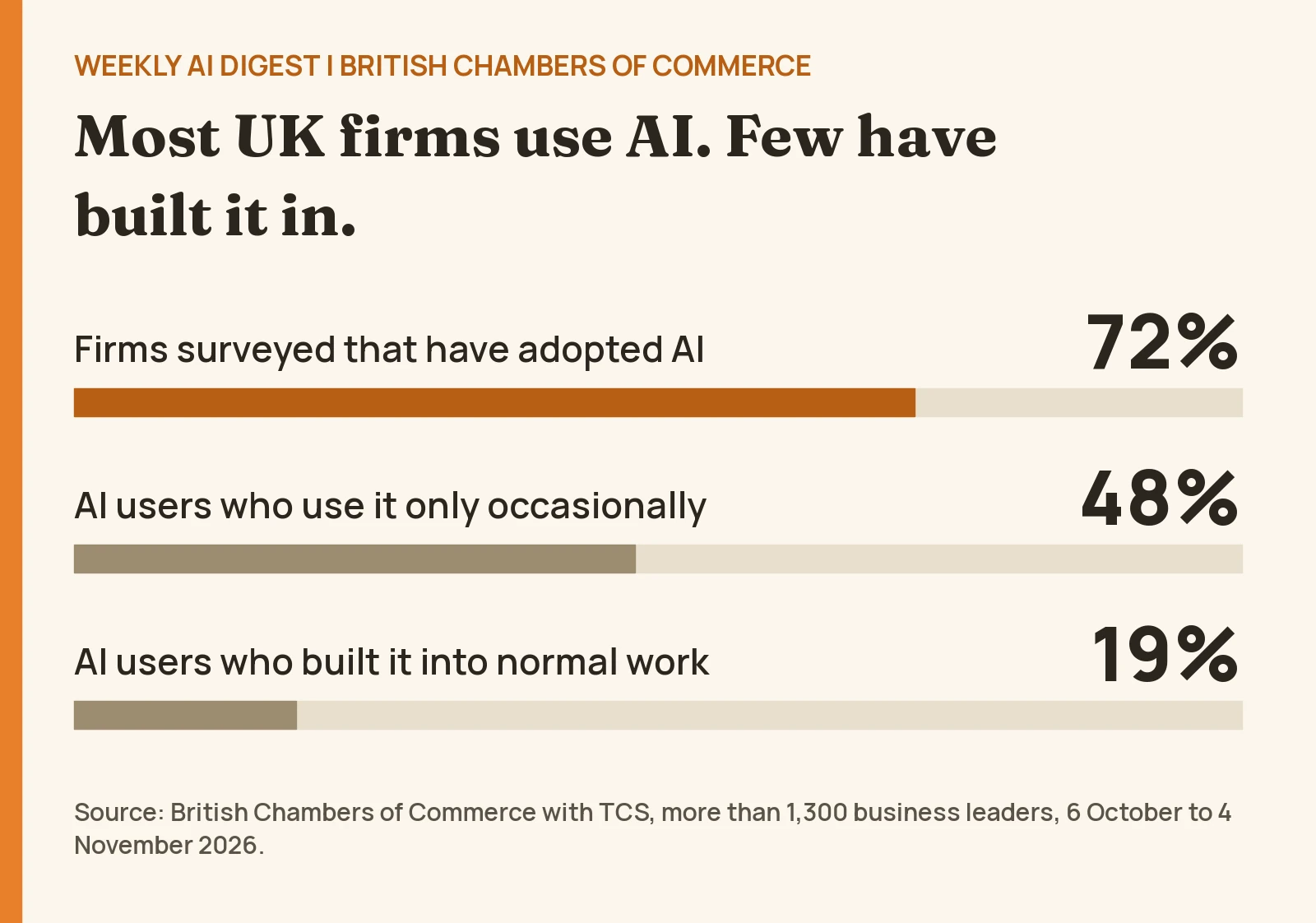
24 November. The British Chambers of Commerce published research conducted with TCS. More than 1,300 business leaders responded between 6 October and 4 November, and 87% of the responding firms were small or medium-sized. Across the respondents, 72% said they had adopted AI. Among firms already using it, 48% described their use as occasional or ad hoc, while 19% had built it into their normal working processes. Read the British Chambers of Commerce findings.
What this means for your business. Two owners can both tick yes to using AI and have very different working weeks. One opens a chat when a difficult email lands. The other has arranged for the person preparing a quote to start with the customer's original request, the agreed prices and an approved example every time. Both uses have value. The second gives the owner something they can check when the usual person is away.
How it can help you. Find a job you did at least twice recently. A good one is passing a new order to the person who delivers it. Pull up a finished order and list the details that person needed: exactly what was bought, when it was due, where it was going and any promise that changed after the quote. Ask a colleague to prepare the handover for a different completed order using those same headings. If you work alone, use a fresh conversation and keep the final handover out of sight.
12. The UK Intellectual Property Office explains where people make the decision
24 November. The UK Intellectual Property Office published a statement explaining how it uses AI. Its examples include searching, drafting, summarising information and helping people examine material. It says its staff retain responsibility for decisions requiring professional judgement. It also says customers will get more detail when AI materially affects a service they use. This is a description of the office's own practice. UK Intellectual Property Office statement.
What this means for your business. A customer asking why a refund was refused needs somebody who can review the decision. If an assistant summarised the order history, you can explain that quite simply. The harder question is whether the person signing the reply has seen the customer's evidence and has the authority to change the outcome.
How it can help you. Take the last request for an exception that came into your business. Perhaps a customer missed the return date because the replacement parcel arrived late. On one side of a sheet, put the facts an assistant could collect: purchase date, promised arrival, delivery record and the relevant terms. On the other, put the decision somebody has to make: whether to accept the return and whether to refund postage. Give the decision to a named role in your business. Make sure the person who speaks to the customer knows how to reach them.
If customers ask how you use AI, describe the job plainly. For example, a shop that works this way could say, "We use AI to put the order history together. Our returns manager reads your message and decides whether we can make an exception." Only use wording that reflects what your business does.
13. French small businesses say reliability is a concern
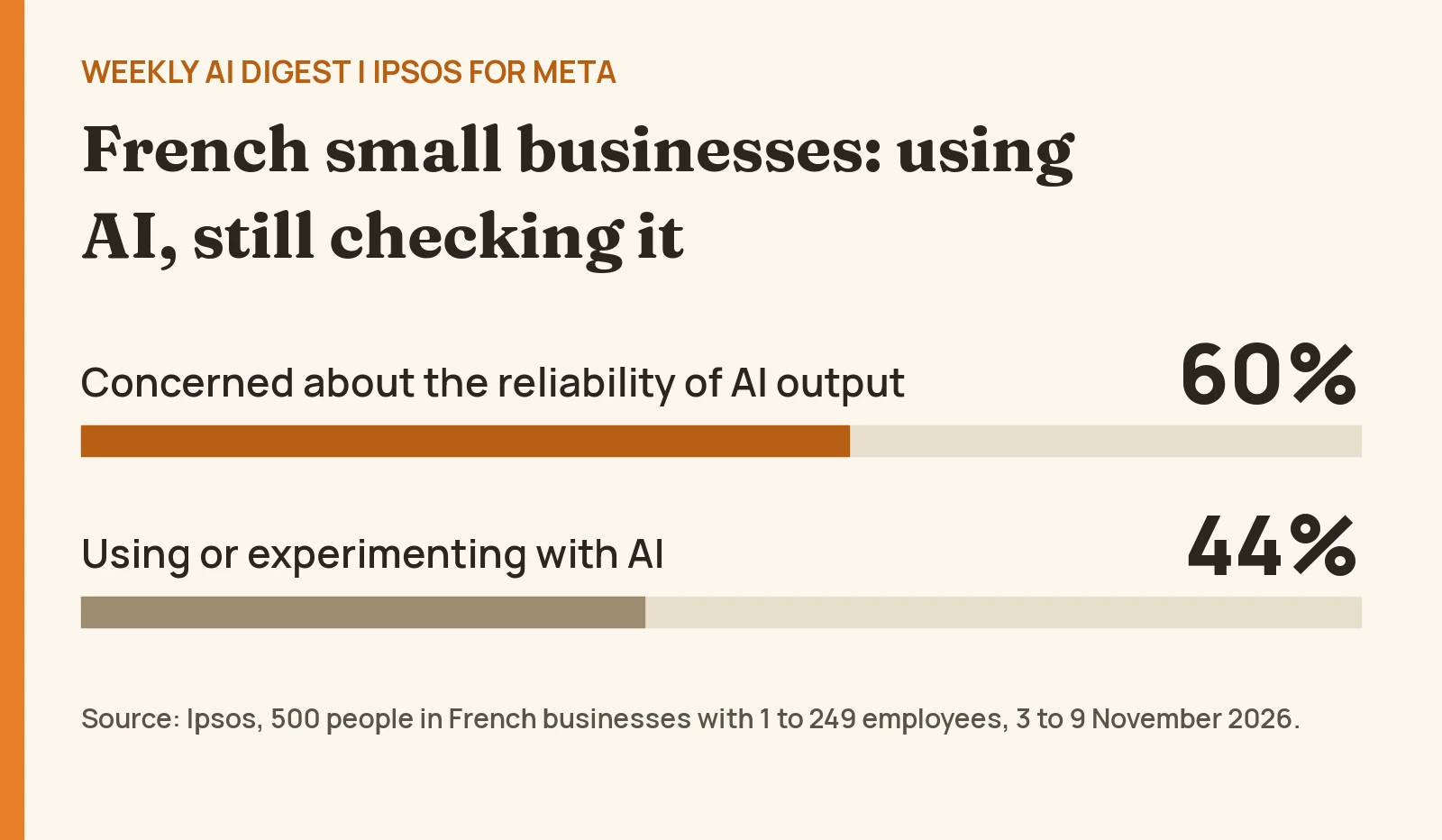
27 November. Ipsos published a study commissioned by Meta of 500 people working in French businesses with one to 249 employees. The survey ran from 3 to 9 November. Among respondents, 44% said their business was using or experimenting with AI, and 60% expressed concern about the reliability of its output. Those percentages answer different questions. A business can use AI regularly and still want a person to check its work. Ipsos research and methodology.
What this means for your business. You can agree that an assistant saves time and still decide some errors cost more than others. A slightly long product description takes a minute to shorten. A quote that gives away installation on every order can be expensive by the time somebody spots it. That makes the job a better starting point for deciding how much checking to do than a general opinion about how accurate AI is.
How it can help you. Pick three orders you've already fulfilled. Use an ordinary one, one with a customer amendment and one where information was missing when the order came in. Remove personal details and keep the final answers to one side. Ask for the information a member of staff would need before confirming each order. On the incomplete one, pay particular attention to what the assistant does with the gap. If the message says the customer might collect, the collection date should stay open.
Mark each answer with the consequence of sending it as written. Would somebody just tidy the wording? Would you have to contact the customer again? Would the shop be committed to a price or date nobody agreed to? You end up with a short list of things the reviewer needs to check on the next order. For a small team, that is easier to use than asking everybody to check everything.
14. OpenAI clarifies the shared ChatGPT and Codex allowance
28 November. OpenAI Support confirmed that Instant chat is exempt from the combined ChatGPT and Codex allowance. Some customers already have combined usage. A wider rollout for Plus, Pro and Business is planned for December.
What this means for your business. You can continue using Instant chat for eligible everyday work without drawing on that shared allowance. A warning about the length of one conversation is separate.
How it can help you. Open Settings > Usage for your remaining allowance and reset time. If a particular conversation has reached its length limit, branch from an earlier reply or start a fresh chat with the latest brief.
How to compare two supplier quotes in ChatGPT
Here's a short example you can copy. You're organising a Thursday lunch and need 80 printed menus at the venue by 10am. Both printers have quoted in US dollars before tax.
I need 80 menus delivered to the venue by 10am on Thursday. Printer A charges $1.80 per menu and a $24 setup fee. Delivery is included. They say, "We can deliver to the venue by 9am Thursday." Printer B charges $2.05 per menu, with no setup fee and $8 delivery per order. They say, "We can dispatch on Wednesday." Calculate both totals. Which printer has confirmed it can meet the deadline? Quote the wording you used and draft any follow-up question I need to ask.
What the answer should show: Printer A costs $168 and has confirmed delivery an hour before the deadline. Printer B costs $172 and has given a dispatch date. The outstanding question for B is, "Can you confirm the menus will arrive at the venue by 10am on Thursday?"
Now change one detail in the same chat: "We only need 40 menus. Please update the totals and the recommendation."
Printer A now costs $96, including setup. Printer B costs $90, including delivery. B has become the cheaper option, so there's a reason to follow up. Until B confirms when the order will arrive, A is the only printer that meets the deadline in writing.
You can do this with two quotes you've already received. Include the quantity, delivery address and any extras that affect the decision. If one supplier agreed to free delivery in a later email, include that reply too. It makes a useful check on whether the assistant picked up the latest terms.
Which model fits the job: Sol, Astra or Claude Fable?
| Job | Model to try | What to give it |
|---|---|---|
| Compare two quotes and draft a question for a supplier | GPT-6.2 Sol in Chat | Both quotes, your deadline and the quantity you need. Ask for the total and the wording behind each delivery promise. |
| Update a budget, purchase list and client proposal after a change | GPT-6.2 Astra in Work | The three files and the new guest count. Check the revised quantity and total in each file. |
| Work out what several people agreed in a long email exchange | Claude Fable 5.2 | The full conversation. Ask it to list each commitment with the sender, date and original wording. |
These are suggestions for different kinds of work. If you're deciding which model to use regularly, take a finished job and give each one the same material, keeping the approved version for comparison. Count the figures, dates and promises that need correcting. The three-model guide from 22 November has a second example. There's also a separate comparison for marketing work.
How to check whether the assistant saved time on the quote
After you've tried the printer example, try the same exercise on one of your own repeat purchases. Before opening the chat, write down the part that usually holds up the decision. It might be a delivery date buried in an attachment, a setup charge the second supplier includes in the unit price, or a minimum order that only appears at checkout. Pick something you can check afterwards.
Keep the supplier's original wording beside the summary. For each charge, you want to be able to point to the amount, the quantity it applies to and whether it's charged once or on every item. If a supplier offers free delivery above a minimum order, compare the basket on both sides of that threshold. A larger order can have a lower delivery charge while still costing you more in total. Which one suits you depends on how many items you can use.
Time the whole job from opening the quotes to having a recommendation you would send. Include the minutes spent finding the right attachment, checking the arithmetic and composing the question for the supplier. If the summary saves time but the final figures still need careful checking, use it for the summary. That's a perfectly useful result. On the next job you'll know where it helps and how much time the work still needs from you.
Questions about this week's AI news
Where do I fulfil an order placed through ChatGPT?
In Shopify admin. The order uses your Shopify checkout, and your team handles fulfilment as usual.
Can I turn off ChatGPT checkout for my shop?
Yes. Open the ChatGPT settings in Agentic Storefronts. The choice is specific to that channel, and previous opt-outs still apply.
What does Shopify provide if a customer disputes an assistant's purchase?
It adds the recorded payment approval, the customer's spending limit and the assistant's name when known. The bank decides the dispute.
Does the UK shopping assistant ask before buying something?
Yes. Meta says the customer is asked to approve the purchase. In the UK, the rollout is for adults.
What should I include in a spending limit for an AI purchase?
Give a maximum for the whole order, including delivery and any applicable taxes. State the quantity separately so the assistant can distinguish a limit for one item from a limit for the basket. If a charge is unknown, ask for a total before approving payment.
What would be a useful first task for a team that's only tried AI occasionally?
Start with a recurring job that has an agreed finish, such as preparing an order handover. Take a completed example and hide the approved answer. Can somebody else use the same instructions to recover the right quantity, address and promised date? Record whichever detail they had to look up elsewhere.
Which ChatGPT plans are included in the new Sol rollout?
OpenAI listed Plus, Pro, Business and Enterprise for the regular Chat tab. Enterprise availability depends on workspace settings.
Will an installed Claude artifact open offline?
Anthropic says you need to be online and signed in to Claude. If staff need prices during an outage, a locally saved copy of the approved rates is useful.
Can a colleague change the desktop app by editing the original artifact?
Yes, edits to the underlying artifact can flow through to the installed app. Test the current version against a completed job after a change.
Can a Gmail assistant prepare a reply for me to review?
Yes. Drafting is one of the supported jobs in the new Gmail connection. For a customer order, compare the draft with the latest message that changed the quantity, price or delivery date.
For more from the series, the 22 November Digest includes a worked invoice example, the 15 November issue covers claiming your business in ChatGPT, and the 8 November issue looks at AI tools for product images and video. Get the Weekly AI Digest by email.
Lilach