Last updated: May 2026. Originally written for 2024, this guide has been refreshed for the current landscape.
Managing a dispersed team creates new challenges when it comes to communication. A lack of face time with supervisors and colleagues changes the work environment. It’s tough to read nonverbal cues that add to interactions and many mediums don’t provide real-time interaction.
There’s also a fine line to walk. Communication and collaboration are crucial for managing remote teams effectively, but too much message noise can be distracting and cause important information to get overlooked. Still, communication is vital.
Tips for Effective Communication With Remote Teams
Let’s explore some of the key ways you can communicate effectively with your team, starting with making sure you pick the right medium for what you’re trying to discuss.
Use the Right Medium
The media richness theory (MRT) was first unveiled in 1982, far before video calls, conferencing, and instant messaging became workplace staples. We’ve updated it a bit to include modern tech.
Think of communication modes as rungs on a ladder. At the bottom rung, you are sharing information but it’s a one-way street. You have to activate another method to provide any interaction. As you go up the ladder, your medium becomes richer, allowing greater interaction. In the top tiers, you can pick up on verbal and non-verbal cues, navigating a conversation for greater impact.
While each medium has its use, as you go higher on the ladder, you improve the richness of your interaction.
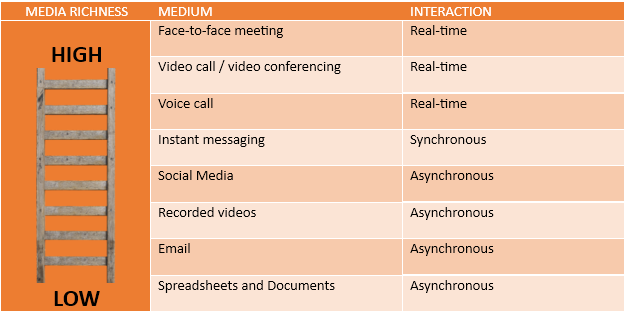
However, each medium also has its limitations. For example, face-to-face meetings aren’t practical for remote teams. It’s difficult to have an effective voice or video call with hundreds or thousands of employees at the same time. Instant messaging and email can reach significant numbers of people instantly, but email doesn’t allow for synchronous interaction.
Choose your team communication apps carefully to ensure they allow you to reach the audience you want in the most effective manner.
Embrace Asynchronous Communication
Not everyone may be available at the same time either. Asynchronous communication tools allow team members to communicate when they are available while providing access to the information they need. Modern communication apps allow organizing groups, teams, and projects to make it easier to find relevant information when needed.
For example, say your PR department is using an AI text generator like ChatGPT and undetectable AI like StealthGPT to produce a series of blog posts and needs the content team to check that the content is correct and unique content. The problem is that these team are separated by the Atlantic ocean. Asynchronous communication allows the team in Europe to provide the answer via a digital communication channel while the team in NY is asleep.
Make Time for Formal and Informal Communication
Set regular meeting schedules for teams, groups, and individuals. This puts time on the calendar to make sure you keep projects on track and the lines of communication open. This also helps keep team members accountable as they know regular reporting is expected.
At the same time, informal check-ins are crucial.
When everyone is sitting in the office, it’s easy for you to take their temperature and observe their moods and whether they are feeling overwhelmed. You might see that someone is stressed out or leaving late every day. You can’t do that when someone is working remotely if you’re not connecting occasionally.
Encourage Open Communication
One drawback of remote work is that you can get stuck at times waiting for the information you need to move forward. By encouraging open communication, you can avoid this delay. If you need focused time where you can’t be bothered, you can set schedules within communication apps.
One effective technique is to set consistent times when you are always available for impromptu meetings.
Want AI doing the heavy lifting in your marketing?
I build the systems that handle the boring 80 percent, so you get your week back. Done properly, with the human kept in.
Make Sure You Have the Right Tools
You will need to invest in the right project management software and communication apps to manage — and empower — communication. Team communication apps like Connecteam allow businesses to create company wide notifications, group and 1:1 chat experiences, employee surveys and company directories for easy connection across departments. The goal here is to streamline communication no matter if an employee is in the office, working from home or in the field. They can connect with and easily communicate with the appropriate person in the company to get questions answered and problems solved.
Train Team Leads and Managers
Managing remote teams can be difficult for many managers, supervisors, and team leaders. Make sure they receive the proper training in effective communication for remote teams. Leaders also must be comfortable using communication tools and apps. If they struggle, it can undermine confidence and hurt interactions.
Managers must also understand when to use which type of medium. For example, video conferences may be good for informal discussions, but lists and detailed information are better shared by email, messaging, or in a knowledge base for future reference.
Set Clear Expectations
One of the keys to managing remote teams is setting clear expectations. Team members must know what is expected of them, such as required deliverables and deadlines. This also extends to communication. For example, setting reasonable expectations for responding to emails or messages.
Employing the Right Tools and Practices
As of March 2024, Gallup reports that some 14 million U.S. employees are working remotely or in a hybrid environment. Studies show that remote and hybrid work can increase productivity and help retain employees.
However, managing teams effectively requires the right tools and employing best practices to enable employees to thrive.
Related reading
- 7 Subscription Billing Software Features to Look for in 2026
- Harnessing the Power of Media Software for Seamless Workflows
- Transformative Financial Solutions: The Impact of Proficient Software Development
- Healthcare Innovation: The Critical Role of Software Development
- the best AI tools for small business
Related: Bookkeeping Jobs You Can Do From Home (And What They Pay)
The short version: Remote team communication in 2026 works best when you pair async-first habits with the right mix of tools, so people can do focused work without missing important updates. Get the balance right and meetings drop, clarity goes up, and your team feels more connected, not less.
Related: The ultimate tool to manage your remote team and projects.
Frequently asked questions
What is the biggest communication mistake remote teams make?
Relying on meetings as the default way to share information. Most updates can be written down, shared asynchronously, and referenced later. Save live meetings for discussions that truly need real-time back and forth.
How many tools does a remote team really need?
Fewer than most teams use. A solid setup usually covers chat, video calls, project tracking, and a shared documentation space. Adding more tools than that tends to create confusion about where information lives.
How do you keep remote teams from feeling isolated?
Build in regular, informal touchpoints alongside work discussions, such as short video check-ins or a casual chat channel. Recognition and visibility matter too; make sure wins and progress are shared publicly within the team.
Is async communication better than real-time chat?
Neither is better on its own; they serve different needs. Async communication supports deep work and respects different time zones, while real-time chat is useful for quick questions or urgent issues. Strong remote teams set clear norms for when to use each.
Related reading: The ultimate tool to manage your remote team and projects and How to Choose the Right Remote Support Software for Your IT Team.