


Last updated: May 2026. Originally written in 2023, this guide has been substantially expanded with a new "What's changed by 2026" section covering the GA4 transition, AI-powered analytics, server-side tracking, and how the metrics worth tracking have shifted.
Getting traffic to your website is only the first step. But is that traffic actually converting into sales? If you’re not getting the sales you want, a big reason for this could simply be bad traffic. As a business owner or marketer, you need to know the type of traffic is coming to your website. Think about it: Without the ideal traffic, you'll struggle to acquire qualified leads, and struggle more to turn them into customers. That's why web analytics has become a necessity if you want to get the best performance out of your website. It provides the vital information you need about your traffic and its sources. And if you engage in advertising, you'll love analytics that can help you get the best out of your campaigns. Having said that, you might still be wondering: what are the real benefits of web analytics to my business? In this blog post, discover the only guide you need for effective web analytics.Benefits of web analytics
Crunching numbers can be a difficult task. Frankly, it's quite boring. But it's a necessary evil. If you need some reasons to take web analytics seriously, here are 5 of them:Track visitors' interests
Through people's actions on your website, you can get an insight into what they're looking for. Do they stay longer on a page? Does the page have a low bounce rate? If you have a form on the page, do visitors convert on the form? It's possible to have many products or services on your website. Likewise, it's possible to make a wrong prediction about what visitors will like. In fact, visitors might mislead you by what they say. However, actions never lie. When you understand your visitors' interests, it will help you streamline your efforts to aspects of your business where you can get better results. [click_to_tweet tweet="Why you really need to pay more attention to your web analytics #analytics #businesstips" quote="Why you really need to pay more attention to your web analytics #analytics #businesstips"]It helps you understand your customer's demographics
With the demographic data of your visitors, you'll have a knowledge of who your potential customers and customers are. Are they predominantly female? What is the predominant age range? Are they concentrated in a specific location? If you have a buyer persona, these pieces of information can help improve your persona to reflect your ideal customer.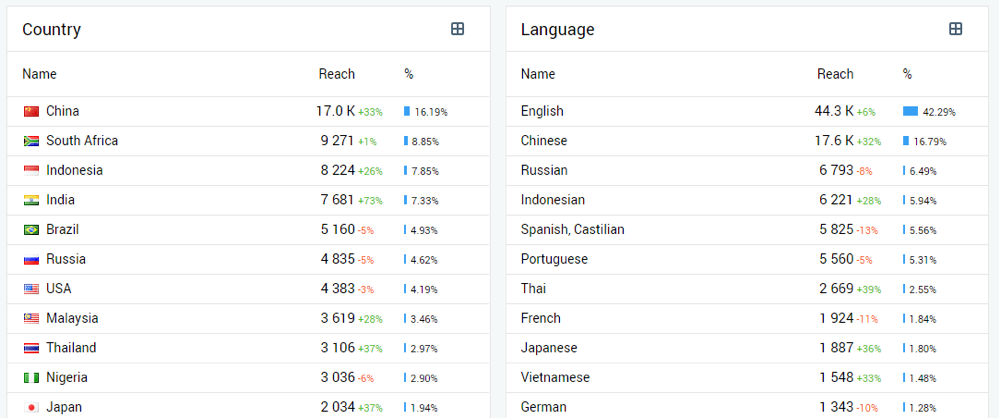 As you already know, different people react to different messages. Understanding your visitors' demographics will determine the tone of your content and the words you use.
It will also affect the offers you send to your visitors. Since you can predict your audience's needs due to their traits, you'll also be able to craft offers that can meet those needs.
As you already know, different people react to different messages. Understanding your visitors' demographics will determine the tone of your content and the words you use.
It will also affect the offers you send to your visitors. Since you can predict your audience's needs due to their traits, you'll also be able to craft offers that can meet those needs.
Track highest converting pages
It's inevitable that some pages will convert more than others. Without the knowledge of these pages, you'll lose many conversion opportunities. But you can prevent this by using a web analytics tool. Of course, high conversion means different things to different businesses. It actually depends on how you define a conversion. Is it high traffic or leads? Or sales? Identifying these pages means you can optimize them for better conversions. Then you can also create pages similar to them for more conversions.Cut costs through targeted advertising
Are your advertisements getting results? In most cases, you want to consider the amount you spend on advertisements and how much you realize in return. Talking about cost, I believe every marketer wants to reduce their advertising costs. It becomes even sweeter if they can maintain or improve returns. With events tracking, you can find details about people who visit your website through your ads. Which ads bring more traffic to your pages? Which advertising channels bring more visitors that convert? You can also discover advertising channels that are sending quality traffic to your site. Details like these will help you focus on the performing advertising channels and cut costs on the non-performing ones.Optimize conversion funnels
Frankly, there's no perfect conversion funnel. I can't create one, neither can any other person who claims to be an "expert." All we can do is find leaks in our conversion funnel and block them to keep more leads in the funnel. And ultimately convert them to customers. But what if you have no knowledge of where your conversion funnel is leaking? Then you'll also be blind to changes you can make. Through web analytics, you can find pages with the highest exit percentage. You can visit these pages and find the elements repelling visitors. You can even carry out A/B tests and track improvements until you lower the exit rates in these pages.It helps to improve ROI
The ultimate result of web analytics is that it leads to an increase in your returns on investment. You can find the low-performing aspects of your website and improve upon them. In return, you can make the necessary changes to improve performance. Likewise, you can understand your visitors better and tailor your pieces of content and offers to their needs.Vital metrics to track
Many businesses suck at web analytics. And this is because they fail to focus on metrics that really matter. At the end of the day, a business wants to survive and grow. What are the metrics to look out for? What are the metrics important to the growth of your business?- Number of visits
- Source of traffic
- Pages viewed
- Entry pages
- Exit pages
- Bounce rates
- Click-through rates
- Conversions
- Time spent on pages
- Visitor demographics
Effective web analytics with Finteza
To get the best out of web analytics, you need all the help you can get. What I mean is, you need a reliable tool that can provide the right metrics. If you're looking for one, look no further than Finteza. The reality is that most marketers will have more than a single tool they use for web analytics. For instance, most websites will use Google Analytics. Having said that, you should definitely have Finteza as one of your web analytics tools, as Google Analytics can only do so much.Why Finteza?
Because it provides some metrics you'll never find on Google Analytics. It also provides an in-depth analysis of your mobile app traffic.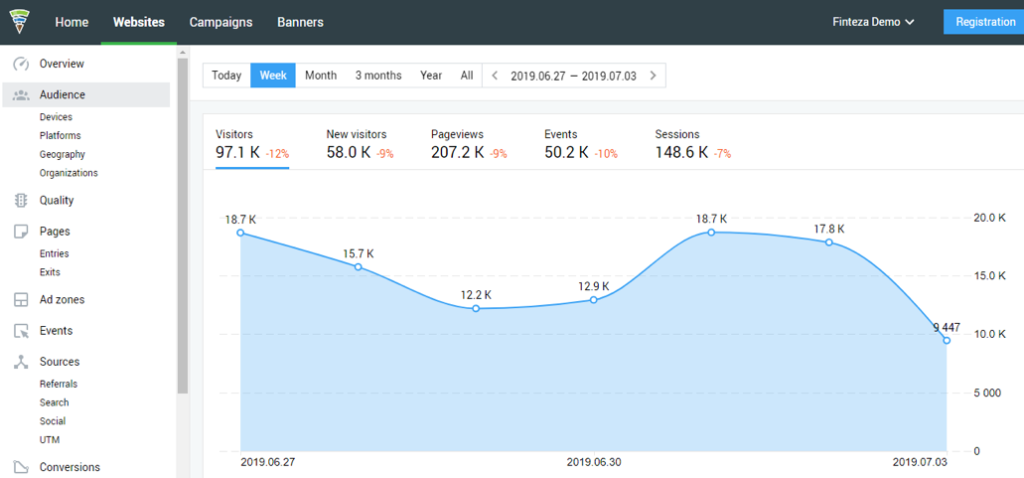 Without further ado, let's dive into the tool to see the metrics you can track and how it can make your website a better conversion machine.
Audience analysis
One of your vital needs is to understand your audience. And to achieve this, you need more details about them. First of all, Finteza can show you where your website visitors come from. You can view the countries, cities, and even the language of your visitors.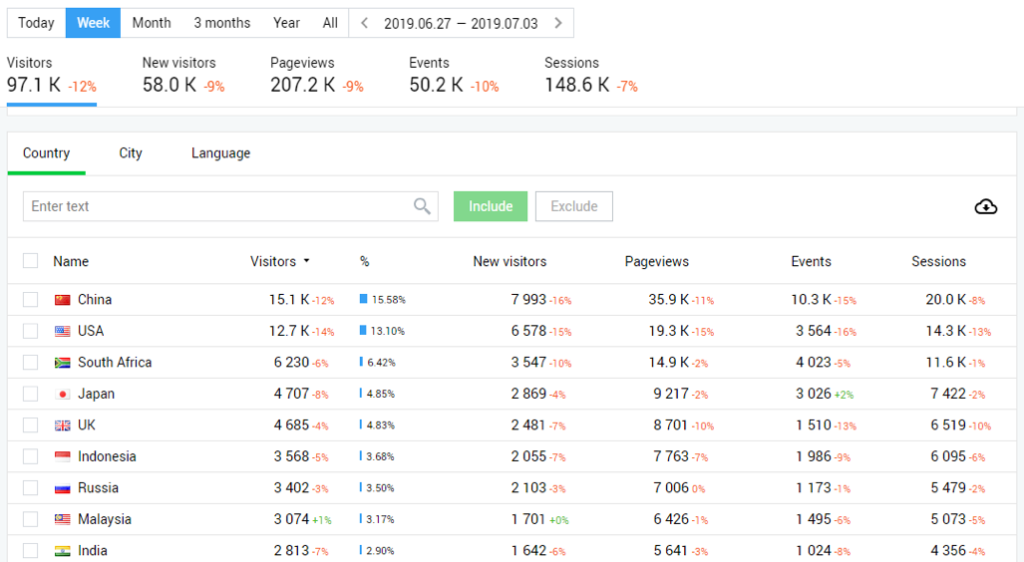 You can also see the devices and operating systems used by your audience. This is important as you can ensure your website has a great user experience for the majority of your users.
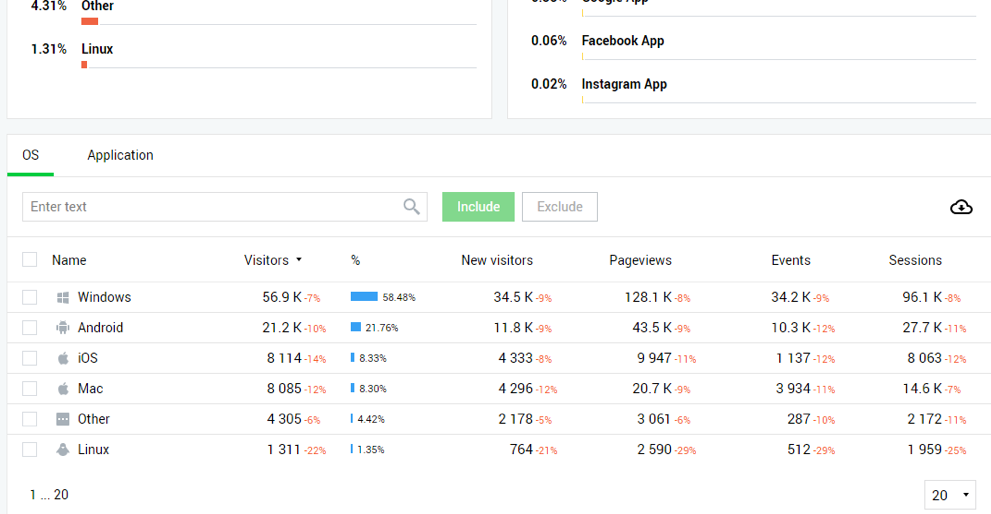 If you need to see the devices your visitors use, even specific models, you can see them.
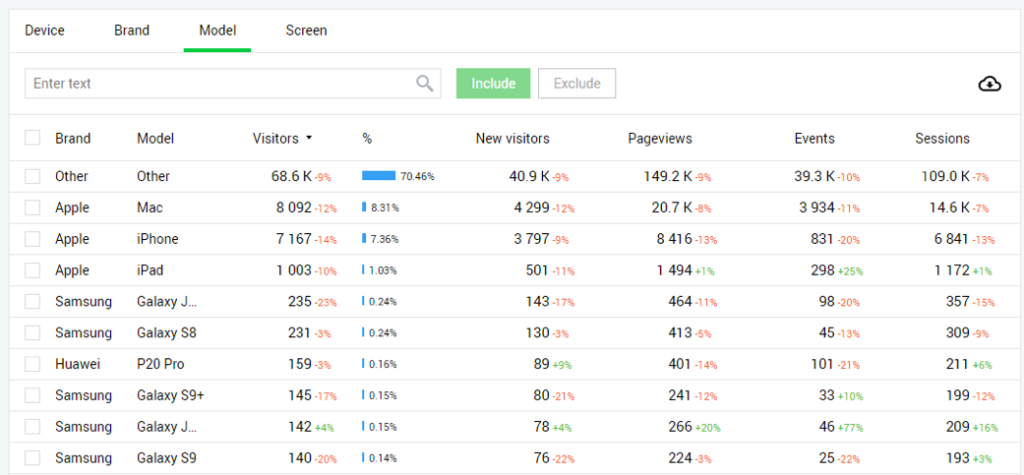 Knowing the companies your visitors work for can help you personalize your messages and offer to them. When you click on “Organizations” below “Audience” at the sidebar, you’ll see this:
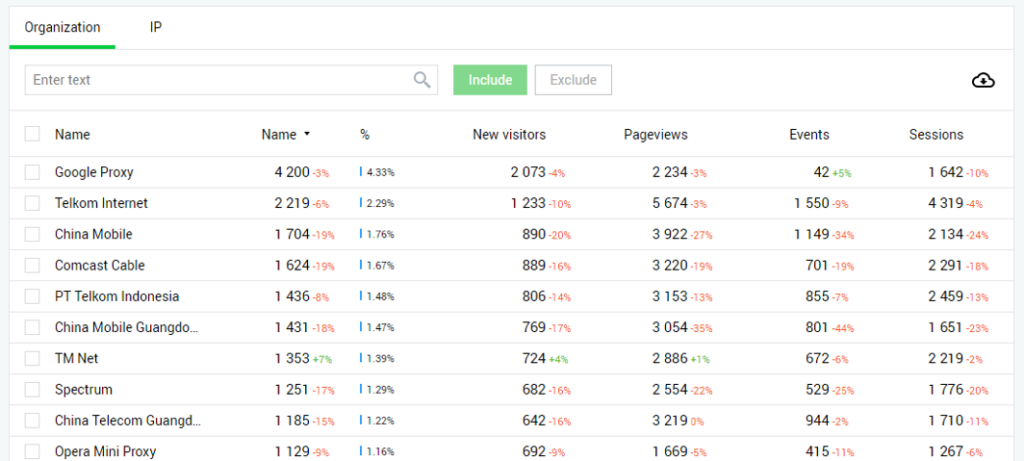 You can click on “IP” to view the IP address of those organizations.
Traffic Quality
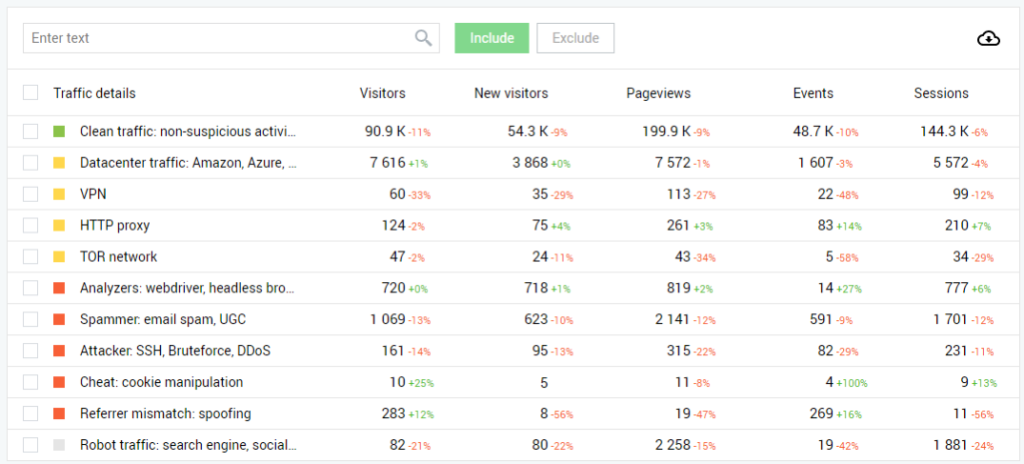
Another vital metric you get from Finteza is the quality of traffic. The huge number you see on your traffic stats, are they real? This tool will show you the real visitors who can take actions on your website and those that might be suspicious.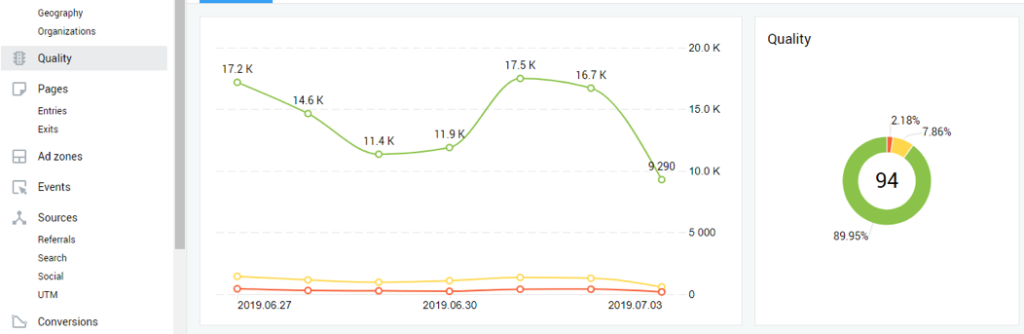 The green portion accounts for clean traffic, the yellow for visits from proxies and VPNs, while the red is for spammers and hackers.
Page analytics
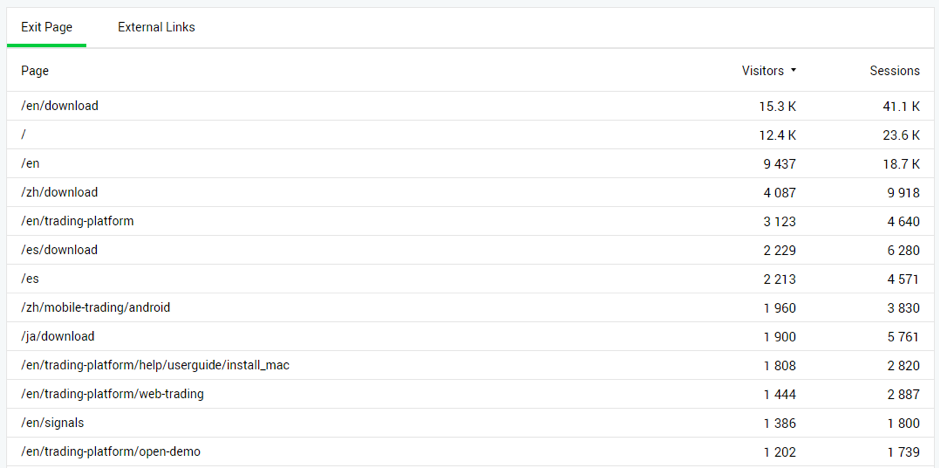
Come to think of it, more of your visitors land on some pages. While some pages chase your visitors away.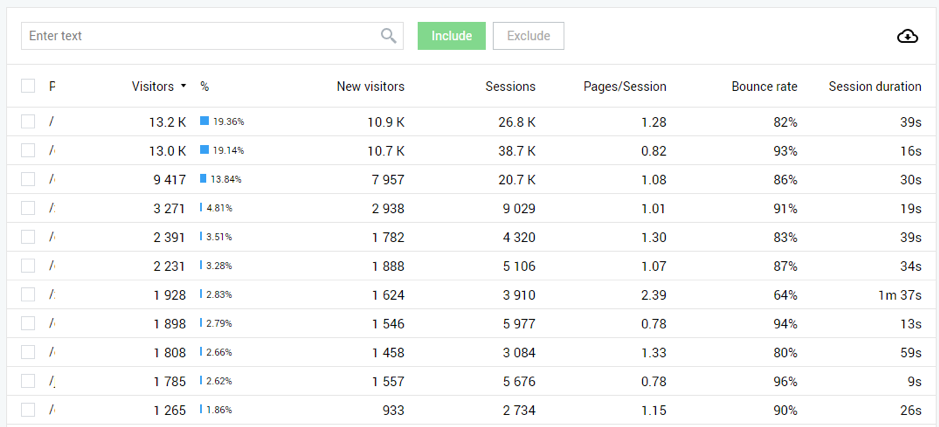 With this knowledge, you can optimize these pages for conversions. Likewise, you can investigate your exit pages. Why are visitors bouncing off these pages? This would lead to the necessary changes.
Ad Zones
If you’re an advertiser, you’ll love to see how your ads perform. Finteza can show you the performance details like impressions, clicks, and CTR of your ad zones.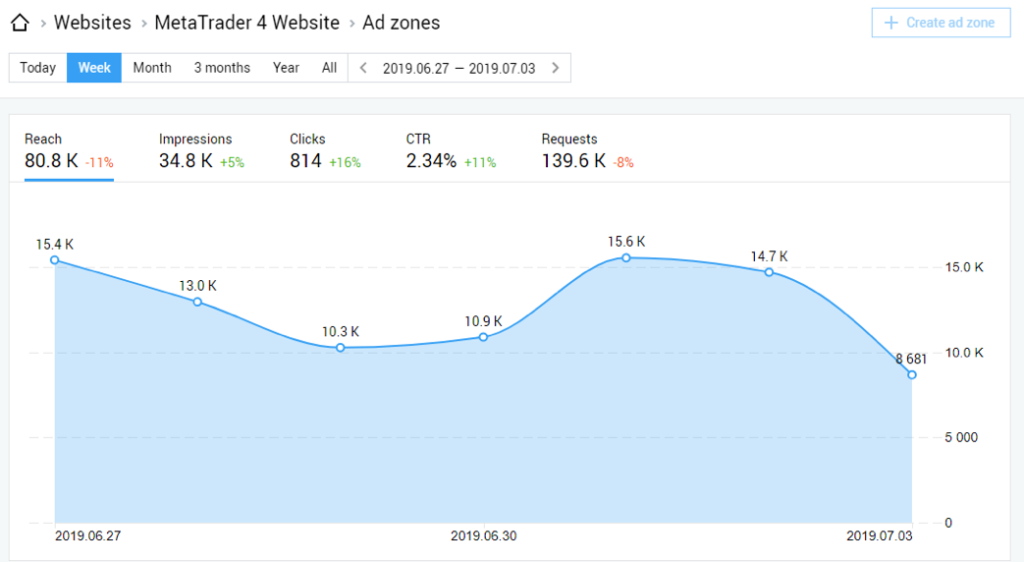 Here, there’s a single ad zone. You can click on “+ Create ad zone” to add more ad zones on your website.

Events
For events you want to track on your website, you can check how often these events occur. In most cases, these events represent conversions or some important activities on your website.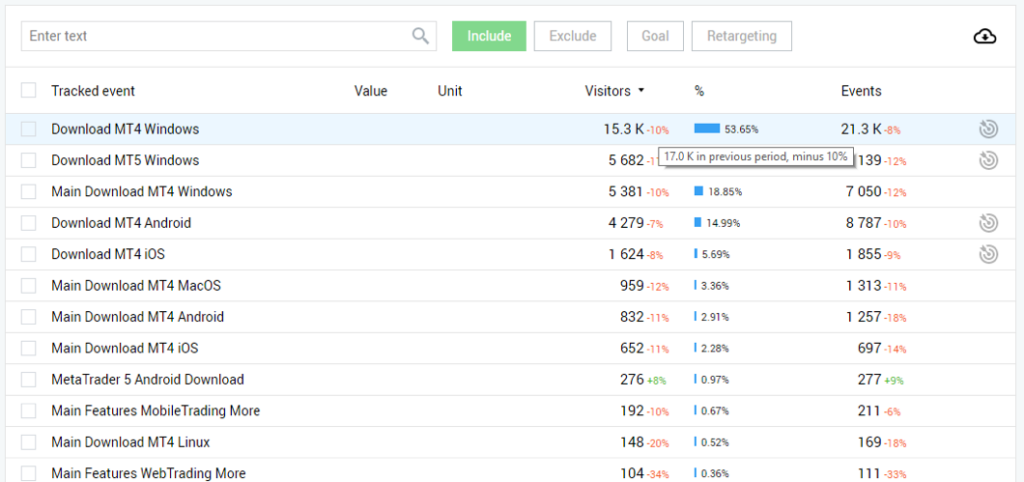 If you’re wondering what the small red and green percentages mean, they represent the percentage increase or decrease compared to the previous period.
[click_to_tweet tweet="How to leverage Finteza to get more out of your web analytics #analytics #businesstips" quote="How to leverage Finteza to get more out of your web analytics #analytics #businesstips"]
If you’re wondering what the small red and green percentages mean, they represent the percentage increase or decrease compared to the previous period.
[click_to_tweet tweet="How to leverage Finteza to get more out of your web analytics #analytics #businesstips" quote="How to leverage Finteza to get more out of your web analytics #analytics #businesstips"]
Sources
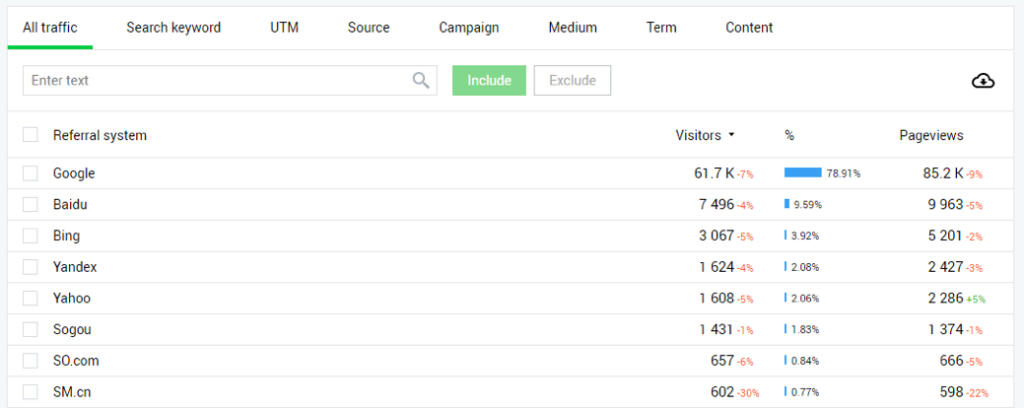
Another vital metric you want to keep an eye on is your traffic sources. Where do your visitors come from? When you understand your sources of visitors, you can focus your marketing efforts on channels that bring visitors to your website.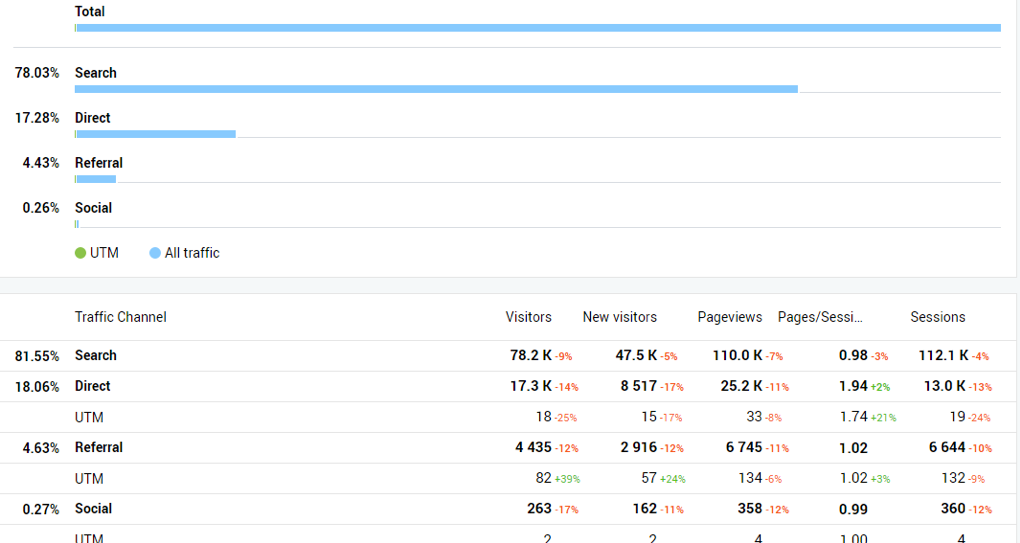 You can click on each of the sources to get more details about them. For instance, if you click on search, you’ll see the traffic analysis of visitors from search engines and the number of pageviews.
Conversions
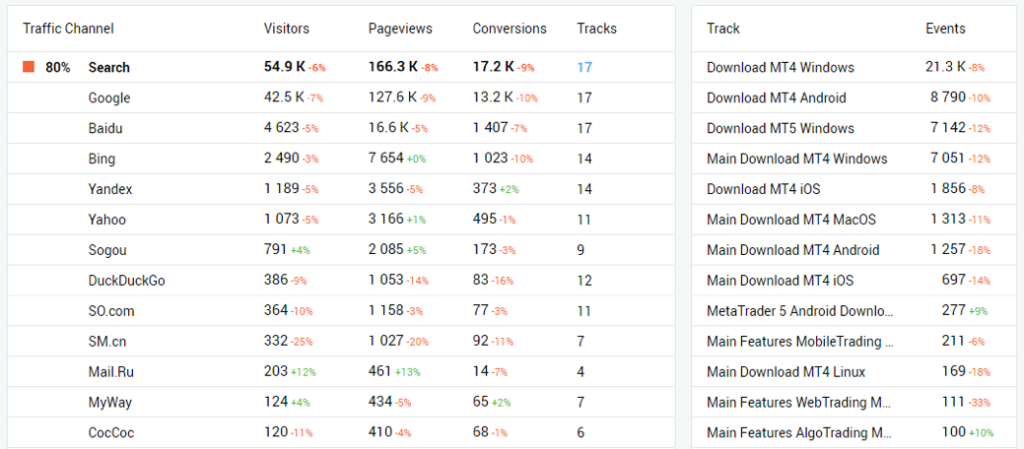
How well does your traffic sources convert? Do organic visitors convert more than those from social media? If you’re marketing on these channels, it’s easy to see if you’re getting results from your efforts.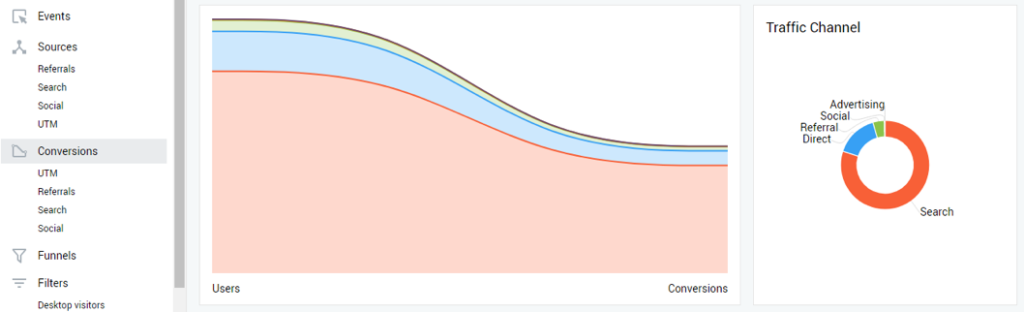 Even if your advertising platform provides these metrics, this can serve as a way to confirm those figures. If you go further down this page, you’ll see the conversion figures for each traffic channel.
Funnels
Your conversion funnel shows the steps from having visitors to your website, turning them into leads, and nurturing those leads until they become customers. You can check your funnels and also create new ones if you want to.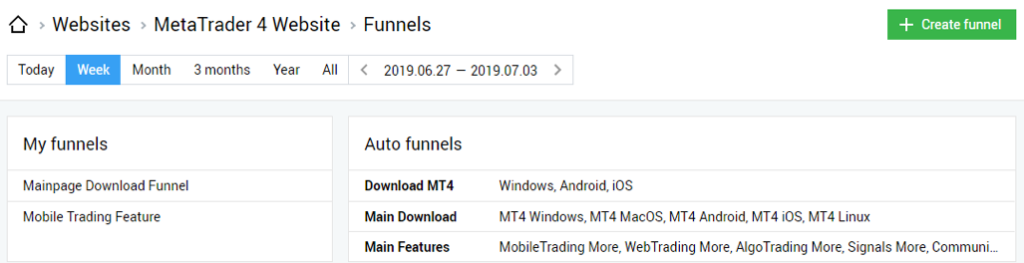
Filters
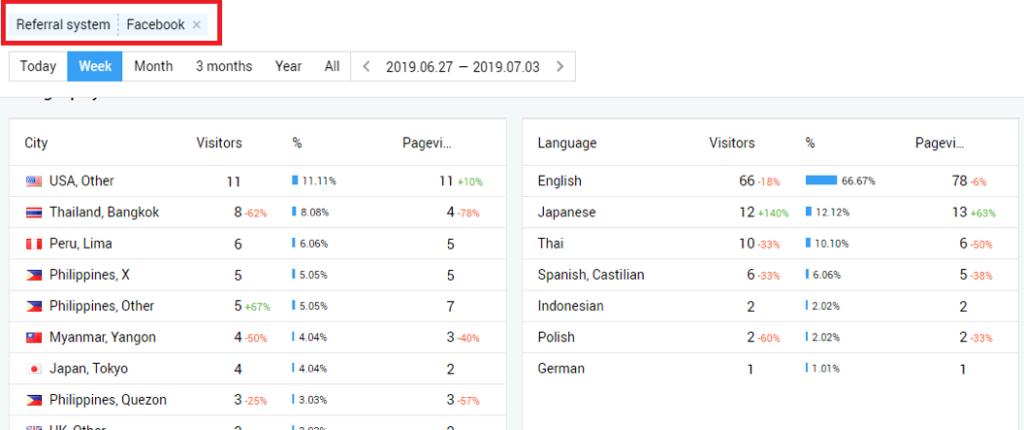
If you want to filter all these pieces of information based on a particular channel or quality, there are 4 options available to you on Finteza.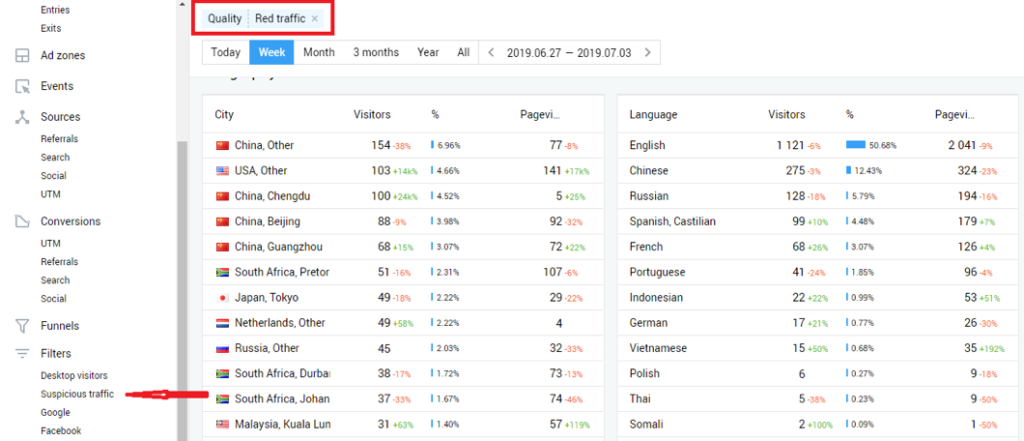 Above, you’ll observe that I’ve filtered the metrics based on suspicious traffic. Now, you can see the amount of suspicious traffic from each city. When I apply the Facebook filter, I see another table:
Campaigns
For your advertising campaigns, you can get more details about them when you click on “Campaigns” at the navigation bar.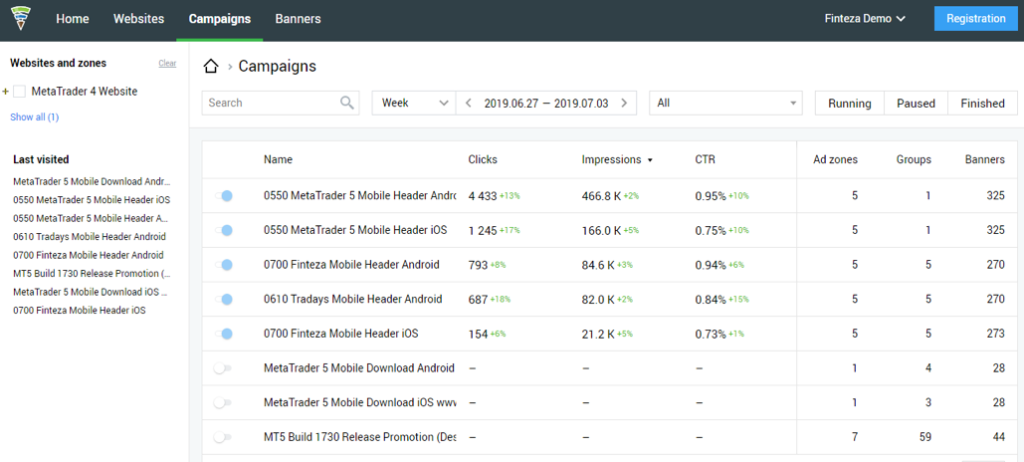 If you click on a particular campaign, you’ll get even more details about that campaign.
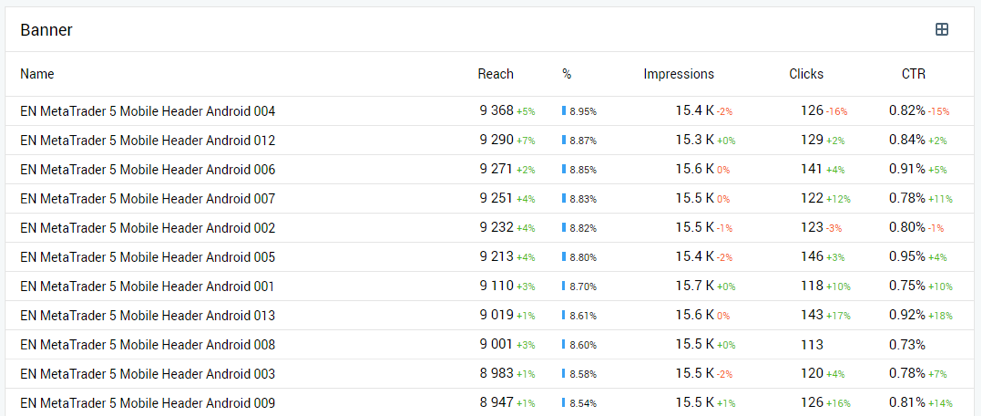
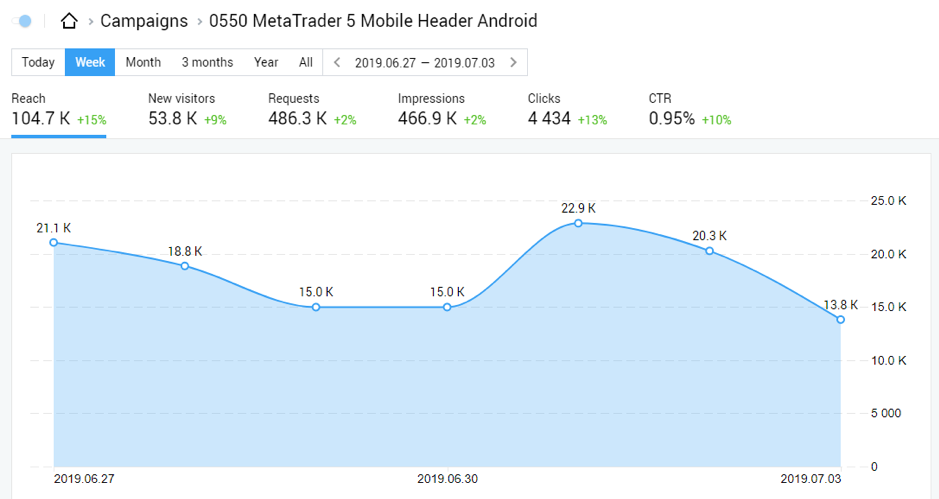 When you go down this page, you’ll see more details about this campaign like operating systems, browsers, platforms, country, and language. You’ll also see the performance of banners in the campaign.
 You might want to ask me: what if I want to keep these pieces of information for future reference? Finteza allows you to export these details in CSV format.
[click_to_tweet tweet="How to leverage Finteza to get more out of your web analytics #analytics #businesstips" quote="How to leverage Finteza to get more out of your web analytics #analytics #businesstips"]
You might want to ask me: what if I want to keep these pieces of information for future reference? Finteza allows you to export these details in CSV format.
[click_to_tweet tweet="How to leverage Finteza to get more out of your web analytics #analytics #businesstips" quote="How to leverage Finteza to get more out of your web analytics #analytics #businesstips"]
Conclusion
If you’re paying no attention to your website analytics, you’re losing money daily. Even though it takes time and tenacity to go through all these numbers, it’s definitely worth your time. You can get the best performance from your website pages and marketing efforts. And with a tool like Finteza, you have a source of numbers that show you if what you’re doing is really driving the results that matter for your business (a.k.a leads, customers, and revenue).What's changed by 2026: AI and the new analytics landscape
This guide was originally written in early 2023, before two major shifts in web analytics. Both worth knowing if you're setting up or revisiting your analytics work in 2026.
Universal Analytics is gone, GA4 is the standard
Google Analytics Universal stopped processing data on 1 July 2023 and was fully retired in July 2024. If your analytics setup still references UA properties, the data is no longer collecting or exportable except through the historical archive. Anyone running web analytics in 2026 is doing it on GA4, on a GA4 alternative (Plausible, Fathom, Matomo, Microsoft Clarity for behavioural), or on a server-side setup. The event-based model in GA4 is fundamentally different from UA's pageview-based model — most of the dashboards you had in UA need rebuilding.
AI-assisted analytics has changed how you interpret data
By 2026, AI integration into analytics tools has changed the interpretation layer dramatically. GA4's built-in AI insights surface patterns automatically. Tools like Microsoft Clarity now offer AI-powered session-recording summaries. The work has shifted from "what's in the data" (the tool tells you) to "what does this mean for the business" (still your job, but with less manual digging).
The trap: trusting AI summary outputs without questioning them. AI insights are pattern-matched against typical patterns. Your business may not be typical. I treat AI-generated insights as hypotheses to verify, not answers to act on.
Privacy regulation has narrowed what you can collect
GDPR enforcement has tightened in the UK and EU. CCPA expanded in California. Multiple US states added consumer privacy regulation. The default consent model has shifted from opt-out to explicit consent in many regions. Practically: your analytics now sees less data than it did in 2023. For most sites, 30-50% of visitors will not be tracked by analytics due to consent declines and ad-block use. Plan for that gap rather than trying to close it.
Server-side tracking has gone mainstream
In 2023 server-side tracking was niche. By 2026 it's standard for any business serious about data quality. Browser-based tracking (the standard analytics tag in your HTML) is hit increasingly hard by ad blockers, ITP, and consent declines. Server-side moves the tracking to your own server, which is more reliable and gives you more control. Setting it up requires technical work — usually GTM server-side container plus a cloud hosting setup — but the data quality difference is substantial.
The metrics worth tracking have shifted
Pageviews and bounce rate are still useful but increasingly noisy. In 2026 the metrics I actually look at week-to-week:
- Engaged sessions: GA4's replacement for bounce rate, much more reliable
- Conversions per organic visit: what's actually happening when search visitors arrive
- Citation traffic: AI engine referrals (still small but growing) — track via referrer patterns and direct traffic spikes after AI mentions
- Newsletter signups per content piece: the trust-building metric for a content business
- Sessions from named AI engines: use a UTM-clean URL strategy or referrer logging to attribute
My 2026 analytics stack
- GA4: primary; standard cookie consent, accepting the gap from consent declines
- Microsoft Clarity: session recordings and heatmaps; lighter consent footprint, still useful for behavioural data
- Search Console: the truth source for organic search performance, more accurate than GA's organic numbers
- Manual referrer log review: for AI engine citation tracking, which doesn't yet appear cleanly in standard analytics
- Kit dashboard: for newsletter engagement metrics, which are the actual business metric for my content work
Notable absences from my 2026 stack that I would have recommended in 2023: dedicated heatmap tools (Clarity does this well enough for free), analytics aggregator dashboards (most are over-engineered for solo operators), AI-powered "marketing intelligence" platforms (they automate work that should be human-judgement).
Want more on this topic?
Related: AI Marketing ROI Calculator, The Honest Maths (2026)
Want AI doing the heavy lifting in your marketing?
I build the systems that handle the boring 80 percent, so you get your week back. Done properly, with the human kept in.
Related: these Facebook Messenger hacks
Related reading: AI for social media management: ideation, scheduling and analytics and Why Your Analytics Are Hiding How Many Customers AI Is Sending You.
The bottom line: Effective web analytics starts with clear goals, not just data collection. Track the metrics that connect to revenue and customer behavior, then act on what you find. Tools only matter if you build a habit of reviewing and applying the insights.
Frequently asked questions
What is the most important web analytics metric to track?
There is no single "most important" metric for every business. Conversion rate, customer acquisition cost, and engagement metrics like time on page and bounce rate matter most when tied directly to your specific goals, whether that's sales, leads, or brand awareness.
Which web analytics tool should I use?
Google Analytics is the most widely used free option and works well for most businesses. Depending on your needs, tools like Hotjar for heatmaps, SEMrush for SEO tracking, or Mixpanel for product analytics can complement it.
How often should I review my web analytics data?
Weekly reviews help you catch trends and issues early, while monthly deep dives are better for spotting longer-term patterns and informing strategy changes. The key is consistency, not just frequency.
Do small businesses really need web analytics?
Yes. Small businesses often benefit the most since every marketing dollar counts. Analytics shows what's working and what's wasting budget, helping smaller teams make smarter decisions with limited resources.



