Premium Chat is a paid messaging feature that lets creators and small businesses charge followers for one-to-one chat access on social media and on their own website, with the platform handling payment, subscriber management and payout. It sits between a free DM inbox and a full paid-community tool: you set the price, followers pay to unlock the chat, and you keep talking to them the way you already do.
| Decision | What to work out before you switch it on |
|---|---|
| Ideal client | Who you already talk to for free, and what they currently ask you that a paid chat would answer faster. |
| Price | What one message thread is worth to that client, set as a flat rate or a subscription. |
| Tools | Whether you need Premium Chat's own inbox or want it feeding an existing CRM. |
| Availability | The hours you will actually answer inside, stated on your profile so demand does not outpace you. |
| Niche | Whether your niche has a track record of paying for direct access (coaching, fitness, business advice) or not. |
Last updated: August 2026. This guide covers what Premium Chat is, how the earnings model works, and how to set your profile, pricing and payout up correctly the first time.
If you have built any kind of online audience in 2026, your direct messages are probably full of people wanting your time. Premium Chat is the platform that turns that demand into income, letting you charge per message, per minute, or per voice call from your existing social channels and website. This guide covers exactly how Premium Chat works in 2026, who it is built for, the realistic earnings range for creators of different sizes, the setup process, and how it compares to other paid-chat platforms on the market.
What is Premium Chat?
Premium Chat (premium.chat) is a paid messaging platform that lets creators, coaches and experts charge for their time by the message, by the minute or per voice call. You add a Premium Chat link to your Instagram, TikTok, X, YouTube or website, followers pay to reach you, and you are paid out to your bank or PayPal. It is legitimate and free to join; the platform takes a commission on what you earn.
- Your ideal clients: who are your clients and what is their favourite form of communication?
- Cost of service: how much do you want to charge your clients? If you charge them too high, you might find many people avoiding your service. But if you charge too low, you may have too many clients that you're unable to attend to them all. You have to find the middle ground.
- Tools you need: the right tools can make it easy to offer your service to clients. You have to consider factors like cost of tools, ease of use, payment methods, and other important factors to you.
- Availability: you have to set a time for this service or else the time demand may lead to burn out.
- Niche: some niches are more favourable for monetizing compared to others. For instance, fitness experts or psychics will find it easier as many of their clients are willing to chat with them.
How to earn money through Premium Chat
Many jobs are moving completely online. And many professionals are looking for more ways to share their knowledge and make money. If you run a consultancy online, Premium Chat is a way to earn money by chatting with your clients or fans.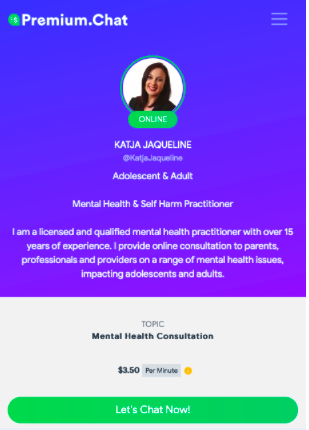
How can you earn money through Premium Chat?
The first step is to register an account. After that, you’ll have to enter your registered phone number to log in. [click_to_tweet tweet="The ultimate chat platform to make money from #socialmedia and your website: @PremiumChatApp #makemoneyonline" quote="The ultimate chat platform to make money from #socialmedia and your website: @PremiumChatApp #makemoneyonline"] Premium.chat will send an SMS with a login code. This is to ensure the utmost safety of your account. After you log in, the first step is to add a widget to verify your account.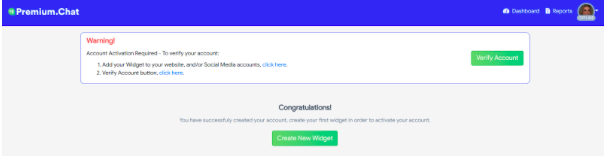 When you select “click here” or “Create New Widget,” you’ll be taken to the next page.
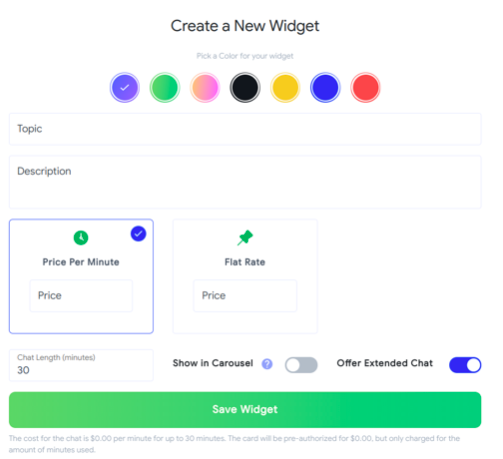 Here, you can pick a colour for your widget. It’s advisable to pick a colour that complements your website or the social media channel you want to create a widget for. After that, you can enter the topic of your chats and description.
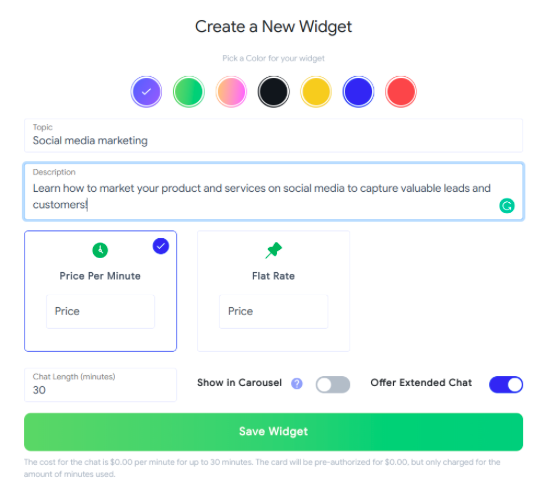 Once you're done with this, select whether you want your chats to be charged per minute or for a flat rate. If you’re a consultant who offers conversations for fixed periods, then a flat rate might be the best.
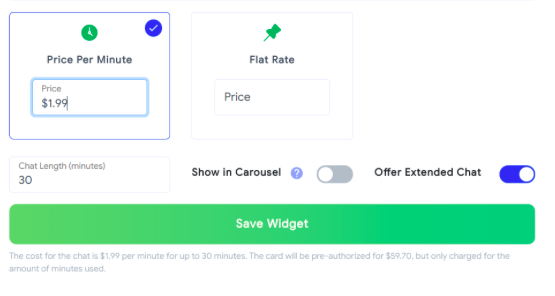 After this, you can select the maximum chat length. Since the option to extend chat has been switched on, your chats can go beyond 30 minutes at an extra cost to your client.
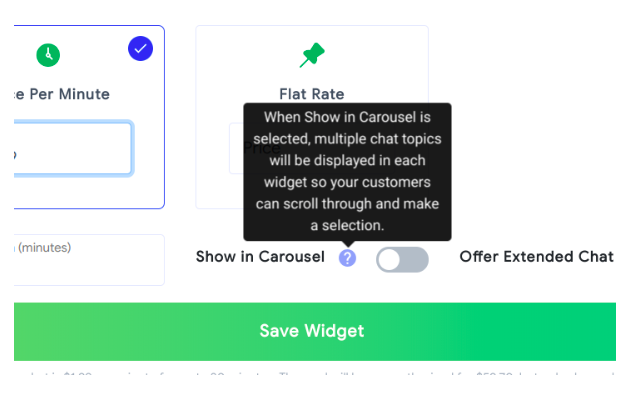
You’ll notice the statement below of how much a client could incur during the chat. Another option here is to show your chats in a carousel. This is beneficial if you want to chat about different topics with your clients.
After this, you can select the maximum chat length. Since the option to extend chat has been switched on, your chats can go beyond 30 minutes at an extra cost to your client.
You’ll notice the statement below of how much a client could incur during the chat. Another option here is to show your chats in a carousel. This is beneficial if you want to chat about different topics with your clients.
 On the next page, you’ll see the widget preview. You can add your widget URL to your social media pages or copy the script into your website.
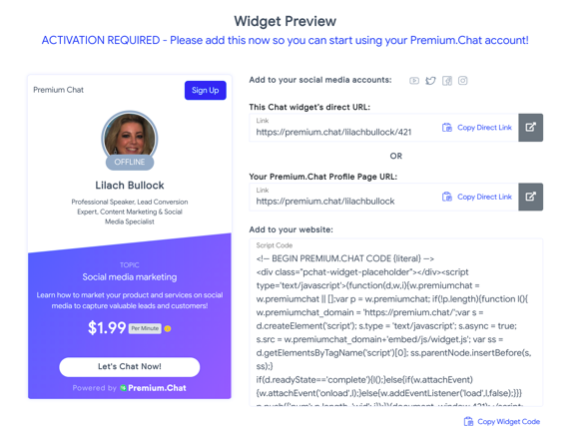 I’ve copied the code into my website. If your website is on WordPress, you can easily add the plugin to your theme.
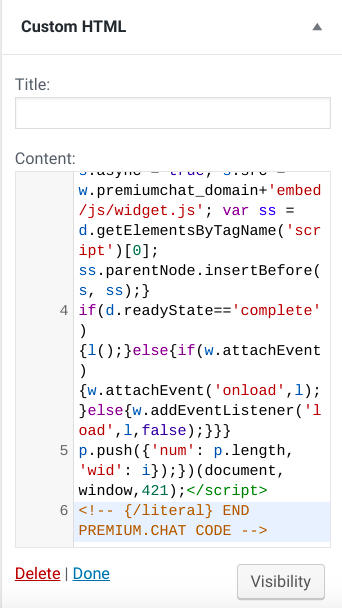 Click “Done” and you’re good to go. After doing that, you can see the Premium Chat plugin on my site:
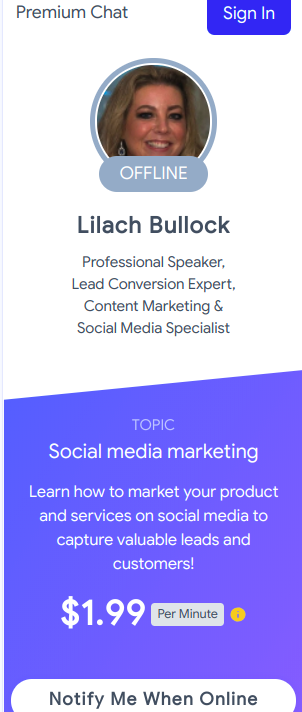 When you’re done with that, the account becomes verified and you can now see your live widgets.
 You can add more widgets to your account as you see fit. On the right side of the widget, there are icons to preview, copy, or delete a widget.
[click_to_tweet tweet="The ultimate chat platform to make money from #socialmedia and your website: @PremiumChatApp #makemoneyonline" quote="The ultimate chat platform to make money from #socialmedia and your website: @PremiumChatApp #makemoneyonline"]
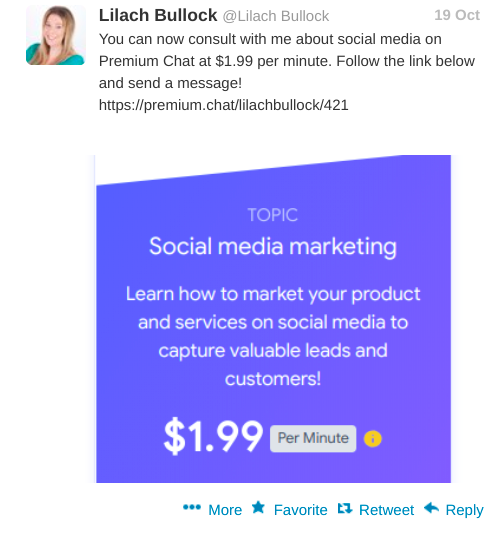
If you want to use the widget on your social media accounts, all you have to do is add the widget’s URL to your social media profile or share it in an update with your followers.
You can add more widgets to your account as you see fit. On the right side of the widget, there are icons to preview, copy, or delete a widget.
[click_to_tweet tweet="The ultimate chat platform to make money from #socialmedia and your website: @PremiumChatApp #makemoneyonline" quote="The ultimate chat platform to make money from #socialmedia and your website: @PremiumChatApp #makemoneyonline"]
If you want to use the widget on your social media accounts, all you have to do is add the widget’s URL to your social media profile or share it in an update with your followers.
 For a client who wants to have a chat with me, they can click on “Notify Me When Online” since I’m currently offline. If they do that, they’ll see this:
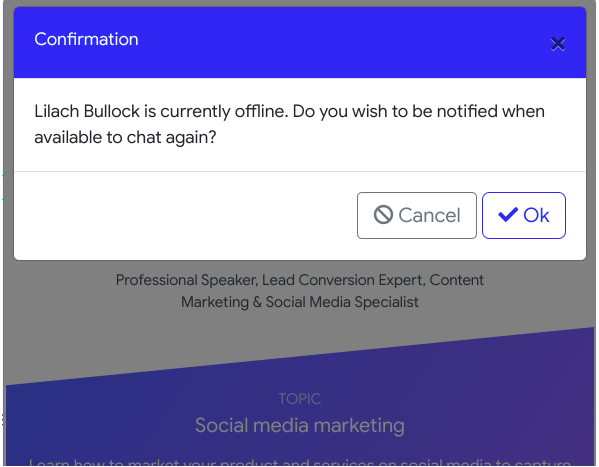 Then, they can click on “Ok.” A potential client would have to enter their phone number to sign in to their account or create a new one. This way, they’ll get a notification when I'm online.
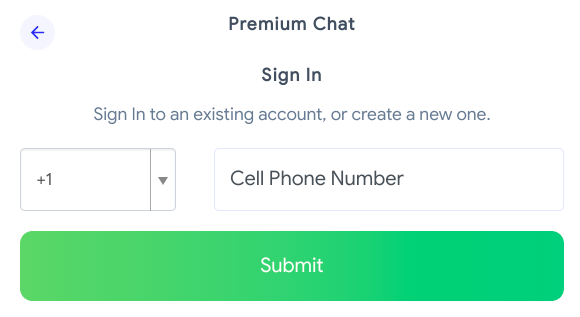 This makes it easy for your clients to get online when you’re available and have a chat with you.
Availability
Premium Chat allows you to chat based on your schedule. This means you can set your status to online or offline. And even better, you have the ability to set your schedule. To access the availability settings, click on the drop-down beside your profile: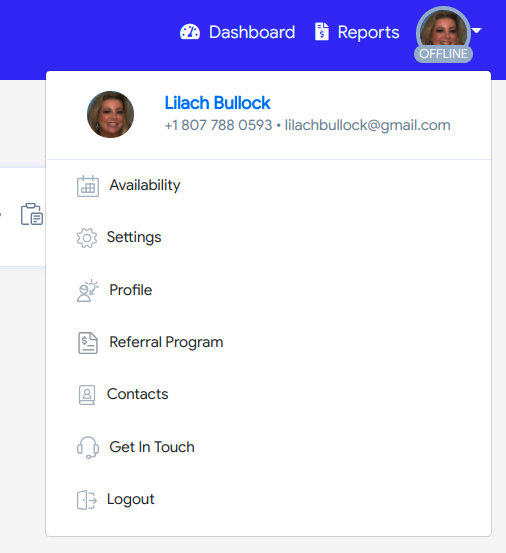 When you click on “Availability,” you’ll see the options to set the time you can chat with your clients.
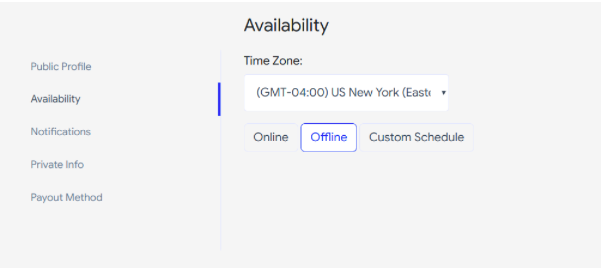 If you click on “Custom Schedule,” you’ll see the schedule for all days of the week.
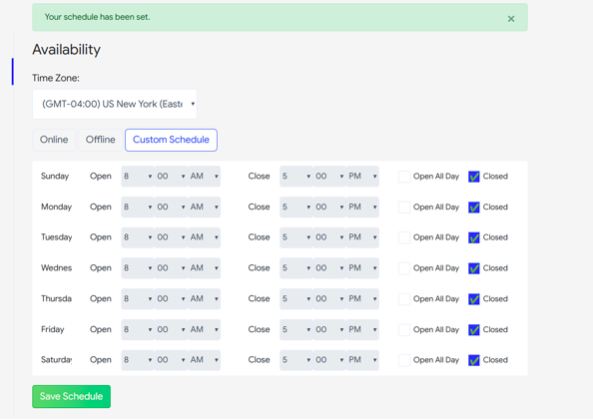 You have enough options to set your own time. Evidently, you can make a schedule to chat at times when you have no other engagements. If you want to have some days off, this option is available too. After making changes to your schedule, click on the “Save Schedule” button to set your chat schedule.
Profile
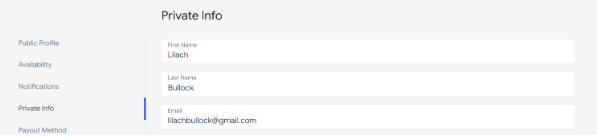
On your public profile, your clients can find details such as your profile URL, description, social media accounts, and website.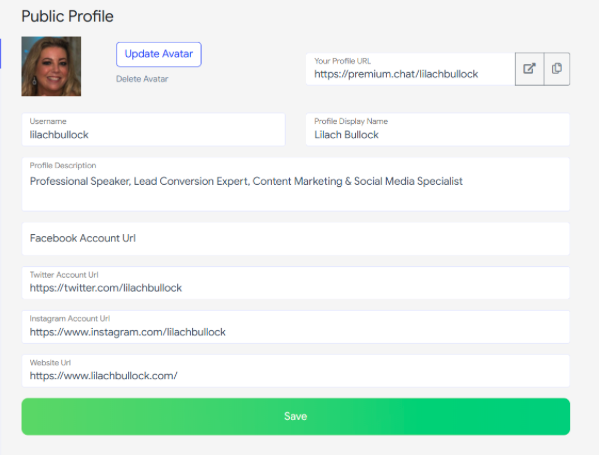 Whatever detail you want your clients to see, you can add it to your public profile. Additionally, you have a private profile where you have your email address and phone number.
Notifications
It might be inconvenient to be on your Premium Chat constantly. But you don’t need to worry about this. Premium Chat will send notifications to your email address or phone number. You’re free to select whatever medium is convenient or both.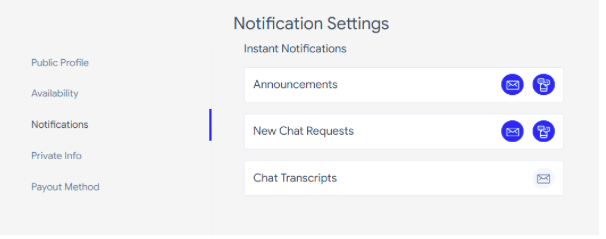 The blue sign means you will receive notifications through those media.
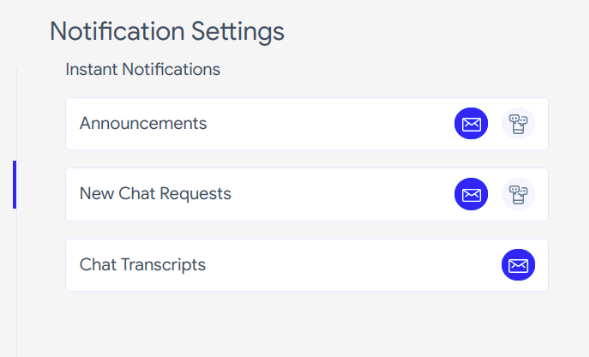 When you receive a chat request, you can either accept, reject, or ignore the request. Added to that, Premium Chat keeps a record of your chats. As a consultant, this is great as you can keep track of your sessions.
This also helps you to track previous conversations with a client effectively. To make it even more convenient, Premium Chat can send these chat transcripts to your email address.
When you receive a chat request, you can either accept, reject, or ignore the request. Added to that, Premium Chat keeps a record of your chats. As a consultant, this is great as you can keep track of your sessions.
This also helps you to track previous conversations with a client effectively. To make it even more convenient, Premium Chat can send these chat transcripts to your email address.
Analytics
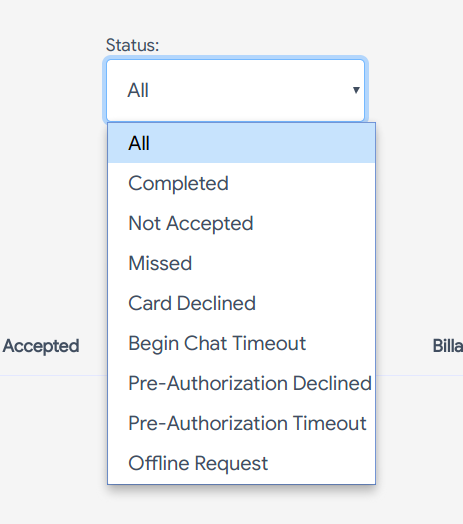
To get reports about your widgets, click on “Reports” at the top right corner of your dashboard. Here, you can see the status of all your calls including the number of billable minutes and your net profit. You can select different durations if you want to get details for a particular period.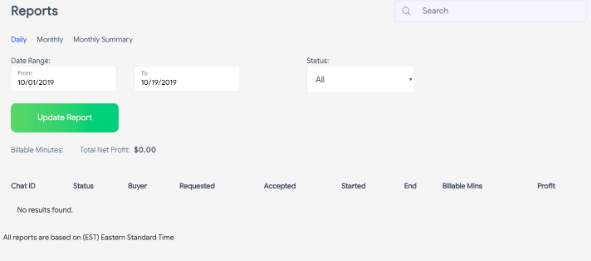 Another option available to you is to get reports for different actions you take for your chat requests.
When you click on the “Status” drop-down, you’ll see different criteria to segment your report.
Another option available to you is to get reports for different actions you take for your chat requests.
When you click on the “Status” drop-down, you’ll see different criteria to segment your report.
 [click_to_tweet tweet="The ultimate chat platform to make money from #socialmedia and your website: @PremiumChatApp #makemoneyonline" quote="The ultimate chat platform to make money from #socialmedia and your website: @PremiumChatApp #makemoneyonline"]
Referral program
Apart from your chats, Premium Chat also allows you to make money through referrals. To access the referral program, click on “Referral Program” in the drop-down below your profile. There’s an invite link you can copy to invite potential Premium Chat users. Apart from the invite link, users who sign up through the “Powered by Premium.Chat” link in your chat widget also count as referrals. When a user signs up through your link, you’ll earn 2.5% of their Premium Chat revenue forever. To even make the deal better, Premium Chat will pay you 2.5% of your referral’s referral earnings forever.
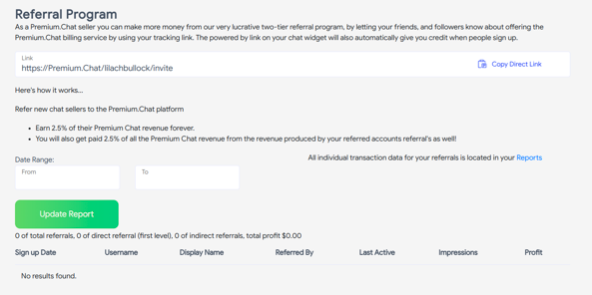 This way, you can continue to make automatic revenue on two levels forever. In the lower part of the page, there’s a report of your referrals which helps you to track users who signed up through your link.
Contacts
As you chat with your clients, you can add regular clients to your contact list so that it’s easier to see them in one place. You can also see the increase in your customer base. To access the list, click “Contacts” in your profile drop-down.Payout
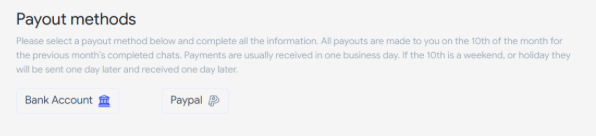
One of the main features of Premium Chat is that you get paid for chatting with your clients or fans. As a result, it’s vital to understand how you receive your earnings. Before that, Premium Chat charges your clients for every chat you make according to your settings. The service accepts payments from Visa, Amex, Mastercard, and Discover. For your payment, Premium Chat releases it on the 10th of every month. If the 10th of a month happens to be on the weekend or a holiday, then you’ll have your payment on the next business day. Premium Chat offers two methods of receiving your payments:- Bank transfer
- PayPal
Customer support
It’s normal to have issues or questions about a tool from time to time. Premium Chat provides many opportunities to reach their customer support in case of any complaints. To access the customer support channels, click “Get In Touch” from your profile drop-down. Doing that will lead you to this page: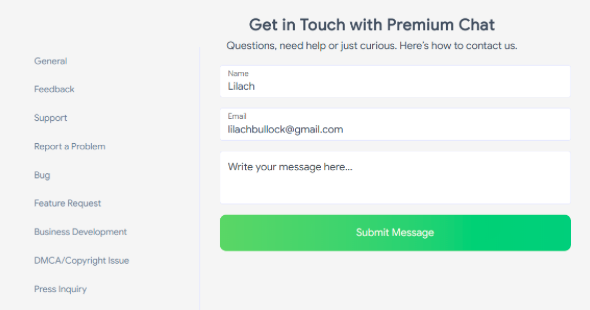 On the left sidebar, you can see various reasons for contacting customer support. Click on any of these categories to ensure you’re sending your message to the right quarters.
Alternatively, you should check the FAQs page to see the answers to some common questions.
On the left sidebar, you can see various reasons for contacting customer support. Click on any of these categories to ensure you’re sending your message to the right quarters.
Alternatively, you should check the FAQs page to see the answers to some common questions.
Pricing
Unlike most other tools, Premium Chat has no paid plan. However, the service takes a commission on your earnings. This means Premium Chat only earn when you earn. Having said that, the commissions Premium Chat will receive depends on your revenues for the month. See the percentage you get paid for each earnings range: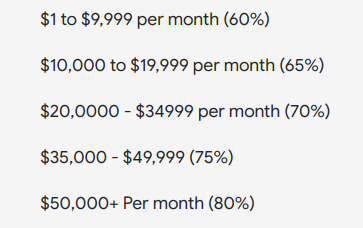
Conclusion
There are many ways to make money online through your knowledge. And Premium Chat has delivered another unique way. Whether you’re a business consultant or a life coach, you can provide information through chat and earn money. All you need is an audience ready to pay you and Premium Chat has provided a medium. Added to these, you can start using this tool free of charge and on any device.Premium Chat app, login and sign up: how it actually works
Premium Chat has no app to install. Everything runs at premium.chat in a normal web browser, on a phone or a desktop, and the platform says so itself: you take chats, calls and video from any device with nothing from an app store. That trips people up because the brand's social handle is @PremiumChatApp, so searchers go looking for a download that does not exist.
Signing up is a short form on premium.chat (Sign Up, top right). You register an account, then log in with your phone number: Premium Chat texts you an SMS code each time, which is the security step that protects your earnings. Once you are in, the first job is to add the chat widget to a profile or website to verify the account, then set your price per minute or flat fee. If the SMS code does not arrive, check the number you registered with and try again; a wrong country code is the usual cause.
Your login is also where the money lives: the dashboard shows earnings, referrals and the Payout tab covered above, so bookmark premium.chat rather than searching for a login page every time.
Premium Chat FAQ
How much can you make with Premium Chat?
Creator earnings on Premium Chat vary widely based on audience size, niche, and pricing. Small accounts with 1,000-10,000 engaged followers typically earn $100-$500/month. Mid-size accounts with 50,000+ engaged followers commonly earn $1,000-$5,000/month. The platform takes a percentage of each transaction, so net income depends on volume.
How is Premium Chat different from OnlyFans or Patreon?
OnlyFans monetises content subscriptions and direct messages. Patreon monetises tiered membership content. Premium Chat focuses specifically on paid one-to-one conversations (chat, voice, or video) without the content-creation burden of OnlyFans or the membership-management overhead of Patreon.
Where can you embed Premium Chat?
Premium Chat can be linked from Instagram, TikTok, X, YouTube, LinkedIn, and embedded directly on your own website. The flexibility makes it usable for creators, consultants, coaches, and service providers across most platforms.
Want AI doing the heavy lifting in your marketing?
I build the systems that handle the boring 80 percent, so you get your week back. Done properly, with the human kept in.
Related: how to make money on Instagram with 1k followers
Related reading: how to boost your website leads conversions and sales using live chat.
FAQs: making money with a premium chat platform
What is a premium chat platform? It is a tool that lets creators charge for private messages, voice notes or one-to-one chats, turning direct access to you into income.
Do you need a big following to use one? No. Premium chat works best with a small, loyal audience willing to pay for closer access, so engagement matters far more than follower count.
Related reading: How to boost your website leads, conversions and sales using Live Chat and Top 10 live chat tools for your online business.