


- Quick comparison: the best online booking and scheduling tools in 2026
- How to choose an online booking tool in 2026
- 10 Best online booking and scheduling tools
- 1. Acuity Scheduling
- 2. Calendly
- 3. SuperSaaS
- 4. You Can Book Me
- 5. AppointmentPlus
- 6. Bookeo
- 7. 10 to 8
- 8. Setmore
- 9. BirchPress
- 10. Qudini
- 11. Booksy
- Frequently asked questions
- Conclusion: Best online booking and scheduling tools
- The features that matter and why
- Pricing models explained
- Common mistakes to avoid
- Comparison criteria at a glance
- FAQ
The best online booking and scheduling tools let clients book time with you automatically, ending the back-and-forth of finding a slot and freeing hours in your week. The right one depends on whether you take payments, run a team, or need calendar sync. This guide covers ten options and what each is best for.
Quick comparison: the best online booking and scheduling tools in 2026
The eleven tools reviewed on this page, side by side, so you can shortlist in a minute and read only the two or three that fit.
| Tool | Best for | Free tier | Card checkout | Standout |
|---|---|---|---|---|
| Acuity Scheduling | Service businesses that confirm bookings up front | Trial only | Yes | Deep intake forms and packages |
| Calendly | Solo owners and simple one to one bookings | Yes | Upper tiers | Fastest to set up and everyone recognises it |
| SuperSaaS | Classes, rentals and unusual booking rules | Yes | Yes | Very flexible schedule types |
| YouCanBook.me | Teams booking around shared calendars | Yes | Yes | Strong team and round robin routing |
| AppointmentPlus | Multi location businesses with staff rotas | No | Yes | Enterprise style scheduling and reporting |
| Bookeo | Tours, classes and workshops | Trial only | Yes | Built for group bookings and capacity |
| 10to8 (Sign In Scheduling) | Cutting no shows with reminders | Yes | Yes | Automated SMS and email reminders |
| Setmore | Small teams | Yes | Yes | Generous free tier with staff logins |
| BirchPress | WordPress sites that want bookings on page | No | Yes | Native WordPress booking plugin |
| Qudini | Retail and banking queues and appointments | No | No | Queue management plus appointments |
| Booksy | Beauty, barbers and wellness | No | Yes | Its own client marketplace brings bookings |
How to choose an online booking tool in 2026
The best online booking tool is the one that removes the back-and-forth of scheduling for the way you actually work. Match it to your setup: solo appointments, a team calendar, or class and group bookings. Look for two-way calendar sync, automated reminders that cut no-shows, payment collection at booking, and a booking page that works cleanly on mobile. Confirm it integrates with the calendar and payment tools you already use before you commit. The tools below are grouped so you can find the right fit.
10 Best online booking and scheduling tools
1. Acuity Scheduling
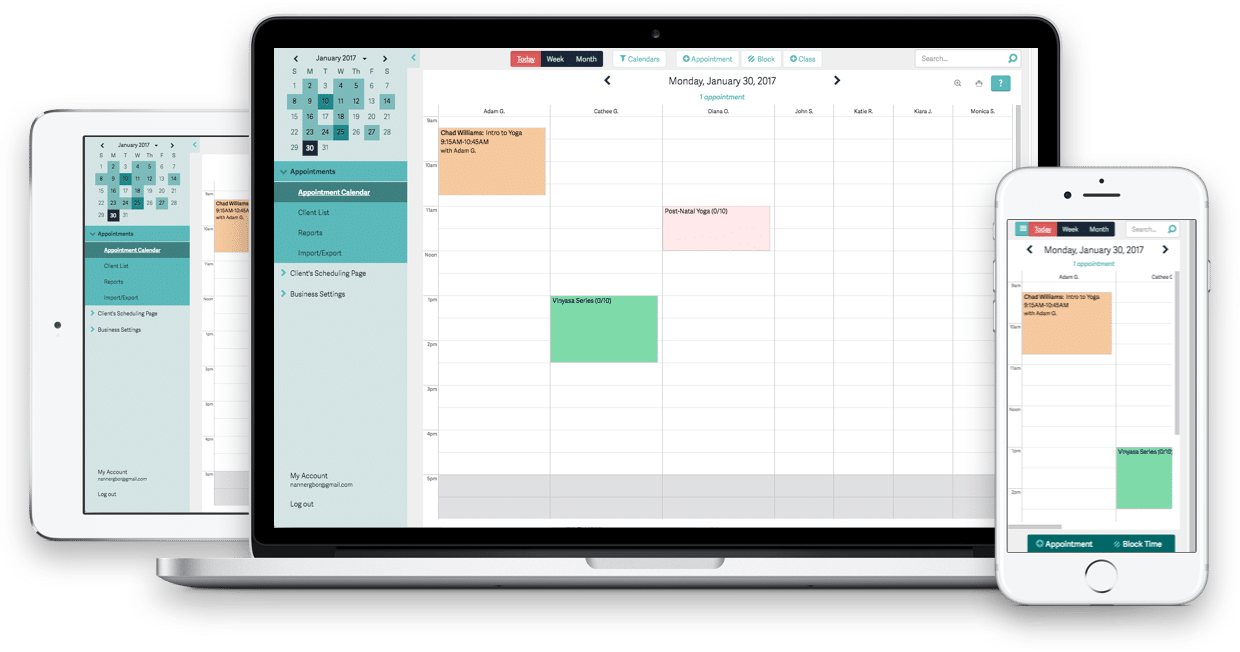 I’ve tried a lot of different booking and scheduling tools over the years, but for my personal needs, I found Acuity Scheduling to be the best option – which is why I’m still using it now. That’s not to say that you should stop reading this and just grab this tool; there are some other great tools out there and everyone has different needs and preferences – this is just mine.
With Acuity, you have complete control over your schedule. Whenever someone books a meeting, it will be updated in your availability calendar, and you can also enter any times or days where you won’t be available.
Your visitors will be able to see your full calendar availability, and select the exact times they want to schedule:
I’ve tried a lot of different booking and scheduling tools over the years, but for my personal needs, I found Acuity Scheduling to be the best option – which is why I’m still using it now. That’s not to say that you should stop reading this and just grab this tool; there are some other great tools out there and everyone has different needs and preferences – this is just mine.
With Acuity, you have complete control over your schedule. Whenever someone books a meeting, it will be updated in your availability calendar, and you can also enter any times or days where you won’t be available.
Your visitors will be able to see your full calendar availability, and select the exact times they want to schedule:
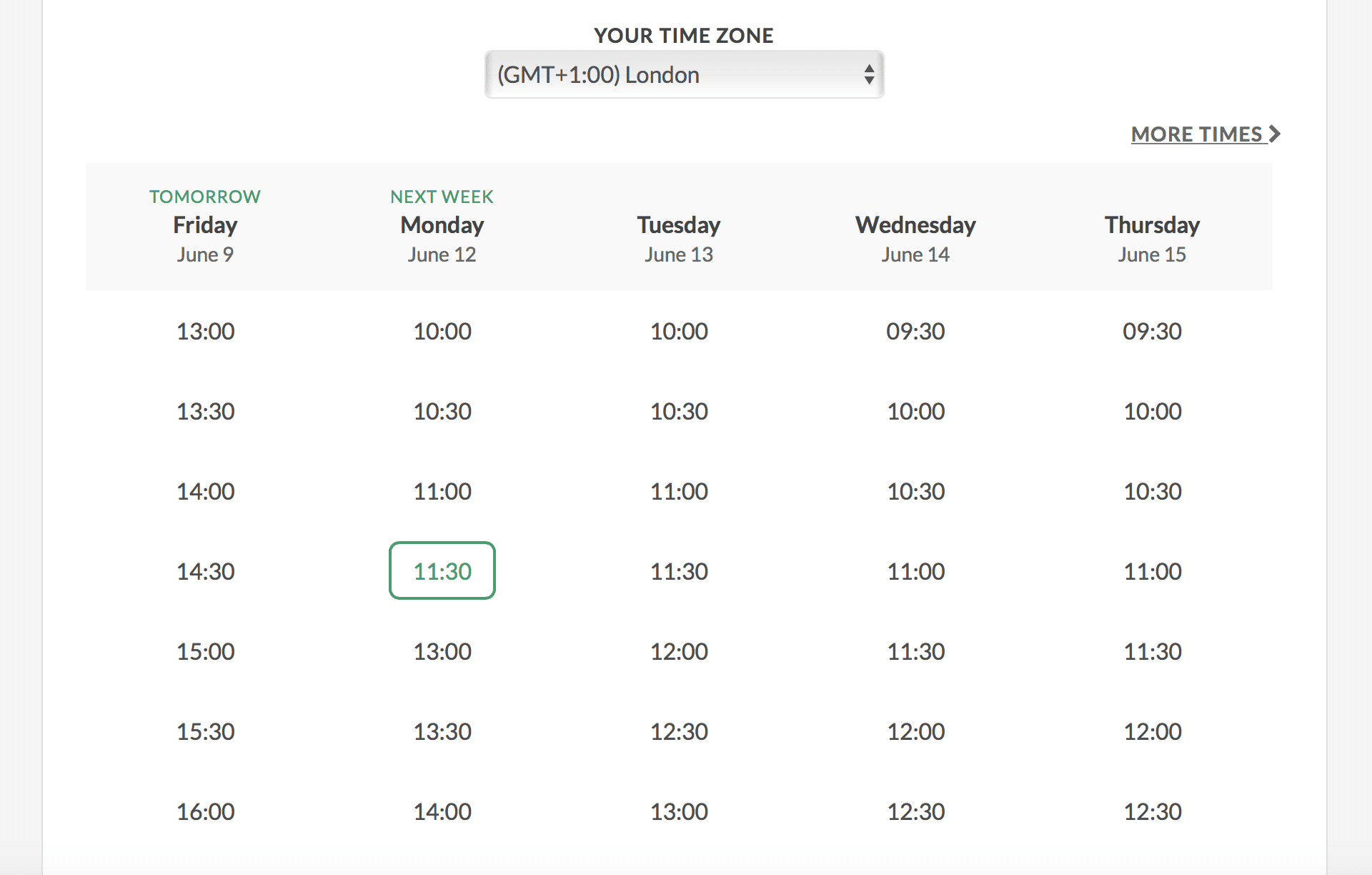 The visitor can then set the appointment (by their time-zone, so there are no mix ups!) and even pay, if that is the case.
But this is the real reason why I switched to Acuity - you can also ask for any information you want before the booking is confirmed:
The visitor can then set the appointment (by their time-zone, so there are no mix ups!) and even pay, if that is the case.
But this is the real reason why I switched to Acuity - you can also ask for any information you want before the booking is confirmed:
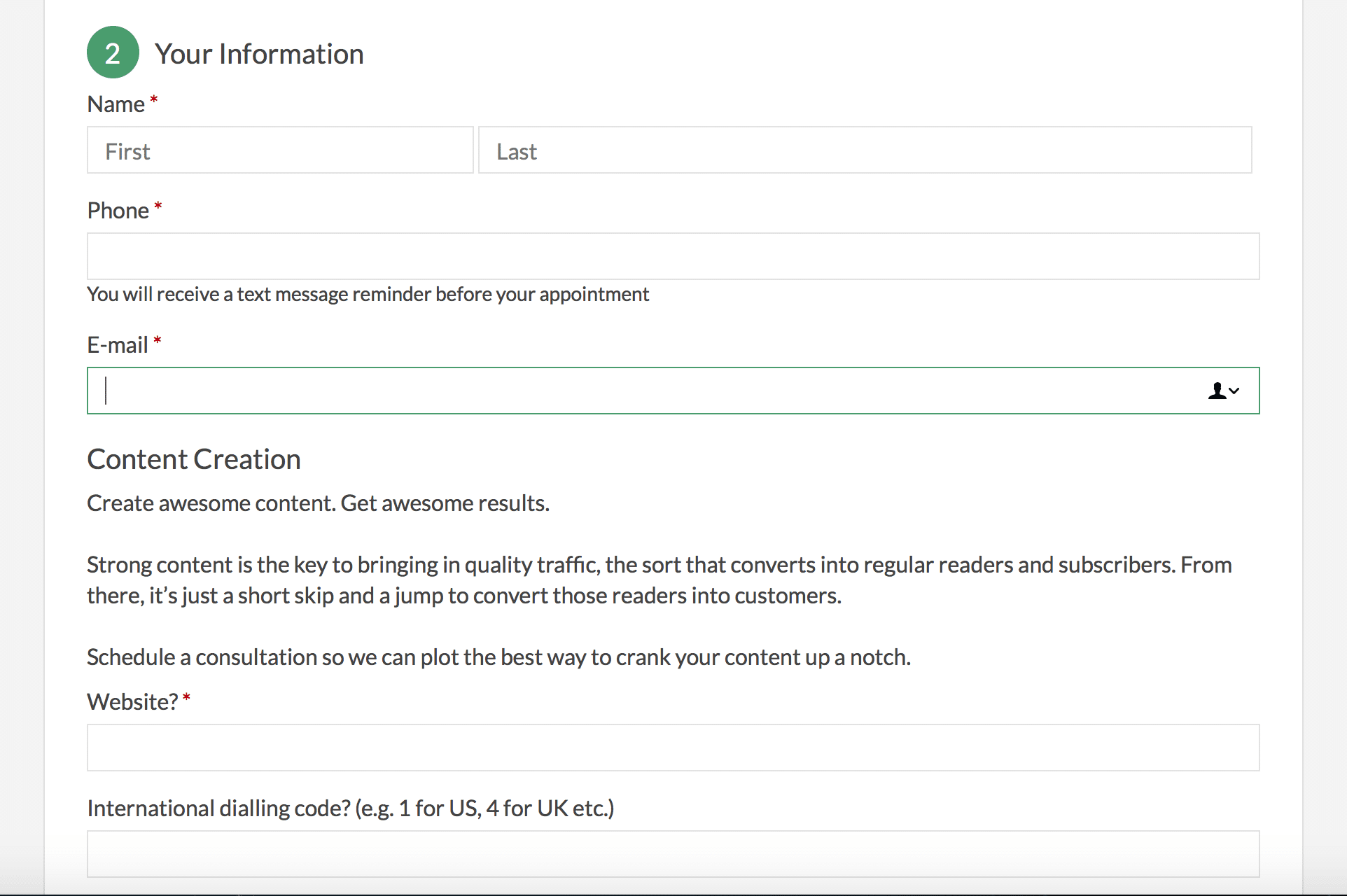 This helps you collect enough information for a successful call, and it also helps weed out any callers who aren’t serious about talking to you. I can set the exact questions I want, so that I can qualify potential clients.
Once the call is confirmed, you can then automatically send branded meeting confirmations, reminders or follow-ups via email or text. As a plus, the set meetings from your Acuity calendar can also be automatically updated to whatever online calendar you’re using (such as Google, Outlook or iCal).
[clickToTweet tweet="10 Best online booking and scheduling tools @acuityschedulin via @lilachbullock" quote="10 Best online booking and scheduling tools @acuityschedulin via @lilachbullock"]
This helps you collect enough information for a successful call, and it also helps weed out any callers who aren’t serious about talking to you. I can set the exact questions I want, so that I can qualify potential clients.
Once the call is confirmed, you can then automatically send branded meeting confirmations, reminders or follow-ups via email or text. As a plus, the set meetings from your Acuity calendar can also be automatically updated to whatever online calendar you’re using (such as Google, Outlook or iCal).
[clickToTweet tweet="10 Best online booking and scheduling tools @acuityschedulin via @lilachbullock" quote="10 Best online booking and scheduling tools @acuityschedulin via @lilachbullock"]
2. Calendly
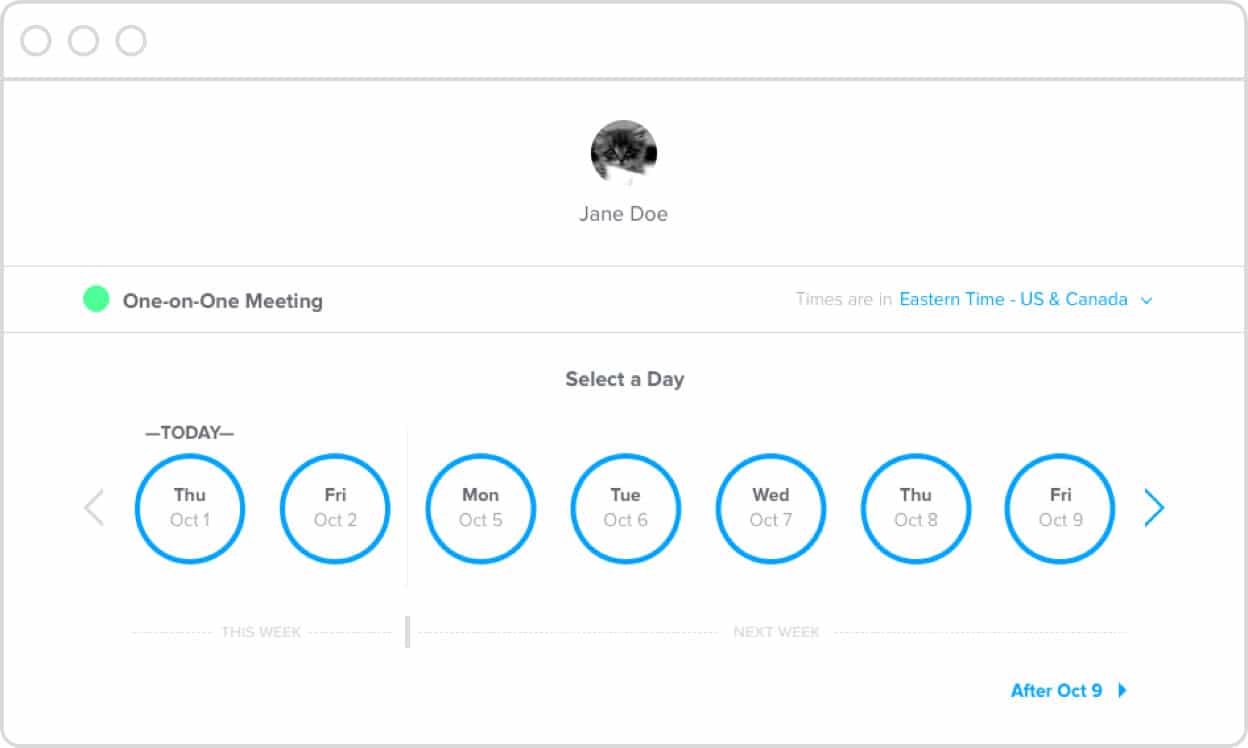 Calendly is another great option for a booking and scheduling calendar. You can use it both for one-on-one meetings, as well as for multiple attendees. In fact, Calendly is the tool I used before I switched to Acuity, and the big reason for that switch was the fact that Acuity had the form that helped me qualify clients, which I personally think is essential.
Calendly works great if you have a bigger team; for example, you can set it up so meetings are automatically distributed to different team members, or you can give the attendee the option to select which team member they want to speak with.
The calendar can be shared as a link (in an email, in online conversations, etc.) or you can embed it on your website directly. The tool also integrates with different apps, including calendars (Google, Outlook, Office 365 and iCloud), as well as sales and email marketing tools like Salesforce, GoToMeeting or Mailchimp.
Calendly works across devices and time zones, which are automatically detected. In terms of your schedule, you have full control over it, so you can add buffer times before and after meetings, set custom event times and set a daily limit of meetings.
[clickToTweet tweet="10 Best online booking and scheduling tools @calendly via @lilachbullock" quote="10 Best online booking and scheduling tools @calendly via @lilachbullock"]
Calendly is another great option for a booking and scheduling calendar. You can use it both for one-on-one meetings, as well as for multiple attendees. In fact, Calendly is the tool I used before I switched to Acuity, and the big reason for that switch was the fact that Acuity had the form that helped me qualify clients, which I personally think is essential.
Calendly works great if you have a bigger team; for example, you can set it up so meetings are automatically distributed to different team members, or you can give the attendee the option to select which team member they want to speak with.
The calendar can be shared as a link (in an email, in online conversations, etc.) or you can embed it on your website directly. The tool also integrates with different apps, including calendars (Google, Outlook, Office 365 and iCloud), as well as sales and email marketing tools like Salesforce, GoToMeeting or Mailchimp.
Calendly works across devices and time zones, which are automatically detected. In terms of your schedule, you have full control over it, so you can add buffer times before and after meetings, set custom event times and set a daily limit of meetings.
[clickToTweet tweet="10 Best online booking and scheduling tools @calendly via @lilachbullock" quote="10 Best online booking and scheduling tools @calendly via @lilachbullock"]
3. SuperSaaS
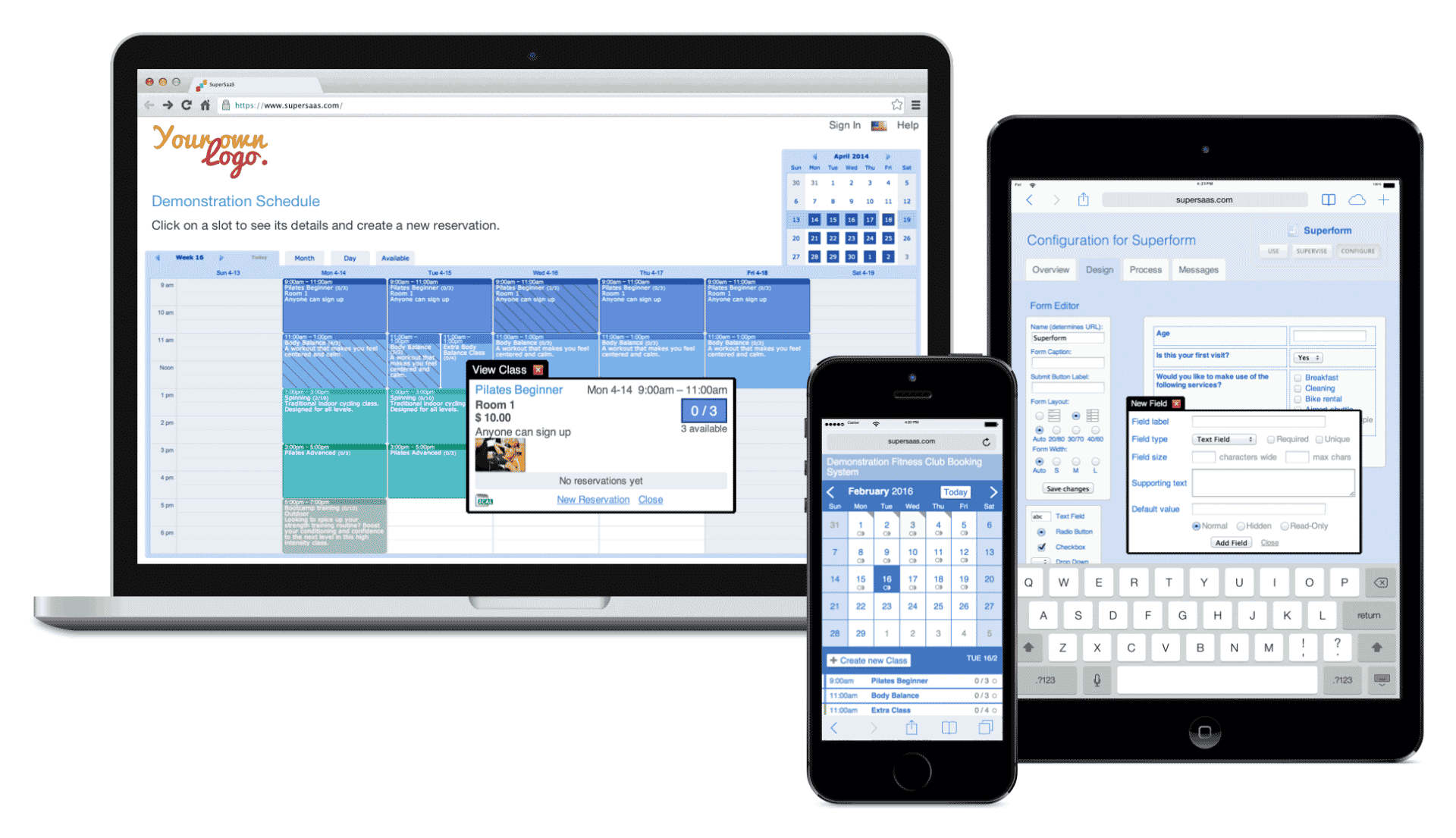 SuperSaaS is a very flexible online appointment booking tool. You can easily create a beautiful calendar layout that fits with your branding, in 29 different languages – and any time zone.
In order to reduce no-shows, you can set it up so that customers receive an email or text confirming or reminding them of the appointment.
You can choose to handle payment yourself or set up direct payment through PayPal or Stripe. Plus, you can also create advanced price rules for fluctuating prices or discounts.
SuperSaaS can then be added directly to your website or your Facebook page, and it will synchronize with your other calendars.
[clickToTweet tweet="10 Best online booking and scheduling tools @supersaas via @lilachbullock" quote="10 Best online booking and scheduling tools @supersaas via @lilachbullock"]
SuperSaaS is a very flexible online appointment booking tool. You can easily create a beautiful calendar layout that fits with your branding, in 29 different languages – and any time zone.
In order to reduce no-shows, you can set it up so that customers receive an email or text confirming or reminding them of the appointment.
You can choose to handle payment yourself or set up direct payment through PayPal or Stripe. Plus, you can also create advanced price rules for fluctuating prices or discounts.
SuperSaaS can then be added directly to your website or your Facebook page, and it will synchronize with your other calendars.
[clickToTweet tweet="10 Best online booking and scheduling tools @supersaas via @lilachbullock" quote="10 Best online booking and scheduling tools @supersaas via @lilachbullock"]
4. You Can Book Me
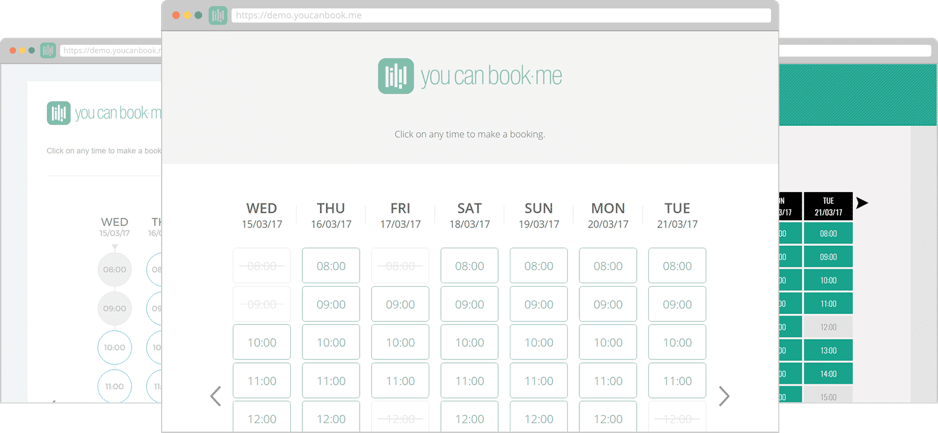 You can book me is an online scheduling tool for adding customer bookings directly in your calendar.
With this tool, you have complete control over your bookings and availability; you can offer a fixed appointment duration or leave it up to the customer, add padding between appointments, set confirmations and reminders and set up automated follow-up emails to tell your customer everything they need to know about the meeting.
If you do business in different time zones, don’t worry about mix-ups as the tool automatically detects time zones.
The tool integrates with Gmail and popular calendar apps, as well as with Zapier.
[clickToTweet tweet="10 Best online booking and scheduling tools @youcanbookme via @lilachbullock" quote="10 Best online booking and scheduling tools @youcanbookme via @lilachbullock"]
You can book me is an online scheduling tool for adding customer bookings directly in your calendar.
With this tool, you have complete control over your bookings and availability; you can offer a fixed appointment duration or leave it up to the customer, add padding between appointments, set confirmations and reminders and set up automated follow-up emails to tell your customer everything they need to know about the meeting.
If you do business in different time zones, don’t worry about mix-ups as the tool automatically detects time zones.
The tool integrates with Gmail and popular calendar apps, as well as with Zapier.
[clickToTweet tweet="10 Best online booking and scheduling tools @youcanbookme via @lilachbullock" quote="10 Best online booking and scheduling tools @youcanbookme via @lilachbullock"]
5. AppointmentPlus
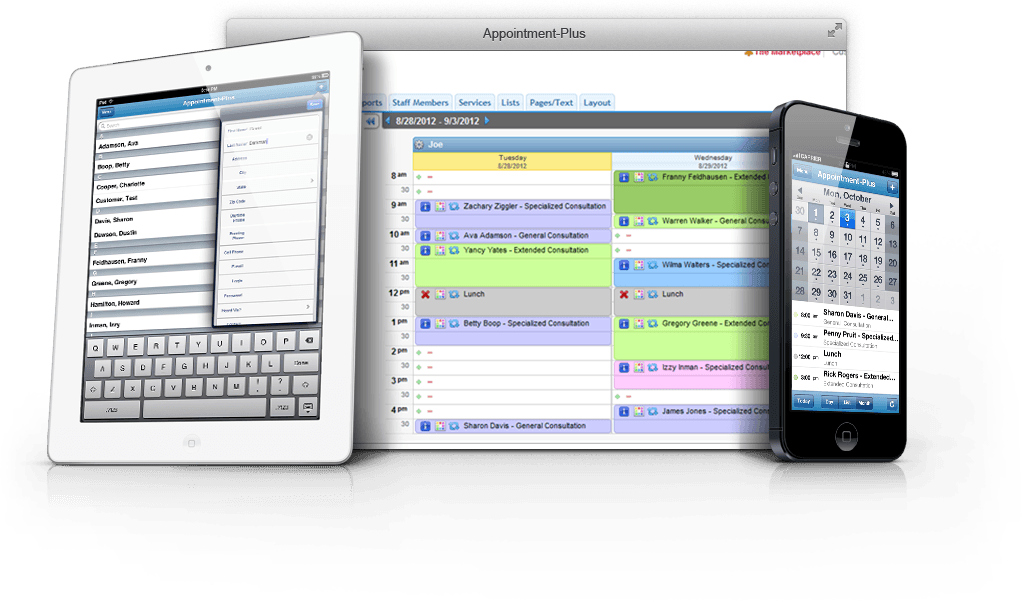 AppointmentPlus is an online scheduling calendar that attempts to provide you with all the features you need, no matter the size of your business – from small businesses, to large corporations, the tool aims to grow and scale along with your business.
People can easily set up appointments and rest assured that you will get a notification any time someone schedules, or makes any changes to the appointment (cancels it, changes the hour). Users can also pay easily, as the tool provides integrated payment processing.
The tool provides detailed analytics and tracking, such as no-show rates and full customer appointment history.
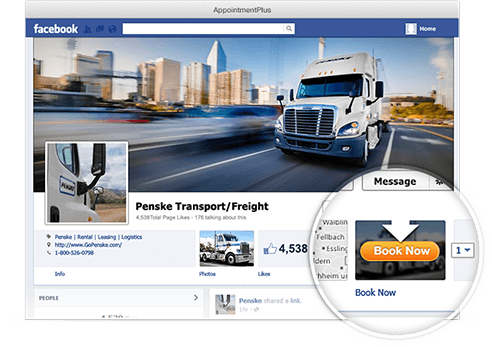
Plus, you can add a “book now” button to your website and even to your Facebook Page, so that your fans can easily set up a meeting:
AppointmentPlus is an online scheduling calendar that attempts to provide you with all the features you need, no matter the size of your business – from small businesses, to large corporations, the tool aims to grow and scale along with your business.
People can easily set up appointments and rest assured that you will get a notification any time someone schedules, or makes any changes to the appointment (cancels it, changes the hour). Users can also pay easily, as the tool provides integrated payment processing.
The tool provides detailed analytics and tracking, such as no-show rates and full customer appointment history.
Plus, you can add a “book now” button to your website and even to your Facebook Page, so that your fans can easily set up a meeting:
 [clickToTweet tweet="10 Best online booking and scheduling tools @appointmentplus via @lilachbullock" quote="10 Best online booking and scheduling tools @appointmentplus via @lilachbullock"]
6. Bookeo
 Bookeo is a software built for service providers of all sizes, designed to help make the booking process as simple as possible and to help you grow and scale your business.
You can use it to accept bookings and payments/deposits across any device, on your website or on your Facebook Page.
The tool then collects and analyses all of your customer information, and your calendar is automatically synced to your personal calendar (Google Calendar, iCal, etc.).
Bookeo stands out, though, with its integrated marketing tools that will help your promote your business. Use it to create daily deals, to set up gift vouchers and create targeted promotions, among other features.
[clickToTweet tweet="10 Best online booking and scheduling tools @bookeo via @lilachbullock" quote="10 Best online booking and scheduling tools @bookeo via @lilachbullock"]
Bookeo is a software built for service providers of all sizes, designed to help make the booking process as simple as possible and to help you grow and scale your business.
You can use it to accept bookings and payments/deposits across any device, on your website or on your Facebook Page.
The tool then collects and analyses all of your customer information, and your calendar is automatically synced to your personal calendar (Google Calendar, iCal, etc.).
Bookeo stands out, though, with its integrated marketing tools that will help your promote your business. Use it to create daily deals, to set up gift vouchers and create targeted promotions, among other features.
[clickToTweet tweet="10 Best online booking and scheduling tools @bookeo via @lilachbullock" quote="10 Best online booking and scheduling tools @bookeo via @lilachbullock"]
7. 10 to 8
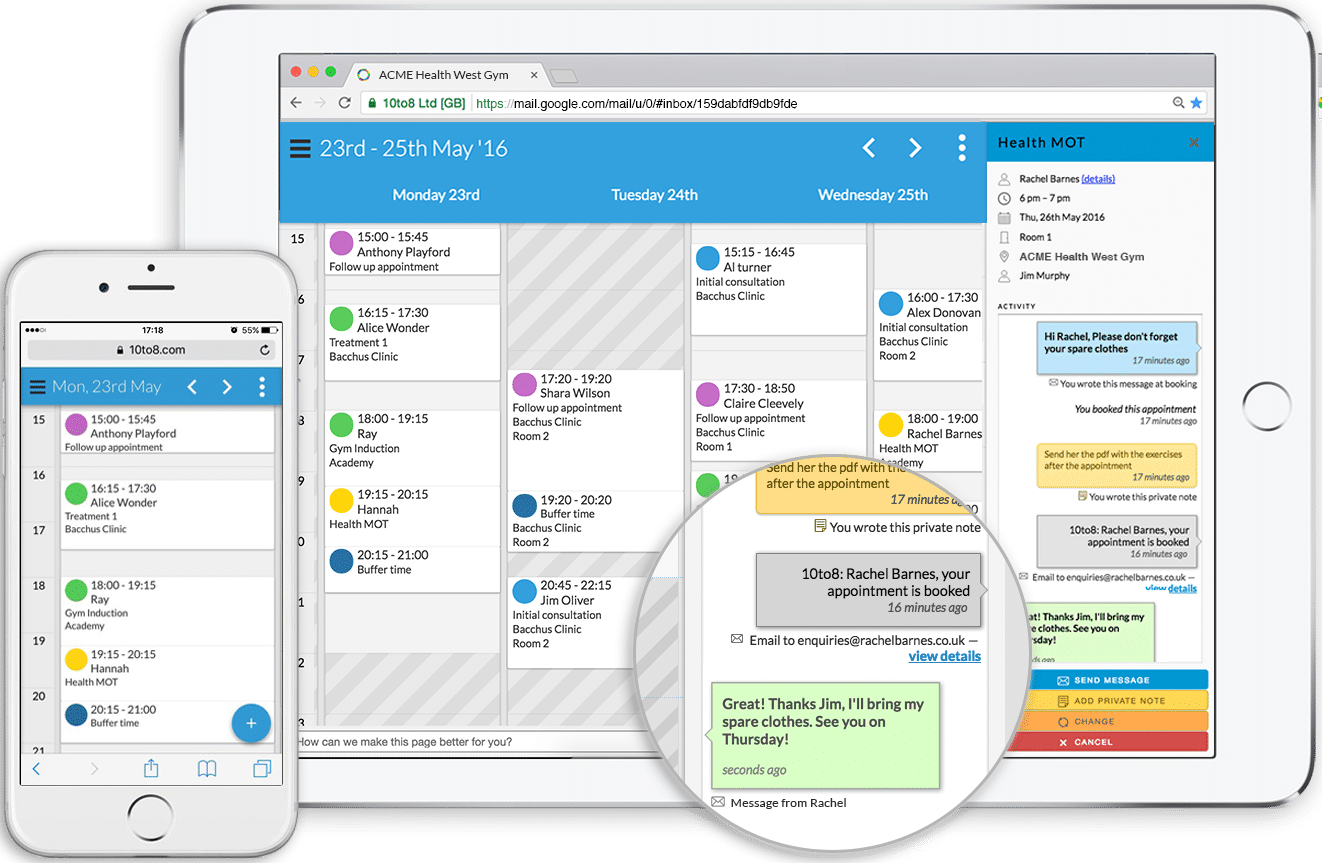 10 to 8 is an appointment scheduling software, which you can try for free. Your (future) clients can easily use it to set up, reschedule and cancel appointments any time of the day, as well as to pay for the meeting, where necessary.
Once the appointment is set up, you can automatically send people a text or email reminding them of the meeting, or you can even send them a form so that you can gather more information about them before the actual meetings.
If you have a bigger team, you can manage your entire team’s bookings with multiple calendars, where everyone can configure the best times to contact them.
Like the other tools, 10 to 8 also integrates with various tools, such as your calendar, as well as with CRM and email marketing tools, such as InfusionSoft and MailChimp.
[clickToTweet tweet="10 Best online booking and scheduling tools @10to8ltd via @lilachbullock" quote="10 Best online booking and scheduling tools @10to8ltd via @lilachbullock"]
10 to 8 is an appointment scheduling software, which you can try for free. Your (future) clients can easily use it to set up, reschedule and cancel appointments any time of the day, as well as to pay for the meeting, where necessary.
Once the appointment is set up, you can automatically send people a text or email reminding them of the meeting, or you can even send them a form so that you can gather more information about them before the actual meetings.
If you have a bigger team, you can manage your entire team’s bookings with multiple calendars, where everyone can configure the best times to contact them.
Like the other tools, 10 to 8 also integrates with various tools, such as your calendar, as well as with CRM and email marketing tools, such as InfusionSoft and MailChimp.
[clickToTweet tweet="10 Best online booking and scheduling tools @10to8ltd via @lilachbullock" quote="10 Best online booking and scheduling tools @10to8ltd via @lilachbullock"]
8. Setmore
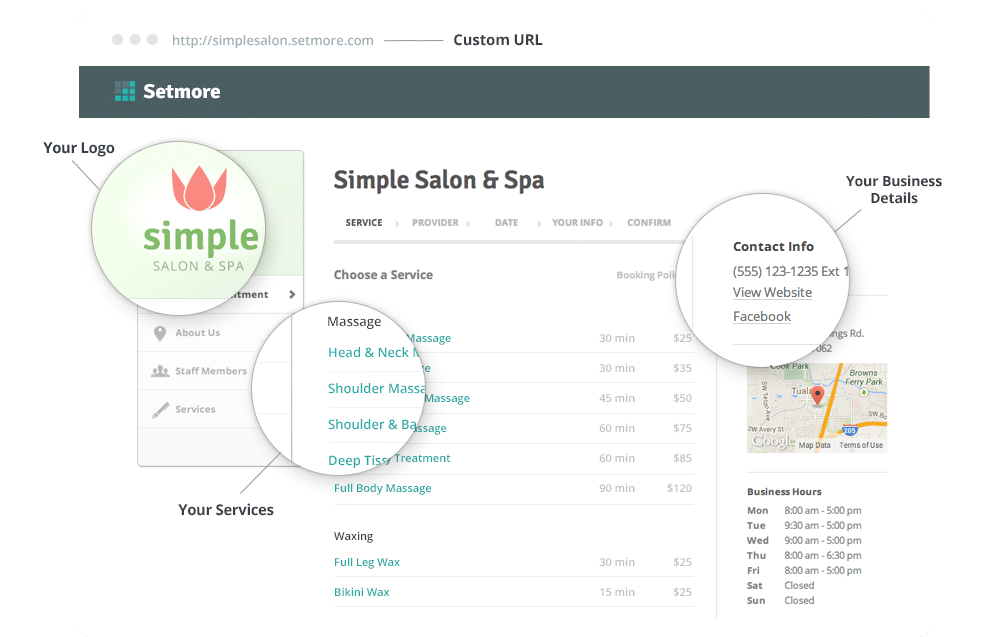 Setmore is a tool built for small business owners and entrepreneurs in the services industry. Whether you have a spa or a consulting business, so long as you’re in the services industry, Setmore is a great option.
Appointments are very easy to set up online, plus you can easily re-arrange your schedule by dragging and dropping appointments – and, your customers will get an email notification instantly to let them know of the change. For bigger teams, you can allow your team members to manage their own booking calendars.
Once an appointment is set up, rest assured that your clients will receive either a text or an email reminding them of the meeting.
Setmore also want to help you grow your business; one of the ways they help with this is by allowing you display reviews and ratings on your Booking Page.
The tool integrated with other apps and software, such as Google Calendar, Facebook, WordPress, Constant Contact and MailChimp.
[clickToTweet tweet="10 Best online booking and scheduling tools @setmore via @lilachbullock" quote="10 Best online booking and scheduling tools @setmore via @lilachbullock"]
Setmore is a tool built for small business owners and entrepreneurs in the services industry. Whether you have a spa or a consulting business, so long as you’re in the services industry, Setmore is a great option.
Appointments are very easy to set up online, plus you can easily re-arrange your schedule by dragging and dropping appointments – and, your customers will get an email notification instantly to let them know of the change. For bigger teams, you can allow your team members to manage their own booking calendars.
Once an appointment is set up, rest assured that your clients will receive either a text or an email reminding them of the meeting.
Setmore also want to help you grow your business; one of the ways they help with this is by allowing you display reviews and ratings on your Booking Page.
The tool integrated with other apps and software, such as Google Calendar, Facebook, WordPress, Constant Contact and MailChimp.
[clickToTweet tweet="10 Best online booking and scheduling tools @setmore via @lilachbullock" quote="10 Best online booking and scheduling tools @setmore via @lilachbullock"]
9. BirchPress
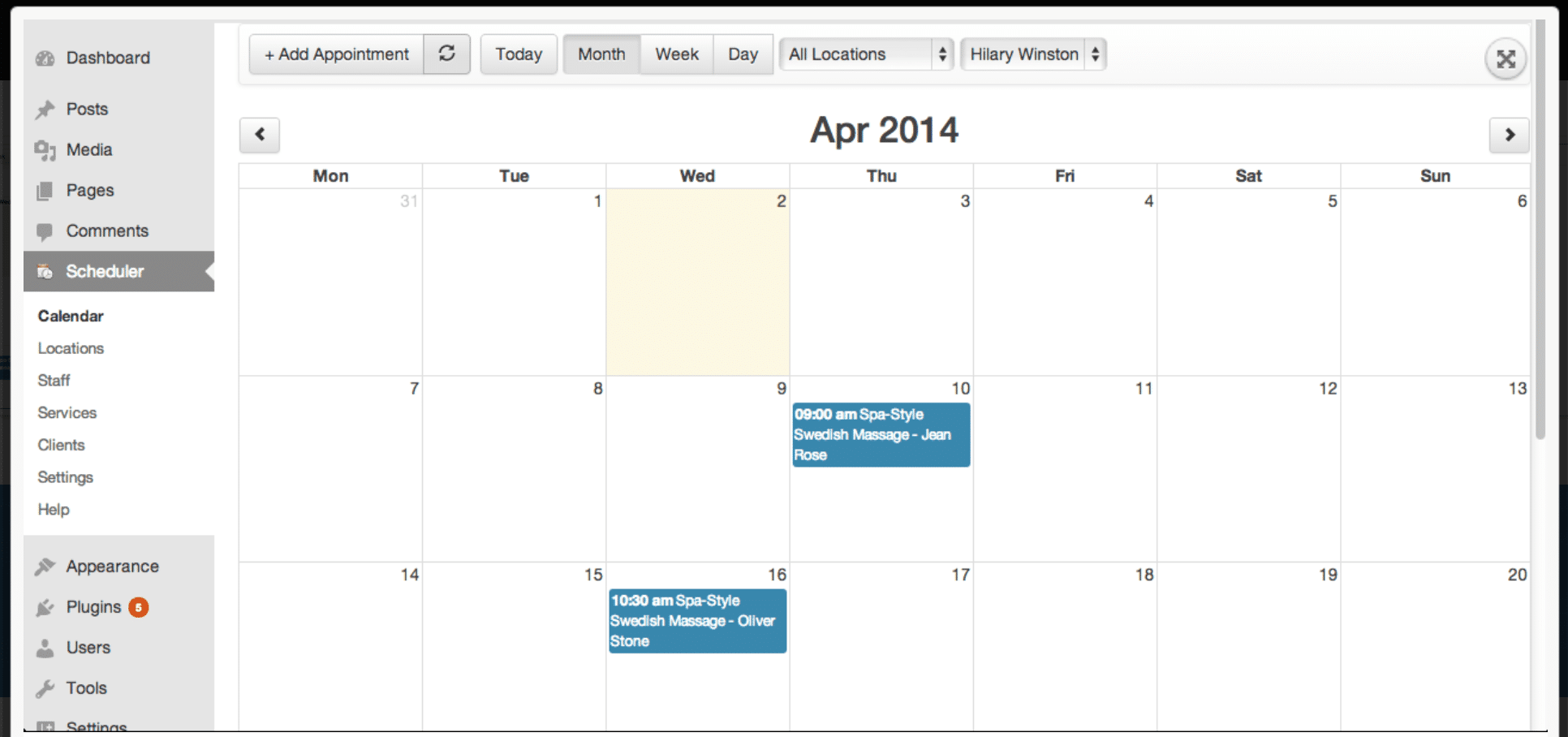 BirchPress is a premium WordPress appointment booking plugin that is perfect for all of you WordPress users out there.
With it, you can easily embed a booking form in a page or post, so that your website visitors can see your availability and book their appointments directly. You can then automatically set email notifications and reminders, for whenever an appointment is booked, rescheduled or canceled.
The form is completely customizable and you can also set it up so you accept online payments via PayPal, or through other services, when you integrate with WooCommerce.
The plugin integrates with your normal calendar as well (Google, iCal, Outlook, Android), so that you’re always in the know.
[clickToTweet tweet="10 Best online booking and scheduling tools via @lilachbullock" quote="10 Best online booking and scheduling tools via @lilachbullock"]
BirchPress is a premium WordPress appointment booking plugin that is perfect for all of you WordPress users out there.
With it, you can easily embed a booking form in a page or post, so that your website visitors can see your availability and book their appointments directly. You can then automatically set email notifications and reminders, for whenever an appointment is booked, rescheduled or canceled.
The form is completely customizable and you can also set it up so you accept online payments via PayPal, or through other services, when you integrate with WooCommerce.
The plugin integrates with your normal calendar as well (Google, iCal, Outlook, Android), so that you’re always in the know.
[clickToTweet tweet="10 Best online booking and scheduling tools via @lilachbullock" quote="10 Best online booking and scheduling tools via @lilachbullock"]
10. Qudini
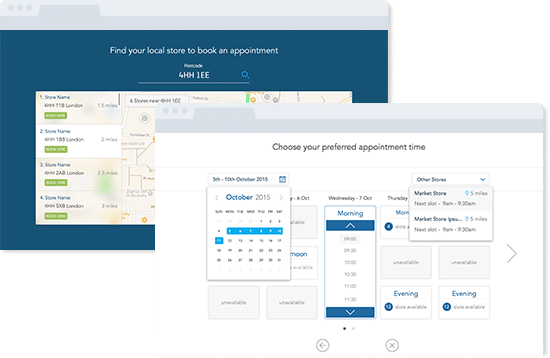 If you have a very busy schedule (and a busy queue!) Qudini is a great option for your business.
This Omnichannel appointment booking system allows your customers to easily book appointments via your website, on the phone, as well as through your staff, in store. As customers are increasingly expecting a more integrated experience across channels, this is a great tool for those who have a presence online, as well as a bricks and mortar store.
Qudini also offers so-called virtual queue management; what this means is, if you have a big queue, this can help cut down on waiting time. Once customers join the queue, Qudini uses historic and real time data to accurately calculate queuing times and to help manage your customers, by sending them personalized wait time information and engaging visuals while they wait for their turn.
[clickToTweet tweet="10 Best online booking and scheduling tools @qudini via @lilachbullock" quote="10 Best online booking and scheduling tools @qudini via @lilachbullock"]
If you have a very busy schedule (and a busy queue!) Qudini is a great option for your business.
This Omnichannel appointment booking system allows your customers to easily book appointments via your website, on the phone, as well as through your staff, in store. As customers are increasingly expecting a more integrated experience across channels, this is a great tool for those who have a presence online, as well as a bricks and mortar store.
Qudini also offers so-called virtual queue management; what this means is, if you have a big queue, this can help cut down on waiting time. Once customers join the queue, Qudini uses historic and real time data to accurately calculate queuing times and to help manage your customers, by sending them personalized wait time information and engaging visuals while they wait for their turn.
[clickToTweet tweet="10 Best online booking and scheduling tools @qudini via @lilachbullock" quote="10 Best online booking and scheduling tools @qudini via @lilachbullock"]
11. Booksy
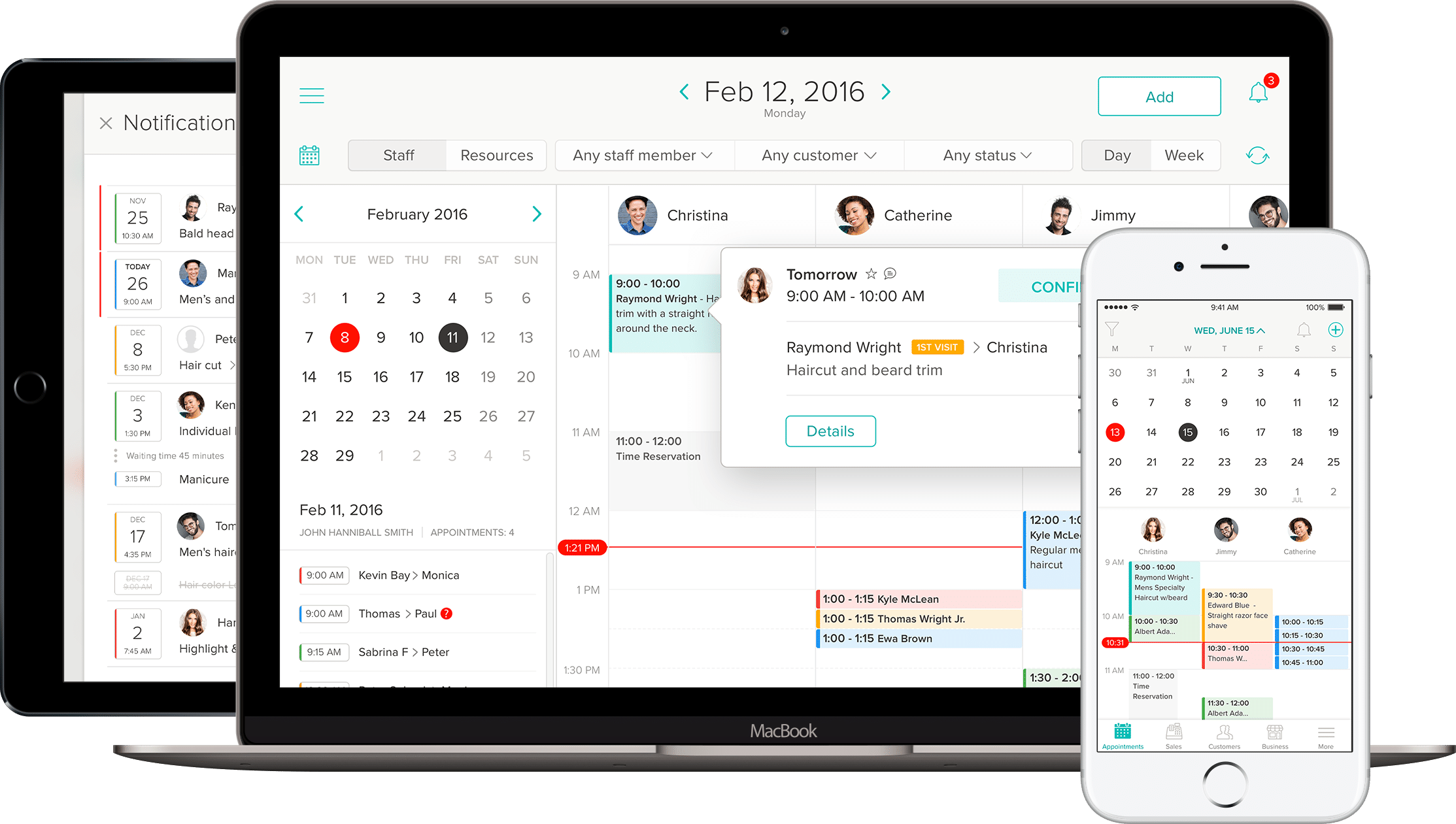 Booksy is the beauty appointment app that helps you find and book your next haircut, mani-pedi, or massage. Booksy makes it easy to search for beauty treatments near you. Whether you're the provider or the customer, Booksy is your one-stop beauty app. It has a system that helps business owners in the beauty industry to manage their appointments, process payments, and help with marketing.
The coolest part about Booksy is that it's completely free to use for customers, and it's just $29.99 monthly for providers. You can find nearby services, schedule an appointment, or discover new jobs in a matter of minutes with this intuitive booking tool. If you're looking for deals, these can be found, too. Booksy helps you get a hold of the best offers on hairstyling, waxing, and laser treatments.
Booksy is the beauty appointment app that helps you find and book your next haircut, mani-pedi, or massage. Booksy makes it easy to search for beauty treatments near you. Whether you're the provider or the customer, Booksy is your one-stop beauty app. It has a system that helps business owners in the beauty industry to manage their appointments, process payments, and help with marketing.
The coolest part about Booksy is that it's completely free to use for customers, and it's just $29.99 monthly for providers. You can find nearby services, schedule an appointment, or discover new jobs in a matter of minutes with this intuitive booking tool. If you're looking for deals, these can be found, too. Booksy helps you get a hold of the best offers on hairstyling, waxing, and laser treatments.
Frequently asked questions
What is the best online booking software for a small business?
For most small businesses I point people to Acuity Scheduling or Calendly first. Calendly is the fastest to set up and brilliant for one to one calls. Acuity is the better pick once you need to take payments, run classes or manage more complex availability. If you are on a tight budget, Setmore and SuperSaaS both have genuinely usable free plans.
Is there free online booking and scheduling software?
Yes. Calendly and Setmore both have free tiers that work well for solo businesses and freelancers. SuperSaaS offers a free plan too, though it is more limited. The free plans are usually capped on the number of staff, calendars or monthly bookings, so the moment you start taking real volume it is worth moving to a paid plan to unlock payments and reminders.
Acuity Scheduling vs Calendly: which should I choose?
Choose Calendly if you mainly book one to one calls and want the simplest possible setup. Choose Acuity if you sell packages, run classes, take deposits or want more control over your booking page and intake forms. Both sync with your calendar and send reminders. The honest answer is that Calendly is easier and Acuity is more powerful, so pick based on how complex your booking actually is.
Can these booking tools take payments and sync with my calendar?
Most of them can. Acuity, Bookeo, Booksy and Setmore all let clients pay or leave a deposit when they book, usually through Stripe, PayPal or Square. Almost every tool on this list syncs with Google Calendar and Outlook so you never get double booked, and sends automatic email or text reminders to cut down no shows.
Conclusion: Best online booking and scheduling tools
Online booking tools are true life-savers for all of us in the services industry. Not only do they help save a lot of time and headaches, but they are also so much more convenient for the customer, as it would only take them a few minutes to set up a meeting. As to what the best tool is? Difficult to say – personally, as I mentioned earlier, I prefer (and use) Acuity Scheduling, but depending on what type of business you are in, you might find that another tool is much better suited to your needs. There are even some great free tools in this list – for me though, I chose to pay for Acuity because the features were worth it. When deciding on a tool, you’ll need to think whether you want people to receive a text before an appointment, or whether you want a form that can help you qualify potential clients, for example; if so, it might be worth investing in a paid service, so that you can get the best possible results. What online booking software are you using? Let me know in your comments and please share this post if you’ve found it helpful 🙂Related reading: How to Use AI for Customer Service in Hair and Beauty Salons.
Writing about this yourself? You can pitch a travel guest post here.
Related reading: How to Find a Booking App That Suits Your Business Type.
Related reading: How to Set Up Auto Scheduling for Your Appointments.
The features that matter and why
When I first started comparing booking systems for my own business, I got distracted by flashy dashboards and ignored the basics. That was a mistake I would not repeat. The features that actually make a difference day to day are usually the quiet ones: reliable calendar sync, clear reminder emails and texts, and a booking page that loads fast on a phone. If customers cannot book you from their mobile in under a minute, you will lose them to someone who can.
Look closely at how the tool handles double bookings and buffer times between appointments. A system that lets two clients grab the same slot will damage your reputation faster than almost anything else. Check whether staff permissions are flexible enough for your team size, and whether you can customise the booking form to collect the information you need without overloading the customer with fields they will abandon halfway through.
Want AI doing the heavy lifting in your marketing?
I build the systems that handle the boring 80 percent, so you get your week back. Done properly, with the human kept in.
Integration with payment processing and existing calendar apps also matters more than most buyers expect at the start. If the tool cannot talk to the software you already rely on, you end up doing manual data entry twice, which defeats the point of automating bookings in the first place.
Pricing models explained
Booking software pricing tends to fall into a few common patterns, and understanding them before you commit will save you from nasty surprises on your card statement. Per-seat pricing charges you for each staff member who needs a login, which works fine for small teams but can get expensive as you grow. Tiered plans bundle a set of features at each price point, so you need to check carefully whether the tier you can afford actually includes the features you need, not just the ones you would like.
Some providers charge a flat monthly fee regardless of booking volume, which suits businesses with steady, predictable demand. Others charge per booking or take a small percentage of transactions, which can work out cheaper if you are just starting out but adds up quickly once you scale. Free plans exist too, though they usually cap the number of bookings, staff accounts or integrations, so treat them as a trial rather than a long-term solution.
Always read the fine print on contract length. Monthly rolling contracts cost more per month but give you the freedom to leave if the tool does not suit you. Annual contracts are cheaper overall but lock you in, which is fine if you have already tested the software properly but risky if you have not.
Common mistakes to avoid
The biggest mistake I see business owners make is choosing a tool based purely on price without testing how it feels from the customer's side. Book a slot yourself, on a phone and a laptop, before you sign up. If the process feels clunky to you, it will feel clunky to your customers too.
Another common error is ignoring customer support quality until something goes wrong. Send a support query during the trial period and time how long it takes to get a useful reply. A tool with brilliant features but slow support will cost you time and goodwill when a booking issue happens at a busy moment.
Many buyers also underestimate how much setup time a new system needs. Migrating existing appointments, training staff and updating your website links all take longer than expected. Budget at least a few weeks for a smooth transition rather than switching the week before a busy season.
Finally, do not overlook data ownership. Ask what happens to your client list and booking history if you decide to cancel. A trustworthy provider will let you export your data easily, without hoops to jump through.
Comparison criteria at a glance
| Criteria | What to look for |
|---|---|
| Ease of booking | A simple, mobile-friendly process that takes under a minute to complete |
| Calendar sync | Two-way sync with the calendar apps your team already uses, updating in real time |
| Reminders | Automated email and text reminders with customisable timing to cut no-shows |
| Payment handling | Support for deposits, full payments or cancellation fees without extra plugins |
| Staff and permissions | Flexible user roles that scale as your team grows, with individual calendars |
| Customisation | Ability to match your branding and collect the booking details you actually need |
| Support quality | Fast, helpful responses tested during the free trial, not just marketing promises |
| Data export | Straightforward way to download your client list and history if you leave |
| Pricing transparency | Clear terms on contract length, seat costs and any transaction fees |
FAQ
How long should I trial a booking tool before committing?
Give it at least two to three weeks of real use, including a busy period if possible. This gives you enough bookings to spot any glitches with reminders, payments or double bookings before you sign a longer contract.
Do I need integrations with other software?
If you already use accounting, email marketing or point of sale software, check that the booking tool connects to it. Manual data entry between disconnected systems wastes time and increases the risk of errors.
Is a free plan ever enough for a small business?
It can work while you are testing the waters or handling very low booking volumes, but most free plans cap staff accounts, bookings or features. Plan to upgrade once your booking numbers become steady.

