Do you have a blog? Are you using social media to promote your business? If the answer to any of those two questions is yes, then you most likely could use an editorial calendar to help you plan out your strategy, keep you organized and help you make sure everything is on schedule and consistent.
In this blog post, find out how to create your own editorial calendar or you can download the free template to get started immediately.
Why you need an editorial calendar How to get started with your first editorial calendarEditorial calendar: useful toolsHow to create your very own calendar + free template
[sc_fs_faq sc_id="fs_faqiu178e4vb" html="true" headline="p" img="" question="What is an editorial calendar? " img_alt="" css_class="" ]An editorial calendar is a calendar used by publishers, bloggers and content creators to plan their content in advance, across different channels. [/sc_fs_faq]
Why do you need an editorial calendar?/a>
Anyone with a blog or who uses social media marketing could benefit from creating an editorial calendar. If you ever thought to yourself “oh no, I haven’t published anything new in forever” and then scouring the web for ideas of what to write, or if you’re finding that there are days when you’re barely posting anything on social media, you would definitely benefit from using an editorial calendar.
The main reason for this? It’s simple, really: it will help keep you organized. And, especially when working with a team, this can help you make sure you make the most out of your time.
[clickToTweet tweet="Why do you need an editorial calendar? #blogging via @lilachbullock " quote="Why do you need an editorial calendar? #blogging via @lilachbullock "]
Another big reason is that it helps you be more consistent with what you’re posting. This is a problem that many struggle with – not posting new content or social media updates regularly, not diversifying their content enough and so on.
With an editorial calendar in place, you will have a clear schedule for when you need to post something, and you will know exactly what to post.
Having an editorial calendar will also help you better strategize your blogging and social media marketing. Depending on what your goals are, you can then plan your content in such a way that it will help you achieve those goals.
For example, if your goal is to get more subscribers on your email list, you should probably focus your attention on creating content that will drive more conversions, such as how-to guides, where you can add opt-in forms for downloadable files (like a PDF file of your guide, a checklist and basically anything that would offer people value and get them to subscribe).
Or, if your goal is to get more traffic to your website from social media, you could, for example, schedule in your calendar more updates that link back to your website.
With an editorial calendar, you can also keep better track of the keywords you use for your blog posts, so that in time, you can improve your blog’s search engine ranking.
How to get started with your first editorial calendar
The first step in creating your editorial calendar is to establish what your goals are.
Goals
As I mentioned earlier on, once you know what your goals are, it will be much easier to
As I mentioned earlier on, once you know what your goals are, it will be much easier to establish what kinds of content you want to publish, so that you can achieve those goals as quickly and efficiently as possible.
Leaving your posting to chance might work for a while, or here and there, but once you actually have a plan and an organized strategy in place, getting results will be much easier, and not to mention, you will be much more consistent.
Your goals from blogging and from social media marketing could be:
To get more traffic
To boost your influence and your status as a thought-leader
To increase your reach
To build loyalty among your audience
To improve brand awareness
To make more conversions and get more subscribers and leads
To boost your sales
To get more new customers
[clickToTweet tweet="How to get started with your first editorial calendar #blogging via @lilachbullock " quote="How to get started with your first editorial calendar #blogging via @lilachbullock "]
Research Topics & The Best Times To Post
Once you’ve established what your goals are, it’s time to think about what kinds of content or social media updates will help you achieve these goals.
Make a list of the topics you want to cover, as well as the types of content you are planning to create: blog posts, images and videos, e-books, webinars, interactive content and so on.
Next, consider when you’re going to post: what days and what times. Make sure to take into consideration your analytics, as well as your availability. On which days do you get the most engagement and traffic? When is your audience most active? On which days can you spend time promoting new blog posts?
Once you identify the most successful days – i.e. the days with the most traffic, social media shares and so on – make a note to publish your best content during those days, such as in-depth ultimate guides, extensive lists and how-to posts.
This way, you will assure that your best content gets maximum exposure.
Come up with multiple ideas for blog post headlines
Next, when you’ve established the dates and times you will be publishing, as well as the topics you will be covering in your posts, it’s time to think of the content you will be creating.
Where possible, get the team together and spend some time thinking of ideas and adding them to a list. Ideally, you should come up with ideas for at the least the following month – but the more ideas, the merrier!
Here are a few tips to help you come up with multiple blog post ideas at a time:
Use a tool like Buzzsumoto see what the top articles in your niche are and use as inspiration for your own ideas
Check out what your competitors are writing about and which posts get the most shares and comments
Revisit your older content: what could use a re-write? What else could you write about these subjects?
Use a keyword research tool to see what other groups of keywords people use – it will not only allow you to use better keywords in your titles/articles, but it can also give you ideas of what to write about
Common mistakes posts: change things up so that instead of “how-to”, it’s “common mistakes: how not to”
Case studies: any potential case studies about your business or your clients that you can write about?
Subscribe to an RSS reader: get a content curation tool like Feedly to subscribe to multiple blogs in your industry so that you can quickly see what blog posts they’re publishing and use them as inspiration
Use Google to search for relevant keywords in your niche, to see what kinds of results you get and use them as inspiration for ideas
[clickToTweet tweet="How to come up with multiple #blog post ideas for your content calendar via @lilachbullock" quote="How to come up with multiple #blog post ideas for your content calendar via @lilachbullock"]
Guest posting
Another thing that you need to consider is guest posting – both on your blog and guest blogs you would like to publish on other websites. These too will need to be planned out and added to your editorial calendar.
First, consider how many guest posts you want to publish on your website on a regular basis. Make a list of your regular contributors and then assign them different days for their guest blogs. When you get more requests for guest blogging, add them to your backlog until their posts can be published.
Next, start planning your own guest blogging strategy. Do you have any blogs that you’re regularly contributing to? if so, add them to your editorial calendar so that you don’t forget your due dates.
Useful tools
In regards to editorial calendars, you have 3 main options: A, to use a tool, B, to use an editorial calendar template (like the one that’s free to download with the opt-in form below) or C, to create your own editorial calendar using something like Google Sheets or Excel.
If you prefer getting a tool, these are some of the best options available:
ContentCal
ContentCal is, in theory, a social media planning and scheduling tool. That being said...it's actually also a great tool for planning your editorial calendar.
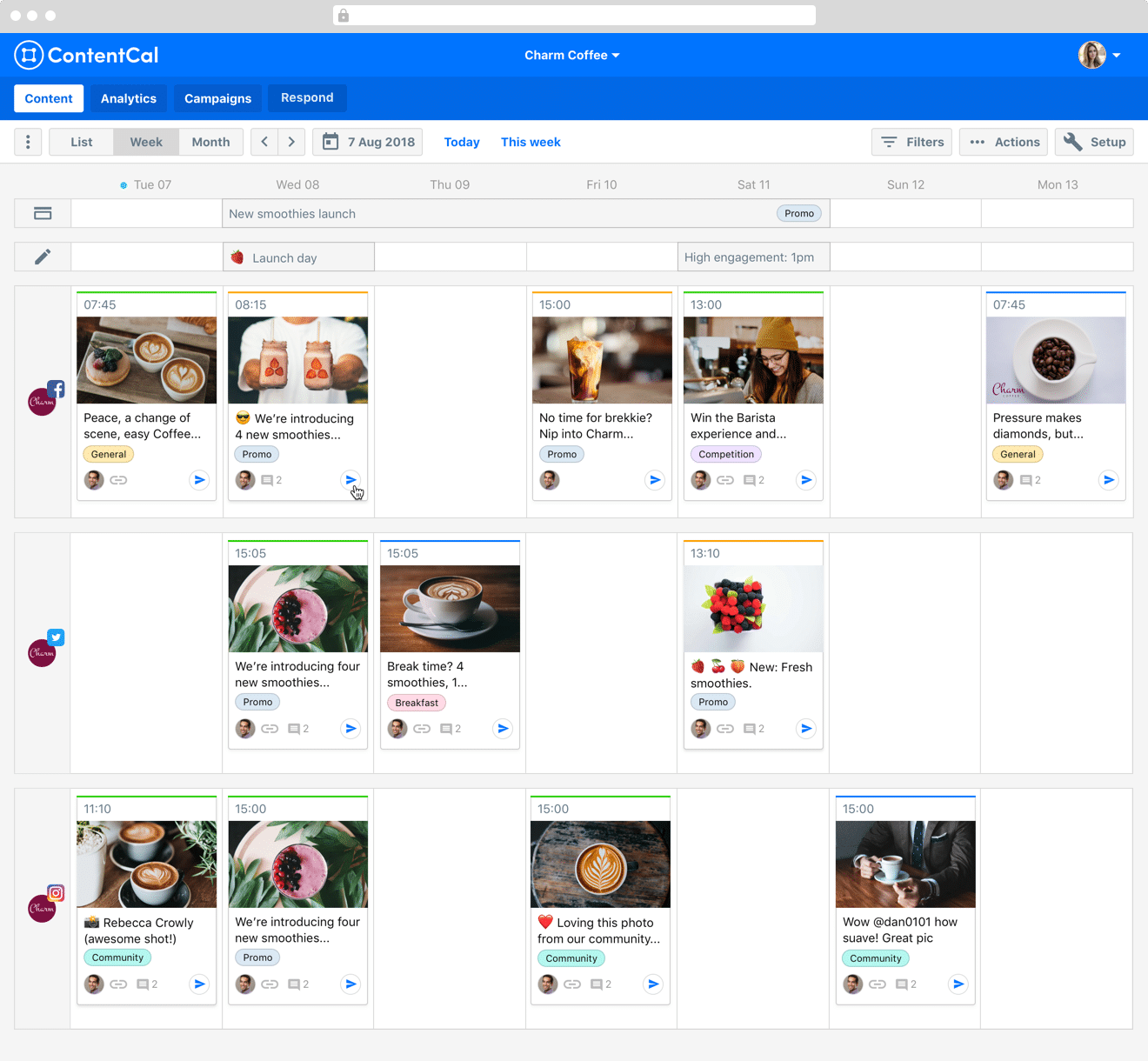
It's built with teams in mind, so you can add multiple team members to collaborate on content ideas (each with specific roles). You can then all come up with ideas on the ContentCal platform and then easily drag and drop them on the calendar, on the days you want to publish. As you can see in the screenshot above, you can tag and organise your posts for ease, as well as add any images you're planning to use.
Plus, it also has the advantage of being a social media marketing tool, meaning you can plan both your editorial calendar and your social media calendar using the same dashboard, as well as schedule your social media updates and track your social analytics and post performance.
CoSchedule
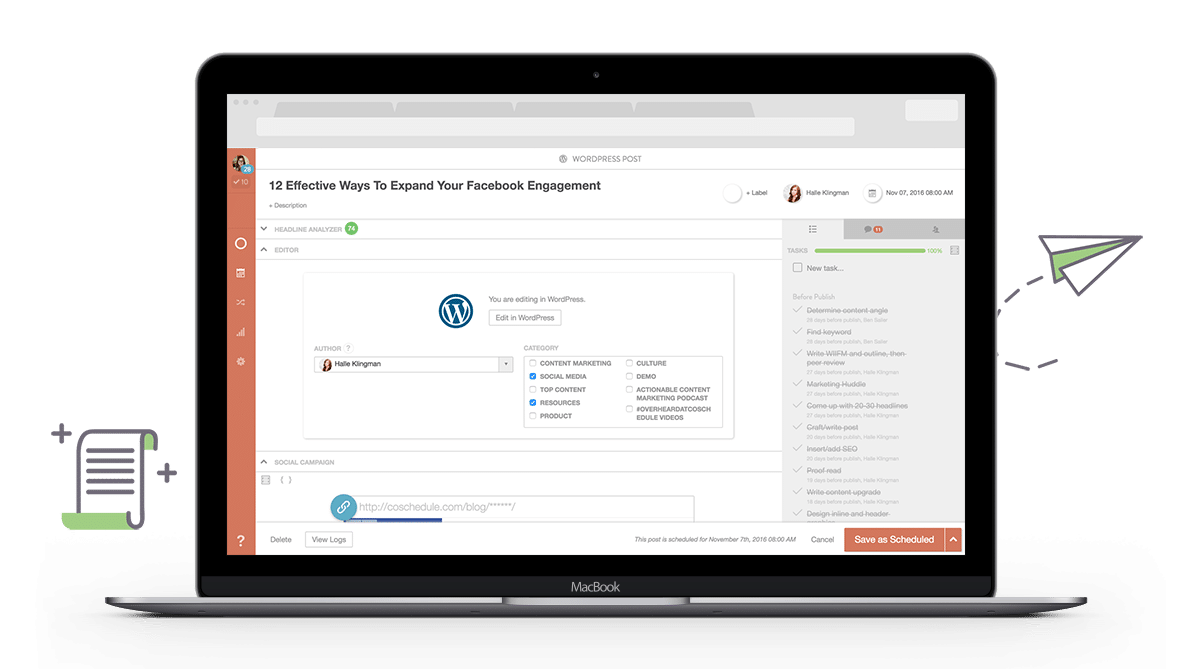
CoSchedule is one of the most popular tools of the sort. With it, you can manage all of your inbound marketing process, including your blog and your social media, as well as any other marketing projects you and your team are working on.
CoSchedule also has the benefit of integrating with numerous other tools, such as Google Analytics and the top social networks. There’s even a WordPress plugin that you can use to manage your blog content directly within WordPress.
[clickToTweet tweet="Best editorial calendar tools @coschedule #blogging via @lilachbullock" quote="Best editorial calendar tools @coschedule #blogging via @lilachbullock"]
Kapost
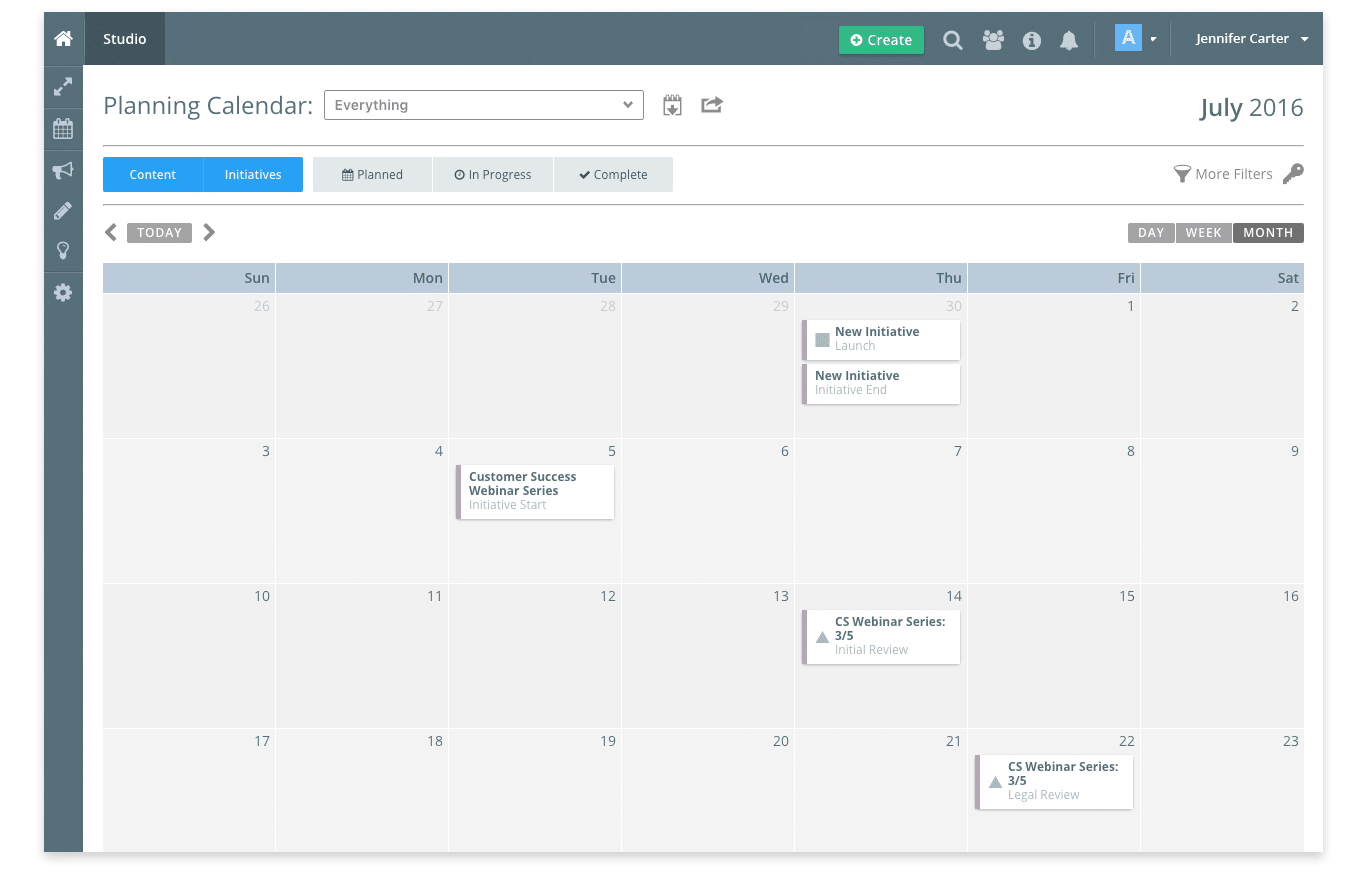
Kapost is a B2B marketing operating system, that also offers a planning calendar which you can also use as an editorial calendar.
You can use their calendar to plan more than just your content strategy, but also your upcoming events, meetings and so on and then you can share it with others.
[clickToTweet tweet="Best editorial calendar tools @kapost #blogging via @lilachbullock" quote="Best editorial calendar tools @kapost #blogging via @lilachbullock"]
Trello
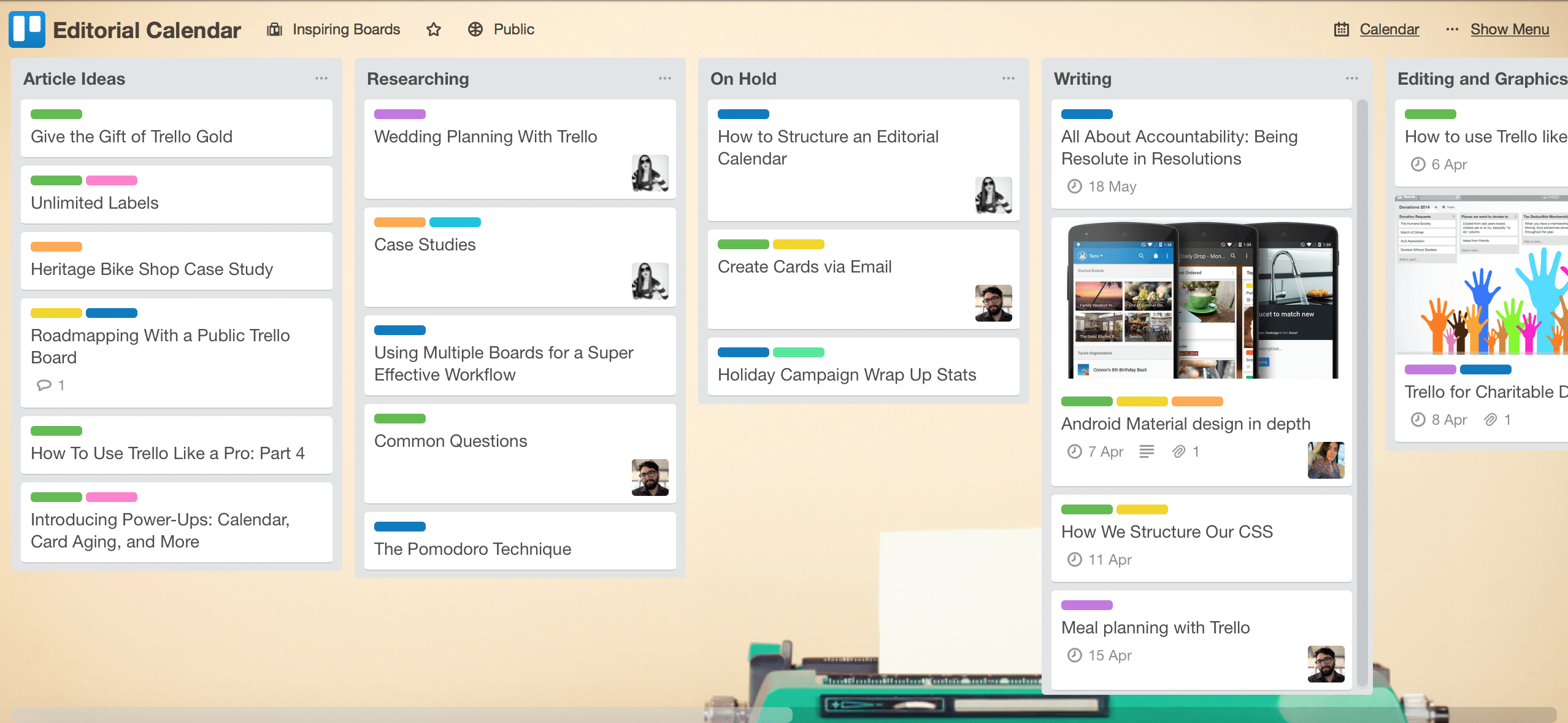
Trello is a tool that is a favourite of mine and I’ve been using it for some time now to keep track of tasks, assign things and so on.
But, it can also be used for creating an editorial calendar. Basically, you create boards and within those boards, you can add different lists. Here is how an editorial calendar could look like with Trello:
It’s very easy to create and maintain, you can add colour coding, add all kinds of files to your items and much more.
[clickToTweet tweet="Best editorial calendar tools @trello #blogging via @lilachbullock" quote="Best editorial calendar tools @trello #blogging via @lilachbullock"]
How to create your very own editorial calendar
As I mentioned earlier, one of the best ways to create your own calendar, is to use something like Excel or Google Sheets. Google Sheets might be the better option here, as you can invite the whole team to view the calendar and collaborate and add to it.
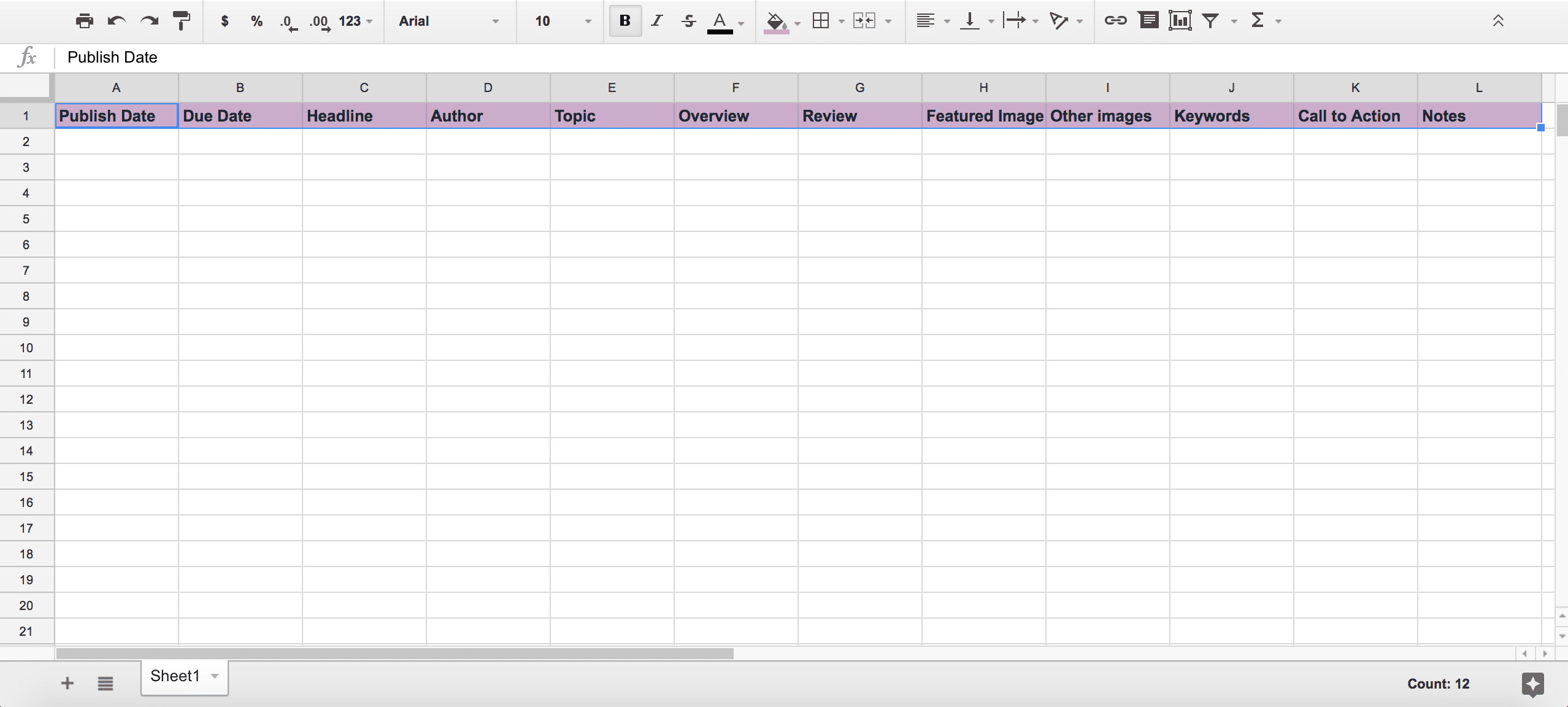
To get started, open a blank spreadsheet.
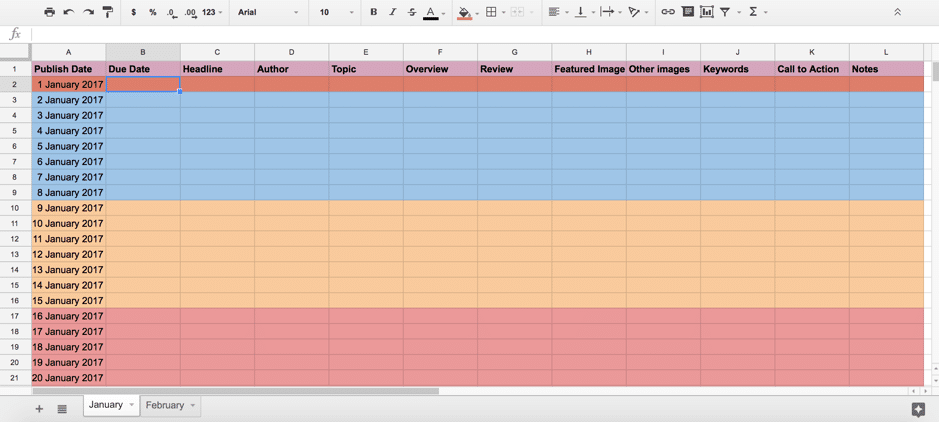
The first thing we’re going to add is the first row. This should include (depending, of course, on your particular strategy), in order:
A review column in case the post needs to be reviewed by someone
Featured image: is there a featured image ready for the post
Other images: are there enough images and other types of visual content in the post?
Keywords: the keywords used for the blog post
Call to action: what is the call to action for the post?
Notes: a space where the reviewer, for example, can make notes about the post, like suggestions for changes
[clickToTweet tweet="How to create your own editorial calendar #blogging via @lilachbullock" quote="How to create your own editorial calendar #blogging via @lilachbullock"]
Next, it’s time to enter all of the dates you want to publish the articles. To make things easier and more organized, you could create different tabs for each month within your spreadsheet.
Ideally, you should also colour-code your publishing dates – I prefer doing it on a weekly basis:
Afterwards, do the same things for each month of the year. In my case I put every date of the month in, because since this is a template, you can’t know when people usually post new blogs. That said, if you only publish on certain days, you can choose to only enter those days in your calendar.
Next, select the due dates by which the posts need to be ready for review. Ideally, you should have them ready at least a day or two in advance, so that you can make sure there’s enough time to make any changes where necessary, as well as to have the time to upload them.
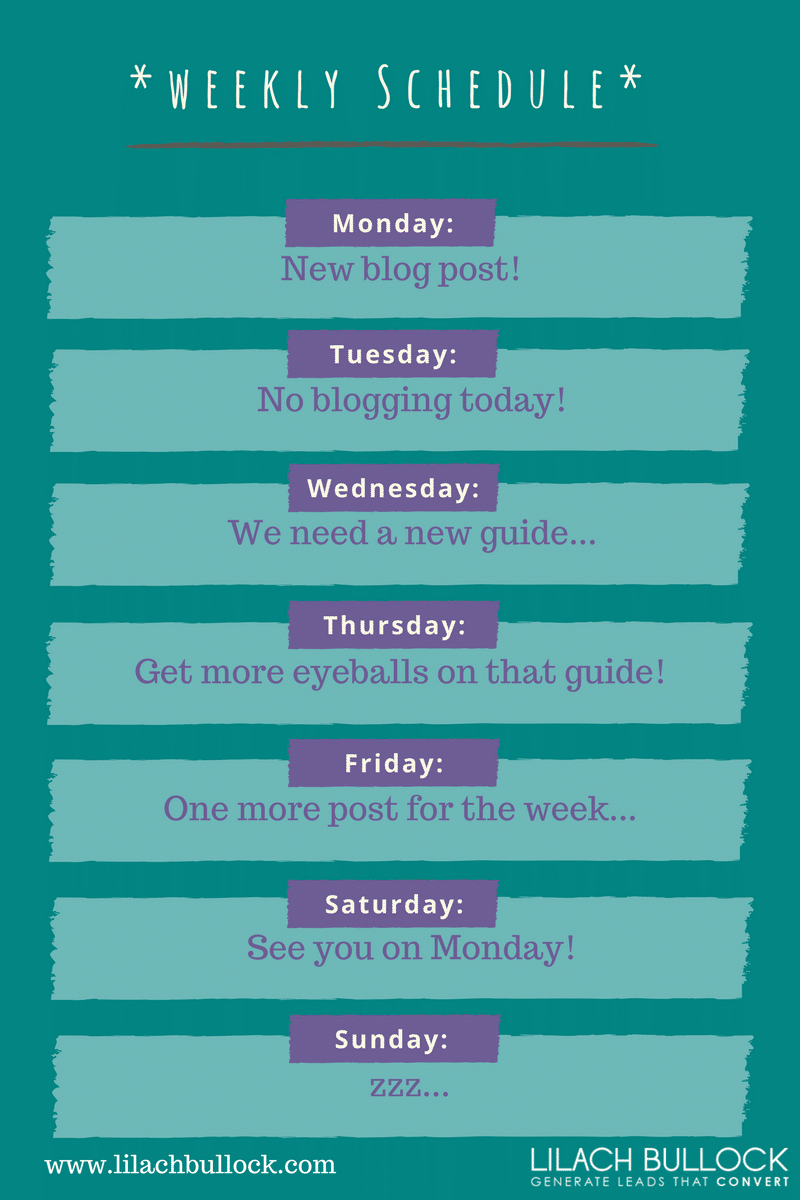
Now, for the posts; as I mentioned a bit earlier on, you need to strategize when you publish your posts. As an example, I’ve noticed that for me, personally, the best days for publishing are usually Wednesdays, because that is when I get the most traffic to your website, as well as the most shares and engagement on social media. For that reason, I try to publish my best content on Wednesdays, such as ultimate guides, long lists and so on. Then, I leave my shorter blog posts for the days when there isn’t as much activity.
Use your own analytics for your blog and for social media to figure out the best days to post. Then, schedule your content so that your best posts are published on those days where you get the most traffic and shares, in order to maximise your results.
After you’re done setting the dates for all of your post ideas, complete all of the other fields in your editorial calendar, where possible.
[clickToTweet tweet="How to create your own editorial calendar step by step #blogging via @lilachbullock" quote="How to create your own editorial calendar step by step #blogging via @lilachbullock"]
Once you start creating content, make sure to add to your editorial calendar any relevant information about them, such as if there’s a featured image for it, or any other images in the post, what the main keywords are and any other notes and comments.
The more up to date you keep it, the better!
Once the editorial calendar is one, share it with all of the team members involved who can contribute, so that they can see what the schedule is, or if they’re writers, so that they know exactly when they’re supposed to write or publish an article.
Now, all you have to do is start creating your own editorial calendar – or, if you want to skip the calendar creation part, you can download the free template which I created here:
Having an editorial calendar should be an essential part of your content marketing strategy. It will help you become more organized, which will help you save time, plus it will also help you better strategize your plan so that you can achieve your content marketing goals faster and more efficiently.
Get your free template now, create your own or use a tool and you’ll notice what a huge difference an editorial calendar can make – both with saving you a lot of headaches (and time) and with making a bigger impact with your content.
Are you using an editorial calendar? If so, what kind of calendar? Let me know in your comments and happy publishing:) Oh, and please share if you enjoyed the post:)
Forbes Top 20 Social Media Power Influencer. 21 years of marketing experience. Currently obsessed with AI implementation done well. British AI and marketing consultant working internationally, writes a weekly newsletter that 15,000+ founders read on Sunday mornings.




 CoSchedule is one of the most popular tools of the sort. With it, you can manage all of your inbound marketing process, including your blog and your social media, as well as any other marketing projects you and your team are working on.
CoSchedule also has the benefit of integrating with numerous other tools, such as Google Analytics and the top social networks. There’s even a WordPress plugin that you can use to manage your blog content directly within WordPress.
[clickToTweet tweet="Best editorial calendar tools @coschedule #blogging via @lilachbullock" quote="Best editorial calendar tools @coschedule #blogging via @lilachbullock"]
CoSchedule is one of the most popular tools of the sort. With it, you can manage all of your inbound marketing process, including your blog and your social media, as well as any other marketing projects you and your team are working on.
CoSchedule also has the benefit of integrating with numerous other tools, such as Google Analytics and the top social networks. There’s even a WordPress plugin that you can use to manage your blog content directly within WordPress.
[clickToTweet tweet="Best editorial calendar tools @coschedule #blogging via @lilachbullock" quote="Best editorial calendar tools @coschedule #blogging via @lilachbullock"]


 CoSchedule is one of the most popular tools of the sort. With it, you can manage all of your inbound marketing process, including your blog and your social media, as well as any other marketing projects you and your team are working on.
CoSchedule also has the benefit of integrating with numerous other tools, such as Google Analytics and the top social networks. There’s even a WordPress plugin that you can use to manage your blog content directly within WordPress.
[clickToTweet tweet="Best editorial calendar tools @coschedule #blogging via @lilachbullock" quote="Best editorial calendar tools @coschedule #blogging via @lilachbullock"]
CoSchedule is one of the most popular tools of the sort. With it, you can manage all of your inbound marketing process, including your blog and your social media, as well as any other marketing projects you and your team are working on.
CoSchedule also has the benefit of integrating with numerous other tools, such as Google Analytics and the top social networks. There’s even a WordPress plugin that you can use to manage your blog content directly within WordPress.
[clickToTweet tweet="Best editorial calendar tools @coschedule #blogging via @lilachbullock" quote="Best editorial calendar tools @coschedule #blogging via @lilachbullock"]