


- How to become an efficient digital marketer with the right social media content
- Enter Content Studio…
- Content Studio – features overview
- Discovery: here’s how to find awesome content to share
- How to create posts for social media or your blog from scratch
- Planning your campaigns
- Automation recipes
- Conclusion: How to become an efficient digital marketer with the right social media content
- What's changed by 2026: Social media for marketers
Last updated: May 2026. This guide has been substantially expanded with a new section reflecting the 2026 landscape.
Promoting a business today requires a plethora of different methods and strategies; from social media marketing to blogging and everything in between, it all takes up so much of our time. So, how can you become a more efficient digital marketer? Quite simply, by using tools and workflows to help streamline your digital marketing efforts – in fact, without tools to help, I probably wouldn’t have time for anything besides social media and blogging. In this blog post, I’m going to show you how to become an efficient digital marketer.How to become an efficient digital marketer with the right social media content
A day in the life…
What does a day in the life of digital marketer look like? Well, it depends from case to case, but some tasks are unavoidable:- Creating and posting social media updates
- Creating and posting blog posts
- Sharing useful, interesting content on social media, your blog, and other platforms
- Optimising content for specific platforms and for search engines
Enter Content Studio…
I’ve tried a LOT of digital marketing tools over the years; management tools, automation tools, content creation tools, and so on. Some are amazing and I’ve kept using them for years, others are just good, and others…well, others are pretty much disappointing (but those usually just die out on their own). Lately, I’ve had the opportunity to try Content Studio – and I have to admit I fell in love just a tiny bit. Why? Because it makes social media and content curation easy – and extremely effective. Let me walk you through what it does – and what features had me coming back for more: [clickToTweet tweet="How to become an efficient marketer with the right #socialmedia content @contentstudioio" quote="How to become an efficient marketer with the right #socialmedia content @contentstudioio"]Content Studio – features overview
Content Studio is primarily a social media marketing/content curation tool. But, it also has a few twists that make it stand out in a market that’s filled with similar tools:- Discover amazing content in a variety of topics – their algorithm particularly loves to find the content that is on the verge of becoming viral in your niche.
- Publish content to multiple social networks, as well as blogging platforms (read on for more about this feature – if you’re like me, you’re going to love some of the things you can do when creating content for your blog)
- Find awesome images, GIFs and Quotes: easily find free, beautiful images and GIFs to add to your content or use already designed visual quotes for your social media channels
- Automation: easily set up automated campaigns that you can rely on – and forget about them while they help do your job for you
- Planner: efficiently plan your month-long content strategy using built-in calendar and collaborate with your team members in a seamless way
- Integrations with third-party apps, including all major URL shorteners, most major email marketing tools, as well as loads of other cool services
- SEO: easily optimise your blog post content for search engines
Discovery: here’s how to find awesome content to share
One of Content Studio’s biggest features is their content curation tool – or Discovery, as it’s called here.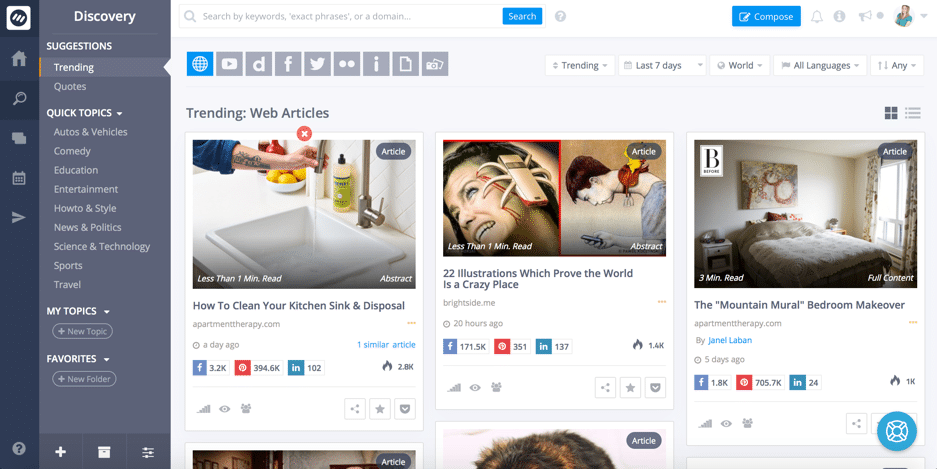 This is the main hub where you can see the top trending content.
When you get started with Content Studio, you’ll already have access to content in a variety of popular topics, such as comedy, entertainment, news & politics, sports, and so on.
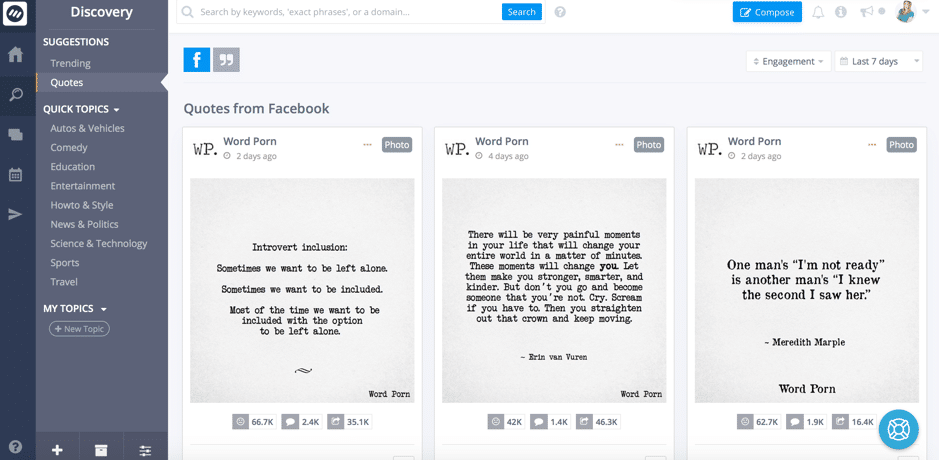
Plus, you also get suggestions for trending content, popular quotes being shared and custom-designed visual quotes:
This is the main hub where you can see the top trending content.
When you get started with Content Studio, you’ll already have access to content in a variety of popular topics, such as comedy, entertainment, news & politics, sports, and so on.
Plus, you also get suggestions for trending content, popular quotes being shared and custom-designed visual quotes:
 Additionally, to make things easier for you and only get content that’s relevant to you, you can set up your own topics with easy to configure rules:
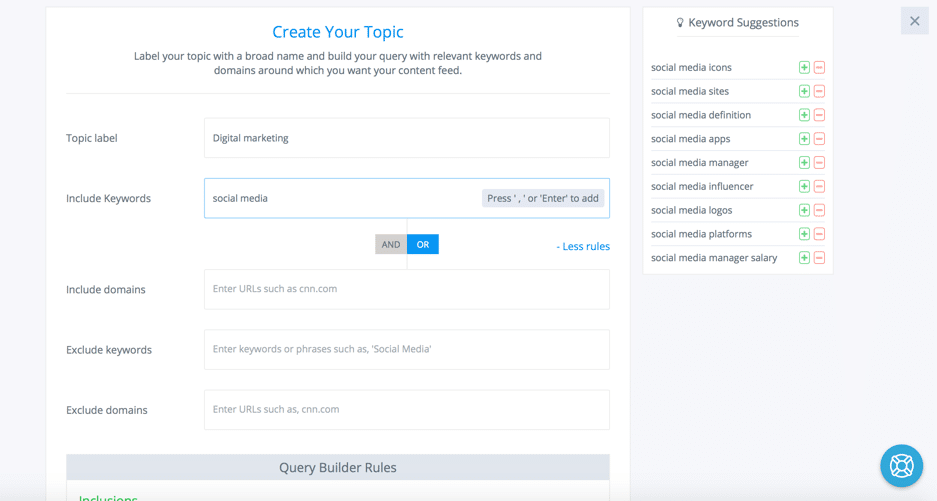 Give your topic a name and then start adding keywords; if you’re not sure what keywords to add, the tool helps you – just enter a word or two in the search bar and you’ll get plenty of keyword suggestions that you can add by clicking on them.
Plus, you can include or exclude certain domains, or choose to exclude results with certain keywords.
Once done, you can simply check your content while in the Discovery dashboard to browse through the results.
What’s really useful, though, is that you have a lot of filtering options:
Give your topic a name and then start adding keywords; if you’re not sure what keywords to add, the tool helps you – just enter a word or two in the search bar and you’ll get plenty of keyword suggestions that you can add by clicking on them.
Plus, you can include or exclude certain domains, or choose to exclude results with certain keywords.
Once done, you can simply check your content while in the Discovery dashboard to browse through the results.
What’s really useful, though, is that you have a lot of filtering options:
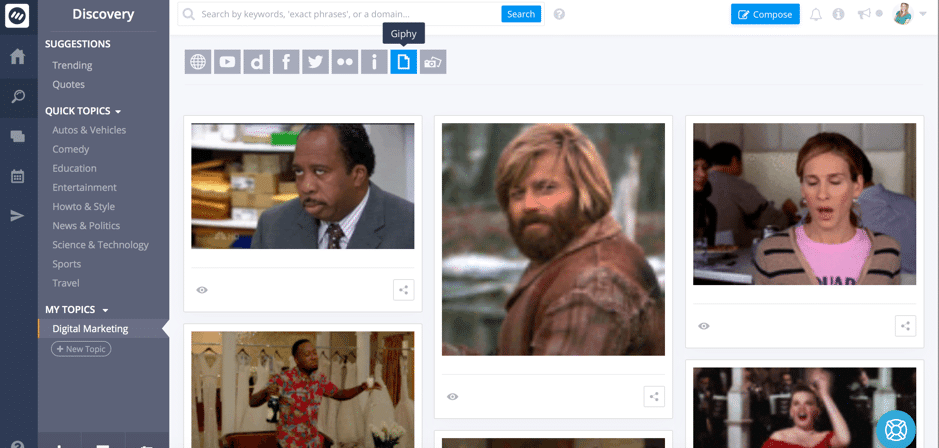
- Click on the content source you want at the top to see the results – the whole web, YouTube, Facebook, and other social networks, Dailymotion, as well as visual platforms like Giphy, Pixabay (great for getting free images!), and Imgur:
- Order your results by how popular they are (trending), how recent they are, by most shares in total, or by most shares by specific social networks
- Dig deeper by only viewing content from the last hour (great if you want to be one of the first to share awesome content), last 3 hours, 6 hours, 3 days, and so on
- Filter your results by country (they’ve got a lot of countries already set up, and not just the usual options – USA, UK, Canada, etc. – but also smaller countries, like Macedonia and Romania)
- Filter your results by language – just like with countries, there are plenty of options here from all around the world
- Plus, you can use the search bar to search through your results!
- See a preview of the article
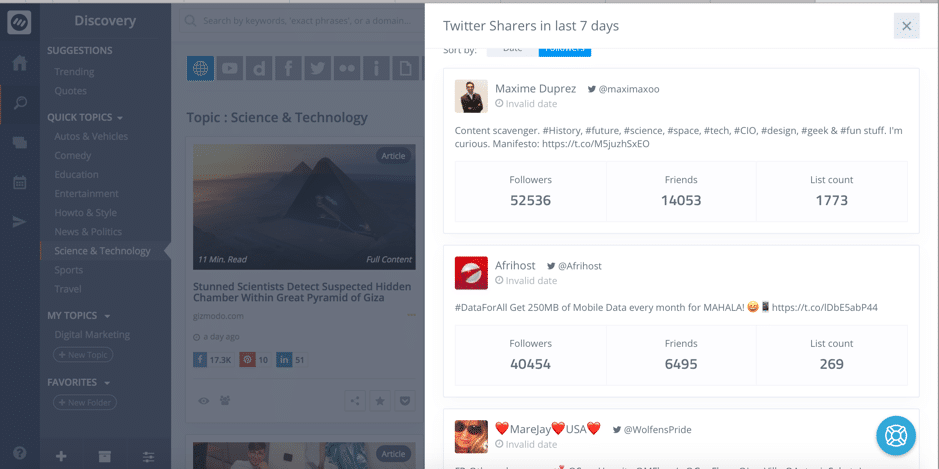
- See what social media influencers have shared the article in the last 7 days:
- Save the article to your Pocket account to read later, or add it to your favourites
- See the content sources’ website stats (including traffic!), other articles, and authors:

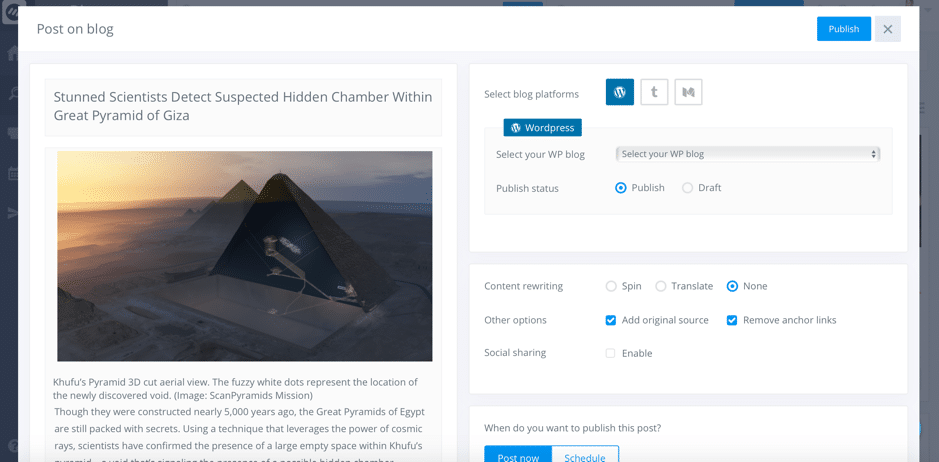
- Share the post on social media or on your blog – either post it now, schedule it for later, or add it to a queue (social media only):
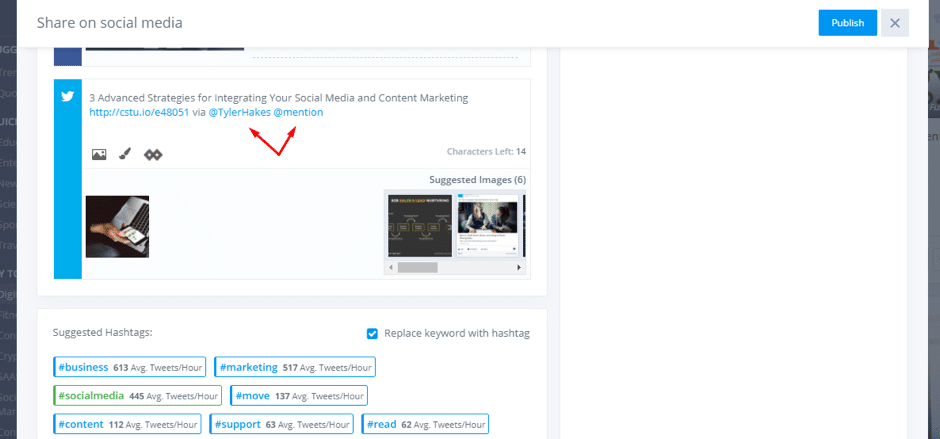
 While sharing content on social media, you get some really cool features like:
- Auto-tagging of relevant Twitter handles
- Hashtag suggestions to get more reach
- Easy to use image editor
- Add CTA (call-to-action) to your shared links via Replug.io
How to create posts for social media or your blog from scratch
Their content curation features are probably my favourites; buuut…post creation comes in a close second.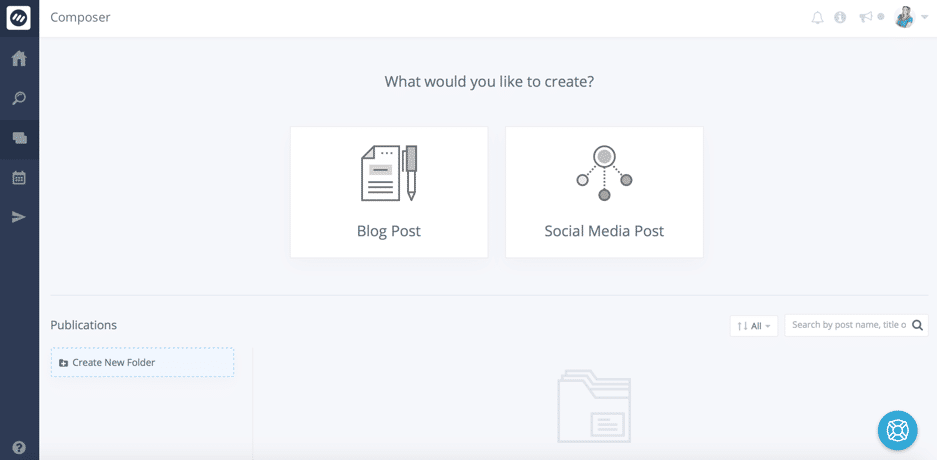 As you can see from about, you have 2 options in Composer: to create a blog post, or a social media post.
Let’s start with social media…
As you can see from about, you have 2 options in Composer: to create a blog post, or a social media post.
Let’s start with social media…
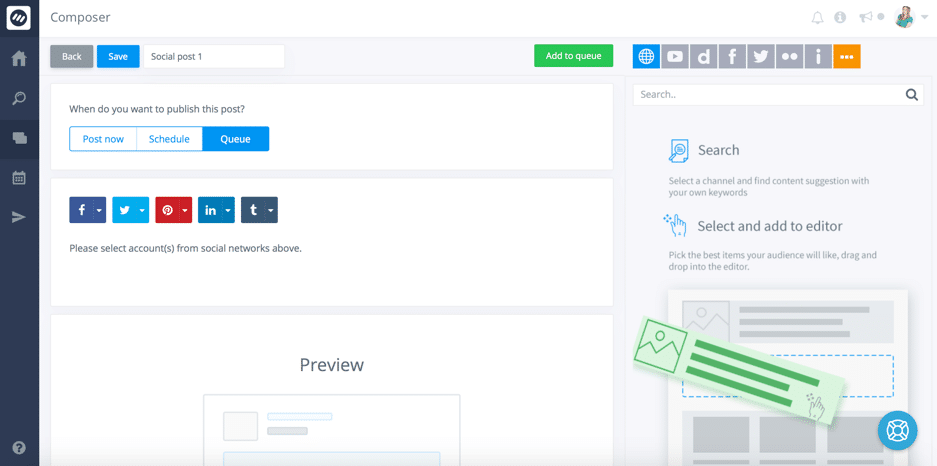 Most of it is pretty straightforward and nothing out of the ordinary – upload and add images, select the platform you want to publish on, and decide whether to post now, schedule it for later, or add it to your queue.
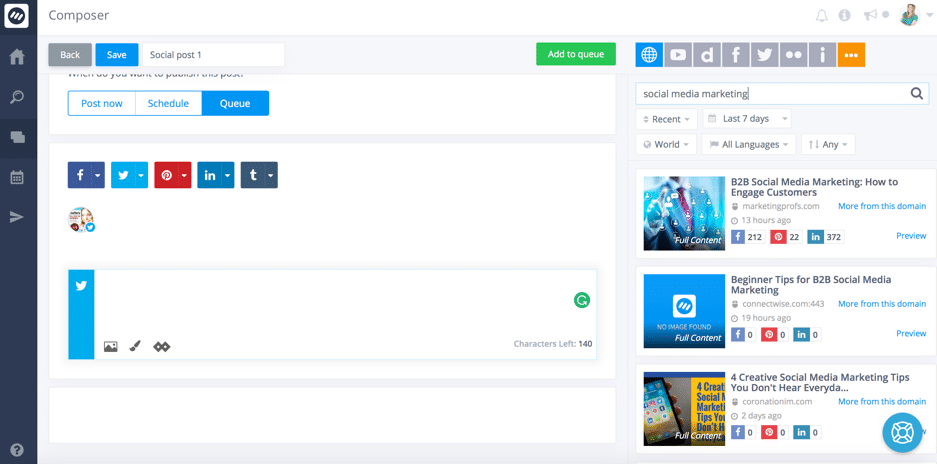
What’s really cool though is that in the post creator, you can also search for content – either for inspiration, or to add it to your update/share it:
Most of it is pretty straightforward and nothing out of the ordinary – upload and add images, select the platform you want to publish on, and decide whether to post now, schedule it for later, or add it to your queue.
What’s really cool though is that in the post creator, you can also search for content – either for inspiration, or to add it to your update/share it:
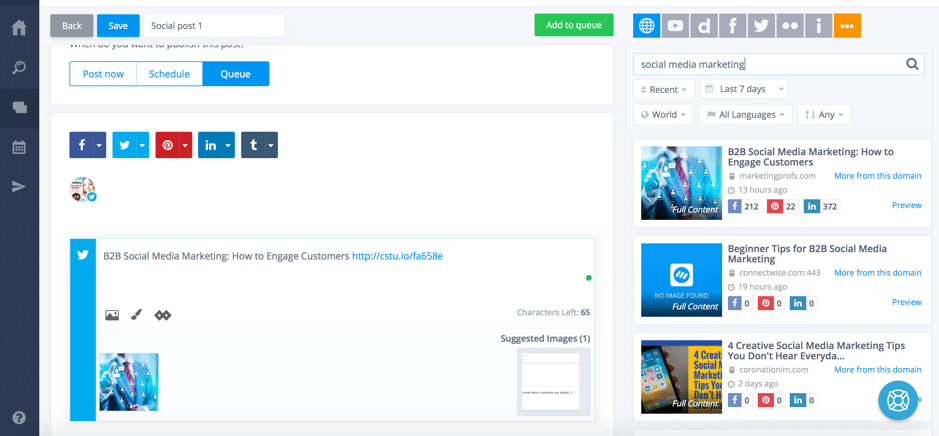
 If one of the results catches your eye and you want to share it out, all you have to do is drag and drop it to your post:
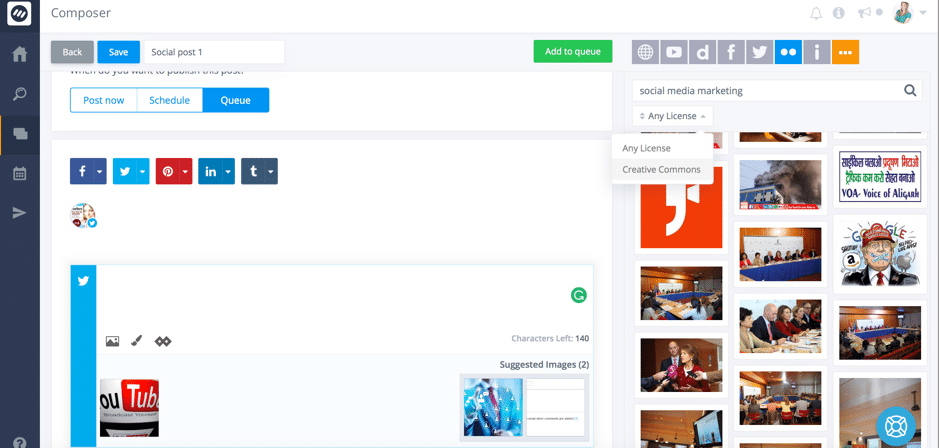
 Plus, you can even search for visuals from platforms like Flickr, Imgur, Giphy, and Pixabay, as well as Quotes – all of which you can easily drag and drop to add to your social media post. What’s even better, is that you can filter image results so you only see the ones that are free to use under the Creative Commons License:
 See now why I got so excited about creating social media posts?
Blog posts are just as easy to create and have many of the same features (like browsing for content – articles or visuals – and dragging and dropping them in your post), but also a few other very useful features.
One of the best parts it that you can optimise your post for search engines and get suggestions for improvement. Additionally, if you’re on WordPress, you can also add your meta description:
See now why I got so excited about creating social media posts?
Blog posts are just as easy to create and have many of the same features (like browsing for content – articles or visuals – and dragging and dropping them in your post), but also a few other very useful features.
One of the best parts it that you can optimise your post for search engines and get suggestions for improvement. Additionally, if you’re on WordPress, you can also add your meta description:
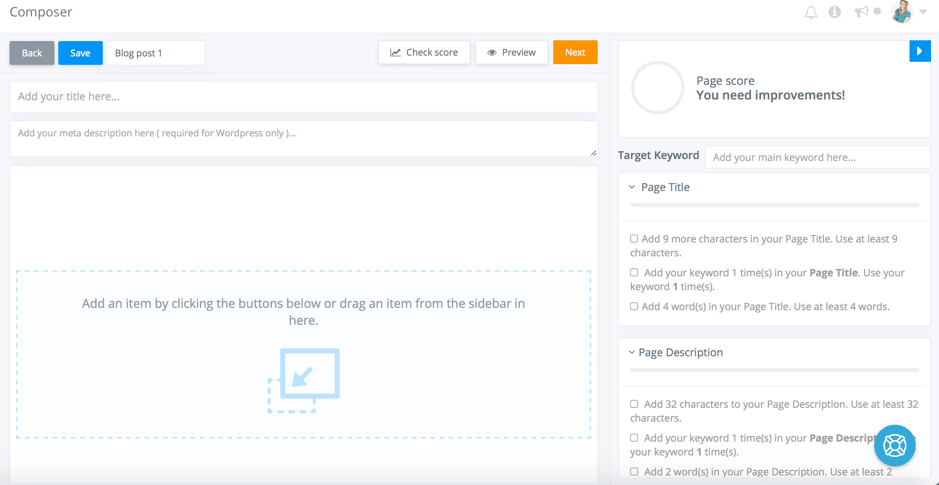 You can easily see what your SEO score is, and get suggestions for how to improve it – from page title, to the description and to the post’s main content.
[clickToTweet tweet="How to become an efficient marketer with the right #socialmedia content @contentstudioio" quote="How to become an efficient marketer with the right #socialmedia content @contentstudioio"]
You can easily see what your SEO score is, and get suggestions for how to improve it – from page title, to the description and to the post’s main content.
[clickToTweet tweet="How to become an efficient marketer with the right #socialmedia content @contentstudioio" quote="How to become an efficient marketer with the right #socialmedia content @contentstudioio"]
Planning your campaigns
Since this is a publishing tool, and not just a content curation one, Content Studio also features a content calendar that you can use to plan and visualize your social media and blogging campaigns: All of your posts will be colour coded to make things easier:
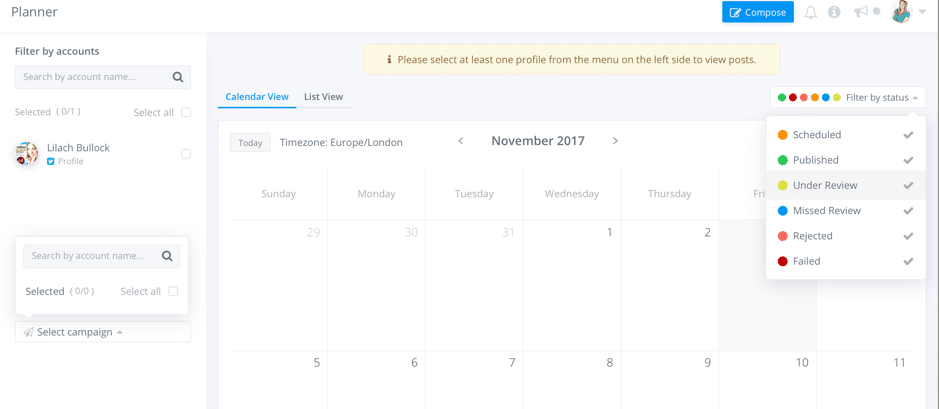 And you can see your upcoming posts/calendar for each one of your different campaigns, or filter by the accounts you’ve connected to the tool.
Automation recipes
Another stand-out feature is automation; what’s really cool is that you can go beyond automating social media posts (like with many other tools) and create all kinds of different automation recipes: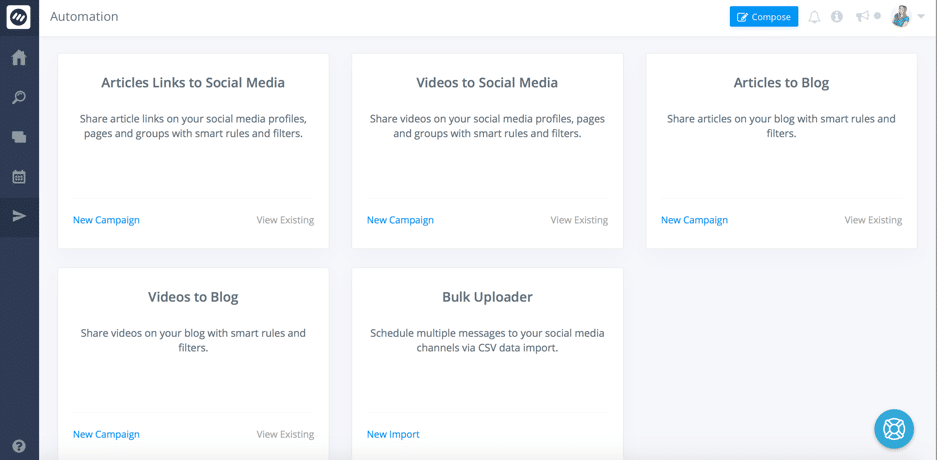 All you have to do is choose one of the recipes provided to then customize it to your liking and set it up:
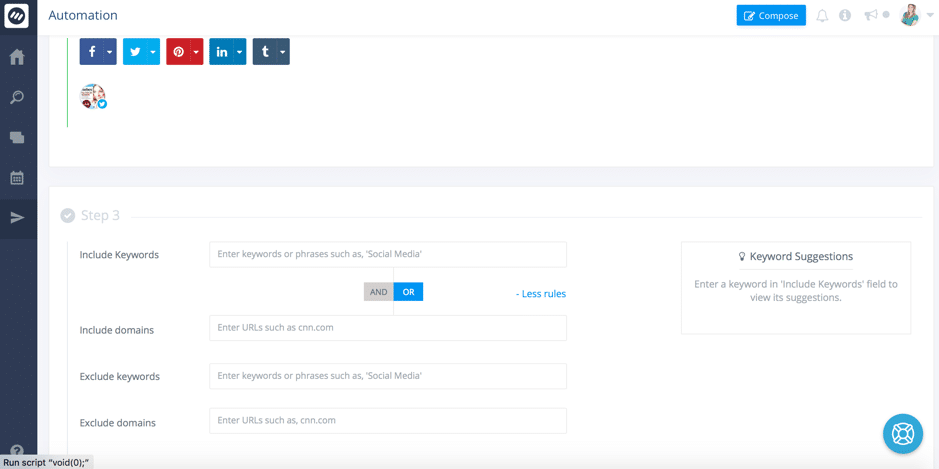 You’ve got very similar filtering options to the ones you have when setting up monitoring searches for different topics, so you can really dig deep and make sure you only get the best, most relevant content.
And, if you want, you can set it up so you can review the content before it’s published – or just set it and forget about it.
You’ve got very similar filtering options to the ones you have when setting up monitoring searches for different topics, so you can really dig deep and make sure you only get the best, most relevant content.
And, if you want, you can set it up so you can review the content before it’s published – or just set it and forget about it.
Conclusion: How to become an efficient digital marketer with the right social media content
Content Studio somehow found a way to stand out among a plethora of similar content curation tools – I hope I’ve managed to show you why. It’s one of those tools that is essential as a digital marketer, blogger, or business owner who promotes their business online; sharing valuable, interesting, and targeted content is an integral part of a winning digital marketing strategy and Content Studio can help you not only find amazing content, but also help you save time. Have you ever tried Content Studio? Let me know in the comments section below and please share the post if you enjoyed it 🙂What's changed by 2026: Social media for marketers
Social media in 2026 looks meaningfully different from when this guide was written. Algorithm shifts, AI content saturation, platform-specific policy changes, and audience behaviour shifts all warrant updating any social media strategy that was set before 2025.
Algorithms now down-rank AI-detected content
By 2026 most major platforms (LinkedIn, X, Instagram, TikTok) actively down-rank content that pattern-matches as AI-generated. Detection looks at: hedge-word density, identical structure across posts from the same account, lack of specific names or examples, generic opening lines. Posts that read as written by a real human with idiosyncratic voice get more reach.
Native posting beats scheduling tools
The reach gap between native posting and scheduled posting has widened in 2026. Native posts get materially more reach on most platforms. If you're using a scheduler more than a few times per week, you're likely leaving reach on the table. Mix scheduled posts (for must-publish content) with native posts (for the work you want to land).
Post cadence has come down, not up
The "post more frequently" advice from 2020-2022 has reversed. Most platforms now reward engagement-per-post over post volume. Operators who post less frequently with more substance are outperforming high-volume accounts in 2026 across LinkedIn, X, and Instagram.
Want AI doing the heavy lifting in your marketing?
I build the systems that handle the boring 80 percent, so you get your week back. Done properly, with the human kept in.
First-hour engagement determines the rest of the day
Modern algorithms heavily weight engagement velocity in the first 30-60 minutes after publish. Posts that get strong early reactions, comments, and replies compound. Posts that get scheduled and then abandoned underperform regardless of content quality. The workflow that works in 2026: post, block 30 minutes in your calendar to engage with replies, then move on.
Video format dominance has continued
Short-form video remains the dominant format across most platforms. AI video tools have made production cheaper but have not made human-led video less effective. Audiences increasingly distinguish between AI-assembled content and human-narrated content, with the latter getting better engagement.
Related reading
- Social Media Campaigns - What You Should Know
- Instagram Analytics: Measuring Your Sales Success
- How Students Can Use Social Media Marketing to Enhance Their Academic Projects
- The Most Common 7 Social Media Marketing Mistakes Startups Should Avoid
- how to grow on Instagram
Related reading: Harnessing Digital Tools for a Smooth, Efficient Workflow and How to Become a Social Media Manager (The Honest Guide, From Someone Who's Hired Plenty).


