


One of the most common problems I see entrepreneurs struggling with is getting leads. And if you aren’t getting leads, you aren’t getting sales. Not new sales, anyway.
But the next issue I see often happens to those who ARE getting leads. The problem is that they aren’t always getting relevant leads. And if your leads aren’t the people who are likely to buy from you, you’re wasting your time and effort!
So what’s the best way to get relevant, qualified leads? There are a ton of ways, but I have a new favourite: Scoreapp.
It’s fun (for both you and your prospects!), easy to use, and a lot more engaging than most other lead magnets. And I can almost guarantee that just after just a few minutes, anybody who wouldn’t be a good lead for you will back out.
Quick, fun, and a great way to get and qualify leads! Here’s everything you need to know about the Scoreapp quiz software and how to use it effectively.
What Is Scoreapp?
Scoreapp is one of the most fun lead generation tools out there. It’s ideal for small businesses, entrepreneurs, and solopreneurs to generate the kind of leads they need for their business.
In a nutshell, it’s a quiz creation tool. But it’s many steps above those “Which Marvel character are you?” type of quizzes. This one almost has an intelligence of its own!
Your prospect gets to do a quick quiz that asks all the information you need to know. What do they get out of it? Personalised, insightful information in a post-quiz results report that they can use to help them improve their business.
What do you get out of it? An influx of leads who have already given you all the info you need to qualify them properly.
It’s got all the fun of a good old-fashioned quiz packed into a superb lead generating tool. It’s a paid service, but if you use it right, you’ll make back your fee with little to no extra effort.
Why Should You Use It?
Lead generation can be tough. You have to put work into creating a lead magnet that provides real value, and then you have to go about marketing it in the hope that relevant people pick up on it and give you their email address.
Scoreapp makes it simpler. Yes, it takes some time to put together a great quiz. You can’t scrabble together a slapdash quiz and expect to have top-quality leads come flooding in.
But if you put in your time and effort to make a quiz that’s relevant, interesting, covers everything you need to know, and provides a ton of value, you can expect good leads to come in.
Anyway, who wouldn’t prefer a quick, 5-minute quiz to an ebook that they’re going to have to find time to read?
Sure, they’ll need to read the report in order to get the real value, but the act of answering the quiz questions is in itself valuable as it gets them thinking about how they do business, what they need, and what they struggle with.
How Does Scoreapp Work?
When you first sign up to Scoreapp, it can seem quite in-depth and maybe a little intimidating. Don’t worry—this quick breakdown will help you to get a good idea of how to move through the quiz-creating process.
Creating Your Scorecard
Your quiz is known as a scorecard. This is the whole point of Scoreapp—to create a detailed, information-rich quiz that’s valuable to both you and your prospect.
It starts with choosing a template. There’s a lot of them to choose from, and a menu of different categories down the side so you can find something that’s designed specifically for your niche.
- Health & Wellbeing
- Business
- Finance
- Sales & Marketing
- Property
- HR
- IT
- Brand
- Authors
There’s also a lot of templates designed for specific things, like productivity, mindfulness, sustainability, digital impact, and more.
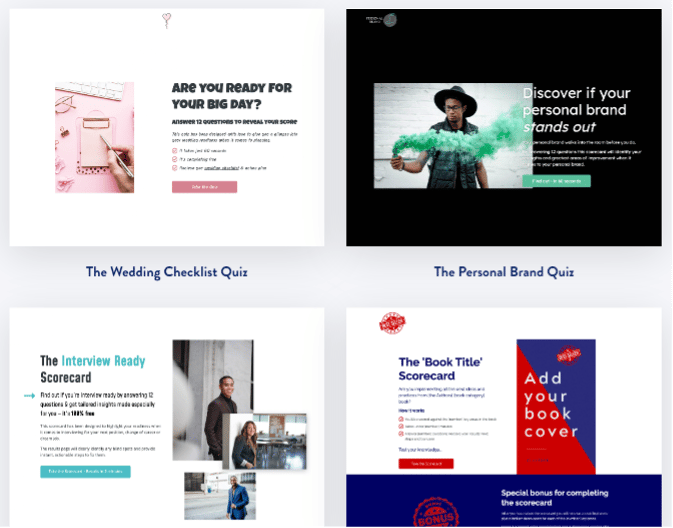
You can change colours down the line, so go for design and function over colour scheme here. You can also choose to go ahead without a template and create from scratch, but if you’re making your first one, I highly recommend finding a template you like the look of.
You should note that the template you choose also comes with set categories and questions. Clicking on a template takes you to an overview page, where you can see how many of each there are.

We will be editing these later, unless you want to stick to their template. But it’s fun fleshing it out and making it suitable for your audience!
Create Your Branding
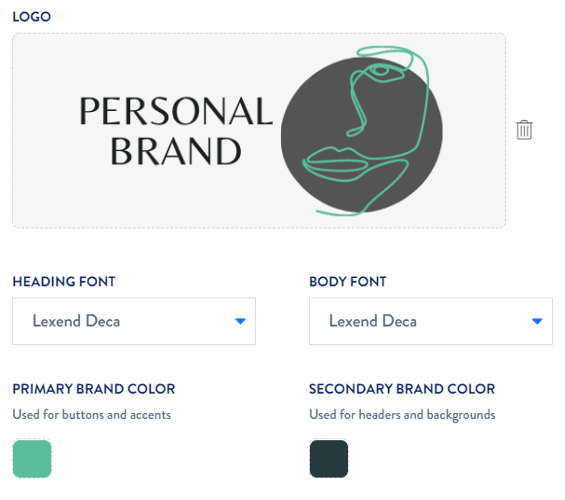
Next up, you’ll have the chance to upload your own logo and choose your brand colours and fonts. If you don’t have any of these yet, don’t worry—you can change this later on.
Split Into Categories
Once you move on from your branding, it will take you straight to the questions included in your template. You’ll see a column for “category”. If the template you selected included categories, your questions will be split into those sections.

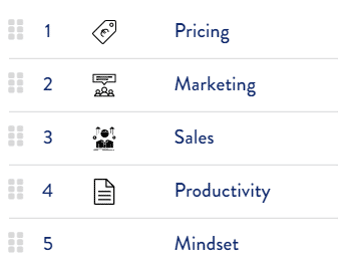
If not, I highly recommend adding your own categories if it will help to qualify your lead better. For example, in my business coaching business, I chose 5 specific categories that are relevant to my leads.
Compile Your Questions
Once you’ve chosen your categories, it’s time to check out your questions. You can use the pre-set questions that came with your template, add your own to those, or you can get rid of all the questions and start your own from scratch.
I advise mixing and matching question types, both to stop your prospect getting bored as they go through the questions and also because some answers just work better in certain formats.
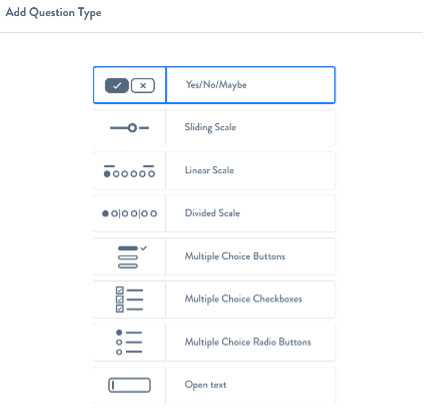
You can also allocate scores to your questions, which will help later when it comes to personalising results. I recommend sticking to 0, 1, and 2, even for sliding scales and linear scales. This makes it much easier to wrap your own head around it!
Tweak Your Design
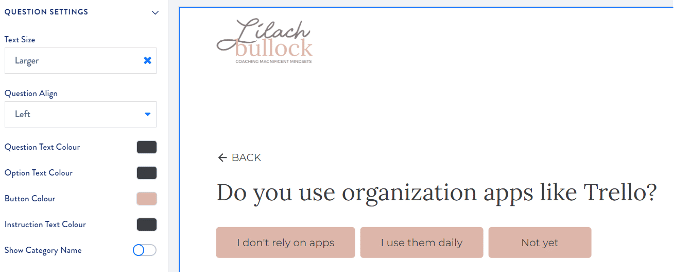
Clicking on the “design” menu item will take you to a preview of what your quiz will look like. Here you can choose the size of your question text, left, right, or middle orientation, and the colour of your text and buttons.
This allows you to see what your prospects will see when they take the quiz! It’s a good opportunity to make small tweaks that will make your quiz look more appealing.
Creating a Landing Page
Your quiz is done. But there’s still a good bit of work to be done, and it starts with creating a great landing page.
This can be time-consuming. Thankfully, it’s a pretty easy “click to add” kind of design, with templates that can help you get through it fairly quickly. All you need to do is click on the blue plus sign, and you’ll find a whole lot of choices:
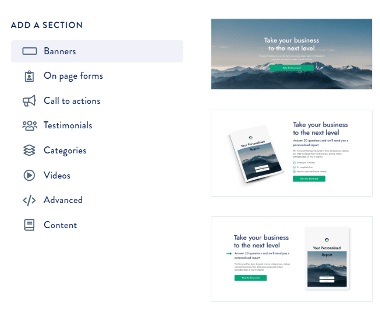
I recommend taking some time to browse through a few sales pages on websites you know and decide exactly how you want to set this up and what you want to say. Having an idea of your design upfront helps this step to go much faster!
Want AI doing the heavy lifting in your marketing?
I build the systems that handle the boring 80 percent, so you get your week back. Done properly, with the human kept in.
Creating Your Lead Form
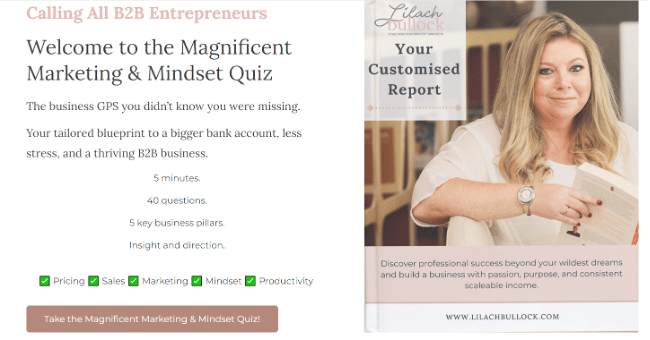
Your lead form is the place where people will put in their email address and get taken to the quiz. You can customise this to an extent, but all it really needs is a space for a name and email.
Here you can also select whether to have them add their name and email before the quiz, or only after the quiz in order to get their results.
Results Pages
This is where it gets tricky. Just like everything else, you can get a templated results page, which will give your prospect some useful information based on their answers.
But if you truly want this to be a WOW kind of lead magnet, this is where you need to put into most of your effort.
Main Results Page
Your prospect will land on a page with a graph or pie chart showing their overall results. You’ll need to write something here to thank them for doing your quiz, and explain how to use their personalised results.
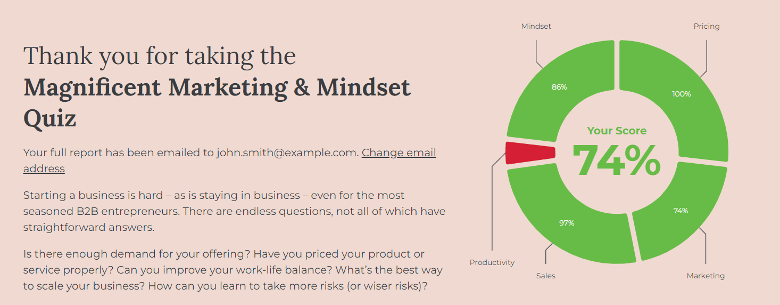
Below this, they’ll get insight into their scores in each specific category. This is where it gets a little more complicated, but it’s worth putting in the effort to provide extreme value to your prospect.
Category Scores
The idea here is to provide your prospect with useful information and advice based on what they’ve answered. The key to getting this right is something called “dynamic content”.
This allows you to set three sections for each category: high, medium, and low. Your prospect will see information on every category based on how they scored.
This means writing up three separate results blurbs for every category. Here’s a quick look at an example of mine, for low, medium, and high:
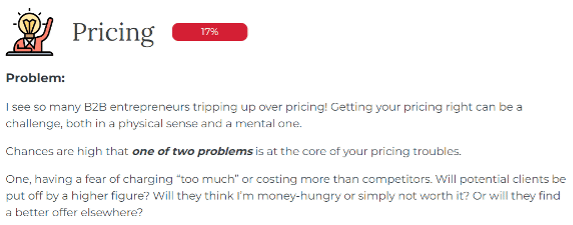
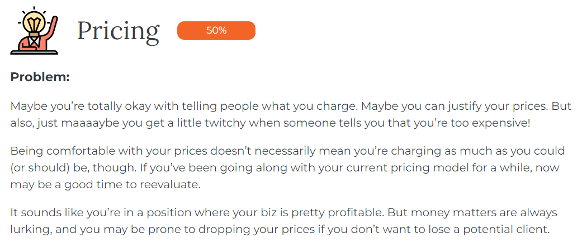
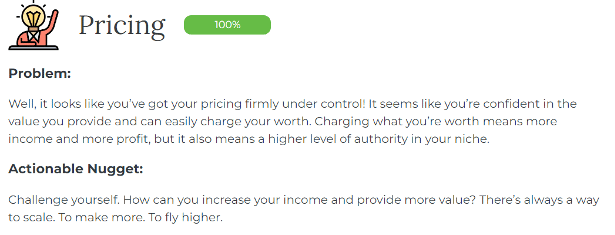
In my case, I’ve written up a total of 15 “dynamic content” results pages for my quiz:
- Pricing: Low, medium, and high
- Marketing: Low, medium, and high
- Sales: Low, medium, and high
- Productivity: Low, medium, and high
- Mindset: Low, medium, and high
I advise going into a lot of detail on these pages. You want to offer as much value as possible, so add actionable tips, valuable information, and anything that they can use in a practical sense.
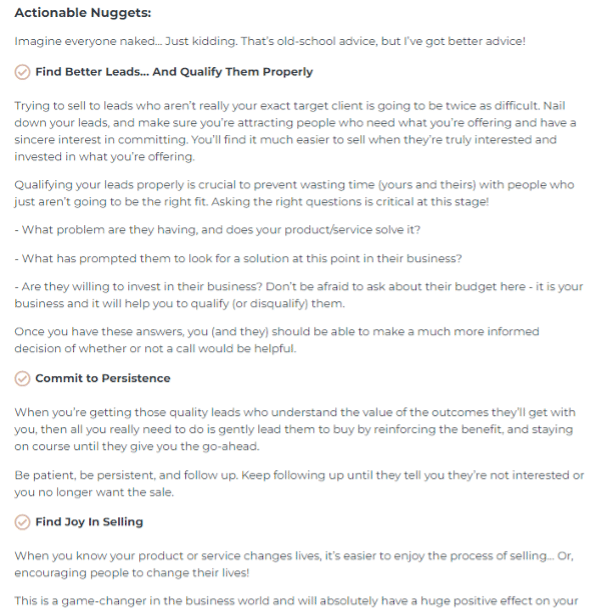
Emails
You can set up a results email that gets sent once your prospect has completed your scorecard. This provides them with all their results info in their inbox, so they can go back to it whenever they need and actually use it to improve.
And of course, if they find value in it, they have something to remind them of how valuable you’ve already been. When they need more help, it’s easy for them to find you again.
You can also set up an abandon quiz email if someone doesn’t finish. This is a great idea, because sometimes they get distracted or have to run off and forget where they were!
Other Features
If you really want to get advanced, you can also play around with these features to streamline your lead generation game:
- Audience Segmentation
- A/B Testing (experiment)
Checking Out Your Leads
The icon on the left-hand side of two little blue silhouettes is where you can find a list of your leads. Click on any name to see an in-depth view of their information.
You’ll be able to see their scores, where they’re doing great, and where they need help. This helps you to qualify them really well, and by the time you hop on a call with them, you’re already ahead of the game.
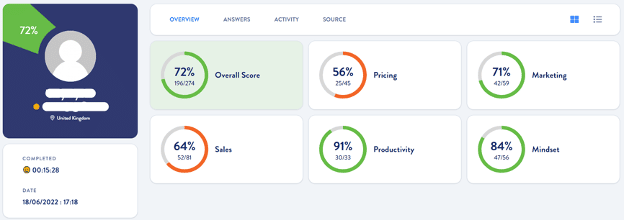
This is the most valuable feature of Scoreapp. It saves a ton of time and energy, because you know who can benefit from your services, what exactly they need, and how serious they are about improvement and business development.
For example, while the above lead looks good and is someone I could quite possibly work with, the one below is probably not worth my time:
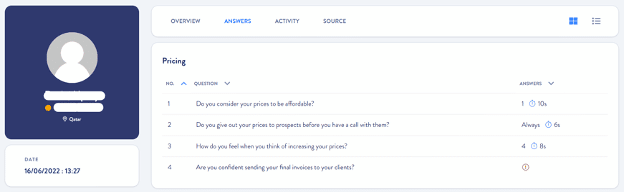
As you can see, they did not complete the quiz and probably aren’t truly interested in working together. This is a lead I could possibly remove from my list upfront, or at the very least, I won’t be reaching out to in the future.
Verdict: Do It!
I’ve created many lead magnets over the years, but Scoreapp has to be one of my favourites. Not only did I enjoy the creation, but it’s one of the most value-packed lead magnets I’ve found to offer potential clients.
The effort that went into creating the quiz was worth it, for me. Depending on your business, you may not need as in-depth a quiz as I have. Yours might be much simpler than mine, and to be honest mine was quite detailed!
But however you need to qualify your leads, this is an excellent way to do it. It’s a little more fun for your client than a simple ebook, more valuable than a cheat sheet, and more specifically practical than a collection of resources.
And it gets you so much more than a simple email address. I recommend Scoreapp wholeheartedly—if lead generation and qualification is tricky for you, you won’t regret it!
Related reading
- The ultimate tool to manage your remote team and projects
- Penji: The ultimate platform to outsource your graphic designs
- Cloud storage for a more productive way to work
- Everything you need to know about mobile app development outsourcing today
- the best AI tools for small business
Related: Helene Hadsell's business lessons
Bottom line: ScoreApp turns quizzes into a lead generation machine by giving visitors a fun, personalised result while you collect their contact details and interests in the background. It works because people love finding out something about themselves, and that curiosity translates into higher opt-in rates than a standard lead form.
Frequently asked questions
What is ScoreApp used for?
ScoreApp is a quiz and scorecard builder that businesses use to capture leads. Visitors answer a short set of questions, get a personalised score or result, and in exchange share their name and email, giving you a warm lead with insight into what they care about.
How does ScoreApp help generate better quality leads?
Because the quiz questions are tailored to your business, the answers act as a built-in qualification step. You learn about a lead's needs, budget or challenges before you ever speak to them, so follow-up conversations are more relevant and conversion rates tend to improve.
Is ScoreApp easy to set up without technical skills?
Yes, ScoreApp is built with a drag and drop interface so you do not need coding or design experience. You can pick a template, customise the questions and branding, then embed or link the quiz on your website or social channels within a short time.
Can ScoreApp integrate with my existing email or CRM tools?
ScoreApp connects with popular email marketing platforms and CRMs, so leads captured through your quiz flow straight into your existing follow-up sequences. This means new contacts get nurtured automatically instead of sitting in a separate spreadsheet.

