Related reading: Budget Business Cards That Don't Look Cheap: What Works in 2024. Related guides you might find useful I build the systems that handle the boring 80 percent, so you get your week back. Done properly, with the human kept in.
Want to get better results from Twitter? Want to improve your engagement levels, get more traffic back to your website and grow your following? One of the ways that you can achieve these goals more quickly is through Twitter Advertising. In this latest blog post, I aim to create a complete how-to guide on Twitter Ads – how to use it, why use it and who should use it.
Why Twitter Advertising?
Twitter has been one of the top social media platforms for 10 years now, continuously growing over the years, now reaching over 300 million users. It’s also one of the best (if not the best) social networks for connecting with customers, getting more engagement, managing customer service and getting traffic.
Twitter Advertising is a relatively cheap, easy way to get all of these results – only, much faster.
Types of Twitter Ads
There are three main types of promotions you can do on Twitter:
Promoted Tweets – for increasing engagement
Promoted Accounts – for increasing following and engagement
Promoted Trends – for increasing engagement
Website Card – for increasing your website traffic
App Card – adds for apps for more downloads
[clickToTweet tweet="Twitter #Ads Guide for Beginners via @lilachbullock" quote="Twitter #Ads Guide for Beginners via @lilachbullock"]
Getting Started With Twitter Ads
In order to get started on you first Twitter Ad campaign, connect your account here. From there, simply follow the prompts and instructions until you’ve finished setting up your account.
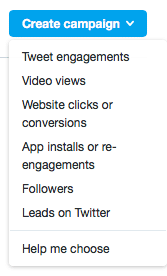
Now, it’s time to set up your first Twitter Ads campaign: go to Create a Campaign in your dashboard and select the campaign type you want.
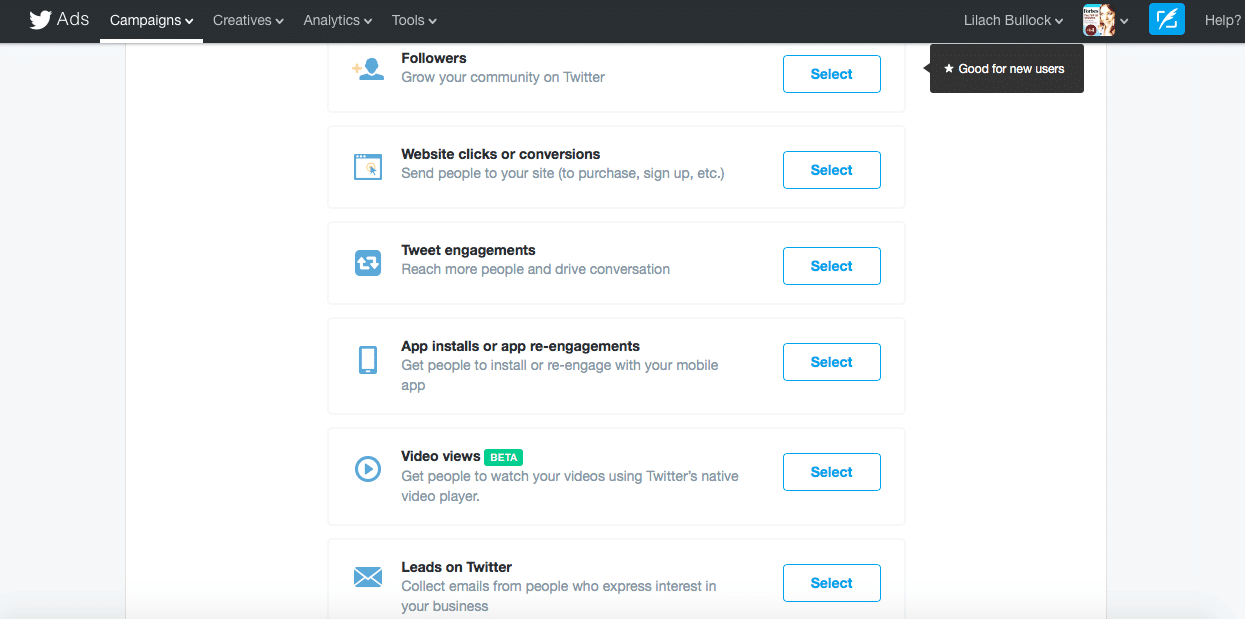
If you click on Help me Choose, you’ll get a better rundown of the different types of campaigns, based on objectives:
[clickToTweet tweet="How to get started with Twitter #Ads via @lilachbullock" quote="How to get started with Twitter #Ads via @lilachbullock"]
Get more followers
Perfect for: new users, new brands, users struggling to get followers, users who want more targeted followers
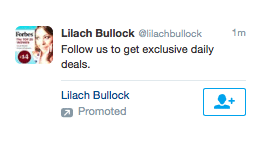
Where will users see the ad: in their timelines and in their “who to follow” suggestions; there will be a follow button that they can click on without having to visit your profile, or you can also buy Twitter followers.
Once you’ve selected your target audience and set up the pricing plan (more on both a little later on), you need to create the promoted tweets you want people to see. Here, it’s important to think of a good reason why people should follow you, such “follow us for the best social media marketing tips” or “Follow us for a chance to win a prize weekly” – the better the incentive, the better the chances you’ll get more results. You can also add media to your tweet, but in this case, it’s not recommended, as it will detract from your message and the follow button.
[clickToTweet tweet="How to get more followers with Twitter #Ads via @lilachbullock" quote="How to get more followers with Twitter #Ads via @lilachbullock"]
Website clicks and conversion
Perfect for: All users who want to improve their traffic and conversions; businesses launching a new product or service
Where will users see the ad: in their timelines and in search results
When you set up a Website clicks and conversions campaign, you will need to enter the URL for the website used and select a category for it. You can then set up conversion tracking on your website, which is very much worth it as you’ll get a much better idea of how the campaign worked and what results you got as you track the actions of all visitors from Twitter.
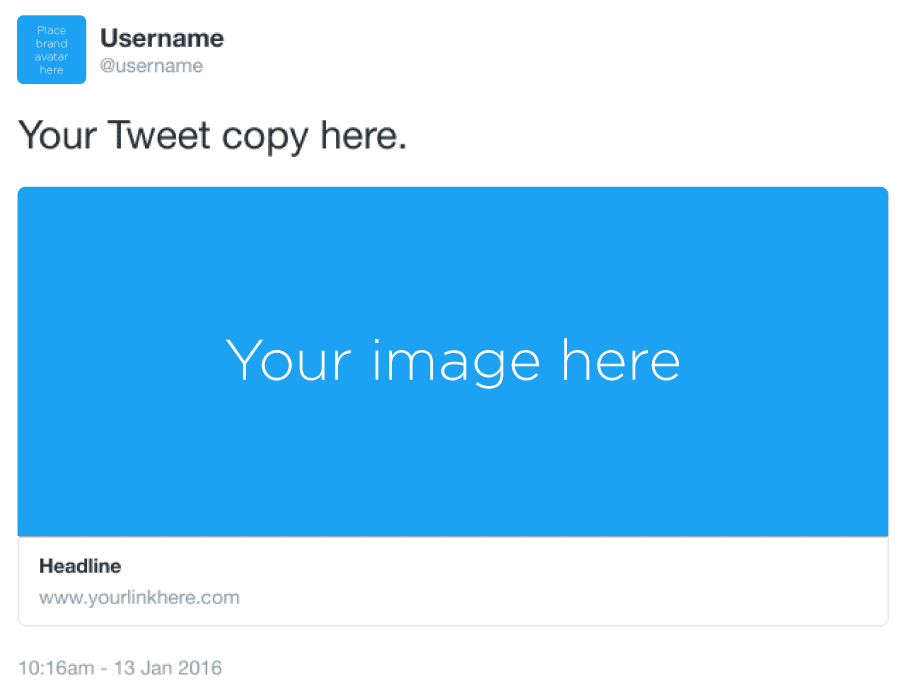
You can use existing tweets for this promotion or create new ones; eligible tweets need to have a call to action, a URL or Website Card. Website Cards are a better option in my opinion as they attract attention:
Whenever someone clicks on your Twitter Card, they will be automatically redirected to your website.
[clickToTweet tweet="How to make more conversions with Twitter #Ads via @lilachbullock" quote="How to make more conversions with Twitter #Ads via @lilachbullock"]
Tweet Engagement
Perfect for: anyone who wants to get more engagement, for announcements and special offers
Where will users see the ad: in user’s timelines and in search results
Promoted tweets will help you increase your engagement by pushing your tweet in front of your target audience. You can tweet about anything, but for best results, make sure to add media to your tweet and include a hashtag – or, even better, jump on trending hashtag to maximise engagement.
Increase video views
Perfect for: anyone who wants to promote a video and get more views
Where will users see the ad: in user’s timelines and in search results
If you’ve started a video marketing campaign and want to get your video to more people, this is a great option for promoting.
There are different options for pricing for videos: you can select to pay per video view, or per 3%/100% view. Your video will count as ‘viewed’ when it is watched in 50% view for over 2 seconds, or when a user expands it or unmutes it.
You can create a new tweet or promote an existing one, so long as it has a video, GIF, Vine or Periscope.
[clickToTweet tweet="Increase your video views with Twitter #Ads via @lilachbullock" quote="Increase your video views with Twitter #Ads via @lilachbullock"]
Collect leads on Twitter
Perfect for: businesses that want to increase lead conversions
Where will users see the ad: in user’s timelines and search results
Who says you can’t find leads on social media? You can use Twitter to increase your conversions directly on social media.
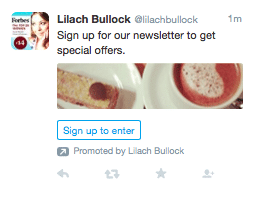
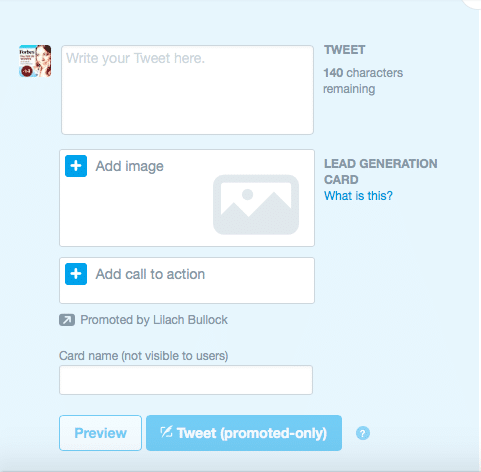
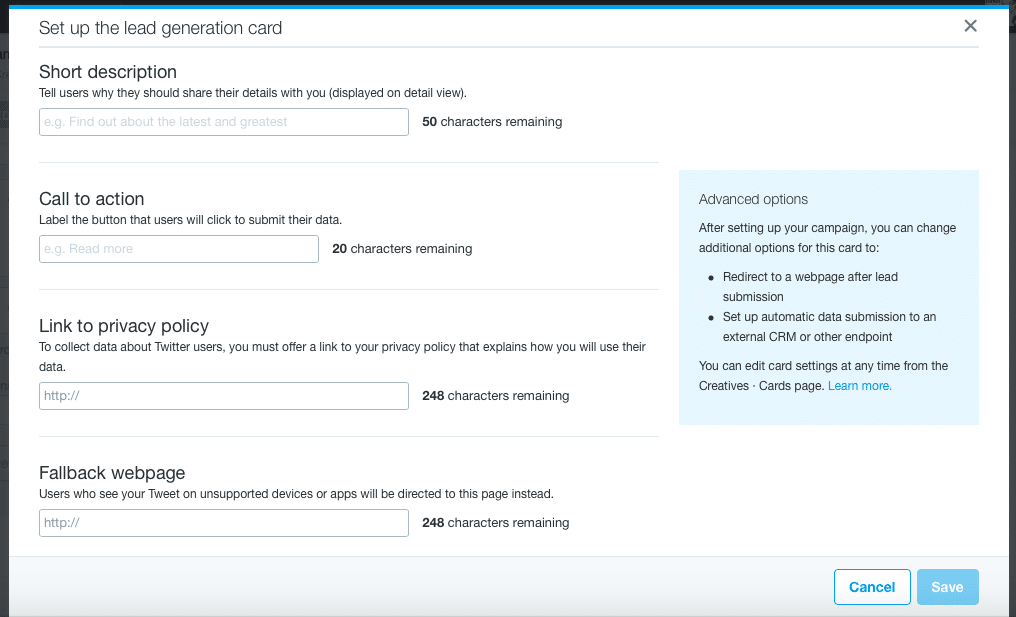
Once you’ve written a tweet, preferably containing the relevant call to action, add an image and then click on Add call to action to set up your own lead generation card:
When you’re finished setting up your tweet, you will have a new opt-in form on one of the top social networks.
App installs and App re-engagements
Perfect for: mobile app developers of all kinds who want new downloads and to get previous users to re-engage with the app
Where will users see the ad: in user’s mobile timeline
More and more people are using Twitter on their mobile phones, so it makes sense that this would be the perfect platform for promoting apps. Twitter claims that their users have used 24% more apps than the average smartphone owner.
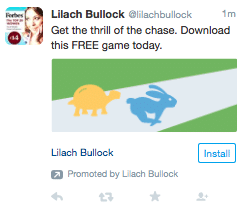
App cards are very similar to Website Cards and also allow for conversion tracking to see how many people download and re-engage.
When it comes to setting up payment, you can choose how to optimise and pay for your bid:
For app clicks -> pay for app clicks
For installs -> pay for installs
For installs -> pay for app clicks
[clickToTweet tweet="Collect more leads with Twitter #Ads via @lilachbullock" quote="Collect more leads with Twitter #Ads via @lilachbullock"]
Quick Promote
Sometimes, you simply need to quickly promote a tweet – maybe you’re at an event and want to get more engagement on your live tweeting, or you’ve got a great deal that ends very soon, or you’ve just published an awesome new blog post and want to get some traffic, quickly; whatever it is, you can use Quick Promote to set it up in minutes.
First, go to your timeline and click on the activity icon for the Tweet you want to promote, and then click on Promote this Tweet. Afterwards, you can select the location you want to target, the budget you’re willing to spend and your tweet is good to go.
Promoted Trends
You’ve probably noticed promoted trends before at the top of the trending topics list. These are great for massive increases in awareness around a brand or brand event, but it can set you back $200,000 per day.
Twitter Ads Targeting
First, you have to select the locations you want to target or import multiple locations directly and then select the genders.
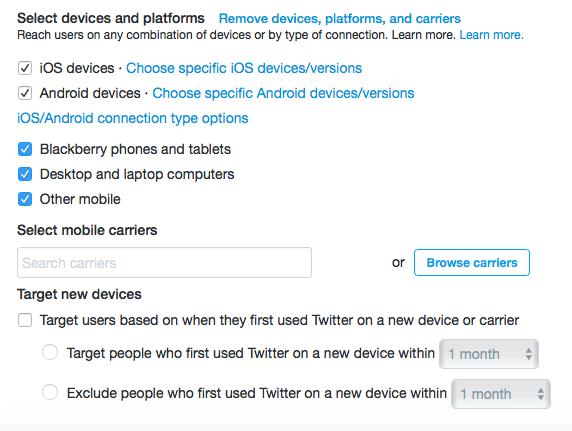
You can also segment your targeting by the devices and platforms they use, and even by mobile carriers.
This is where the targeting starts to get more interesting.
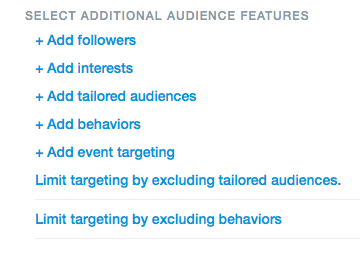
Add examples of usernames of followers that share similar interests to the followers you want to get and target users that are similar to your existing followers.
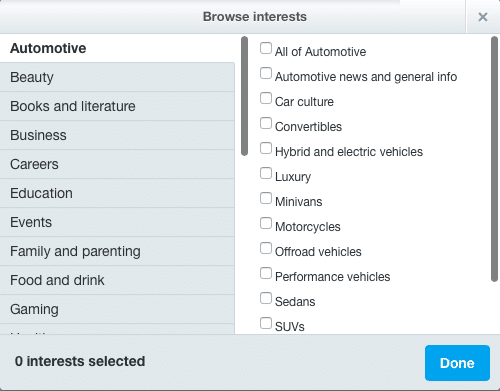
Add interests from a multitude of categories for more in-depth targeting
Add specific users to your targets by uploading lists with emails, Twitter usernames, or even target your own website visitors by putting a code snippet on your website.
Add behaviour targeting by browsing through the list of categories – unfortunately, this feature is not yet available to all countries
Limit your targeting by excluding certain users: just like when adding specific users, you have to upload the lists of emails, usernames, or website visitors
Limit your targeting by excluding behaviours: again, this has not yet rolled out to all countries, but hopefully we will all have it soon
[clickToTweet tweet=" Twitter #Ads targeting via @lilachbullock" quote=" Twitter #Ads targeting via @lilachbullock"]
Twitter Ads Pricing
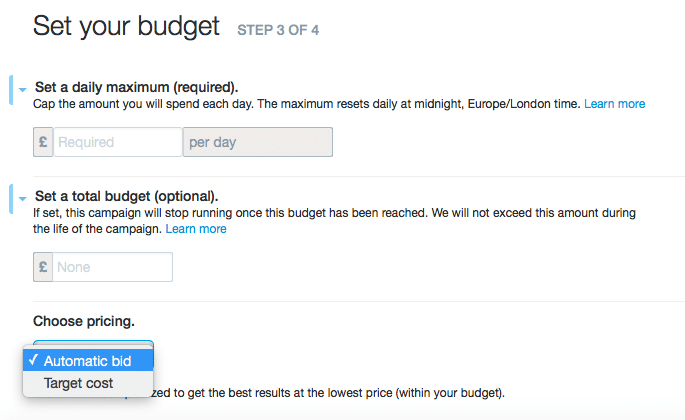
Next, it’s time to set up your budget. Start by setting up a daily maximum spend, that will reset every day at midnight. Then, you have the option to set up a total budget that you’re willing to spend, so that the campaign ends when you’ve reached this cap.
As you can see from above, there are three pricing options: automatic bids, target cost and maximum bid.
By selecting automatic bidding, Twitter will automatically optimise your bid for your ad’s impressions (within the budget you set up, of course). With target bidding, you need to enter your own target cost, but it allows you control of your bids. With the maximum bid, you select the maximum you are willing to pay per ad impression. Before entering a target cost or maximum bid, you’ll be able to see what other advertisers are paying so that you can make a decision.
Conclusion
Twitter ads are great tools for increasing follower numbers, engagement, traffic and leads; they’ve got awesome targeting, great prices and pretty good results if you do it right. Have you tried Twitter Ads yet? What types ads do you prefer? Let me know in the comments section and please share:)
Forbes Top 20 Social Media Power Influencer. 21 years of marketing experience. Currently obsessed with AI implementation done well. British AI and marketing consultant working internationally, writes a weekly newsletter that 15,000+ founders read on Sunday mornings.



 In order to get started on you first Twitter Ad campaign, connect your account here. From there, simply follow the prompts and instructions until you’ve finished setting up your account.
Now, it’s time to set up your first Twitter Ads campaign: go to Create a Campaign in your dashboard and select the campaign type you want.
If you click on Help me Choose, you’ll get a better rundown of the different types of campaigns, based on objectives:
In order to get started on you first Twitter Ad campaign, connect your account here. From there, simply follow the prompts and instructions until you’ve finished setting up your account.
Now, it’s time to set up your first Twitter Ads campaign: go to Create a Campaign in your dashboard and select the campaign type you want.
If you click on Help me Choose, you’ll get a better rundown of the different types of campaigns, based on objectives:


 Whenever someone clicks on your Twitter Card, they will be automatically redirected to your website.
[clickToTweet tweet="How to make more conversions with Twitter #Ads via @lilachbullock" quote="How to make more conversions with Twitter #Ads via @lilachbullock"]
Whenever someone clicks on your Twitter Card, they will be automatically redirected to your website.
[clickToTweet tweet="How to make more conversions with Twitter #Ads via @lilachbullock" quote="How to make more conversions with Twitter #Ads via @lilachbullock"]


 This is where the targeting starts to get more interesting.


 In order to get started on you first Twitter Ad campaign, connect your account here. From there, simply follow the prompts and instructions until you’ve finished setting up your account.
Now, it’s time to set up your first Twitter Ads campaign: go to Create a Campaign in your dashboard and select the campaign type you want.
If you click on Help me Choose, you’ll get a better rundown of the different types of campaigns, based on objectives:
In order to get started on you first Twitter Ad campaign, connect your account here. From there, simply follow the prompts and instructions until you’ve finished setting up your account.
Now, it’s time to set up your first Twitter Ads campaign: go to Create a Campaign in your dashboard and select the campaign type you want.
If you click on Help me Choose, you’ll get a better rundown of the different types of campaigns, based on objectives:

 Whenever someone clicks on your Twitter Card, they will be automatically redirected to your website.
[clickToTweet tweet="How to make more conversions with Twitter #Ads via @lilachbullock" quote="How to make more conversions with Twitter #Ads via @lilachbullock"]
Whenever someone clicks on your Twitter Card, they will be automatically redirected to your website.
[clickToTweet tweet="How to make more conversions with Twitter #Ads via @lilachbullock" quote="How to make more conversions with Twitter #Ads via @lilachbullock"]

 This is where the targeting starts to get more interesting.