


Updated for 2026: finding a prospect's contact details is no longer the hard part of prospecting, since a browser extension will pull a direct line and an email in a couple of clicks, so the work has shifted to deciding who is worth contacting and what you say when you reach them.
Next step on this topic: prospects contact information lusha.
Next step on this topic: contact us.
Ask any salesperson about it, and they’ll talk and rant your ear off: finding a leads’ contact information can be a time-consuming, often fruitless operation. Or, of course, if you do find an email, it might not be up to date. But, these details are necessary if you want to be proactive and find more prospects for your business. In this blog post, I’ll share with you the absolute easiest way to get a prospects’ contact information, using Lusha.What is Lusha?
 Lusha is a Chrome extension (and API provider) that allows you to easily pull up someone’s’ contact information, both their email and their direct phone number – with just one click.
It is, quite literally, the absolute easiest way of getting a person’s contact information. It takes seconds and the data is always very accurate – at least as far as I’ve used it, it’s pulled up the right information in every single case.
The Chrome extension works on Twitter and LinkedIn; however, if you’re willing to get technical, you can get the API version and you’ll be able to pull up information from anywhere on the web, not just these 2 social networks.
Only LinkedIn though is a goldmine of potential leads for B2B companies; with around 500 million users, it’s actually the number 1 social network when it comes to B2B marketing leads. In fact, a study has found that a staggering 80% of all B2B social media leads come from LinkedIn.
So if you’re thinking of improving your social media lead generation this year, start leveraging LinkedIn; with a tool like Lusha to help you get a leads’ information, it will be so much easier to start nurturing and converting your leads into customers.
Lusha is a Chrome extension (and API provider) that allows you to easily pull up someone’s’ contact information, both their email and their direct phone number – with just one click.
It is, quite literally, the absolute easiest way of getting a person’s contact information. It takes seconds and the data is always very accurate – at least as far as I’ve used it, it’s pulled up the right information in every single case.
The Chrome extension works on Twitter and LinkedIn; however, if you’re willing to get technical, you can get the API version and you’ll be able to pull up information from anywhere on the web, not just these 2 social networks.
Only LinkedIn though is a goldmine of potential leads for B2B companies; with around 500 million users, it’s actually the number 1 social network when it comes to B2B marketing leads. In fact, a study has found that a staggering 80% of all B2B social media leads come from LinkedIn.
So if you’re thinking of improving your social media lead generation this year, start leveraging LinkedIn; with a tool like Lusha to help you get a leads’ information, it will be so much easier to start nurturing and converting your leads into customers.
Why get it?
There are 2 main benefits to using Lusha as a B2B marketer or salesperson: it helps save you time and it helps you get better results, faster – i.e. it helps you convert more leads, in less time. The thing is, in many cases when you discover a lead that has a lot of potential, you can’t find contact details that will help make sure you get to them as soon as possible. Or, many salespeople do have the company’s phone number but not a direct line to the actual prospects - with a tool like Lusha, they can simply bypass the gatekeepers and reach out directly to the prospect, which also means they’re much more likely to get a response. [clickToTweet tweet="The easiest way to get a prospects’ contact information with Lusha #sales" quote="The easiest way to get a prospects’ contact information with Lusha #sales"]Who is it for?
Lusha first started out as a tool for recruitment pros and recruitment agencies; this way, whenever they discovered a potential candidate, they could just get their information and reach out to them via their direct phone number or via email. In fact, their customers are some of the biggest companies in the world, such as Google and Microsoft, to help them find the best possible candidates for their job openings. But although it was initially designed with recruiters in mind, it turns out that this is actually a very useful tool for marketers, salespeople, and businesses of all shapes and sizes. That is because marketers and salespeople often discover potential quality leads online, but can find no direct way of reaching out to them. Direct messages can usually only be used if you’re already friends on social media, while other ways of reaching out directly are simply not that effective. Another way B2B marketers are using Lusha is to build lists of leads they want to target (on social media, for example); in most cases, the most you can get as a B2B marketer is the leads’ name and business email, which isn’t nearly as useful as a direct phone number or email. With Lusha, they can gather direct lines of communication which can then help them get better rates and results on their campaigns. Quite simply, reaching out to someone via their direct phone number or email will massively increase the chances of establishing a relationship with that lead and getting the ball rolling much faster. Another issue with finding contact information online is that you can’t know for sure that it’s the right information or that it’s up to date; with this tool though, if it can find the persons’ contact information in their database, you can rest assured that it’s correct and up to date. To sum up, Lusha is a great option for:- Recruiters and recruitment agencies
- Marketers
- Salespeople
How does it work?
Once you’ve installed the extension, the Lusha icon will appear in the top right corner. You’ll also need to sign up to Lusha (it’s completely free to join) to start using it. Although it’s free to join, you’ll need credits to actually get someone’s contact details – and I’ll show you exactly how to do that in a second. You get 5 free credits every month, or you can pay a monthly fee to get more credits. When you find a lead on Twitter or LinkedIn, check the Lusha icon – if there are any contact details for that person in their database, a number badge will appear over the icon: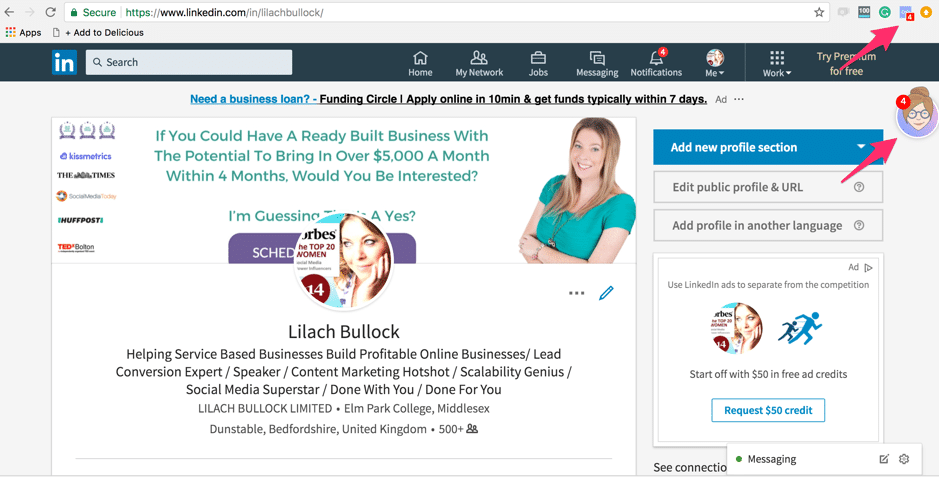 If you click on it, you’ll then be able to see what contact details are available for that person:
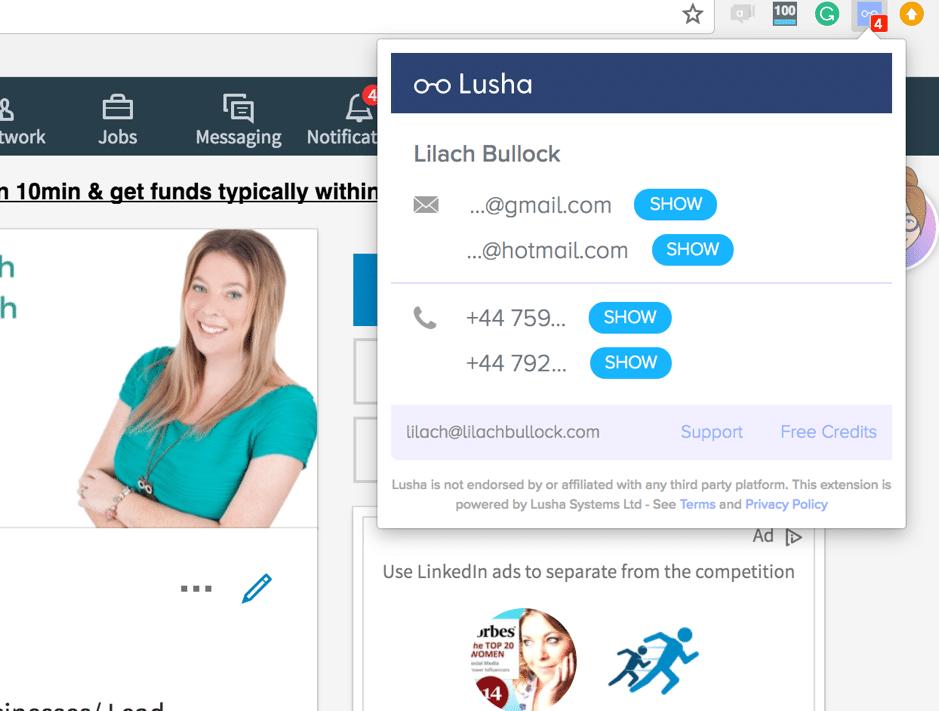 As you’ll notice in the screenshot above, you can’t actually see the full email address or phone number – although you can see that person’s business email, if they have one.
This is where your credits come in; for any contact information you want to know, click on “show” and one credit will be taken from your digital wallet.
The Lusha extension can be used on Twitter and LinkedIn; if you find a potential lead or prospect on a different website or social platform and you have their name, you can always search for them on LinkedIn or Twitter to see if you can find them and pull up their contact information.
[clickToTweet tweet="The easiest way to get a prospects’ contact information with Lusha #sales" quote="The easiest way to get a prospects’ contact information with Lusha #sales"]
As you’ll notice in the screenshot above, you can’t actually see the full email address or phone number – although you can see that person’s business email, if they have one.
This is where your credits come in; for any contact information you want to know, click on “show” and one credit will be taken from your digital wallet.
The Lusha extension can be used on Twitter and LinkedIn; if you find a potential lead or prospect on a different website or social platform and you have their name, you can always search for them on LinkedIn or Twitter to see if you can find them and pull up their contact information.
[clickToTweet tweet="The easiest way to get a prospects’ contact information with Lusha #sales" quote="The easiest way to get a prospects’ contact information with Lusha #sales"]
Zapier integrations
As I mentioned earlier, Lusha started out as a solution for recruitment purposes; however, as they grew in popularity, marketers and salespeople began to take notice. it’s probably because of this why there are now several integrations through Zapier with popular CRM solutions, such as Salesforce, Hubspot CRM and Highrise CRM. Other integrations include:- Google Sheets
- Intercom
- Close.io
- Marketo
Pricing
Lusha has a few different pricing options, although actually creating your account is completely free. There are a few different pricing options:- Free for 1 user and you get 5 credits for free every month
- $29 a month for 1 user and 50 credits
- The pro plan for $75 which works with up to 3 users and provides 200 monthly credits
- Premium plan at $149, with up to 10 users and 500 credits
- Or the custom plan for enterprise level, if you want over 25 users and over 1000 credits every month
There is a full guide to digital business cards for networking if you want to switch.
If your team works in Spanish, my guide to Lusha en español covers the same tool for them.
Conclusion
If you work in B2B and sales or marketing, Lusha can be a huge asset, one that allows you to reach out to your leads faster and more efficiently. Not to mention, leads are more likely to be converted if you reach out to them via their usual contact. Have you tried Lusha yet? Leave your comments below and please share 🙂Want more on this topic?
FAQ
How accurate are contact lookup tools?
Good on company emails, noticeably weaker on direct dials, and weakest on people who have changed jobs in the last few months. Treat the result as a strong lead rather than a fact, and verify before you use it for anything that matters. A bounced email costs you more than a minute of checking.
Want AI doing the heavy lifting in your marketing?
I build the systems that handle the boring 80 percent, so you get your week back. Done properly, with the human kept in.
Is using a contact lookup tool legal?
Using one is legal in most places. What you do next is the part that is regulated, and in the UK and EU that means having a lawful basis for contacting someone and giving them a clear way to opt out. Business to business outreach has more room than consumer marketing, but it is not a free pass, so read the rules for the country you are contacting rather than assuming.
What is the best way to use the contact details once you have them?
Send something specific enough that it could only have been written to that person. The tools have made contact details cheap, so a generic email now reads as automated to almost everyone. If budget comes up early in the conversation, this piece on getting a client's budget will help, and Snov.io is worth a look as an alternative.
Related reading: How Do I Build a List of Bloggers to Contact for My Brand? Here's My Exact Process and What Makes a Work-From-Home Contact Center Job Worth Applying For.

