


Quick answer: The Snov.io Chrome extension finds email addresses on any company website and on LinkedIn, including profile pages, searches, company pages and group member lists, then saves them to lists in your dashboard. As of Oct 2026 each prospect found or email verified costs 1 credit, and the free Trial plan includes 50 credits.
Updated for 2026: cold outreach still starts with finding the right email, and Snov.io is one of the quickest ways to do it at scale. This walkthrough covers the finder, the Chrome extension, and the dashboard. Comparing tools? See the Lusha contact-finder review and the Facebook ad tools roundup for the rest of your pipeline.
If you want to go deeper on this: Does Email Marketing Cost Money to Run? Here's the Actual Breakdown.
Lilach's verdict: 4.4 out of 5. Snov.io is a fast and genuinely useful email finder that makes B2B prospecting at scale far less painful, though its value depends heavily on how often the Chrome extension surfaces verified contacts rather than guesses.
Why do you need an email finder?
If you work in sales or have a B2B business, prospecting is likely a huge part of your business; in order to grow, you need to find new sales leads consistently, as well as be proactive and reach out to them. Snov.io is one of the tools I cover in my roundup of the best sales prospecting tools. Many of these prospects will come from social media websites as well as from any relevant company websites you’ve found. However, using a social networks’ direct messaging system or a company’s contact form to reach to sales prospects isn’t the most efficient method; your prospects might not take your outreach seriously, or even see your messages. That’s why you absolutely to reach out to them via a direct contact, such as their email. Reaching out this way means they’re more likely to see your message as well as respond to it. But, how do you find the right email addresses, the ones they use on a regular basis, without having to scout their social profiles and websites? Quite simply, with an email finder like Snov.io:What is Snov.io?
The simple answer: it’s an email finder. However, there’s so much more to it than that and I think it would be better to show you how exactly it can help with your prospecting…The Snov.io Chrome extension
Once you’ve created an account with Snov.io, the first step is to get the Chrome extension to get started; although you can use the Snov.io dashboard to search for emails as well, the Chrome extension makes prospecting much easier and quicker. The extension works on any company website as well as on social media – specifically, LinkedIn. And what’s really cool about it compared to other similar tools is that you can use it in multiple situations on LinkedIn:- On someone’s personal account page
- On a LinkedIn search
- On a company profile page
- And on a group members page
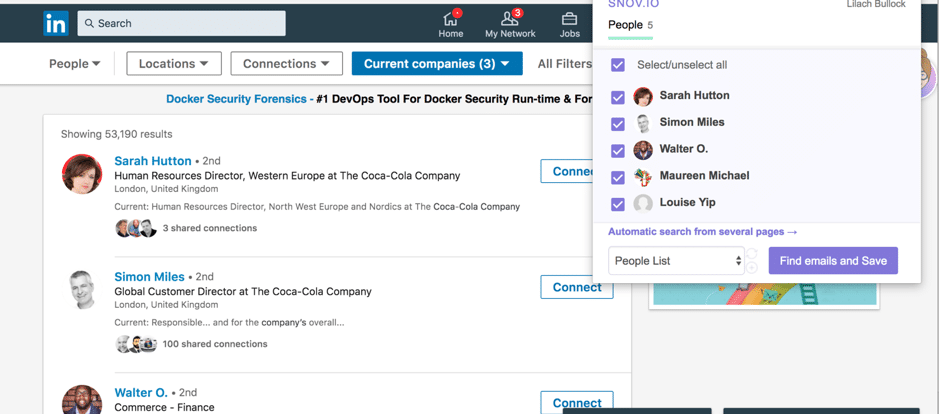 As you can see, Snov.io pulls up the people from that particular page which you can easily select or remove from your list. Once you’ve made your selection, simply click on “find emails and save” to send these prospects to your Snov.io dashboard, and repeat the process with the next pages to keep finding and adding prospects:
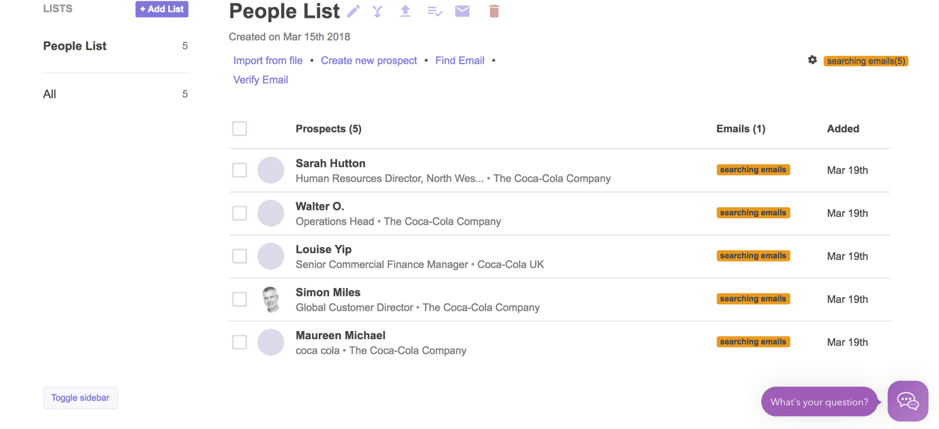 The tool will then start looking for their emails while you can keep browsing the web for more prospects to add to your list.
To keep things organised and easy to follow, you can create multiple lists of prospects on your Snov.io dashboard:
The tool will then start looking for their emails while you can keep browsing the web for more prospects to add to your list.
To keep things organised and easy to follow, you can create multiple lists of prospects on your Snov.io dashboard:
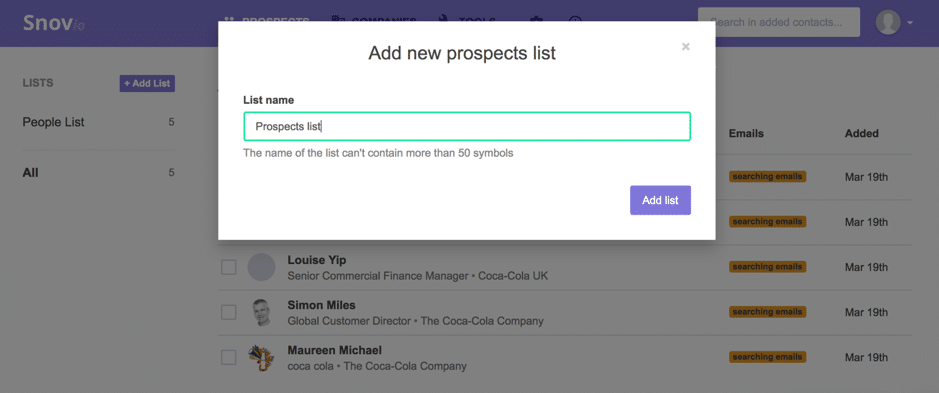 You’ll then be able to use the Chrome extension to easily send new prospects to the right list of people:
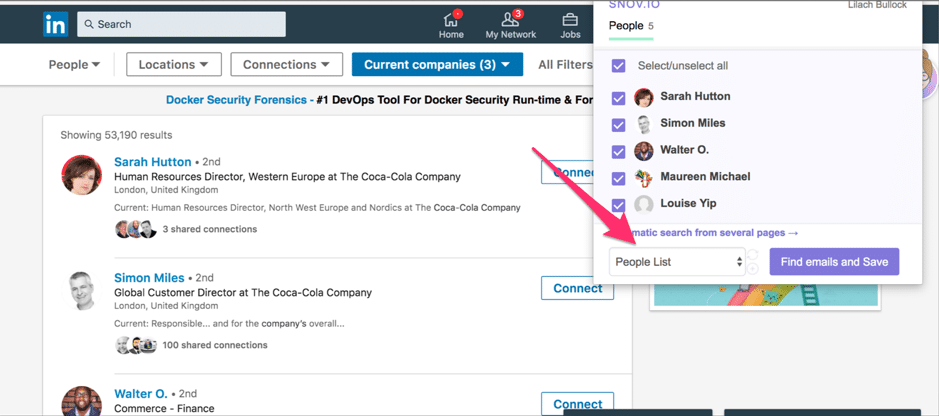 Another way to use the Chrome extension is to go directly to a company website and click on the Snov.io icon:
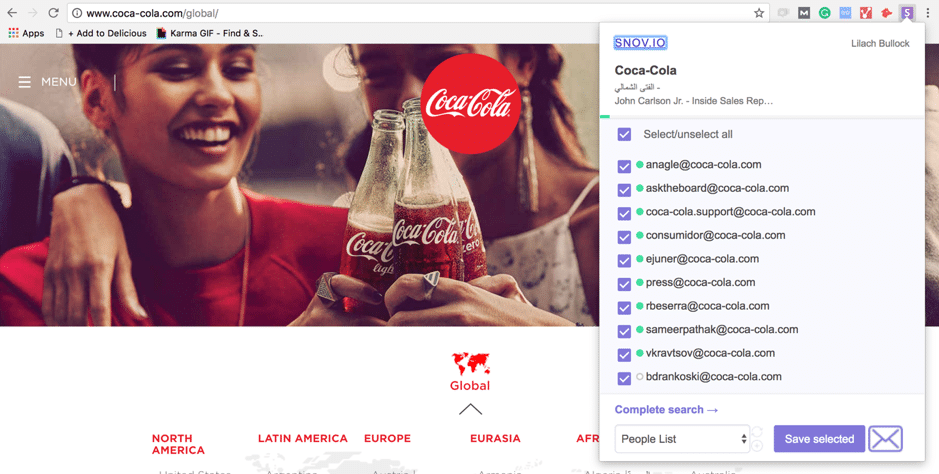 As you can see, you get a full list of emails that they’ve found which you can easily save to one of your lists – or, you can even start sending them emails with Snov.io by clicking on the ‘email’ icon at the bottom.
[clickToTweet tweet="How to prospect like a pro with @snovio_ico #sales #prospecting" quote="How to prospect like a pro with @snovio_ico #sales #prospecting"]
To see all the available emails for a company, click on ‘complete search’; you will be taken to your dashboard where you’ll be able to see every email they’ve pulled up from the page so you can select any relevant emails and add them to your list:
As you can see, you get a full list of emails that they’ve found which you can easily save to one of your lists – or, you can even start sending them emails with Snov.io by clicking on the ‘email’ icon at the bottom.
[clickToTweet tweet="How to prospect like a pro with @snovio_ico #sales #prospecting" quote="How to prospect like a pro with @snovio_ico #sales #prospecting"]
To see all the available emails for a company, click on ‘complete search’; you will be taken to your dashboard where you’ll be able to see every email they’ve pulled up from the page so you can select any relevant emails and add them to your list:
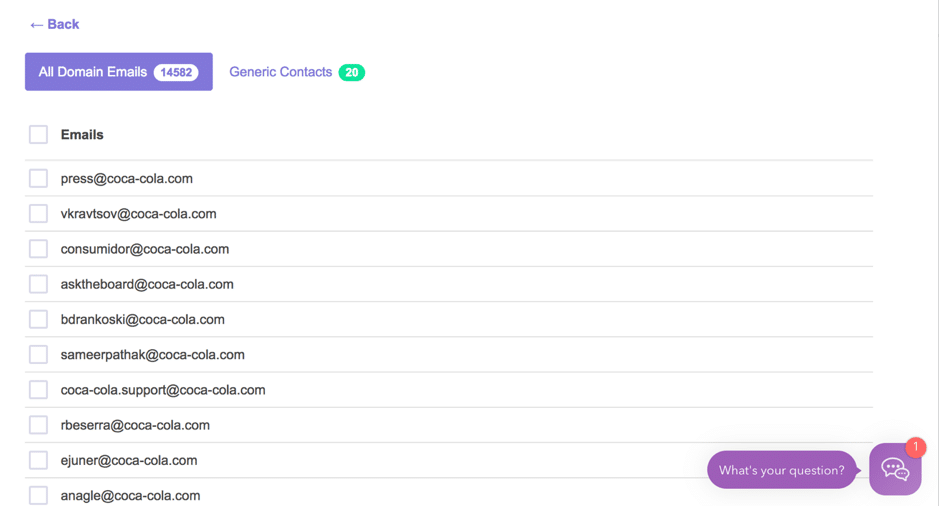 Whether you’re searching for prospects via social media or a company, the extension makes the whole process go by very quickly. You don’t need to add each email to your lists, but rather add them all in one go and keep prospecting while the tool pulls up emails for you. You can pretty much prospect dozens, even hundreds of people in minutes – and that’s not all that you can do with Snov.io.
The Snov.io dashboard
The Snov.io dashboard has a lot to offer beyond what the Chrome extension can do:The Prospects dashboard
First of all, it’s a place to store all of the prospects you’ve found as well as add more yourself - including by uploading a list of emails from Excel, csv, or txt files or by adding them manually: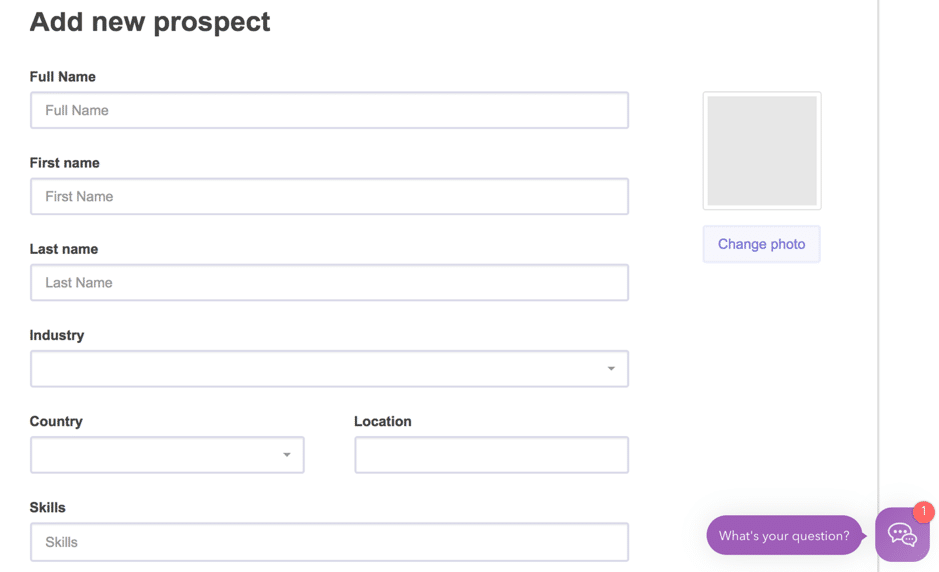 Snov.io can then search for their emails as well and you’ll have a full list of all your prospects in one place.
Alternatively, you can also search for emails with first and last names and the company’s domain:
Snov.io can then search for their emails as well and you’ll have a full list of all your prospects in one place.
Alternatively, you can also search for emails with first and last names and the company’s domain:
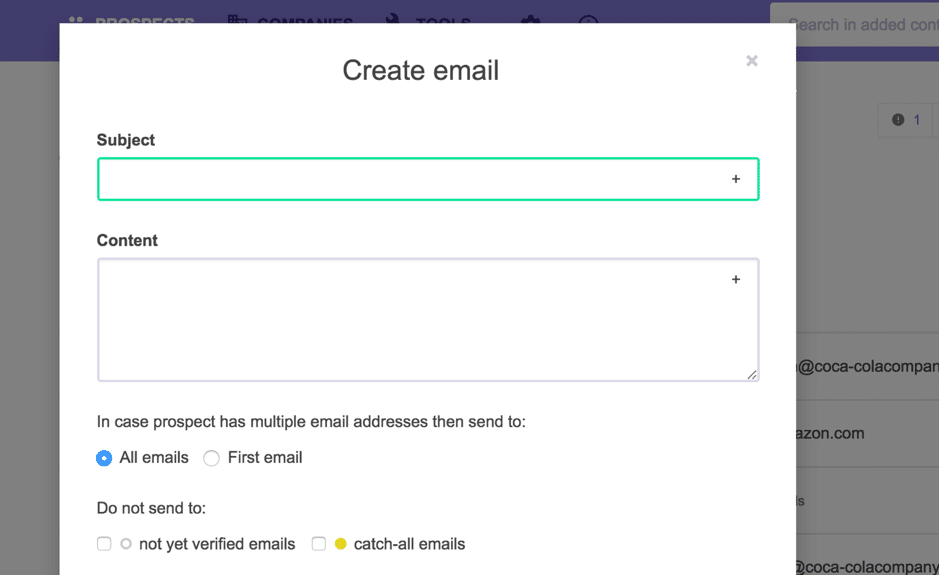
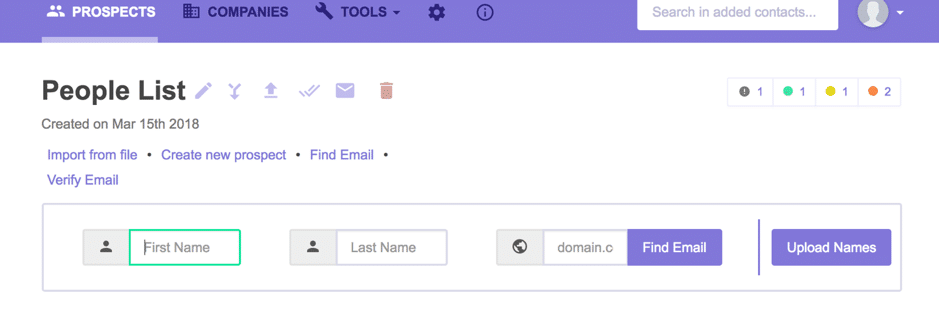 Once done, if you’re ready to start your outreach, select the prospects you want and simply click on the email icon to create your email:
The companies dashboard
Another option you have is to add companies; you can add them with the Chrome extension, as I showed you earlier, or you can use the Company Profile Search to find more: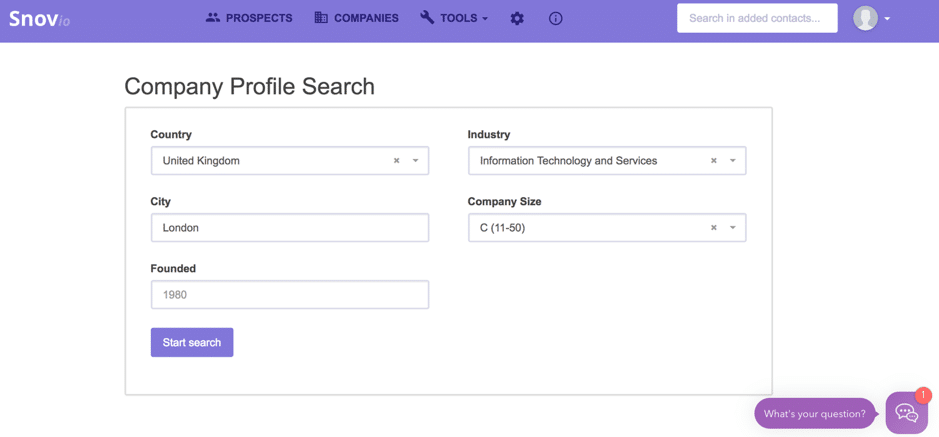 As you can see in the screenshot above, you can also all kinds of filters to search for relevant companies, such as their location (including both country and city, the company size, the industry, and the year it’s been founded).
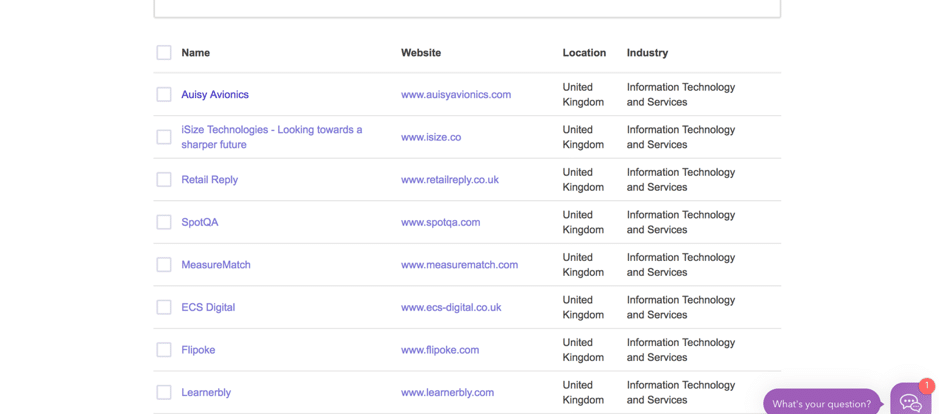
Snov.io will then immediately pull up relevant results based on your requirements:
As you can see in the screenshot above, you can also all kinds of filters to search for relevant companies, such as their location (including both country and city, the company size, the industry, and the year it’s been founded).
Snov.io will then immediately pull up relevant results based on your requirements:
 To find out more about a company, click on its name:
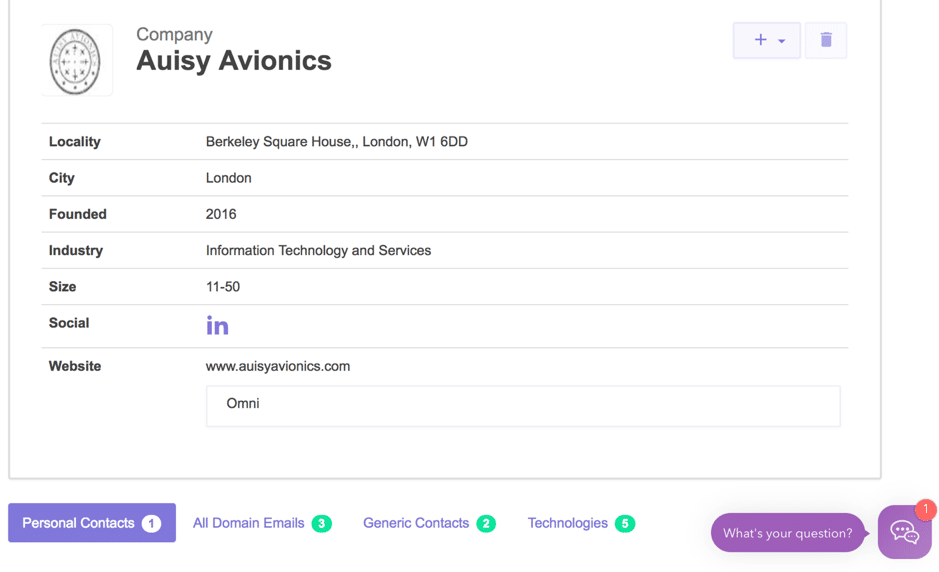 Apart from relevant information about the company, you can also check what contacts they have and add the company (or prospects) to your lists.
Search for more prospects
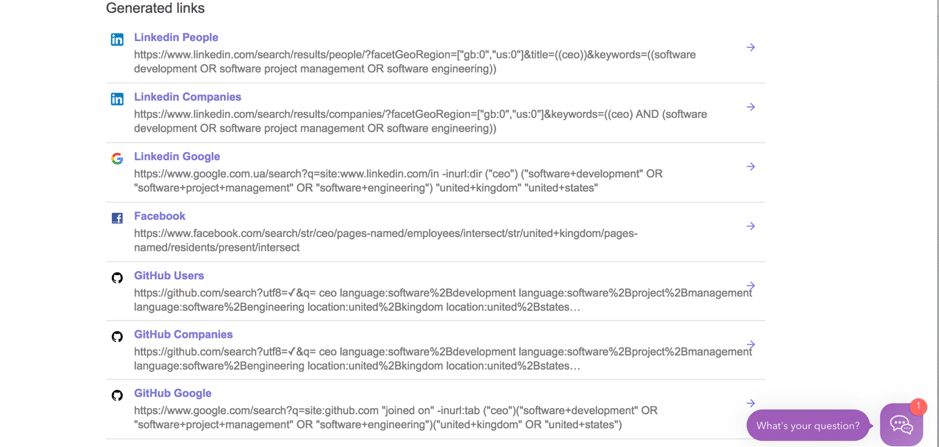
Another way to use Snov.io is to find more sales prospects – and there are a few different ways to do this. For example, you can use Boolean search to find prospects from around the web: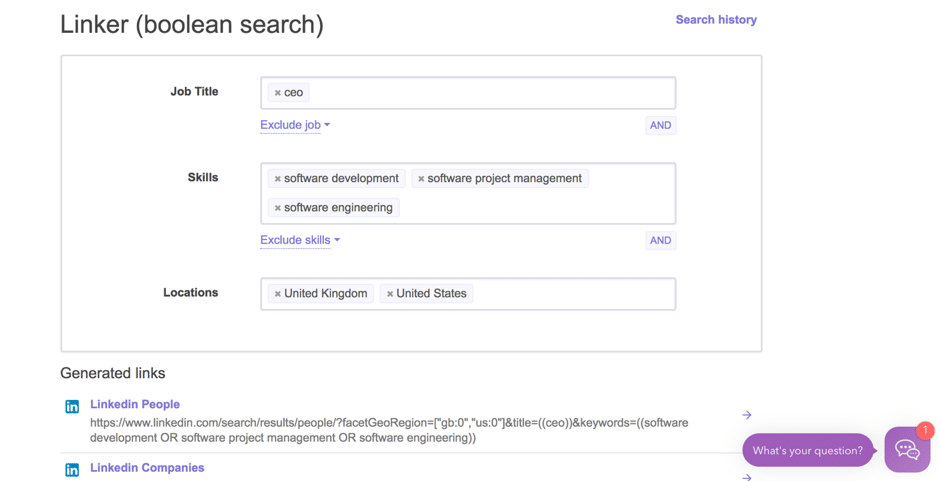 Add the job titles you’re looking for, as well as a section of skills and locations and you’ll get results from a variety of sources, such as LinkedIn, Facebook, Google and Google+, and many others:
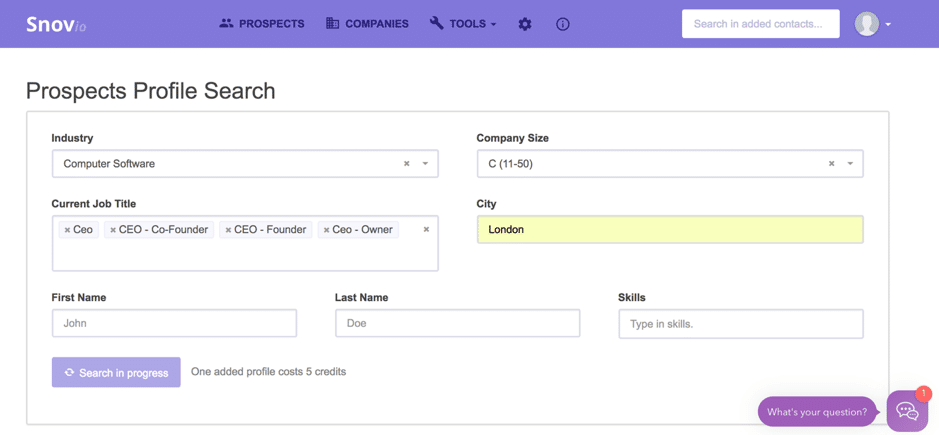
 Another way to find prospects is with the Prospects Profile Search:
 In the results, you’ll be able to see their names, emails, current jobs, company and company size, location, and industry:
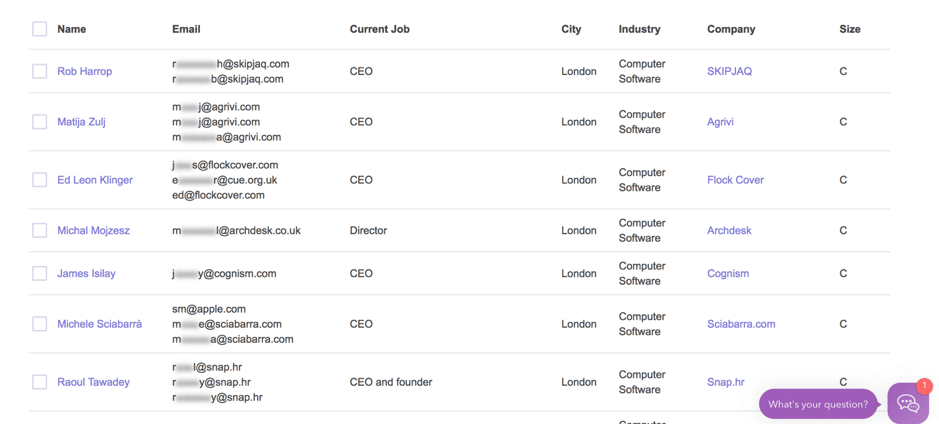 Any prospect that sounds good can easily be added to your prospect list so you can start reaching out.
Alternatively, you can also search for domains to find emails – either one domain a time, or get emails from a list of domains at once:
Any prospect that sounds good can easily be added to your prospect list so you can start reaching out.
Alternatively, you can also search for domains to find emails – either one domain a time, or get emails from a list of domains at once:
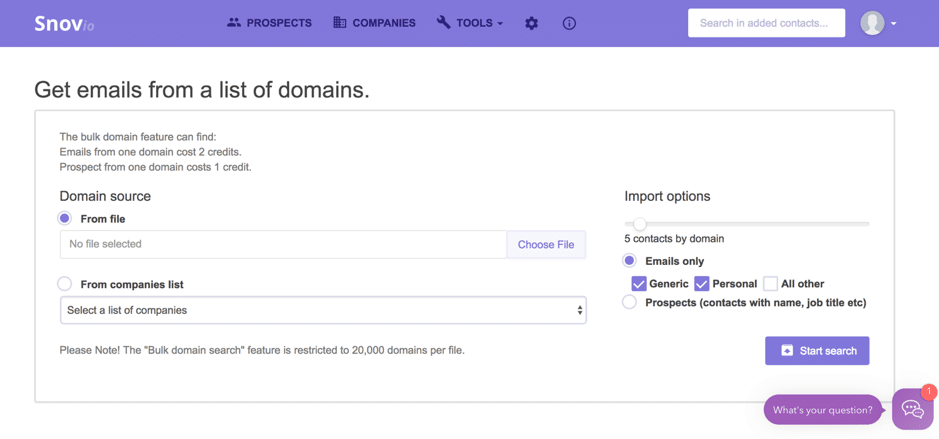 You can select what data you want, such as the type of emails you’re looking for (generic or personal emails) or whether you want prospects’ information, like their name and job title.
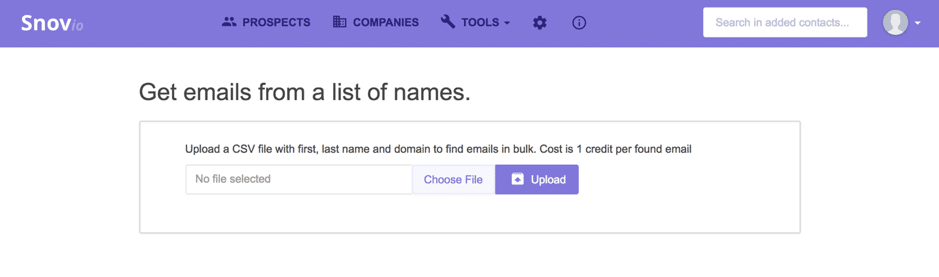
Or, you can upload a .csv file with your prospects’ names and domain addresses to find all of their emails:
You can select what data you want, such as the type of emails you’re looking for (generic or personal emails) or whether you want prospects’ information, like their name and job title.
Or, you can upload a .csv file with your prospects’ names and domain addresses to find all of their emails:
 And you can even upload a list of social media profiles you’re interested in (either .csv or .txt files) to generate their email addresses.
When you’ve finished gathering prospect emails, you can easily verify all of them to make sure they’re still valid with email verifier feature – which helps ensure that you’ll reduce your email bounce rate and actually reach the majority of your list.
[clickToTweet tweet="How to prospect like a pro with @snovio_ico #sales #prospecting" quote="How to prospect like a pro with @snovio_ico #sales #prospecting"]
And you can even upload a list of social media profiles you’re interested in (either .csv or .txt files) to generate their email addresses.
When you’ve finished gathering prospect emails, you can easily verify all of them to make sure they’re still valid with email verifier feature – which helps ensure that you’ll reduce your email bounce rate and actually reach the majority of your list.
[clickToTweet tweet="How to prospect like a pro with @snovio_ico #sales #prospecting" quote="How to prospect like a pro with @snovio_ico #sales #prospecting"]
Find out what tech your prospects are using
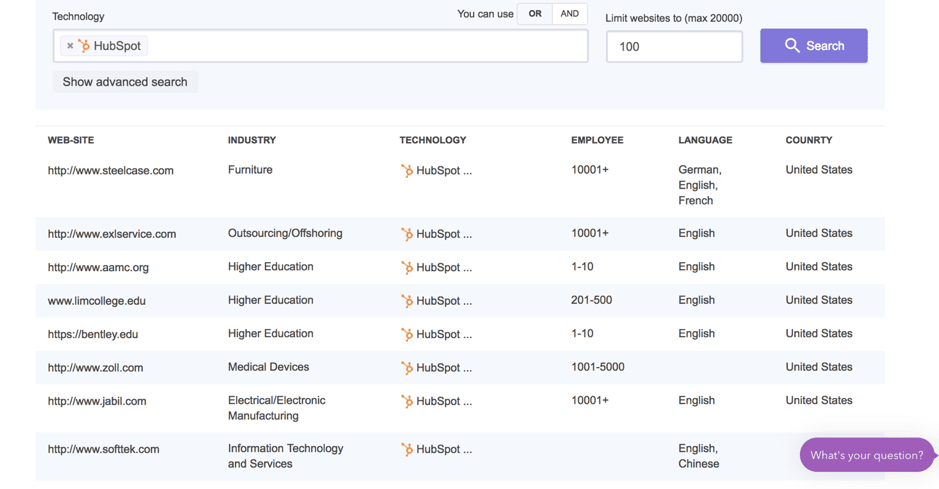
Before you start reaching out, you should do some more research on your prospects so you’re prepared for anything and everything. With Snov.io, you can quickly check to see what companies are using certain technology: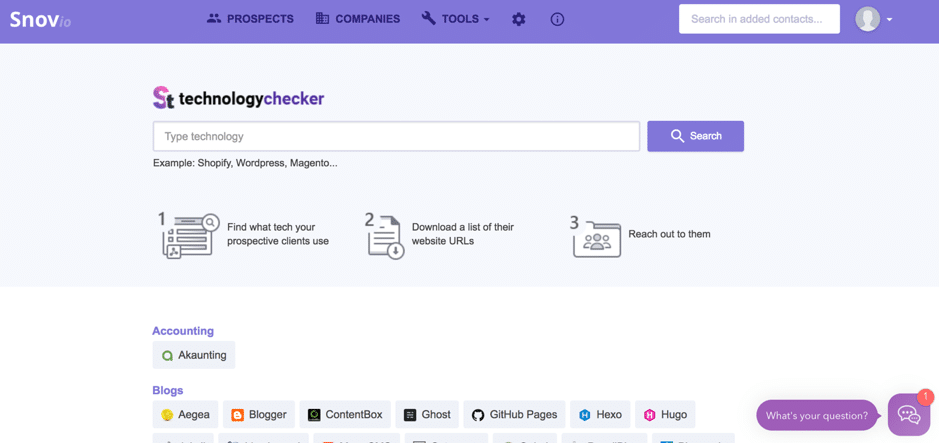 Browse through the list of tech or start typing in the search box to get started:
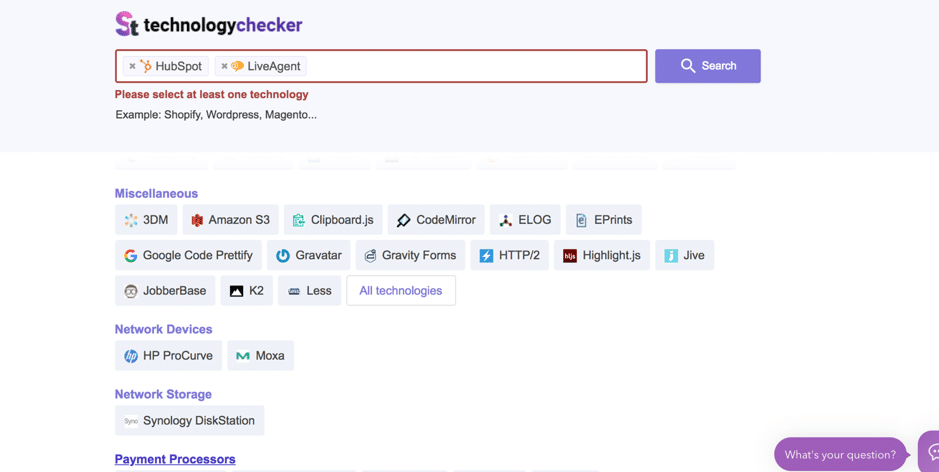 The tool will then pull up relevant companies and if you find any prospects, you can quickly check for people to contact:
Conclusion
Clearly, Snov.io is so much more than an email finder; in fact, it has a plethora of useful sales prospecting tools that would many any sales persons’ life so much easier – not just because it helps you find relevant and correct contact details, but also because it aims to make the process as quick as possible. Have you tried Snov.io yet? What other tools do you use and why? Please do let me know in the comments section and share the post if you enjoyed it 🙂Related: how to make money on instagram with just 1k followers
I run AI training and workshops for teams, and help businesses with AI enablement and workflow automation, so the busywork runs itself and people get time back. Most of that work is with SaaS marketing teams and small businesses. Here's how we can work together.
FAQ
What does Snov.io do?
Snov.io finds and verifies business email addresses, then lets you run cold email campaigns from the same place. It also has a Chrome extension that pulls contact details straight from a company site or LinkedIn.
Is Snov.io better than Lusha?
They overlap, but Snov.io leans toward email finding plus outreach, while Lusha leans toward direct dials and verified B2B contacts. If you mainly send cold email, Snov.io usually wins on price. Compare them in the Lusha review.
Is Snov.io free?
Snov.io has a free tier with limited credits so you can test the finder and verifier before paying. Paid plans scale with the number of searches and emails you need each month.
Want AI doing the heavy lifting in your marketing?
I build the systems that handle the boring 80 percent, so you get your week back. Done properly, with the human kept in.
How do Snov.io credits work?
Each email verification and each prospect uses 1 credit. Recipients are counted separately: you're charged 1 recipient when you first contact a lead, and follow-ups to that lead in the same billing period are free. As of Oct 2026 Starter is $39 a month billed monthly, or $29.25 a month billed annually, with 1,000 credits and 5,000 recipients.
What does the free Snov.io Trial plan include?
A renewable Trial plan with 50 credits, 100 recipients, 25 enrichment tokens and 1 email warm-up slot, per Snov.io's pricing page (Oct 2026). Premium features such as integrations, bulk search, bulk verification, email A/B testing, API access and export aren't available on it.
Frequently asked questions
Is Snov.io still accurate for finding emails in 2026?
Yes, Snov.io continues to refine its database and verification engine, so accuracy rates for common domains remain strong. Always run a bulk verification pass before sending to catch outdated or invalid addresses.
How much does Snov.io cost compared to alternatives?
Snov.io offers tiered plans based on credits and email volume, and it tends to sit in the mid-range price bracket compared to tools like Hunter or Apollo. Many users find the free trial enough to test list quality before committing to a paid plan.
Can Snov.io help with cold email deliverability?
Snov.io includes an email warm-up feature and sending limits designed to protect your domain reputation. Pairing this with a proper SPF, DKIM and DMARC setup gives you the best chance of landing in the inbox rather than spam.
What is the best way to start using Snov.io for lead generation?
Begin with the Chrome extension to pull emails directly from LinkedIn profiles or company websites, then organize contacts into lists inside the platform. From there, set up a simple two or three step drip campaign to test response rates before scaling.
Related reading: Why Does Instagram Ask for ID Verification? Here’s What’s Re.



