Last updated: May 2026. This guide has been substantially expanded with a new section reflecting the 2026 landscape.
ConvertKit is an email marketing platform that’s only been around for a few years and yet has massively grown in popularity very quickly. In fact, I keep hearing more and more people saying how they’ve stopped using MailChimp, AWeber and generally some of the biggest names in email marketing to replace them with ConvertKit. I’ve personally been using it since I’ve launched staging.exclusive-side.flywheelsites.com and absolutely love it, more so than any other email marketing software I’ve ever used, as the results are noticeably better and it is so easy to use and intuitive. In this blog post, I’m going to try to explain why I switched to ConvertKit and what makes it so great in a nearly saturated market.
The importance of building a list
Before we get into ConvertKit, I wanted to talk a bit about the importance and benefits of building an email list. While some marketers may claim that email marketing is dying a slow death, the truth is, it gets results:
- Email subscribers have higher conversion rates
- A good list brings in a steady stream of traffic
- It's a great promotional tool
- Make more sales
[clickToTweet tweet="Make more #conversions on your website with @Convertkit #emailmarketing via @lilachbullock" quote="Make more #conversions on your website with @Convertkit #emailmarketing via @lilachbullock"]
Emails are a big part of our everyday lives and most of us, I'm sure, check our email accounts daily, if not several times a day. With a good list and a strong email marketing campaign, you will be able to reach highly targeted people with all of your latest news, blog posts, product suggestions, new launches and get them to visit your website and buy from you.
Now on with the review of ConvertKit:
The forms
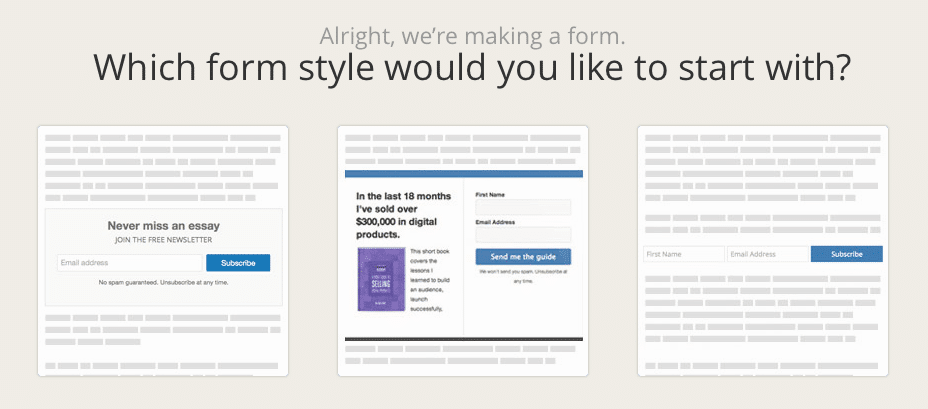
Let’s start at the beginning – with the forms. The opt-in forms are very easy to set up, and only take minutes, and anywhere you choose to put them on a page, they automatically adjust to fit the width, including on mobile phones. There are different types of forms depending on where you want to put them on your website: at the end of a blog post, as a sidebar, etc. I personally use ConvertKit in conjunction with OptinMonster and use their forms, as they have more options in terms of style and customizations.
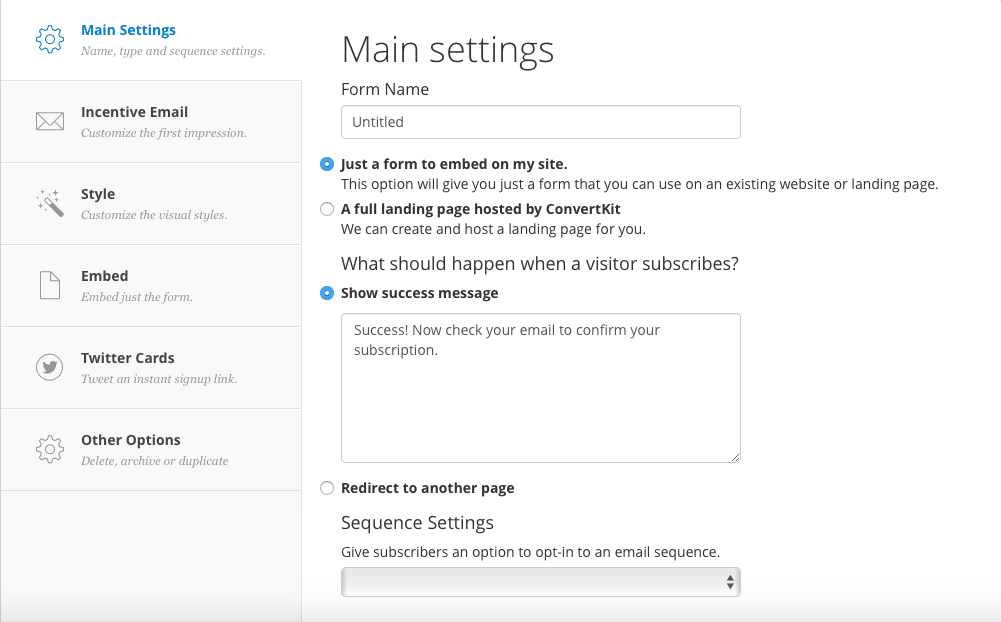
You can create as many different forms as you like, offering different incentives for each one. This is great because, in order to increase your subscriber numbers, you have to give them the incentives that they want. So for example, if they’re reading a blog post on Twitter Advertising, they might also be interested in getting a list of the top Twitter tools to help them get better results. Or, if they’re reading something on how to get more traffic to their website and blog, they will most likely be more inclined to subscribe in order to get a guide on how to increase the conversion rate on their website.
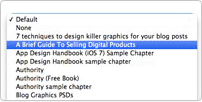 For WordPress users, there is a Convertkit plugin that allows you to easily add the custom opt-in form they want to each post while editing the post. This makes it very quick to add a targeted opt-in form with a call to action unique to the post you are publishing, which can help you increase your subscription numbers.
[clickToTweet tweet="Make more #conversions on your website with @Convertkit #emailmarketing via @lilachbullock" quote="Make more #conversions on your website with @Convertkit #emailmarketing via @lilachbullock"]
Landing Pages
ConvertKit also allows you to very quickly create a landing page with one of their templates:
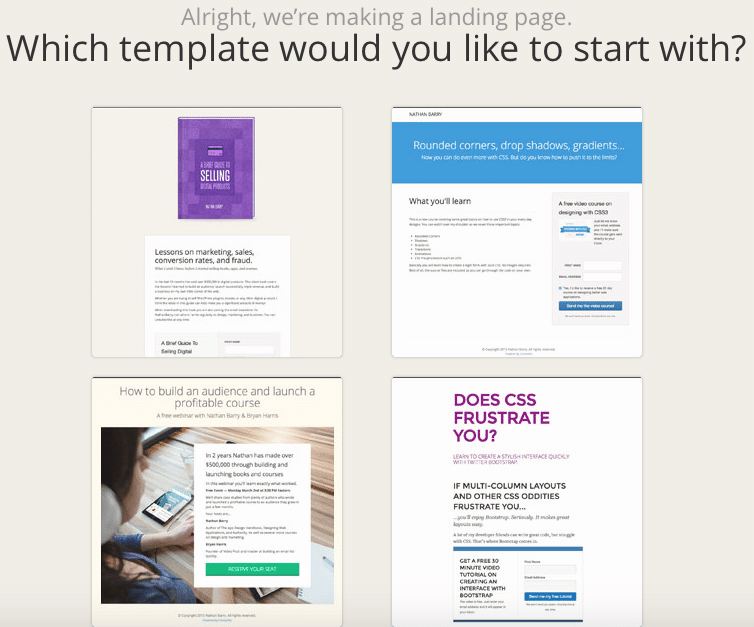
This a great feature for when you need a landing page quickly for events you’re holding, webinars or for a giveaway. It’s extremely easy to customise your landing page with the ConvertKit visual editor, as you can add images, change colours, add text and customise patterns and textures. If the editor doesn’t allow you to make the changes you want, you can use custom CSS to write in any change you want.
Drip email marketing and marketing automation
Convertikit’s biggest and most powerful feature is it’s drip email and marketing automation, which it does better than any other email marketing software I’ve ever tried.
Setting up a drip email sequence can seem like a huge undertaking, and it is – but not with ConvertKit. A good drip email sequence will help you build trust and increase conversions, but with other email marketing software this can be an unnecessarily difficult task; and I say unnecessary, because once you try it with ConvertKit, it seems like the easiest, most logical way to do it.
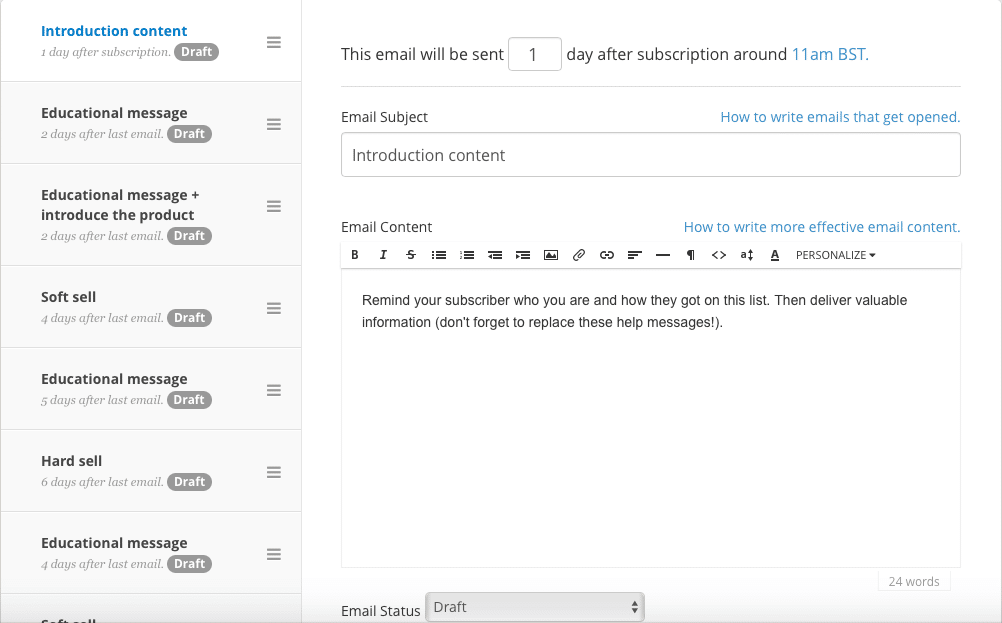
All you have to do is go to Sequences at the top of your account, click on Create a Sequence, give it a name and the form from above will pop up. From there, all you have to do is write each email, give it an email subject, and select how many days after the user’s subscription you want this email to be sent out.
[clickToTweet tweet="Make more #conversions on your website with @Convertkit #emailmarketing via @lilachbullock" quote="Make more #conversions on your website with @Convertkit #emailmarketing via @lilachbullock"]
This is an amazing feature, as it allows you to make sure each one of your subscribers finds out about all of your offers and downloadable goodies and therefore helps you increase your conversions, along with your subscriber’s trust as you give them lots of free but very useful material.
Want AI doing the heavy lifting in your marketing?
I build the systems that handle the boring 80 percent, so you get your week back. Done properly, with the human kept in.
You can take automated emails even further with ConvertKit. Go to Automations to see all automation rules or create new ones to explore all possibilities.
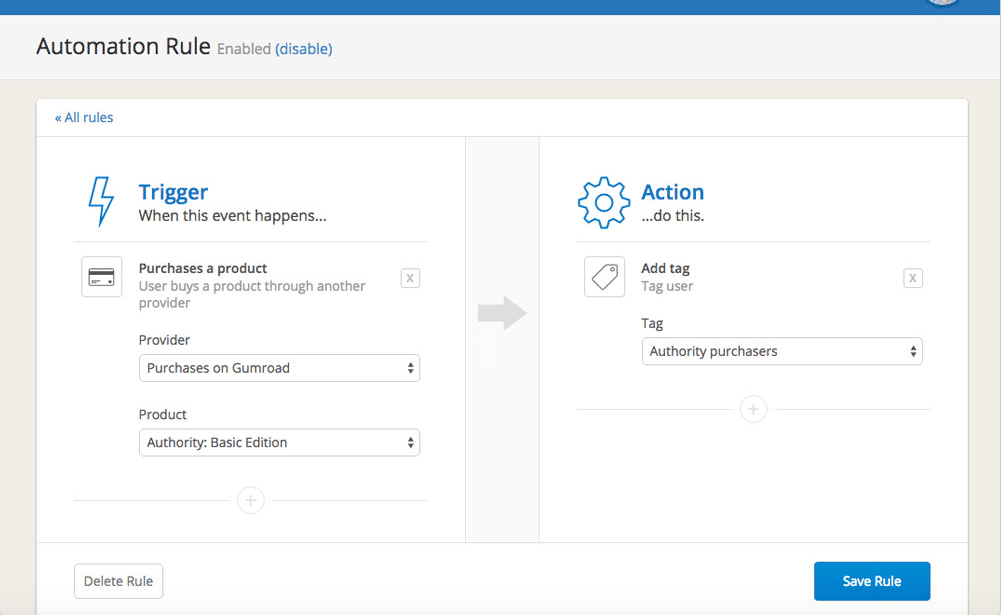
You can, for example, make sure all your subscribers go through your entire sales funnel. Or, if someone bought something on your website and you want to send a follow-up – you can easily arrange to have it sent automatically with ConvertKit.
Another cool thing that you can do is allowing your subscribers to opt out of the emails they’re not interested in by creating custom unsubscribe links for any of your sequences or launches. This is a really great feature as it can help with keeping as many subscribers as possible. Since they’ve subscribed of their own free will to your newsletter and emails, that means they’re probably interested in some of what you have to offer – just not all you have to offer. In most cases, if people are getting emails they’re not interested in at all, they’ll probably un-subscriber or simply not read or even open your emails. But, if they only select to hear about the things that are relevant to them, then they are more likely to remain subscribers.
[clickToTweet tweet="Make more #conversions on your website with @Convertkit #emailmarketing via @lilachbullock" quote="Make more #conversions on your website with @Convertkit #emailmarketing via @lilachbullock"]
Conclusion
ConvertKit is everything I didn’t know I needed before I got it – all I knew is that the email marketing software I’ve used in the past was not keeping up with my needs. ConvertKit is perfect because not only does it have amazing features like drip email sequences and marketing automation, as well as easy to create forms and landing pages, but it is also very easy to use. It was designed with bloggers in mind and they have clearly tried to make sure that it has an interface which is intuitive and very easy to figure out and use. Which email marketing software do you prefer? Have you tried ConvertKit yet? Let me know your thoughts and please share:)
What's changed by 2026: Email marketing and deliverability
Email marketing in 2026 looks materially different from earlier years. AI-generated content has flooded inboxes, deliverability standards have tightened, and privacy regulation has narrowed what you can do. Worth updating any strategy that was set before 2025.
AI-detected emails go to promotions or spam
Gmail, Outlook, and Apple Mail all now have AI content detection layers that filter emails matching AI-generated patterns into Promotions or Spam. Sender domain reputation matters more than ever because suspected-AI senders accumulate negative reputation faster. Emails written with specific names, real examples, and clear human voice perform substantially better than AI-templated outreach in 2026.
Authentication requirements have tightened
Since February 2024, Gmail and Yahoo have enforced strict authentication requirements for bulk senders: SPF, DKIM, DMARC, and one-click unsubscribe. By 2026 this enforcement extends to smaller senders too. If your sending domain isn't authenticated correctly, deliverability drops materially. If you're not sure, run a free DMARC analyser before sending another campaign.
List quality matters more than list size
A 5,000-subscriber list with 60% engagement outperforms a 50,000-subscriber list with 5% engagement on most business outcomes. Email service providers in 2026 actively suppress sending to disengaged subscribers, which means your inflated list size doesn't even reach the disengaged half. Suppress non-openers after 90 days. Welcome new subscribers with care. Build engagement, not just numbers.
Subject lines: human-voice beats curiosity-gap
Curiosity-gap subject lines ("You won't believe what happened next") were a 2018-2022 staple. By 2026 they pattern-match as spam triggers in many filters AND as AI-generated by readers. The strongest subject lines in 2026 are short, direct, and sound like a human said them: "Quick update on the deal," "Thinking about you," "Here's what I worked out."
Privacy regulation is broader than 2022
GDPR enforcement has tightened in the UK and EU. CCPA expanded in California. Multiple US states added consumer privacy regulation in 2024-2025. The practical upshot: explicit consent is now the default, double opt-in is recommended, and unsubscribe must be one-click. Compliance is no longer optional even for small senders.
Related: running a guest posting campaign
If you want the full breakdown, here is everything I know about email marketing.
Related reading: Mailchimp vs ConvertKit: Which Is Better for Your Email List? and Here's Why a Data-Driven Social Media Strategy Will Make You a Better Blogger.