Updated for 2026: a content marketing calendar earns its keep when it holds three things per row, the topic, the person responsible and the date it goes live, and it stops working the moment you try to make it track every idea you have ever had.
Have you started planning your content marketing strategy for the year? With a content marketing calendar, you can start putting together a plan that really works, by posting the right content at the right time. In this blog post, I’m going to show you how to create your own content marketing calendar – and there’s a free content marketing calendar template for you to download to get you started:
What is a content marketing calendar?
A content marketing calendar is a calendar that helps you map out and execute your content marketing strategy, over a set period of time. Use it to build a schedule, plan all of your content in advance and ensure that your content is strategically published.Why you need a content marketing calendar
Content marketing calendars have 2 main benefits:- They help you get better results for your business, more leads and more conversions
- They help you save (a lot!) of time
What are your business and content marketing goals?
Before planning any content for your marketing calendar, make a list of your content marketing goals. What do you want to achieve?- More leads?
- More subscribers?
- More conversions?
- More traffic?
- More engagement?
- More trust?
“What will this do to help me achieve my goals?”If it doesn’t help you achieve any goal, then it’s most likely worth scrapping off your list and coming up with a different idea.
Create audience personas
Who forms your audience? How much do you truly know about your target audience? Who are they, specifically? Personalization, as I mentioned earlier, is extremely important in the current climate. If you want your audience to actually read/see/hear your content, then you need to give them a reason to: you have to give them content they want to read. And in order to understand what they want to read, you need to understand who they are. Sometimes, it helps to create some imaginary audience personas. Give them a name, a face, an occupation and so on: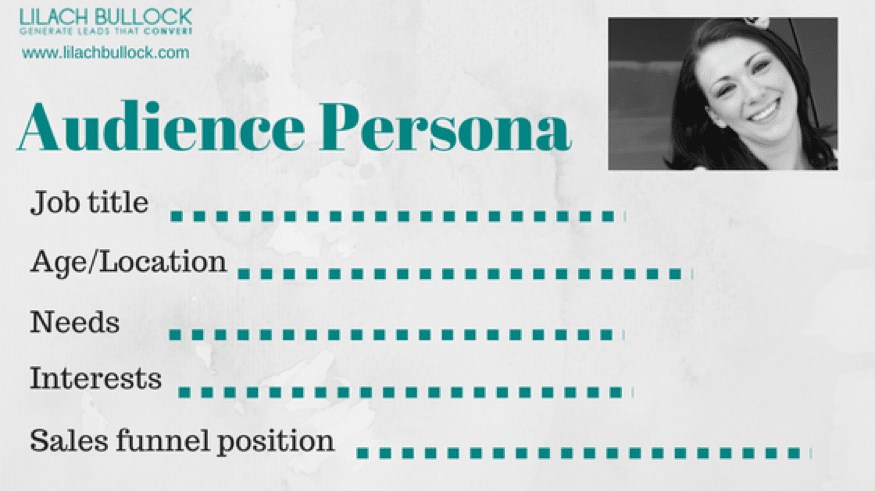
Research your niche
You can also learn a lot by following your niche and understanding what content topics your audience prefers, what content formats they use the most (video, blog post, and so on), and what channels they’re on. Ideally, you should subscribe to multiple publications (blogs and news sources), as well as follow relevant thought leaders in your industry, so that you can always keep up to date with the latest news and developments, as well as to keep an eye on what content your competitors and other content creators in your niche are publishing. Most importantly, focus on what content works best, whether it’s blogging or social media. What blog posts get the most readers, the most shares, the most comments? What social media updates get people to take action? Useful tools for research:- Feedly and Flipboard, for subscribing to different online publications and keeping track of all the latest news and other content in your industry
- Buzzsumo, for researching the content in your niche: which posts get the most attention on social media, the most shares, etc.
Start planning your content marketing calendar
Now that we got all the research out of the way, here’s how to start planning your content marketing calendar – and, don’t forget, you can also download a free content marketing calendar template for 2018 by using one of the forms in this post:What types of content will you publish?
For example:![How to Create a Content Marketing Calendar [FREE Template]](https://www.lilachbullock.com/wp-content/uploads/2023/01/4_Picture1-3.png)
Important dates
Next, put together another list, this one with important dates:- Holidays
- Novelty holidays that are relevant to your business
- Industry events
- New products or services launches
How to use the content marketing template
So, you’ve downloaded the free content marketing template (if you haven’t yet, what are you waiting for?).![How to Create a Content Marketing Calendar [FREE Template]](https://www.lilachbullock.com/wp-content/uploads/2023/01/4_Picture1-4.png)
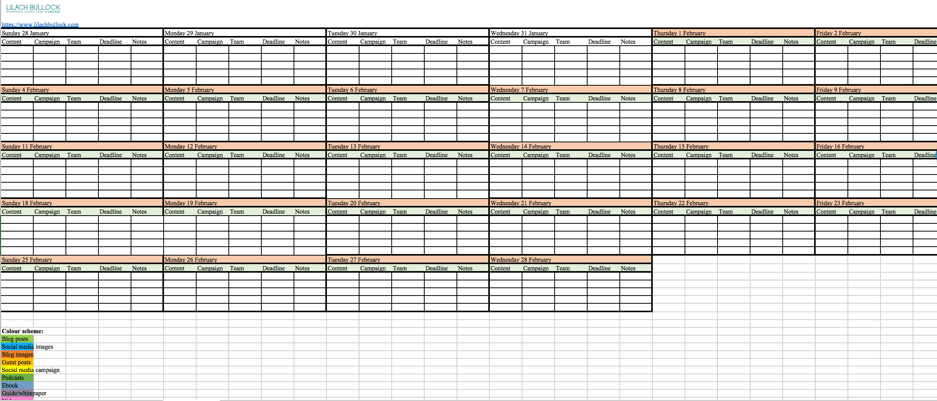
- If you create any content that needs to be published regularly, like blog posts, podcasts, vlogs, and so on – you don’t need to think of all the headlines and subjects, but you can schedule out the days when they need to be published and the days by which they need to be completed
- Bigger projects that require more work so they don’t happen as often, like webinars, online courses, and e-books, so you know ahead of time when you need to get started to finish them on time
- Promotional content related to new product and service releases
- Regular email marketing campaigns and newsletters
If your week runs on back-to-back calls, try one of these AI calendar apps that plan your time for you.
Conclusion
To sum it all up, there are a few things that you need to remember from this post:- Establish your overall business goals as well as your content marketing goals
- Think of who you’re targeting: create your audience personas and understand what their needs are
- Research your niche: understand what works and what doesn’t
- Plan your content calendar: put together a list of all the different types of content you want to create this year and start creating the timeline using the free content marketing calendar
To put this into practice fast, grab my free 30-day content calendar template and map out a full month of posts in one sitting.
Free resource: The Community Content Calendar Template.
I take guest contributions on this topic, so you can the contributor guidelines.
Guest contributors with hands-on content marketing experience are welcome: submit a content marketing guest post.
Want AI doing the heavy lifting in your marketing?
I build the systems that handle the boring 80 percent, so you get your week back. Done properly, with the human kept in.
FAQ
What should a content calendar contain?
Topic, owner, publish date, channel and status. That is enough. The calendars that get abandoned are the ones with twenty columns, because filling them in becomes a job in itself and everyone quietly goes back to a notepad. Start narrow and add a column only when its absence has caused a real problem.
How far ahead should I plan my content?
One quarter in outline, one month in detail. Planning further than that in detail feels productive and usually gets thrown away, because your priorities move and so does the search demand you were writing for. Pair the calendar with a proper content marketing strategy so the dates are attached to a reason.
Should the calendar live in a spreadsheet or a dedicated tool?
Start in a spreadsheet. It is free, everyone can already use it, and it will tell you within a month whether you need anything more. Move to a dedicated tool only when the spreadsheet is clearly creaking, usually once more than three people are updating it at once. If you are short on writing capacity, repurposing what you already have fills the calendar faster than writing from scratch.