


How the tool works
The best part about the tool is that it’s very customizable. First, you start by entering the basic information on what you are going to need to manage: the number of different social media profiles that you want to manage with the tool, the total number of fans and followers of all social media profiles put together, and the total number of team members that are going to be actively managing these profiles: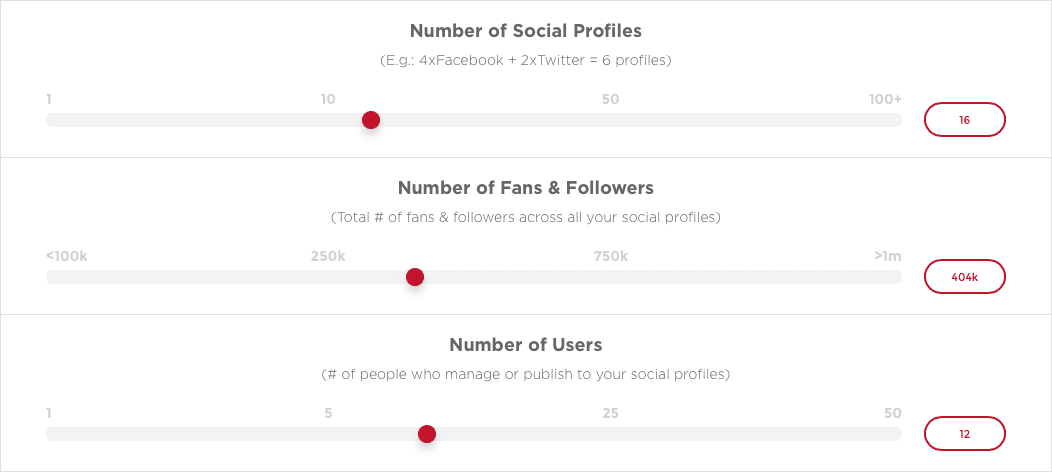 This is important information as many social media management tools will ask you to pay extra depending on these numbers. For example, when it comes to adding more team members to your plan can cost you extra for each team member, while other tools have plans that allow for numerous team members. The same happens with the number of social media profiles you have and even with the total number of followers.
You can take things further and get to personalise your search some more with the advanced options:
This is important information as many social media management tools will ask you to pay extra depending on these numbers. For example, when it comes to adding more team members to your plan can cost you extra for each team member, while other tools have plans that allow for numerous team members. The same happens with the number of social media profiles you have and even with the total number of followers.
You can take things further and get to personalise your search some more with the advanced options:
- Monitoring keywords and hashtags on Twitter: some tools will ask you to pay more if you want to monitor than five keywords or hashtags on Twitter. Unfortunately, this is a very important feature to many marketers and businesses; setting up keyword monitoring searches helps you stay on top of any mention of your brand on social media, helps you keep an eye on your competitors and also helps you find more easily any engagement and followers opportunities.
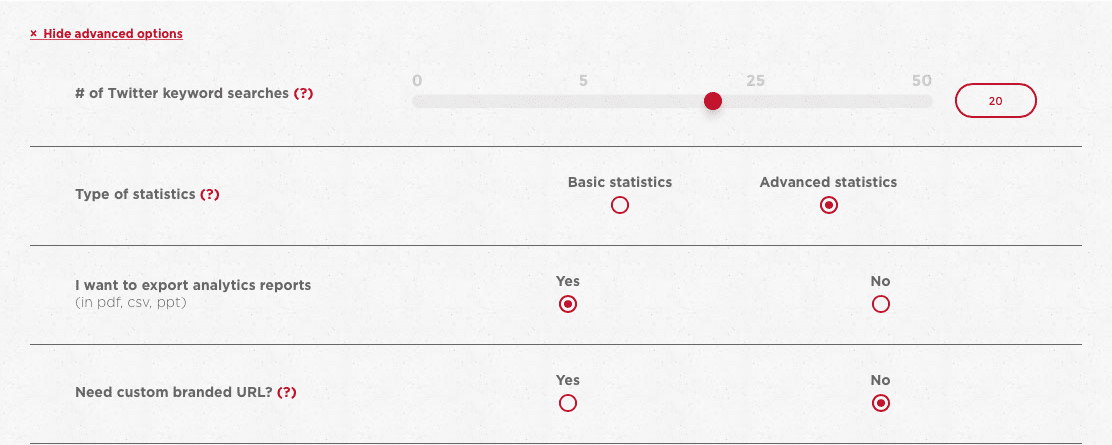
- Basic and advanced analytics and statistics: while many social media management tools offer some of sort of statistics and analytics reports, they’re not all that useful. Social media analytics are very important as they can help you discover marketing techniques that aren’t working and show you where there is room for improvement. And while some social networks have their own analytics (Facebook Insights, Twitter Analytics and more), most marketers and businesses prefer to do everything within the same tool and not to mention, many also want reports that they can share with clients or their shareholders, for example. Some tools only offer basic statistics, such as the number of fans and followers and how your numbers have evolved over time. If you’re looking for more advanced statistics, such as a detailed rundown of your fans and followers, the engagement you’re getting on social media, hashtags campaign statistics and so on, then you either have to pay extra or find another tool altogether.
- Export your analytics: another feature that can cost you extra is the ability to export your analytics to PowerPoint, PDF or CSV. As I mentioned earlier, this is an important feature, particularly to agencies and marketers who have to share their results with their clients. In order to be able to do that, they need to be able to customise and brand their reports, as well as to export them.
- Custom branded URL: if you’re using a particular URL shortener and want to connect with your social media management tool, be aware that some tools will charge extra for this feature.
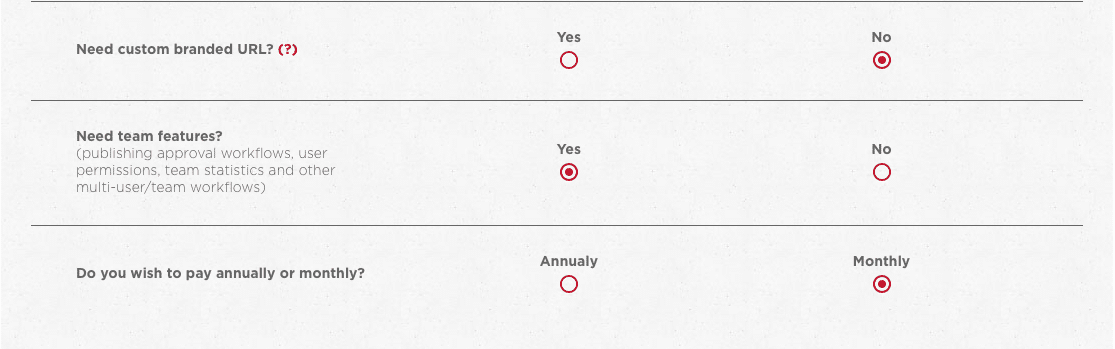
- Team collaboration features: if you work a lot of with other members of your team on managing social media, then you will probably want a tool that has team features. For example, some tools will allow you to tag and assign updates to members of your team, or to make it so that your collaborators will have to get permission before doing a certain task. You might also be looking to leave notes and directions to your team, or to get analytics reports for each team member, in order to see who and what they are doing.
- Paying monthly or annually: finally, the last option is more straightforward: do you want to pay monthly or yearly?
 I think that this tool is very useful not only because it helps you discover the best possible tool for you and your needs, but also because it helps you figure out what features you need, that you might otherwise forget about when searching for a tool.
One of its downsides, though, is that if you’re looking to get one of the bigger plans, the tool won’t be able to give you an accurate figure as most tools don’t have a set cost for their enterprise plans. Usually, these plans and their costs are tailor based on the needs of each business, so you would need to give them a call and explain what you need before they can come back to you with an exact price.
The tool is designed to give you a ballpark figure of what to expect in terms of costs for the features you are looking for, as the tool is still in beta, but I’m excited to see if it will take off and how it will evolve.
[clickToTweet tweet="How much does a #socialmedia management #tool really cost? via @lilachbullock" quote="How much does a #socialmedia management #tool really cost? via @lilachbullock"]
I think that this tool is very useful not only because it helps you discover the best possible tool for you and your needs, but also because it helps you figure out what features you need, that you might otherwise forget about when searching for a tool.
One of its downsides, though, is that if you’re looking to get one of the bigger plans, the tool won’t be able to give you an accurate figure as most tools don’t have a set cost for their enterprise plans. Usually, these plans and their costs are tailor based on the needs of each business, so you would need to give them a call and explain what you need before they can come back to you with an exact price.
The tool is designed to give you a ballpark figure of what to expect in terms of costs for the features you are looking for, as the tool is still in beta, but I’m excited to see if it will take off and how it will evolve.
[clickToTweet tweet="How much does a #socialmedia management #tool really cost? via @lilachbullock" quote="How much does a #socialmedia management #tool really cost? via @lilachbullock"]
What I Paid Versus What the Pricing Page Showed Me
After a decade of testing and buying social media management tools for my own business and recommending them to clients, I can tell you the advertised monthly price is almost never the real monthly price. The gap between what you see on a pricing page and what lands on your credit card statement is where most small business owners get a nasty surprise, usually around month three when the initial discount expires.
Here is a concrete example. A client of mine signed up for a mid-tier plan advertised at $49 per month. By the time she added a second user seat ($15), upgraded her post queue because the base plan capped her at 10 scheduled posts per profile ($12 upgrade), and opted into the analytics export feature she needed for her monthly client reports ($19 add-on), she was paying $95 per month for what she thought was a $49 tool. That is a 94% increase on the headline price, and not one of those charges felt optional once she was inside the platform and using it .
The categories that inflate your bill most reliably are these:
- User seats: Most tools price their base plan for one user. Add a VA or a content manager and the cost jumps immediately.
- Social profile limits: A base plan covering five profiles sounds fine until you manage LinkedIn, Facebook, Instagram, X, Pinterest, and a YouTube channel for one single brand.
- Analytics depth: Basic dashboards are usually included. Historical data beyond 30 or 90 days, custom reports, or CSV exports almost always cost extra.
- Approval workflows: If you work with clients who need to sign off on content, this feature is frequently locked behind a higher tier, sometimes doubling your monthly cost.
- AI features: Caption generation, hashtag suggestions, and image tools are being added as paid credits or separate add-ons across nearly every major platform right now.
My honest advice is to do a 15-minute audit before you sign up. Write down your actual requirements: how many profiles, how many users, whether you need white-label reports, whether you need a client approval link. Then go to the pricing page and click every single "what's included" tooltip for the tier you are considering. I do this for every tool review I publish, and without fail I find at least one critical feature sitting one tier above the plan most people would naturally choose based on the headline price.
Annual billing creates another layer of confusion. The $49 per month figure is often only available if you pay annually upfront, meaning the real cash commitment is $588 minimum before you have used the tool for a single day. Monthly billing might cost $65 per month for identical features. Neither option is wrong, but you are making a very different financial decision depending on which one you choose, and the pricing pages are not always upfront about that distinction. Before committing annually, use the free trial to stress-test the features you need, not the ones that look impressive in the feature comparison table.
Conclusion
Finding the perfect social media management tool is difficult as you not only have to find one that has all of the features you need, at the best price, but also one that won’t surprise you with hidden costs once you start using it and you realise you’re not getting all the features you wanted. What do you think, would this tool be helpful to you when researching social media management tool? Let me know in your comments and please share 🙂Brought to you by Seriously Social with Ian Anderson Gray
The short version: Social media management tools range from free plans with basic features to enterprise packages costing thousands per month, so the real price depends on how many profiles, users, and advanced features your business needs. Most small businesses find a solid fit in the $50 to $200 per month range, while agencies and larger teams often pay $300 to $1,000 or more. Always factor in the hidden costs like add-ons, extra users, and overage fees before you commit to a plan.
Want your tool on this list? Featured spots and reviews here are paid partnerships. Here's how to partner with me.
Frequently asked questions
What is the average monthly cost of a social media management tool?
For most small to medium businesses, expect to pay somewhere between $50 and $300 per month for a reputable tool with scheduling, analytics, and multi-platform support. Free tiers exist but tend to cap you at a small number of profiles and limited reporting, which quickly becomes a problem as your business grows.
Want AI doing the heavy lifting in your marketing?
I build the systems that handle the boring 80 percent, so you get your week back. Done properly, with the human kept in.
Are there hidden costs I should watch out for?
Yes, and they add up fast. Many tools charge extra for additional users, premium analytics, social listening features, or going over your monthly post limit. Read the pricing page carefully and calculate your total based on your actual team size and posting volume, not just the headline price.
Is a free social media management tool ever enough?
A free plan can work if you are managing one or two profiles and just need basic scheduling, but most growing businesses hit the limits quickly. Paid plans typically pay for themselves when you consider the time saved and the value of the deeper analytics and automation you get access to.
How do I choose the right pricing tier for my business?
Start by listing the number of social profiles you manage, how many team members need access, and which features like reporting or inbox management matter most to you. Then compare two or three tools using free trials before spending a cent, so you know exactly what you are getting for your money.
Related reading: Why All Your Competitors' AI Content Sounds Exactly Like Yours.
Related reading: What Should Be Included in a Solid Business Contract Template (Plus the .
Related reading: How Do You Calculate Your Instagram Engagement Rate By Hand (The Actual .
Related reading: What Does Listing a LinkedIn Profile Mean on a Job Application?.


