


- Best time to change your profile picture on Facebook
- How to schedule a Facebook cover photo or album change
- Why and when to schedule your social media updates
- What is Postfity and how to schedule your social media posts and cover photos
- How to schedule your social media updates with Postfity
- Find quality content to share
- Can you schedule a Facebook cover photo change? Yes, here's how
- Social media analytics
- Other useful features and tools
- Best time to change your profile picture on Facebook
- Conclusion: How to schedule your social media posts and cover photos
- Social media scheduling FAQ
- What's changed by 2026: AI in social media scheduling
- Want more on this topic?
The best social media scheduling platform for you depends on how many accounts and people you manage, your budget, and whether you want AI to draft captions and pick post times. In 2026 the leading tools handle multi-account queues, approvals and analytics in one place. This guide covers what to look for and how to choose the right one for your workflow.
Best time to change your profile picture on Facebook
The best time to change your Facebook profile picture is when the most people who follow you are online, because a new profile photo goes into the feed as a post and gets its likes and comments in the first few hours. For most personal and business profiles that means a weekday evening between 7pm and 9pm in your audience's local time, or late morning at the weekend. Avoid the early hours and the middle of the working day. Add a short caption when you change it, and if you run a page, schedule the change for that window rather than doing it whenever you happen to have the new photo. The steps below show how to schedule it.
- Weekday evenings, 7pm to 9pm local time: highest reach for most audiences
- Weekend late morning: second best, especially for personal profiles
- Avoid 1am to 6am and the middle of the working day
- Check your own Page or profile insights: your audience's active hours beat any general rule
| Tool | Best for |
|---|---|
| Meta Business Suite | Free scheduling for your own Facebook Page and Instagram posts. |
| Postfity | Scheduling posts and cover photo changes across several networks. |
| Buffer | Simple queue-based scheduling for small teams and solo creators. |
| Hootsuite | Larger teams managing many accounts with approvals. |
| Publer | Bulk scheduling and recycling evergreen posts. |
| Later | Visual planning for Instagram and TikTok feeds. |
Updated for 2026: social media scheduling has moved on a lot since this guide first went up, with AI now drafting captions, suggesting post times, and sorting your queue for you. The basics of building a reliable schedule still apply, but the tools doing the work have changed. Once you have the routine below in place, see how AI handles the heavier lifting in our guide to AI social media management, and how to keep it sane with a realistic social media schedule for a busy founder.
Last updated: May 2026. This guide was originally written in 2018 and substantially expanded with a new "What's changed by 2026" section covering AI's impact on social media scheduling.
Scheduling your social media posts in 2026 is no longer optional if you are running anything more than a personal account. Manual posting wastes hours and produces inconsistent results, while scheduled content lets you batch in advance, stay consistent, and step away from the apps for entire days. This guide covers exactly how to schedule social media posts and cover photos across the major platforms, the best scheduling tools in 2026, the optimal frequency by platform, and the workflow that keeps content production sustainable.
If you’re familiar with my blog or follow me on social media, then you might have noticed a (small…) obsession with social media scheduling tools. And there are a lot of them out there – some stand out, some don’t. Social media scheduling has become a must-have if you’re using social media to promote your business or other marketing purposes as it helps you save time and boost your results. In this blog post, I’m going to show you how to schedule your social media posts and cover photos with Postfity.How to schedule a Facebook cover photo or album change
Facebook does not let you schedule a cover photo change from the app, so the reliable way is a third-party scheduler such as Postfity, Buffer or Meta Business Suite. Upload the new cover or album, set the date and time, and the tool publishes it for you. To do it manually, add a calendar reminder and change the cover from a desktop browser at the time you want. The step-by-step walkthrough is below.
Why and when to schedule your social media updates
Social media scheduling has become a must-have for businesses, helping you save time and boost results. But beyond digital marketing, aesthetics also play a crucial role in branding—both online and offline. Whether you're curating your social media presence or designing an inspiring workspace, adding Canvas Wall Art Photos Tiles Prints can create a visually engaging environment that reflects your personal or business brand. There is so much more that a scheduling tool can do for you – if it’s the right choice. Social media scheduling can help you:- Drive more traffic to your website or blog by allowing you to promote your evergreen content and other evergreen promotional updates. Because let’s face it, most social media updates have a very short lifespan, on some social network more than others. But usually, people’s newsfeeds change constantly and generally, algorithms do prefer new posts; and what’s the point in posting the same update manually multiple times over weeks, even months? It’s much more effective to schedule or queue an update
- Free up your time and allowing you to focus on other tasks that you can’t automate; for example, spending more time actually engaging with your fans and followers, responding to their comments and messages, interacting with them and so on. Plus, you can also use that extra free time to create more quality content to share on your social profiles
- Be more strategic with your social media posts and make sure you’re posting them at the right times (for example, when your audience is most active) as well making sure that you’re offering a good mix of different types of content.
What is Postfity and how to schedule your social media posts and cover photos
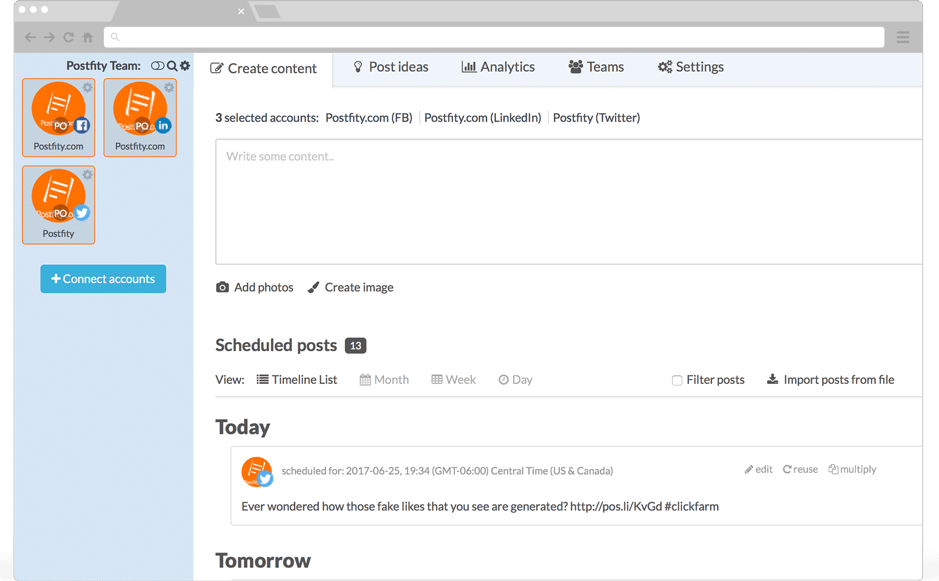 Postfity is, you’ve guessed it, a social media scheduling tool that works with multiple social networks, most notably, Twitter, Facebook, Instagram, LinkedIn, and Xing.
Primarily, it’s a social media scheduling tool. However, there’s much more than meets the eye and one of the coolest features it has is the ability to schedule your Facebook cover photos – something you don’t get with other major scheduling tools. But, more on that later.
First, let me show you what it can do in terms of social media scheduling…
Postfity is, you’ve guessed it, a social media scheduling tool that works with multiple social networks, most notably, Twitter, Facebook, Instagram, LinkedIn, and Xing.
Primarily, it’s a social media scheduling tool. However, there’s much more than meets the eye and one of the coolest features it has is the ability to schedule your Facebook cover photos – something you don’t get with other major scheduling tools. But, more on that later.
First, let me show you what it can do in terms of social media scheduling…
How to schedule your social media updates with Postfity
Getting started with Postfity is super easy. You can create an account for free and upgrade it later if you prefer; or, just keep using the free version as long as you want. Once you’ve connected your accounts, you can actually organise them into groups to make things easier and more organised. Depending on your plan, you can add dozens, even up to 200 social accounts to manage, so this feature comes in very handy: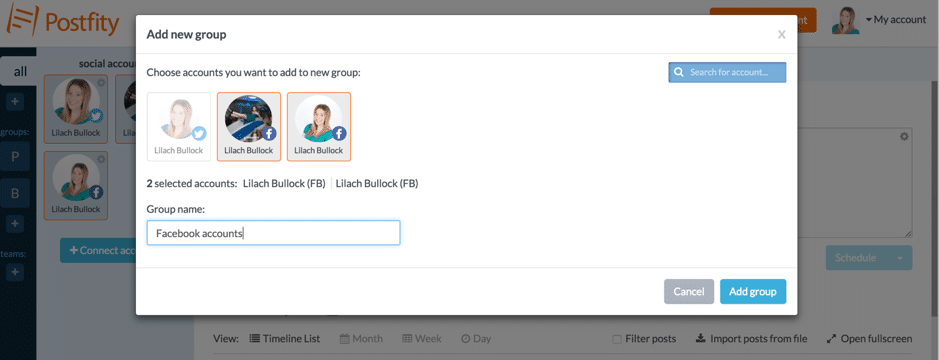 You can create several groups and easily access them from the left-hand side of your dashboard. Additionally, you can also add different team members to your account to help manage all of your social media.
To start scheduling, simply select all of the accounts you want (so you can schedule the same update at the same time across multiple social accounts and social networks) and start writing your update:
You can create several groups and easily access them from the left-hand side of your dashboard. Additionally, you can also add different team members to your account to help manage all of your social media.
To start scheduling, simply select all of the accounts you want (so you can schedule the same update at the same time across multiple social accounts and social networks) and start writing your update:
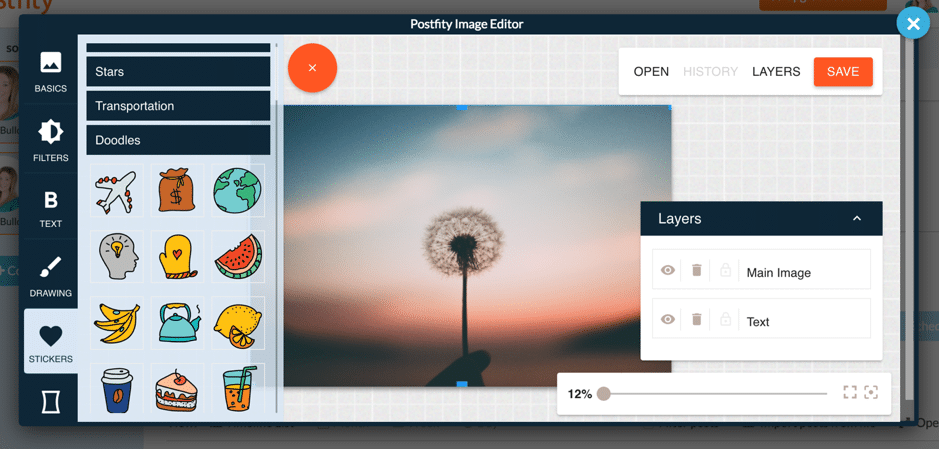
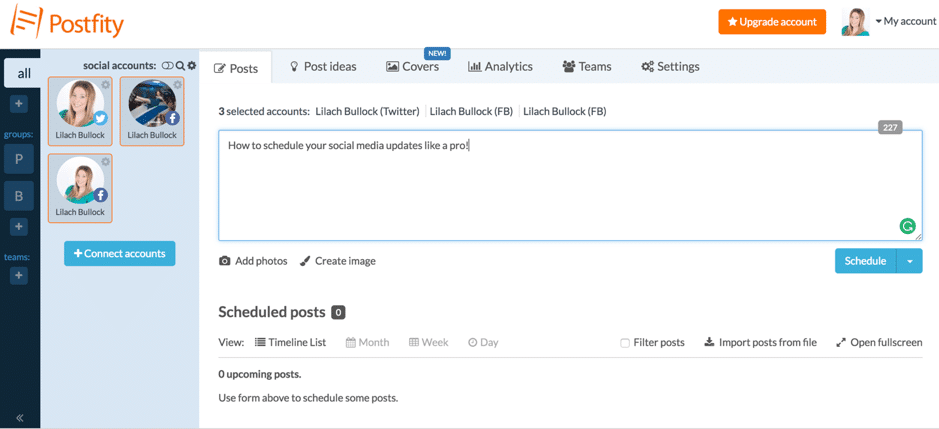 As you can see, you can also add images from your computer, but what’s even cooler is that you have access to a built-in photo editor that lets you edit and customize your images – or create something from scratch:
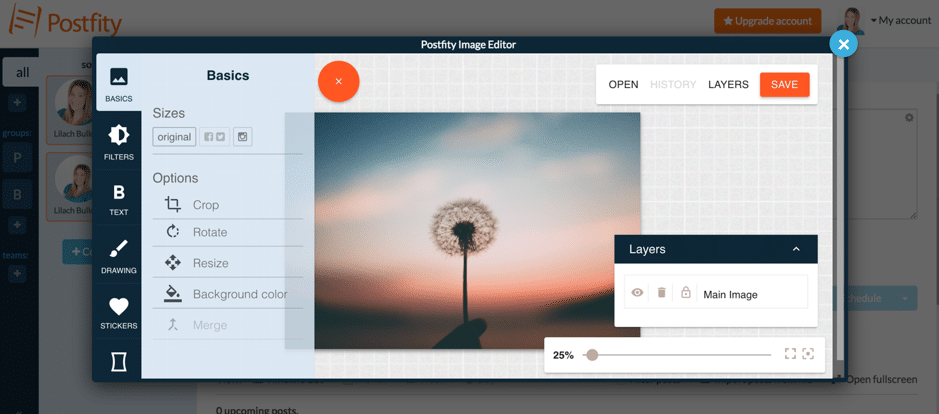 And you can do quite a bit with this editor; for example, you can automatically optimise the size of the image to fit your preferred social network (Twitter, Facebook, Instagram), as well as make simple edits like cropping or rotating your image and adding a background colour.
Plus, you can pick a different filter to completely change the look of your image, add some text (like a call to action, for example), as well as draw something yourself over it or use a sticker:
And you can do quite a bit with this editor; for example, you can automatically optimise the size of the image to fit your preferred social network (Twitter, Facebook, Instagram), as well as make simple edits like cropping or rotating your image and adding a background colour.
Plus, you can pick a different filter to completely change the look of your image, add some text (like a call to action, for example), as well as draw something yourself over it or use a sticker:
 As for watermarking your images, you can actually do that automatically in your accounts’ settings. Just upload your logo, decide where you want the watermark to be positioned in the image, and even set it for all of your accounts. This way, you don’t have to manually add your watermark to every single image you want to share or schedule.
Back to posting updates though, you have 3 options: share something right then and there, schedule the update for a later time, or you can queue your update to be published automatically by Postfity.
[clickToTweet tweet="How to schedule your #socialmedia posts and cover photos with @postfity #smm #tools" quote="How to schedule your #socialmedia posts and cover photos with @postfity #smm #tools"]
You don’t necessarily have to set any particular times for your queue as the tool can still publish them for you (and you’ll a list of all your upcoming updates in the main dashboard so you can remove or edit them); however, if you go to your setting, you can build your own posting schedule for the queue:
As for watermarking your images, you can actually do that automatically in your accounts’ settings. Just upload your logo, decide where you want the watermark to be positioned in the image, and even set it for all of your accounts. This way, you don’t have to manually add your watermark to every single image you want to share or schedule.
Back to posting updates though, you have 3 options: share something right then and there, schedule the update for a later time, or you can queue your update to be published automatically by Postfity.
[clickToTweet tweet="How to schedule your #socialmedia posts and cover photos with @postfity #smm #tools" quote="How to schedule your #socialmedia posts and cover photos with @postfity #smm #tools"]
You don’t necessarily have to set any particular times for your queue as the tool can still publish them for you (and you’ll a list of all your upcoming updates in the main dashboard so you can remove or edit them); however, if you go to your setting, you can build your own posting schedule for the queue:
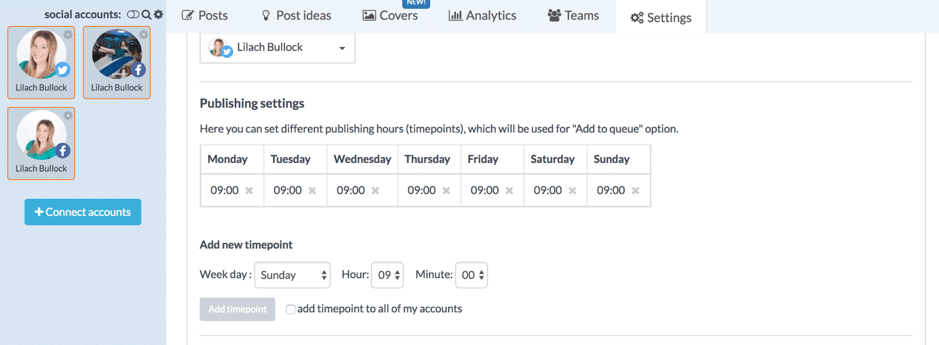 You can do this for all of your social media accounts individually, or add a time slot to all of your accounts at once to help you save time when setting everything up.
Once you’re done scheduling or queuing your updates, you can check your upcoming posts on the main dashboard, either as a list, or as a calendar by day, week, or month.
As you browse through your list of scheduled updated, you can take certain actions; for example, you can reuse posts or even ‘multiply’ them:
You can do this for all of your social media accounts individually, or add a time slot to all of your accounts at once to help you save time when setting everything up.
Once you’re done scheduling or queuing your updates, you can check your upcoming posts on the main dashboard, either as a list, or as a calendar by day, week, or month.
As you browse through your list of scheduled updated, you can take certain actions; for example, you can reuse posts or even ‘multiply’ them:
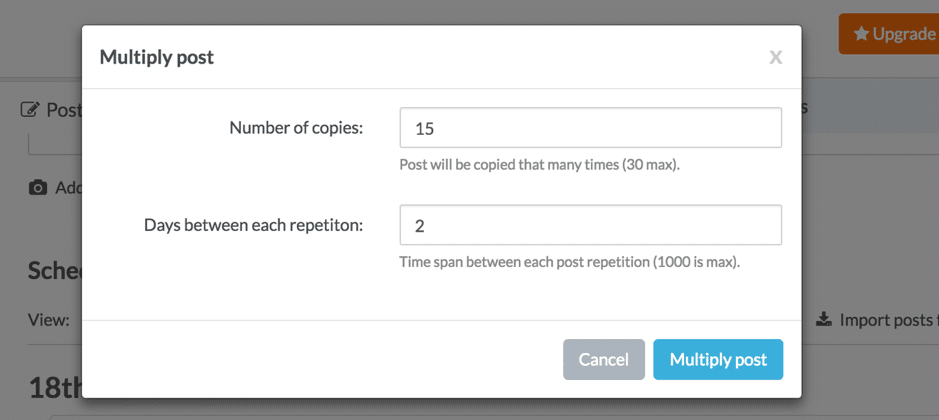 The post will then be republished the amount of times you’ve specified, and as you can see, you can also determine the posting frequency so you don’t post the same update too many times in a row or too often.
Find quality content to share
Apart from posting and scheduling your own content, Postfity also allows you to search for quality content to share with your audience: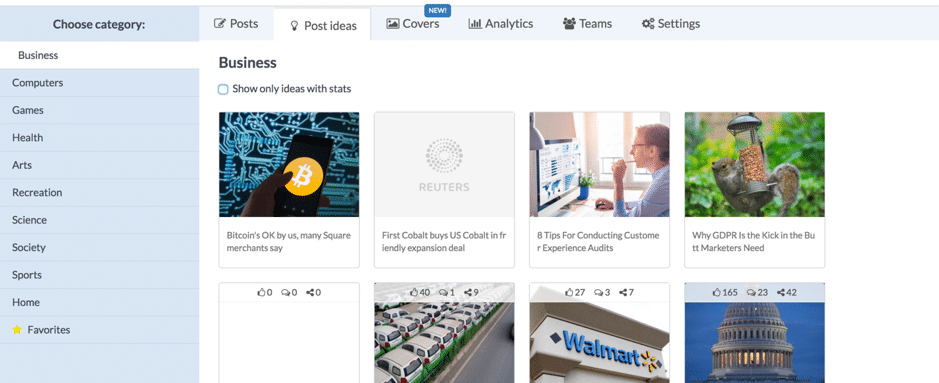 As you can see, you can browse through different categories like Business, Science, Games, and Arts to find content to share. Each post also mentions how many shares, likes, and comments it has so you can tell at a glance how popular it is – and therefore, also engaging.
When sharing one of these posts, you can customize the update with your own thoughts as well as add your own images (and edit them as I showed you earlier) and schedule or queue it for later.
Plus, you can easily mark posts as favourites to see them all in the same tab and post them or schedule them at a later time.
As you can see, you can browse through different categories like Business, Science, Games, and Arts to find content to share. Each post also mentions how many shares, likes, and comments it has so you can tell at a glance how popular it is – and therefore, also engaging.
When sharing one of these posts, you can customize the update with your own thoughts as well as add your own images (and edit them as I showed you earlier) and schedule or queue it for later.
Plus, you can easily mark posts as favourites to see them all in the same tab and post them or schedule them at a later time.
Can you schedule a Facebook cover photo change? Yes, here's how
One of Postfity’s really cool features is that you can actually schedule your Facebook Page’s cover photos: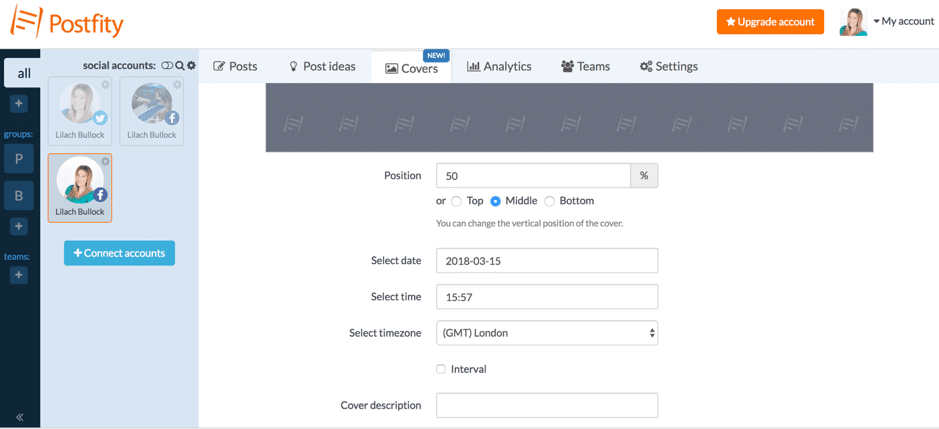 Plus, you can schedule the same cover to be posted multiple times.
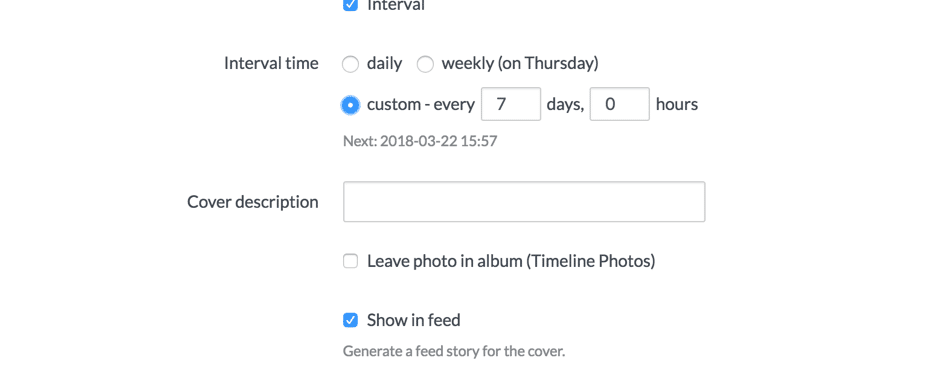 This is a very handy feature for businesses; for example, say you had an offer coming up in a few weeks that you want to advertise across your social networks or a regular event that happens every few weeks or months. With this feature, you can create all of your cover photos ahead of time and schedule them for the exact date you want them live.
Social media analytics
Apart from scheduling and content curation, Postfity also offers social media analytics: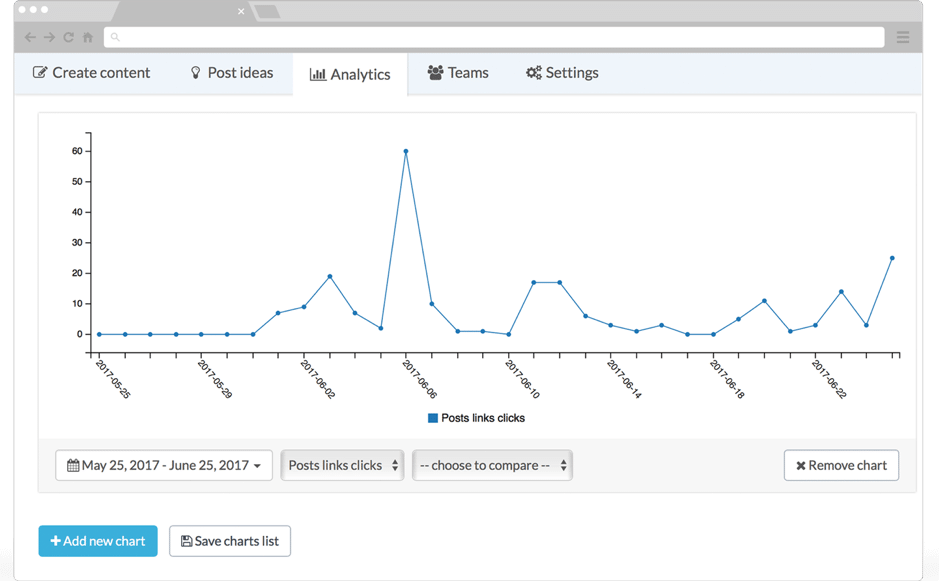 Simply select what analytics you want to see (posts published, post likes, shares, comments, or link clicks) as well as the time frame preferred to see your social media results from that time:
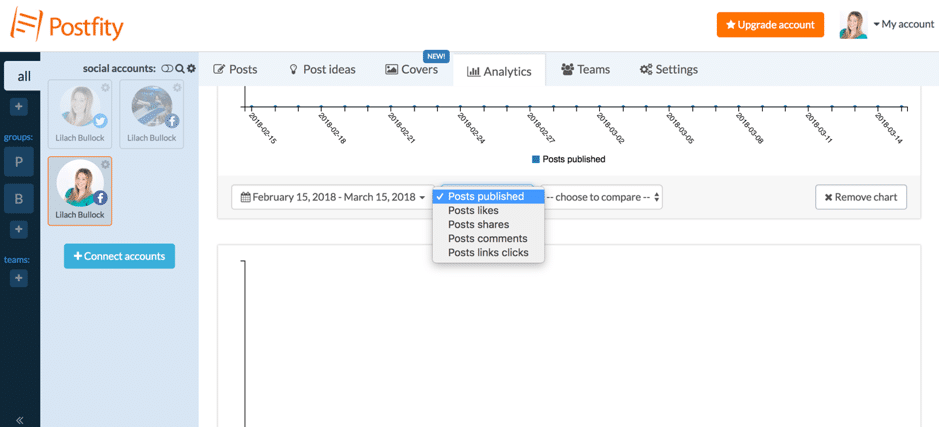 Plus, you can also compare results within the chart, so you can see, for example, both how many likes you got and how many comments, shares, or total link clicks.
Also in your analytics, are archives all of your published posts and covers so that you can take any action you want (like reposting them or multiplying them, for example).
[clickToTweet tweet="How to schedule your #socialmedia posts and cover photos with @postfity #smm #tools" quote="How to schedule your #socialmedia posts and cover photos with @postfity #smm #tools"]
Plus, you can also compare results within the chart, so you can see, for example, both how many likes you got and how many comments, shares, or total link clicks.
Also in your analytics, are archives all of your published posts and covers so that you can take any action you want (like reposting them or multiplying them, for example).
[clickToTweet tweet="How to schedule your #socialmedia posts and cover photos with @postfity #smm #tools" quote="How to schedule your #socialmedia posts and cover photos with @postfity #smm #tools"]
Other useful features and tools
It’s also worth mentioning that there are a couple more useful apps and tools that you can get to save time while managing your social media:- A Chrome browser extension to easily post or schedule anything you’d like from any web page (and you can still upload your own images and edit them to customize)
- A smartphone app for both android users and iOS users for managing your social media marketing on the go
Best time to change your profile picture on Facebook
The best time to change your profile picture on Facebook is the same as the best time to post: when the largest share of your friends or followers are online, which for most accounts is early evening on a weekday, between about 6 and 9pm in your own time zone, or late Sunday morning. A profile picture change is treated as a post and shown in feeds, so a change made at 3am gets a fraction of the likes and comments of one made at 7pm. If you run a business page, check the Audience tab in Insights for the hour your followers peak and change it just before that.
Conclusion: How to schedule your social media posts and cover photos
I love being (pleasantly) surprised and Postfity has definitely managed to do that. Not only is it easy to use and with a great interface but it has some really cool scheduling features – especially the fact that you can schedule Facebook cover photos, which isn’t exactly a common feature among similar scheduling tools (but very useful for business Pages, especially when it comes to e-commerce). Have you ever tried Postfity? Leave any comments below and please share if you liked the post JSocial media scheduling FAQ
What is the best social media scheduler in 2026?
The market leaders in 2026 are Buffer, Hootsuite, Publer, Metricool, and Later, with newer entrants like Postiz gaining traction. The best choice depends on platform coverage, team size, and budget. Most have free tiers worth trying first.
Can you schedule Instagram cover photos in advance?
Instagram does not officially support scheduling profile picture or cover changes through third-party tools. Most schedulers can schedule feed posts, Stories, and Reels in advance, plus calendar reminders for manual cover updates.
How far in advance should you schedule posts?
Two weeks ahead works well for most accounts. It leaves room for current-events posts while still giving the consistency benefits of batched content production.
Want to go deeper? Read these next:
- What Works in Digital Marketing Today Beyond Theories
- How to Use Reddit for Lead Generation in 2026 (The Step-by-Step Guide Nobody Has Written Yet)
- 25 LinkedIn Algorithm Hacks That Work in 2026 (Not the Stuff Everyone Else Is Flogging)
What's changed by 2026: AI in social media scheduling
I originally wrote this guide in 2018. The fundamentals are still solid, but the tooling landscape has shifted substantially. Here's what's worth knowing for 2026.
Want AI doing the heavy lifting in your marketing?
I build the systems that handle the boring 80 percent, so you get your week back. Done properly, with the human kept in.
AI now writes much of the scheduling-adjacent work, but should not write the posts
Most scheduling tools in 2026 ship with built-in AI features that promise to write your posts for you. The output is plausible but generic. The reach pattern is the same: a brief boost in posting volume, followed by an erosion of engagement as your audience starts to recognise the AI tone. I now use AI for the surrounding work (caption variations to choose from, hashtag research, optimal-time suggestions, repurposing one piece across formats) but I write the actual posts myself.
Scheduling cadence has come down, not up
Back in 2018 the consensus was post more often. In 2026 the algorithms favour engagement quality over posting frequency. I post less than I did six years ago and my reach is stronger. The right cadence depends on platform, but as a rule: half what you think.
Cover photos matter less, profile clarity matters more
Cover photos were a primary brand-first-impression piece when this guide was written. In 2026 most platform engagement happens in feed or in DMs, with cover photos seen by a fraction of profile visitors. The work I'd done on cover photo design now goes into profile bio clarity and the first three pieces of pinned content. Cover photos still matter, but the priority order has shifted.
The schedule-then-disappear model doesn't work anymore
In 2018 you could schedule a week of posts and walk away. In 2026 platforms heavily down-rank accounts that don't engage with replies and comments within hours of posting. Scheduling is still useful, but you have to be available to engage post-publish or the reach collapses. This changes the workflow: I schedule the post, then block 30 minutes in my calendar at the time it goes live to engage with replies.
Tools I use in 2026
Honest list of what's in my current stack:
- LinkedIn native: I post manually, not via scheduler. The native algorithm rewards posts written in-app.
- Kit (formerly ConvertKit): for the newsletter, which is the primary content channel; everything else amplifies it.
- Claude: for the surrounding AI work I described above (caption variations, hashtag research, repurposing).
- My phone for voice notes: the original content thinking still starts here, transcribed with Whisper, written from there.
Notable absences from my 2026 stack that were prominent in 2018: dedicated cross-platform schedulers, automated re-sharing of evergreen content, AI-generated post writers, voice-cloning tools for audio content. Each of those I tried, kept for 4-12 weeks, and removed because the audience signal dropped.
The 2026 rule
Schedule the operational work (the when and the where). Write the substance yourself (the what and the how). AI handles the surrounding tasks. The thinking and the voice stay with you.
Want more on this topic?
Related: how to make money on Instagram with 1k followers
Related reading: Personal Branding for Founders Who Feel Like Imposters.
Related reading: How to Build an Aesthetic Instagram Stories Background (Without Losing a.
Related reading: What Are Instagram Reels Officially Called (and Why It Matters for Your .
For the full guide on this topic, see schedule facebook photo album.



