


Updated for 2026: professional social media analytics earn their cost for one reason, benchmarking. Your own numbers tell you what changed on your account. Only a comparison against competitors and against the platform average tells you whether the change was something you did or something that happened to everyone that month. If a tool cannot show you that comparison, the free analytics built into each app will do the job for nothing. See the best tools for managing social media for what covers scheduling alongside it.
Social media analytics are an extremely important part of any successful social media marketing strategy. This is what helps you figure out what works and what doesn’t, so that you can optimise your performance and get better results. Recently, I’ve discovered and tried out social media analytics tool, quintly – and I’m loving it. Here’s why you need professional social media analytics for your business.What is quintly?
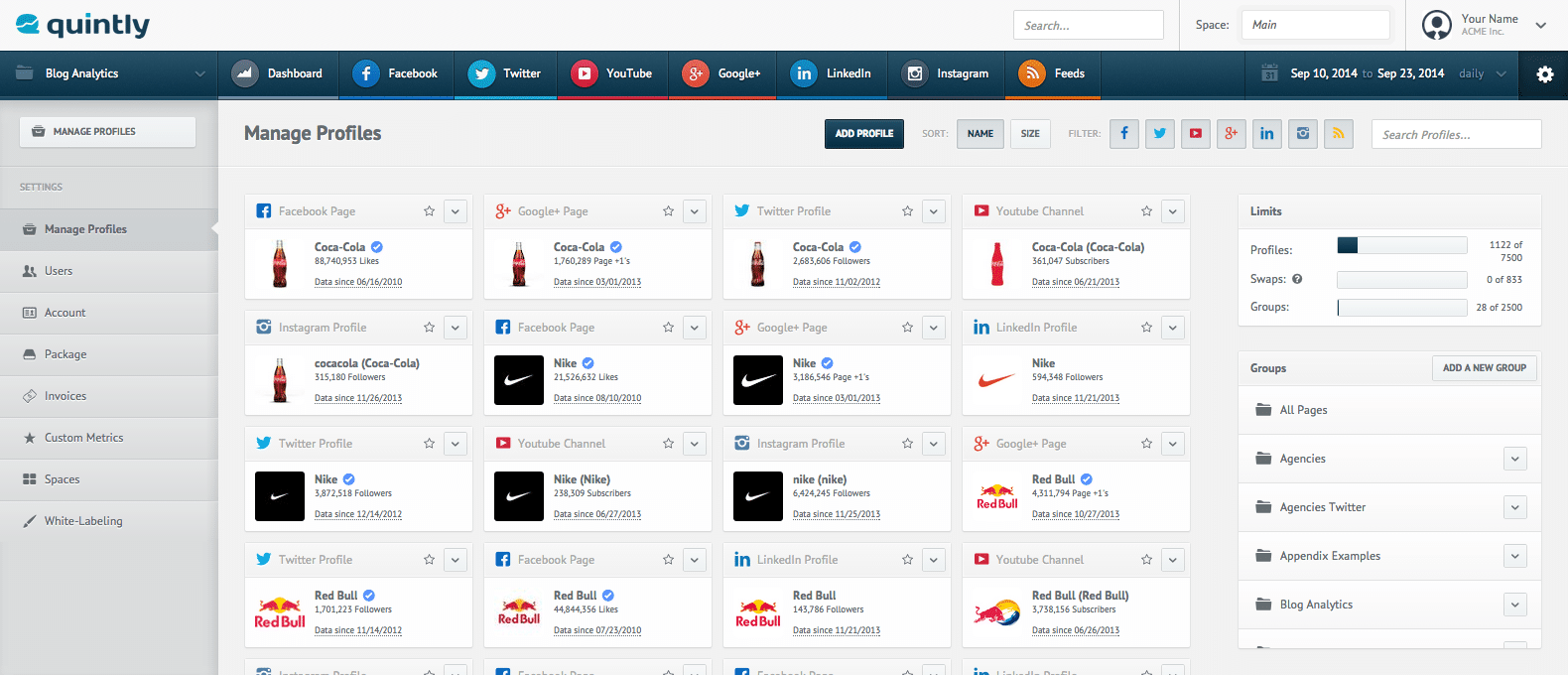 quintly is a professional social media analytics tool to help you track, benchmark and optimise your social media performance.
It works with 8 different social platforms, namely Twitter, Facebook, Instagram, LinkedIn, Pinterest, Google+, YouTube and blogs.
You can use it to:
quintly is a professional social media analytics tool to help you track, benchmark and optimise your social media performance.
It works with 8 different social platforms, namely Twitter, Facebook, Instagram, LinkedIn, Pinterest, Google+, YouTube and blogs.
You can use it to:
- Track all of your social media data and analytics
- Create instant competitive benchmarks
- Create detailed reports for your social media activity
- Uncover relevant key social influencers and brand ambassadors
- Monitor for customer service issues
- Get the most important social media KPIs
Why do you need professional social media analytics?
If you’ve been following my blog, then you’re most likely aware of my view on analytics and that is, put simply, that they are an essential part to achieving success. Just like with any other marketing expense, you are putting a lot of resources, time, effort and money into getting results from social media marketing. The only way to track these results is by carefully checking your analytics. The main benefits of tracking your social media analytics are:- Discover what isn’t working so that you can make changes to your social media strategy as soon as possible
- Find out how you’re stacking up against your competitors on social media
- Find out what your best performing content is so that you can post better updates in the future
- Find out whether your social media efforts are paying off
- Get more traffic to your blog or website
- Improve your brand awareness and your reach
- Make more conversions from social media
- Improve your lead generation
- Increase engagement with your target audience
- Manage and improve your customer service
I've listed tools to measure social media success that suit most businesses.
How to start analysing your social media performance with quintly
Now, I want to show you how you can get started with quintly, step by step – I’ve only recently started out using it myself, so it’s all still very fresh in my mind. As I mentioned earlier, quintly works with 8 different social media channels. To get started, go to settings and click on add profile: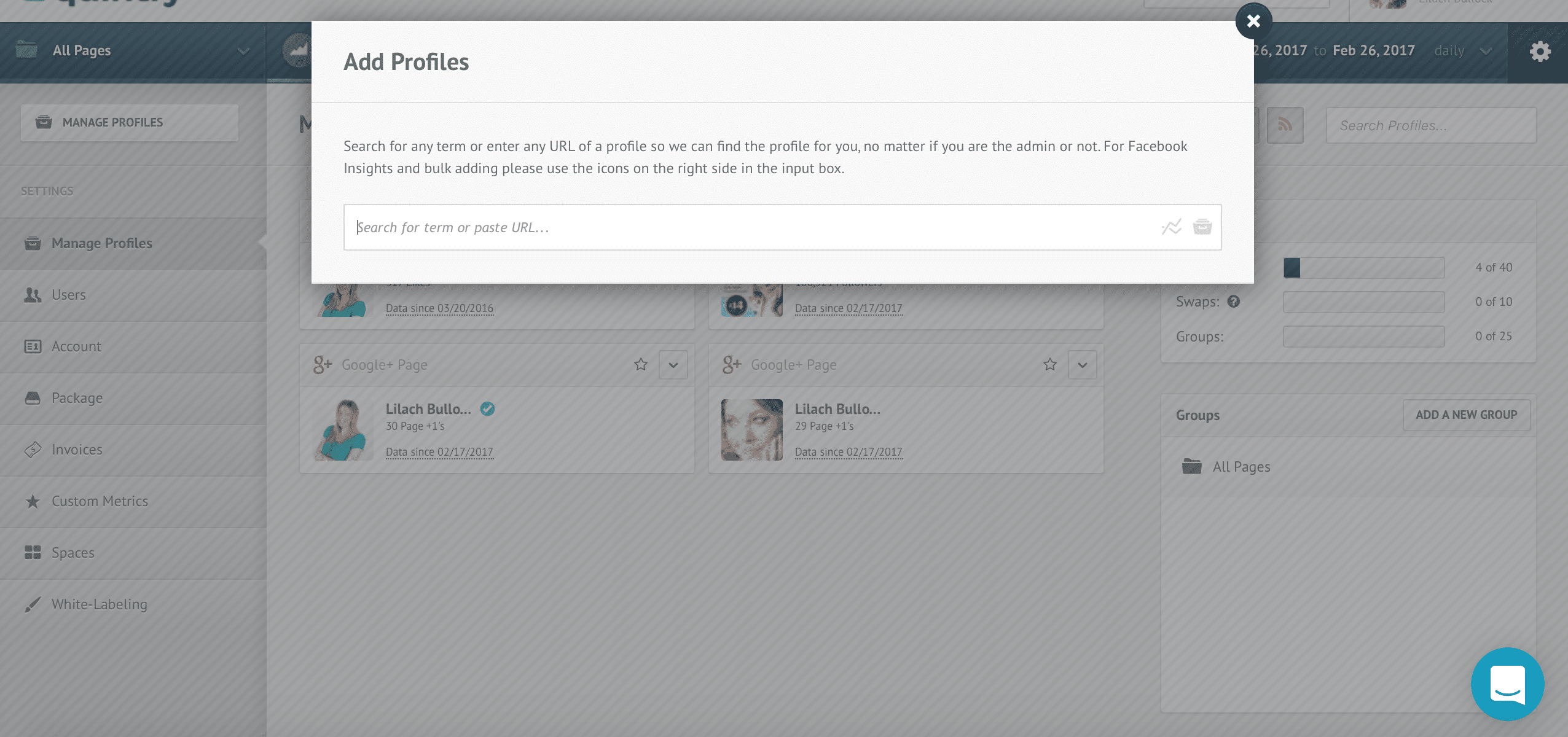 For some profiles, you will need to authenticate with your account, but in most cases, you can simply enter the link to any profile, whether you are the admin for it or not.
Depending on the plan you select, you can add from 5 profiles to 40 – or, if you go for the customized plan, you can discuss adding even more.
After adding your different profiles to your account, you also have the option to add different users that will have access to your analytics. Simply go to the users tab in your settings and click on ‘add a new user’:
For some profiles, you will need to authenticate with your account, but in most cases, you can simply enter the link to any profile, whether you are the admin for it or not.
Depending on the plan you select, you can add from 5 profiles to 40 – or, if you go for the customized plan, you can discuss adding even more.
After adding your different profiles to your account, you also have the option to add different users that will have access to your analytics. Simply go to the users tab in your settings and click on ‘add a new user’:
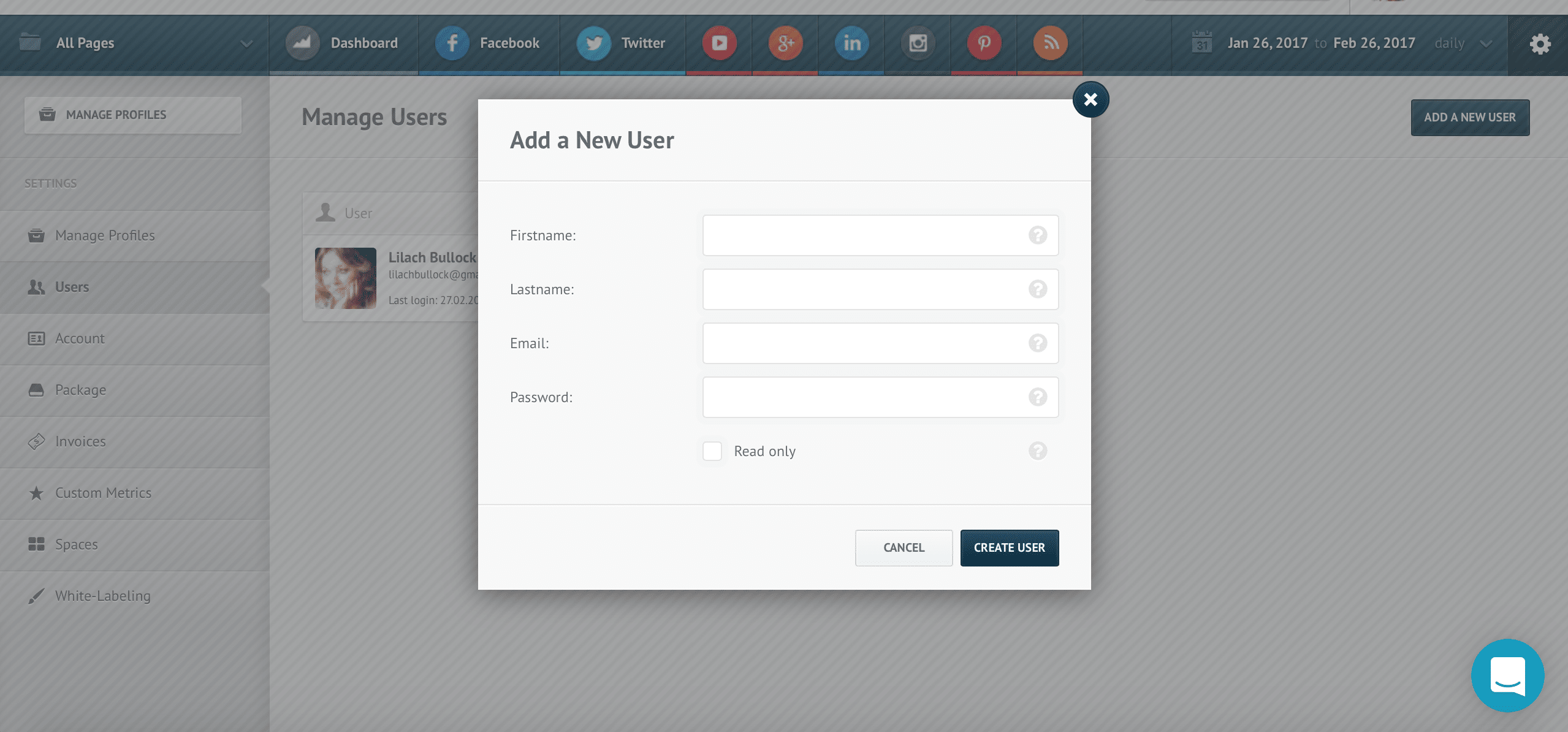 As you can see, you can also decide who gets to take action and who doesn’t, by selecting ‘read only’ for those who you want to only view your analytics dashboard.
After you’ve set up all of the admin aspects, it’s time to create the main dashboard. One of the unique aspects about this particular tool, is that the way you design your dashboard is completely up to you.
The reason for this, is that everyone has different needs and priorities – depending on what social networks you use and what your goals are from social media marketing, your needs will shift. Fortunately, though, it’s very easy to set up a dashboard on quintly, but you’ll probably have to spend some time browsing through all the different widgets, stats and options.
There are also no pre-set templates for your dashboards, so in order to start creating one, you need to click on “add a widget”:
As you can see, you can also decide who gets to take action and who doesn’t, by selecting ‘read only’ for those who you want to only view your analytics dashboard.
After you’ve set up all of the admin aspects, it’s time to create the main dashboard. One of the unique aspects about this particular tool, is that the way you design your dashboard is completely up to you.
The reason for this, is that everyone has different needs and priorities – depending on what social networks you use and what your goals are from social media marketing, your needs will shift. Fortunately, though, it’s very easy to set up a dashboard on quintly, but you’ll probably have to spend some time browsing through all the different widgets, stats and options.
There are also no pre-set templates for your dashboards, so in order to start creating one, you need to click on “add a widget”:
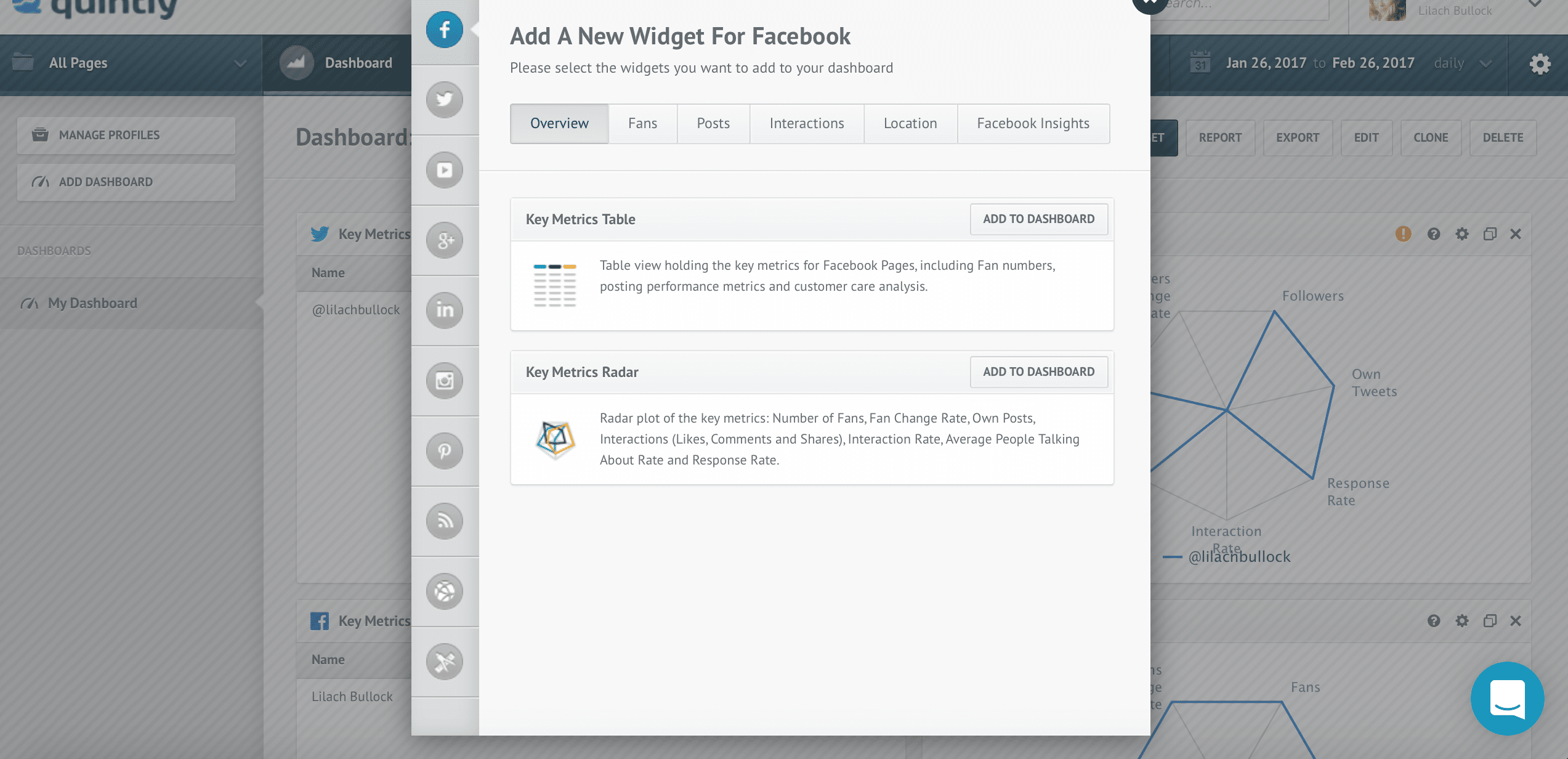 On the left-hand side, you have a column with all of the different social networks it supports. To start adding different widgets, click on the network you want to set up to browse through the different options.
At the top, as you can see, there is a row with different categories, such as profile overview, fans or followers analytics, insights about your posts and so on.
Browse through all of them to find the analytics you’re most interested in and to add them to your dashboard.
[clickToTweet tweet="How to get started with @quintly via @lilachbullock #socialmedia #analytics" quote="How to get started with @quintly via @lilachbullock #socialmedia #analytics"]
You also have the option to create multiple dashboards. Ideally, you should create one with your main social media stats, the ones you need to check most often, then one dashboard for each of your main profiles.
It’s completely up to you, though, which is one of the pluses of using this tool.
Rounding back to the widgets you can add to your dashboards, there are very detailed options for each social network, such as:
On the left-hand side, you have a column with all of the different social networks it supports. To start adding different widgets, click on the network you want to set up to browse through the different options.
At the top, as you can see, there is a row with different categories, such as profile overview, fans or followers analytics, insights about your posts and so on.
Browse through all of them to find the analytics you’re most interested in and to add them to your dashboard.
[clickToTweet tweet="How to get started with @quintly via @lilachbullock #socialmedia #analytics" quote="How to get started with @quintly via @lilachbullock #socialmedia #analytics"]
You also have the option to create multiple dashboards. Ideally, you should create one with your main social media stats, the ones you need to check most often, then one dashboard for each of your main profiles.
It’s completely up to you, though, which is one of the pluses of using this tool.
Rounding back to the widgets you can add to your dashboards, there are very detailed options for each social network, such as:
- Key metrics: the most important metrics for your accounts
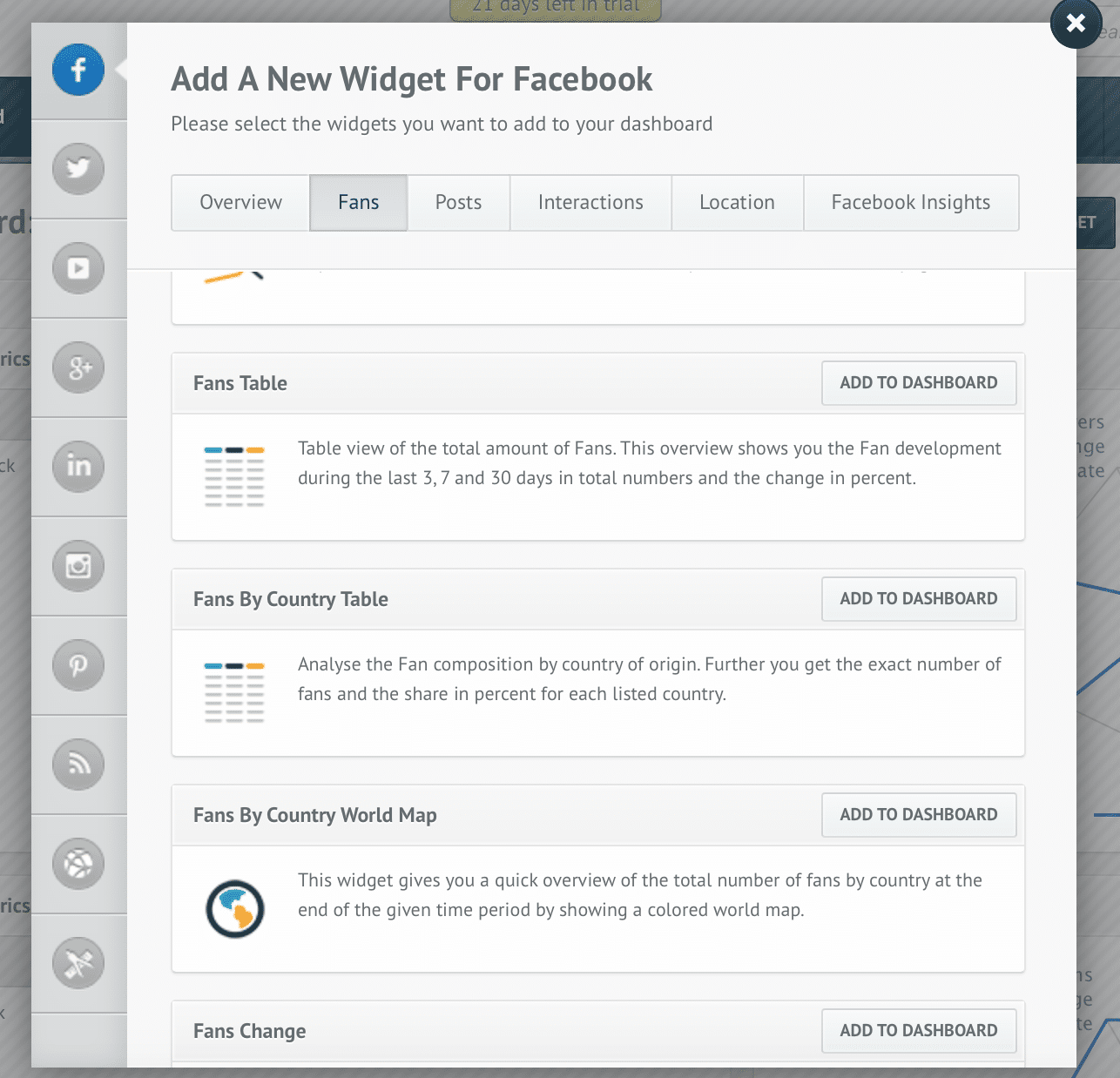
- Fans and followers: everything from an overview of your total number of fans and followers, to follower and following changes and to fans’ locations and their distribution
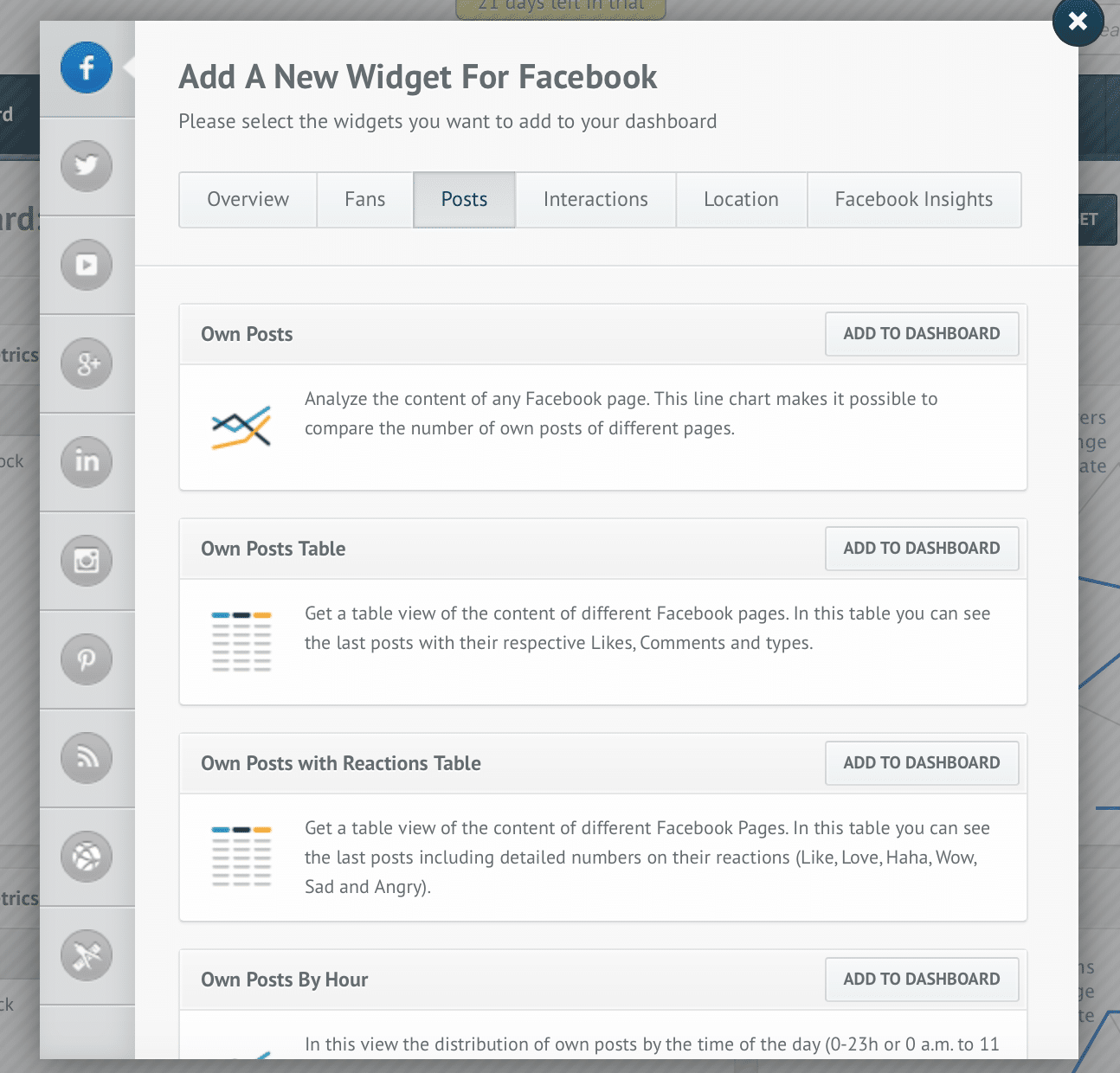
- Posts/tweets/videos etc: everything you need to know about your posts, by weekday and even hour, engagement and more
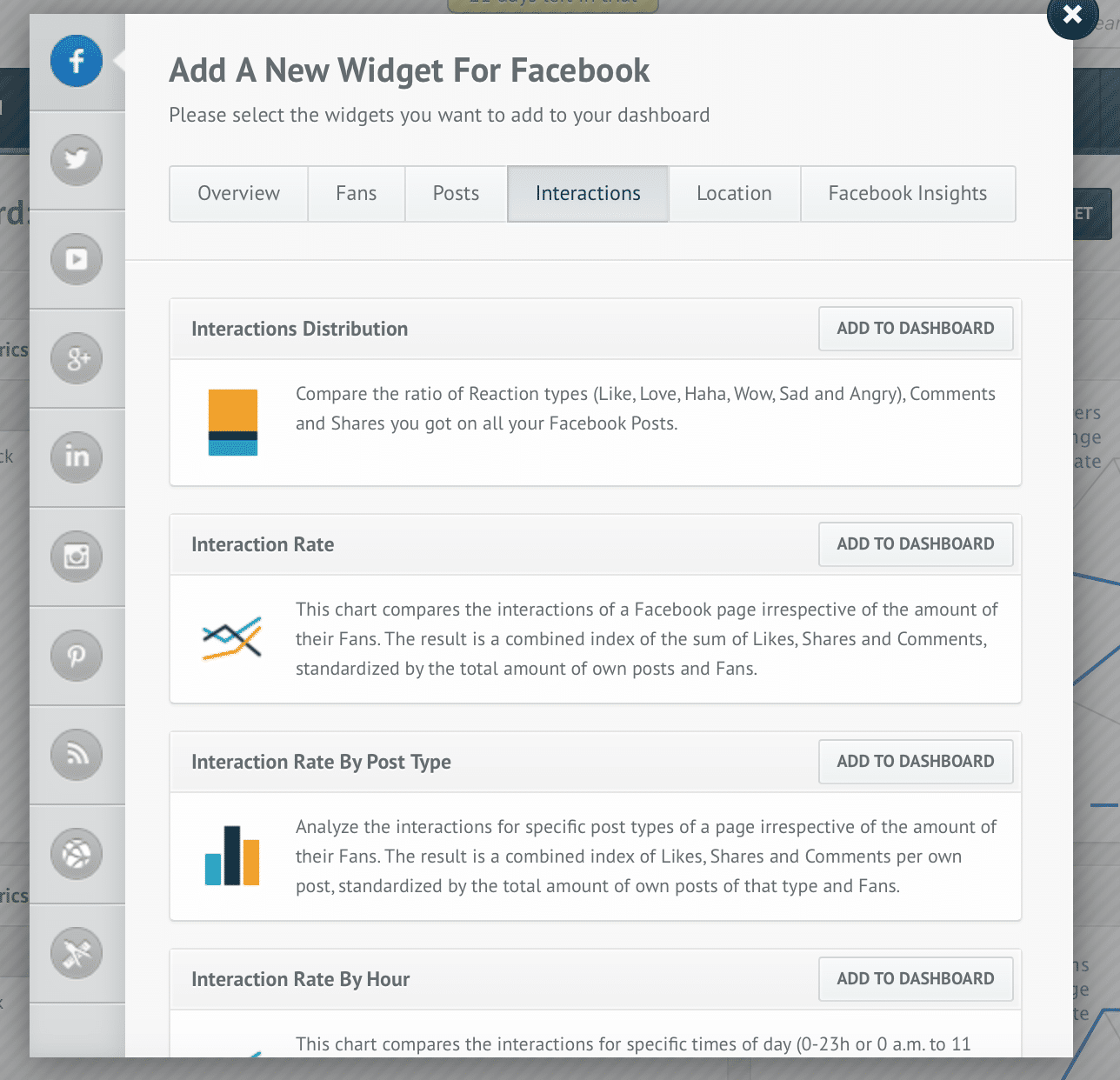
- Interactions: interaction rates, engagement stats, interaction breakdown by hour or day, interaction comparisons and much more. The interaction rate can be adjusted as you want – and, if you’re not sure how to do that, you can get assistance for that for free from quintly
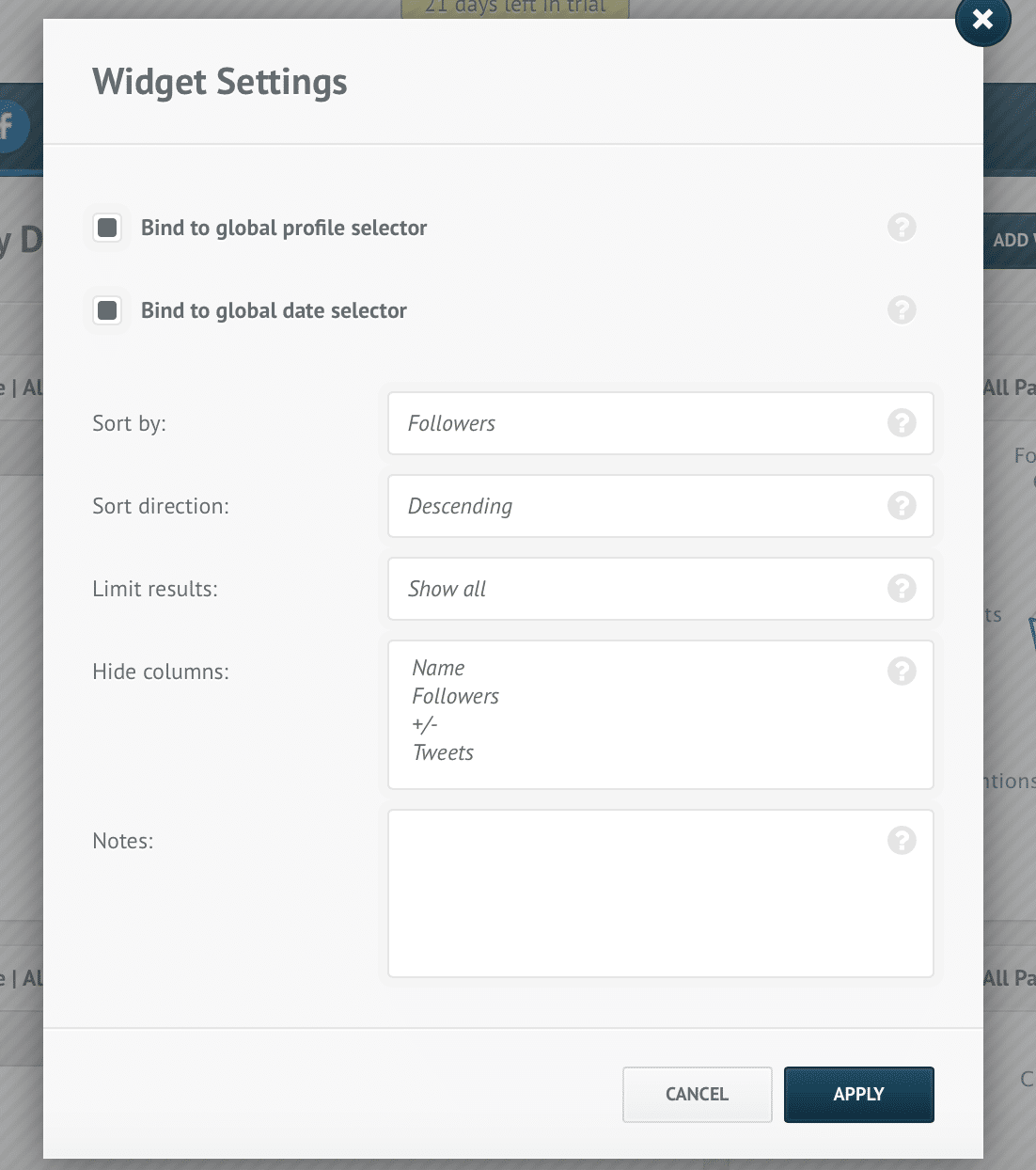 Depending on the widget, there will be different customization that you can make.
Once you’ve set up your different widgets, you can also select the time period you prefer for the mentions. At the top of your dashboard, click on the dates to change them:
Depending on the widget, there will be different customization that you can make.
Once you’ve set up your different widgets, you can also select the time period you prefer for the mentions. At the top of your dashboard, click on the dates to change them:
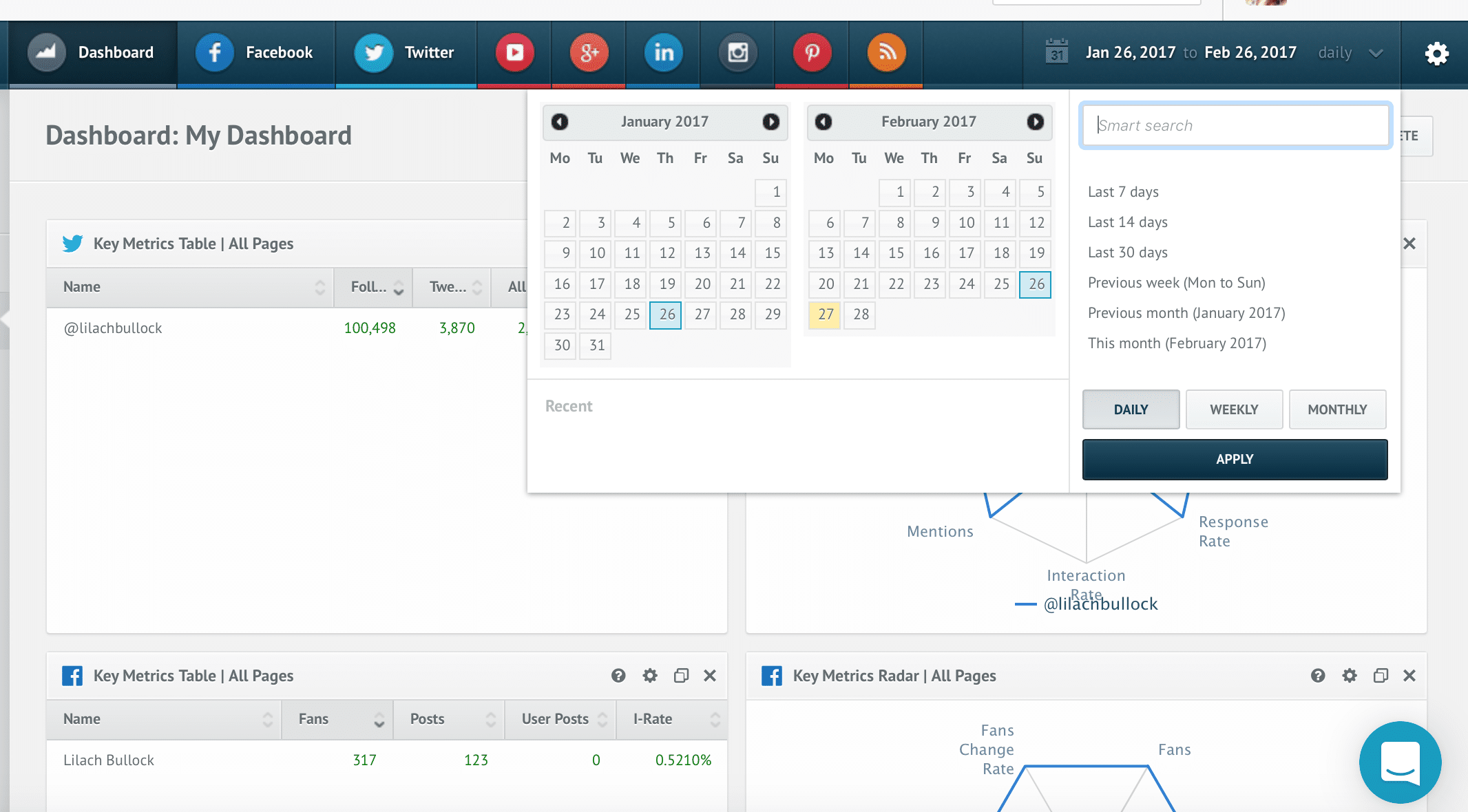 With some social networks, you won’t be able to get accurate historical data due to network restrictions – however, this happens with any social media analytics tool, as they are all affected by the same restrictions. But, once you’ve connected your different account, the data you receive is completely accurate.
You can also use quintly to create competitive benchmarking. One of the options is to compare your business to the industry standard. Go to your settings, add profile and then click on add benchmark:
With some social networks, you won’t be able to get accurate historical data due to network restrictions – however, this happens with any social media analytics tool, as they are all affected by the same restrictions. But, once you’ve connected your different account, the data you receive is completely accurate.
You can also use quintly to create competitive benchmarking. One of the options is to compare your business to the industry standard. Go to your settings, add profile and then click on add benchmark:
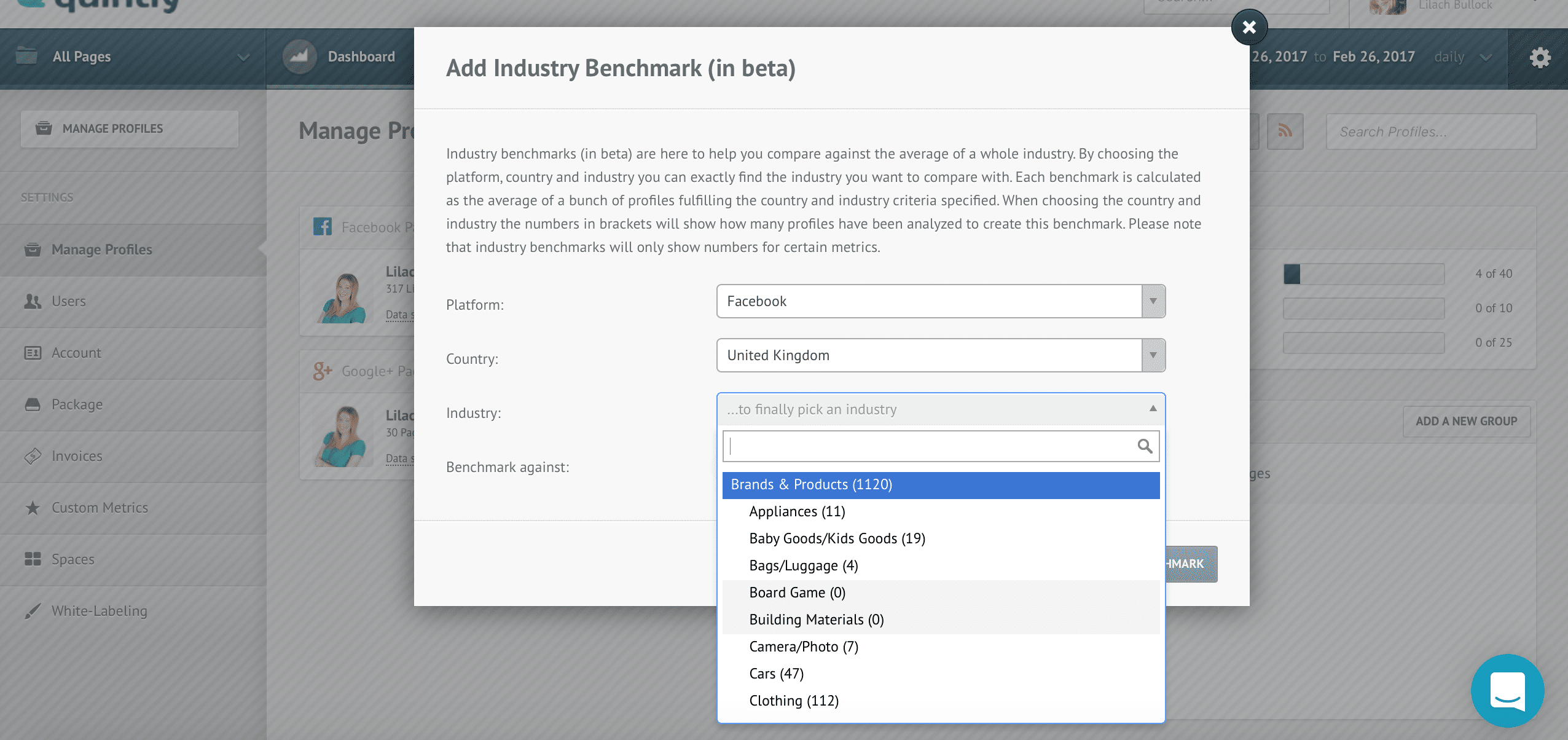 Afterwards, select the platform you want to compare, choose a country and then an industry to see how you’re stacking up against it.
Reporting
To set up your social media analytics reports, go to your dashboard, click on reports, and then setup: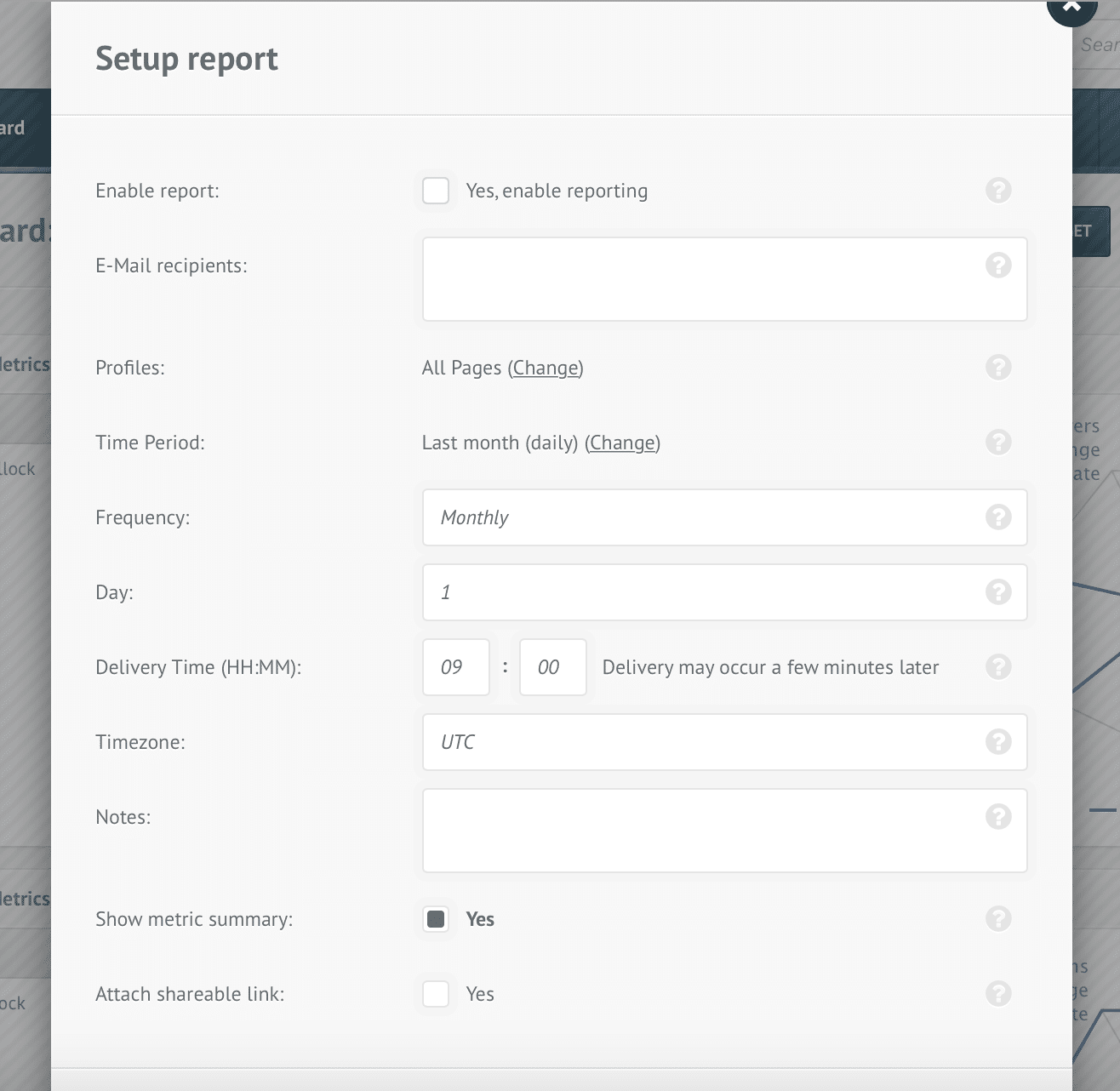 As you can see above, there are different options here: you can select different emails that you want to send the report to, what profiles should be included, what time period it should cover and how frequently it should be sent out.
One of my favourite things here is that you can also create a shareable link. The way it works is, you create a link, give it to anyone you want, and these people will be able to go through your dashboard and your analytics, but they won’t have the ability to take any action or make any changes to your dashboard or metrics.
[clickToTweet tweet="How to use @quintly to analyse your #socialmedia performance via @lilachbullock" quote="How to use @quintly to analyse your #socialmedia performance via @lilachbullock"]
You also have the option to export your data in different formats – as a JPG or PNG, as a PDF file, a CSV and many others. Here is where you can also create the shareable link, if you want it without having to wait for the regular report.
The reporting is very in-depth, which makes it perfect for agencies or brands who need to present their results from social media marketing.
As you can see above, there are different options here: you can select different emails that you want to send the report to, what profiles should be included, what time period it should cover and how frequently it should be sent out.
One of my favourite things here is that you can also create a shareable link. The way it works is, you create a link, give it to anyone you want, and these people will be able to go through your dashboard and your analytics, but they won’t have the ability to take any action or make any changes to your dashboard or metrics.
[clickToTweet tweet="How to use @quintly to analyse your #socialmedia performance via @lilachbullock" quote="How to use @quintly to analyse your #socialmedia performance via @lilachbullock"]
You also have the option to export your data in different formats – as a JPG or PNG, as a PDF file, a CSV and many others. Here is where you can also create the shareable link, if you want it without having to wait for the regular report.
The reporting is very in-depth, which makes it perfect for agencies or brands who need to present their results from social media marketing.
Pricing
In terms of pricing, there are different plans depending on your needs and your budget: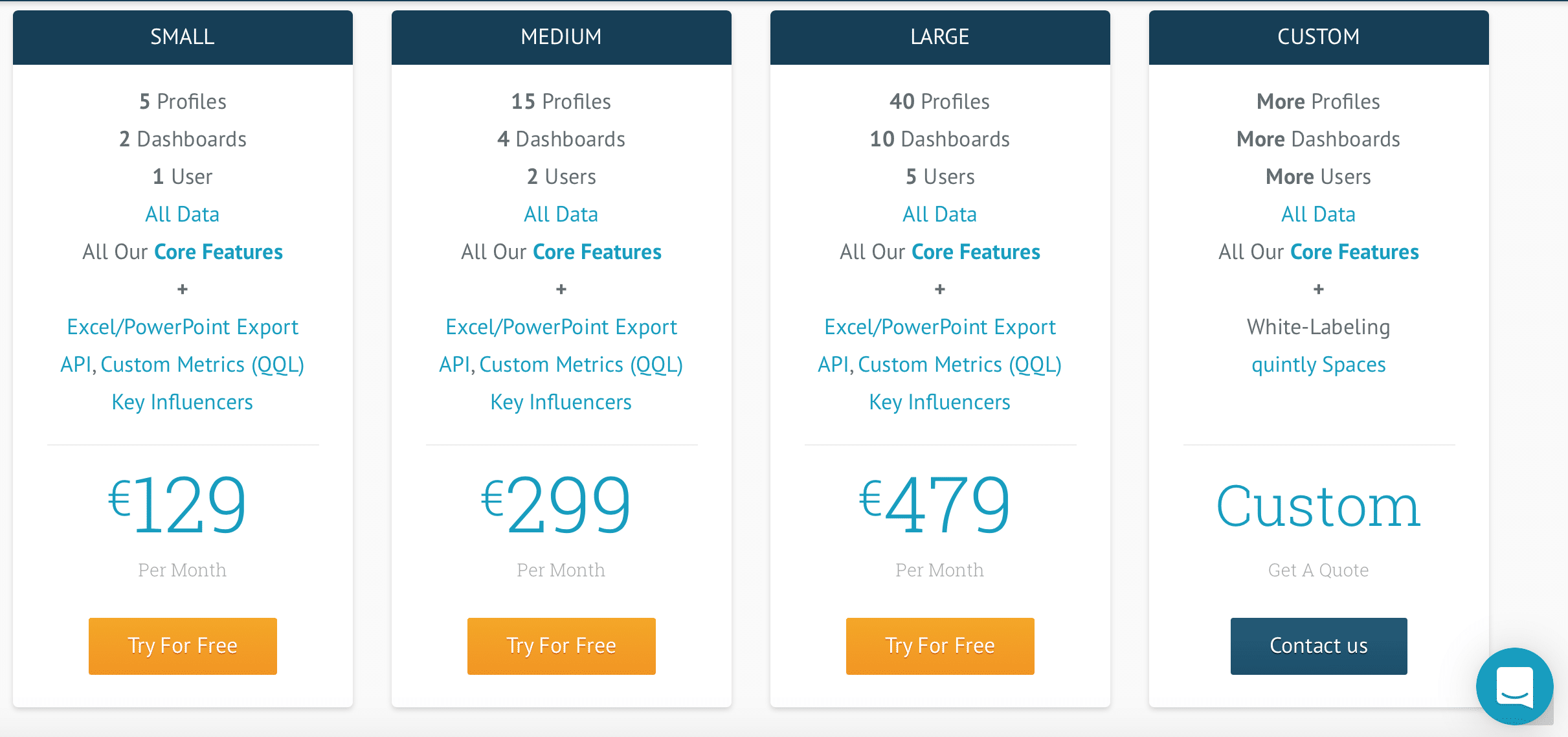 Starting at €129 per month, where you get all the core quintly features, plus 2 dashboards, 5 different profiles and 2 users and ending at €479 per month for 40 profiles, 10 dashboards and 5 users. If you need more, though, you can also discuss getting a custom plan where you basically get more than everything.
The best part, though, is that you can try if for free for 14 days and you don’t need to leave your credit card details to get started.
Plus, they also have a free plan, that lets you add 3 different profiles, 1 dashboard, 1 user and you get a 30-day data period and all the core features. However, it only works with Facebook – so, if you have a Facebook account, I would definitely recommend you try them out to gain more insight into your Facebook activity and success.
Starting at €129 per month, where you get all the core quintly features, plus 2 dashboards, 5 different profiles and 2 users and ending at €479 per month for 40 profiles, 10 dashboards and 5 users. If you need more, though, you can also discuss getting a custom plan where you basically get more than everything.
The best part, though, is that you can try if for free for 14 days and you don’t need to leave your credit card details to get started.
Plus, they also have a free plan, that lets you add 3 different profiles, 1 dashboard, 1 user and you get a 30-day data period and all the core features. However, it only works with Facebook – so, if you have a Facebook account, I would definitely recommend you try them out to gain more insight into your Facebook activity and success.
Conclusion
quintly is one of the top professional social media analytics tools – with customized dashboards, in-depth analytics for all major social networks, extensive reporting features, you get everything you need to gain a better understanding of all your social media activity in one place. Their interface is clear and clean, easy to use and just as easy to set up – the only part where you might encounter some difficulty is with customizing your interaction rate, but you can get help to sort that out for free. The fact that you have so many customization options is a huge plus in my point of view. Depending on your business size, your industry, the social networks you use and so on, your needs will be different to others, so extensive customization features are very useful. The only issue is with the accuracy of the historical data you receive – but, as I pointed out earlier as well, this would be a problem with any other social media analytics tool you use. And, once you’ve set up your accounts, there shouldn’t be any errors or missing data from your analytics. Have you tried quintly yet? What features do you like about it and what do you think is missing? What other social media analytics tools are you using? Let me know in your comments and please share:)Related: how to make money on Instagram with 1k followers
The short version: Professional social media analytics give you the hard numbers behind what is working and what is wasting your budget. Without that data, you are making expensive guesses instead of informed decisions that grow your business.
Guest contributors with real data and analytics results are welcome: submit a data and analytics guest post.
Frequently asked questions
What is the difference between free and professional social media analytics?
Free tools give you surface-level metrics like likes and follower counts, while professional analytics platforms track conversion rates, audience behavior, revenue attribution, and competitor benchmarks so you can act on data that matters to your bottom line.
Want AI doing the heavy lifting in your marketing?
I build the systems that handle the boring 80 percent, so you get your week back. Done properly, with the human kept in.
How often should I review my social media analytics?
A weekly check on key performance indicators keeps you responsive to trends, while a deeper monthly review lets you spot patterns, adjust your content strategy, and report meaningful results to stakeholders or clients.
Which metrics should I prioritize in my social media reports?
Focus on engagement rate, click-through rate, conversion rate, and cost per result rather than vanity metrics. These numbers connect your social activity directly to business goals and help you justify your marketing spend.
Can small businesses afford professional social media analytics tools?
Yes. Many professional analytics platforms offer tiered pricing that fits small business budgets, and the return on investment from cutting wasted ad spend alone typically covers the cost within the first few months of use.


