


If you are skim reading
Related reading: How to generate sales leads: The ultimate list of 25 tactics to boost your sales and How to boost your website leads, conversions and sales using Live Chat.In this article
Getting results online is not just about crafting amazing and eye-catching marketing strategies; nowadays, you need to be as proactive as possible with your lead generation.
And the truth is, you’re losing opportunities every day when you’re not being proactive: mainly, your website visitors.
As people keep coming back to your website, reading your content, checking out your “About” page and so on, they’re getting closer and closer to becoming proper leads. But some of them get lost along the way: their actions on your website show their interest but they might not always reach out to you directly to ask about your services and how you can help them.
And that can lead to a lot of lost opportunities – unless you’re willing to be more proactive. And fortunately, it’s easier than ever to do so.
You can now track the people who visit your website and see exactly what they’ve done, what they downloaded, what they read and what forms they completed.
You can find out whether a company you want to work with is visiting your website.
And you can find if a potential customer has come back to your website – so that you can act immediately.
All you need to do this is the right tool.
In this blog post, discover how to leverage website tracking to generate more leads and sales, using CANDDi.
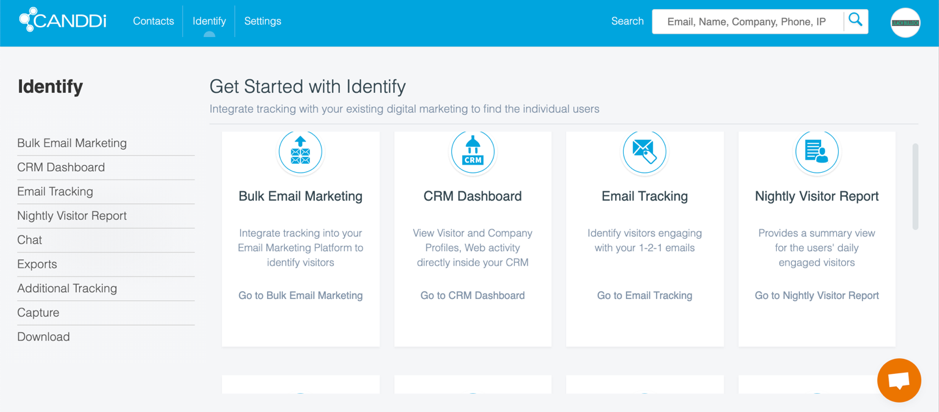
 Furthermore, you can connect with even more sources by going to Identify:
 Here, you can find all of the various integrations available, including:

 And there are many more customization settings you can make:
 There are numerous customization options available; and most importantly, their support team can definitely help you set them up so that you can make the most out of CANDDi. Likewise with the integrations that I talked about earlier: you can discuss with your CANDDi contact to figure out which integrations will work best for you.
So let’s get to the really good stuff: the CANDDi dashboard.
[click_to_tweet tweet="How to leverage website tracking to generate more leads and #sales using @CANDDi #leadgen" quote="How to leverage website tracking to generate more leads and #sales using @CANDDi #leadgen"]
As you can see in the above screenshot, there are several tabs available that break down your data:
There are numerous customization options available; and most importantly, their support team can definitely help you set them up so that you can make the most out of CANDDi. Likewise with the integrations that I talked about earlier: you can discuss with your CANDDi contact to figure out which integrations will work best for you.
So let’s get to the really good stuff: the CANDDi dashboard.
[click_to_tweet tweet="How to leverage website tracking to generate more leads and #sales using @CANDDi #leadgen" quote="How to leverage website tracking to generate more leads and #sales using @CANDDi #leadgen"]
As you can see in the above screenshot, there are several tabs available that break down your data:
 To start, you can see what company they work for, their email address and other contact information about them, if available.
Plus, you can also see information about the company:
To start, you can see what company they work for, their email address and other contact information about them, if available.
Plus, you can also see information about the company:
 You can see, at a glance, how many times they visited your website, how many activities they took part in, how much time they spent on your website in total and when their first and last visits were.
Scrolling down, you can also see a full list of their activities on your website: what pages they visited and how much they spent and any other actions they might’ve taken (such as completing a form):
This is super useful information for a B2B business, as it allows you to be proactive and identify potential leads that you can then reach out with a personalized message. For example, if someone from a target company has read your content, came back multiple times and visited your contact page, then you should probably reach out to them directly and try to nurture them into becoming customers.
Of, if a company you really wanted to work with start visiting your website, you can reach out to them and break the ice with the information you’ve gathered about them based on their visits to your site.
Back to the Company Identified tab, there’s a lot more information that you can find about identified companies:
You can see, at a glance, how many times they visited your website, how many activities they took part in, how much time they spent on your website in total and when their first and last visits were.
Scrolling down, you can also see a full list of their activities on your website: what pages they visited and how much they spent and any other actions they might’ve taken (such as completing a form):
This is super useful information for a B2B business, as it allows you to be proactive and identify potential leads that you can then reach out with a personalized message. For example, if someone from a target company has read your content, came back multiple times and visited your contact page, then you should probably reach out to them directly and try to nurture them into becoming customers.
Of, if a company you really wanted to work with start visiting your website, you can reach out to them and break the ice with the information you’ve gathered about them based on their visits to your site.
Back to the Company Identified tab, there’s a lot more information that you can find about identified companies:
 Basically, it’s all the same type of information, apart from info about their company if that wasn’t properly identified. Otherwise, you can see all of that super useful data: what actions they took on your website, where they came from, what their location is and so on.
Plus, you can also take actions for that account:
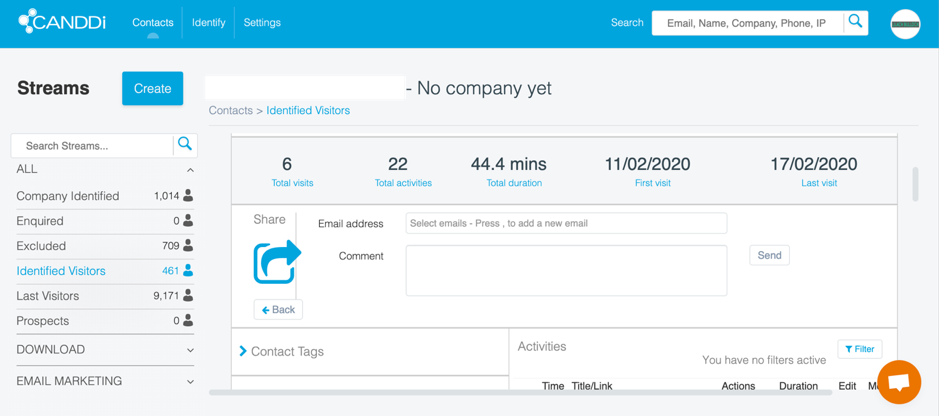
You can quickly mark a person as a prospect or tag them as “excluded”, you can assign them directly to a salesperson on your team, or you can share them with someone else from your team, via email:
[click_to_tweet tweet="How to leverage website tracking to generate more leads and #sales using @CANDDi #leadgen" quote="How to leverage website tracking to generate more leads and #sales using @CANDDi #leadgen"]
Basically, it’s all the same type of information, apart from info about their company if that wasn’t properly identified. Otherwise, you can see all of that super useful data: what actions they took on your website, where they came from, what their location is and so on.
Plus, you can also take actions for that account:
You can quickly mark a person as a prospect or tag them as “excluded”, you can assign them directly to a salesperson on your team, or you can share them with someone else from your team, via email:
[click_to_tweet tweet="How to leverage website tracking to generate more leads and #sales using @CANDDi #leadgen" quote="How to leverage website tracking to generate more leads and #sales using @CANDDi #leadgen"]
What is CANDDi?
In a nutshell, CANDDi is a software for tracking website visitors and identifying leads. But the truth is, it’s so much more than that: not only does it track and identify your visitors, but it also pulls up a lot of useful information about them and their visits to your site, as well as what actions they took while browsing. Plus, it can identify the companies visiting your website, automatically tag and score your leads and prospects and help you identify the leads most likely to convert. Because of this, CANDDi is well-suited for those who want to be very proactive with their lead generation and sales efforts. You need to keep an eye on your data and act quickly as soon as you identify a potential lead and use all the information gathered by CANDDi to personalize your message to them and increase your chances of converting them into customers. [click_to_tweet tweet="How to leverage website tracking to generate more leads and #sales using @CANDDi #leadgen" quote="How to leverage website tracking to generate more leads and #sales using @CANDDi #leadgen"] It’s also worth noting that the tracking doesn’t stop there; you can also integrate CANDDi with your email provider to track the actions of the prospects you email, as well as integrate with other services you use to help you gather as much data as possible. This is so you can get a full picture of all your leads and prospects – no matter where they came from, once you’ve set up CANDDi, you can easily track all these leads’ actions on your website and use that data to close more deals.Getting started with CANDDi
Once you’ve signed up with CANDDi, one of the first things you’ll learn is that while this is a completely out-of-the-box software, you get a fully personalized experience. You start out with an initial demo call to learn how to use the platform and to get answers to any questions you might have; not only that, but you’ll also get tips on how to fully leverage the platform, based on your particular needs. They’ll ask you about your business, about your audience, and about your objectives; in fact, they want to get a full picture of your entire marketing strategy so that they can then show you how to use the platform in order to reach those objectives. What’s more, they can help customize CANDDi to suit your needs, so that you can make the most out of it. Basically, their entire mantra seems to be they don’t just have software users; they have actual clients, who they try to work closely with and help as much as possible along the way. And I have to say, I’m loving the VIP treatment. Because the thing is, if you want to fully leverage the tools you use for your business, you need to truly understand how to use them and be proactive about it. As for installing CANDDi, it’s super easy and takes minutes: they’ll generate a code that you copy into your website, and the tool will automatically start collecting data. But let’s now go into the actual software: what does it do and how does it work? And most importantly, how can it help your business? As I mentioned earlier, CANDDi is a software that’s built for those who want to be proactive about their sales; i.e. identifying leads early on so that you can nurture them into becoming customers. Once you’ve added the code to your website, you can also connect CANDDi to your Gmail or Outlook; in other words, this will mean that you can track all of your – and your sales teams’ - emails to any prospects. This way, you’ll be able to see if a prospect you emailed clicked on your link and what they did on your website. With that information, you’ll be much better equipped to reach out to them and nurture them into becoming customers. To connect your email to CANDDi, simply go to your Settings and click on My Applications: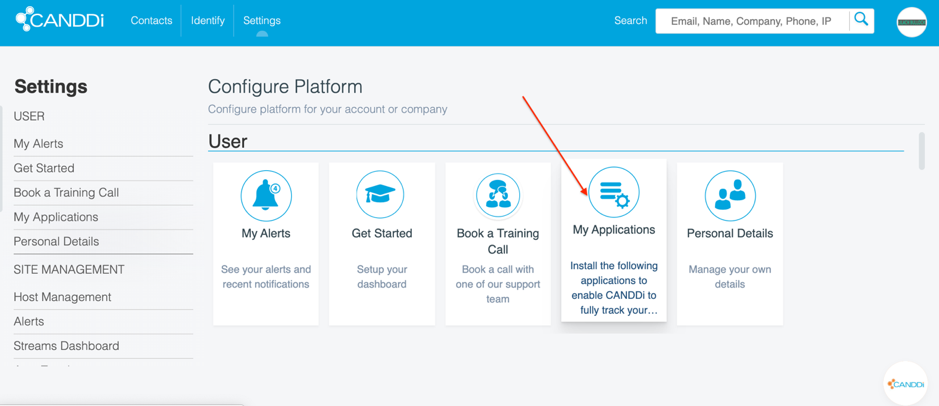 Furthermore, you can connect with even more sources by going to Identify:
 Here, you can find all of the various integrations available, including:
- Email marketing to track conversations with prospects and see their activity on your website
- CRM dashboards to keep track of all your leads and prospects
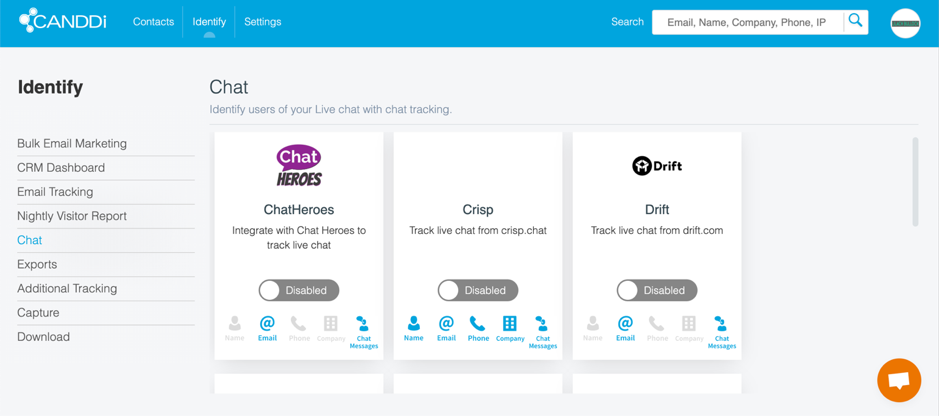
- Live chat tools, to track chats and identify visitors who use your website’s live chat:
- File attachments: you can use the CANDDi.download feature to track your file attachments, as well as any redirect links you want to track
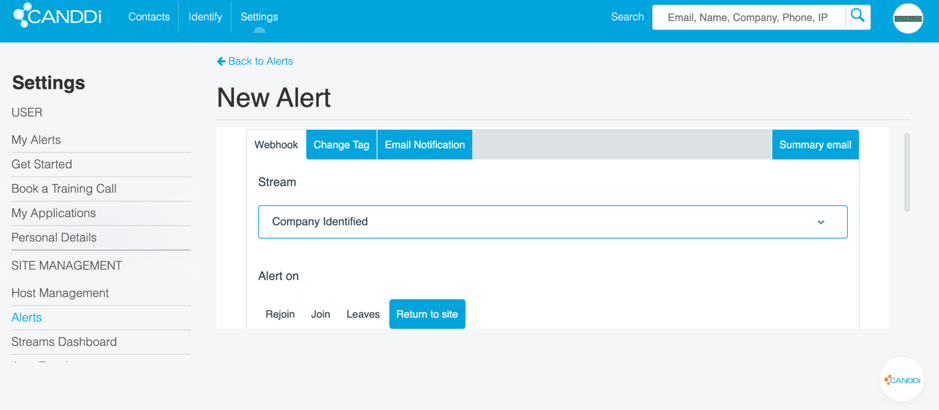 And there are many more customization settings you can make:
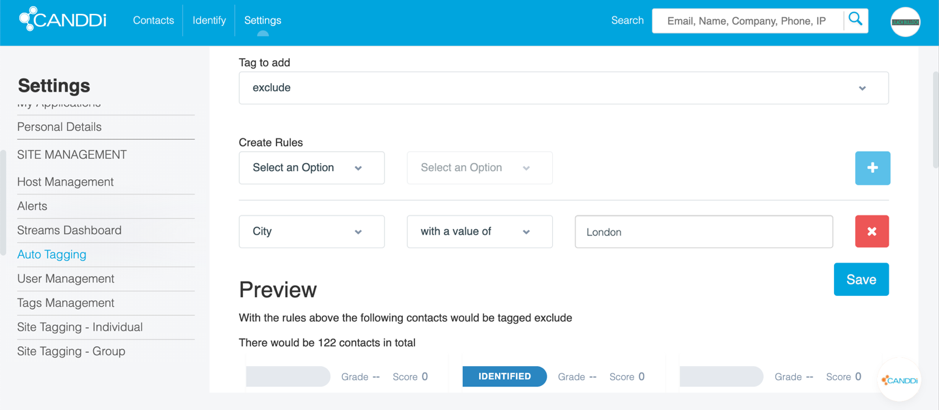
- Set up automated tagging for your visitors based on custom rules:
- Add other users to your account (such as your sales team)
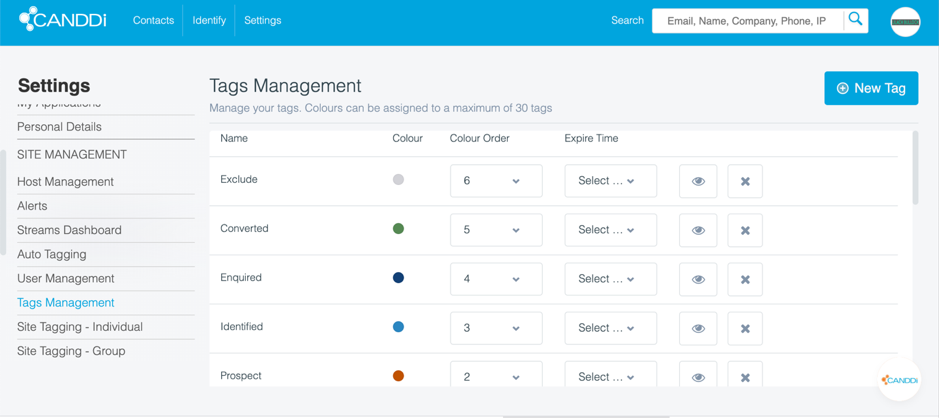
- Customize the various tags and add new ones as needed
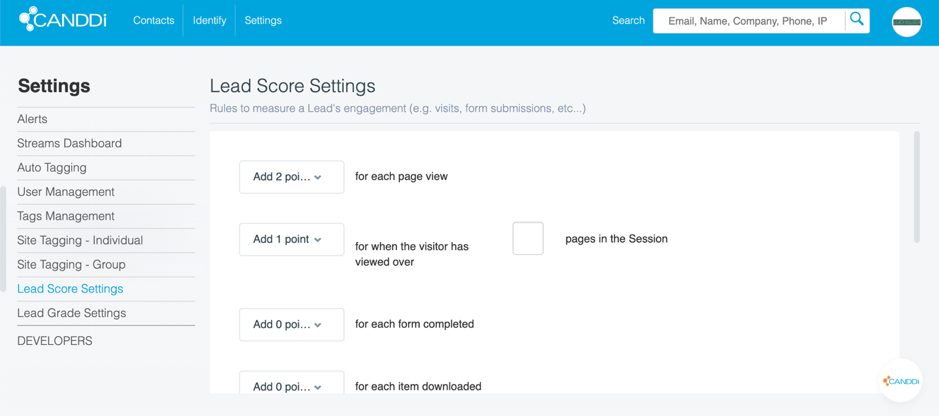
- Configure your lead scoring: you can set points for any action so that CANDDi can automatically score your website visitors based on the actions you consider important
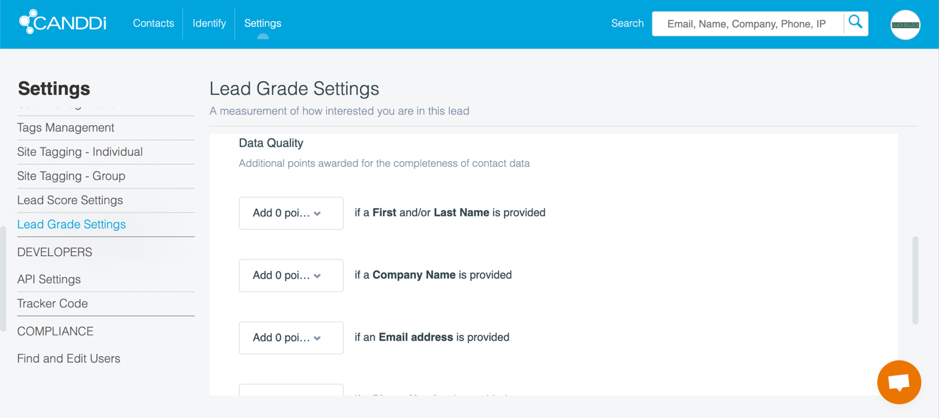
- Configure your lead grading settings: apart from lead scoring, you can also a points system to help you determine how interested you are in a particular lead:
 There are numerous customization options available; and most importantly, their support team can definitely help you set them up so that you can make the most out of CANDDi. Likewise with the integrations that I talked about earlier: you can discuss with your CANDDi contact to figure out which integrations will work best for you.
So let’s get to the really good stuff: the CANDDi dashboard.
[click_to_tweet tweet="How to leverage website tracking to generate more leads and #sales using @CANDDi #leadgen" quote="How to leverage website tracking to generate more leads and #sales using @CANDDi #leadgen"]
There are numerous customization options available; and most importantly, their support team can definitely help you set them up so that you can make the most out of CANDDi. Likewise with the integrations that I talked about earlier: you can discuss with your CANDDi contact to figure out which integrations will work best for you.
So let’s get to the really good stuff: the CANDDi dashboard.
[click_to_tweet tweet="How to leverage website tracking to generate more leads and #sales using @CANDDi #leadgen" quote="How to leverage website tracking to generate more leads and #sales using @CANDDi #leadgen"]
Tracking your website visitors with CANDDi
As I mentioned earlier, CANDDi can track all of your website visitors and when legally possible (such as one someone completes a form on your website and gives you their information voluntarily), it will also identify them and their activity on your website, as well as what companies they work for.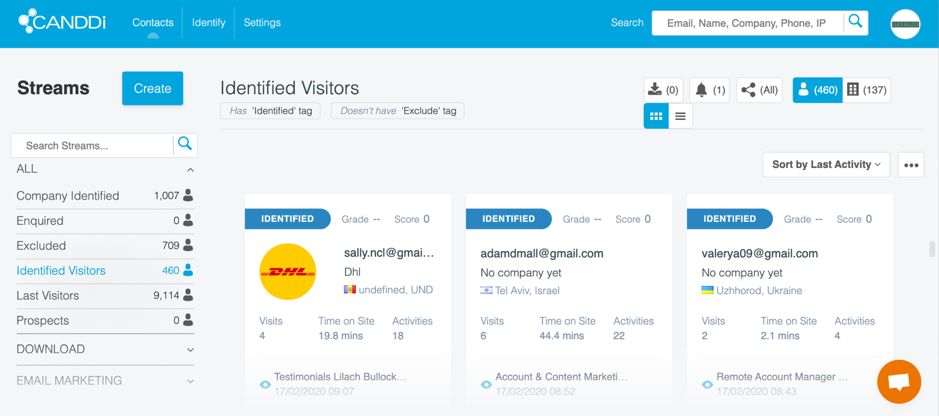 As you can see in the above screenshot, there are several tabs available that break down your data:
- Company identified: here, you can see which companies have visited your website, including details about their visit (which I’ll tell you all about in a bit)
- Enquired: a place where you can see all of the visitors who were tagged as ‘enquired’
- Excluded: any visitors who have the “excluded” tag – i.e. leads that you don’t need to follow up with/reach out to
- Identified visitors: a stream of all the visitors to your site that CANDDi managed to identify
- Last visitors: a list of all your website visitors for a certain time period
- Prospects: this is where you’ll see a list of all the contacts that matched the filters that determine whether a visitor to your site is an actual prospect or not
- Email marketing tab: this is where you can track visitors coming from your emails and email marketing campaigns (including their activities on your website)
Identifying companies that visit your website
Whenever possible, CANDDi tries to identify the companies that your website visitors work for. As we’ve seen earlier, these are all then grouped in the Company Identified stream, where you can browse through all the companies and get more information about the person who visited from that company, as well as what they did on your website. If you want to learn more about a visitor/company, simply click on them in the stream: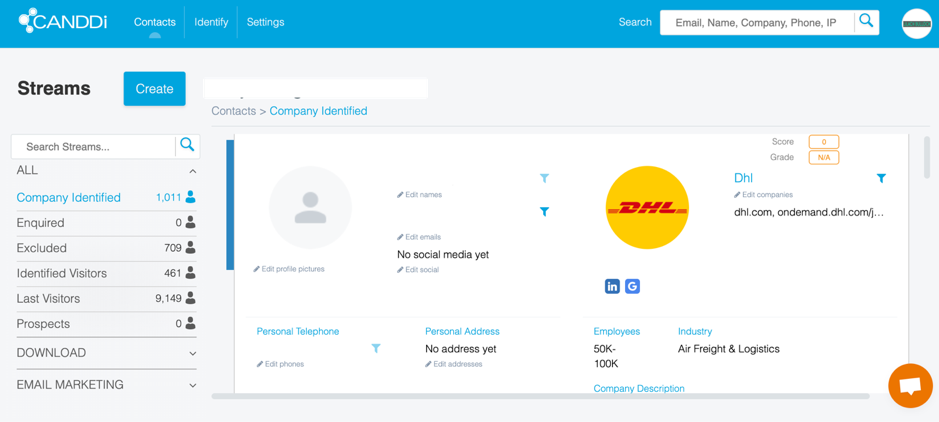 To start, you can see what company they work for, their email address and other contact information about them, if available.
Plus, you can also see information about the company:
To start, you can see what company they work for, their email address and other contact information about them, if available.
Plus, you can also see information about the company:
- What industry it’s in
- How many employees they have
- What the company does
- Links to the company’s’ social media
- Contact information for that company: their addresses and phone numbers
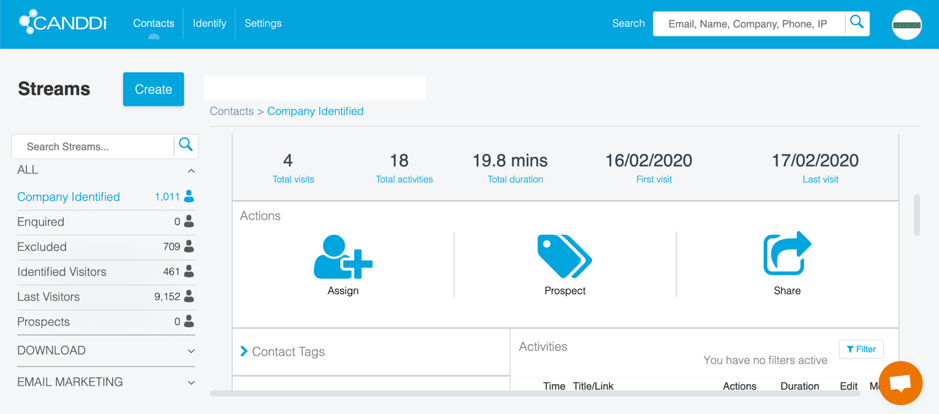 You can see, at a glance, how many times they visited your website, how many activities they took part in, how much time they spent on your website in total and when their first and last visits were.
Scrolling down, you can also see a full list of their activities on your website: what pages they visited and how much they spent and any other actions they might’ve taken (such as completing a form):
You can see, at a glance, how many times they visited your website, how many activities they took part in, how much time they spent on your website in total and when their first and last visits were.
Scrolling down, you can also see a full list of their activities on your website: what pages they visited and how much they spent and any other actions they might’ve taken (such as completing a form):
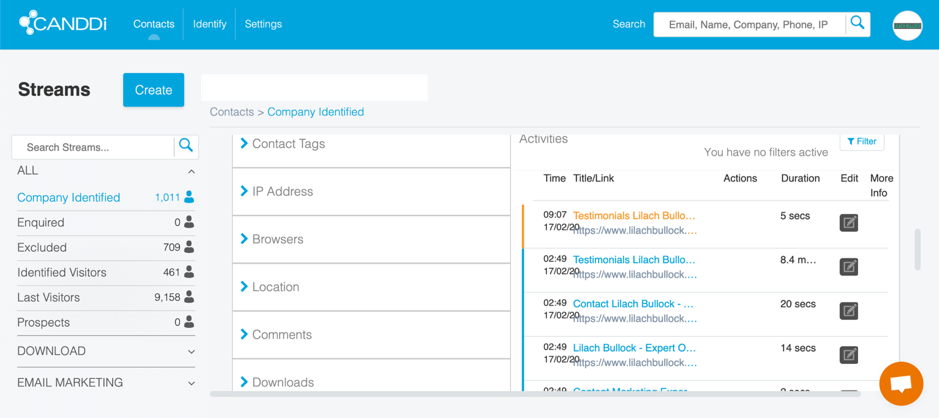 This is super useful information for a B2B business, as it allows you to be proactive and identify potential leads that you can then reach out with a personalized message. For example, if someone from a target company has read your content, came back multiple times and visited your contact page, then you should probably reach out to them directly and try to nurture them into becoming customers.
Of, if a company you really wanted to work with start visiting your website, you can reach out to them and break the ice with the information you’ve gathered about them based on their visits to your site.
Back to the Company Identified tab, there’s a lot more information that you can find about identified companies:
This is super useful information for a B2B business, as it allows you to be proactive and identify potential leads that you can then reach out with a personalized message. For example, if someone from a target company has read your content, came back multiple times and visited your contact page, then you should probably reach out to them directly and try to nurture them into becoming customers.
Of, if a company you really wanted to work with start visiting your website, you can reach out to them and break the ice with the information you’ve gathered about them based on their visits to your site.
Back to the Company Identified tab, there’s a lot more information that you can find about identified companies:
- The tags associated with that contact (which are added automatically as people take actions on your site/visit certain pages, although you can also customize them to your liking)
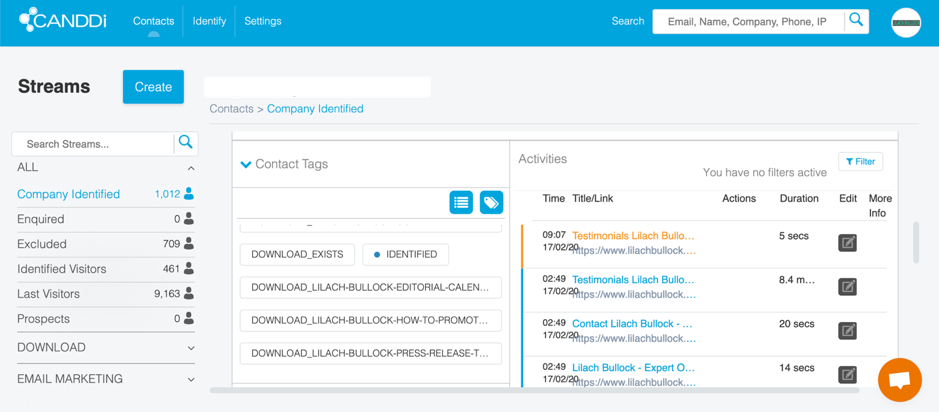
- Their IP address and location
- The browser they used to visit your website
- What they downloaded from your website and when:
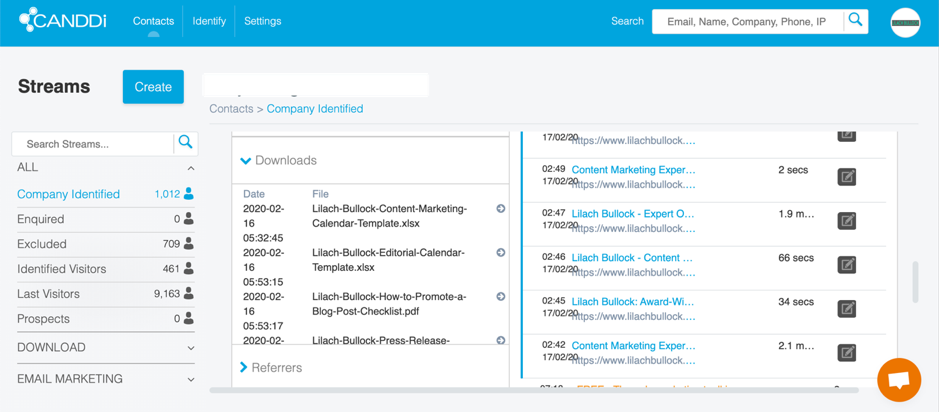
- Where they came from; i.e. what their referrer was (direct visits, from social media, search, etc.)
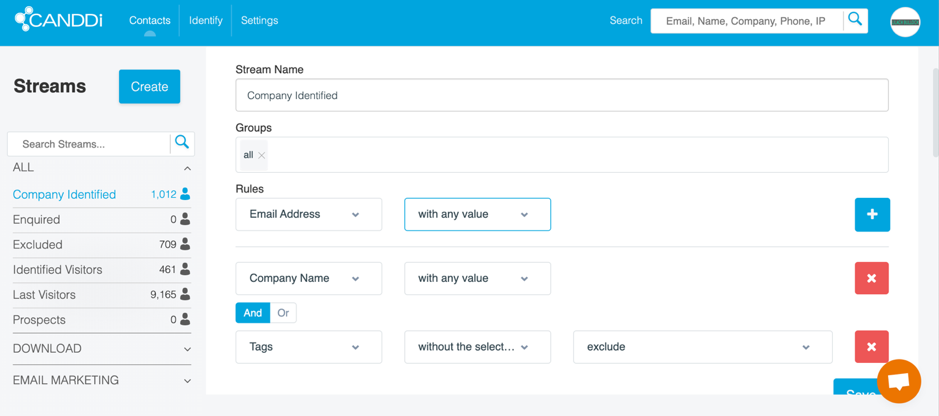
- A summary of their lead score, based on your lead scoring settings
- Plus, you can add any comments you might have about that particular contact here
Identifying your website visitors
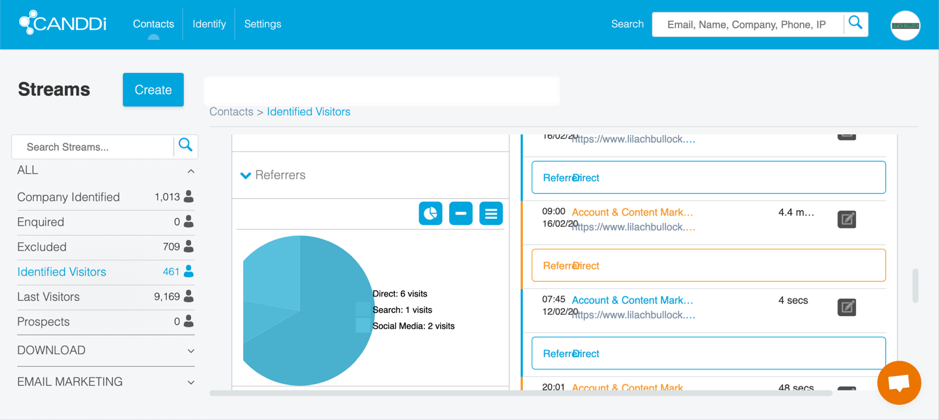
As for individual visitors, the process is very similar; as we’ve seen earlier, they’re organized into different streams:- Last visitors, where you can see all visitors, including those that haven’t been identified
- Enquired visitors
- Excluded visitors
- And of course, “identified visitors” where you can see every visitor that has actually been identified by CANDDi
 Basically, it’s all the same type of information, apart from info about their company if that wasn’t properly identified. Otherwise, you can see all of that super useful data: what actions they took on your website, where they came from, what their location is and so on.
Plus, you can also take actions for that account:
Basically, it’s all the same type of information, apart from info about their company if that wasn’t properly identified. Otherwise, you can see all of that super useful data: what actions they took on your website, where they came from, what their location is and so on.
Plus, you can also take actions for that account:
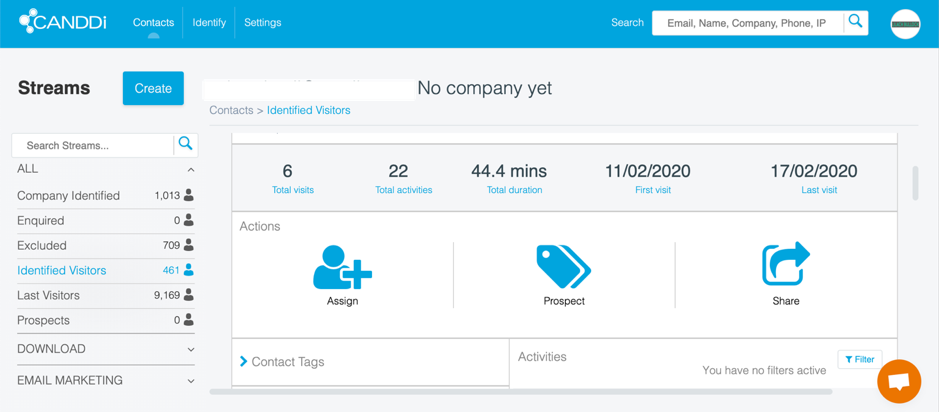 You can quickly mark a person as a prospect or tag them as “excluded”, you can assign them directly to a salesperson on your team, or you can share them with someone else from your team, via email:
 [click_to_tweet tweet="How to leverage website tracking to generate more leads and #sales using @CANDDi #leadgen" quote="How to leverage website tracking to generate more leads and #sales using @CANDDi #leadgen"]
Conclusion
If you want to make more sales, then you need to invest in technology to help, as well as be proactive with your lead generation and prospecting efforts. CANDDi offers a truly powerful solution that we recommend not just because of all the valuable data it offers, but also because it’s so much more than just a tool: you don’t just get a software, you also get genuine help from CANDDi experts that can fully customize the experience for you, as well as guide you through the entire process so that you can maximize your results.Related reading
- How to build a stellar online brand with the perfect domain name
- Credit Card Processing Fees and Your Business: How To Save Money
- How to get more out of your online forms with a Salesforce integration
- Tailor Brands: How to Design an Amazing Logo & Create Your Brand
- more marketing and business articles
Related reading: How to generate sales leads: The ultimate list of 25 tactics to boost your sales and How to boost your website leads, conversions and sales using Live Chat.
Work with me
Want AI doing the heavy lifting in your marketing?
I build the systems that handle the boring 80 percent, so you get your week back. Done properly, with the human kept in.
Published and maintained by the Lilach Bullock team, covering marketing, AI and business growth.



