


Quick answer: In my experience, yes. ConvertKit is the email marketing platform I switched to, and I found it easier to use and the results noticeably better than any other email software I've tried. Below I cover why list building matters, its forms, landing pages, and drip email marketing and automation.
The importance of building a list
Before we get into ConvertKit, I wanted to talk a bit about the importance and benefits of building an email list. While some marketers may claim that email marketing is dying a slow death, the truth is, it gets results:- Email subscribers have higher conversion rates
- A good list brings in a steady stream of traffic
- It's a great promotional tool
- Make more sales
The forms
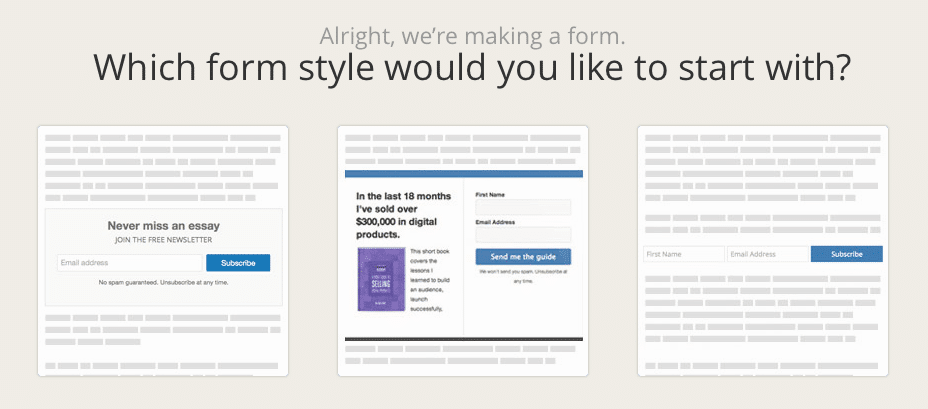 Let’s start at the beginning – with the forms. The opt-in forms are very easy to set up, and only take minutes, and anywhere you choose to put them on a page, they automatically adjust to fit the width, including on mobile phones. There are different types of forms depending on where you want to put them on your website: at the end of a blog post, as a sidebar, etc. I personally use ConvertKit in conjunction with OptinMonster and use their forms, as they have more options in terms of style and customizations.
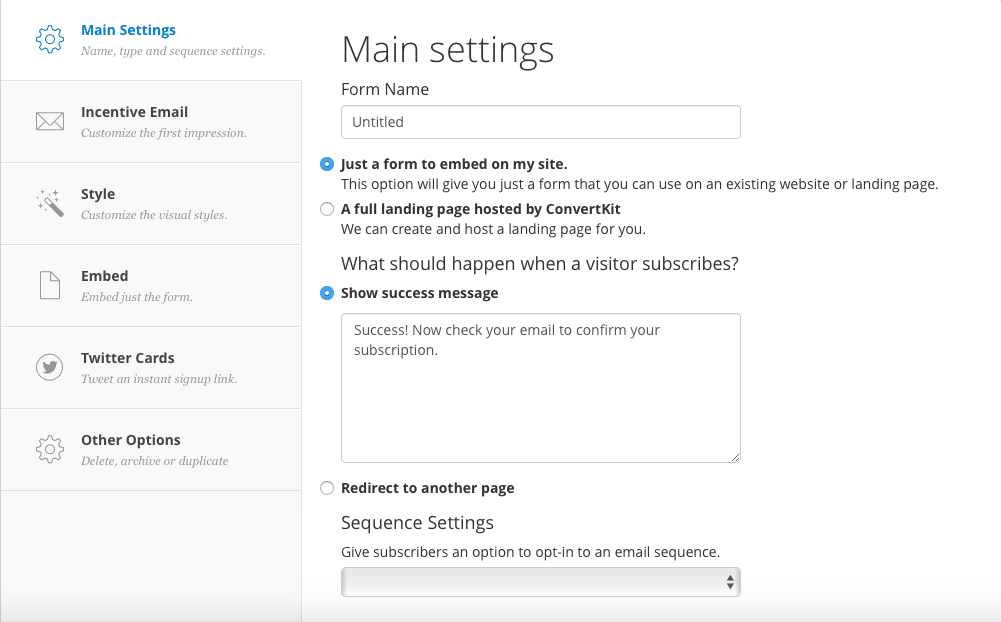 You can create as many different forms as you like, offering different incentives for each one. This is great because, in order to increase your subscriber numbers, you have to give them the incentives that they want. So for example, if they’re reading a blog post on Twitter Advertising, they might also be interested in getting a list of the top Twitter tools to help them get better results. Or, if they’re reading something on how to get more traffic to their website and blog, they will most likely be more inclined to subscribe in order to get a guide on how to increase the conversion rate on their website.
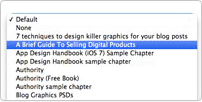 For WordPress users, there is a Convertkit plugin that allows you to easily add the custom opt-in form they want to each post while editing the post. This makes it very quick to add a targeted opt-in form with a call to action unique to the post you are publishing, which can help you increase your subscription numbers.
[clickToTweet tweet="Make more #conversions on your website with @Convertkit #emailmarketing via @lilachbullock" quote="Make more #conversions on your website with @Convertkit #emailmarketing via @lilachbullock"]
For WordPress users, there is a Convertkit plugin that allows you to easily add the custom opt-in form they want to each post while editing the post. This makes it very quick to add a targeted opt-in form with a call to action unique to the post you are publishing, which can help you increase your subscription numbers.
[clickToTweet tweet="Make more #conversions on your website with @Convertkit #emailmarketing via @lilachbullock" quote="Make more #conversions on your website with @Convertkit #emailmarketing via @lilachbullock"]
Landing Pages
ConvertKit also allows you to very quickly create a landing page with one of their templates: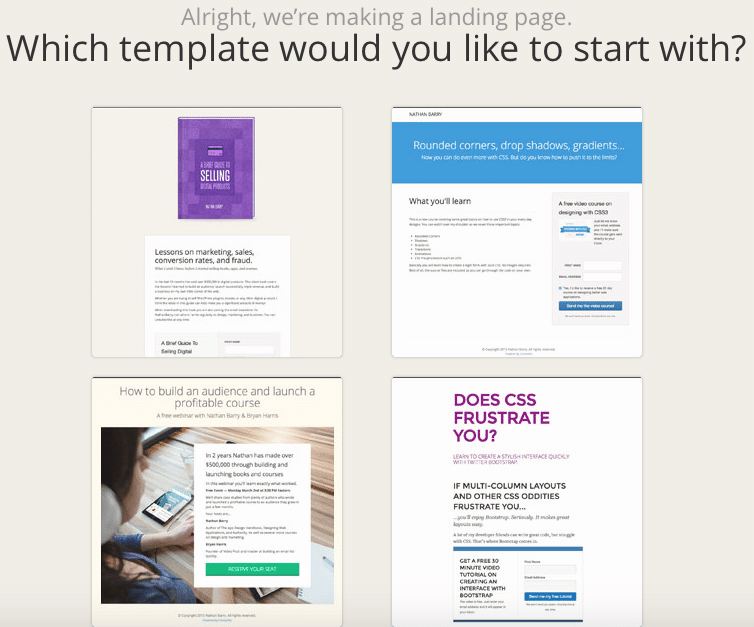 This a great feature for when you need a landing page quickly for events you’re holding, webinars or for a giveaway. It’s extremely easy to customise your landing page with the ConvertKit visual editor, as you can add images, change colours, add text and customise patterns and textures. If the editor doesn’t allow you to make the changes you want, you can use custom CSS to write in any change you want.
Drip email marketing and marketing automation
Convertikit’s biggest and most powerful feature is it’s drip email and marketing automation, which it does better than any other email marketing software I’ve ever tried. Setting up a drip email sequence can seem like a huge undertaking, and it is – but not with ConvertKit. A good drip email sequence will help you build trust and increase conversions, but with other email marketing software this can be an unnecessarily difficult task; and I say unnecessary, because once you try it with ConvertKit, it seems like the easiest, most logical way to do it.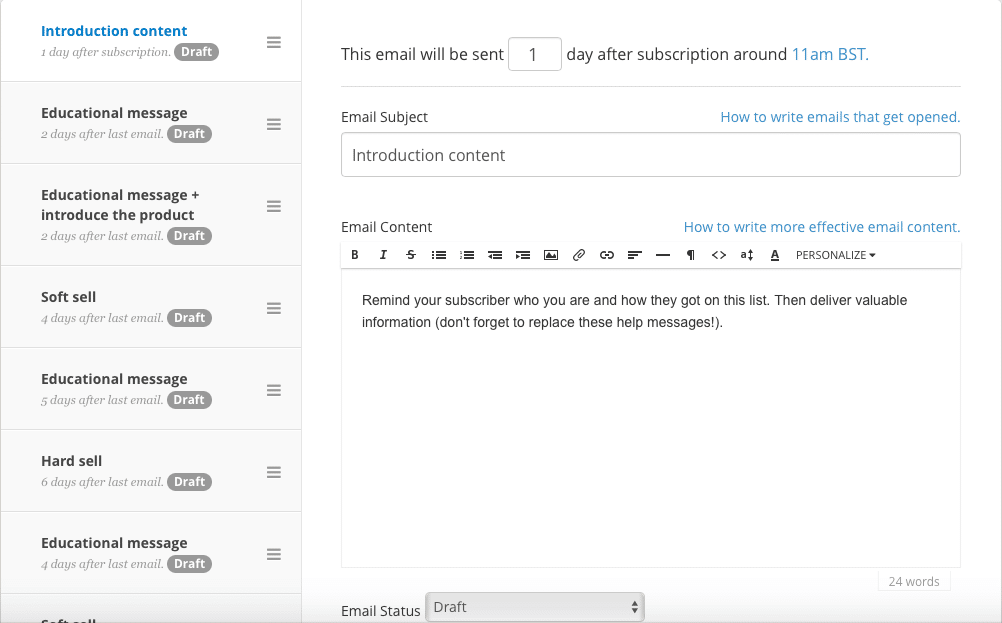 All you have to do is go to Sequences at the top of your account, click on Create a Sequence, give it a name and the form from above will pop up. From there, all you have to do is write each email, give it an email subject, and select how many days after the user’s subscription you want this email to be sent out.
[clickToTweet tweet="Make more #conversions on your website with @Convertkit #emailmarketing via @lilachbullock" quote="Make more #conversions on your website with @Convertkit #emailmarketing via @lilachbullock"]
This is an amazing feature, as it allows you to make sure each one of your subscribers finds out about all of your offers and downloadable goodies and therefore helps you increase your conversions, along with your subscriber’s trust as you give them lots of free but very useful material.
You can take automated emails even further with ConvertKit. Go to Automations to see all automation rules or create new ones to explore all possibilities.
All you have to do is go to Sequences at the top of your account, click on Create a Sequence, give it a name and the form from above will pop up. From there, all you have to do is write each email, give it an email subject, and select how many days after the user’s subscription you want this email to be sent out.
[clickToTweet tweet="Make more #conversions on your website with @Convertkit #emailmarketing via @lilachbullock" quote="Make more #conversions on your website with @Convertkit #emailmarketing via @lilachbullock"]
This is an amazing feature, as it allows you to make sure each one of your subscribers finds out about all of your offers and downloadable goodies and therefore helps you increase your conversions, along with your subscriber’s trust as you give them lots of free but very useful material.
You can take automated emails even further with ConvertKit. Go to Automations to see all automation rules or create new ones to explore all possibilities.
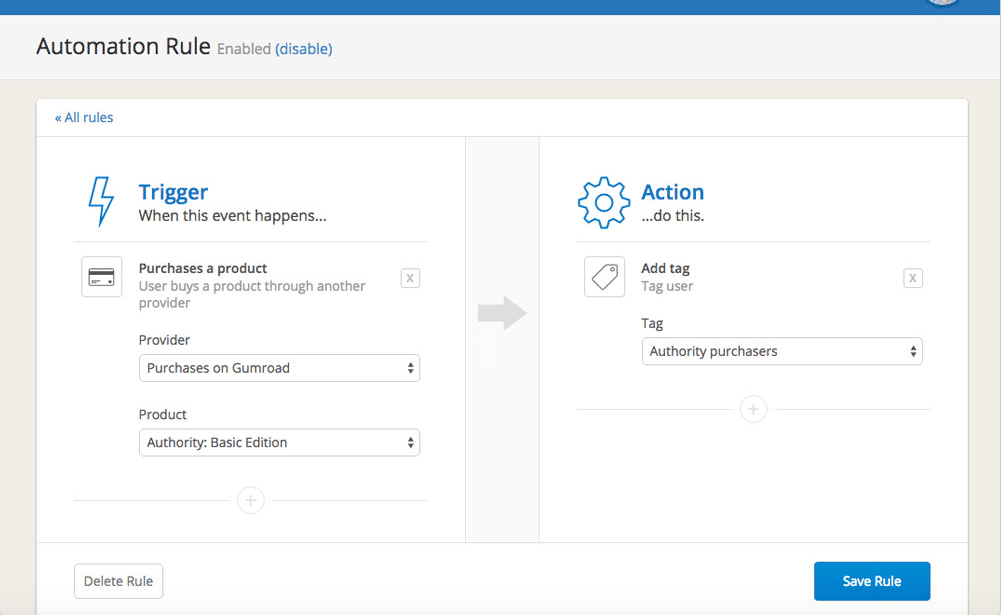 You can, for example, make sure all your subscribers go through your entire sales funnel. Or, if someone bought something on your website and you want to send a follow-up – you can easily arrange to have it sent automatically with ConvertKit.
Another cool thing that you can do is allowing your subscribers to opt out of the emails they’re not interested in by creating custom unsubscribe links for any of your sequences or launches. This is a really great feature as it can help with keeping as many subscribers as possible. Since they’ve subscribed of their own free will to your newsletter and emails, that means they’re probably interested in some of what you have to offer – just not all you have to offer. In most cases, if people are getting emails they’re not interested in at all, they’ll probably un-subscriber or simply not read or even open your emails. But, if they only select to hear about the things that are relevant to them, then they are more likely to remain subscribers.
[clickToTweet tweet="Make more #conversions on your website with @Convertkit #emailmarketing via @lilachbullock" quote="Make more #conversions on your website with @Convertkit #emailmarketing via @lilachbullock"]
You can, for example, make sure all your subscribers go through your entire sales funnel. Or, if someone bought something on your website and you want to send a follow-up – you can easily arrange to have it sent automatically with ConvertKit.
Another cool thing that you can do is allowing your subscribers to opt out of the emails they’re not interested in by creating custom unsubscribe links for any of your sequences or launches. This is a really great feature as it can help with keeping as many subscribers as possible. Since they’ve subscribed of their own free will to your newsletter and emails, that means they’re probably interested in some of what you have to offer – just not all you have to offer. In most cases, if people are getting emails they’re not interested in at all, they’ll probably un-subscriber or simply not read or even open your emails. But, if they only select to hear about the things that are relevant to them, then they are more likely to remain subscribers.
[clickToTweet tweet="Make more #conversions on your website with @Convertkit #emailmarketing via @lilachbullock" quote="Make more #conversions on your website with @Convertkit #emailmarketing via @lilachbullock"]
Conclusion
ConvertKit is everything I didn’t know I needed before I got it – all I knew is that the email marketing software I’ve used in the past was not keeping up with my needs. ConvertKit is perfect because not only does it have amazing features like drip email sequences and marketing automation, as well as easy to create forms and landing pages, but it is also very easy to use. It was designed with bloggers in mind and they have clearly tried to make sure that it has an interface which is intuitive and very easy to figure out and use. Which email marketing software do you prefer? Have you tried ConvertKit yet? Let me know your thoughts and please share:)What ConvertKit's Automations Look Like When You Build Them From Scratch
Most reviews tell you ConvertKit has "powerful automations" and leave it there. So let me show you what that means in practice, because the reality is more nuanced than the marketing copy suggests. When I first set up a welcome sequence for a content upgrade on one of my lead generation posts, I had a functional five-email sequence running within about 40 minutes. That includes the time I spent writing the emails themselves. The visual automation builder is that straightforward, and I say that as someone who spent years wrestling with ActiveCampaign's far more complex (and far more capable) workflow editor.
Lilach's verdict: 4.7 out of 5. A glowing hands-on endorsement praising ConvertKit as the best email marketing tool the reviewer has used, with virtually no meaningful criticism raised throughout.
Here is what a typical entry-level blogger automation looks like inside ConvertKit. You create a form, attach it to a sequence, then add conditional logic based on whether subscribers clicked a specific link. So if someone clicks your affiliate link inside email three, you tag them as "interested in tools" and they enter a separate sequence. That entire logic chain takes perhaps six clicks to build. The limitation I hit quickly, though, is that ConvertKit's conditions are tag-based rather than behaviour-based in any deep sense. You cannot, for example, trigger an automation based on a subscriber opening three consecutive emails without clicking anything. That level of re-engagement logic requires workarounds.
The numbers that matter here: in my own testing across two niche blogs, ConvertKit consistently delivered open rates between 38% and 44% for new subscriber sequences. That is not magic, that is partly because ConvertKit's deliverability is solid and partly because the plain-text email format they encourage works for personal-feeling content. One blog in the personal finance space saw a 22% click rate on a free resource email sent through ConvertKit, compared to 14% for a visually identical email sent through Mailchimp three months earlier to a comparable audience. I cannot attribute that entirely to the platform, but it is worth knowing.
Where ConvertKit falls short for bloggers is the broadcast analytics screen. You get opens, clicks, and unsubscribes. That is it. There is no heatmap, no time-of-open data broken down by device, and no revenue attribution unless you connect it to a paid product. If you are a blogger who sells courses or digital downloads and you want to understand which email sequence drove a purchase, you are doing manual UTM tracking and spreadsheet work. That is not a dealbreaker, but no review should pretend it is not a gap.
My honest recommendation is this: ConvertKit earns its place as the best email tool for bloggers who are between 0 and 10,000 subscribers and whose primary goal is building a relationship with readers rather than running complex sales funnels. The interface removes friction from the tasks bloggers do most, which are writing sequences, tagging subscribers by interest, and sending broadcast newsletters. If you are past that stage and running a multi-product business with serious funnel complexity, you will find the ceiling faster than you expect. Start with ConvertKit, learn email marketing on it, and then decide in 18 months whether your needs have grown beyond what it offers. Most bloggers never will.
The short version: ConvertKit is built specifically with creators and bloggers in mind, making it one of the most focused email marketing platforms available today. Its visual automation builder, subscriber tagging system, and clean landing page tools give bloggers everything they need to grow and monetize an audience without the clutter of tools designed for large e-commerce businesses.
I covered the follow-on problem in Is Convertkit the best email marketing tool for bloggers.
Frequently asked questions
Is ConvertKit good for beginner bloggers?
Yes, ConvertKit is a strong choice for beginner bloggers because its interface is clean and straightforward, the free plan supports up to 1,000 subscribers, and the learning curve is much gentler than tools like ActiveCampaign or HubSpot.
How does ConvertKit compare to Mailchimp for bloggers?
ConvertKit wins on subscriber segmentation and automation logic, while Mailchimp has a larger template library. For bloggers focused on building a relationship with readers rather than sending promotional newsletters, ConvertKit's tag-based system is a better fit.
Want AI doing the heavy lifting in your marketing?
I build the systems that handle the boring 80 percent, so you get your week back. Done properly, with the human kept in.
Does ConvertKit help bloggers make money?
ConvertKit includes built-in tools to sell digital products, paid newsletters, and tip jars directly through the platform, so bloggers can start earning without needing a separate e-commerce tool.
What is the biggest drawback of ConvertKit?
The pricing scales quickly as your list grows, and the email template designs are minimal by default, which can be a limitation for bloggers who want visually rich newsletters without custom coding.
Related reading: Digital Products to Sell as a Solopreneur in 2026 (What Sells, With Real.
Related reading: Will AI Replace Marketers in 2026? Here's What's Really Happening.
Related reading: I Stopped Getting AI to Write My Emails. I Got It to Read Them Instead..
Related reading: Digital Products You Can Sell With No Audience in 2026.
Related reading: How to Build Content Funnels That Turn Readers Into Buyers.
Related reading: What Is Affiliate Marketing and How Small Businesses Can Use It in 2026.



